VAKE

THE VAKE RELEASE EXPLORER · 2H 2026

What’s changing.
What needs your attention.

Your guide to the SAP SuccessFactors release. Find the changes that matter to your teams, understand how they arrive, and build your review shortlist.

Explore the changes ↓
01 / PREVIEW12 October 2026Validate your critical processes
02 / PRODUCTIONFrom 13 NovemberConfirm your tenant’s deployment window
03 / YOUR PLANReview → Test → PrepareAssign owners before production
411Release items in this snapshot
271Automatically on
123Customer configured
17Require SAP or partner contact

SAP source snapshot: 9 October 2026. Includes carried-forward and future-effective items, not just new features. Preview information can change.

UNDERSTAND THE DIFFERENCE

Automatic does not mean “nothing to do”.

Enablement tells you how a change becomes available. Action tells you whether SAP asks you to do something.

Customer-configured changes need an applicability decision; they are not all simply optional. Check permissions, licensing and prerequisites in the linked SAP detail before planning.

VAKE · FIND YOUR PRIORITIES

From release note to readiness plan

Every catalogue entry has preparation guidance. Demo observations are shown separately; they are not a full feature or customer-tenant validation.

Demo checks dated 10 October found mixed results: some documented controls are visible, while the Performance Management removals are not. SAP’s standard 2H preview date is 12 October. The build number alone does not confirm all release changes are available; the full 411-item assessment is still in progress.

1 · ScopeModule, activation, dates and dependencies
2 · ValidateExpected results, roles and evidence
3 · Guide usersScreens, instructions and process ownership

SEE THE DIFFERENCE

A closer look at the UI changes

Three examples from SAP’s 2H 2026 documentation, effective 13 November 2026. Select an example to compare the screens.

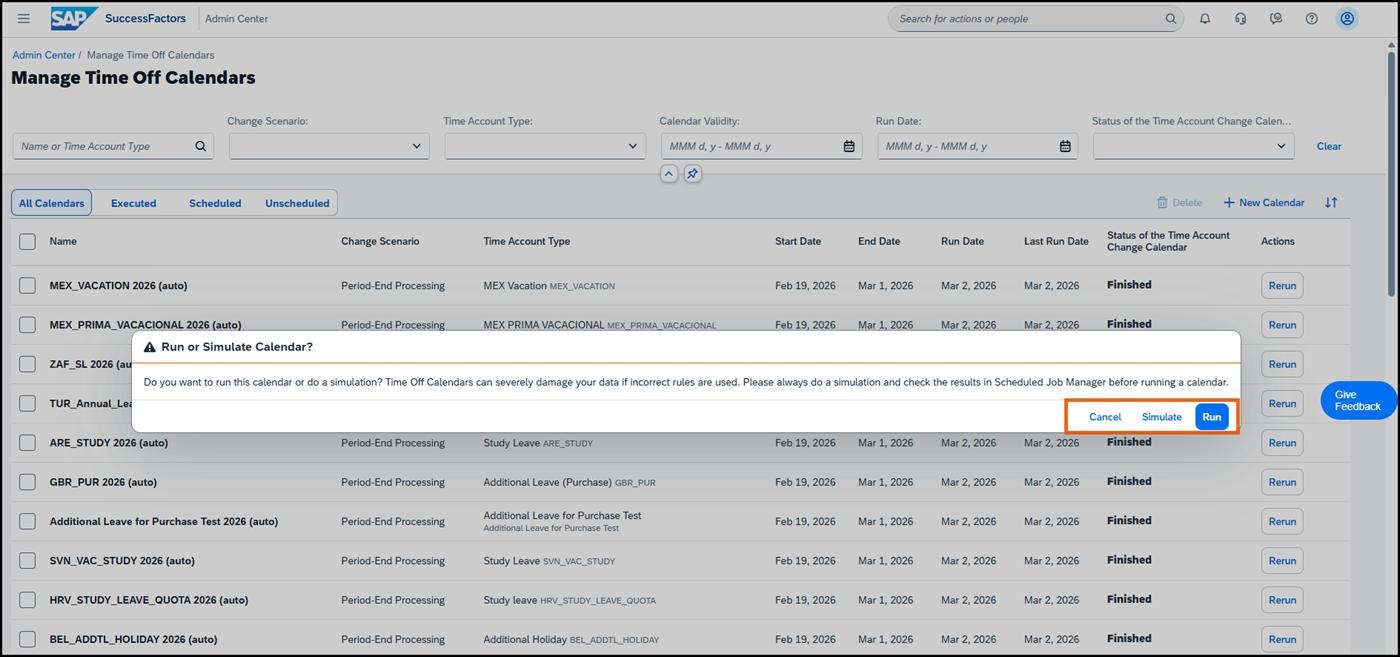
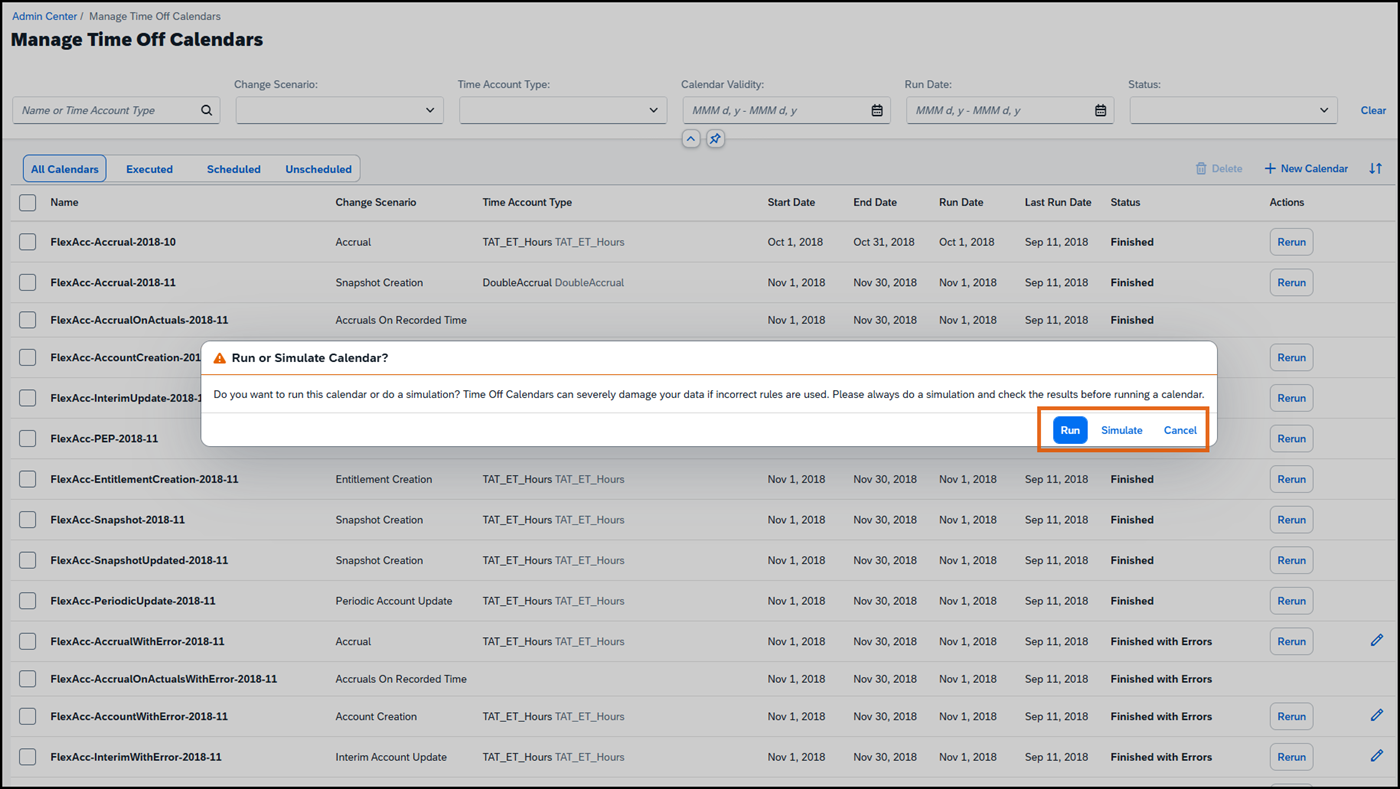
Run or Simulate Calendar Time Management

SAP has reordered the dialog’s action buttons to follow its latest design guidelines. Include the updated layout in your administrator walkthrough.

Before · previous version
SAP Run or Simulate Calendar: Before · previous version
After · 2H 2026
SAP Run or Simulate Calendar: After · 2H 2026

Select an image to open it full size. SAP screenshots reprinted with permission from SAP. © SAP SE or an SAP affiliate company. View SAP source ↗

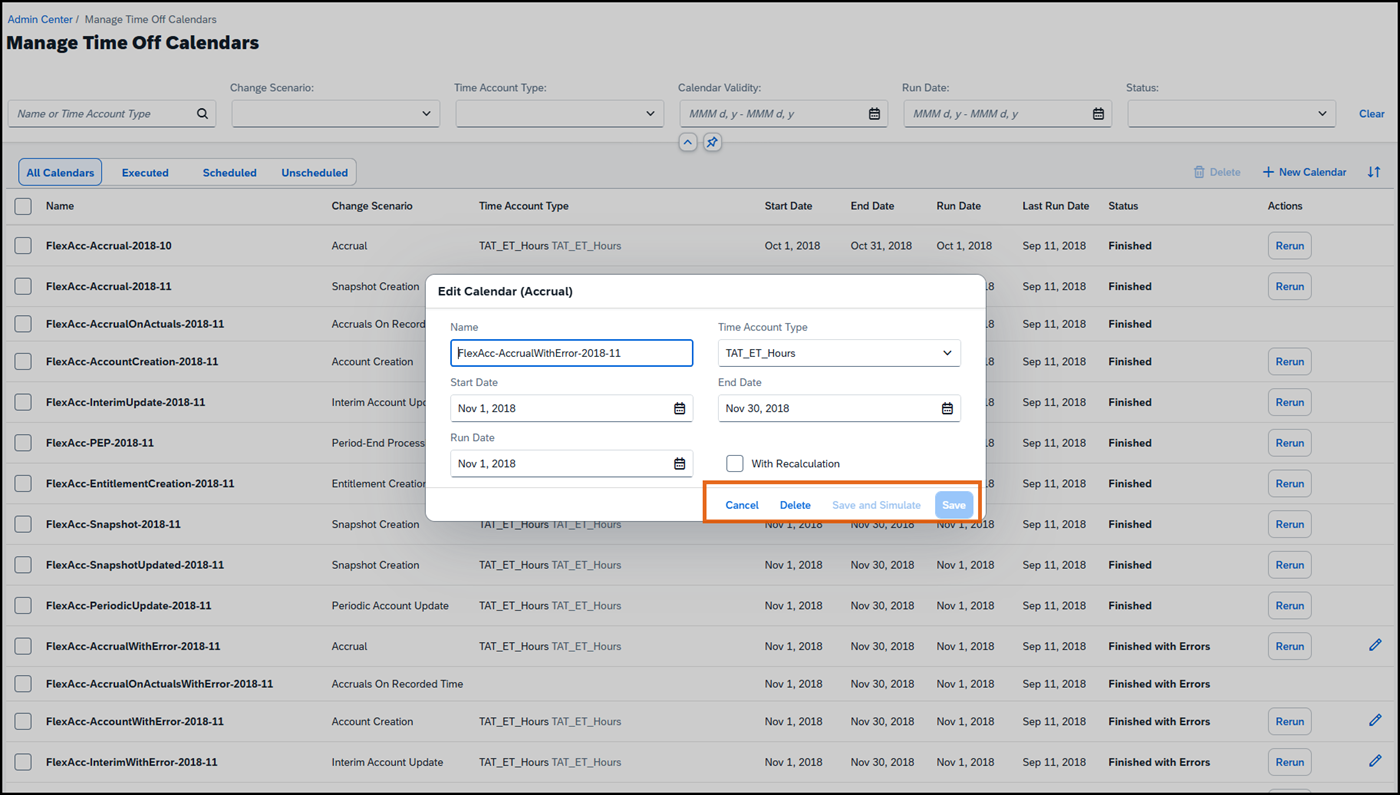
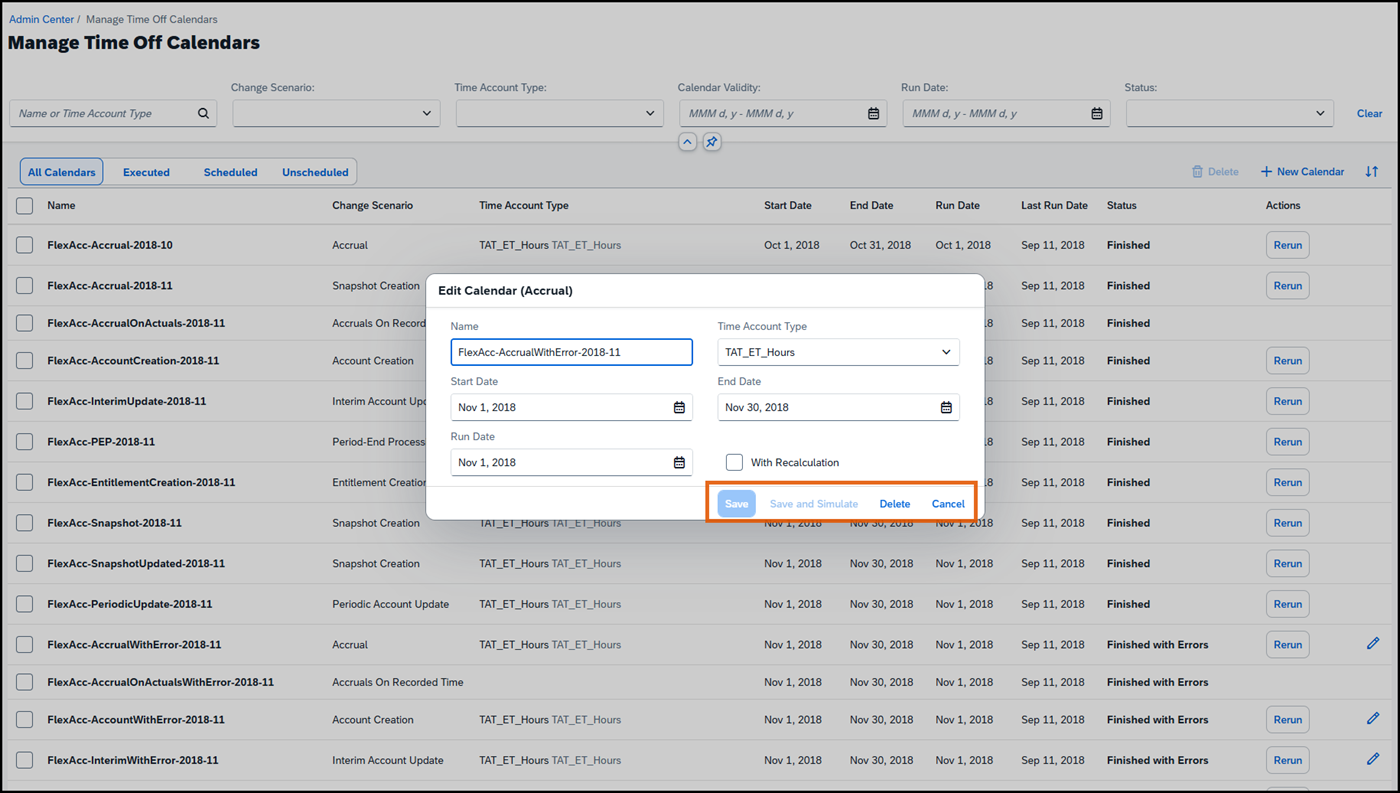
Edit Calendar (Accrual) Time Management

The accrual calendar dialog also receives the updated action-button order. Refresh training references that show the previous layout.

Before · previous version
SAP Edit Calendar (Accrual): Before · previous version
After · 2H 2026
SAP Edit Calendar (Accrual): After · 2H 2026

Select an image to open it full size. SAP screenshots reprinted with permission from SAP. © SAP SE or an SAP affiliate company. View SAP source ↗

Learning custom-card images Content Management

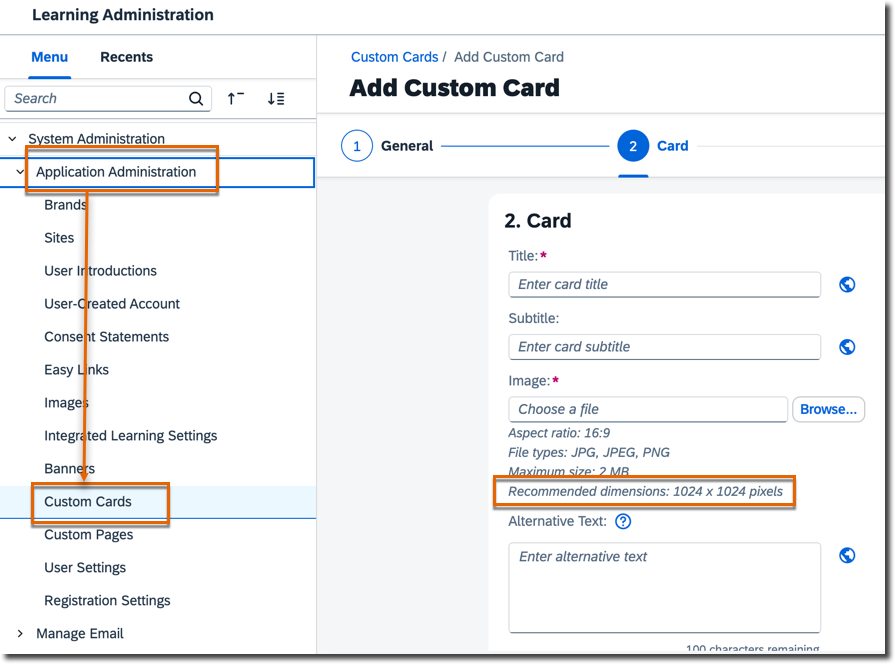
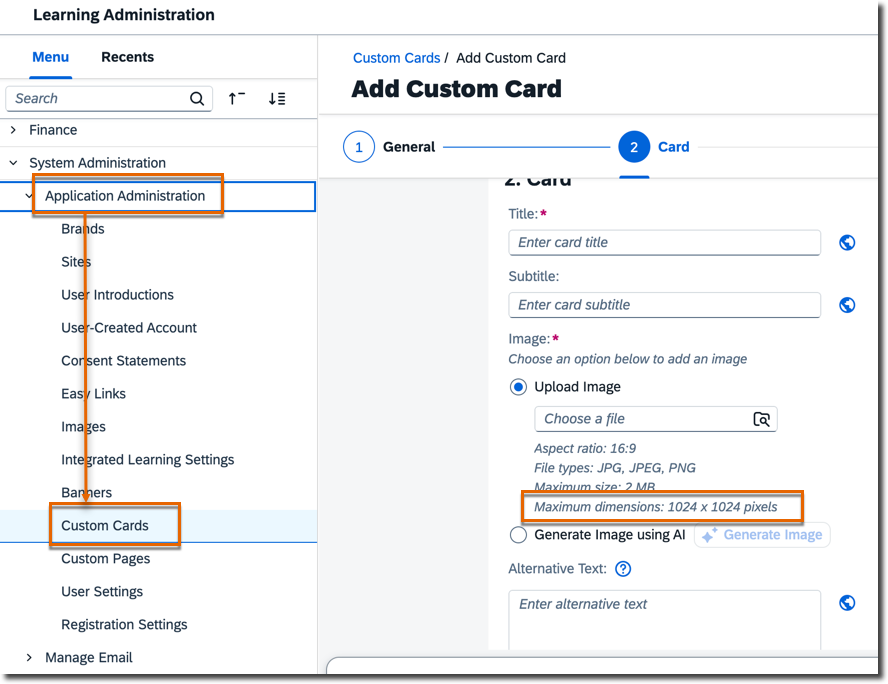
The upload guidance changes from ‘Recommended dimensions’ to ‘Maximum dimensions’. SAP clarifies that 1024 × 1024 pixels is the maximum supported image size.

Before · previous version
SAP Learning custom-card images: Before · previous version
After · 2H 2026
SAP Learning custom-card images: After · 2H 2026

Select an image to open it full size. SAP screenshots reprinted with permission from SAP. © SAP SE or an SAP affiliate company. View SAP source ↗

Selected UI examples, not the full release. Browse all entries below. Screenshots remain unchanged in their original English; preparation suggestions are VAKE commentary.

FIND YOUR PRIORITIES

Explore your release

411 matching items

Shortlist selections stay in this tab until you reload. Download them to keep a copy. No sign-in needed.

43 module sections. Shared changes appear in each relevant module; the total counts each change once.

360 Reviews7 changes
Customer configuredRecommendedChanged

Enhancements to Full Profile Cards and New Cards Available

360 Reviews, Employee Data, Mobile Applications, Payroll, Performance Management, Succession Planning, Time Management

We introduced new cards and more enhancements to the existing cards in the Full Profile of the latest People Profile.

Dates, scope & next step
Product
Career and Talent Development,Employee Central,Employee Central Payroll,Performance & Goals,Platform
Valid as of
November 13, 2026
Lifecycle
General Availability
Reference
PLT-88262 · HCM-DBAA-4D5D
Last SAP revision
October 2, 2026

VAKE review prompt: Confirm applicability in the SAP detail, assign a process owner and test the affected workflow in preview. This is planning guidance, not a tenant assessment.

Prepare this change

Activation decision

Check SAP’s prerequisites, permissions and configuration steps, then decide whether to adopt the change. Do not enable it in production before validation.

Review SAP’s recommended action and record your adoption decision.

VAKE suggested checks

  1. Confirm applicability of “Enhancements to Full Profile Cards and New Cards Available” for your licensed products, enabled features, countries and affected roles.
  2. With an authorised test client, compare the documented request/response or metadata change, permissions and error handling. Check downstream consumers before changing an integration.
  3. Choose representative dates and time patterns for the documented change. Compare affected balances, calculations or approval results with an agreed expected outcome, including boundary dates.
  4. Trace the affected payroll data or process through its handoffs. Agree expected outputs with the payroll owner and check country-specific dependencies and reconciliation.
  5. Record the environment/build, role, test data, expected versus actual result, date and process-owner sign-off. Create a user guide only after the changed journey is verified.

Tailor these planning checks to the prerequisites and expected behaviour in the linked SAP detail. They are not results of an executed test.

Demo check: Not yet checked in demo
Customer configuredInfo onlyNew

Maximum Character Limits for Optional Text Area Fields

360 Reviews

Administrators can now define maximum character limits for optional custom text area fields in 360 Reviews forms.

Dates, scope & next step
Product
Performance & Goals
Valid as of
November 13, 2026
Lifecycle
General Availability
Reference
MTR-10354 · HCM-B475-9D68
Last SAP revision
October 2, 2026

VAKE review prompt: Confirm applicability in the SAP detail, assign a process owner and test the affected workflow in preview. This is planning guidance, not a tenant assessment.

Prepare this change

Activation decision

Check SAP’s prerequisites, permissions and configuration steps, then decide whether to adopt the change. Do not enable it in production before validation.

Review applicability with the process owner; “information only” does not mean that the affected workflow needs no testing.

VAKE suggested checks

  1. Confirm applicability of “Maximum Character Limits for Optional Text Area Fields” for your licensed products, enabled features, countries and affected roles.
  2. Agree one representative scenario and expected result with the module owner. Recheck the related existing journey and document any prerequisite or dependency that prevents testing.
  3. Record the environment/build, role, test data, expected versus actual result, date and process-owner sign-off. Create a user guide only after the changed journey is verified.

Tailor these planning checks to the prerequisites and expected behaviour in the linked SAP detail. They are not results of an executed test.

Demo check: Not yet checked in demo
Customer configuredInfo onlyChanged

Latest Experience of 360 Reviews Forms

360 Reviews

We've redesigned your experience with the 360 Reviews form, introducing a more streamlined, more engaging user interface, along with numerous interaction optimizations.

Dates, scope & next step
Product
Performance & Goals
Valid as of
November 13, 2026
Lifecycle
General Availability
Reference
MTR-10095 · HCM-DDB5-673F
Last SAP revision
October 2, 2026

VAKE review prompt: Confirm applicability in the SAP detail, assign a process owner and test the affected workflow in preview. This is planning guidance, not a tenant assessment.

Prepare this change

Activation decision

Check SAP’s prerequisites, permissions and configuration steps, then decide whether to adopt the change. Do not enable it in production before validation.

Review applicability with the process owner; “information only” does not mean that the affected workflow needs no testing.

VAKE suggested checks

  1. Confirm applicability of “Latest Experience of 360 Reviews Forms” for your licensed products, enabled features, countries and affected roles.
  2. Agree one representative scenario and expected result with the module owner. Recheck the related existing journey and document any prerequisite or dependency that prevents testing.
  3. Record the environment/build, role, test data, expected versus actual result, date and process-owner sign-off. Create a user guide only after the changed journey is verified.

Tailor these planning checks to the prerequisites and expected behaviour in the linked SAP detail. They are not results of an executed test.

Demo check: Not yet checked in demo
Automatically onInfo onlyNew

Form Launching Based on Permission Groups

360 Reviews, Performance Management

As an administrator, you can now use permission groups to specify which employees you launch forms for. This enhancement applies to both Performance Management and 360 Reviews.

Dates, scope & next step
Product
Performance & Goals
Valid as of
November 13, 2026
Lifecycle
General Availability
Reference
PMU-26922 · HCM-1D9C-BD42
Last SAP revision
October 2, 2026

VAKE review prompt: Confirm applicability in the SAP detail, assign a process owner and test the affected workflow in preview. This is planning guidance, not a tenant assessment.

Prepare this change

Activation decision

Plan a regression check when this change reaches your environment. Automatic activation does not remove prerequisites or your testing responsibilities.

Review applicability with the process owner; “information only” does not mean that the affected workflow needs no testing.

VAKE suggested checks

  1. Confirm applicability of “Form Launching Based on Permission Groups” for your licensed products, enabled features, countries and affected roles.
  2. Agree one representative scenario and expected result with the module owner. Recheck the related existing journey and document any prerequisite or dependency that prevents testing.
  3. Record the environment/build, role, test data, expected versus actual result, date and process-owner sign-off. Create a user guide only after the changed journey is verified.

Tailor these planning checks to the prerequisites and expected behaviour in the linked SAP detail. They are not results of an executed test.

Demo check: Not yet checked in demo
Customer configuredInfo onlyNew

Custom Manager Role Available in Route Maps for Performance Management and 360 Reviews

360 Reviews, Performance Management

As an administrator, you can now add route map steps that use the custom manager role defined in Employee Central, enabling roles like Coach or Mentor to participate in Performance Management or 360 Reviews processes.

Dates, scope & next step
Product
Performance & Goals
Valid as of
November 13, 2026
Lifecycle
General Availability
Reference
PMU-27138 · HCM-D920-42EE
Last SAP revision
October 2, 2026

VAKE review prompt: Confirm applicability in the SAP detail, assign a process owner and test the affected workflow in preview. This is planning guidance, not a tenant assessment.

Prepare this change

Activation decision

Check SAP’s prerequisites, permissions and configuration steps, then decide whether to adopt the change. Do not enable it in production before validation.

Review applicability with the process owner; “information only” does not mean that the affected workflow needs no testing.

VAKE suggested checks

  1. Confirm applicability of “Custom Manager Role Available in Route Maps for Performance Management and 360 Reviews” for your licensed products, enabled features, countries and affected roles.
  2. Agree one representative scenario and expected result with the module owner. Recheck the related existing journey and document any prerequisite or dependency that prevents testing.
  3. Record the environment/build, role, test data, expected versus actual result, date and process-owner sign-off. Create a user guide only after the changed journey is verified.

Tailor these planning checks to the prerequisites and expected behaviour in the linked SAP detail. They are not results of an executed test.

Demo check: Not yet checked in demo
Automatically onInfo onlyChanged

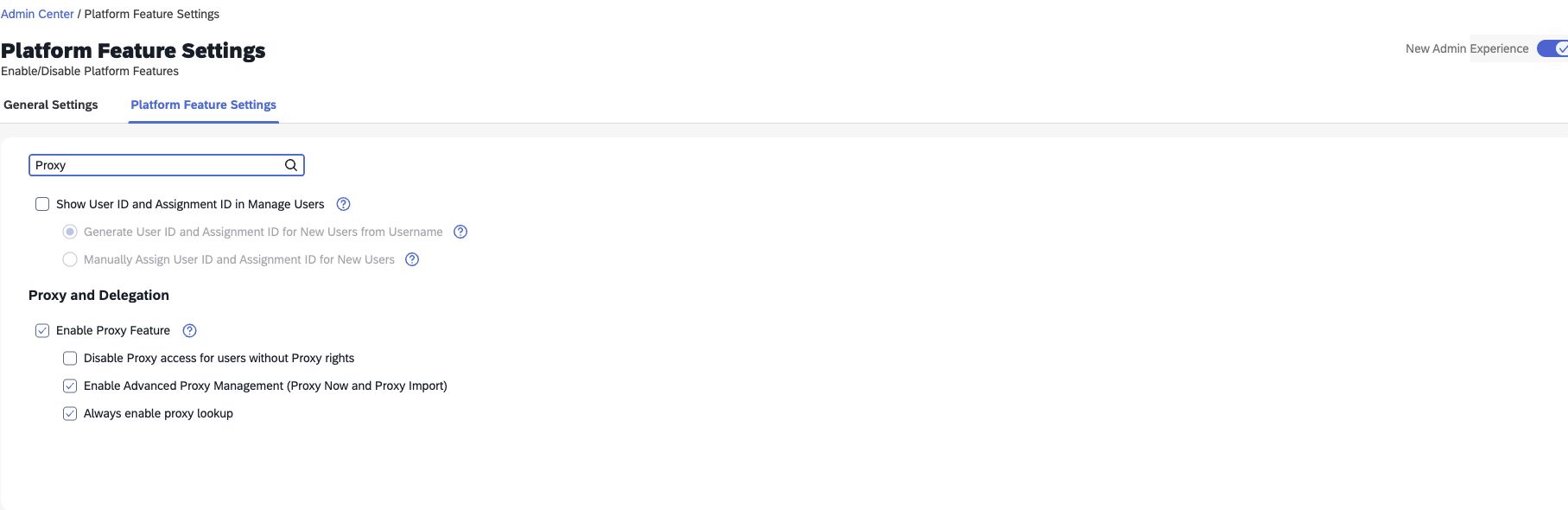
Text Improvements and Setting Removals in Performance Management Feature Settings Page

360 Reviews, Performance Management

We've improved labels and help text for some settings in Admin Center  Performance Management Feature Settings and removed two settings that are deprecated.

Dates, scope & next step
Product
Performance & Goals
Valid as of
November 13, 2026
Lifecycle
General Availability
Reference
PMU-28575 · HCM-B4EC-0C62
Last SAP revision
October 2, 2026

VAKE review prompt: Confirm applicability in the SAP detail, assign a process owner and test the affected workflow in preview. This is planning guidance, not a tenant assessment.

Prepare this change

Activation decision

Plan a regression check when this change reaches your environment. Automatic activation does not remove prerequisites or your testing responsibilities.

Review applicability with the process owner; “information only” does not mean that the affected workflow needs no testing.

VAKE suggested checks

  1. Confirm applicability of “Text Improvements and Setting Removals in Performance Management Feature Settings Page” for your licensed products, enabled features, countries and affected roles.
  2. Agree one representative scenario and expected result with the module owner. Recheck the related existing journey and document any prerequisite or dependency that prevents testing.
  3. Record the environment/build, role, test data, expected versus actual result, date and process-owner sign-off. Create a user guide only after the changed journey is verified.

Tailor these planning checks to the prerequisites and expected behaviour in the linked SAP detail. They are not results of an executed test.

Demo check: Checked: differs from SAP release notes

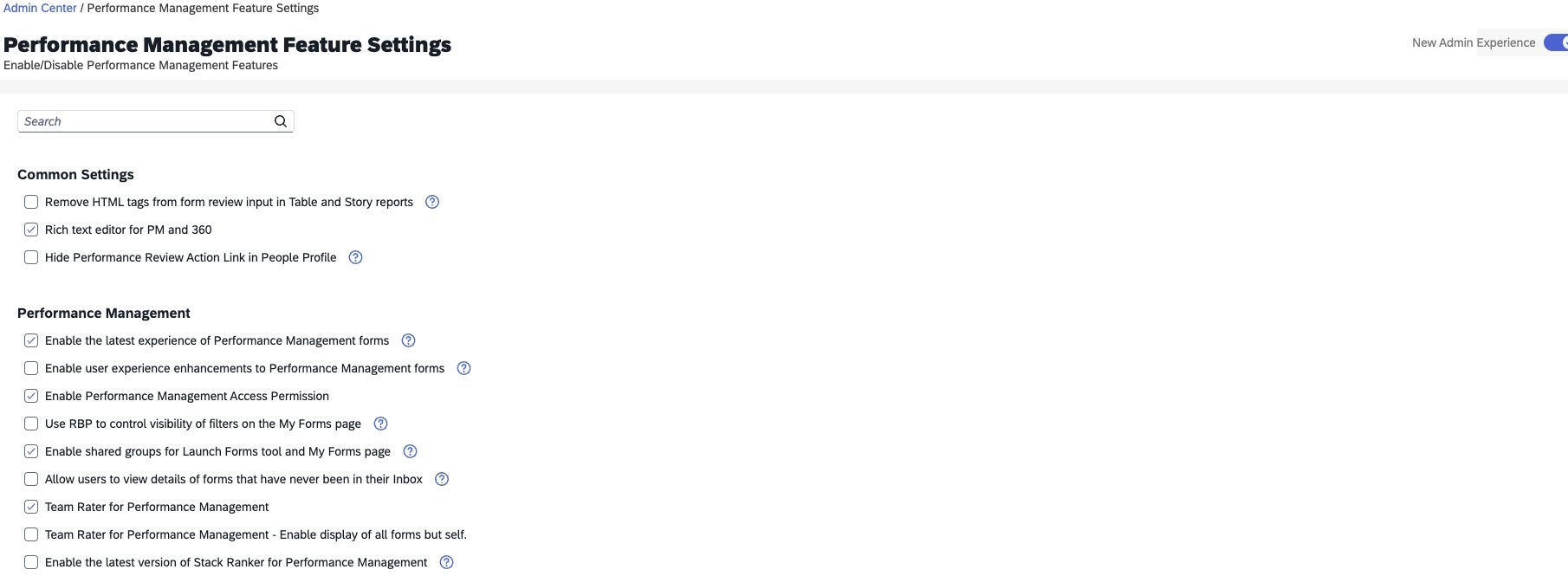
Visual comparison completed. With New Admin Experience on, this demo still shows the old Performance Management setting labels and both settings that SAP says are removed in 2H 2026: PM Form Search Competencies and the Microsoft Word text-cleanup option. The documented change was not observed on 10 October.

Observed on: October 10, 2026

Still to validate: Recheck after the tenant upgrade. Confirm the revised labels and removed controls before writing a guide to the new screen. This comparison does not establish the release state of other modules.

Screen walkthrough

  1. Open Admin Center → Performance Management Feature Settings.
  2. Compare the visible labels and controls with SAP item PMU-28575. Use the page search for “Word” to locate the legacy cleanup setting.
  3. Record any differences and the check date. Do not describe the documented removals as implemented while the controls remain visible.

Administrator permission: Manage System Properties → Performance Management Feature Settings. No configuration was changed.

Text Improvements and Setting Removals in Performance Management Feature Settings Page
Actual demo capture. Interface labels remain in English. Your layout and permissions may differ.
Text Improvements and Setting Removals in Performance Management Feature Settings Page
Actual demo capture. Interface labels remain in English. Your layout and permissions may differ.
Automatically onInfo onlyChanged

"View Overall Ratings from Forms" Permission No Longer Required for Trend Information in Latest People Profile

360 Reviews, Employee Data, Identity and Access Management, Performance Management

Previously, viewing Performance Management and 360 Reviews form ratings on Trend Information cards required the Performance  View Overall Ratings from Forms permission. Now, this permission is no longer required.

Dates, scope & next step
Product
Performance & Goals,Platform
Valid as of
August 27, 2026
Lifecycle
General Availability
Reference
PMU-27932 · HCM-3D39-E1CB
Last SAP revision
August 14, 2026

VAKE review prompt: Confirm applicability in the SAP detail, assign a process owner and test the affected workflow in preview. This is planning guidance, not a tenant assessment.

Prepare this change

Activation decision

Plan a regression check when this change reaches your environment. Automatic activation does not remove prerequisites or your testing responsibilities.

Review applicability with the process owner; “information only” does not mean that the affected workflow needs no testing.

VAKE suggested checks

  1. Confirm applicability of “"View Overall Ratings from Forms" Permission No Longer Required for Trend Information in Latest People Profile” for your licensed products, enabled features, countries and affected roles.
  2. Compare an authorised role with a restricted role and verify target-population boundaries. Capture permission evidence without exposing employee data.
  3. Compare navigation, field visibility and labels for the affected roles. Check responsive layout and your supported languages or custom theme where relevant.
  4. Record the environment/build, role, test data, expected versus actual result, date and process-owner sign-off. Create a user guide only after the changed journey is verified.

Tailor these planning checks to the prerequisites and expected behaviour in the linked SAP detail. They are not results of an executed test.

Demo check: Not yet checked in demo
Analytics4 changes
Customer configuredInfo onlyNew

New Benefits Eligibility Evaluation Job

Analytics, Global Benefits

You can now run the Evaluate Benefit Eligibility for Employees job in the Scheduled Job Manager to store employee benefit eligibility data for all benefit types.

Dates, scope & next step
Product
Employee Central
Valid as of
November 13, 2026
Lifecycle
General Availability
Reference
BEN-17641 · HCM-DB7A-2C8C
Last SAP revision
October 9, 2026

VAKE review prompt: Confirm applicability in the SAP detail, assign a process owner and test the affected workflow in preview. This is planning guidance, not a tenant assessment.

Prepare this change

Activation decision

Check SAP’s prerequisites, permissions and configuration steps, then decide whether to adopt the change. Do not enable it in production before validation.

Review applicability with the process owner; “information only” does not mean that the affected workflow needs no testing.

VAKE suggested checks

  1. Confirm applicability of “New Benefits Eligibility Evaluation Job” for your licensed products, enabled features, countries and affected roles.
  2. Compare a known data sample with the affected report or export. Check filters, totals, access restrictions and downstream consumption where relevant.
  3. Record the environment/build, role, test data, expected versus actual result, date and process-owner sign-off. Create a user guide only after the changed journey is verified.

Tailor these planning checks to the prerequisites and expected behaviour in the linked SAP detail. They are not results of an executed test.

Demo check: Not yet checked in demo
Automatically onRequiredChanged

Enhancements to the Manage Analytics Data Products Tool

Analytics

In the Manage Analytics Data Products tool, we've added a new Compensation Planning Settings page, and updated an Employee Central filter setting and added a new Recruiting filter setting.

Dates, scope & next step
Product
People Intelligence
Valid as of
June 12, 2026
Lifecycle
General Availability
Reference
PIN-7518 · HCM-B383-8D5D
Last SAP revision
July 17, 2026

VAKE review prompt: Confirm applicability in the SAP detail, assign a process owner and test the affected workflow in preview. This is planning guidance, not a tenant assessment.

Prepare this change

Activation decision

Plan a regression check when this change reaches your environment. Automatic activation does not remove prerequisites or your testing responsibilities.

SAP marks an action as required. Identify the applicable deadline in the SAP detail, name an owner and record completion evidence.

VAKE suggested checks

  1. Confirm applicability of “Enhancements to the Manage Analytics Data Products Tool” for your licensed products, enabled features, countries and affected roles.
  2. Compare a known data sample with the affected report or export. Check filters, totals, access restrictions and downstream consumption where relevant.
  3. Record the environment/build, role, test data, expected versus actual result, date and process-owner sign-off. Create a user guide only after the changed journey is verified.

Tailor these planning checks to the prerequisites and expected behaviour in the linked SAP detail. They are not results of an executed test.

Demo check: Not yet checked in demo

Automatically onRequiredChanged

New Criteria Added to Data Access Control for People Intelligence Insights

Analytics

Company and Country are two new criteria added to the data access control file "sap.sf.wrk.DAC", which is linked to the data models for each of the People Intelligence Insights.

Dates, scope & next step
Product
People Intelligence
Valid as of
June 12, 2026
Lifecycle
General Availability
Reference
PIN-1634 · HCM-4667-7DE4
Last SAP revision
July 17, 2026

VAKE review prompt: Confirm applicability in the SAP detail, assign a process owner and test the affected workflow in preview. This is planning guidance, not a tenant assessment.

Prepare this change

Activation decision

Plan a regression check when this change reaches your environment. Automatic activation does not remove prerequisites or your testing responsibilities.

SAP marks an action as required. Identify the applicable deadline in the SAP detail, name an owner and record completion evidence.

VAKE suggested checks

  1. Confirm applicability of “New Criteria Added to Data Access Control for People Intelligence Insights” for your licensed products, enabled features, countries and affected roles.
  2. Compare a known data sample with the affected report or export. Check filters, totals, access restrictions and downstream consumption where relevant.
  3. Record the environment/build, role, test data, expected versus actual result, date and process-owner sign-off. Create a user guide only after the changed journey is verified.

Tailor these planning checks to the prerequisites and expected behaviour in the linked SAP detail. They are not results of an executed test.

Demo check: Not yet checked in demo
Customer configuredInfo onlyNew

Additional Set of Insights and Data Products Available for People Intelligence

Analytics

With this release, People Intelligence delivers intelligent content and data products from SAP SuccessFactors product areas like Compensation, Rewards and Recognition, and Employee Central Benefits.

Dates, scope & next step
Product
People Intelligence
Valid as of
June 12, 2026
Lifecycle
General Availability
Reference
PIN-2031 · HCM-6BEA-922F
Last SAP revision
June 12, 2026

VAKE review prompt: Confirm applicability in the SAP detail, assign a process owner and test the affected workflow in preview. This is planning guidance, not a tenant assessment.

Prepare this change

Activation decision

Check SAP’s prerequisites, permissions and configuration steps, then decide whether to adopt the change. Do not enable it in production before validation.

Review applicability with the process owner; “information only” does not mean that the affected workflow needs no testing.

VAKE suggested checks

  1. Confirm applicability of “Additional Set of Insights and Data Products Available for People Intelligence” for your licensed products, enabled features, countries and affected roles.
  2. Compare a known data sample with the affected report or export. Check filters, totals, access restrictions and downstream consumption where relevant.
  3. Record the environment/build, role, test data, expected versus actual result, date and process-owner sign-off. Create a user guide only after the changed journey is verified.

Tailor these planning checks to the prerequisites and expected behaviour in the linked SAP detail. They are not results of an executed test.

Demo check: Not yet checked in demo

Applicant Management1 change
Automatically onInfo onlyChanged

Interview Scheduling in SAP SuccessFactors Recruiting with SmartRecruiters

Applicant Management, Candidate Experience

SAP SuccessFactors Recruiting customers can now use interview self-scheduling capabilities from SmartRecruiters for all candidates, whether or not they applied with Winston Chat.

Dates, scope & next step
Product
Recruiting,SmartRecruiters Winston
Valid as of
September 10, 2026
Lifecycle
General Availability
Reference
SMR-862 · HCM-3130-217D
Last SAP revision
October 2, 2026

VAKE review prompt: Confirm applicability in the SAP detail, assign a process owner and test the affected workflow in preview. This is planning guidance, not a tenant assessment.

Prepare this change

Activation decision

Plan a regression check when this change reaches your environment. Automatic activation does not remove prerequisites or your testing responsibilities.

Review applicability with the process owner; “information only” does not mean that the affected workflow needs no testing.

VAKE suggested checks

  1. Confirm applicability of “Interview Scheduling in SAP SuccessFactors Recruiting with SmartRecruiters” for your licensed products, enabled features, countries and affected roles.
  2. Agree one representative scenario and expected result with the module owner. Recheck the related existing journey and document any prerequisite or dependency that prevents testing.
  3. Record the environment/build, role, test data, expected versus actual result, date and process-owner sign-off. Create a user guide only after the changed journey is verified.

Tailor these planning checks to the prerequisites and expected behaviour in the linked SAP detail. They are not results of an executed test.

Demo check: Not yet checked in demo
Apprentice Management1 change
Automatically onInfo onlyChanged

Support Onboardee User Type for People Search in Apprentice Management

Apprentice Management

Now employees onboarded using SAP SuccessFactors Onboarding appear in the search results of Apprentice Management, even before their employment start date.

Dates, scope & next step
Product
Employee Central
Valid as of
November 13, 2026
Lifecycle
General Availability
Reference
ECT-268750 · HCM-BA8A-90C1
Last SAP revision
October 2, 2026

VAKE review prompt: Confirm applicability in the SAP detail, assign a process owner and test the affected workflow in preview. This is planning guidance, not a tenant assessment.

Prepare this change

Activation decision

Plan a regression check when this change reaches your environment. Automatic activation does not remove prerequisites or your testing responsibilities.

Review applicability with the process owner; “information only” does not mean that the affected workflow needs no testing.

VAKE suggested checks

  1. Confirm applicability of “Support Onboardee User Type for People Search in Apprentice Management” for your licensed products, enabled features, countries and affected roles.
  2. Agree one representative scenario and expected result with the module owner. Recheck the related existing journey and document any prerequisite or dependency that prevents testing.
  3. Record the environment/build, role, test data, expected versus actual result, date and process-owner sign-off. Create a user guide only after the changed journey is verified.

Tailor these planning checks to the prerequisites and expected behaviour in the linked SAP detail. They are not results of an executed test.

Demo check: Not yet checked in demo

Calibration12 changes
Automatically onInfo onlyChanged

Configure Rating Sources for Talent Cards

Calibration, Presentations, Succession Planning

As an administrator, you can now configure rating sources for Talent Cards directly in Manage Talent Cards in instances with the latest People Profile enabled.

Dates, scope & next step
Product
Career and Talent Development,Performance & Goals
Valid as of
November 13, 2026
Lifecycle
General Availability
Reference
SCM-22053 · HCM-2E1B-D14A
Last SAP revision
October 2, 2026

VAKE review prompt: Confirm applicability in the SAP detail, assign a process owner and test the affected workflow in preview. This is planning guidance, not a tenant assessment.

Prepare this change

Activation decision

Plan a regression check when this change reaches your environment. Automatic activation does not remove prerequisites or your testing responsibilities.

Review applicability with the process owner; “information only” does not mean that the affected workflow needs no testing.

VAKE suggested checks

  1. Confirm applicability of “Configure Rating Sources for Talent Cards” for your licensed products, enabled features, countries and affected roles.
  2. Agree one representative scenario and expected result with the module owner. Recheck the related existing journey and document any prerequisite or dependency that prevents testing.
  3. Record the environment/build, role, test data, expected versus actual result, date and process-owner sign-off. Create a user guide only after the changed journey is verified.

Tailor these planning checks to the prerequisites and expected behaviour in the linked SAP detail. They are not results of an executed test.

Demo check: Not yet checked in demo
Automatically onInfo onlyNew

Manage Filter Visibility in Calibration Sessions

Calibration

You can now manage which filters are visible and used in your calibration sessions.

Dates, scope & next step
Product
Performance & Goals
Valid as of
November 13, 2026
Lifecycle
General Availability
Reference
CAL-9525 · HCM-7A0E-2363
Last SAP revision
October 2, 2026

VAKE review prompt: Confirm applicability in the SAP detail, assign a process owner and test the affected workflow in preview. This is planning guidance, not a tenant assessment.

Prepare this change

Activation decision

Plan a regression check when this change reaches your environment. Automatic activation does not remove prerequisites or your testing responsibilities.

Review applicability with the process owner; “information only” does not mean that the affected workflow needs no testing.

VAKE suggested checks

  1. Confirm applicability of “Manage Filter Visibility in Calibration Sessions” for your licensed products, enabled features, countries and affected roles.
  2. Agree one representative scenario and expected result with the module owner. Recheck the related existing journey and document any prerequisite or dependency that prevents testing.
  3. Record the environment/build, role, test data, expected versus actual result, date and process-owner sign-off. Create a user guide only after the changed journey is verified.

Tailor these planning checks to the prerequisites and expected behaviour in the linked SAP detail. They are not results of an executed test.

Demo check: Not yet checked in demo

Automatically onInfo onlyNew

Permission Groups Supported in Session Creation

Calibration

When creating a calibration session, you can now search for users by permission group to add them as participants and subjects.

Dates, scope & next step
Product
Performance & Goals
Valid as of
November 13, 2026
Lifecycle
General Availability
Reference
CAL-9544 · HCM-549D-22A6
Last SAP revision
October 2, 2026

VAKE review prompt: Confirm applicability in the SAP detail, assign a process owner and test the affected workflow in preview. This is planning guidance, not a tenant assessment.

Prepare this change

Activation decision

Plan a regression check when this change reaches your environment. Automatic activation does not remove prerequisites or your testing responsibilities.

Review applicability with the process owner; “information only” does not mean that the affected workflow needs no testing.

VAKE suggested checks

  1. Confirm applicability of “Permission Groups Supported in Session Creation” for your licensed products, enabled features, countries and affected roles.
  2. Agree one representative scenario and expected result with the module owner. Recheck the related existing journey and document any prerequisite or dependency that prevents testing.
  3. Record the environment/build, role, test data, expected versus actual result, date and process-owner sign-off. Create a user guide only after the changed journey is verified.

Tailor these planning checks to the prerequisites and expected behaviour in the linked SAP detail. They are not results of an executed test.

Demo check: Not yet checked in demo
Customer configuredInfo onlyNew

Set Mirrored Distribution in Calibration Templates

Calibration

As an administrator, you can now define mirrored distribution rules for ratings from Performance Management forms in calibration templates, linking two ratings so that one always follows the distribution of the other during calibration.

Dates, scope & next step
Product
Performance & Goals
Valid as of
November 13, 2026
Lifecycle
General Availability
Reference
CAL-9875 · HCM-7CD4-2105
Last SAP revision
October 2, 2026

VAKE review prompt: Confirm applicability in the SAP detail, assign a process owner and test the affected workflow in preview. This is planning guidance, not a tenant assessment.

Prepare this change

Activation decision

Check SAP’s prerequisites, permissions and configuration steps, then decide whether to adopt the change. Do not enable it in production before validation.

Review applicability with the process owner; “information only” does not mean that the affected workflow needs no testing.

VAKE suggested checks

  1. Confirm applicability of “Set Mirrored Distribution in Calibration Templates” for your licensed products, enabled features, countries and affected roles.
  2. Agree one representative scenario and expected result with the module owner. Recheck the related existing journey and document any prerequisite or dependency that prevents testing.
  3. Record the environment/build, role, test data, expected versus actual result, date and process-owner sign-off. Create a user guide only after the changed journey is verified.

Tailor these planning checks to the prerequisites and expected behaviour in the linked SAP detail. They are not results of an executed test.

Demo check: Not yet checked in demo
Customer configuredInfo onlyNew

Define Custom URL Access for Calibration Reviews

Calibration

You can now configure a custom URL in calibration templates so that users can open a custom page for a specific subject during calibration reviews.

Dates, scope & next step
Product
Performance & Goals
Valid as of
November 13, 2026
Lifecycle
General Availability
Reference
CAL-9515 · HCM-68FB-5C79
Last SAP revision
October 2, 2026

VAKE review prompt: Confirm applicability in the SAP detail, assign a process owner and test the affected workflow in preview. This is planning guidance, not a tenant assessment.

Prepare this change

Activation decision

Check SAP’s prerequisites, permissions and configuration steps, then decide whether to adopt the change. Do not enable it in production before validation.

Review applicability with the process owner; “information only” does not mean that the affected workflow needs no testing.

VAKE suggested checks

  1. Confirm applicability of “Define Custom URL Access for Calibration Reviews” for your licensed products, enabled features, countries and affected roles.
  2. Agree one representative scenario and expected result with the module owner. Recheck the related existing journey and document any prerequisite or dependency that prevents testing.
  3. Record the environment/build, role, test data, expected versus actual result, date and process-owner sign-off. Create a user guide only after the changed journey is verified.

Tailor these planning checks to the prerequisites and expected behaviour in the linked SAP detail. They are not results of an executed test.

Demo check: Not yet checked in demo
Customer configuredInfo onlyNew

New Rule Scenario: Synchronize Data to Calibration Extended Info MDF Object

Calibration

A new business rule scenario in Calibration enables you to populate fields in the new MDF object CalibrationExtendedInfo with data from Job Information and user-based custom MDF objects.

Dates, scope & next step
Product
Performance & Goals
Valid as of
November 13, 2026
Lifecycle
General Availability
Reference
CAL-9682 · HCM-9412-8EA2
Last SAP revision
October 2, 2026

VAKE review prompt: Confirm applicability in the SAP detail, assign a process owner and test the affected workflow in preview. This is planning guidance, not a tenant assessment.

Prepare this change

Activation decision

Check SAP’s prerequisites, permissions and configuration steps, then decide whether to adopt the change. Do not enable it in production before validation.

Review applicability with the process owner; “information only” does not mean that the affected workflow needs no testing.

VAKE suggested checks

  1. Confirm applicability of “New Rule Scenario: Synchronize Data to Calibration Extended Info MDF Object” for your licensed products, enabled features, countries and affected roles.
  2. Agree one representative scenario and expected result with the module owner. Recheck the related existing journey and document any prerequisite or dependency that prevents testing.
  3. Record the environment/build, role, test data, expected versus actual result, date and process-owner sign-off. Create a user guide only after the changed journey is verified.

Tailor these planning checks to the prerequisites and expected behaviour in the linked SAP detail. They are not results of an executed test.

Demo check: Not yet checked in demo
Customer configuredInfo onlyNew

Redesigned Experience for Managing Fields for List View

Calibration

We redesigned the experience for managing fields for List view in calibration templates and provided new features.

Dates, scope & next step
Product
Performance & Goals
Valid as of
November 13, 2026
Lifecycle
General Availability
Reference
CAL-9506 · HCM-D7D3-3520
Last SAP revision
October 2, 2026

VAKE review prompt: Confirm applicability in the SAP detail, assign a process owner and test the affected workflow in preview. This is planning guidance, not a tenant assessment.

Prepare this change

Activation decision

Check SAP’s prerequisites, permissions and configuration steps, then decide whether to adopt the change. Do not enable it in production before validation.

Review applicability with the process owner; “information only” does not mean that the affected workflow needs no testing.

VAKE suggested checks

  1. Confirm applicability of “Redesigned Experience for Managing Fields for List View” for your licensed products, enabled features, countries and affected roles.
  2. Agree one representative scenario and expected result with the module owner. Recheck the related existing journey and document any prerequisite or dependency that prevents testing.
  3. Record the environment/build, role, test data, expected versus actual result, date and process-owner sign-off. Create a user guide only after the changed journey is verified.

Tailor these planning checks to the prerequisites and expected behaviour in the linked SAP detail. They are not results of an executed test.

Demo check: Not yet checked in demo
Automatically onInfo onlyNew

Manage Column Visibility in List View

Calibration

You can now manage column visibility in the List view of a calibration session.

Dates, scope & next step
Product
Performance & Goals
Valid as of
November 13, 2026
Lifecycle
General Availability
Reference
CAL-9538 · HCM-41EB-844A
Last SAP revision
October 2, 2026

VAKE review prompt: Confirm applicability in the SAP detail, assign a process owner and test the affected workflow in preview. This is planning guidance, not a tenant assessment.

Prepare this change

Activation decision

Plan a regression check when this change reaches your environment. Automatic activation does not remove prerequisites or your testing responsibilities.

Review applicability with the process owner; “information only” does not mean that the affected workflow needs no testing.

VAKE suggested checks

  1. Confirm applicability of “Manage Column Visibility in List View” for your licensed products, enabled features, countries and affected roles.
  2. Agree one representative scenario and expected result with the module owner. Recheck the related existing journey and document any prerequisite or dependency that prevents testing.
  3. Record the environment/build, role, test data, expected versus actual result, date and process-owner sign-off. Create a user guide only after the changed journey is verified.

Tailor these planning checks to the prerequisites and expected behaviour in the linked SAP detail. They are not results of an executed test.

Demo check: Not yet checked in demo
Customer configuredInfo onlyNew

Create Calibration Sessions from the Latest Team Overview

Calibration, Performance Management

Managers can now calibrate employees' ratings directly from the latest experience of Team Overview.

Dates, scope & next step
Product
Performance & Goals
Valid as of
November 13, 2026
Lifecycle
General Availability
Reference
PMU-27202 · HCM-95AB-0E33
Last SAP revision
October 2, 2026

VAKE review prompt: Confirm applicability in the SAP detail, assign a process owner and test the affected workflow in preview. This is planning guidance, not a tenant assessment.

Prepare this change

Activation decision

Check SAP’s prerequisites, permissions and configuration steps, then decide whether to adopt the change. Do not enable it in production before validation.

Review applicability with the process owner; “information only” does not mean that the affected workflow needs no testing.

VAKE suggested checks

  1. Confirm applicability of “Create Calibration Sessions from the Latest Team Overview” for your licensed products, enabled features, countries and affected roles.
  2. Agree one representative scenario and expected result with the module owner. Recheck the related existing journey and document any prerequisite or dependency that prevents testing.
  3. Record the environment/build, role, test data, expected versus actual result, date and process-owner sign-off. Create a user guide only after the changed journey is verified.

Tailor these planning checks to the prerequisites and expected behaviour in the linked SAP detail. They are not results of an executed test.

Demo check: Not yet checked in demo
Customer configuredInfo onlyChanged

Enhancements to Calibration Alerts

Calibration

Two enhancements are now available for Calibration alerts.

Dates, scope & next step
Product
Performance & Goals,Platform
Valid as of
November 13, 2026
Lifecycle
General Availability
Reference
CAL-9717 · HCM-D84C-3298
Last SAP revision
October 2, 2026

VAKE review prompt: Confirm applicability in the SAP detail, assign a process owner and test the affected workflow in preview. This is planning guidance, not a tenant assessment.

Prepare this change

Activation decision

Check SAP’s prerequisites, permissions and configuration steps, then decide whether to adopt the change. Do not enable it in production before validation.

Review applicability with the process owner; “information only” does not mean that the affected workflow needs no testing.

VAKE suggested checks

  1. Confirm applicability of “Enhancements to Calibration Alerts” for your licensed products, enabled features, countries and affected roles.
  2. Agree one representative scenario and expected result with the module owner. Recheck the related existing journey and document any prerequisite or dependency that prevents testing.
  3. Record the environment/build, role, test data, expected versus actual result, date and process-owner sign-off. Create a user guide only after the changed journey is verified.

Tailor these planning checks to the prerequisites and expected behaviour in the linked SAP detail. They are not results of an executed test.

Demo check: Not yet checked in demo
Contact Customer Engagement Executive or Account ManagerInfo onlyNew

Joule Assistants and Agents in Restricted Availability - September 16, 2026

Calibration, Goal Management, SAP Business AI

We're introducing more AI assistants and agents in restricted availability as part of the September 2026 release.

Dates, scope & next step
Product
Performance & Goals,Platform
Valid as of
September 16, 2026
Lifecycle
Restricted Availability
Reference
KM-23810 · HCM-301A-AEB1
Last SAP revision
September 16, 2026

VAKE review prompt: Confirm applicability in the SAP detail, assign a process owner and test the affected workflow in preview. This is planning guidance, not a tenant assessment.

Prepare this change

Activation decision

Confirm availability and activation with the SAP contact named in this entry. Check commercial and technical prerequisites before committing to rollout.

Review applicability with the process owner; “information only” does not mean that the affected workflow needs no testing.

VAKE suggested checks

  1. Confirm applicability of “Joule Assistants and Agents in Restricted Availability - September 16, 2026” for your licensed products, enabled features, countries and affected roles.
  2. Confirm entitlement, activation, supported languages and data prerequisites in SAP’s documentation. Evaluate outputs on agreed examples, human review and inappropriate or incomplete inputs.
  3. Record the environment/build, role, test data, expected versus actual result, date and process-owner sign-off. Create a user guide only after the changed journey is verified.

Tailor these planning checks to the prerequisites and expected behaviour in the linked SAP detail. They are not results of an executed test.

Demo check: Not yet checked in demo
Automatically onRequiredChanged

Deprecation of "Review Team Calibration Summary" and "Review Team Summary For New Manager" To-Do Tasks

Calibration, Presentations, User Experience

The Review Team Calibration Summary and Review Team Summary For New Manager to-do tasks will reach End of Development on May 15, 2026 and will be Deleted on May 14, 2027.

Dates, scope & next step
Product
Performance & Goals,Platform
Valid as of
May 14, 2027
Lifecycle
Deprecated
Reference
CAL-9156 · HCM-D9E9-E785
Last SAP revision
April 3, 2026

VAKE review prompt: Confirm applicability in the SAP detail, assign a process owner and test the affected workflow in preview. This is planning guidance, not a tenant assessment.

Prepare this change

Activation decision

Plan a regression check when this change reaches your environment. Automatic activation does not remove prerequisites or your testing responsibilities.

SAP marks an action as required. Identify the applicable deadline in the SAP detail, name an owner and record completion evidence.

VAKE suggested checks

  1. Confirm applicability of “Deprecation of "Review Team Calibration Summary" and "Review Team Summary For New Manager" To-Do Tasks” for your licensed products, enabled features, countries and affected roles.
  2. Inventory current use and dependencies. Verify the exact retirement or deprecation date and SAP’s replacement guidance; test the replacement before retiring the old path.
  3. Compare navigation, field visibility and labels for the affected roles. Check responsive layout and your supported languages or custom theme where relevant.
  4. Record the environment/build, role, test data, expected versus actual result, date and process-owner sign-off. Create a user guide only after the changed journey is verified.

Tailor these planning checks to the prerequisites and expected behaviour in the linked SAP detail. They are not results of an executed test.

Demo check: Not yet checked in demo
Candidate Experience6 changes
Automatically onRequiredChanged

Migration of Interview Scheduling using Microsoft Outlook Integration to Work Tech

Candidate Experience

We're migrating configurations from Set up Interview Scheduling Outlook Integration page to Work Tech Configuration. The Set up Interview Scheduling Outlook Integration page will reach end of maintenance and will be Deleted on May 14, 2027.

Dates, scope & next step
Product
Platform,Recruiting
Valid as of
May 14, 2027
Lifecycle
Deprecated
Reference
RCM-119380 · HCM-DEE7-74C0
Last SAP revision
October 2, 2026

VAKE review prompt: Confirm applicability in the SAP detail, assign a process owner and test the affected workflow in preview. This is planning guidance, not a tenant assessment.

Prepare this change

Activation decision

Plan a regression check when this change reaches your environment. Automatic activation does not remove prerequisites or your testing responsibilities.

SAP marks an action as required. Identify the applicable deadline in the SAP detail, name an owner and record completion evidence.

VAKE suggested checks

  1. Confirm applicability of “Migration of Interview Scheduling using Microsoft Outlook Integration to Work Tech” for your licensed products, enabled features, countries and affected roles.
  2. Inventory current use and dependencies. Verify the exact retirement or deprecation date and SAP’s replacement guidance; test the replacement before retiring the old path.
  3. With an authorised test client, compare the documented request/response or metadata change, permissions and error handling. Check downstream consumers before changing an integration.
  4. Record the environment/build, role, test data, expected versus actual result, date and process-owner sign-off. Create a user guide only after the changed journey is verified.

Tailor these planning checks to the prerequisites and expected behaviour in the linked SAP detail. They are not results of an executed test.

Demo check: Not yet checked in demo
Customer configuredInfo onlyNew

Enhancements to Career Site Builder and Career Sites

Candidate Experience

In 2H 2026, we've made some enhancements to Career Site Builder and career sites.

Dates, scope & next step
Product
Recruiting,SmartRecruiters
Valid as of
November 13, 2026
Lifecycle
General Availability
Reference
RMK-37173 · HCM-2064-EC5F
Last SAP revision
October 2, 2026

VAKE review prompt: Confirm applicability in the SAP detail, assign a process owner and test the affected workflow in preview. This is planning guidance, not a tenant assessment.

Prepare this change

Activation decision

Check SAP’s prerequisites, permissions and configuration steps, then decide whether to adopt the change. Do not enable it in production before validation.

Review applicability with the process owner; “information only” does not mean that the affected workflow needs no testing.

VAKE suggested checks

  1. Confirm applicability of “Enhancements to Career Site Builder and Career Sites” for your licensed products, enabled features, countries and affected roles.
  2. Compare navigation, field visibility and labels for the affected roles. Check responsive layout and your supported languages or custom theme where relevant.
  3. Record the environment/build, role, test data, expected versus actual result, date and process-owner sign-off. Create a user guide only after the changed journey is verified.

Tailor these planning checks to the prerequisites and expected behaviour in the linked SAP detail. They are not results of an executed test.

Demo check: Not yet checked in demo
Automatically onInfo onlyChanged

Interview Scheduling in SAP SuccessFactors Recruiting with SmartRecruiters

Applicant Management, Candidate Experience

SAP SuccessFactors Recruiting customers can now use interview self-scheduling capabilities from SmartRecruiters for all candidates, whether or not they applied with Winston Chat.

Dates, scope & next step
Product
Recruiting,SmartRecruiters Winston
Valid as of
September 10, 2026
Lifecycle
General Availability
Reference
SMR-862 · HCM-3130-217D
Last SAP revision
October 2, 2026

VAKE review prompt: Confirm applicability in the SAP detail, assign a process owner and test the affected workflow in preview. This is planning guidance, not a tenant assessment.

Prepare this change

Activation decision

Plan a regression check when this change reaches your environment. Automatic activation does not remove prerequisites or your testing responsibilities.

Review applicability with the process owner; “information only” does not mean that the affected workflow needs no testing.

VAKE suggested checks

  1. Confirm applicability of “Interview Scheduling in SAP SuccessFactors Recruiting with SmartRecruiters” for your licensed products, enabled features, countries and affected roles.
  2. Agree one representative scenario and expected result with the module owner. Recheck the related existing journey and document any prerequisite or dependency that prevents testing.
  3. Record the environment/build, role, test data, expected versus actual result, date and process-owner sign-off. Create a user guide only after the changed journey is verified.

Tailor these planning checks to the prerequisites and expected behaviour in the linked SAP detail. They are not results of an executed test.

Demo check: Not yet checked in demo
Customer configuredInfo onlyNew

Career Site Builder for SmartRecruiters

Candidate Experience

You can now use Career Site Builder with SmartRecruiters.

Dates, scope & next step
Product
SmartRecruiters
Valid as of
August 28, 2026
Lifecycle
General Availability
Reference
SMR-851 · HCM-B550-D81D
Last SAP revision
September 4, 2026

VAKE review prompt: Confirm applicability in the SAP detail, assign a process owner and test the affected workflow in preview. This is planning guidance, not a tenant assessment.

Prepare this change

Activation decision

Check SAP’s prerequisites, permissions and configuration steps, then decide whether to adopt the change. Do not enable it in production before validation.

Review applicability with the process owner; “information only” does not mean that the affected workflow needs no testing.

VAKE suggested checks

  1. Confirm applicability of “Career Site Builder for SmartRecruiters” for your licensed products, enabled features, countries and affected roles.
  2. Compare navigation, field visibility and labels for the affected roles. Check responsive layout and your supported languages or custom theme where relevant.
  3. Record the environment/build, role, test data, expected versus actual result, date and process-owner sign-off. Create a user guide only after the changed journey is verified.

Tailor these planning checks to the prerequisites and expected behaviour in the linked SAP detail. They are not results of an executed test.

Demo check: Not yet checked in demo
Automatically onRequiredChanged

Deprecation of RSS Response for XML Endpoints on Career Sites

Candidate Experience

The RSS response for XML endpoints on career sites reached End of Development on November 14, 2025 and will be Deleted on May 14, 2027.

Dates, scope & next step
Product
Recruiting
Valid as of
May 14, 2027
Lifecycle
Deprecated
Reference
RMK-36600 · HCM-4D12-FCCF
Last SAP revision
April 3, 2026

VAKE review prompt: Confirm applicability in the SAP detail, assign a process owner and test the affected workflow in preview. This is planning guidance, not a tenant assessment.

Prepare this change

Activation decision

Plan a regression check when this change reaches your environment. Automatic activation does not remove prerequisites or your testing responsibilities.

SAP marks an action as required. Identify the applicable deadline in the SAP detail, name an owner and record completion evidence.

VAKE suggested checks

  1. Confirm applicability of “Deprecation of RSS Response for XML Endpoints on Career Sites” for your licensed products, enabled features, countries and affected roles.
  2. Inventory current use and dependencies. Verify the exact retirement or deprecation date and SAP’s replacement guidance; test the replacement before retiring the old path.
  3. Compare navigation, field visibility and labels for the affected roles. Check responsive layout and your supported languages or custom theme where relevant.
  4. Record the environment/build, role, test data, expected versus actual result, date and process-owner sign-off. Create a user guide only after the changed journey is verified.

Tailor these planning checks to the prerequisites and expected behaviour in the linked SAP detail. They are not results of an executed test.

Demo check: Not yet checked in demo
Automatically onRequiredChanged

Deprecation of "Top Jobs" and "View All Jobs" Links on Career Sites

Candidate Experience

The Top Jobs and View All Jobs link types will reach End of Maintenance on November 15, 2024 and will be Deleted on May 14, 2027.

Dates, scope & next step
Product
Recruiting
Valid as of
May 14, 2027
Lifecycle
Deprecated
Reference
RMK-34386 · HCM-5544-31A7
Last SAP revision
February 13, 2026

VAKE review prompt: Confirm applicability in the SAP detail, assign a process owner and test the affected workflow in preview. This is planning guidance, not a tenant assessment.

Prepare this change

Activation decision

Plan a regression check when this change reaches your environment. Automatic activation does not remove prerequisites or your testing responsibilities.

SAP marks an action as required. Identify the applicable deadline in the SAP detail, name an owner and record completion evidence.

VAKE suggested checks

  1. Confirm applicability of “Deprecation of "Top Jobs" and "View All Jobs" Links on Career Sites” for your licensed products, enabled features, countries and affected roles.
  2. Inventory current use and dependencies. Verify the exact retirement or deprecation date and SAP’s replacement guidance; test the replacement before retiring the old path.
  3. Compare navigation, field visibility and labels for the affected roles. Check responsive layout and your supported languages or custom theme where relevant.
  4. Record the environment/build, role, test data, expected versus actual result, date and process-owner sign-off. Create a user guide only after the changed journey is verified.

Tailor these planning checks to the prerequisites and expected behaviour in the linked SAP detail. They are not results of an executed test.

Demo check: Not yet checked in demo
Career Development6 changes
Automatically onInfo onlyNew

Automatic Enablement of Latest Development Goals with Development Plan V12

Career Development

For newly provisioned companies, enabling Development Plan V12 in Provisioning now automatically enables the latest version of Development Goals if conditions are met.

Dates, scope & next step
Product
Career and Talent Development
Valid as of
November 13, 2026
Lifecycle
General Availability
Reference
CDP-34446 · HCM-81BA-2ECE
Last SAP revision
October 2, 2026

VAKE review prompt: Confirm applicability in the SAP detail, assign a process owner and test the affected workflow in preview. This is planning guidance, not a tenant assessment.

Prepare this change

Activation decision

Plan a regression check when this change reaches your environment. Automatic activation does not remove prerequisites or your testing responsibilities.

Review applicability with the process owner; “information only” does not mean that the affected workflow needs no testing.

VAKE suggested checks

  1. Confirm applicability of “Automatic Enablement of Latest Development Goals with Development Plan V12” for your licensed products, enabled features, countries and affected roles.
  2. Agree one representative scenario and expected result with the module owner. Recheck the related existing journey and document any prerequisite or dependency that prevents testing.
  3. Record the environment/build, role, test data, expected versus actual result, date and process-owner sign-off. Create a user guide only after the changed journey is verified.

Tailor these planning checks to the prerequisites and expected behaviour in the linked SAP detail. They are not results of an executed test.

Demo check: Not yet checked in demo
Automatically onRequiredChanged

Deprecation of Mentoring Integration with SAP Jam

Career Development

Mentoring integration with SAP Jam will reach end of development and end of maintenance on November 13, 2026, and will be deleted on December 31, 2026.

Dates, scope & next step
Product
Career and Talent Development
Valid as of
December 31, 2026
Lifecycle
Deprecated
Reference
CDP-35119 · HCM-4F8D-D57E
Last SAP revision
October 2, 2026

VAKE review prompt: Confirm applicability in the SAP detail, assign a process owner and test the affected workflow in preview. This is planning guidance, not a tenant assessment.

Prepare this change

Activation decision

Plan a regression check when this change reaches your environment. Automatic activation does not remove prerequisites or your testing responsibilities.

SAP marks an action as required. Identify the applicable deadline in the SAP detail, name an owner and record completion evidence.

VAKE suggested checks

  1. Confirm applicability of “Deprecation of Mentoring Integration with SAP Jam” for your licensed products, enabled features, countries and affected roles.
  2. Inventory current use and dependencies. Verify the exact retirement or deprecation date and SAP’s replacement guidance; test the replacement before retiring the old path.
  3. Record the environment/build, role, test data, expected versus actual result, date and process-owner sign-off. Create a user guide only after the changed journey is verified.

Tailor these planning checks to the prerequisites and expected behaviour in the linked SAP detail. They are not results of an executed test.

Demo check: Not yet checked in demo
Automatically onInfo onlyChanged

Minor Visual Changes in 2H 2026

Career Development, Content Discovery, Content Management, Continuous Performance Management, Documents and Storage, Employee Data, Identity and Access Management, Mobile Applications, Onboarding, Reporting, Security and Compliance, Succession Planning, Talent Intelligence Hub, Time Management, User Experience

SAP SuccessFactors made numerous minor visual enhancements in 2H 2026. The following enhancements are of particular note, although many less-visible enhancements have been made.

Dates, scope & next step
Product
Career and Talent Development,Employee Central,Learning,Onboarding,Performance & Goals,Platform,Time Tracking
Valid as of
November 13, 2026
Lifecycle
General Availability
Reference
KM-23817 · HCM-1ADD-B193
Last SAP revision
October 2, 2026

VAKE review prompt: Confirm applicability in the SAP detail, assign a process owner and test the affected workflow in preview. This is planning guidance, not a tenant assessment.

Prepare this change

Activation decision

Plan a regression check when this change reaches your environment. Automatic activation does not remove prerequisites or your testing responsibilities.

Review applicability with the process owner; “information only” does not mean that the affected workflow needs no testing.

VAKE suggested checks

  1. Confirm applicability of “Minor Visual Changes in 2H 2026” for your licensed products, enabled features, countries and affected roles.
  2. Compare an authorised role with a restricted role and verify target-population boundaries. Capture permission evidence without exposing employee data.
  3. Choose representative dates and time patterns for the documented change. Compare affected balances, calculations or approval results with an agreed expected outcome, including boundary dates.
  4. Follow the affected journey with the intended users and approvers. Check routing, notifications, status transitions and the authorised correction or rejection path where applicable.
  5. Record the environment/build, role, test data, expected versus actual result, date and process-owner sign-off. Create a user guide only after the changed journey is verified.

Tailor these planning checks to the prerequisites and expected behaviour in the linked SAP detail. They are not results of an executed test.

Demo check: Not yet checked in demo
A closer look at the UI changes
Automatically onRequiredChanged

Deprecation of Legacy Goal Management

Career Development, Goal Management

The legacy version of Goal Management will reach End of Maintenance on May 17, 2024 and will be Deleted on November 12, 2027.

Dates, scope & next step
Product
Career and Talent Development,Performance & Goals,Succession & Development
Valid as of
November 12, 2027
Lifecycle
Deprecated
Reference
TGM-18116 · HCM-DEFF-F757
Last SAP revision
October 2, 2026

VAKE review prompt: Confirm applicability in the SAP detail, assign a process owner and test the affected workflow in preview. This is planning guidance, not a tenant assessment.

Prepare this change

Activation decision

Plan a regression check when this change reaches your environment. Automatic activation does not remove prerequisites or your testing responsibilities.

SAP marks an action as required. Identify the applicable deadline in the SAP detail, name an owner and record completion evidence.

VAKE suggested checks

  1. Confirm applicability of “Deprecation of Legacy Goal Management” for your licensed products, enabled features, countries and affected roles.
  2. Inventory current use and dependencies. Verify the exact retirement or deprecation date and SAP’s replacement guidance; test the replacement before retiring the old path.
  3. Record the environment/build, role, test data, expected versus actual result, date and process-owner sign-off. Create a user guide only after the changed journey is verified.

Tailor these planning checks to the prerequisites and expected behaviour in the linked SAP detail. They are not results of an executed test.

Demo check: Not yet checked in demo
Customer configuredInfo onlyNew

Latest Career Worksheet Available in Mobile Apps

Career Development, Mobile Applications

The latest Career Worksheet is now available in SAP SuccessFactors Mobile, allowing users to manage their current and target roles and associated skills and attributes on the go. The Role Details page provides a consolidated view of a role's required skills, linked development goals, and related growth opportunities.

Dates, scope & next step
Product
Career and Talent Development,Platform
Valid as of
November 13, 2026
Lifecycle
General Availability
Reference
MOB-113932 · HCM-4C0C-6C6B
Last SAP revision
October 2, 2026

VAKE review prompt: Confirm applicability in the SAP detail, assign a process owner and test the affected workflow in preview. This is planning guidance, not a tenant assessment.

Prepare this change

Activation decision

Check SAP’s prerequisites, permissions and configuration steps, then decide whether to adopt the change. Do not enable it in production before validation.

Review applicability with the process owner; “information only” does not mean that the affected workflow needs no testing.

VAKE suggested checks

  1. Confirm applicability of “Latest Career Worksheet Available in Mobile Apps” for your licensed products, enabled features, countries and affected roles.
  2. Use a supported device and app version listed by SAP. Check the affected journey, notification handling and access boundaries on mobile as well as web where applicable.
  3. Record the environment/build, role, test data, expected versus actual result, date and process-owner sign-off. Create a user guide only after the changed journey is verified.

Tailor these planning checks to the prerequisites and expected behaviour in the linked SAP detail. They are not results of an executed test.

Demo check: Not yet checked in demo
Contact Customer Engagement Executive or Account ManagerInfo onlyNew

Joule Assistants and Agents in Restricted Availability - September 24, 2026

Career Development, SAP Business AI, Succession Planning

We're introducing more AI assistants and agents in restricted availability as part of the September 2026 release.

Dates, scope & next step
Product
Career and Talent Development,Platform
Valid as of
September 24, 2026
Lifecycle
Restricted Availability
Reference
KM-23878 · HCM-8B2F-0C07
Last SAP revision
September 24, 2026

VAKE review prompt: Confirm applicability in the SAP detail, assign a process owner and test the affected workflow in preview. This is planning guidance, not a tenant assessment.

Prepare this change

Activation decision

Confirm availability and activation with the SAP contact named in this entry. Check commercial and technical prerequisites before committing to rollout.

Review applicability with the process owner; “information only” does not mean that the affected workflow needs no testing.

VAKE suggested checks

  1. Confirm applicability of “Joule Assistants and Agents in Restricted Availability - September 24, 2026” for your licensed products, enabled features, countries and affected roles.
  2. Confirm entitlement, activation, supported languages and data prerequisites in SAP’s documentation. Evaluate outputs on agreed examples, human review and inappropriate or incomplete inputs.
  3. Record the environment/build, role, test data, expected versus actual result, date and process-owner sign-off. Create a user guide only after the changed journey is verified.

Tailor these planning checks to the prerequisites and expected behaviour in the linked SAP detail. They are not results of an executed test.

Demo check: Not yet checked in demo
Company Organization4 changes
Automatically onInfo onlyChanged

Updated Permission Default Settings for MDF Objects

Company Organization, Integration and Extension

We've updated the default settings of certain MDF objects. Previously, the Access to non-secured objects permission was necessary to view, create, and update the records of the object. All users who had the Access to non-secured objects permission could add and delete objects.

Dates, scope & next step
Product
Employee Central,Platform
Valid as of
November 13, 2026
Lifecycle
General Availability
Reference
ECT-257018 · HCM-DE03-1DCF
Last SAP revision
October 2, 2026

VAKE review prompt: Confirm applicability in the SAP detail, assign a process owner and test the affected workflow in preview. This is planning guidance, not a tenant assessment.

Prepare this change

Activation decision

Plan a regression check when this change reaches your environment. Automatic activation does not remove prerequisites or your testing responsibilities.

Review applicability with the process owner; “information only” does not mean that the affected workflow needs no testing.

VAKE suggested checks

  1. Confirm applicability of “Updated Permission Default Settings for MDF Objects” for your licensed products, enabled features, countries and affected roles.
  2. With an authorised test client, compare the documented request/response or metadata change, permissions and error handling. Check downstream consumers before changing an integration.
  3. Compare an authorised role with a restricted role and verify target-population boundaries. Capture permission evidence without exposing employee data.
  4. Record the environment/build, role, test data, expected versus actual result, date and process-owner sign-off. Create a user guide only after the changed journey is verified.

Tailor these planning checks to the prerequisites and expected behaviour in the linked SAP detail. They are not results of an executed test.

Demo check: Not yet checked in demo
Automatically onInfo onlyChanged

Configurable Display Order for Org Chart

Company Organization, Mobile Applications

As an administrator, you can now configure the left-to-right display order of subordinate employees in Org Chart by selecting from a set of supported fields.

Dates, scope & next step
Product
Employee Central,Platform
Valid as of
November 13, 2026
Lifecycle
General Availability
Reference
ECT-266528 · HCM-A623-3EB9
Last SAP revision
October 2, 2026

VAKE review prompt: Confirm applicability in the SAP detail, assign a process owner and test the affected workflow in preview. This is planning guidance, not a tenant assessment.

Prepare this change

Activation decision

Plan a regression check when this change reaches your environment. Automatic activation does not remove prerequisites or your testing responsibilities.

Review applicability with the process owner; “information only” does not mean that the affected workflow needs no testing.

VAKE suggested checks

  1. Confirm applicability of “Configurable Display Order for Org Chart” for your licensed products, enabled features, countries and affected roles.
  2. Use a supported device and app version listed by SAP. Check the affected journey, notification handling and access boundaries on mobile as well as web where applicable.
  3. Record the environment/build, role, test data, expected versus actual result, date and process-owner sign-off. Create a user guide only after the changed journey is verified.

Tailor these planning checks to the prerequisites and expected behaviour in the linked SAP detail. They are not results of an executed test.

Demo check: Not yet checked in demo
Automatically onInfo onlyChanged

Default Reporting Relationship Settings in Mobile Org Chart

Company Organization, Mobile Applications

Mobile Org Chart now respects the same reporting relationship display settings in Admin Center and allows users to switch display settings individually.

Dates, scope & next step
Product
Platform
Valid as of
November 13, 2026
Lifecycle
General Availability
Reference
MOB-119808 · HCM-8BD2-6214
Last SAP revision
October 2, 2026

VAKE review prompt: Confirm applicability in the SAP detail, assign a process owner and test the affected workflow in preview. This is planning guidance, not a tenant assessment.

Prepare this change

Activation decision

Plan a regression check when this change reaches your environment. Automatic activation does not remove prerequisites or your testing responsibilities.

Review applicability with the process owner; “information only” does not mean that the affected workflow needs no testing.

VAKE suggested checks

  1. Confirm applicability of “Default Reporting Relationship Settings in Mobile Org Chart” for your licensed products, enabled features, countries and affected roles.
  2. Use a supported device and app version listed by SAP. Check the affected journey, notification handling and access boundaries on mobile as well as web where applicable.
  3. Record the environment/build, role, test data, expected versus actual result, date and process-owner sign-off. Create a user guide only after the changed journey is verified.

Tailor these planning checks to the prerequisites and expected behaviour in the linked SAP detail. They are not results of an executed test.

Demo check: Not yet checked in demo
Contact Customer Engagement Executive or Account ManagerInfo onlyNew

Joule Assistants and Agents in Restricted Availability - August 2026

Company Organization, Compensation, Employee Data, Integration and Extension, SAP Business AI

We're introducing more AI assistants and agents in restricted availability as part of the August 2026 release.

Dates, scope & next step
Product
Employee Central,Platform
Valid as of
August 26, 2026
Lifecycle
Restricted Availability
Reference
KM-23674 · HCM-6CEB-10A1
Last SAP revision
August 26, 2026

VAKE review prompt: Confirm applicability in the SAP detail, assign a process owner and test the affected workflow in preview. This is planning guidance, not a tenant assessment.

Prepare this change

Activation decision

Confirm availability and activation with the SAP contact named in this entry. Check commercial and technical prerequisites before committing to rollout.

Review applicability with the process owner; “information only” does not mean that the affected workflow needs no testing.

VAKE suggested checks

  1. Confirm applicability of “Joule Assistants and Agents in Restricted Availability - August 2026” for your licensed products, enabled features, countries and affected roles.
  2. With an authorised test client, compare the documented request/response or metadata change, permissions and error handling. Check downstream consumers before changing an integration.
  3. Confirm entitlement, activation, supported languages and data prerequisites in SAP’s documentation. Evaluate outputs on agreed examples, human review and inappropriate or incomplete inputs.
  4. Record the environment/build, role, test data, expected versus actual result, date and process-owner sign-off. Create a user guide only after the changed journey is verified.

Tailor these planning checks to the prerequisites and expected behaviour in the linked SAP detail. They are not results of an executed test.

Demo check: Not yet checked in demo
Compensation4 changes
Automatically onInfo onlyNew

Multiple PM Rating and Comp Rating Fields in Compensation Templates

Compensation

We've enhanced compensation plan templates with additional rating fields for the salary and stock plan tabs, giving you more flexibility in how you structure your compensation planning calculations.

Dates, scope & next step
Product
Compensation
Valid as of
November 13, 2026
Lifecycle
General Availability
Reference
SFCMP-7483 · HCM-A4A5-C411
Last SAP revision
October 2, 2026

VAKE review prompt: Confirm applicability in the SAP detail, assign a process owner and test the affected workflow in preview. This is planning guidance, not a tenant assessment.

Prepare this change

Activation decision

Plan a regression check when this change reaches your environment. Automatic activation does not remove prerequisites or your testing responsibilities.

Review applicability with the process owner; “information only” does not mean that the affected workflow needs no testing.

VAKE suggested checks

  1. Confirm applicability of “Multiple PM Rating and Comp Rating Fields in Compensation Templates” for your licensed products, enabled features, countries and affected roles.
  2. Agree one representative scenario and expected result with the module owner. Recheck the related existing journey and document any prerequisite or dependency that prevents testing.
  3. Record the environment/build, role, test data, expected versus actual result, date and process-owner sign-off. Create a user guide only after the changed journey is verified.

Tailor these planning checks to the prerequisites and expected behaviour in the linked SAP detail. They are not results of an executed test.

Demo check: Not yet checked in demo
Automatically onInfo onlyChanged

Simultaneous Executive Review Exports in XLSX Format

Compensation, Variable Pay

You can now run multiple Executive Review exports in XLSX format at the same time without the export jobs failing.

Dates, scope & next step
Product
Compensation
Valid as of
November 13, 2026
Lifecycle
General Availability
Reference
SFCMP-236587 · HCM-4DF5-A29E
Last SAP revision
October 2, 2026

VAKE review prompt: Confirm applicability in the SAP detail, assign a process owner and test the affected workflow in preview. This is planning guidance, not a tenant assessment.

Prepare this change

Activation decision

Plan a regression check when this change reaches your environment. Automatic activation does not remove prerequisites or your testing responsibilities.

Review applicability with the process owner; “information only” does not mean that the affected workflow needs no testing.

VAKE suggested checks

  1. Confirm applicability of “Simultaneous Executive Review Exports in XLSX Format” for your licensed products, enabled features, countries and affected roles.
  2. Agree one representative scenario and expected result with the module owner. Recheck the related existing journey and document any prerequisite or dependency that prevents testing.
  3. Record the environment/build, role, test data, expected versus actual result, date and process-owner sign-off. Create a user guide only after the changed journey is verified.

Tailor these planning checks to the prerequisites and expected behaviour in the linked SAP detail. They are not results of an executed test.

Demo check: Not yet checked in demo
Customer configuredInfo onlyNew

Compensation Statement Acknowledgment

Compensation, Variable Pay

You can now require employees to acknowledge receipt of compensation statements. Employees can acknowledge a statement one time, after which the acknowledgment button is replaced with a confirmation banner.

Dates, scope & next step
Product
Compensation
Valid as of
November 13, 2026
Lifecycle
General Availability
Reference
VRP-16061 · HCM-940D-F49F
Last SAP revision
October 2, 2026

VAKE review prompt: Confirm applicability in the SAP detail, assign a process owner and test the affected workflow in preview. This is planning guidance, not a tenant assessment.

Prepare this change

Activation decision

Check SAP’s prerequisites, permissions and configuration steps, then decide whether to adopt the change. Do not enable it in production before validation.

Review applicability with the process owner; “information only” does not mean that the affected workflow needs no testing.

VAKE suggested checks

  1. Confirm applicability of “Compensation Statement Acknowledgment” for your licensed products, enabled features, countries and affected roles.
  2. Agree one representative scenario and expected result with the module owner. Recheck the related existing journey and document any prerequisite or dependency that prevents testing.
  3. Record the environment/build, role, test data, expected versus actual result, date and process-owner sign-off. Create a user guide only after the changed journey is verified.

Tailor these planning checks to the prerequisites and expected behaviour in the linked SAP detail. They are not results of an executed test.

Demo check: Not yet checked in demo
Contact Customer Engagement Executive or Account ManagerInfo onlyNew

Joule Assistants and Agents in Restricted Availability - August 2026

Company Organization, Compensation, Employee Data, Integration and Extension, SAP Business AI

We're introducing more AI assistants and agents in restricted availability as part of the August 2026 release.

Dates, scope & next step
Product
Employee Central,Platform
Valid as of
August 26, 2026
Lifecycle
Restricted Availability
Reference
KM-23674 · HCM-6CEB-10A1
Last SAP revision
August 26, 2026

VAKE review prompt: Confirm applicability in the SAP detail, assign a process owner and test the affected workflow in preview. This is planning guidance, not a tenant assessment.

Prepare this change

Activation decision

Confirm availability and activation with the SAP contact named in this entry. Check commercial and technical prerequisites before committing to rollout.

Review applicability with the process owner; “information only” does not mean that the affected workflow needs no testing.

VAKE suggested checks

  1. Confirm applicability of “Joule Assistants and Agents in Restricted Availability - August 2026” for your licensed products, enabled features, countries and affected roles.
  2. With an authorised test client, compare the documented request/response or metadata change, permissions and error handling. Check downstream consumers before changing an integration.
  3. Confirm entitlement, activation, supported languages and data prerequisites in SAP’s documentation. Evaluate outputs on agreed examples, human review and inappropriate or incomplete inputs.
  4. Record the environment/build, role, test data, expected versus actual result, date and process-owner sign-off. Create a user guide only after the changed journey is verified.

Tailor these planning checks to the prerequisites and expected behaviour in the linked SAP detail. They are not results of an executed test.

Demo check: Not yet checked in demo
Content Access4 changes
Customer configuredInfo onlyChanged

Enhancements to Survey Cards in the New Learning Experience

Content Access

We've made several enhancements to required surveys, including improved access to surveys for non-assigned learning completions and visibility of survey due dates.

Dates, scope & next step
Product
Learning
Valid as of
November 13, 2026
Lifecycle
General Availability
Reference
LRN-202450 · HCM-090D-406D
Last SAP revision
October 2, 2026

VAKE review prompt: Confirm applicability in the SAP detail, assign a process owner and test the affected workflow in preview. This is planning guidance, not a tenant assessment.

Prepare this change

Activation decision

Check SAP’s prerequisites, permissions and configuration steps, then decide whether to adopt the change. Do not enable it in production before validation.

Review applicability with the process owner; “information only” does not mean that the affected workflow needs no testing.

VAKE suggested checks

  1. Confirm applicability of “Enhancements to Survey Cards in the New Learning Experience” for your licensed products, enabled features, countries and affected roles.
  2. Run the affected learner or learning-admin journey on approved test data. Compare assignment, access or completion behaviour with the specific expected result documented by SAP.
  3. Compare navigation, field visibility and labels for the affected roles. Check responsive layout and your supported languages or custom theme where relevant.
  4. Record the environment/build, role, test data, expected versus actual result, date and process-owner sign-off. Create a user guide only after the changed journey is verified.

Tailor these planning checks to the prerequisites and expected behaviour in the linked SAP detail. They are not results of an executed test.

Demo check: Not yet checked in demo
Automatically onRecommendedChanged

Enhancements to Redesigned Program and Curriculum Detail Pages

Content Access

We made several enhancements to the page layout of the redesigned program detail and curriculum detail pages to improve the user experience.

Dates, scope & next step
Product
Learning
Valid as of
November 13, 2026
Lifecycle
General Availability
Reference
LRN-213739 · HCM-73E5-5B49
Last SAP revision
October 2, 2026

VAKE review prompt: Confirm applicability in the SAP detail, assign a process owner and test the affected workflow in preview. This is planning guidance, not a tenant assessment.

Prepare this change

Activation decision

Plan a regression check when this change reaches your environment. Automatic activation does not remove prerequisites or your testing responsibilities.

Review SAP’s recommended action and record your adoption decision.

VAKE suggested checks

  1. Confirm applicability of “Enhancements to Redesigned Program and Curriculum Detail Pages” for your licensed products, enabled features, countries and affected roles.
  2. Run the affected learner or learning-admin journey on approved test data. Compare assignment, access or completion behaviour with the specific expected result documented by SAP.
  3. Record the environment/build, role, test data, expected versus actual result, date and process-owner sign-off. Create a user guide only after the changed journey is verified.

Tailor these planning checks to the prerequisites and expected behaviour in the linked SAP detail. They are not results of an executed test.

Demo check: Not yet checked in demo
Automatically onRecommendedChanged

Additional Fields on External Learning Request Forms

Content Access, Reporting

As learners and managers, you can provide additional details when submitting External Learning Request (SF-182) forms.

Dates, scope & next step
Product
Learning
Valid as of
November 13, 2026
Lifecycle
General Availability
Reference
LRN-209459 · HCM-4989-04B8
Last SAP revision
October 2, 2026

VAKE review prompt: Confirm applicability in the SAP detail, assign a process owner and test the affected workflow in preview. This is planning guidance, not a tenant assessment.

Prepare this change

Activation decision

Plan a regression check when this change reaches your environment. Automatic activation does not remove prerequisites or your testing responsibilities.

Review SAP’s recommended action and record your adoption decision.

VAKE suggested checks

  1. Confirm applicability of “Additional Fields on External Learning Request Forms” for your licensed products, enabled features, countries and affected roles.
  2. Compare a known data sample with the affected report or export. Check filters, totals, access restrictions and downstream consumption where relevant.
  3. Run the affected learner or learning-admin journey on approved test data. Compare assignment, access or completion behaviour with the specific expected result documented by SAP.
  4. Record the environment/build, role, test data, expected versus actual result, date and process-owner sign-off. Create a user guide only after the changed journey is verified.

Tailor these planning checks to the prerequisites and expected behaviour in the linked SAP detail. They are not results of an executed test.

Demo check: Not yet checked in demo
Automatically onRequiredChanged

Deprecation of Free-of-Charge Subscriptions

Content Access, Content Delivery, Content Management

The ability to create a free-of-charge subscription to override all pricing within a library will reach End of Maintenance on May 17, 2024 and will be Deleted on May 14, 2027.

Dates, scope & next step
Product
Learning
Valid as of
May 14, 2027
Lifecycle
Deprecated
Reference
LRN-150708 · HCM-F595-1560
Last SAP revision
April 3, 2026

VAKE review prompt: Confirm applicability in the SAP detail, assign a process owner and test the affected workflow in preview. This is planning guidance, not a tenant assessment.

Prepare this change

Activation decision

Plan a regression check when this change reaches your environment. Automatic activation does not remove prerequisites or your testing responsibilities.

SAP marks an action as required. Identify the applicable deadline in the SAP detail, name an owner and record completion evidence.

VAKE suggested checks

  1. Confirm applicability of “Deprecation of Free-of-Charge Subscriptions” for your licensed products, enabled features, countries and affected roles.
  2. Inventory current use and dependencies. Verify the exact retirement or deprecation date and SAP’s replacement guidance; test the replacement before retiring the old path.
  3. Run the affected learner or learning-admin journey on approved test data. Compare assignment, access or completion behaviour with the specific expected result documented by SAP.
  4. Record the environment/build, role, test data, expected versus actual result, date and process-owner sign-off. Create a user guide only after the changed journey is verified.

Tailor these planning checks to the prerequisites and expected behaviour in the linked SAP detail. They are not results of an executed test.

Demo check: Not yet checked in demo
Content Delivery3 changes
Automatically onRequiredChanged

Deprecation of Support for Webex Training Center

Content Delivery

Support for Webex Training Center as a VLS vendor in SAP SuccessFactors Learning will reach End of Maintenance on November 14, 2025.

Dates, scope & next step
Product
Learning
Valid as of
May 14, 2027
Lifecycle
Deprecated
Reference
LRN-195403 · HCM-B402-67EA
Last SAP revision
October 2, 2026

VAKE review prompt: Confirm applicability in the SAP detail, assign a process owner and test the affected workflow in preview. This is planning guidance, not a tenant assessment.

Prepare this change

Activation decision

Plan a regression check when this change reaches your environment. Automatic activation does not remove prerequisites or your testing responsibilities.

SAP marks an action as required. Identify the applicable deadline in the SAP detail, name an owner and record completion evidence.

VAKE suggested checks

  1. Confirm applicability of “Deprecation of Support for Webex Training Center” for your licensed products, enabled features, countries and affected roles.
  2. Inventory current use and dependencies. Verify the exact retirement or deprecation date and SAP’s replacement guidance; test the replacement before retiring the old path.
  3. Run the affected learner or learning-admin journey on approved test data. Compare assignment, access or completion behaviour with the specific expected result documented by SAP.
  4. Record the environment/build, role, test data, expected versus actual result, date and process-owner sign-off. Create a user guide only after the changed journey is verified.

Tailor these planning checks to the prerequisites and expected behaviour in the linked SAP detail. They are not results of an executed test.

Demo check: Not yet checked in demo
Customer configuredInfo onlyNew

Assisted Course Generation in Learning Administration

Content Delivery, SAP Business AI

You can now use AI-assisted capabilities to generate Learning courses and task checklists.

Dates, scope & next step
Product
Learning
Valid as of
November 13, 2026
Lifecycle
General Availability
Reference
LRN-206215 · HCM-ACCE-C1A5
Last SAP revision
October 2, 2026

VAKE review prompt: Confirm applicability in the SAP detail, assign a process owner and test the affected workflow in preview. This is planning guidance, not a tenant assessment.

Prepare this change

Activation decision

Check SAP’s prerequisites, permissions and configuration steps, then decide whether to adopt the change. Do not enable it in production before validation.

Review applicability with the process owner; “information only” does not mean that the affected workflow needs no testing.

VAKE suggested checks

  1. Confirm applicability of “Assisted Course Generation in Learning Administration” for your licensed products, enabled features, countries and affected roles.
  2. Confirm entitlement, activation, supported languages and data prerequisites in SAP’s documentation. Evaluate outputs on agreed examples, human review and inappropriate or incomplete inputs.
  3. Run the affected learner or learning-admin journey on approved test data. Compare assignment, access or completion behaviour with the specific expected result documented by SAP.
  4. Record the environment/build, role, test data, expected versus actual result, date and process-owner sign-off. Create a user guide only after the changed journey is verified.

Tailor these planning checks to the prerequisites and expected behaviour in the linked SAP detail. They are not results of an executed test.

Demo check: Not yet checked in demo
Automatically onRequiredChanged

Deprecation of Free-of-Charge Subscriptions

Content Access, Content Delivery, Content Management

The ability to create a free-of-charge subscription to override all pricing within a library will reach End of Maintenance on May 17, 2024 and will be Deleted on May 14, 2027.

Dates, scope & next step
Product
Learning
Valid as of
May 14, 2027
Lifecycle
Deprecated
Reference
LRN-150708 · HCM-F595-1560
Last SAP revision
April 3, 2026

VAKE review prompt: Confirm applicability in the SAP detail, assign a process owner and test the affected workflow in preview. This is planning guidance, not a tenant assessment.

Prepare this change

Activation decision

Plan a regression check when this change reaches your environment. Automatic activation does not remove prerequisites or your testing responsibilities.

SAP marks an action as required. Identify the applicable deadline in the SAP detail, name an owner and record completion evidence.

VAKE suggested checks

  1. Confirm applicability of “Deprecation of Free-of-Charge Subscriptions” for your licensed products, enabled features, countries and affected roles.
  2. Inventory current use and dependencies. Verify the exact retirement or deprecation date and SAP’s replacement guidance; test the replacement before retiring the old path.
  3. Run the affected learner or learning-admin journey on approved test data. Compare assignment, access or completion behaviour with the specific expected result documented by SAP.
  4. Record the environment/build, role, test data, expected versus actual result, date and process-owner sign-off. Create a user guide only after the changed journey is verified.

Tailor these planning checks to the prerequisites and expected behaviour in the linked SAP detail. They are not results of an executed test.

Demo check: Not yet checked in demo
Content Discovery6 changes
Automatically onInfo onlyChanged

Minor Visual Changes in 2H 2026

Career Development, Content Discovery, Content Management, Continuous Performance Management, Documents and Storage, Employee Data, Identity and Access Management, Mobile Applications, Onboarding, Reporting, Security and Compliance, Succession Planning, Talent Intelligence Hub, Time Management, User Experience

SAP SuccessFactors made numerous minor visual enhancements in 2H 2026. The following enhancements are of particular note, although many less-visible enhancements have been made.

Dates, scope & next step
Product
Career and Talent Development,Employee Central,Learning,Onboarding,Performance & Goals,Platform,Time Tracking
Valid as of
November 13, 2026
Lifecycle
General Availability
Reference
KM-23817 · HCM-1ADD-B193
Last SAP revision
October 2, 2026

VAKE review prompt: Confirm applicability in the SAP detail, assign a process owner and test the affected workflow in preview. This is planning guidance, not a tenant assessment.

Prepare this change

Activation decision

Plan a regression check when this change reaches your environment. Automatic activation does not remove prerequisites or your testing responsibilities.

Review applicability with the process owner; “information only” does not mean that the affected workflow needs no testing.

VAKE suggested checks

  1. Confirm applicability of “Minor Visual Changes in 2H 2026” for your licensed products, enabled features, countries and affected roles.
  2. Compare an authorised role with a restricted role and verify target-population boundaries. Capture permission evidence without exposing employee data.
  3. Choose representative dates and time patterns for the documented change. Compare affected balances, calculations or approval results with an agreed expected outcome, including boundary dates.
  4. Follow the affected journey with the intended users and approvers. Check routing, notifications, status transitions and the authorised correction or rejection path where applicable.
  5. Record the environment/build, role, test data, expected versus actual result, date and process-owner sign-off. Create a user guide only after the changed journey is verified.

Tailor these planning checks to the prerequisites and expected behaviour in the linked SAP detail. They are not results of an executed test.

Demo check: Not yet checked in demo
A closer look at the UI changes
Customer configuredInfo onlyNew

Enhanced Search Filtering by Language and Proficiency

Content Discovery

Learners can now filter library search results by language and proficiency level.

Dates, scope & next step
Product
Learning
Valid as of
November 13, 2026
Lifecycle
General Availability
Reference
LRN-199704 · HCM-77BE-4FC5
Last SAP revision
October 2, 2026

VAKE review prompt: Confirm applicability in the SAP detail, assign a process owner and test the affected workflow in preview. This is planning guidance, not a tenant assessment.

Prepare this change

Activation decision

Check SAP’s prerequisites, permissions and configuration steps, then decide whether to adopt the change. Do not enable it in production before validation.

Review applicability with the process owner; “information only” does not mean that the affected workflow needs no testing.

VAKE suggested checks

  1. Confirm applicability of “Enhanced Search Filtering by Language and Proficiency” for your licensed products, enabled features, countries and affected roles.
  2. Run the affected learner or learning-admin journey on approved test data. Compare assignment, access or completion behaviour with the specific expected result documented by SAP.
  3. Record the environment/build, role, test data, expected versus actual result, date and process-owner sign-off. Create a user guide only after the changed journey is verified.

Tailor these planning checks to the prerequisites and expected behaviour in the linked SAP detail. They are not results of an executed test.

Demo check: Not yet checked in demo
Automatically onInfo onlyChanged

Category Hierarchy Support in SAP SuccessFactors Learning Search

Content Discovery

SAP SuccessFactors Learning search results now reflect category hierarchy associations.

Dates, scope & next step
Product
Learning
Valid as of
November 13, 2026
Lifecycle
General Availability
Reference
LRN-162668 · HCM-3CEA-7F4E
Last SAP revision
October 2, 2026

VAKE review prompt: Confirm applicability in the SAP detail, assign a process owner and test the affected workflow in preview. This is planning guidance, not a tenant assessment.

Prepare this change

Activation decision

Plan a regression check when this change reaches your environment. Automatic activation does not remove prerequisites or your testing responsibilities.

Review applicability with the process owner; “information only” does not mean that the affected workflow needs no testing.

VAKE suggested checks

  1. Confirm applicability of “Category Hierarchy Support in SAP SuccessFactors Learning Search” for your licensed products, enabled features, countries and affected roles.
  2. Run the affected learner or learning-admin journey on approved test data. Compare assignment, access or completion behaviour with the specific expected result documented by SAP.
  3. Record the environment/build, role, test data, expected versus actual result, date and process-owner sign-off. Create a user guide only after the changed journey is verified.

Tailor these planning checks to the prerequisites and expected behaviour in the linked SAP detail. They are not results of an executed test.

Demo check: Not yet checked in demo
Automatically onInfo onlyChanged

Improved Localized Title Display in Learning Search Results

Content Discovery

Search results now display learning activity titles using an improved fallback order that includes the system default locale before defaulting to the item ID.

Dates, scope & next step
Product
Learning
Valid as of
November 13, 2026
Lifecycle
General Availability
Reference
LRN-205386 · HCM-72F2-89EC
Last SAP revision
October 2, 2026

VAKE review prompt: Confirm applicability in the SAP detail, assign a process owner and test the affected workflow in preview. This is planning guidance, not a tenant assessment.

Prepare this change

Activation decision

Plan a regression check when this change reaches your environment. Automatic activation does not remove prerequisites or your testing responsibilities.

Review applicability with the process owner; “information only” does not mean that the affected workflow needs no testing.

VAKE suggested checks

  1. Confirm applicability of “Improved Localized Title Display in Learning Search Results” for your licensed products, enabled features, countries and affected roles.
  2. Run the affected learner or learning-admin journey on approved test data. Compare assignment, access or completion behaviour with the specific expected result documented by SAP.
  3. Record the environment/build, role, test data, expected versus actual result, date and process-owner sign-off. Create a user guide only after the changed journey is verified.

Tailor these planning checks to the prerequisites and expected behaviour in the linked SAP detail. They are not results of an executed test.

Demo check: Not yet checked in demo
Customer configuredInfo onlyNew

Browse and Filter by Category in Mobile Learning Search

Content Discovery, Mobile Applications

You can now filter learning search results by category in the SAP SuccessFactors Mobile apps.

Dates, scope & next step
Product
Learning
Valid as of
September 22, 2026
Lifecycle
General Availability
Reference
MOB-94880 · HCM-0959-6850
Last SAP revision
September 18, 2026

VAKE review prompt: Confirm applicability in the SAP detail, assign a process owner and test the affected workflow in preview. This is planning guidance, not a tenant assessment.

Prepare this change

Activation decision

Check SAP’s prerequisites, permissions and configuration steps, then decide whether to adopt the change. Do not enable it in production before validation.

Review applicability with the process owner; “information only” does not mean that the affected workflow needs no testing.

VAKE suggested checks

  1. Confirm applicability of “Browse and Filter by Category in Mobile Learning Search” for your licensed products, enabled features, countries and affected roles.
  2. Use a supported device and app version listed by SAP. Check the affected journey, notification handling and access boundaries on mobile as well as web where applicable.
  3. Run the affected learner or learning-admin journey on approved test data. Compare assignment, access or completion behaviour with the specific expected result documented by SAP.
  4. Record the environment/build, role, test data, expected versus actual result, date and process-owner sign-off. Create a user guide only after the changed journey is verified.

Tailor these planning checks to the prerequisites and expected behaviour in the linked SAP detail. They are not results of an executed test.

Demo check: Not yet checked in demo
Automatically onRequiredChanged

Deprecation of Legacy Learning Search

Content Discovery

The legacy Learning search experience will reach End of Maintenance on November 14, 2025 and will be Deleted on May 14, 2027.

Dates, scope & next step
Product
Learning
Valid as of
May 14, 2027
Lifecycle
Deprecated
Reference
LRN-200811 · HCM-8F5D-5319
Last SAP revision
October 3, 2025

VAKE review prompt: Confirm applicability in the SAP detail, assign a process owner and test the affected workflow in preview. This is planning guidance, not a tenant assessment.

Prepare this change

Activation decision

Plan a regression check when this change reaches your environment. Automatic activation does not remove prerequisites or your testing responsibilities.

SAP marks an action as required. Identify the applicable deadline in the SAP detail, name an owner and record completion evidence.

VAKE suggested checks

  1. Confirm applicability of “Deprecation of Legacy Learning Search” for your licensed products, enabled features, countries and affected roles.
  2. Inventory current use and dependencies. Verify the exact retirement or deprecation date and SAP’s replacement guidance; test the replacement before retiring the old path.
  3. Run the affected learner or learning-admin journey on approved test data. Compare assignment, access or completion behaviour with the specific expected result documented by SAP.
  4. Record the environment/build, role, test data, expected versus actual result, date and process-owner sign-off. Create a user guide only after the changed journey is verified.

Tailor these planning checks to the prerequisites and expected behaviour in the linked SAP detail. They are not results of an executed test.

Demo check: Not yet checked in demo
Content Management8 changes
Automatically onInfo onlyChanged

Minor Visual Changes in 2H 2026

Career Development, Content Discovery, Content Management, Continuous Performance Management, Documents and Storage, Employee Data, Identity and Access Management, Mobile Applications, Onboarding, Reporting, Security and Compliance, Succession Planning, Talent Intelligence Hub, Time Management, User Experience

SAP SuccessFactors made numerous minor visual enhancements in 2H 2026. The following enhancements are of particular note, although many less-visible enhancements have been made.

Dates, scope & next step
Product
Career and Talent Development,Employee Central,Learning,Onboarding,Performance & Goals,Platform,Time Tracking
Valid as of
November 13, 2026
Lifecycle
General Availability
Reference
KM-23817 · HCM-1ADD-B193
Last SAP revision
October 2, 2026

VAKE review prompt: Confirm applicability in the SAP detail, assign a process owner and test the affected workflow in preview. This is planning guidance, not a tenant assessment.

Prepare this change

Activation decision

Plan a regression check when this change reaches your environment. Automatic activation does not remove prerequisites or your testing responsibilities.

Review applicability with the process owner; “information only” does not mean that the affected workflow needs no testing.

VAKE suggested checks

  1. Confirm applicability of “Minor Visual Changes in 2H 2026” for your licensed products, enabled features, countries and affected roles.
  2. Compare an authorised role with a restricted role and verify target-population boundaries. Capture permission evidence without exposing employee data.
  3. Choose representative dates and time patterns for the documented change. Compare affected balances, calculations or approval results with an agreed expected outcome, including boundary dates.
  4. Follow the affected journey with the intended users and approvers. Check routing, notifications, status transitions and the authorised correction or rejection path where applicable.
  5. Record the environment/build, role, test data, expected versus actual result, date and process-owner sign-off. Create a user guide only after the changed journey is verified.

Tailor these planning checks to the prerequisites and expected behaviour in the linked SAP detail. They are not results of an executed test.

Demo check: Not yet checked in demo
A closer look at the UI changes
Customer configuredInfo onlyNew

Prevent Browser Interactions in the Learning Content Player

Content Management

You can enable a configuration setting to prevent learners from certain browser interactions when they access learning content in the content player.

Dates, scope & next step
Product
Learning
Valid as of
November 13, 2026
Lifecycle
General Availability
Reference
LRN-206496 · HCM-15F9-5932
Last SAP revision
October 2, 2026

VAKE review prompt: Confirm applicability in the SAP detail, assign a process owner and test the affected workflow in preview. This is planning guidance, not a tenant assessment.

Prepare this change

Activation decision

Check SAP’s prerequisites, permissions and configuration steps, then decide whether to adopt the change. Do not enable it in production before validation.

Review applicability with the process owner; “information only” does not mean that the affected workflow needs no testing.

VAKE suggested checks

  1. Confirm applicability of “Prevent Browser Interactions in the Learning Content Player” for your licensed products, enabled features, countries and affected roles.
  2. Run the affected learner or learning-admin journey on approved test data. Compare assignment, access or completion behaviour with the specific expected result documented by SAP.
  3. Record the environment/build, role, test data, expected versus actual result, date and process-owner sign-off. Create a user guide only after the changed journey is verified.

Tailor these planning checks to the prerequisites and expected behaviour in the linked SAP detail. They are not results of an executed test.

Demo check: Not yet checked in demo
Customer configuredInfo onlyChanged

Enhanced Item Connector Support to Remove Item Attributes

Content Management

You can use the Item Connector to remove skills and other attributes associated with an item, helping maintain accurate item-to-attribute mappings in Learning.

Dates, scope & next step
Product
Learning
Valid as of
November 13, 2026
Lifecycle
General Availability
Reference
LRN-202615 · HCM-4AB3-F1A6
Last SAP revision
October 2, 2026

VAKE review prompt: Confirm applicability in the SAP detail, assign a process owner and test the affected workflow in preview. This is planning guidance, not a tenant assessment.

Prepare this change

Activation decision

Check SAP’s prerequisites, permissions and configuration steps, then decide whether to adopt the change. Do not enable it in production before validation.

Review applicability with the process owner; “information only” does not mean that the affected workflow needs no testing.

VAKE suggested checks

  1. Confirm applicability of “Enhanced Item Connector Support to Remove Item Attributes” for your licensed products, enabled features, countries and affected roles.
  2. Run the affected learner or learning-admin journey on approved test data. Compare assignment, access or completion behaviour with the specific expected result documented by SAP.
  3. Record the environment/build, role, test data, expected versus actual result, date and process-owner sign-off. Create a user guide only after the changed journey is verified.

Tailor these planning checks to the prerequisites and expected behaviour in the linked SAP detail. They are not results of an executed test.

Demo check: Not yet checked in demo
Customer configuredInfo onlyChanged

Automatic Review and Association of Inferred Skills and Ratings for Learning

Content Management

You can automate the review and association of AI-inferred skills and ratings on the Assisted Skills Inference page for a large catalog of learning items and programs, without requiring manual review.

Dates, scope & next step
Product
Learning
Valid as of
November 13, 2026
Lifecycle
General Availability
Reference
LRN-213312 · HCM-91C3-8F6F
Last SAP revision
October 2, 2026

VAKE review prompt: Confirm applicability in the SAP detail, assign a process owner and test the affected workflow in preview. This is planning guidance, not a tenant assessment.

Prepare this change

Activation decision

Check SAP’s prerequisites, permissions and configuration steps, then decide whether to adopt the change. Do not enable it in production before validation.

Review applicability with the process owner; “information only” does not mean that the affected workflow needs no testing.

VAKE suggested checks

  1. Confirm applicability of “Automatic Review and Association of Inferred Skills and Ratings for Learning” for your licensed products, enabled features, countries and affected roles.
  2. Run the affected learner or learning-admin journey on approved test data. Compare assignment, access or completion behaviour with the specific expected result documented by SAP.
  3. Record the environment/build, role, test data, expected versus actual result, date and process-owner sign-off. Create a user guide only after the changed journey is verified.

Tailor these planning checks to the prerequisites and expected behaviour in the linked SAP detail. They are not results of an executed test.

Demo check: Not yet checked in demo
Automatically onInfo onlyChanged

Retain Additional Retraining Assignment Data During Item Revisions

Content Management

You can now retain two additional retraining assignment data for items in a curriculum during item revisions through the Item Connector, in addition to the existing initial and retraining assignment data.

Dates, scope & next step
Product
Learning
Valid as of
November 13, 2026
Lifecycle
General Availability
Reference
LRN-209244 · HCM-9B54-0A99
Last SAP revision
October 2, 2026

VAKE review prompt: Confirm applicability in the SAP detail, assign a process owner and test the affected workflow in preview. This is planning guidance, not a tenant assessment.

Prepare this change

Activation decision

Plan a regression check when this change reaches your environment. Automatic activation does not remove prerequisites or your testing responsibilities.

Review applicability with the process owner; “information only” does not mean that the affected workflow needs no testing.

VAKE suggested checks

  1. Confirm applicability of “Retain Additional Retraining Assignment Data During Item Revisions” for your licensed products, enabled features, countries and affected roles.
  2. Run the affected learner or learning-admin journey on approved test data. Compare assignment, access or completion behaviour with the specific expected result documented by SAP.
  3. Record the environment/build, role, test data, expected versus actual result, date and process-owner sign-off. Create a user guide only after the changed journey is verified.

Tailor these planning checks to the prerequisites and expected behaviour in the linked SAP detail. They are not results of an executed test.

Demo check: Not yet checked in demo
Customer configuredInfo onlyChanged

Acknowledgement for External Learning Event Records

Content Management

As learners and managers, you can acknowledge the completion of external learning events when recording them in the learning history.

Dates, scope & next step
Product
Learning
Valid as of
November 13, 2026
Lifecycle
General Availability
Reference
LRN-212704 · HCM-20C7-4889
Last SAP revision
October 2, 2026

VAKE review prompt: Confirm applicability in the SAP detail, assign a process owner and test the affected workflow in preview. This is planning guidance, not a tenant assessment.

Prepare this change

Activation decision

Check SAP’s prerequisites, permissions and configuration steps, then decide whether to adopt the change. Do not enable it in production before validation.

Review applicability with the process owner; “information only” does not mean that the affected workflow needs no testing.

VAKE suggested checks

  1. Confirm applicability of “Acknowledgement for External Learning Event Records” for your licensed products, enabled features, countries and affected roles.
  2. Run the affected learner or learning-admin journey on approved test data. Compare assignment, access or completion behaviour with the specific expected result documented by SAP.
  3. Record the environment/build, role, test data, expected versus actual result, date and process-owner sign-off. Create a user guide only after the changed journey is verified.

Tailor these planning checks to the prerequisites and expected behaviour in the linked SAP detail. They are not results of an executed test.

Demo check: Not yet checked in demo
Automatically onInfo onlyChanged

Enhancements to Importing Learning History Records for Classes

Content Management

We've enhanced the behavior of learning history imports through the Import Data page to automatically set the class end date as the completion date.

Dates, scope & next step
Product
Learning
Valid as of
November 13, 2026
Lifecycle
General Availability
Reference
LRN-213418 · HCM-345C-B967
Last SAP revision
October 2, 2026

VAKE review prompt: Confirm applicability in the SAP detail, assign a process owner and test the affected workflow in preview. This is planning guidance, not a tenant assessment.

Prepare this change

Activation decision

Plan a regression check when this change reaches your environment. Automatic activation does not remove prerequisites or your testing responsibilities.

Review applicability with the process owner; “information only” does not mean that the affected workflow needs no testing.

VAKE suggested checks

  1. Confirm applicability of “Enhancements to Importing Learning History Records for Classes” for your licensed products, enabled features, countries and affected roles.
  2. Run the affected learner or learning-admin journey on approved test data. Compare assignment, access or completion behaviour with the specific expected result documented by SAP.
  3. Record the environment/build, role, test data, expected versus actual result, date and process-owner sign-off. Create a user guide only after the changed journey is verified.

Tailor these planning checks to the prerequisites and expected behaviour in the linked SAP detail. They are not results of an executed test.

Demo check: Not yet checked in demo
Automatically onRequiredChanged

Deprecation of Free-of-Charge Subscriptions

Content Access, Content Delivery, Content Management

The ability to create a free-of-charge subscription to override all pricing within a library will reach End of Maintenance on May 17, 2024 and will be Deleted on May 14, 2027.

Dates, scope & next step
Product
Learning
Valid as of
May 14, 2027
Lifecycle
Deprecated
Reference
LRN-150708 · HCM-F595-1560
Last SAP revision
April 3, 2026

VAKE review prompt: Confirm applicability in the SAP detail, assign a process owner and test the affected workflow in preview. This is planning guidance, not a tenant assessment.

Prepare this change

Activation decision

Plan a regression check when this change reaches your environment. Automatic activation does not remove prerequisites or your testing responsibilities.

SAP marks an action as required. Identify the applicable deadline in the SAP detail, name an owner and record completion evidence.

VAKE suggested checks

  1. Confirm applicability of “Deprecation of Free-of-Charge Subscriptions” for your licensed products, enabled features, countries and affected roles.
  2. Inventory current use and dependencies. Verify the exact retirement or deprecation date and SAP’s replacement guidance; test the replacement before retiring the old path.
  3. Run the affected learner or learning-admin journey on approved test data. Compare assignment, access or completion behaviour with the specific expected result documented by SAP.
  4. Record the environment/build, role, test data, expected versus actual result, date and process-owner sign-off. Create a user guide only after the changed journey is verified.

Tailor these planning checks to the prerequisites and expected behaviour in the linked SAP detail. They are not results of an executed test.

Demo check: Not yet checked in demo
Contingent Workforce1 change
Automatically onRecommendedChanged

Regular Employment Restricted When Rehiring Contingent Worker on New Employment

Contingent Workforce

As an HR administrator, if the New Work Order Requires New Employment setting is disabled, you can no longer select an inactive regular employment when rehiring an inactive contingent worker with a new employment if the person already has a contingent worker employment.

Dates, scope & next step
Product
Employee Central
Valid as of
November 13, 2026
Lifecycle
General Availability
Reference
ECT-273470 · HCM-A6D2-B559
Last SAP revision
October 2, 2026

VAKE review prompt: Confirm applicability in the SAP detail, assign a process owner and test the affected workflow in preview. This is planning guidance, not a tenant assessment.

Prepare this change

Activation decision

Plan a regression check when this change reaches your environment. Automatic activation does not remove prerequisites or your testing responsibilities.

Review SAP’s recommended action and record your adoption decision.

VAKE suggested checks

  1. Confirm applicability of “Regular Employment Restricted When Rehiring Contingent Worker on New Employment” for your licensed products, enabled features, countries and affected roles.
  2. Agree one representative scenario and expected result with the module owner. Recheck the related existing journey and document any prerequisite or dependency that prevents testing.
  3. Record the environment/build, role, test data, expected versus actual result, date and process-owner sign-off. Create a user guide only after the changed journey is verified.

Tailor these planning checks to the prerequisites and expected behaviour in the linked SAP detail. They are not results of an executed test.

Demo check: Not yet checked in demo
Continuous Performance Management6 changes
Automatically onInfo onlyChanged

Minor Visual Changes in 2H 2026

Career Development, Content Discovery, Content Management, Continuous Performance Management, Documents and Storage, Employee Data, Identity and Access Management, Mobile Applications, Onboarding, Reporting, Security and Compliance, Succession Planning, Talent Intelligence Hub, Time Management, User Experience

SAP SuccessFactors made numerous minor visual enhancements in 2H 2026. The following enhancements are of particular note, although many less-visible enhancements have been made.

Dates, scope & next step
Product
Career and Talent Development,Employee Central,Learning,Onboarding,Performance & Goals,Platform,Time Tracking
Valid as of
November 13, 2026
Lifecycle
General Availability
Reference
KM-23817 · HCM-1ADD-B193
Last SAP revision
October 2, 2026

VAKE review prompt: Confirm applicability in the SAP detail, assign a process owner and test the affected workflow in preview. This is planning guidance, not a tenant assessment.

Prepare this change

Activation decision

Plan a regression check when this change reaches your environment. Automatic activation does not remove prerequisites or your testing responsibilities.

Review applicability with the process owner; “information only” does not mean that the affected workflow needs no testing.

VAKE suggested checks

  1. Confirm applicability of “Minor Visual Changes in 2H 2026” for your licensed products, enabled features, countries and affected roles.
  2. Compare an authorised role with a restricted role and verify target-population boundaries. Capture permission evidence without exposing employee data.
  3. Choose representative dates and time patterns for the documented change. Compare affected balances, calculations or approval results with an agreed expected outcome, including boundary dates.
  4. Follow the affected journey with the intended users and approvers. Check routing, notifications, status transitions and the authorised correction or rejection path where applicable.
  5. Record the environment/build, role, test data, expected versus actual result, date and process-owner sign-off. Create a user guide only after the changed journey is verified.

Tailor these planning checks to the prerequisites and expected behaviour in the linked SAP detail. They are not results of an executed test.

Demo check: Not yet checked in demo
A closer look at the UI changes
Automatically onInfo onlyChanged

Channel Management Enhancements on Activities and Feedback Screens in Mobile Apps

Continuous Performance Management, Mobile Applications

Mobile users can now directly manage channels in Activities and switch channels in Feedback without navigating to Team. Additionally, channel status indicators are now visible on the Activities screen.

Dates, scope & next step
Product
Performance & Goals
Valid as of
September 22, 2026
Lifecycle
General Availability
Reference
MOB-115491 · HCM-3F5B-574B
Last SAP revision
September 18, 2026

VAKE review prompt: Confirm applicability in the SAP detail, assign a process owner and test the affected workflow in preview. This is planning guidance, not a tenant assessment.

Prepare this change

Activation decision

Plan a regression check when this change reaches your environment. Automatic activation does not remove prerequisites or your testing responsibilities.

Review applicability with the process owner; “information only” does not mean that the affected workflow needs no testing.

VAKE suggested checks

  1. Confirm applicability of “Channel Management Enhancements on Activities and Feedback Screens in Mobile Apps” for your licensed products, enabled features, countries and affected roles.
  2. Use a supported device and app version listed by SAP. Check the affected journey, notification handling and access boundaries on mobile as well as web where applicable.
  3. Record the environment/build, role, test data, expected versus actual result, date and process-owner sign-off. Create a user guide only after the changed journey is verified.

Tailor these planning checks to the prerequisites and expected behaviour in the linked SAP detail. They are not results of an executed test.

Demo check: Not yet checked in demo
Automatically onRequiredChanged

Deprecation of Channel Management in the SAP SuccessFactors Mobile Team Tab

Continuous Performance Management, Mobile Applications

The channel management functions in the Team tab within the SAP SuccessFactors Mobile app will reach end of development and end of maintenance on September 22, 2026 (app version: 17.2.0), and will be deleted on November 17, 2026 (app version: 18.0.0).

Dates, scope & next step
Product
Performance & Goals
Valid as of
November 17, 2026
Lifecycle
Deprecated
Reference
MOB-112273 · HCM-1619-9FA2
Last SAP revision
September 18, 2026

VAKE review prompt: Confirm applicability in the SAP detail, assign a process owner and test the affected workflow in preview. This is planning guidance, not a tenant assessment.

Prepare this change

Activation decision

Plan a regression check when this change reaches your environment. Automatic activation does not remove prerequisites or your testing responsibilities.

SAP marks an action as required. Identify the applicable deadline in the SAP detail, name an owner and record completion evidence.

VAKE suggested checks

  1. Confirm applicability of “Deprecation of Channel Management in the SAP SuccessFactors Mobile Team Tab” for your licensed products, enabled features, countries and affected roles.
  2. Inventory current use and dependencies. Verify the exact retirement or deprecation date and SAP’s replacement guidance; test the replacement before retiring the old path.
  3. Use a supported device and app version listed by SAP. Check the affected journey, notification handling and access boundaries on mobile as well as web where applicable.
  4. Record the environment/build, role, test data, expected versus actual result, date and process-owner sign-off. Create a user guide only after the changed journey is verified.

Tailor these planning checks to the prerequisites and expected behaviour in the linked SAP detail. They are not results of an executed test.

Demo check: Not yet checked in demo
Automatically onInfo onlyChanged

Updated Continuous Feedback Experience in Microsoft Teams

Continuous Performance Management

The experience of requesting and giving feedback in the SAP SuccessFactors app for Microsoft Teams is now aligned with the latest Continuous Performance Management experience .

Dates, scope & next step
Product
Performance & Goals
Valid as of
July 17, 2026
Lifecycle
General Availability
Reference
WRK-4019 · HCM-A741-A08B
Last SAP revision
July 17, 2026

VAKE review prompt: Confirm applicability in the SAP detail, assign a process owner and test the affected workflow in preview. This is planning guidance, not a tenant assessment.

Prepare this change

Activation decision

Plan a regression check when this change reaches your environment. Automatic activation does not remove prerequisites or your testing responsibilities.

Review applicability with the process owner; “information only” does not mean that the affected workflow needs no testing.

VAKE suggested checks

  1. Confirm applicability of “Updated Continuous Feedback Experience in Microsoft Teams” for your licensed products, enabled features, countries and affected roles.
  2. With an authorised test client, compare the documented request/response or metadata change, permissions and error handling. Check downstream consumers before changing an integration.
  3. Record the environment/build, role, test data, expected versus actual result, date and process-owner sign-off. Create a user guide only after the changed journey is verified.

Tailor these planning checks to the prerequisites and expected behaviour in the linked SAP detail. They are not results of an executed test.

Demo check: Not yet checked in demo
Contact Customer Engagement Executive or Account ManagerInfo onlyNew

AI-Assisted Writing Available on My Activities and Teams Screen in Mobile Apps

Continuous Performance Management, Mobile Applications, SAP Business AI

Mobile users can now use AI-assisted writing to compose and refine text on the Teams and the Continuous Performance My Activities screens.

Dates, scope & next step
Product
Performance & Goals,Platform
Valid as of
July 21, 2026
Lifecycle
General Availability
Reference
MOB-109423 · HCM-F31E-BF0A
Last SAP revision
July 17, 2026

VAKE review prompt: Confirm applicability in the SAP detail, assign a process owner and test the affected workflow in preview. This is planning guidance, not a tenant assessment.

Prepare this change

Activation decision

Confirm availability and activation with the SAP contact named in this entry. Check commercial and technical prerequisites before committing to rollout.

Review applicability with the process owner; “information only” does not mean that the affected workflow needs no testing.

VAKE suggested checks

  1. Confirm applicability of “AI-Assisted Writing Available on My Activities and Teams Screen in Mobile Apps” for your licensed products, enabled features, countries and affected roles.
  2. Confirm entitlement, activation, supported languages and data prerequisites in SAP’s documentation. Evaluate outputs on agreed examples, human review and inappropriate or incomplete inputs.
  3. Use a supported device and app version listed by SAP. Check the affected journey, notification handling and access boundaries on mobile as well as web where applicable.
  4. Record the environment/build, role, test data, expected versus actual result, date and process-owner sign-off. Create a user guide only after the changed journey is verified.

Tailor these planning checks to the prerequisites and expected behaviour in the linked SAP detail. They are not results of an executed test.

Demo check: Not yet checked in demo
Automatically onRequiredChanged

Deletion of Microsoft Outlook Add-in for Providing Continuous Feedback

Continuous Performance Management

The Outlook add-in for users to provide continuous feedback will be fully removed on November 13, 2026.

Dates, scope & next step
Product
Performance & Goals
Valid as of
November 13, 2026
Lifecycle
Deleted
Reference
SFSL-15142 · HCM-57CB-9BB4
Last SAP revision
June 12, 2026

VAKE review prompt: Confirm applicability in the SAP detail, assign a process owner and test the affected workflow in preview. This is planning guidance, not a tenant assessment.

Prepare this change

Activation decision

Plan a regression check when this change reaches your environment. Automatic activation does not remove prerequisites or your testing responsibilities.

SAP marks an action as required. Identify the applicable deadline in the SAP detail, name an owner and record completion evidence.

VAKE suggested checks

  1. Confirm applicability of “Deletion of Microsoft Outlook Add-in for Providing Continuous Feedback” for your licensed products, enabled features, countries and affected roles.
  2. Inventory current use and dependencies. Verify the exact retirement or deprecation date and SAP’s replacement guidance; test the replacement before retiring the old path.
  3. Record the environment/build, role, test data, expected versus actual result, date and process-owner sign-off. Create a user guide only after the changed journey is verified.

Tailor these planning checks to the prerequisites and expected behaviour in the linked SAP detail. They are not results of an executed test.

Demo check: Not yet checked in demo
Documents and Storage20 changes
Automatically onInfo onlyChanged

Minor Visual Changes in 2H 2026

Career Development, Content Discovery, Content Management, Continuous Performance Management, Documents and Storage, Employee Data, Identity and Access Management, Mobile Applications, Onboarding, Reporting, Security and Compliance, Succession Planning, Talent Intelligence Hub, Time Management, User Experience

SAP SuccessFactors made numerous minor visual enhancements in 2H 2026. The following enhancements are of particular note, although many less-visible enhancements have been made.

Dates, scope & next step
Product
Career and Talent Development,Employee Central,Learning,Onboarding,Performance & Goals,Platform,Time Tracking
Valid as of
November 13, 2026
Lifecycle
General Availability
Reference
KM-23817 · HCM-1ADD-B193
Last SAP revision
October 2, 2026

VAKE review prompt: Confirm applicability in the SAP detail, assign a process owner and test the affected workflow in preview. This is planning guidance, not a tenant assessment.

Prepare this change

Activation decision

Plan a regression check when this change reaches your environment. Automatic activation does not remove prerequisites or your testing responsibilities.

Review applicability with the process owner; “information only” does not mean that the affected workflow needs no testing.

VAKE suggested checks

  1. Confirm applicability of “Minor Visual Changes in 2H 2026” for your licensed products, enabled features, countries and affected roles.
  2. Compare an authorised role with a restricted role and verify target-population boundaries. Capture permission evidence without exposing employee data.
  3. Choose representative dates and time patterns for the documented change. Compare affected balances, calculations or approval results with an agreed expected outcome, including boundary dates.
  4. Follow the affected journey with the intended users and approvers. Check routing, notifications, status transitions and the authorised correction or rejection path where applicable.
  5. Record the environment/build, role, test data, expected versus actual result, date and process-owner sign-off. Create a user guide only after the changed journey is verified.

Tailor these planning checks to the prerequisites and expected behaviour in the linked SAP detail. They are not results of an executed test.

Demo check: Not yet checked in demo
A closer look at the UI changes
Automatically onInfo onlyNew

Document Generation Usage Record in Employee Central

Documents and Storage

You can now track all successful document generation activities in Employee Central through the Document Generation Usage Records MDF Object.

Dates, scope & next step
Product
Employee Central
Valid as of
November 13, 2026
Lifecycle
General Availability
Reference
ECT-271653 · HCM-4782-498B
Last SAP revision
October 2, 2026

VAKE review prompt: Confirm applicability in the SAP detail, assign a process owner and test the affected workflow in preview. This is planning guidance, not a tenant assessment.

Prepare this change

Activation decision

Plan a regression check when this change reaches your environment. Automatic activation does not remove prerequisites or your testing responsibilities.

Review applicability with the process owner; “information only” does not mean that the affected workflow needs no testing.

VAKE suggested checks

  1. Confirm applicability of “Document Generation Usage Record in Employee Central” for your licensed products, enabled features, countries and affected roles.
  2. Agree one representative scenario and expected result with the module owner. Recheck the related existing journey and document any prerequisite or dependency that prevents testing.
  3. Record the environment/build, role, test data, expected versus actual result, date and process-owner sign-off. Create a user guide only after the changed journey is verified.

Tailor these planning checks to the prerequisites and expected behaviour in the linked SAP detail. They are not results of an executed test.

Demo check: Not yet checked in demo
Automatically onInfo onlyNew

Enhanced Permission Checks for Current and Historical Employee Data

Documents and Storage

We've enhanced permission checks in Document Generation to ensure that historical and future employee data are only accessible when you have the proper role-based permissions. This applies to placeholders for both HRIS entities and MDF objects.

Dates, scope & next step
Product
Employee Central
Valid as of
November 13, 2026
Lifecycle
General Availability
Reference
ECT-260731 · HCM-A9F0-3F32
Last SAP revision
October 2, 2026

VAKE review prompt: Confirm applicability in the SAP detail, assign a process owner and test the affected workflow in preview. This is planning guidance, not a tenant assessment.

Prepare this change

Activation decision

Plan a regression check when this change reaches your environment. Automatic activation does not remove prerequisites or your testing responsibilities.

Review applicability with the process owner; “information only” does not mean that the affected workflow needs no testing.

VAKE suggested checks

  1. Confirm applicability of “Enhanced Permission Checks for Current and Historical Employee Data” for your licensed products, enabled features, countries and affected roles.
  2. Agree one representative scenario and expected result with the module owner. Recheck the related existing journey and document any prerequisite or dependency that prevents testing.
  3. Record the environment/build, role, test data, expected versus actual result, date and process-owner sign-off. Create a user guide only after the changed journey is verified.

Tailor these planning checks to the prerequisites and expected behaviour in the linked SAP detail. They are not results of an executed test.

Demo check: Not yet checked in demo
Customer configuredInfo onlyNew

Generate Compliance Forms in Employee Central

Documents and Storage

You can now generate and complete legally mandated compliance forms directly from your People Profile in Employee Central, without needing to go through an onboarding process.

Dates, scope & next step
Product
Employee Central
Valid as of
November 13, 2026
Lifecycle
General Availability
Reference
ECT-273315 · HCM-15C3-338B
Last SAP revision
October 2, 2026

VAKE review prompt: Confirm applicability in the SAP detail, assign a process owner and test the affected workflow in preview. This is planning guidance, not a tenant assessment.

Prepare this change

Activation decision

Check SAP’s prerequisites, permissions and configuration steps, then decide whether to adopt the change. Do not enable it in production before validation.

Review applicability with the process owner; “information only” does not mean that the affected workflow needs no testing.

VAKE suggested checks

  1. Confirm applicability of “Generate Compliance Forms in Employee Central” for your licensed products, enabled features, countries and affected roles.
  2. Agree one representative scenario and expected result with the module owner. Recheck the related existing journey and document any prerequisite or dependency that prevents testing.
  3. Record the environment/build, role, test data, expected versus actual result, date and process-owner sign-off. Create a user guide only after the changed journey is verified.

Tailor these planning checks to the prerequisites and expected behaviour in the linked SAP detail. They are not results of an executed test.

Demo check: Not yet checked in demo
Customer configuredInfo onlyNew

Store-Generated Documents in Document Management Service (DMS)

Documents and Storage

You can now store documents generated from the template category Document Generation in SAP SuccessFactors Document Management Service (DMS).

Dates, scope & next step
Product
Employee Central
Valid as of
November 13, 2026
Lifecycle
General Availability
Reference
ECT-274282 · HCM-149A-B8BC
Last SAP revision
October 2, 2026

VAKE review prompt: Confirm applicability in the SAP detail, assign a process owner and test the affected workflow in preview. This is planning guidance, not a tenant assessment.

Prepare this change

Activation decision

Check SAP’s prerequisites, permissions and configuration steps, then decide whether to adopt the change. Do not enable it in production before validation.

Review applicability with the process owner; “information only” does not mean that the affected workflow needs no testing.

VAKE suggested checks

  1. Confirm applicability of “Store-Generated Documents in Document Management Service (DMS)” for your licensed products, enabled features, countries and affected roles.
  2. Agree one representative scenario and expected result with the module owner. Recheck the related existing journey and document any prerequisite or dependency that prevents testing.
  3. Record the environment/build, role, test data, expected versus actual result, date and process-owner sign-off. Create a user guide only after the changed journey is verified.

Tailor these planning checks to the prerequisites and expected behaviour in the linked SAP detail. They are not results of an executed test.

Demo check: Not yet checked in demo
Automatically onInfo onlyNew

Workflow Approval for Document Generation

Documents and Storage

You can now assign a workflow for generating documents to ensure that sensitive or legal documents are reviewed and approved before delivery to users.

Dates, scope & next step
Product
Employee Central
Valid as of
November 13, 2026
Lifecycle
General Availability
Reference
ECT-270456 · HCM-5BF6-FB16
Last SAP revision
October 2, 2026

VAKE review prompt: Confirm applicability in the SAP detail, assign a process owner and test the affected workflow in preview. This is planning guidance, not a tenant assessment.

Prepare this change

Activation decision

Plan a regression check when this change reaches your environment. Automatic activation does not remove prerequisites or your testing responsibilities.

Review applicability with the process owner; “information only” does not mean that the affected workflow needs no testing.

VAKE suggested checks

  1. Confirm applicability of “Workflow Approval for Document Generation” for your licensed products, enabled features, countries and affected roles.
  2. Agree one representative scenario and expected result with the module owner. Recheck the related existing journey and document any prerequisite or dependency that prevents testing.
  3. Record the environment/build, role, test data, expected versus actual result, date and process-owner sign-off. Create a user guide only after the changed journey is verified.

Tailor these planning checks to the prerequisites and expected behaviour in the linked SAP detail. They are not results of an executed test.

Demo check: Not yet checked in demo
Automatically onInfo onlyNew

New Document Categories and Modules for Benefits and Advances

Documents and Storage

As an administrator, you can now use four new document categories to organize and manage attachments related to benefit enrollments, benefit claims, benefit life events, and advance requests. These categories provide better structure for document management across Benefits Management and Advances Management.

Dates, scope & next step
Product
Employee Central
Valid as of
November 13, 2026
Lifecycle
General Availability
Reference
BEN-21696 · HCM-5A7F-6C95
Last SAP revision
October 2, 2026

VAKE review prompt: Confirm applicability in the SAP detail, assign a process owner and test the affected workflow in preview. This is planning guidance, not a tenant assessment.

Prepare this change

Activation decision

Plan a regression check when this change reaches your environment. Automatic activation does not remove prerequisites or your testing responsibilities.

Review applicability with the process owner; “information only” does not mean that the affected workflow needs no testing.

VAKE suggested checks

  1. Confirm applicability of “New Document Categories and Modules for Benefits and Advances” for your licensed products, enabled features, countries and affected roles.
  2. Agree one representative scenario and expected result with the module owner. Recheck the related existing journey and document any prerequisite or dependency that prevents testing.
  3. Record the environment/build, role, test data, expected versus actual result, date and process-owner sign-off. Create a user guide only after the changed journey is verified.

Tailor these planning checks to the prerequisites and expected behaviour in the linked SAP detail. They are not results of an executed test.

Demo check: Not yet checked in demo
Automatically onInfo onlyChanged

Asynchronous Virus Scan for Large Static Content Files

Documents and Storage

The system now performs an asynchronous virus scan for large static content files (over 10 MB) and sends an email notification with the results when the scan completes.

Dates, scope & next step
Product
Platform
Valid as of
November 13, 2026
Lifecycle
General Availability
Reference
PLT-87166 · HCM-4B93-ED1C
Last SAP revision
October 2, 2026

VAKE review prompt: Confirm applicability in the SAP detail, assign a process owner and test the affected workflow in preview. This is planning guidance, not a tenant assessment.

Prepare this change

Activation decision

Plan a regression check when this change reaches your environment. Automatic activation does not remove prerequisites or your testing responsibilities.

Review applicability with the process owner; “information only” does not mean that the affected workflow needs no testing.

VAKE suggested checks

  1. Confirm applicability of “Asynchronous Virus Scan for Large Static Content Files” for your licensed products, enabled features, countries and affected roles.
  2. Agree one representative scenario and expected result with the module owner. Recheck the related existing journey and document any prerequisite or dependency that prevents testing.
  3. Record the environment/build, role, test data, expected versus actual result, date and process-owner sign-off. Create a user guide only after the changed journey is verified.

Tailor these planning checks to the prerequisites and expected behaviour in the linked SAP detail. They are not results of an executed test.

Demo check: Not yet checked in demo
Automatically onInfo onlyChanged

Attachment ID Added to Downloaded Document File Names

Documents and Storage

When you download documents from the Manage Documents page, this change doesn't apply to files downloaded from the document preview widget.

Dates, scope & next step
Product
Platform
Valid as of
November 13, 2026
Lifecycle
General Availability
Reference
PLT-90013 · HCM-A1B3-4B74
Last SAP revision
October 2, 2026

VAKE review prompt: Confirm applicability in the SAP detail, assign a process owner and test the affected workflow in preview. This is planning guidance, not a tenant assessment.

Prepare this change

Activation decision

Plan a regression check when this change reaches your environment. Automatic activation does not remove prerequisites or your testing responsibilities.

Review applicability with the process owner; “information only” does not mean that the affected workflow needs no testing.

VAKE suggested checks

  1. Confirm applicability of “Attachment ID Added to Downloaded Document File Names” for your licensed products, enabled features, countries and affected roles.
  2. Agree one representative scenario and expected result with the module owner. Recheck the related existing journey and document any prerequisite or dependency that prevents testing.
  3. Record the environment/build, role, test data, expected versus actual result, date and process-owner sign-off. Create a user guide only after the changed journey is verified.

Tailor these planning checks to the prerequisites and expected behaviour in the linked SAP detail. They are not results of an executed test.

Demo check: Not yet checked in demo
Automatically onInfo onlyChanged

Attachment Manager Framework Enabled by Default

Documents and Storage

The Attachment Manager framework is now enabled by default for all customers, and the Enable Attachment Manager setting is removed from Provisioning.

Dates, scope & next step
Product
Platform
Valid as of
November 13, 2026
Lifecycle
General Availability
Reference
PLT-88992 · HCM-CB6C-2694
Last SAP revision
October 2, 2026

VAKE review prompt: Confirm applicability in the SAP detail, assign a process owner and test the affected workflow in preview. This is planning guidance, not a tenant assessment.

Prepare this change

Activation decision

Plan a regression check when this change reaches your environment. Automatic activation does not remove prerequisites or your testing responsibilities.

Review applicability with the process owner; “information only” does not mean that the affected workflow needs no testing.

VAKE suggested checks

  1. Confirm applicability of “Attachment Manager Framework Enabled by Default” for your licensed products, enabled features, countries and affected roles.
  2. Agree one representative scenario and expected result with the module owner. Recheck the related existing journey and document any prerequisite or dependency that prevents testing.
  3. Record the environment/build, role, test data, expected versus actual result, date and process-owner sign-off. Create a user guide only after the changed journey is verified.

Tailor these planning checks to the prerequisites and expected behaviour in the linked SAP detail. They are not results of an executed test.

Demo check: Not yet checked in demo
Automatically onInfo onlyChanged

Automated Storage Space Recalculation Jobs for Document Management

Documents and Storage

SAP SuccessFactors Document Management System (DMS) now includes automated background jobs that recalculate storage space consumption at both the company level and user level. The user-level recalculation jobs are new in this release.

Dates, scope & next step
Product
Platform
Valid as of
November 13, 2026
Lifecycle
General Availability
Reference
PLT-88944 · HCM-76A2-BA9B
Last SAP revision
October 2, 2026

VAKE review prompt: Confirm applicability in the SAP detail, assign a process owner and test the affected workflow in preview. This is planning guidance, not a tenant assessment.

Prepare this change

Activation decision

Plan a regression check when this change reaches your environment. Automatic activation does not remove prerequisites or your testing responsibilities.

Review applicability with the process owner; “information only” does not mean that the affected workflow needs no testing.

VAKE suggested checks

  1. Confirm applicability of “Automated Storage Space Recalculation Jobs for Document Management” for your licensed products, enabled features, countries and affected roles.
  2. Agree one representative scenario and expected result with the module owner. Recheck the related existing journey and document any prerequisite or dependency that prevents testing.
  3. Record the environment/build, role, test data, expected versus actual result, date and process-owner sign-off. Create a user guide only after the changed journey is verified.

Tailor these planning checks to the prerequisites and expected behaviour in the linked SAP detail. They are not results of an executed test.

Demo check: Not yet checked in demo
Automatically onInfo onlyChanged

Document Preview with Media Service Integration

Documents and Storage

The Document View widget provides secure document preview without downloading and viewing the document locally.

Dates, scope & next step
Product
Platform
Valid as of
November 13, 2026
Lifecycle
General Availability
Reference
PLT-87542 · HCM-4A36-1F45
Last SAP revision
October 2, 2026

VAKE review prompt: Confirm applicability in the SAP detail, assign a process owner and test the affected workflow in preview. This is planning guidance, not a tenant assessment.

Prepare this change

Activation decision

Plan a regression check when this change reaches your environment. Automatic activation does not remove prerequisites or your testing responsibilities.

Review applicability with the process owner; “information only” does not mean that the affected workflow needs no testing.

VAKE suggested checks

  1. Confirm applicability of “Document Preview with Media Service Integration” for your licensed products, enabled features, countries and affected roles.
  2. Agree one representative scenario and expected result with the module owner. Recheck the related existing journey and document any prerequisite or dependency that prevents testing.
  3. Record the environment/build, role, test data, expected versus actual result, date and process-owner sign-off. Create a user guide only after the changed journey is verified.

Tailor these planning checks to the prerequisites and expected behaviour in the linked SAP detail. They are not results of an executed test.

Demo check: Not yet checked in demo
Automatically onInfo onlyChanged

Dynamic Document Count Added to Documents Section on the Public Content Links Page

Documents and Storage

As an administrator, you can now see the total number of uploaded Documents directly in the Public Content Links page. This provides immediate confirmation of how many documents are listed.

Dates, scope & next step
Product
Platform
Valid as of
November 13, 2026
Lifecycle
General Availability
Reference
SFPLU-11519 · HCM-7FA5-632E
Last SAP revision
October 2, 2026

VAKE review prompt: Confirm applicability in the SAP detail, assign a process owner and test the affected workflow in preview. This is planning guidance, not a tenant assessment.

Prepare this change

Activation decision

Plan a regression check when this change reaches your environment. Automatic activation does not remove prerequisites or your testing responsibilities.

Review applicability with the process owner; “information only” does not mean that the affected workflow needs no testing.

VAKE suggested checks

  1. Confirm applicability of “Dynamic Document Count Added to Documents Section on the Public Content Links Page” for your licensed products, enabled features, countries and affected roles.
  2. Agree one representative scenario and expected result with the module owner. Recheck the related existing journey and document any prerequisite or dependency that prevents testing.
  3. Record the environment/build, role, test data, expected versus actual result, date and process-owner sign-off. Create a user guide only after the changed journey is verified.

Tailor these planning checks to the prerequisites and expected behaviour in the linked SAP detail. They are not results of an executed test.

Demo check: Not yet checked in demo
Automatically onInfo onlyChanged

Improved Document Storage Allocation Values for OpenText-Integrated Instances

Documents and Storage

The Manage Documents tool includes details about the quantities of used and available storage on the Document Storage tab. The storage Allocation value in Manage Documents now reflects only the documents physically stored in SAP SuccessFactors storage, excluding documents stored in OpenText storage.

Dates, scope & next step
Product
Platform
Valid as of
November 13, 2026
Lifecycle
General Availability
Reference
PLT-88707 · HCM-8450-E0E2
Last SAP revision
October 2, 2026

VAKE review prompt: Confirm applicability in the SAP detail, assign a process owner and test the affected workflow in preview. This is planning guidance, not a tenant assessment.

Prepare this change

Activation decision

Plan a regression check when this change reaches your environment. Automatic activation does not remove prerequisites or your testing responsibilities.

Review applicability with the process owner; “information only” does not mean that the affected workflow needs no testing.

VAKE suggested checks

  1. Confirm applicability of “Improved Document Storage Allocation Values for OpenText-Integrated Instances” for your licensed products, enabled features, countries and affected roles.
  2. Agree one representative scenario and expected result with the module owner. Recheck the related existing journey and document any prerequisite or dependency that prevents testing.
  3. Record the environment/build, role, test data, expected versus actual result, date and process-owner sign-off. Create a user guide only after the changed journey is verified.

Tailor these planning checks to the prerequisites and expected behaviour in the linked SAP detail. They are not results of an executed test.

Demo check: Not yet checked in demo
Automatically onInfo onlyChanged

Unified Document Management Experience

Documents and Storage

As an administrator, you can now manage all company documents from the Manage Documents page in Admin Center. We've consolidated document management, category management, and storage monitoring into one unified workspace.

Dates, scope & next step
Product
Platform
Valid as of
November 13, 2026
Lifecycle
General Availability
Reference
SFPLU-11163 · HCM-0AE6-6C19
Last SAP revision
October 2, 2026

VAKE review prompt: Confirm applicability in the SAP detail, assign a process owner and test the affected workflow in preview. This is planning guidance, not a tenant assessment.

Prepare this change

Activation decision

Plan a regression check when this change reaches your environment. Automatic activation does not remove prerequisites or your testing responsibilities.

Review applicability with the process owner; “information only” does not mean that the affected workflow needs no testing.

VAKE suggested checks

  1. Confirm applicability of “Unified Document Management Experience” for your licensed products, enabled features, countries and affected roles.
  2. Agree one representative scenario and expected result with the module owner. Recheck the related existing journey and document any prerequisite or dependency that prevents testing.
  3. Record the environment/build, role, test data, expected versus actual result, date and process-owner sign-off. Create a user guide only after the changed journey is verified.

Tailor these planning checks to the prerequisites and expected behaviour in the linked SAP detail. They are not results of an executed test.

Demo check: Not yet checked in demo
Automatically onInfo onlyChanged

Virus Scan for Uploaded E-mails with Included Attachments

Documents and Storage

The virus scan for e-mail uploads to the Document Management System (DMS) now includes e-mail attachments.

Dates, scope & next step
Product
Platform
Valid as of
November 13, 2026
Lifecycle
General Availability
Reference
PLT-88440 · HCM-85D1-5E9E
Last SAP revision
October 2, 2026

VAKE review prompt: Confirm applicability in the SAP detail, assign a process owner and test the affected workflow in preview. This is planning guidance, not a tenant assessment.

Prepare this change

Activation decision

Plan a regression check when this change reaches your environment. Automatic activation does not remove prerequisites or your testing responsibilities.

Review applicability with the process owner; “information only” does not mean that the affected workflow needs no testing.

VAKE suggested checks

  1. Confirm applicability of “Virus Scan for Uploaded E-mails with Included Attachments” for your licensed products, enabled features, countries and affected roles.
  2. Agree one representative scenario and expected result with the module owner. Recheck the related existing journey and document any prerequisite or dependency that prevents testing.
  3. Record the environment/build, role, test data, expected versus actual result, date and process-owner sign-off. Create a user guide only after the changed journey is verified.

Tailor these planning checks to the prerequisites and expected behaviour in the linked SAP detail. They are not results of an executed test.

Demo check: Not yet checked in demo
Automatically onRequiredChanged

Deprecation of Basic Authentication for Integration with Document Management and OpenText

Documents and Storage

Basic Authentication for outbound communication from SAP SuccessFactors Document Management to OpenText will reach the end of maintenance and support on May 14, 2026 and be deleted on May 21, 2027. Customers should plan to migrate to OAuth 2.0 authentication by this time to avoid disruption.

Dates, scope & next step
Product
Platform
Valid as of
May 21, 2027
Lifecycle
Deprecated
Reference
PLT-81286 · HCM-5C0D-1C3E
Last SAP revision
October 2, 2026

VAKE review prompt: Confirm applicability in the SAP detail, assign a process owner and test the affected workflow in preview. This is planning guidance, not a tenant assessment.

Prepare this change

Activation decision

Plan a regression check when this change reaches your environment. Automatic activation does not remove prerequisites or your testing responsibilities.

SAP marks an action as required. Identify the applicable deadline in the SAP detail, name an owner and record completion evidence.

VAKE suggested checks

  1. Confirm applicability of “Deprecation of Basic Authentication for Integration with Document Management and OpenText” for your licensed products, enabled features, countries and affected roles.
  2. Inventory current use and dependencies. Verify the exact retirement or deprecation date and SAP’s replacement guidance; test the replacement before retiring the old path.
  3. Record the environment/build, role, test data, expected versus actual result, date and process-owner sign-off. Create a user guide only after the changed journey is verified.

Tailor these planning checks to the prerequisites and expected behaviour in the linked SAP detail. They are not results of an executed test.

Demo check: Not yet checked in demo
Automatically onInfo onlyChanged

Localized Name Field and Bulk Translation in Manage Documents

Documents and Storage, Localization

The Add and Edit Document Category dialogs now includes a translatable Localized Name field and Bulk Translate option, allowing administrators to provide translated labels for custom document categories.

Dates, scope & next step
Product
Platform
Valid as of
November 13, 2026
Lifecycle
General Availability
Reference
SFPLU-11634 · HCM-D290-A338
Last SAP revision
October 2, 2026

VAKE review prompt: Confirm applicability in the SAP detail, assign a process owner and test the affected workflow in preview. This is planning guidance, not a tenant assessment.

Prepare this change

Activation decision

Plan a regression check when this change reaches your environment. Automatic activation does not remove prerequisites or your testing responsibilities.

Review applicability with the process owner; “information only” does not mean that the affected workflow needs no testing.

VAKE suggested checks

  1. Confirm applicability of “Localized Name Field and Bulk Translation in Manage Documents” for your licensed products, enabled features, countries and affected roles.
  2. Agree one representative scenario and expected result with the module owner. Recheck the related existing journey and document any prerequisite or dependency that prevents testing.
  3. Record the environment/build, role, test data, expected versus actual result, date and process-owner sign-off. Create a user guide only after the changed journey is verified.

Tailor these planning checks to the prerequisites and expected behaviour in the linked SAP detail. They are not results of an executed test.

Demo check: Not yet checked in demo
Customer configuredInfo onlyChanged

Role-Based Document Category View in the People Profile for the Mobile App

Documents and Storage, Mobile Applications

As an administrator, you can enable a role-based Documents category in the latest People Profile, allowing employees, managers, and human resource professionals to view and download employee files from the mobile app, based on their permissions.

Dates, scope & next step
Product
Platform
Valid as of
November 13, 2026
Lifecycle
General Availability
Reference
MOB-113239 · HCM-6ED6-A6E1
Last SAP revision
October 2, 2026

VAKE review prompt: Confirm applicability in the SAP detail, assign a process owner and test the affected workflow in preview. This is planning guidance, not a tenant assessment.

Prepare this change

Activation decision

Check SAP’s prerequisites, permissions and configuration steps, then decide whether to adopt the change. Do not enable it in production before validation.

Review applicability with the process owner; “information only” does not mean that the affected workflow needs no testing.

VAKE suggested checks

  1. Confirm applicability of “Role-Based Document Category View in the People Profile for the Mobile App” for your licensed products, enabled features, countries and affected roles.
  2. Use a supported device and app version listed by SAP. Check the affected journey, notification handling and access boundaries on mobile as well as web where applicable.
  3. Compare navigation, field visibility and labels for the affected roles. Check responsive layout and your supported languages or custom theme where relevant.
  4. Record the environment/build, role, test data, expected versus actual result, date and process-owner sign-off. Create a user guide only after the changed journey is verified.

Tailor these planning checks to the prerequisites and expected behaviour in the linked SAP detail. They are not results of an executed test.

Demo check: Not yet checked in demo
Automatically onRequiredChanged

Deprecation of Old MIME Type and Adoption of Mozilla/IANA MIME Type Standard in Document Management

Documents and Storage

The old MIME type standard used in SAP SuccessFactors will be replaced with the new Mozilla/IANA MIME type standard on November 14, 2025, with full deprecation and removal planned for November 2026.

Dates, scope & next step
Product
Platform
Valid as of
November 18, 2026
Lifecycle
Deprecated
Reference
PLT-85689 · HCM-C1C7-A20E
Last SAP revision
April 18, 2025

VAKE review prompt: Confirm applicability in the SAP detail, assign a process owner and test the affected workflow in preview. This is planning guidance, not a tenant assessment.

Prepare this change

Activation decision

Plan a regression check when this change reaches your environment. Automatic activation does not remove prerequisites or your testing responsibilities.

SAP marks an action as required. Identify the applicable deadline in the SAP detail, name an owner and record completion evidence.

VAKE suggested checks

  1. Confirm applicability of “Deprecation of Old MIME Type and Adoption of Mozilla/IANA MIME Type Standard in Document Management” for your licensed products, enabled features, countries and affected roles.
  2. Inventory current use and dependencies. Verify the exact retirement or deprecation date and SAP’s replacement guidance; test the replacement before retiring the old path.
  3. Record the environment/build, role, test data, expected versus actual result, date and process-owner sign-off. Create a user guide only after the changed journey is verified.

Tailor these planning checks to the prerequisites and expected behaviour in the linked SAP detail. They are not results of an executed test.

Demo check: Not yet checked in demo
Employee Data39 changes
Automatically onRequiredChanged

Deprecation of Rehire Inactive Employee (Reversed)

Employee Data

The deprecation of the Rehire Inactive Employee page has been reversed. The feature is no longer deprecated and is not scheduled for deletion.

Dates, scope & next step
Product
Employee Central
Valid as of
November 13, 2026
Lifecycle
General Availability
Reference
ECT-249528 · HCM-B876-3CA8
Last SAP revision
October 9, 2026

VAKE review prompt: Confirm applicability in the SAP detail, assign a process owner and test the affected workflow in preview. This is planning guidance, not a tenant assessment.

Prepare this change

Activation decision

Plan a regression check when this change reaches your environment. Automatic activation does not remove prerequisites or your testing responsibilities.

SAP marks an action as required. Identify the applicable deadline in the SAP detail, name an owner and record completion evidence.

VAKE suggested checks

  1. Confirm applicability of “Deprecation of Rehire Inactive Employee (Reversed)” for your licensed products, enabled features, countries and affected roles.
  2. Agree one representative scenario and expected result with the module owner. Recheck the related existing journey and document any prerequisite or dependency that prevents testing.
  3. Record the environment/build, role, test data, expected versus actual result, date and process-owner sign-off. Create a user guide only after the changed journey is verified.

Tailor these planning checks to the prerequisites and expected behaviour in the linked SAP detail. They are not results of an executed test.

Demo check: Not yet checked in demo
Customer configuredInfo onlyNew

Display Peers on Profile Preview and Full Profile

Employee Data

You can now view a person's peers and their profile information from the Profile Preview and Full Profile header.

Dates, scope & next step
Product
Employee Central,Platform
Valid as of
November 13, 2026
Lifecycle
General Availability
Reference
ECT-268170 · HCM-FF5C-D733
Last SAP revision
October 9, 2026

VAKE review prompt: Confirm applicability in the SAP detail, assign a process owner and test the affected workflow in preview. This is planning guidance, not a tenant assessment.

Prepare this change

Activation decision

Check SAP’s prerequisites, permissions and configuration steps, then decide whether to adopt the change. Do not enable it in production before validation.

Review applicability with the process owner; “information only” does not mean that the affected workflow needs no testing.

VAKE suggested checks

  1. Confirm applicability of “Display Peers on Profile Preview and Full Profile” for your licensed products, enabled features, countries and affected roles.
  2. Compare navigation, field visibility and labels for the affected roles. Check responsive layout and your supported languages or custom theme where relevant.
  3. Record the environment/build, role, test data, expected versus actual result, date and process-owner sign-off. Create a user guide only after the changed journey is verified.

Tailor these planning checks to the prerequisites and expected behaviour in the linked SAP detail. They are not results of an executed test.

Demo check: Not yet checked in demo
Customer configuredRecommendedChanged

Enhancements to Full Profile Cards and New Cards Available

360 Reviews, Employee Data, Mobile Applications, Payroll, Performance Management, Succession Planning, Time Management

We introduced new cards and more enhancements to the existing cards in the Full Profile of the latest People Profile.

Dates, scope & next step
Product
Career and Talent Development,Employee Central,Employee Central Payroll,Performance & Goals,Platform
Valid as of
November 13, 2026
Lifecycle
General Availability
Reference
PLT-88262 · HCM-DBAA-4D5D
Last SAP revision
October 2, 2026

VAKE review prompt: Confirm applicability in the SAP detail, assign a process owner and test the affected workflow in preview. This is planning guidance, not a tenant assessment.

Prepare this change

Activation decision

Check SAP’s prerequisites, permissions and configuration steps, then decide whether to adopt the change. Do not enable it in production before validation.

Review SAP’s recommended action and record your adoption decision.

VAKE suggested checks

  1. Confirm applicability of “Enhancements to Full Profile Cards and New Cards Available” for your licensed products, enabled features, countries and affected roles.
  2. With an authorised test client, compare the documented request/response or metadata change, permissions and error handling. Check downstream consumers before changing an integration.
  3. Choose representative dates and time patterns for the documented change. Compare affected balances, calculations or approval results with an agreed expected outcome, including boundary dates.
  4. Trace the affected payroll data or process through its handoffs. Agree expected outputs with the payroll owner and check country-specific dependencies and reconciliation.
  5. Record the environment/build, role, test data, expected versus actual result, date and process-owner sign-off. Create a user guide only after the changed journey is verified.

Tailor these planning checks to the prerequisites and expected behaviour in the linked SAP detail. They are not results of an executed test.

Demo check: Not yet checked in demo
Automatically onInfo onlyChanged

Minor Visual Changes in 2H 2026

Career Development, Content Discovery, Content Management, Continuous Performance Management, Documents and Storage, Employee Data, Identity and Access Management, Mobile Applications, Onboarding, Reporting, Security and Compliance, Succession Planning, Talent Intelligence Hub, Time Management, User Experience

SAP SuccessFactors made numerous minor visual enhancements in 2H 2026. The following enhancements are of particular note, although many less-visible enhancements have been made.

Dates, scope & next step
Product
Career and Talent Development,Employee Central,Learning,Onboarding,Performance & Goals,Platform,Time Tracking
Valid as of
November 13, 2026
Lifecycle
General Availability
Reference
KM-23817 · HCM-1ADD-B193
Last SAP revision
October 2, 2026

VAKE review prompt: Confirm applicability in the SAP detail, assign a process owner and test the affected workflow in preview. This is planning guidance, not a tenant assessment.

Prepare this change

Activation decision

Plan a regression check when this change reaches your environment. Automatic activation does not remove prerequisites or your testing responsibilities.

Review applicability with the process owner; “information only” does not mean that the affected workflow needs no testing.

VAKE suggested checks

  1. Confirm applicability of “Minor Visual Changes in 2H 2026” for your licensed products, enabled features, countries and affected roles.
  2. Compare an authorised role with a restricted role and verify target-population boundaries. Capture permission evidence without exposing employee data.
  3. Choose representative dates and time patterns for the documented change. Compare affected balances, calculations or approval results with an agreed expected outcome, including boundary dates.
  4. Follow the affected journey with the intended users and approvers. Check routing, notifications, status transitions and the authorised correction or rejection path where applicable.
  5. Record the environment/build, role, test data, expected versus actual result, date and process-owner sign-off. Create a user guide only after the changed journey is verified.

Tailor these planning checks to the prerequisites and expected behaviour in the linked SAP detail. They are not results of an executed test.

Demo check: Not yet checked in demo
A closer look at the UI changes
Automatically onRequiredChanged

Deprecation of Student Person Type

Employee Data

The Student Person Type has reached End of Maintenance and will be permanently deleted on May 14, 2027. As part of this change, we are deprecating the Student Person Type across all HRIS elements.

Dates, scope & next step
Product
Employee Central
Valid as of
May 14, 2027
Lifecycle
Deprecated
Reference
ECT-220060 · HCM-1A5D-329D
Last SAP revision
October 2, 2026

VAKE review prompt: Confirm applicability in the SAP detail, assign a process owner and test the affected workflow in preview. This is planning guidance, not a tenant assessment.

Prepare this change

Activation decision

Plan a regression check when this change reaches your environment. Automatic activation does not remove prerequisites or your testing responsibilities.

SAP marks an action as required. Identify the applicable deadline in the SAP detail, name an owner and record completion evidence.

VAKE suggested checks

  1. Confirm applicability of “Deprecation of Student Person Type” for your licensed products, enabled features, countries and affected roles.
  2. Inventory current use and dependencies. Verify the exact retirement or deprecation date and SAP’s replacement guidance; test the replacement before retiring the old path.
  3. Record the environment/build, role, test data, expected versus actual result, date and process-owner sign-off. Create a user guide only after the changed journey is verified.

Tailor these planning checks to the prerequisites and expected behaviour in the linked SAP detail. They are not results of an executed test.

Demo check: Not yet checked in demo
Automatically onRequiredChanged

Fields in Job Information Are Deleted

Employee Data

The change-reason and change-reason-external fields in the Job Information HRIS entity reached End of Maintenance on May 15, 2025.

Dates, scope & next step
Product
Employee Central
Valid as of
May 15, 2026
Lifecycle
Deleted
Reference
ECT-251702 · HCM-0379-77E1
Last SAP revision
October 2, 2026

VAKE review prompt: Confirm applicability in the SAP detail, assign a process owner and test the affected workflow in preview. This is planning guidance, not a tenant assessment.

Prepare this change

Activation decision

Plan a regression check when this change reaches your environment. Automatic activation does not remove prerequisites or your testing responsibilities.

SAP marks an action as required. Identify the applicable deadline in the SAP detail, name an owner and record completion evidence.

VAKE suggested checks

  1. Confirm applicability of “Fields in Job Information Are Deleted” for your licensed products, enabled features, countries and affected roles.
  2. Inventory current use and dependencies. Verify the exact retirement or deprecation date and SAP’s replacement guidance; test the replacement before retiring the old path.
  3. Record the environment/build, role, test data, expected versus actual result, date and process-owner sign-off. Create a user guide only after the changed journey is verified.

Tailor these planning checks to the prerequisites and expected behaviour in the linked SAP detail. They are not results of an executed test.

Demo check: Not yet checked in demo
Automatically onInfo onlyChanged

Enhanced Succession Data Model Import Validation

Employee Data

We've enhanced the Succession Data Model (SDM) import process by introducing version validation. Exported Succession Data Model XML files now include version information, and the system validates this version during import to ensure that only the latest data model is uploaded.

Dates, scope & next step
Product
Employee Central
Valid as of
November 13, 2026
Lifecycle
General Availability
Reference
ECT-265617 · HCM-6044-CC62
Last SAP revision
October 2, 2026

VAKE review prompt: Confirm applicability in the SAP detail, assign a process owner and test the affected workflow in preview. This is planning guidance, not a tenant assessment.

Prepare this change

Activation decision

Plan a regression check when this change reaches your environment. Automatic activation does not remove prerequisites or your testing responsibilities.

Review applicability with the process owner; “information only” does not mean that the affected workflow needs no testing.

VAKE suggested checks

  1. Confirm applicability of “Enhanced Succession Data Model Import Validation” for your licensed products, enabled features, countries and affected roles.
  2. Agree one representative scenario and expected result with the module owner. Recheck the related existing journey and document any prerequisite or dependency that prevents testing.
  3. Record the environment/build, role, test data, expected versus actual result, date and process-owner sign-off. Create a user guide only after the changed journey is verified.

Tailor these planning checks to the prerequisites and expected behaviour in the linked SAP detail. They are not results of an executed test.

Demo check: Not yet checked in demo
Automatically onRequiredNew

Pay Range Added to Job Information

Employee Data

Pay range values are now stored directly in Job Information records. Pay range is calculated once when a Job Information record is saved and retained as a fixed attribute of that record.

Dates, scope & next step
Product
Employee Central
Valid as of
November 13, 2026
Lifecycle
General Availability
Reference
ECT-276827 · HCM-9403-CEA0
Last SAP revision
October 2, 2026

VAKE review prompt: Confirm applicability in the SAP detail, assign a process owner and test the affected workflow in preview. This is planning guidance, not a tenant assessment.

Prepare this change

Activation decision

Plan a regression check when this change reaches your environment. Automatic activation does not remove prerequisites or your testing responsibilities.

SAP marks an action as required. Identify the applicable deadline in the SAP detail, name an owner and record completion evidence.

VAKE suggested checks

  1. Confirm applicability of “Pay Range Added to Job Information” for your licensed products, enabled features, countries and affected roles.
  2. Agree one representative scenario and expected result with the module owner. Recheck the related existing journey and document any prerequisite or dependency that prevents testing.
  3. Record the environment/build, role, test data, expected versus actual result, date and process-owner sign-off. Create a user guide only after the changed journey is verified.

Tailor these planning checks to the prerequisites and expected behaviour in the linked SAP detail. They are not results of an executed test.

Demo check: Not yet checked in demo
Automatically onInfo onlyChanged

Aligning Global Assignment Dependent Information

Employee Data

When a global assignment with an accompanying dependent is added, the system now creates an effective-dated record with the global assignment start date in the dependent's Personal Information, Address Information, and Global Information. Each record aligns with the Relationship Information record created at the same date.

Dates, scope & next step
Product
Employee Central
Valid as of
November 13, 2026
Lifecycle
General Availability
Reference
ECT-267966 · HCM-8B4E-ADAA
Last SAP revision
October 2, 2026

VAKE review prompt: Confirm applicability in the SAP detail, assign a process owner and test the affected workflow in preview. This is planning guidance, not a tenant assessment.

Prepare this change

Activation decision

Plan a regression check when this change reaches your environment. Automatic activation does not remove prerequisites or your testing responsibilities.

Review applicability with the process owner; “information only” does not mean that the affected workflow needs no testing.

VAKE suggested checks

  1. Confirm applicability of “Aligning Global Assignment Dependent Information” for your licensed products, enabled features, countries and affected roles.
  2. Agree one representative scenario and expected result with the module owner. Recheck the related existing journey and document any prerequisite or dependency that prevents testing.
  3. Record the environment/build, role, test data, expected versus actual result, date and process-owner sign-off. Create a user guide only after the changed journey is verified.

Tailor these planning checks to the prerequisites and expected behaviour in the linked SAP detail. They are not results of an executed test.

Demo check: Not yet checked in demo
Automatically onRequiredChanged

Deprecation of Legacy Hiring Experience

Employee Data

The legacy hiring experience will reach End of Maintenance on November 11, 2027 and will be deleted on November 12, 2027. After this, you'll use the latest hiring experience.

Dates, scope & next step
Product
Employee Central
Valid as of
November 12, 2027
Lifecycle
Deprecated
Reference
ECT-278880 · HCM-3DF4-B010
Last SAP revision
October 2, 2026

VAKE review prompt: Confirm applicability in the SAP detail, assign a process owner and test the affected workflow in preview. This is planning guidance, not a tenant assessment.

Prepare this change

Activation decision

Plan a regression check when this change reaches your environment. Automatic activation does not remove prerequisites or your testing responsibilities.

SAP marks an action as required. Identify the applicable deadline in the SAP detail, name an owner and record completion evidence.

VAKE suggested checks

  1. Confirm applicability of “Deprecation of Legacy Hiring Experience” for your licensed products, enabled features, countries and affected roles.
  2. Inventory current use and dependencies. Verify the exact retirement or deprecation date and SAP’s replacement guidance; test the replacement before retiring the old path.
  3. Record the environment/build, role, test data, expected versus actual result, date and process-owner sign-off. Create a user guide only after the changed journey is verified.

Tailor these planning checks to the prerequisites and expected behaviour in the linked SAP detail. They are not results of an executed test.

Demo check: Not yet checked in demo
Automatically onRecommendedNew

Hire Templates Support for Latest Hiring Experience

Employee Data

As an HR administrator, can now include MDF objects in hire templates in the latest hiring experience by using the new MDF Object Type field, which has been added to the Hire Block Configuration object definition.

Dates, scope & next step
Product
Employee Central
Valid as of
November 13, 2026
Lifecycle
General Availability
Reference
ECT-248612 · HCM-5860-FD3C
Last SAP revision
October 2, 2026

VAKE review prompt: Confirm applicability in the SAP detail, assign a process owner and test the affected workflow in preview. This is planning guidance, not a tenant assessment.

Prepare this change

Activation decision

Plan a regression check when this change reaches your environment. Automatic activation does not remove prerequisites or your testing responsibilities.

Review SAP’s recommended action and record your adoption decision.

VAKE suggested checks

  1. Confirm applicability of “Hire Templates Support for Latest Hiring Experience” for your licensed products, enabled features, countries and affected roles.
  2. Agree one representative scenario and expected result with the module owner. Recheck the related existing journey and document any prerequisite or dependency that prevents testing.
  3. Record the environment/build, role, test data, expected versus actual result, date and process-owner sign-off. Create a user guide only after the changed journey is verified.

Tailor these planning checks to the prerequisites and expected behaviour in the linked SAP detail. They are not results of an executed test.

Demo check: Not yet checked in demo
Automatically onInfo onlyChanged

Dependent Field Values Are Retained When a Primary Field Changes in Latest People Profile

Employee Data

The dependent field values are now retained when they remain valid after a primary field value changes in latest People Profile. This applies when editing a record using the Edit option, or when using the Create or Correct options in History. It doesn't apply in View mode.

Dates, scope & next step
Product
Employee Central
Valid as of
November 13, 2026
Lifecycle
General Availability
Reference
ECT-260499 · HCM-EBD6-A1F5
Last SAP revision
October 2, 2026

VAKE review prompt: Confirm applicability in the SAP detail, assign a process owner and test the affected workflow in preview. This is planning guidance, not a tenant assessment.

Prepare this change

Activation decision

Plan a regression check when this change reaches your environment. Automatic activation does not remove prerequisites or your testing responsibilities.

Review applicability with the process owner; “information only” does not mean that the affected workflow needs no testing.

VAKE suggested checks

  1. Confirm applicability of “Dependent Field Values Are Retained When a Primary Field Changes in Latest People Profile” for your licensed products, enabled features, countries and affected roles.
  2. Compare navigation, field visibility and labels for the affected roles. Check responsive layout and your supported languages or custom theme where relevant.
  3. Record the environment/build, role, test data, expected versus actual result, date and process-owner sign-off. Create a user guide only after the changed journey is verified.

Tailor these planning checks to the prerequisites and expected behaviour in the linked SAP detail. They are not results of an executed test.

Demo check: Not yet checked in demo
Customer configuredRecommendedNew

Country/Region-Specific Dependent Configuration Now Available to More Customers

Employee Data

The Country/Region-Specific (CSF) Dependent Configuration feature is now available to more customers, including those with existing dependent data in their systems.

Dates, scope & next step
Product
Employee Central
Valid as of
November 13, 2026
Lifecycle
General Availability
Reference
ECT-269556 · HCM-380E-3FCA
Last SAP revision
October 2, 2026

VAKE review prompt: Confirm applicability in the SAP detail, assign a process owner and test the affected workflow in preview. This is planning guidance, not a tenant assessment.

Prepare this change

Activation decision

Check SAP’s prerequisites, permissions and configuration steps, then decide whether to adopt the change. Do not enable it in production before validation.

Review SAP’s recommended action and record your adoption decision.

VAKE suggested checks

  1. Confirm applicability of “Country/Region-Specific Dependent Configuration Now Available to More Customers” for your licensed products, enabled features, countries and affected roles.
  2. Compare navigation, field visibility and labels for the affected roles. Check responsive layout and your supported languages or custom theme where relevant.
  3. Record the environment/build, role, test data, expected versus actual result, date and process-owner sign-off. Create a user guide only after the changed journey is verified.

Tailor these planning checks to the prerequisites and expected behaviour in the linked SAP detail. They are not results of an executed test.

Demo check: Not yet checked in demo
Automatically onInfo onlyChanged

Restricted Access for Managers Supports Multiple Permission Roles

Employee Data

Responsibility period-based employee data access now supports managers assigned multiple roles through Permission Groups. This enhancement supports scenarios where a manager has both restricted and unrestricted permissions for the same employee data entity, such as Job Information. For example, a manager can have one role with a responsibility period restriction applied to a permission category and another role with unrestricted access to the same or a different permission category.

Dates, scope & next step
Product
Employee Central
Valid as of
November 13, 2026
Lifecycle
General Availability
Reference
ECT-269782 · HCM-F9A4-E652
Last SAP revision
October 2, 2026

VAKE review prompt: Confirm applicability in the SAP detail, assign a process owner and test the affected workflow in preview. This is planning guidance, not a tenant assessment.

Prepare this change

Activation decision

Plan a regression check when this change reaches your environment. Automatic activation does not remove prerequisites or your testing responsibilities.

Review applicability with the process owner; “information only” does not mean that the affected workflow needs no testing.

VAKE suggested checks

  1. Confirm applicability of “Restricted Access for Managers Supports Multiple Permission Roles” for your licensed products, enabled features, countries and affected roles.
  2. Compare an authorised role with a restricted role and verify target-population boundaries. Capture permission evidence without exposing employee data.
  3. Record the environment/build, role, test data, expected versus actual result, date and process-owner sign-off. Create a user guide only after the changed journey is verified.

Tailor these planning checks to the prerequisites and expected behaviour in the linked SAP detail. They are not results of an executed test.

Demo check: Not yet checked in demo
Automatically onInfo onlyChanged

Record ID Available in OData V2 APIs for Foundation Objects and HRIS Entities

Employee Data, Foundation Management, Integration and Extension

As an administrator, you can now use the new record ID property (objectId) to uniquely identify and filter records in Foundation Objects and HRIS entities through OData V2 APIs. This enhancement enables reliable tracking of record changes and ensures data integrity across system integrations.

Dates, scope & next step
Product
Employee Central
Valid as of
November 13, 2026
Lifecycle
General Availability
Reference
ECT-272394 · HCM-8765-BA83
Last SAP revision
October 2, 2026

VAKE review prompt: Confirm applicability in the SAP detail, assign a process owner and test the affected workflow in preview. This is planning guidance, not a tenant assessment.

Prepare this change

Activation decision

Plan a regression check when this change reaches your environment. Automatic activation does not remove prerequisites or your testing responsibilities.

Review applicability with the process owner; “information only” does not mean that the affected workflow needs no testing.

VAKE suggested checks

  1. Confirm applicability of “Record ID Available in OData V2 APIs for Foundation Objects and HRIS Entities” for your licensed products, enabled features, countries and affected roles.
  2. With an authorised test client, compare the documented request/response or metadata change, permissions and error handling. Check downstream consumers before changing an integration.
  3. Record the environment/build, role, test data, expected versus actual result, date and process-owner sign-off. Create a user guide only after the changed journey is verified.

Tailor these planning checks to the prerequisites and expected behaviour in the linked SAP detail. They are not results of an executed test.

Demo check: Not yet checked in demo
Automatically onRecommendedChanged

Enhancements to Employee Central OData APIs

Employee Data, Integration and Extension, Process Automation

We made several enhancements to the following Employee Central OData APIs.

Dates, scope & next step
Product
Employee Central
Valid as of
November 13, 2026
Lifecycle
General Availability
Reference
ECT-273666 · HCM-9E4B-F7C4
Last SAP revision
October 2, 2026

VAKE review prompt: Confirm applicability in the SAP detail, assign a process owner and test the affected workflow in preview. This is planning guidance, not a tenant assessment.

Prepare this change

Activation decision

Plan a regression check when this change reaches your environment. Automatic activation does not remove prerequisites or your testing responsibilities.

Review SAP’s recommended action and record your adoption decision.

VAKE suggested checks

  1. Confirm applicability of “Enhancements to Employee Central OData APIs” for your licensed products, enabled features, countries and affected roles.
  2. With an authorised test client, compare the documented request/response or metadata change, permissions and error handling. Check downstream consumers before changing an integration.
  3. Follow the affected journey with the intended users and approvers. Check routing, notifications, status transitions and the authorised correction or rejection path where applicable.
  4. Record the environment/build, role, test data, expected versus actual result, date and process-owner sign-off. Create a user guide only after the changed journey is verified.

Tailor these planning checks to the prerequisites and expected behaviour in the linked SAP detail. They are not results of an executed test.

Demo check: Not yet checked in demo
Automatically onInfo onlyChanged

Customized Japanese Name Field Order Is Now Automatically Applied

Employee Data, Localization

For Japanese locale users, now the last name fields are automatically displayed before first name fields on specific UIs. The option to disable this name order has been removed.

Dates, scope & next step
Product
Employee Central
Valid as of
November 13, 2026
Lifecycle
General Availability
Reference
ECT-269377 · HCM-07C5-7080
Last SAP revision
October 2, 2026

VAKE review prompt: Confirm applicability in the SAP detail, assign a process owner and test the affected workflow in preview. This is planning guidance, not a tenant assessment.

Prepare this change

Activation decision

Plan a regression check when this change reaches your environment. Automatic activation does not remove prerequisites or your testing responsibilities.

Review applicability with the process owner; “information only” does not mean that the affected workflow needs no testing.

VAKE suggested checks

  1. Confirm applicability of “Customized Japanese Name Field Order Is Now Automatically Applied” for your licensed products, enabled features, countries and affected roles.
  2. Compare navigation, field visibility and labels for the affected roles. Check responsive layout and your supported languages or custom theme where relevant.
  3. Record the environment/build, role, test data, expected versus actual result, date and process-owner sign-off. Create a user guide only after the changed journey is verified.

Tailor these planning checks to the prerequisites and expected behaviour in the linked SAP detail. They are not results of an executed test.

Demo check: Not yet checked in demo
Customer configuredInfo onlyChanged

Changed Dependents Handling for Hire/Rehire Processes in the Legacy Hiring Experience

Employee Data, Onboarding

When the Country/Region-Specific Dependent Relationship Information setting is enabled, the Dependents section is removed from hire, rehire, and global assignment processes, including hires, rehires, and global assignments that are drafted or pending workflow approval.

Dates, scope & next step
Product
Employee Central
Valid as of
November 13, 2026
Lifecycle
General Availability
Reference
ECT-243377 · HCM-43B0-9128
Last SAP revision
October 2, 2026

VAKE review prompt: Confirm applicability in the SAP detail, assign a process owner and test the affected workflow in preview. This is planning guidance, not a tenant assessment.

Prepare this change

Activation decision

Check SAP’s prerequisites, permissions and configuration steps, then decide whether to adopt the change. Do not enable it in production before validation.

Review applicability with the process owner; “information only” does not mean that the affected workflow needs no testing.

VAKE suggested checks

  1. Confirm applicability of “Changed Dependents Handling for Hire/Rehire Processes in the Legacy Hiring Experience” for your licensed products, enabled features, countries and affected roles.
  2. Follow the affected journey with the intended users and approvers. Check routing, notifications, status transitions and the authorised correction or rejection path where applicable.
  3. Record the environment/build, role, test data, expected versus actual result, date and process-owner sign-off. Create a user guide only after the changed journey is verified.

Tailor these planning checks to the prerequisites and expected behaviour in the linked SAP detail. They are not results of an executed test.

Demo check: Not yet checked in demo
Automatically onRequiredChanged

Deprecation of Legacy Alert Transaction

Employee Data, Process Automation

The Employees Associated With Invalid HR Data transaction will reach End of Maintenance on November 14, 2025 and will be Deleted on May 14, 2027.

Dates, scope & next step
Product
Employee Central
Valid as of
May 14, 2027
Lifecycle
Deprecated
Reference
ECT-251235 · HCM-4733-BA40
Last SAP revision
October 2, 2026

VAKE review prompt: Confirm applicability in the SAP detail, assign a process owner and test the affected workflow in preview. This is planning guidance, not a tenant assessment.

Prepare this change

Activation decision

Plan a regression check when this change reaches your environment. Automatic activation does not remove prerequisites or your testing responsibilities.

SAP marks an action as required. Identify the applicable deadline in the SAP detail, name an owner and record completion evidence.

VAKE suggested checks

  1. Confirm applicability of “Deprecation of Legacy Alert Transaction” for your licensed products, enabled features, countries and affected roles.
  2. Inventory current use and dependencies. Verify the exact retirement or deprecation date and SAP’s replacement guidance; test the replacement before retiring the old path.
  3. Follow the affected journey with the intended users and approvers. Check routing, notifications, status transitions and the authorised correction or rejection path where applicable.
  4. Record the environment/build, role, test data, expected versus actual result, date and process-owner sign-off. Create a user guide only after the changed journey is verified.

Tailor these planning checks to the prerequisites and expected behaviour in the linked SAP detail. They are not results of an executed test.

Demo check: Not yet checked in demo
Customer configuredInfo onlyNew

Latest Hiring Experience

Employee Data

As an HR administrator, you can now hire and rehire employees on a redesigned Add New Employee page. The experience is built around the latest People Profile and features an improved data entry and validation sequence.

Dates, scope & next step
Product
Employee Central,Onboarding,Recruiting
Valid as of
November 13, 2026
Lifecycle
General Availability
Reference
ECT-248247 · HCM-419B-51D7
Last SAP revision
October 2, 2026

VAKE review prompt: Confirm applicability in the SAP detail, assign a process owner and test the affected workflow in preview. This is planning guidance, not a tenant assessment.

Prepare this change

Activation decision

Check SAP’s prerequisites, permissions and configuration steps, then decide whether to adopt the change. Do not enable it in production before validation.

Review applicability with the process owner; “information only” does not mean that the affected workflow needs no testing.

VAKE suggested checks

  1. Confirm applicability of “Latest Hiring Experience” for your licensed products, enabled features, countries and affected roles.
  2. Agree one representative scenario and expected result with the module owner. Recheck the related existing journey and document any prerequisite or dependency that prevents testing.
  3. Record the environment/build, role, test data, expected versus actual result, date and process-owner sign-off. Create a user guide only after the changed journey is verified.

Tailor these planning checks to the prerequisites and expected behaviour in the linked SAP detail. They are not results of an executed test.

Demo check: Not yet checked in demo
Customer configuredRecommendedChanged

Enhancements to Latest People Profile in Mobile Apps

Employee Data, Foundation Management, Mobile Applications, Public Sector Management, Time Management, User Experience

In the latest People Profile in mobile apps, you can now view direct reports, team size, and peers directly. As an administrator, you can now enable or disable the mobile self-description and Save to Contact features to match your organization's policies. When your Skills or Competencies card in People Profile Spotlight is empty, you can go to Growth Portfolio in mobile apps to add information.

Dates, scope & next step
Product
Employee Central,Performance & Goals,Platform
Valid as of
November 13, 2026
Lifecycle
General Availability
Reference
MOB-112265 · HCM-9686-33F8
Last SAP revision
October 2, 2026

VAKE review prompt: Confirm applicability in the SAP detail, assign a process owner and test the affected workflow in preview. This is planning guidance, not a tenant assessment.

Prepare this change

Activation decision

Check SAP’s prerequisites, permissions and configuration steps, then decide whether to adopt the change. Do not enable it in production before validation.

Review SAP’s recommended action and record your adoption decision.

VAKE suggested checks

  1. Confirm applicability of “Enhancements to Latest People Profile in Mobile Apps” for your licensed products, enabled features, countries and affected roles.
  2. Choose representative dates and time patterns for the documented change. Compare affected balances, calculations or approval results with an agreed expected outcome, including boundary dates.
  3. Use a supported device and app version listed by SAP. Check the affected journey, notification handling and access boundaries on mobile as well as web where applicable.
  4. Compare navigation, field visibility and labels for the affected roles. Check responsive layout and your supported languages or custom theme where relevant.
  5. Record the environment/build, role, test data, expected versus actual result, date and process-owner sign-off. Create a user guide only after the changed journey is verified.

Tailor these planning checks to the prerequisites and expected behaviour in the linked SAP detail. They are not results of an executed test.

Demo check: Not yet checked in demo
Customer configuredInfo onlyChanged

Enhanced Position Follow-Up Processes and Related Admin Alerts

Employee Data, Process Automation

We have improved the system handling for the follow-up processes that are triggered after a position change. They now run asynchronously in the background and related admin alerts are created for issues in those processes. These follow-up processes are triggered when a position record is saved through the user interface or through import.

Dates, scope & next step
Product
Employee Central,Platform
Valid as of
November 13, 2026
Lifecycle
General Availability
Reference
ECT-268413 · HCM-55B8-2C21
Last SAP revision
October 2, 2026

VAKE review prompt: Confirm applicability in the SAP detail, assign a process owner and test the affected workflow in preview. This is planning guidance, not a tenant assessment.

Prepare this change

Activation decision

Check SAP’s prerequisites, permissions and configuration steps, then decide whether to adopt the change. Do not enable it in production before validation.

Review applicability with the process owner; “information only” does not mean that the affected workflow needs no testing.

VAKE suggested checks

  1. Confirm applicability of “Enhanced Position Follow-Up Processes and Related Admin Alerts” for your licensed products, enabled features, countries and affected roles.
  2. Follow the affected journey with the intended users and approvers. Check routing, notifications, status transitions and the authorised correction or rejection path where applicable.
  3. Record the environment/build, role, test data, expected versus actual result, date and process-owner sign-off. Create a user guide only after the changed journey is verified.

Tailor these planning checks to the prerequisites and expected behaviour in the linked SAP detail. They are not results of an executed test.

Demo check: Not yet checked in demo
Customer configuredInfo onlyChanged

Demotion Quick Action Available in SAP SuccessFactors Work Zone Cards

Employee Data, Integration and Extension

The Demotion Employee Central quick action is now available in the My Profile, My Team, and Manage My Data cards in SAP SuccessFactors Work Zone.

Dates, scope & next step
Product
Employee Central,SAP SuccessFactors Work Zone
Valid as of
November 13, 2026
Lifecycle
General Availability
Reference
SFSWZ-9472 · HCM-6D6A-92B4
Last SAP revision
October 2, 2026

VAKE review prompt: Confirm applicability in the SAP detail, assign a process owner and test the affected workflow in preview. This is planning guidance, not a tenant assessment.

Prepare this change

Activation decision

Check SAP’s prerequisites, permissions and configuration steps, then decide whether to adopt the change. Do not enable it in production before validation.

Review applicability with the process owner; “information only” does not mean that the affected workflow needs no testing.

VAKE suggested checks

  1. Confirm applicability of “Demotion Quick Action Available in SAP SuccessFactors Work Zone Cards” for your licensed products, enabled features, countries and affected roles.
  2. With an authorised test client, compare the documented request/response or metadata change, permissions and error handling. Check downstream consumers before changing an integration.
  3. Record the environment/build, role, test data, expected versus actual result, date and process-owner sign-off. Create a user guide only after the changed journey is verified.

Tailor these planning checks to the prerequisites and expected behaviour in the linked SAP detail. They are not results of an executed test.

Demo check: Not yet checked in demo
Customer configuredInfo onlyNew

Hide Action Links to Employees' Latest Performance Forms

Employee Data, Performance Management, User Experience

As an administrator, you can now hide action links that open an employee's most recent Performance Management form in the People Profile and on the home page. This prevents users in a specific review context from unintentionally opening irrelevant forms.

Dates, scope & next step
Product
Performance & Goals,Platform
Valid as of
November 13, 2026
Lifecycle
General Availability
Reference
PMU-28482 · HCM-6A17-F762
Last SAP revision
October 2, 2026

VAKE review prompt: Confirm applicability in the SAP detail, assign a process owner and test the affected workflow in preview. This is planning guidance, not a tenant assessment.

Prepare this change

Activation decision

Check SAP’s prerequisites, permissions and configuration steps, then decide whether to adopt the change. Do not enable it in production before validation.

Review applicability with the process owner; “information only” does not mean that the affected workflow needs no testing.

VAKE suggested checks

  1. Confirm applicability of “Hide Action Links to Employees' Latest Performance Forms” for your licensed products, enabled features, countries and affected roles.
  2. Compare navigation, field visibility and labels for the affected roles. Check responsive layout and your supported languages or custom theme where relevant.
  3. Record the environment/build, role, test data, expected versus actual result, date and process-owner sign-off. Create a user guide only after the changed journey is verified.

Tailor these planning checks to the prerequisites and expected behaviour in the linked SAP detail. They are not results of an executed test.

Demo check: Not yet checked in demo
Automatically onRecommendedChanged

Managing Proxy Access Through Employee Data Import or User OData V2 API is Deleted

Employee Data, Identity and Access Management, Integration and Extension

Managing Proxy Access Through Employee Data Import or User OData V2 API is deleted as of November 13, 2026.

Dates, scope & next step
Product
Platform
Valid as of
November 13, 2026
Lifecycle
Deleted
Reference
KM-22404 · HCM-7703-1A4B
Last SAP revision
October 2, 2026

VAKE review prompt: Confirm applicability in the SAP detail, assign a process owner and test the affected workflow in preview. This is planning guidance, not a tenant assessment.

Prepare this change

Activation decision

Plan a regression check when this change reaches your environment. Automatic activation does not remove prerequisites or your testing responsibilities.

Review SAP’s recommended action and record your adoption decision.

VAKE suggested checks

  1. Confirm applicability of “Managing Proxy Access Through Employee Data Import or User OData V2 API is Deleted” for your licensed products, enabled features, countries and affected roles.
  2. Inventory current use and dependencies. Verify the exact retirement or deprecation date and SAP’s replacement guidance; test the replacement before retiring the old path.
  3. With an authorised test client, compare the documented request/response or metadata change, permissions and error handling. Check downstream consumers before changing an integration.
  4. Compare an authorised role with a restricted role and verify target-population boundaries. Capture permission evidence without exposing employee data.
  5. Record the environment/build, role, test data, expected versus actual result, date and process-owner sign-off. Create a user guide only after the changed journey is verified.

Tailor these planning checks to the prerequisites and expected behaviour in the linked SAP detail. They are not results of an executed test.

Demo check: Not yet checked in demo
Automatically onRecommendedChanged

Transport Configurations for Individual Categories and Card in People Profile

Employee Data, Process Automation

You can now transport individual Spotlight cards or specific Full Profile categories and cards in People Profile to a target instance using the Configuration Transport Center, in addition to transporting the entire profile configuration.

Dates, scope & next step
Product
Platform
Valid as of
November 13, 2026
Lifecycle
General Availability
Reference
UIC-1645 · HCM-04DF-CC3E
Last SAP revision
October 2, 2026

VAKE review prompt: Confirm applicability in the SAP detail, assign a process owner and test the affected workflow in preview. This is planning guidance, not a tenant assessment.

Prepare this change

Activation decision

Plan a regression check when this change reaches your environment. Automatic activation does not remove prerequisites or your testing responsibilities.

Review SAP’s recommended action and record your adoption decision.

VAKE suggested checks

  1. Confirm applicability of “Transport Configurations for Individual Categories and Card in People Profile” for your licensed products, enabled features, countries and affected roles.
  2. Follow the affected journey with the intended users and approvers. Check routing, notifications, status transitions and the authorised correction or rejection path where applicable.
  3. Compare navigation, field visibility and labels for the affected roles. Check responsive layout and your supported languages or custom theme where relevant.
  4. Record the environment/build, role, test data, expected versus actual result, date and process-owner sign-off. Create a user guide only after the changed journey is verified.

Tailor these planning checks to the prerequisites and expected behaviour in the linked SAP detail. They are not results of an executed test.

Demo check: Not yet checked in demo
Automatically onInfo onlyNew

Personal Information Import and Export Jobs Supported in Admin Center

Employee Data, System Management

As an administrator, you can now import and export personal information using two new scheduled job types directly from Admin Center.

Dates, scope & next step
Product
Platform
Valid as of
November 13, 2026
Lifecycle
General Availability
Reference
ECT-272520 · HCM-74F9-18EA
Last SAP revision
October 2, 2026

VAKE review prompt: Confirm applicability in the SAP detail, assign a process owner and test the affected workflow in preview. This is planning guidance, not a tenant assessment.

Prepare this change

Activation decision

Plan a regression check when this change reaches your environment. Automatic activation does not remove prerequisites or your testing responsibilities.

Review applicability with the process owner; “information only” does not mean that the affected workflow needs no testing.

VAKE suggested checks

  1. Confirm applicability of “Personal Information Import and Export Jobs Supported in Admin Center” for your licensed products, enabled features, countries and affected roles.
  2. With an authorised test client, compare the documented request/response or metadata change, permissions and error handling. Check downstream consumers before changing an integration.
  3. Record the environment/build, role, test data, expected versus actual result, date and process-owner sign-off. Create a user guide only after the changed journey is verified.

Tailor these planning checks to the prerequisites and expected behaviour in the linked SAP detail. They are not results of an executed test.

Demo check: Not yet checked in demo
Automatically onRequiredChanged

Deprecation of PersonTypeUsage OData API and Its Related Navigation Properties

Employee Data, Integration and Extension

The PersonTypeUsage OData v2 API and its related navigation property personTypeUsageNav under PerPerson will reach End of Development on May 15, 2026 and will be deleted on May 14, 2027.

Dates, scope & next step
Product
Employee Central,Onboarding
Valid as of
May 14, 2027
Lifecycle
Deprecated
Reference
ECT-218023 · HCM-AA46-9C23
Last SAP revision
September 18, 2026

VAKE review prompt: Confirm applicability in the SAP detail, assign a process owner and test the affected workflow in preview. This is planning guidance, not a tenant assessment.

Prepare this change

Activation decision

Plan a regression check when this change reaches your environment. Automatic activation does not remove prerequisites or your testing responsibilities.

SAP marks an action as required. Identify the applicable deadline in the SAP detail, name an owner and record completion evidence.

VAKE suggested checks

  1. Confirm applicability of “Deprecation of PersonTypeUsage OData API and Its Related Navigation Properties” for your licensed products, enabled features, countries and affected roles.
  2. Inventory current use and dependencies. Verify the exact retirement or deprecation date and SAP’s replacement guidance; test the replacement before retiring the old path.
  3. With an authorised test client, compare the documented request/response or metadata change, permissions and error handling. Check downstream consumers before changing an integration.
  4. Follow the affected journey with the intended users and approvers. Check routing, notifications, status transitions and the authorised correction or rejection path where applicable.
  5. Record the environment/build, role, test data, expected versus actual result, date and process-owner sign-off. Create a user guide only after the changed journey is verified.

Tailor these planning checks to the prerequisites and expected behaviour in the linked SAP detail. They are not results of an executed test.

Demo check: Not yet checked in demo
Contact Customer Engagement Executive or Account ManagerInfo onlyNew

Joule Assistants and Agents in Restricted Availability - August 2026

Company Organization, Compensation, Employee Data, Integration and Extension, SAP Business AI

We're introducing more AI assistants and agents in restricted availability as part of the August 2026 release.

Dates, scope & next step
Product
Employee Central,Platform
Valid as of
August 26, 2026
Lifecycle
Restricted Availability
Reference
KM-23674 · HCM-6CEB-10A1
Last SAP revision
August 26, 2026

VAKE review prompt: Confirm applicability in the SAP detail, assign a process owner and test the affected workflow in preview. This is planning guidance, not a tenant assessment.

Prepare this change

Activation decision

Confirm availability and activation with the SAP contact named in this entry. Check commercial and technical prerequisites before committing to rollout.

Review applicability with the process owner; “information only” does not mean that the affected workflow needs no testing.

VAKE suggested checks

  1. Confirm applicability of “Joule Assistants and Agents in Restricted Availability - August 2026” for your licensed products, enabled features, countries and affected roles.
  2. With an authorised test client, compare the documented request/response or metadata change, permissions and error handling. Check downstream consumers before changing an integration.
  3. Confirm entitlement, activation, supported languages and data prerequisites in SAP’s documentation. Evaluate outputs on agreed examples, human review and inappropriate or incomplete inputs.
  4. Record the environment/build, role, test data, expected versus actual result, date and process-owner sign-off. Create a user guide only after the changed journey is verified.

Tailor these planning checks to the prerequisites and expected behaviour in the linked SAP detail. They are not results of an executed test.

Demo check: Not yet checked in demo
Customer configuredInfo onlyChanged

Enhancement to Use Cases - August 2026

Employee Data, SAP Business AI

We've made enhancements to the following use cases.

Dates, scope & next step
Product
Employee Central,Platform
Valid as of
August 24, 2026
Lifecycle
General Availability
Reference
SFDIS-10723 · HCM-2546-E38E
Last SAP revision
August 14, 2026

VAKE review prompt: Confirm applicability in the SAP detail, assign a process owner and test the affected workflow in preview. This is planning guidance, not a tenant assessment.

Prepare this change

Activation decision

Check SAP’s prerequisites, permissions and configuration steps, then decide whether to adopt the change. Do not enable it in production before validation.

Review applicability with the process owner; “information only” does not mean that the affected workflow needs no testing.

VAKE suggested checks

  1. Confirm applicability of “Enhancement to Use Cases - August 2026” for your licensed products, enabled features, countries and affected roles.
  2. Confirm entitlement, activation, supported languages and data prerequisites in SAP’s documentation. Evaluate outputs on agreed examples, human review and inappropriate or incomplete inputs.
  3. Record the environment/build, role, test data, expected versus actual result, date and process-owner sign-off. Create a user guide only after the changed journey is verified.

Tailor these planning checks to the prerequisites and expected behaviour in the linked SAP detail. They are not results of an executed test.

Demo check: Not yet checked in demo
Automatically onInfo onlyChanged

"View Overall Ratings from Forms" Permission No Longer Required for Trend Information in Latest People Profile

360 Reviews, Employee Data, Identity and Access Management, Performance Management

Previously, viewing Performance Management and 360 Reviews form ratings on Trend Information cards required the Performance  View Overall Ratings from Forms permission. Now, this permission is no longer required.

Dates, scope & next step
Product
Performance & Goals,Platform
Valid as of
August 27, 2026
Lifecycle
General Availability
Reference
PMU-27932 · HCM-3D39-E1CB
Last SAP revision
August 14, 2026

VAKE review prompt: Confirm applicability in the SAP detail, assign a process owner and test the affected workflow in preview. This is planning guidance, not a tenant assessment.

Prepare this change

Activation decision

Plan a regression check when this change reaches your environment. Automatic activation does not remove prerequisites or your testing responsibilities.

Review applicability with the process owner; “information only” does not mean that the affected workflow needs no testing.

VAKE suggested checks

  1. Confirm applicability of “"View Overall Ratings from Forms" Permission No Longer Required for Trend Information in Latest People Profile” for your licensed products, enabled features, countries and affected roles.
  2. Compare an authorised role with a restricted role and verify target-population boundaries. Capture permission evidence without exposing employee data.
  3. Compare navigation, field visibility and labels for the affected roles. Check responsive layout and your supported languages or custom theme where relevant.
  4. Record the environment/build, role, test data, expected versus actual result, date and process-owner sign-off. Create a user guide only after the changed journey is verified.

Tailor these planning checks to the prerequisites and expected behaviour in the linked SAP detail. They are not results of an executed test.

Demo check: Not yet checked in demo
Automatically onRequiredChanged

Deprecation of Change User Information, Generate Audit Trail, and Set User Status Permissions

Employee Data, Identity and Access Management

The Change User information, Generate Audit Trail, and Set User Status permissions under Administrator Permission  Manage User will reach end of development and maintenance on November 13, 2026, and will be deleted on May 14, 2027. The functionality provided by these permissions is already available through the Manage Users permission under the same permission category. As a result, the separate permissions are no longer required and are being retired.

Dates, scope & next step
Product
Platform
Valid as of
May 14, 2027
Lifecycle
Deprecated
Reference
ECT-276911 · HCM-B318-9940
Last SAP revision
August 14, 2026

VAKE review prompt: Confirm applicability in the SAP detail, assign a process owner and test the affected workflow in preview. This is planning guidance, not a tenant assessment.

Prepare this change

Activation decision

Plan a regression check when this change reaches your environment. Automatic activation does not remove prerequisites or your testing responsibilities.

SAP marks an action as required. Identify the applicable deadline in the SAP detail, name an owner and record completion evidence.

VAKE suggested checks

  1. Confirm applicability of “Deprecation of Change User Information, Generate Audit Trail, and Set User Status Permissions” for your licensed products, enabled features, countries and affected roles.
  2. Inventory current use and dependencies. Verify the exact retirement or deprecation date and SAP’s replacement guidance; test the replacement before retiring the old path.
  3. Compare an authorised role with a restricted role and verify target-population boundaries. Capture permission evidence without exposing employee data.
  4. Record the environment/build, role, test data, expected versus actual result, date and process-owner sign-off. Create a user guide only after the changed journey is verified.

Tailor these planning checks to the prerequisites and expected behaviour in the linked SAP detail. They are not results of an executed test.

Demo check: Not yet checked in demo
Automatically onInfo onlyNew

Download Attachments from Hybrid Pages in Mobile People Profile

Employee Data, Mobile Applications

Users can now download attachments from hybrid pages in Mobile People Profile, providing a more consistent experience with native mobile pages.

Dates, scope & next step
Product
Employee Central,Platform
Valid as of
July 21, 2026
Lifecycle
General Availability
Reference
MOB-112044 · HCM-C22B-FEBC
Last SAP revision
July 17, 2026

VAKE review prompt: Confirm applicability in the SAP detail, assign a process owner and test the affected workflow in preview. This is planning guidance, not a tenant assessment.

Prepare this change

Activation decision

Plan a regression check when this change reaches your environment. Automatic activation does not remove prerequisites or your testing responsibilities.

Review applicability with the process owner; “information only” does not mean that the affected workflow needs no testing.

VAKE suggested checks

  1. Confirm applicability of “Download Attachments from Hybrid Pages in Mobile People Profile” for your licensed products, enabled features, countries and affected roles.
  2. Use a supported device and app version listed by SAP. Check the affected journey, notification handling and access boundaries on mobile as well as web where applicable.
  3. Compare navigation, field visibility and labels for the affected roles. Check responsive layout and your supported languages or custom theme where relevant.
  4. Record the environment/build, role, test data, expected versus actual result, date and process-owner sign-off. Create a user guide only after the changed journey is verified.

Tailor these planning checks to the prerequisites and expected behaviour in the linked SAP detail. They are not results of an executed test.

Demo check: Not yet checked in demo
Automatically onRequiredChanged

Deprecation of Field in Pay Component Foundation Object

Employee Data

The Tax Treatment field in the Pay Component Foundation Object will reach End of Maintenance on May 15, 2026 and will be Deleted on November 10, 2028.

Dates, scope & next step
Product
Employee Central
Valid as of
November 10, 2028
Lifecycle
Deprecated
Reference
ECT-269258 · HCM-7ABB-40EE
Last SAP revision
June 12, 2026

VAKE review prompt: Confirm applicability in the SAP detail, assign a process owner and test the affected workflow in preview. This is planning guidance, not a tenant assessment.

Prepare this change

Activation decision

Plan a regression check when this change reaches your environment. Automatic activation does not remove prerequisites or your testing responsibilities.

SAP marks an action as required. Identify the applicable deadline in the SAP detail, name an owner and record completion evidence.

VAKE suggested checks

  1. Confirm applicability of “Deprecation of Field in Pay Component Foundation Object” for your licensed products, enabled features, countries and affected roles.
  2. Inventory current use and dependencies. Verify the exact retirement or deprecation date and SAP’s replacement guidance; test the replacement before retiring the old path.
  3. Record the environment/build, role, test data, expected versus actual result, date and process-owner sign-off. Create a user guide only after the changed journey is verified.

Tailor these planning checks to the prerequisites and expected behaviour in the linked SAP detail. They are not results of an executed test.

Demo check: Not yet checked in demo
Automatically onRequiredChanged

Deprecation of Employee Central SFAPIs Except CompoundEmployee API

Employee Data, Integration and Extension

The SOAP-based SFAPIs for Employee Central, except the CompoundEmployee API, reached end of maintenance on May 17, 2024 and will be deleted on May 14, 2027.

Dates, scope & next step
Product
Employee Central,Platform
Valid as of
May 14, 2027
Lifecycle
Deprecated
Reference
ECT-205994 · HCM-A185-50D2
Last SAP revision
June 12, 2026

VAKE review prompt: Confirm applicability in the SAP detail, assign a process owner and test the affected workflow in preview. This is planning guidance, not a tenant assessment.

Prepare this change

Activation decision

Plan a regression check when this change reaches your environment. Automatic activation does not remove prerequisites or your testing responsibilities.

SAP marks an action as required. Identify the applicable deadline in the SAP detail, name an owner and record completion evidence.

VAKE suggested checks

  1. Confirm applicability of “Deprecation of Employee Central SFAPIs Except CompoundEmployee API” for your licensed products, enabled features, countries and affected roles.
  2. Inventory current use and dependencies. Verify the exact retirement or deprecation date and SAP’s replacement guidance; test the replacement before retiring the old path.
  3. With an authorised test client, compare the documented request/response or metadata change, permissions and error handling. Check downstream consumers before changing an integration.
  4. Record the environment/build, role, test data, expected versus actual result, date and process-owner sign-off. Create a user guide only after the changed journey is verified.

Tailor these planning checks to the prerequisites and expected behaviour in the linked SAP detail. They are not results of an executed test.

Demo check: Not yet checked in demo
Automatically onRequiredChanged

Deprecation of Pay Scale Picklist Fields

Employee Data

Support for pay scale picklists of the Job Information fields Pay Scale Type and Pay Scale Area will reach End of Maintenance on November 17, 2023 and will be Deleted on November 12, 2027.

Dates, scope & next step
Product
Employee Central
Valid as of
November 12, 2027
Lifecycle
Deprecated
Reference
ECT-203910 · HCM-E1FF-2F8B
Last SAP revision
April 3, 2026

VAKE review prompt: Confirm applicability in the SAP detail, assign a process owner and test the affected workflow in preview. This is planning guidance, not a tenant assessment.

Prepare this change

Activation decision

Plan a regression check when this change reaches your environment. Automatic activation does not remove prerequisites or your testing responsibilities.

SAP marks an action as required. Identify the applicable deadline in the SAP detail, name an owner and record completion evidence.

VAKE suggested checks

  1. Confirm applicability of “Deprecation of Pay Scale Picklist Fields” for your licensed products, enabled features, countries and affected roles.
  2. Inventory current use and dependencies. Verify the exact retirement or deprecation date and SAP’s replacement guidance; test the replacement before retiring the old path.
  3. Record the environment/build, role, test data, expected versus actual result, date and process-owner sign-off. Create a user guide only after the changed journey is verified.

Tailor these planning checks to the prerequisites and expected behaviour in the linked SAP detail. They are not results of an executed test.

Demo check: Not yet checked in demo
Automatically onRequiredChanged

Deprecation of Deduction MDF Objects for Employee Central Compensation

Employee Data

The One Time Deduction User and the One Time Deduction Item MDF Objects will reach End of Maintenance on November 14, 2025 and will be Deleted on May 14, 2027.

Dates, scope & next step
Product
Employee Central
Valid as of
May 14, 2027
Lifecycle
Deprecated
Reference
ECT-260671 · HCM-F8C4-0F59
Last SAP revision
October 3, 2025

VAKE review prompt: Confirm applicability in the SAP detail, assign a process owner and test the affected workflow in preview. This is planning guidance, not a tenant assessment.

Prepare this change

Activation decision

Plan a regression check when this change reaches your environment. Automatic activation does not remove prerequisites or your testing responsibilities.

SAP marks an action as required. Identify the applicable deadline in the SAP detail, name an owner and record completion evidence.

VAKE suggested checks

  1. Confirm applicability of “Deprecation of Deduction MDF Objects for Employee Central Compensation” for your licensed products, enabled features, countries and affected roles.
  2. Inventory current use and dependencies. Verify the exact retirement or deprecation date and SAP’s replacement guidance; test the replacement before retiring the old path.
  3. Record the environment/build, role, test data, expected versus actual result, date and process-owner sign-off. Create a user guide only after the changed journey is verified.

Tailor these planning checks to the prerequisites and expected behaviour in the linked SAP detail. They are not results of an executed test.

Demo check: Not yet checked in demo
Automatically onRequiredChanged

Deprecation of Editing UI of Legacy People Profile

Employee Data, User Experience

The feature of editing data in the legacy People Profile will reach End of Maintenance on November 15, 2027 and be deleted on November 15, 2027. After this, you'll edit data using the new People Profile experience.

Dates, scope & next step
Product
Employee Central,Platform
Valid as of
November 15, 2027
Lifecycle
Deprecated
Reference
KM-20980 · HCM-90AE-7EB8
Last SAP revision
October 3, 2025

VAKE review prompt: Confirm applicability in the SAP detail, assign a process owner and test the affected workflow in preview. This is planning guidance, not a tenant assessment.

Prepare this change

Activation decision

Plan a regression check when this change reaches your environment. Automatic activation does not remove prerequisites or your testing responsibilities.

SAP marks an action as required. Identify the applicable deadline in the SAP detail, name an owner and record completion evidence.

VAKE suggested checks

  1. Confirm applicability of “Deprecation of Editing UI of Legacy People Profile” for your licensed products, enabled features, countries and affected roles.
  2. Inventory current use and dependencies. Verify the exact retirement or deprecation date and SAP’s replacement guidance; test the replacement before retiring the old path.
  3. Compare navigation, field visibility and labels for the affected roles. Check responsive layout and your supported languages or custom theme where relevant.
  4. Record the environment/build, role, test data, expected versus actual result, date and process-owner sign-off. Create a user guide only after the changed journey is verified.

Tailor these planning checks to the prerequisites and expected behaviour in the linked SAP detail. They are not results of an executed test.

Demo check: Not yet checked in demo
Automatically onRequiredChanged

Deprecation of History UI of Legacy People Profile

Employee Data, User Experience

The feature of viewing and editing history records of effective-dated entities in the legacy People Profile will reach End of Maintenance on November 15, 2027 and be deleted on November 15, 2027. After this, you'll use the History UI on the new People Profile experience.

Dates, scope & next step
Product
Employee Central,Platform
Valid as of
November 15, 2027
Lifecycle
Deprecated
Reference
KM-21608 · HCM-D9EF-0EF9
Last SAP revision
October 3, 2025

VAKE review prompt: Confirm applicability in the SAP detail, assign a process owner and test the affected workflow in preview. This is planning guidance, not a tenant assessment.

Prepare this change

Activation decision

Plan a regression check when this change reaches your environment. Automatic activation does not remove prerequisites or your testing responsibilities.

SAP marks an action as required. Identify the applicable deadline in the SAP detail, name an owner and record completion evidence.

VAKE suggested checks

  1. Confirm applicability of “Deprecation of History UI of Legacy People Profile” for your licensed products, enabled features, countries and affected roles.
  2. Inventory current use and dependencies. Verify the exact retirement or deprecation date and SAP’s replacement guidance; test the replacement before retiring the old path.
  3. Compare navigation, field visibility and labels for the affected roles. Check responsive layout and your supported languages or custom theme where relevant.
  4. Record the environment/build, role, test data, expected versus actual result, date and process-owner sign-off. Create a user guide only after the changed journey is verified.

Tailor these planning checks to the prerequisites and expected behaviour in the linked SAP detail. They are not results of an executed test.

Demo check: Not yet checked in demo
Foundation Management15 changes
Customer configuredRequiredChanged

Support for New and Enhanced To-Do Tasks in SAP Task Center

Foundation Management, Opportunity Marketplace, Succession Planning

SAP Task Center now supports enhancements and new To-Do tasks from SAP SuccessFactors modules. You can now view and update Platform and Employee Central (only View is supported) workflow details directly within Task Center. Talent Intelligence Hub, Opportunity Marketplace, and SAP SuccessFactors Time has now adopted SAP Task Center support. In addition, the Talent Pool Nominee to-do task now displays a more structured detail view.

Dates, scope & next step
Product
Career and Talent Development,Employee Central,Platform,Time Tracking
Valid as of
November 13, 2026
Lifecycle
General Availability
Reference
MDF-94418 · HCM-0A81-9060
Last SAP revision
October 2, 2026

VAKE review prompt: Confirm applicability in the SAP detail, assign a process owner and test the affected workflow in preview. This is planning guidance, not a tenant assessment.

Prepare this change

Activation decision

Check SAP’s prerequisites, permissions and configuration steps, then decide whether to adopt the change. Do not enable it in production before validation.

SAP marks an action as required. Identify the applicable deadline in the SAP detail, name an owner and record completion evidence.

VAKE suggested checks

  1. Confirm applicability of “Support for New and Enhanced To-Do Tasks in SAP Task Center” for your licensed products, enabled features, countries and affected roles.
  2. Follow the affected journey with the intended users and approvers. Check routing, notifications, status transitions and the authorised correction or rejection path where applicable.
  3. Record the environment/build, role, test data, expected versus actual result, date and process-owner sign-off. Create a user guide only after the changed journey is verified.

Tailor these planning checks to the prerequisites and expected behaviour in the linked SAP detail. They are not results of an executed test.

Demo check: Not yet checked in demo
Automatically onInfo onlyChanged

Record ID Available in OData V2 APIs for Foundation Objects and HRIS Entities

Employee Data, Foundation Management, Integration and Extension

As an administrator, you can now use the new record ID property (objectId) to uniquely identify and filter records in Foundation Objects and HRIS entities through OData V2 APIs. This enhancement enables reliable tracking of record changes and ensures data integrity across system integrations.

Dates, scope & next step
Product
Employee Central
Valid as of
November 13, 2026
Lifecycle
General Availability
Reference
ECT-272394 · HCM-8765-BA83
Last SAP revision
October 2, 2026

VAKE review prompt: Confirm applicability in the SAP detail, assign a process owner and test the affected workflow in preview. This is planning guidance, not a tenant assessment.

Prepare this change

Activation decision

Plan a regression check when this change reaches your environment. Automatic activation does not remove prerequisites or your testing responsibilities.

Review applicability with the process owner; “information only” does not mean that the affected workflow needs no testing.

VAKE suggested checks

  1. Confirm applicability of “Record ID Available in OData V2 APIs for Foundation Objects and HRIS Entities” for your licensed products, enabled features, countries and affected roles.
  2. With an authorised test client, compare the documented request/response or metadata change, permissions and error handling. Check downstream consumers before changing an integration.
  3. Record the environment/build, role, test data, expected versus actual result, date and process-owner sign-off. Create a user guide only after the changed journey is verified.

Tailor these planning checks to the prerequisites and expected behaviour in the linked SAP detail. They are not results of an executed test.

Demo check: Not yet checked in demo
Customer configuredRecommendedChanged

Enhancements to Latest People Profile in Mobile Apps

Employee Data, Foundation Management, Mobile Applications, Public Sector Management, Time Management, User Experience

In the latest People Profile in mobile apps, you can now view direct reports, team size, and peers directly. As an administrator, you can now enable or disable the mobile self-description and Save to Contact features to match your organization's policies. When your Skills or Competencies card in People Profile Spotlight is empty, you can go to Growth Portfolio in mobile apps to add information.

Dates, scope & next step
Product
Employee Central,Performance & Goals,Platform
Valid as of
November 13, 2026
Lifecycle
General Availability
Reference
MOB-112265 · HCM-9686-33F8
Last SAP revision
October 2, 2026

VAKE review prompt: Confirm applicability in the SAP detail, assign a process owner and test the affected workflow in preview. This is planning guidance, not a tenant assessment.

Prepare this change

Activation decision

Check SAP’s prerequisites, permissions and configuration steps, then decide whether to adopt the change. Do not enable it in production before validation.

Review SAP’s recommended action and record your adoption decision.

VAKE suggested checks

  1. Confirm applicability of “Enhancements to Latest People Profile in Mobile Apps” for your licensed products, enabled features, countries and affected roles.
  2. Choose representative dates and time patterns for the documented change. Compare affected balances, calculations or approval results with an agreed expected outcome, including boundary dates.
  3. Use a supported device and app version listed by SAP. Check the affected journey, notification handling and access boundaries on mobile as well as web where applicable.
  4. Compare navigation, field visibility and labels for the affected roles. Check responsive layout and your supported languages or custom theme where relevant.
  5. Record the environment/build, role, test data, expected versus actual result, date and process-owner sign-off. Create a user guide only after the changed journey is verified.

Tailor these planning checks to the prerequisites and expected behaviour in the linked SAP detail. They are not results of an executed test.

Demo check: Not yet checked in demo
Customer configuredInfo onlyChanged

New To-Do Categories for Growth Portfolio Cards on the Home Page

Foundation Management, Talent Intelligence Hub

We've introduced two new To-Do categories for the Growth Portfolio cards on the Home page.

Dates, scope & next step
Product
Employee Central,Platform
Valid as of
November 13, 2026
Lifecycle
General Availability
Reference
WSM-34223 · HCM-5E7E-50FD
Last SAP revision
October 2, 2026

VAKE review prompt: Confirm applicability in the SAP detail, assign a process owner and test the affected workflow in preview. This is planning guidance, not a tenant assessment.

Prepare this change

Activation decision

Check SAP’s prerequisites, permissions and configuration steps, then decide whether to adopt the change. Do not enable it in production before validation.

Review applicability with the process owner; “information only” does not mean that the affected workflow needs no testing.

VAKE suggested checks

  1. Confirm applicability of “New To-Do Categories for Growth Portfolio Cards on the Home Page” for your licensed products, enabled features, countries and affected roles.
  2. Follow the affected journey with the intended users and approvers. Check routing, notifications, status transitions and the authorised correction or rejection path where applicable.
  3. Compare navigation, field visibility and labels for the affected roles. Check responsive layout and your supported languages or custom theme where relevant.
  4. Record the environment/build, role, test data, expected versus actual result, date and process-owner sign-off. Create a user guide only after the changed journey is verified.

Tailor these planning checks to the prerequisites and expected behaviour in the linked SAP detail. They are not results of an executed test.

Demo check: Not yet checked in demo
Automatically onInfo onlyChanged

Check Tool Enhancements

Foundation Management

We've enhanced the Check Tool with new periodic execution visibility, expanded quick fix options, an updated history that now includes quick fix results, and a new fix result screen.

Dates, scope & next step
Product
Platform
Valid as of
November 13, 2026
Lifecycle
General Availability
Reference
TLS-35358 · HCM-8AC6-5A9A
Last SAP revision
October 2, 2026

VAKE review prompt: Confirm applicability in the SAP detail, assign a process owner and test the affected workflow in preview. This is planning guidance, not a tenant assessment.

Prepare this change

Activation decision

Plan a regression check when this change reaches your environment. Automatic activation does not remove prerequisites or your testing responsibilities.

Review applicability with the process owner; “information only” does not mean that the affected workflow needs no testing.

VAKE suggested checks

  1. Confirm applicability of “Check Tool Enhancements” for your licensed products, enabled features, countries and affected roles.
  2. Agree one representative scenario and expected result with the module owner. Recheck the related existing journey and document any prerequisite or dependency that prevents testing.
  3. Record the environment/build, role, test data, expected versus actual result, date and process-owner sign-off. Create a user guide only after the changed journey is verified.

Tailor these planning checks to the prerequisites and expected behaviour in the linked SAP detail. They are not results of an executed test.

Demo check: Not yet checked in demo
Automatically onInfo onlyChanged

Filtering and Sorting in Check Results Table

Foundation Management

In the Check Tool, admins can now filter, sort, and view all findings in the Results table on the check result detail page.

Dates, scope & next step
Product
Platform
Valid as of
November 13, 2026
Lifecycle
General Availability
Reference
TLS-34844 · HCM-6DF7-3865
Last SAP revision
October 2, 2026

VAKE review prompt: Confirm applicability in the SAP detail, assign a process owner and test the affected workflow in preview. This is planning guidance, not a tenant assessment.

Prepare this change

Activation decision

Plan a regression check when this change reaches your environment. Automatic activation does not remove prerequisites or your testing responsibilities.

Review applicability with the process owner; “information only” does not mean that the affected workflow needs no testing.

VAKE suggested checks

  1. Confirm applicability of “Filtering and Sorting in Check Results Table” for your licensed products, enabled features, countries and affected roles.
  2. Agree one representative scenario and expected result with the module owner. Recheck the related existing journey and document any prerequisite or dependency that prevents testing.
  3. Record the environment/build, role, test data, expected versus actual result, date and process-owner sign-off. Create a user guide only after the changed journey is verified.

Tailor these planning checks to the prerequisites and expected behaviour in the linked SAP detail. They are not results of an executed test.

Demo check: Not yet checked in demo
Customer configuredInfo onlyNew

Field-Level Data Purge for MDF Entities

Foundation Management

Administrators can now clear specific field values for Metadata Framework (MDF) entities based on country/region-specific retention policies. This eliminates the need to manually update data for one or more fields using UI-based export or import processes, thus reducing both compliance risk and administrative effort.

Dates, scope & next step
Product
Platform
Valid as of
November 13, 2026
Lifecycle
General Availability
Reference
MDF-91619 · HCM-4F43-875E
Last SAP revision
October 2, 2026

VAKE review prompt: Confirm applicability in the SAP detail, assign a process owner and test the affected workflow in preview. This is planning guidance, not a tenant assessment.

Prepare this change

Activation decision

Check SAP’s prerequisites, permissions and configuration steps, then decide whether to adopt the change. Do not enable it in production before validation.

Review applicability with the process owner; “information only” does not mean that the affected workflow needs no testing.

VAKE suggested checks

  1. Confirm applicability of “Field-Level Data Purge for MDF Entities” for your licensed products, enabled features, countries and affected roles.
  2. With an authorised test client, compare the documented request/response or metadata change, permissions and error handling. Check downstream consumers before changing an integration.
  3. Record the environment/build, role, test data, expected versus actual result, date and process-owner sign-off. Create a user guide only after the changed journey is verified.

Tailor these planning checks to the prerequisites and expected behaviour in the linked SAP detail. They are not results of an executed test.

Demo check: Not yet checked in demo
Automatically onInfo onlyChanged

Automated Purge for MDF Audit Data Based on Retention Policy

Foundation Management

As an administrator, you can now rely on automated purge of MDF audit data based on the retention period configured in Manage Audit Configuration. This change aligns MDF audit retention with the generic audit retention policy used across SAP SuccessFactors.

Dates, scope & next step
Product
Platform
Valid as of
November 13, 2026
Lifecycle
General Availability
Reference
MDF-89584 · HCM-DB49-EF03
Last SAP revision
October 2, 2026

VAKE review prompt: Confirm applicability in the SAP detail, assign a process owner and test the affected workflow in preview. This is planning guidance, not a tenant assessment.

Prepare this change

Activation decision

Plan a regression check when this change reaches your environment. Automatic activation does not remove prerequisites or your testing responsibilities.

Review applicability with the process owner; “information only” does not mean that the affected workflow needs no testing.

VAKE suggested checks

  1. Confirm applicability of “Automated Purge for MDF Audit Data Based on Retention Policy” for your licensed products, enabled features, countries and affected roles.
  2. Agree one representative scenario and expected result with the module owner. Recheck the related existing journey and document any prerequisite or dependency that prevents testing.
  3. Record the environment/build, role, test data, expected versus actual result, date and process-owner sign-off. Create a user guide only after the changed journey is verified.

Tailor these planning checks to the prerequisites and expected behaviour in the linked SAP detail. They are not results of an executed test.

Demo check: Not yet checked in demo
Customer configuredRequiredNew

Dynamic Links Support in MDF Object Definitions

Foundation Management

As an administrator, you can configure string fields as dynamic hyperlinks in MDF object definitions, thus enabling clickable links with customizable labels and dynamic URLs based on the record data. The feature is supported in the latest People Profile and is not available on other pages such as Manage Data or Position Org Chart, even if the hyperlink configuration is enabled.

Dates, scope & next step
Product
Platform
Valid as of
November 13, 2026
Lifecycle
General Availability
Reference
MDF-94615 · HCM-AB54-989C
Last SAP revision
October 2, 2026

VAKE review prompt: Confirm applicability in the SAP detail, assign a process owner and test the affected workflow in preview. This is planning guidance, not a tenant assessment.

Prepare this change

Activation decision

Check SAP’s prerequisites, permissions and configuration steps, then decide whether to adopt the change. Do not enable it in production before validation.

SAP marks an action as required. Identify the applicable deadline in the SAP detail, name an owner and record completion evidence.

VAKE suggested checks

  1. Confirm applicability of “Dynamic Links Support in MDF Object Definitions” for your licensed products, enabled features, countries and affected roles.
  2. Agree one representative scenario and expected result with the module owner. Recheck the related existing journey and document any prerequisite or dependency that prevents testing.
  3. Record the environment/build, role, test data, expected versus actual result, date and process-owner sign-off. Create a user guide only after the changed journey is verified.

Tailor these planning checks to the prerequisites and expected behaviour in the linked SAP detail. They are not results of an executed test.

Demo check: Not yet checked in demo
Automatically onRequiredChanged

Enhanced Record Date Validation for Effective-Dated MDF Objects

Foundation Management

We've improved the validation for effective-dated MDF objects to check for pending workflows when you create or edit records, so that administrators receive an error message before attempting to save a record.

Dates, scope & next step
Product
Platform
Valid as of
November 13, 2026
Lifecycle
General Availability
Reference
MDF-94247 · HCM-9E46-9F22
Last SAP revision
October 2, 2026

VAKE review prompt: Confirm applicability in the SAP detail, assign a process owner and test the affected workflow in preview. This is planning guidance, not a tenant assessment.

Prepare this change

Activation decision

Plan a regression check when this change reaches your environment. Automatic activation does not remove prerequisites or your testing responsibilities.

SAP marks an action as required. Identify the applicable deadline in the SAP detail, name an owner and record completion evidence.

VAKE suggested checks

  1. Confirm applicability of “Enhanced Record Date Validation for Effective-Dated MDF Objects” for your licensed products, enabled features, countries and affected roles.
  2. Agree one representative scenario and expected result with the module owner. Recheck the related existing journey and document any prerequisite or dependency that prevents testing.
  3. Record the environment/build, role, test data, expected versus actual result, date and process-owner sign-off. Create a user guide only after the changed journey is verified.

Tailor these planning checks to the prerequisites and expected behaviour in the linked SAP detail. They are not results of an executed test.

Demo check: Not yet checked in demo
Automatically onRequiredChanged

Deprecation of SOLR Search for MDF Objects

Foundation Management

SOLR-based search for Metadata Framework (MDF) Position object autocomplete functionality will reach End of Maintenance on November 13, 2026 and will be Deleted on May 14, 2027.

Dates, scope & next step
Product
Platform
Valid as of
May 14, 2027
Lifecycle
Deprecated
Reference
MDF-94688 · HCM-7AD1-F3A4
Last SAP revision
October 2, 2026

VAKE review prompt: Confirm applicability in the SAP detail, assign a process owner and test the affected workflow in preview. This is planning guidance, not a tenant assessment.

Prepare this change

Activation decision

Plan a regression check when this change reaches your environment. Automatic activation does not remove prerequisites or your testing responsibilities.

SAP marks an action as required. Identify the applicable deadline in the SAP detail, name an owner and record completion evidence.

VAKE suggested checks

  1. Confirm applicability of “Deprecation of SOLR Search for MDF Objects” for your licensed products, enabled features, countries and affected roles.
  2. Inventory current use and dependencies. Verify the exact retirement or deprecation date and SAP’s replacement guidance; test the replacement before retiring the old path.
  3. Record the environment/build, role, test data, expected versus actual result, date and process-owner sign-off. Create a user guide only after the changed journey is verified.

Tailor these planning checks to the prerequisites and expected behaviour in the linked SAP detail. They are not results of an executed test.

Demo check: Not yet checked in demo
Customer configuredRecommendedNew

Migrate Configurations from Configurable UI to Latest People Profile

Foundation Management

As an administrator, you can now use check tool to migrate your custom and pre-delivered MDF objects from legacy Configurable UI to the latest People Profile experience without Configurable UI. The migration tool includes validation capabilities and provides detailed logging to help you plan and complete the migration process.

Dates, scope & next step
Product
Platform
Valid as of
November 13, 2026
Lifecycle
General Availability
Reference
MDF-91705 · HCM-A116-D224
Last SAP revision
October 2, 2026

VAKE review prompt: Confirm applicability in the SAP detail, assign a process owner and test the affected workflow in preview. This is planning guidance, not a tenant assessment.

Prepare this change

Activation decision

Check SAP’s prerequisites, permissions and configuration steps, then decide whether to adopt the change. Do not enable it in production before validation.

Review SAP’s recommended action and record your adoption decision.

VAKE suggested checks

  1. Confirm applicability of “Migrate Configurations from Configurable UI to Latest People Profile” for your licensed products, enabled features, countries and affected roles.
  2. Compare navigation, field visibility and labels for the affected roles. Check responsive layout and your supported languages or custom theme where relevant.
  3. Record the environment/build, role, test data, expected versus actual result, date and process-owner sign-off. Create a user guide only after the changed journey is verified.

Tailor these planning checks to the prerequisites and expected behaviour in the linked SAP detail. They are not results of an executed test.

Demo check: Not yet checked in demo
Customer configuredRequiredNew

Proxy Permission for Custom MDF Object Data Access

Foundation Management

We've enhanced People Profile security to enforce proxy permission checks across all MDF interfaces, ensuring that proxy users can only access the custom object data of an account holder when the appropriate permission is granted.

Dates, scope & next step
Product
Platform
Valid as of
November 13, 2026
Lifecycle
General Availability
Reference
MDF-96211 · HCM-CFE7-D9AA
Last SAP revision
October 2, 2026

VAKE review prompt: Confirm applicability in the SAP detail, assign a process owner and test the affected workflow in preview. This is planning guidance, not a tenant assessment.

Prepare this change

Activation decision

Check SAP’s prerequisites, permissions and configuration steps, then decide whether to adopt the change. Do not enable it in production before validation.

SAP marks an action as required. Identify the applicable deadline in the SAP detail, name an owner and record completion evidence.

VAKE suggested checks

  1. Confirm applicability of “Proxy Permission for Custom MDF Object Data Access” for your licensed products, enabled features, countries and affected roles.
  2. Compare an authorised role with a restricted role and verify target-population boundaries. Capture permission evidence without exposing employee data.
  3. Record the environment/build, role, test data, expected versus actual result, date and process-owner sign-off. Create a user guide only after the changed journey is verified.

Tailor these planning checks to the prerequisites and expected behaviour in the linked SAP detail. They are not results of an executed test.

Demo check: Not yet checked in demo
Automatically onInfo onlyChanged

Maintenance Update for SAP SuccessFactors Employee Central with Third Party Integration Package for Benefitfocus

Foundation Management, Integration and Extension

SAP SuccessFactors is ending development and maintenance of the SAP SuccessFactors Employee Central third party vendor integration packages for Benefitfocus on November 13, 2026 and May 14, 2027 respectively.

Dates, scope & next step
Product
Platform
Valid as of
November 13, 2026
Lifecycle
General Availability
Reference
SFINT-21067 · HCM-E1D9-D3D1
Last SAP revision
October 2, 2026

VAKE review prompt: Confirm applicability in the SAP detail, assign a process owner and test the affected workflow in preview. This is planning guidance, not a tenant assessment.

Prepare this change

Activation decision

Plan a regression check when this change reaches your environment. Automatic activation does not remove prerequisites or your testing responsibilities.

Review applicability with the process owner; “information only” does not mean that the affected workflow needs no testing.

VAKE suggested checks

  1. Confirm applicability of “Maintenance Update for SAP SuccessFactors Employee Central with Third Party Integration Package for Benefitfocus” for your licensed products, enabled features, countries and affected roles.
  2. With an authorised test client, compare the documented request/response or metadata change, permissions and error handling. Check downstream consumers before changing an integration.
  3. Record the environment/build, role, test data, expected versus actual result, date and process-owner sign-off. Create a user guide only after the changed journey is verified.

Tailor these planning checks to the prerequisites and expected behaviour in the linked SAP detail. They are not results of an executed test.

Demo check: Not yet checked in demo
Automatically onInfo onlyChanged

Deprecation of Legacy MDF OData Edit

Foundation Management

Legacy MDF OData edit will reach end of maintenance on November 13 and will be deleted on May 14, 2027.

Dates, scope & next step
Product
Platform
Valid as of
May 14, 2027
Lifecycle
Deprecated
Reference
MDF-89091 · HCM-FC70-8647
Last SAP revision
August 14, 2026

VAKE review prompt: Confirm applicability in the SAP detail, assign a process owner and test the affected workflow in preview. This is planning guidance, not a tenant assessment.

Prepare this change

Activation decision

Plan a regression check when this change reaches your environment. Automatic activation does not remove prerequisites or your testing responsibilities.

Review applicability with the process owner; “information only” does not mean that the affected workflow needs no testing.

VAKE suggested checks

  1. Confirm applicability of “Deprecation of Legacy MDF OData Edit” for your licensed products, enabled features, countries and affected roles.
  2. Inventory current use and dependencies. Verify the exact retirement or deprecation date and SAP’s replacement guidance; test the replacement before retiring the old path.
  3. Record the environment/build, role, test data, expected versus actual result, date and process-owner sign-off. Create a user guide only after the changed journey is verified.

Tailor these planning checks to the prerequisites and expected behaviour in the linked SAP detail. They are not results of an executed test.

Demo check: Not yet checked in demo
Global Benefits24 changes
Customer configuredInfo onlyNew

New Benefits Eligibility Evaluation Job

Analytics, Global Benefits

You can now run the Evaluate Benefit Eligibility for Employees job in the Scheduled Job Manager to store employee benefit eligibility data for all benefit types.

Dates, scope & next step
Product
Employee Central
Valid as of
November 13, 2026
Lifecycle
General Availability
Reference
BEN-17641 · HCM-DB7A-2C8C
Last SAP revision
October 9, 2026

VAKE review prompt: Confirm applicability in the SAP detail, assign a process owner and test the affected workflow in preview. This is planning guidance, not a tenant assessment.

Prepare this change

Activation decision

Check SAP’s prerequisites, permissions and configuration steps, then decide whether to adopt the change. Do not enable it in production before validation.

Review applicability with the process owner; “information only” does not mean that the affected workflow needs no testing.

VAKE suggested checks

  1. Confirm applicability of “New Benefits Eligibility Evaluation Job” for your licensed products, enabled features, countries and affected roles.
  2. Compare a known data sample with the affected report or export. Check filters, totals, access restrictions and downstream consumption where relevant.
  3. Record the environment/build, role, test data, expected versus actual result, date and process-owner sign-off. Create a user guide only after the changed journey is verified.

Tailor these planning checks to the prerequisites and expected behaviour in the linked SAP detail. They are not results of an executed test.

Demo check: Not yet checked in demo
Customer configuredInfo onlyNew

Reimagined Life Event Reporting Experience

Global Benefits

Employees can now report life events directly from Benefits Overview through a guided, context-aware flow. The employee experience adapts dynamically based on how each life event type is configured by administrators.

Dates, scope & next step
Product
Employee Central
Valid as of
November 13, 2026
Lifecycle
General Availability
Reference
BEN-23849 · HCM-3820-8D71
Last SAP revision
October 9, 2026

VAKE review prompt: Confirm applicability in the SAP detail, assign a process owner and test the affected workflow in preview. This is planning guidance, not a tenant assessment.

Prepare this change

Activation decision

Check SAP’s prerequisites, permissions and configuration steps, then decide whether to adopt the change. Do not enable it in production before validation.

Review applicability with the process owner; “information only” does not mean that the affected workflow needs no testing.

VAKE suggested checks

  1. Confirm applicability of “Reimagined Life Event Reporting Experience” for your licensed products, enabled features, countries and affected roles.
  2. Agree one representative scenario and expected result with the module owner. Recheck the related existing journey and document any prerequisite or dependency that prevents testing.
  3. Record the environment/build, role, test data, expected versus actual result, date and process-owner sign-off. Create a user guide only after the changed journey is verified.

Tailor these planning checks to the prerequisites and expected behaviour in the linked SAP detail. They are not results of an executed test.

Demo check: Not yet checked in demo
Automatically onInfo onlyNew

401(k) Retirement Plan Confirmation Statement

Global Benefits

You can now generate confirmation statements for 401(k) retirement plans that include plan-specific fields such as contribution amounts, and employer match details.

Dates, scope & next step
Product
Employee Central
Valid as of
November 13, 2026
Lifecycle
General Availability
Reference
BEN-21265 · HCM-6C6A-E3A3
Last SAP revision
October 2, 2026

VAKE review prompt: Confirm applicability in the SAP detail, assign a process owner and test the affected workflow in preview. This is planning guidance, not a tenant assessment.

Prepare this change

Activation decision

Plan a regression check when this change reaches your environment. Automatic activation does not remove prerequisites or your testing responsibilities.

Review applicability with the process owner; “information only” does not mean that the affected workflow needs no testing.

VAKE suggested checks

  1. Confirm applicability of “401(k) Retirement Plan Confirmation Statement” for your licensed products, enabled features, countries and affected roles.
  2. Agree one representative scenario and expected result with the module owner. Recheck the related existing journey and document any prerequisite or dependency that prevents testing.
  3. Record the environment/build, role, test data, expected versus actual result, date and process-owner sign-off. Create a user guide only after the changed journey is verified.

Tailor these planning checks to the prerequisites and expected behaviour in the linked SAP detail. They are not results of an executed test.

Demo check: Not yet checked in demo
Automatically onInfo onlyNew

Benefits Adoption of Country/Region-Specific Dependents Support for All Customers

Global Benefits

The Country/Region-Specific (CSF) Dependent Configuration feature is now available to more companies, including those with existing dependent data. During migration to the Country/Region-Specific Dependents framework, run the EC CSF Dependents Country Field Migration job to default the standard country field, then run the Sync Employee Central Dependents with Benefits job to synchronize dependent country information with the Benefits Employee Profile. A new Update Dependent Country/Region Information job context is now available within the synchronization job to support this migration.

Dates, scope & next step
Product
Employee Central
Valid as of
November 13, 2026
Lifecycle
General Availability
Reference
BEN-22169 · HCM-51A1-E5A6
Last SAP revision
October 2, 2026

VAKE review prompt: Confirm applicability in the SAP detail, assign a process owner and test the affected workflow in preview. This is planning guidance, not a tenant assessment.

Prepare this change

Activation decision

Plan a regression check when this change reaches your environment. Automatic activation does not remove prerequisites or your testing responsibilities.

Review applicability with the process owner; “information only” does not mean that the affected workflow needs no testing.

VAKE suggested checks

  1. Confirm applicability of “Benefits Adoption of Country/Region-Specific Dependents Support for All Customers” for your licensed products, enabled features, countries and affected roles.
  2. Agree one representative scenario and expected result with the module owner. Recheck the related existing journey and document any prerequisite or dependency that prevents testing.
  3. Record the environment/build, role, test data, expected versus actual result, date and process-owner sign-off. Create a user guide only after the changed journey is verified.

Tailor these planning checks to the prerequisites and expected behaviour in the linked SAP detail. They are not results of an executed test.

Demo check: Not yet checked in demo
Automatically onInfo onlyNew

Configure HSA, Parking FSA, and Transit FSA Enrollment Anytime

Global Benefits

You can now configure Health Savings Account (HSA), Parking Flexible Spending Account (FSA), and Transit FSA plans to allow employee enrollment both during and outside of Open Enrollment periods.

Dates, scope & next step
Product
Employee Central
Valid as of
November 13, 2026
Lifecycle
General Availability
Reference
BEN-16085 · HCM-233D-466E
Last SAP revision
October 2, 2026

VAKE review prompt: Confirm applicability in the SAP detail, assign a process owner and test the affected workflow in preview. This is planning guidance, not a tenant assessment.

Prepare this change

Activation decision

Plan a regression check when this change reaches your environment. Automatic activation does not remove prerequisites or your testing responsibilities.

Review applicability with the process owner; “information only” does not mean that the affected workflow needs no testing.

VAKE suggested checks

  1. Confirm applicability of “Configure HSA, Parking FSA, and Transit FSA Enrollment Anytime” for your licensed products, enabled features, countries and affected roles.
  2. Agree one representative scenario and expected result with the module owner. Recheck the related existing journey and document any prerequisite or dependency that prevents testing.
  3. Record the environment/build, role, test data, expected versus actual result, date and process-owner sign-off. Create a user guide only after the changed journey is verified.

Tailor these planning checks to the prerequisites and expected behaviour in the linked SAP detail. They are not results of an executed test.

Demo check: Not yet checked in demo
Automatically onInfo onlyNew

Dual Contribution Options for 401(k) Enrollment

Global Benefits

You can now configure 401(k) retirement plans to support both fixed amount and percentage contribution options, giving employees the flexibility to choose their preferred contribution type during enrollment.

Dates, scope & next step
Product
Employee Central
Valid as of
November 13, 2026
Lifecycle
General Availability
Reference
BEN-22508 · HCM-AD08-11C1
Last SAP revision
October 2, 2026

VAKE review prompt: Confirm applicability in the SAP detail, assign a process owner and test the affected workflow in preview. This is planning guidance, not a tenant assessment.

Prepare this change

Activation decision

Plan a regression check when this change reaches your environment. Automatic activation does not remove prerequisites or your testing responsibilities.

Review applicability with the process owner; “information only” does not mean that the affected workflow needs no testing.

VAKE suggested checks

  1. Confirm applicability of “Dual Contribution Options for 401(k) Enrollment” for your licensed products, enabled features, countries and affected roles.
  2. Agree one representative scenario and expected result with the module owner. Recheck the related existing journey and document any prerequisite or dependency that prevents testing.
  3. Record the environment/build, role, test data, expected versus actual result, date and process-owner sign-off. Create a user guide only after the changed journey is verified.

Tailor these planning checks to the prerequisites and expected behaviour in the linked SAP detail. They are not results of an executed test.

Demo check: Not yet checked in demo
Automatically onInfo onlyNew

Forward Propagate Changes from Past-Dated Work and Life Events to Existing Future Enrollment Time Period

Global Benefits

When a past-dated Work and Life Event inserts a new enrollment time period, the system now automatically forward propagates applicable changes to existing future enrollment time period, ensuring enrollment records remain accurate and consistent.

Dates, scope & next step
Product
Employee Central
Valid as of
November 13, 2026
Lifecycle
General Availability
Reference
BEN-22480 · HCM-5D1A-B98D
Last SAP revision
October 2, 2026

VAKE review prompt: Confirm applicability in the SAP detail, assign a process owner and test the affected workflow in preview. This is planning guidance, not a tenant assessment.

Prepare this change

Activation decision

Plan a regression check when this change reaches your environment. Automatic activation does not remove prerequisites or your testing responsibilities.

Review applicability with the process owner; “information only” does not mean that the affected workflow needs no testing.

VAKE suggested checks

  1. Confirm applicability of “Forward Propagate Changes from Past-Dated Work and Life Events to Existing Future Enrollment Time Period” for your licensed products, enabled features, countries and affected roles.
  2. Agree one representative scenario and expected result with the module owner. Recheck the related existing journey and document any prerequisite or dependency that prevents testing.
  3. Record the environment/build, role, test data, expected versus actual result, date and process-owner sign-off. Create a user guide only after the changed journey is verified.

Tailor these planning checks to the prerequisites and expected behaviour in the linked SAP detail. They are not results of an executed test.

Demo check: Not yet checked in demo
Customer configuredInfo onlyNew

Imputed Income Display in Benefits Enrollment

Global Benefits

You can now view imputed income amount associated with your insurance benefit selections directly during the enrollment process. This enhancement provides transparency into potential tax implications before you finalize your benefit choices.

Dates, scope & next step
Product
Employee Central
Valid as of
November 13, 2026
Lifecycle
General Availability
Reference
BEN-22668 · HCM-2474-EC8C
Last SAP revision
October 2, 2026

VAKE review prompt: Confirm applicability in the SAP detail, assign a process owner and test the affected workflow in preview. This is planning guidance, not a tenant assessment.

Prepare this change

Activation decision

Check SAP’s prerequisites, permissions and configuration steps, then decide whether to adopt the change. Do not enable it in production before validation.

Review applicability with the process owner; “information only” does not mean that the affected workflow needs no testing.

VAKE suggested checks

  1. Confirm applicability of “Imputed Income Display in Benefits Enrollment” for your licensed products, enabled features, countries and affected roles.
  2. Agree one representative scenario and expected result with the module owner. Recheck the related existing journey and document any prerequisite or dependency that prevents testing.
  3. Record the environment/build, role, test data, expected versus actual result, date and process-owner sign-off. Create a user guide only after the changed journey is verified.

Tailor these planning checks to the prerequisites and expected behaviour in the linked SAP detail. They are not results of an executed test.

Demo check: Not yet checked in demo
Automatically onInfo onlyNew

New Benefits Console for Administrators

Global Benefits

You now have access to a centralized console that streamlines the monitoring of key benefit-related processes and provides quick access to essential administrative tools for Benefits. The Benefits Console offers an overview of benefit activities and allows you to drill down for detailed information.

Dates, scope & next step
Product
Employee Central
Valid as of
November 13, 2026
Lifecycle
General Availability
Reference
BEN-22816 · HCM-B323-E806
Last SAP revision
October 2, 2026

VAKE review prompt: Confirm applicability in the SAP detail, assign a process owner and test the affected workflow in preview. This is planning guidance, not a tenant assessment.

Prepare this change

Activation decision

Plan a regression check when this change reaches your environment. Automatic activation does not remove prerequisites or your testing responsibilities.

Review applicability with the process owner; “information only” does not mean that the affected workflow needs no testing.

VAKE suggested checks

  1. Confirm applicability of “New Benefits Console for Administrators” for your licensed products, enabled features, countries and affected roles.
  2. Agree one representative scenario and expected result with the module owner. Recheck the related existing journey and document any prerequisite or dependency that prevents testing.
  3. Record the environment/build, role, test data, expected versus actual result, date and process-owner sign-off. Create a user guide only after the changed journey is verified.

Tailor these planning checks to the prerequisites and expected behaviour in the linked SAP detail. They are not results of an executed test.

Demo check: Not yet checked in demo
Automatically onInfo onlyNew

New Checkboxes for 401(k) Employee Central Payroll Integration

Global Benefits

In the employee enrollment screen for 401(k) Benefit plan, you can now use two new checkboxes to support Employee Central Payroll (ECP) integration for 401(k) benefit plans. These checkboxes enable pre-tax rollover and immediate post-tax contribution options.

Dates, scope & next step
Product
Employee Central
Valid as of
November 13, 2026
Lifecycle
General Availability
Reference
BEN-22185 · HCM-BEE8-D33C
Last SAP revision
October 2, 2026

VAKE review prompt: Confirm applicability in the SAP detail, assign a process owner and test the affected workflow in preview. This is planning guidance, not a tenant assessment.

Prepare this change

Activation decision

Plan a regression check when this change reaches your environment. Automatic activation does not remove prerequisites or your testing responsibilities.

Review applicability with the process owner; “information only” does not mean that the affected workflow needs no testing.

VAKE suggested checks

  1. Confirm applicability of “New Checkboxes for 401(k) Employee Central Payroll Integration” for your licensed products, enabled features, countries and affected roles.
  2. Agree one representative scenario and expected result with the module owner. Recheck the related existing journey and document any prerequisite or dependency that prevents testing.
  3. Record the environment/build, role, test data, expected versus actual result, date and process-owner sign-off. Create a user guide only after the changed journey is verified.

Tailor these planning checks to the prerequisites and expected behaviour in the linked SAP detail. They are not results of an executed test.

Demo check: Not yet checked in demo
Automatically onInfo onlyNew

One-Time and Custom Paycheck Contributions for HSA Plans

Global Benefits

You can now configure Health Savings Account (HSA) plans to allow employees to make a one-time lump-sum contribution at enrollment and to define a custom pay date range for recurring contributions.

Dates, scope & next step
Product
Employee Central
Valid as of
November 13, 2026
Lifecycle
General Availability
Reference
BEN-20867 · HCM-B80A-568D
Last SAP revision
October 2, 2026

VAKE review prompt: Confirm applicability in the SAP detail, assign a process owner and test the affected workflow in preview. This is planning guidance, not a tenant assessment.

Prepare this change

Activation decision

Plan a regression check when this change reaches your environment. Automatic activation does not remove prerequisites or your testing responsibilities.

Review applicability with the process owner; “information only” does not mean that the affected workflow needs no testing.

VAKE suggested checks

  1. Confirm applicability of “One-Time and Custom Paycheck Contributions for HSA Plans” for your licensed products, enabled features, countries and affected roles.
  2. Agree one representative scenario and expected result with the module owner. Recheck the related existing journey and document any prerequisite or dependency that prevents testing.
  3. Record the environment/build, role, test data, expected versus actual result, date and process-owner sign-off. Create a user guide only after the changed journey is verified.

Tailor these planning checks to the prerequisites and expected behaviour in the linked SAP detail. They are not results of an executed test.

Demo check: Not yet checked in demo
Customer configuredInfo onlyNew

Popup Notifications in the Latest Benefit Enrollment UI

Global Benefits

You can now configure pop-up notifications that appear when employees load the benefit enrollment UI.

Dates, scope & next step
Product
Employee Central
Valid as of
November 13, 2026
Lifecycle
General Availability
Reference
BEN-23123 · HCM-0845-0CCD
Last SAP revision
October 2, 2026

VAKE review prompt: Confirm applicability in the SAP detail, assign a process owner and test the affected workflow in preview. This is planning guidance, not a tenant assessment.

Prepare this change

Activation decision

Check SAP’s prerequisites, permissions and configuration steps, then decide whether to adopt the change. Do not enable it in production before validation.

Review applicability with the process owner; “information only” does not mean that the affected workflow needs no testing.

VAKE suggested checks

  1. Confirm applicability of “Popup Notifications in the Latest Benefit Enrollment UI” for your licensed products, enabled features, countries and affected roles.
  2. Agree one representative scenario and expected result with the module owner. Recheck the related existing journey and document any prerequisite or dependency that prevents testing.
  3. Record the environment/build, role, test data, expected versus actual result, date and process-owner sign-off. Create a user guide only after the changed journey is verified.

Tailor these planning checks to the prerequisites and expected behaviour in the linked SAP detail. They are not results of an executed test.

Demo check: Not yet checked in demo
Automatically onInfo onlyNew

Remaining Pay Periods Calculation for Savings Plan Benefits

Global Benefits

We've updated the logic for calculating remaining pay periods when pay periods span across calendar years. The updated logic ensures that pay periods are always determined based on the paycheck issue date, rather than the pay period start or end dates.

Dates, scope & next step
Product
Employee Central
Valid as of
November 13, 2026
Lifecycle
General Availability
Reference
BEN-17636 · HCM-EC6E-21AA
Last SAP revision
October 2, 2026

VAKE review prompt: Confirm applicability in the SAP detail, assign a process owner and test the affected workflow in preview. This is planning guidance, not a tenant assessment.

Prepare this change

Activation decision

Plan a regression check when this change reaches your environment. Automatic activation does not remove prerequisites or your testing responsibilities.

Review applicability with the process owner; “information only” does not mean that the affected workflow needs no testing.

VAKE suggested checks

  1. Confirm applicability of “Remaining Pay Periods Calculation for Savings Plan Benefits” for your licensed products, enabled features, countries and affected roles.
  2. Agree one representative scenario and expected result with the module owner. Recheck the related existing journey and document any prerequisite or dependency that prevents testing.
  3. Record the environment/build, role, test data, expected versus actual result, date and process-owner sign-off. Create a user guide only after the changed journey is verified.

Tailor these planning checks to the prerequisites and expected behaviour in the linked SAP detail. They are not results of an executed test.

Demo check: Not yet checked in demo
Automatically onInfo onlyNew

Reversal of Benefit Changes for Cancelled Work Events

Global Benefits

You can now ensure that all benefit changes triggered by a Work event are automatically reversed when that Work event is cancelled or corrected in Employee Central.

Dates, scope & next step
Product
Employee Central
Valid as of
November 13, 2026
Lifecycle
General Availability
Reference
BEN-22761 · HCM-B5DD-8236
Last SAP revision
October 2, 2026

VAKE review prompt: Confirm applicability in the SAP detail, assign a process owner and test the affected workflow in preview. This is planning guidance, not a tenant assessment.

Prepare this change

Activation decision

Plan a regression check when this change reaches your environment. Automatic activation does not remove prerequisites or your testing responsibilities.

Review applicability with the process owner; “information only” does not mean that the affected workflow needs no testing.

VAKE suggested checks

  1. Confirm applicability of “Reversal of Benefit Changes for Cancelled Work Events” for your licensed products, enabled features, countries and affected roles.
  2. Agree one representative scenario and expected result with the module owner. Recheck the related existing journey and document any prerequisite or dependency that prevents testing.
  3. Record the environment/build, role, test data, expected versus actual result, date and process-owner sign-off. Create a user guide only after the changed journey is verified.

Tailor these planning checks to the prerequisites and expected behaviour in the linked SAP detail. They are not results of an executed test.

Demo check: Not yet checked in demo
Customer configuredInfo onlyChanged

Age-Banded Contribution Freeze for Insurance

Global Benefits

You can now set up Issue Age Pricing and put in place an age-band freeze when setting up an Insurance benefit.

Dates, scope & next step
Product
Employee Central
Valid as of
November 13, 2026
Lifecycle
General Availability
Reference
BEN-22817 · HCM-5842-0500
Last SAP revision
October 2, 2026

VAKE review prompt: Confirm applicability in the SAP detail, assign a process owner and test the affected workflow in preview. This is planning guidance, not a tenant assessment.

Prepare this change

Activation decision

Check SAP’s prerequisites, permissions and configuration steps, then decide whether to adopt the change. Do not enable it in production before validation.

Review applicability with the process owner; “information only” does not mean that the affected workflow needs no testing.

VAKE suggested checks

  1. Confirm applicability of “Age-Banded Contribution Freeze for Insurance” for your licensed products, enabled features, countries and affected roles.
  2. Agree one representative scenario and expected result with the module owner. Recheck the related existing journey and document any prerequisite or dependency that prevents testing.
  3. Record the environment/build, role, test data, expected versus actual result, date and process-owner sign-off. Create a user guide only after the changed journey is verified.

Tailor these planning checks to the prerequisites and expected behaviour in the linked SAP detail. They are not results of an executed test.

Demo check: Not yet checked in demo
Customer configuredInfo onlyChanged

Custom Fields and Associations for Benefits Enrollment UI

Global Benefits

As an administrator, you can now configure custom fields and custom associations for the Deductible Allowance, Savings Plan, and Insurance enrollment UI. This configuration allows you to go beyond the standard UI and customize the latest benefit enrollment experience.

Dates, scope & next step
Product
Employee Central
Valid as of
November 13, 2026
Lifecycle
General Availability
Reference
BEN-22287 · HCM-CEF3-03D5
Last SAP revision
October 2, 2026

VAKE review prompt: Confirm applicability in the SAP detail, assign a process owner and test the affected workflow in preview. This is planning guidance, not a tenant assessment.

Prepare this change

Activation decision

Check SAP’s prerequisites, permissions and configuration steps, then decide whether to adopt the change. Do not enable it in production before validation.

Review applicability with the process owner; “information only” does not mean that the affected workflow needs no testing.

VAKE suggested checks

  1. Confirm applicability of “Custom Fields and Associations for Benefits Enrollment UI” for your licensed products, enabled features, countries and affected roles.
  2. Agree one representative scenario and expected result with the module owner. Recheck the related existing journey and document any prerequisite or dependency that prevents testing.
  3. Record the environment/build, role, test data, expected versus actual result, date and process-owner sign-off. Create a user guide only after the changed journey is verified.

Tailor these planning checks to the prerequisites and expected behaviour in the linked SAP detail. They are not results of an executed test.

Demo check: Not yet checked in demo
Customer configuredInfo onlyChanged

Imputed Income Fixed Amount by Relationship Type

Global Benefits

You can now configure separate imputed income fixed amount fields on the rate chart to distinguish between domestic partner dependents and tax-qualified dependents during benefits enrollment.

Dates, scope & next step
Product
Employee Central
Valid as of
November 13, 2026
Lifecycle
General Availability
Reference
BEN-24014 · HCM-09BF-37EB
Last SAP revision
October 2, 2026

VAKE review prompt: Confirm applicability in the SAP detail, assign a process owner and test the affected workflow in preview. This is planning guidance, not a tenant assessment.

Prepare this change

Activation decision

Check SAP’s prerequisites, permissions and configuration steps, then decide whether to adopt the change. Do not enable it in production before validation.

Review applicability with the process owner; “information only” does not mean that the affected workflow needs no testing.

VAKE suggested checks

  1. Confirm applicability of “Imputed Income Fixed Amount by Relationship Type” for your licensed products, enabled features, countries and affected roles.
  2. Agree one representative scenario and expected result with the module owner. Recheck the related existing journey and document any prerequisite or dependency that prevents testing.
  3. Record the environment/build, role, test data, expected versus actual result, date and process-owner sign-off. Create a user guide only after the changed journey is verified.

Tailor these planning checks to the prerequisites and expected behaviour in the linked SAP detail. They are not results of an executed test.

Demo check: Not yet checked in demo
Customer configuredInfo onlyChanged

Retroactive Benefit Enrollment Changes in the Employee Master Data Changes Job

Global Benefits

You can now ensure that benefit enrollments reflect the actual effective date of employee data changes, even when those changes are in the past. The system now processes past-dated enrollments based on the data change date rather than the job run date for job of type Create or Update Benefit Enrollments for Employee Master Data Changes.

Dates, scope & next step
Product
Employee Central
Valid as of
November 13, 2026
Lifecycle
General Availability
Reference
BEN-21523 · HCM-BBDC-503E
Last SAP revision
October 2, 2026

VAKE review prompt: Confirm applicability in the SAP detail, assign a process owner and test the affected workflow in preview. This is planning guidance, not a tenant assessment.

Prepare this change

Activation decision

Check SAP’s prerequisites, permissions and configuration steps, then decide whether to adopt the change. Do not enable it in production before validation.

Review applicability with the process owner; “information only” does not mean that the affected workflow needs no testing.

VAKE suggested checks

  1. Confirm applicability of “Retroactive Benefit Enrollment Changes in the Employee Master Data Changes Job” for your licensed products, enabled features, countries and affected roles.
  2. Agree one representative scenario and expected result with the module owner. Recheck the related existing journey and document any prerequisite or dependency that prevents testing.
  3. Record the environment/build, role, test data, expected versus actual result, date and process-owner sign-off. Create a user guide only after the changed journey is verified.

Tailor these planning checks to the prerequisites and expected behaviour in the linked SAP detail. They are not results of an executed test.

Demo check: Not yet checked in demo
Automatically onInfo onlyNew

Savings Plan Types for Parking and Transportation FSA

Global Benefits, Localization

You can now configure Parking and Transportation FSAs for employees in the United States. These new FSA types support monthly IRS contribution limits, unlike the existing annual limit-based FSAs.

Dates, scope & next step
Product
Employee Central
Valid as of
November 13, 2026
Lifecycle
General Availability
Reference
BEN-21813 · HCM-FB91-3DA2
Last SAP revision
October 2, 2026

VAKE review prompt: Confirm applicability in the SAP detail, assign a process owner and test the affected workflow in preview. This is planning guidance, not a tenant assessment.

Prepare this change

Activation decision

Plan a regression check when this change reaches your environment. Automatic activation does not remove prerequisites or your testing responsibilities.

Review applicability with the process owner; “information only” does not mean that the affected workflow needs no testing.

VAKE suggested checks

  1. Confirm applicability of “Savings Plan Types for Parking and Transportation FSA” for your licensed products, enabled features, countries and affected roles.
  2. Agree one representative scenario and expected result with the module owner. Recheck the related existing journey and document any prerequisite or dependency that prevents testing.
  3. Record the environment/build, role, test data, expected versus actual result, date and process-owner sign-off. Create a user guide only after the changed journey is verified.

Tailor these planning checks to the prerequisites and expected behaviour in the linked SAP detail. They are not results of an executed test.

Demo check: Not yet checked in demo
Automatically onInfo onlyNew

Replication of Retirement Savings Plan (401k) Contributions for United States

Global Benefits, Localization, Payroll

You can now replicate 401(k) retirement savings plan contributions from SAP SuccessFactors Employee Central Global Benefits to Employee Central Payroll, ensuring accurate and compliant payroll processing.

Dates, scope & next step
Product
Employee Central,Employee Central Payroll
Valid as of
November 13, 2026
Lifecycle
General Availability
Reference
PAY-34537 · HCM-6766-19FB
Last SAP revision
October 2, 2026

VAKE review prompt: Confirm applicability in the SAP detail, assign a process owner and test the affected workflow in preview. This is planning guidance, not a tenant assessment.

Prepare this change

Activation decision

Plan a regression check when this change reaches your environment. Automatic activation does not remove prerequisites or your testing responsibilities.

Review applicability with the process owner; “information only” does not mean that the affected workflow needs no testing.

VAKE suggested checks

  1. Confirm applicability of “Replication of Retirement Savings Plan (401k) Contributions for United States” for your licensed products, enabled features, countries and affected roles.
  2. Trace the affected payroll data or process through its handoffs. Agree expected outputs with the payroll owner and check country-specific dependencies and reconciliation.
  3. Record the environment/build, role, test data, expected versus actual result, date and process-owner sign-off. Create a user guide only after the changed journey is verified.

Tailor these planning checks to the prerequisites and expected behaviour in the linked SAP detail. They are not results of an executed test.

Demo check: Not yet checked in demo
Automatically onRequiredChanged

Deprecation of Allowance Related Fields

Global Benefits

The allowance related fields in benefit objects have reached End of Development  on May 16, 2025 and will be Deleted on May 14, 2027. After this date, the story reports, Business Rules, and Integrations that refer to such fields will stop working. We have moved these fields into new benefit objects. 

Dates, scope & next step
Product
Employee Central
Valid as of
May 14, 2027
Lifecycle
Deprecated
Reference
BEN-17638 · HCM-F85D-2EDA
Last SAP revision
April 3, 2026

VAKE review prompt: Confirm applicability in the SAP detail, assign a process owner and test the affected workflow in preview. This is planning guidance, not a tenant assessment.

Prepare this change

Activation decision

Plan a regression check when this change reaches your environment. Automatic activation does not remove prerequisites or your testing responsibilities.

SAP marks an action as required. Identify the applicable deadline in the SAP detail, name an owner and record completion evidence.

VAKE suggested checks

  1. Confirm applicability of “Deprecation of Allowance Related Fields” for your licensed products, enabled features, countries and affected roles.
  2. Inventory current use and dependencies. Verify the exact retirement or deprecation date and SAP’s replacement guidance; test the replacement before retiring the old path.
  3. Record the environment/build, role, test data, expected versus actual result, date and process-owner sign-off. Create a user guide only after the changed journey is verified.

Tailor these planning checks to the prerequisites and expected behaviour in the linked SAP detail. They are not results of an executed test.

Demo check: Not yet checked in demo
Automatically onRequiredChanged

Deprecation of Insurance Related Fields

Global Benefits

The Insurance related fields in Benefit objects have reached End of Development on June 2, 2023 and will be Deleted on May 14, 2027. After this date, the Story reports, APIs, Business Rules, and Integrations that refer to such fields will stop working. We have moved these fields into new benefit objects.

Dates, scope & next step
Product
Employee Central
Valid as of
May 14, 2027
Lifecycle
Deprecated
Reference
BEN-12320 · HCM-8589-DC82
Last SAP revision
April 3, 2026

VAKE review prompt: Confirm applicability in the SAP detail, assign a process owner and test the affected workflow in preview. This is planning guidance, not a tenant assessment.

Prepare this change

Activation decision

Plan a regression check when this change reaches your environment. Automatic activation does not remove prerequisites or your testing responsibilities.

SAP marks an action as required. Identify the applicable deadline in the SAP detail, name an owner and record completion evidence.

VAKE suggested checks

  1. Confirm applicability of “Deprecation of Insurance Related Fields” for your licensed products, enabled features, countries and affected roles.
  2. Inventory current use and dependencies. Verify the exact retirement or deprecation date and SAP’s replacement guidance; test the replacement before retiring the old path.
  3. Record the environment/build, role, test data, expected versus actual result, date and process-owner sign-off. Create a user guide only after the changed journey is verified.

Tailor these planning checks to the prerequisites and expected behaviour in the linked SAP detail. They are not results of an executed test.

Demo check: Not yet checked in demo
Automatically onRequiredChanged

Deprecation of Reimbursement Related Fields

Global Benefits

The reimbursement related fields in Benefit objects have reached End of Development on May 15, 2026 and will be Deleted on May 14, 2027. After this date, the Story reports, APIs, Business Rules, and Integrations that refer to such fields will stop working. We have moved these fields into new benefit objects.

Dates, scope & next step
Product
Employee Central
Valid as of
May 14, 2027
Lifecycle
Deprecated
Reference
BEN-20673 · HCM-1D6B-2635
Last SAP revision
April 3, 2026

VAKE review prompt: Confirm applicability in the SAP detail, assign a process owner and test the affected workflow in preview. This is planning guidance, not a tenant assessment.

Prepare this change

Activation decision

Plan a regression check when this change reaches your environment. Automatic activation does not remove prerequisites or your testing responsibilities.

SAP marks an action as required. Identify the applicable deadline in the SAP detail, name an owner and record completion evidence.

VAKE suggested checks

  1. Confirm applicability of “Deprecation of Reimbursement Related Fields” for your licensed products, enabled features, countries and affected roles.
  2. Inventory current use and dependencies. Verify the exact retirement or deprecation date and SAP’s replacement guidance; test the replacement before retiring the old path.
  3. Record the environment/build, role, test data, expected versus actual result, date and process-owner sign-off. Create a user guide only after the changed journey is verified.

Tailor these planning checks to the prerequisites and expected behaviour in the linked SAP detail. They are not results of an executed test.

Demo check: Not yet checked in demo
Automatically onRequiredChanged

Deprecation of Pension Related Fields

Global Benefits, Integration and Extension

The Pension related fields in benefit objects have reached End of Development on May 17, 2024 and will be Deleted on May 14, 2027. After this date, the Story reports, APIs, Business Rules, and Integrations that refer to such fields will stop working. We have moved these fields into new benefit objects.

Dates, scope & next step
Product
Employee Central
Valid as of
May 14, 2027
Lifecycle
Deleted
Reference
BEN-14310 · HCM-9D5B-48FE
Last SAP revision
April 3, 2026

VAKE review prompt: Confirm applicability in the SAP detail, assign a process owner and test the affected workflow in preview. This is planning guidance, not a tenant assessment.

Prepare this change

Activation decision

Plan a regression check when this change reaches your environment. Automatic activation does not remove prerequisites or your testing responsibilities.

SAP marks an action as required. Identify the applicable deadline in the SAP detail, name an owner and record completion evidence.

VAKE suggested checks

  1. Confirm applicability of “Deprecation of Pension Related Fields” for your licensed products, enabled features, countries and affected roles.
  2. Inventory current use and dependencies. Verify the exact retirement or deprecation date and SAP’s replacement guidance; test the replacement before retiring the old path.
  3. With an authorised test client, compare the documented request/response or metadata change, permissions and error handling. Check downstream consumers before changing an integration.
  4. Record the environment/build, role, test data, expected versus actual result, date and process-owner sign-off. Create a user guide only after the changed journey is verified.

Tailor these planning checks to the prerequisites and expected behaviour in the linked SAP detail. They are not results of an executed test.

Demo check: Not yet checked in demo
Goal Management2 changes
Automatically onRequiredChanged

Deprecation of Legacy Goal Management

Career Development, Goal Management

The legacy version of Goal Management will reach End of Maintenance on May 17, 2024 and will be Deleted on November 12, 2027.

Dates, scope & next step
Product
Career and Talent Development,Performance & Goals,Succession & Development
Valid as of
November 12, 2027
Lifecycle
Deprecated
Reference
TGM-18116 · HCM-DEFF-F757
Last SAP revision
October 2, 2026

VAKE review prompt: Confirm applicability in the SAP detail, assign a process owner and test the affected workflow in preview. This is planning guidance, not a tenant assessment.

Prepare this change

Activation decision

Plan a regression check when this change reaches your environment. Automatic activation does not remove prerequisites or your testing responsibilities.

SAP marks an action as required. Identify the applicable deadline in the SAP detail, name an owner and record completion evidence.

VAKE suggested checks

  1. Confirm applicability of “Deprecation of Legacy Goal Management” for your licensed products, enabled features, countries and affected roles.
  2. Inventory current use and dependencies. Verify the exact retirement or deprecation date and SAP’s replacement guidance; test the replacement before retiring the old path.
  3. Record the environment/build, role, test data, expected versus actual result, date and process-owner sign-off. Create a user guide only after the changed journey is verified.

Tailor these planning checks to the prerequisites and expected behaviour in the linked SAP detail. They are not results of an executed test.

Demo check: Not yet checked in demo
Contact Customer Engagement Executive or Account ManagerInfo onlyNew

Joule Assistants and Agents in Restricted Availability - September 16, 2026

Calibration, Goal Management, SAP Business AI

We're introducing more AI assistants and agents in restricted availability as part of the September 2026 release.

Dates, scope & next step
Product
Performance & Goals,Platform
Valid as of
September 16, 2026
Lifecycle
Restricted Availability
Reference
KM-23810 · HCM-301A-AEB1
Last SAP revision
September 16, 2026

VAKE review prompt: Confirm applicability in the SAP detail, assign a process owner and test the affected workflow in preview. This is planning guidance, not a tenant assessment.

Prepare this change

Activation decision

Confirm availability and activation with the SAP contact named in this entry. Check commercial and technical prerequisites before committing to rollout.

Review applicability with the process owner; “information only” does not mean that the affected workflow needs no testing.

VAKE suggested checks

  1. Confirm applicability of “Joule Assistants and Agents in Restricted Availability - September 16, 2026” for your licensed products, enabled features, countries and affected roles.
  2. Confirm entitlement, activation, supported languages and data prerequisites in SAP’s documentation. Evaluate outputs on agreed examples, human review and inappropriate or incomplete inputs.
  3. Record the environment/build, role, test data, expected versus actual result, date and process-owner sign-off. Create a user guide only after the changed journey is verified.

Tailor these planning checks to the prerequisites and expected behaviour in the linked SAP detail. They are not results of an executed test.

Demo check: Not yet checked in demo
Identity and Access Management32 changes
Automatically onInfo onlyChanged

Minor Visual Changes in 2H 2026

Career Development, Content Discovery, Content Management, Continuous Performance Management, Documents and Storage, Employee Data, Identity and Access Management, Mobile Applications, Onboarding, Reporting, Security and Compliance, Succession Planning, Talent Intelligence Hub, Time Management, User Experience

SAP SuccessFactors made numerous minor visual enhancements in 2H 2026. The following enhancements are of particular note, although many less-visible enhancements have been made.

Dates, scope & next step
Product
Career and Talent Development,Employee Central,Learning,Onboarding,Performance & Goals,Platform,Time Tracking
Valid as of
November 13, 2026
Lifecycle
General Availability
Reference
KM-23817 · HCM-1ADD-B193
Last SAP revision
October 2, 2026

VAKE review prompt: Confirm applicability in the SAP detail, assign a process owner and test the affected workflow in preview. This is planning guidance, not a tenant assessment.

Prepare this change

Activation decision

Plan a regression check when this change reaches your environment. Automatic activation does not remove prerequisites or your testing responsibilities.

Review applicability with the process owner; “information only” does not mean that the affected workflow needs no testing.

VAKE suggested checks

  1. Confirm applicability of “Minor Visual Changes in 2H 2026” for your licensed products, enabled features, countries and affected roles.
  2. Compare an authorised role with a restricted role and verify target-population boundaries. Capture permission evidence without exposing employee data.
  3. Choose representative dates and time patterns for the documented change. Compare affected balances, calculations or approval results with an agreed expected outcome, including boundary dates.
  4. Follow the affected journey with the intended users and approvers. Check routing, notifications, status transitions and the authorised correction or rejection path where applicable.
  5. Record the environment/build, role, test data, expected versus actual result, date and process-owner sign-off. Create a user guide only after the changed journey is verified.

Tailor these planning checks to the prerequisites and expected behaviour in the linked SAP detail. They are not results of an executed test.

Demo check: Not yet checked in demo
A closer look at the UI changes
Customer configuredInfo onlyChanged

Identity Provisioning Service - Migration to Global User ID

Identity and Access Management, Payroll

You can now use the enhanced RP_HRSFEC_IAS_USER_ALIAS_UPD report to migrate all existing users to consistent Global User ID authentication across Identity Authentication Service, Employee Central, and Employee Central Payroll.

Dates, scope & next step
Product
Employee Central Payroll
Valid as of
November 13, 2026
Lifecycle
General Availability
Reference
PAY-34371 · HCM-B5D9-6D79
Last SAP revision
October 2, 2026

VAKE review prompt: Confirm applicability in the SAP detail, assign a process owner and test the affected workflow in preview. This is planning guidance, not a tenant assessment.

Prepare this change

Activation decision

Check SAP’s prerequisites, permissions and configuration steps, then decide whether to adopt the change. Do not enable it in production before validation.

Review applicability with the process owner; “information only” does not mean that the affected workflow needs no testing.

VAKE suggested checks

  1. Confirm applicability of “Identity Provisioning Service - Migration to Global User ID” for your licensed products, enabled features, countries and affected roles.
  2. Compare an authorised role with a restricted role and verify target-population boundaries. Capture permission evidence without exposing employee data.
  3. Trace the affected payroll data or process through its handoffs. Agree expected outputs with the payroll owner and check country-specific dependencies and reconciliation.
  4. Record the environment/build, role, test data, expected versus actual result, date and process-owner sign-off. Create a user guide only after the changed journey is verified.

Tailor these planning checks to the prerequisites and expected behaviour in the linked SAP detail. They are not results of an executed test.

Demo check: Not yet checked in demo
Automatically onInfo onlyChanged

Assign Learning Admin Roles Through Role-Based Permissions

Identity and Access Management

As a Role-Based Permissions administrator, you can now assign Learning administrator roles directly through Role-Based Permissions (RBP) in Admin Center in addition to the existing standalone Learning role assignment function. Role assignment and revocation are managed automatically based on defined criteria, and if an admin user does not already exist in Learning, they are created automatically as part of the role assignment process.

Dates, scope & next step
Product
Learning,Platform
Valid as of
November 13, 2026
Lifecycle
General Availability
Reference
PLA-57203 · HCM-42EE-6FD8
Last SAP revision
October 2, 2026

VAKE review prompt: Confirm applicability in the SAP detail, assign a process owner and test the affected workflow in preview. This is planning guidance, not a tenant assessment.

Prepare this change

Activation decision

Plan a regression check when this change reaches your environment. Automatic activation does not remove prerequisites or your testing responsibilities.

Review applicability with the process owner; “information only” does not mean that the affected workflow needs no testing.

VAKE suggested checks

  1. Confirm applicability of “Assign Learning Admin Roles Through Role-Based Permissions” for your licensed products, enabled features, countries and affected roles.
  2. Compare an authorised role with a restricted role and verify target-population boundaries. Capture permission evidence without exposing employee data.
  3. Record the environment/build, role, test data, expected versus actual result, date and process-owner sign-off. Create a user guide only after the changed journey is verified.

Tailor these planning checks to the prerequisites and expected behaviour in the linked SAP detail. They are not results of an executed test.

Demo check: Not yet checked in demo
Automatically onRequiredChanged

Deprecation of Basic Authentication for Onboarding New Hires

Identity and Access Management, Integration and Extension, Onboarding

Basic Authentication with SAP SuccessFactors Onboarding will be fully removed on May 14, 2027. We are requesting all systems to be migrated to the SAP Identity Authentication Service (IAS) for Onboarding new hires by this time.

Dates, scope & next step
Product
Onboarding,Platform
Valid as of
May 14, 2027
Lifecycle
Deprecated
Reference
OBX-44517 · HCM-8F67-154F
Last SAP revision
October 2, 2026

VAKE review prompt: Confirm applicability in the SAP detail, assign a process owner and test the affected workflow in preview. This is planning guidance, not a tenant assessment.

Prepare this change

Activation decision

Plan a regression check when this change reaches your environment. Automatic activation does not remove prerequisites or your testing responsibilities.

SAP marks an action as required. Identify the applicable deadline in the SAP detail, name an owner and record completion evidence.

VAKE suggested checks

  1. Confirm applicability of “Deprecation of Basic Authentication for Onboarding New Hires” for your licensed products, enabled features, countries and affected roles.
  2. Inventory current use and dependencies. Verify the exact retirement or deprecation date and SAP’s replacement guidance; test the replacement before retiring the old path.
  3. With an authorised test client, compare the documented request/response or metadata change, permissions and error handling. Check downstream consumers before changing an integration.
  4. Compare an authorised role with a restricted role and verify target-population boundaries. Capture permission evidence without exposing employee data.
  5. Record the environment/build, role, test data, expected versus actual result, date and process-owner sign-off. Create a user guide only after the changed journey is verified.

Tailor these planning checks to the prerequisites and expected behaviour in the linked SAP detail. They are not results of an executed test.

Demo check: Not yet checked in demo
Customer configuredInfo onlyNew

Hide Story Report Data for Performance Management Forms Never in Users' Inbox

Identity and Access Management, Performance Management, Reporting

As a Role-Based Permissions (RBP) administrator, you can now prevent users from seeing Performance Management data in Story reports for forms that have never appeared in their Inbox.

Dates, scope & next step
Product
Performance & Goals
Valid as of
November 13, 2026
Lifecycle
General Availability
Reference
PMU-27006 · HCM-E363-95A3
Last SAP revision
October 2, 2026

VAKE review prompt: Confirm applicability in the SAP detail, assign a process owner and test the affected workflow in preview. This is planning guidance, not a tenant assessment.

Prepare this change

Activation decision

Check SAP’s prerequisites, permissions and configuration steps, then decide whether to adopt the change. Do not enable it in production before validation.

Review applicability with the process owner; “information only” does not mean that the affected workflow needs no testing.

VAKE suggested checks

  1. Confirm applicability of “Hide Story Report Data for Performance Management Forms Never in Users' Inbox” for your licensed products, enabled features, countries and affected roles.
  2. Compare an authorised role with a restricted role and verify target-population boundaries. Capture permission evidence without exposing employee data.
  3. Compare a known data sample with the affected report or export. Check filters, totals, access restrictions and downstream consumption where relevant.
  4. Record the environment/build, role, test data, expected versus actual result, date and process-owner sign-off. Create a user guide only after the changed journey is verified.

Tailor these planning checks to the prerequisites and expected behaviour in the linked SAP detail. They are not results of an executed test.

Demo check: Not yet checked in demo
Automatically onRecommendedChanged

Managing Proxy Access Through Employee Data Import or User OData V2 API is Deleted

Employee Data, Identity and Access Management, Integration and Extension

Managing Proxy Access Through Employee Data Import or User OData V2 API is deleted as of November 13, 2026.

Dates, scope & next step
Product
Platform
Valid as of
November 13, 2026
Lifecycle
Deleted
Reference
KM-22404 · HCM-7703-1A4B
Last SAP revision
October 2, 2026

VAKE review prompt: Confirm applicability in the SAP detail, assign a process owner and test the affected workflow in preview. This is planning guidance, not a tenant assessment.

Prepare this change

Activation decision

Plan a regression check when this change reaches your environment. Automatic activation does not remove prerequisites or your testing responsibilities.

Review SAP’s recommended action and record your adoption decision.

VAKE suggested checks

  1. Confirm applicability of “Managing Proxy Access Through Employee Data Import or User OData V2 API is Deleted” for your licensed products, enabled features, countries and affected roles.
  2. Inventory current use and dependencies. Verify the exact retirement or deprecation date and SAP’s replacement guidance; test the replacement before retiring the old path.
  3. With an authorised test client, compare the documented request/response or metadata change, permissions and error handling. Check downstream consumers before changing an integration.
  4. Compare an authorised role with a restricted role and verify target-population boundaries. Capture permission evidence without exposing employee data.
  5. Record the environment/build, role, test data, expected versus actual result, date and process-owner sign-off. Create a user guide only after the changed journey is verified.

Tailor these planning checks to the prerequisites and expected behaviour in the linked SAP detail. They are not results of an executed test.

Demo check: Not yet checked in demo
Automatically onRequiredChanged

Deprecation of Case-Sensitive Username Support

Identity and Access Management

Case-sensitive username support will reach End of Development and End of Maintenance on May 14, 2027, and will be Deleted on November 12, 2027. After deletion, all tenants must have case-insensitive usernames enabled to avoid user authentication failures.

Dates, scope & next step
Product
Platform
Valid as of
November 12, 2027
Lifecycle
Deprecated
Reference
PLT-90009 · HCM-9721-1F66
Last SAP revision
October 2, 2026

VAKE review prompt: Confirm applicability in the SAP detail, assign a process owner and test the affected workflow in preview. This is planning guidance, not a tenant assessment.

Prepare this change

Activation decision

Plan a regression check when this change reaches your environment. Automatic activation does not remove prerequisites or your testing responsibilities.

SAP marks an action as required. Identify the applicable deadline in the SAP detail, name an owner and record completion evidence.

VAKE suggested checks

  1. Confirm applicability of “Deprecation of Case-Sensitive Username Support” for your licensed products, enabled features, countries and affected roles.
  2. Inventory current use and dependencies. Verify the exact retirement or deprecation date and SAP’s replacement guidance; test the replacement before retiring the old path.
  3. Compare an authorised role with a restricted role and verify target-population boundaries. Capture permission evidence without exposing employee data.
  4. Record the environment/build, role, test data, expected versus actual result, date and process-owner sign-off. Create a user guide only after the changed journey is verified.

Tailor these planning checks to the prerequisites and expected behaviour in the linked SAP detail. They are not results of an executed test.

Demo check: Not yet checked in demo
Automatically onInfo onlyChanged

Default Role Assignment Set to Groups

Identity and Access Management

As a Role-Based Permissions administrator, you can now assign roles with a safer default scope. In the role assignment wizard, the Grant Access To step now defaults to From groups instead of All. If you select All, a confirmation dialog opens and reminds you that the role grants access to all selected users.

Dates, scope & next step
Product
Platform
Valid as of
November 13, 2026
Lifecycle
General Availability
Reference
PLA-56441 · HCM-C1F9-0EEA
Last SAP revision
October 2, 2026

VAKE review prompt: Confirm applicability in the SAP detail, assign a process owner and test the affected workflow in preview. This is planning guidance, not a tenant assessment.

Prepare this change

Activation decision

Plan a regression check when this change reaches your environment. Automatic activation does not remove prerequisites or your testing responsibilities.

Review applicability with the process owner; “information only” does not mean that the affected workflow needs no testing.

VAKE suggested checks

  1. Confirm applicability of “Default Role Assignment Set to Groups” for your licensed products, enabled features, countries and affected roles.
  2. Compare an authorised role with a restricted role and verify target-population boundaries. Capture permission evidence without exposing employee data.
  3. Record the environment/build, role, test data, expected versus actual result, date and process-owner sign-off. Create a user guide only after the changed journey is verified.

Tailor these planning checks to the prerequisites and expected behaviour in the linked SAP detail. They are not results of an executed test.

Demo check: Not yet checked in demo
Automatically onInfo onlyChanged

Module-Level Proxy Access Control in Role-Based Permissions

Identity and Access Management

We've made changes to how proxy access is granted so that creating proxy relationships and acting as a proxy are now controlled by two separate permissions. You can also define module-level access when setting up group-to-group proxy assignments in Role-Based Permissions (RBP).

Dates, scope & next step
Product
Platform
Valid as of
November 13, 2026
Lifecycle
General Availability
Reference
PLA-57182 · HCM-7ED0-308A
Last SAP revision
October 2, 2026

VAKE review prompt: Confirm applicability in the SAP detail, assign a process owner and test the affected workflow in preview. This is planning guidance, not a tenant assessment.

Prepare this change

Activation decision

Plan a regression check when this change reaches your environment. Automatic activation does not remove prerequisites or your testing responsibilities.

Review applicability with the process owner; “information only” does not mean that the affected workflow needs no testing.

VAKE suggested checks

  1. Confirm applicability of “Module-Level Proxy Access Control in Role-Based Permissions” for your licensed products, enabled features, countries and affected roles.
  2. Compare an authorised role with a restricted role and verify target-population boundaries. Capture permission evidence without exposing employee data.
  3. Record the environment/build, role, test data, expected versus actual result, date and process-owner sign-off. Create a user guide only after the changed journey is verified.

Tailor these planning checks to the prerequisites and expected behaviour in the linked SAP detail. They are not results of an executed test.

Demo check: Not yet checked in demo
Automatically onInfo onlyNew

Download SAML Assertion Party Configuration Data from Admin Center

Identity and Access Management

You can now download SAML assertion party configuration data from the Monitoring Tool for SAP Cloud Identity Services Integration page in Admin Center.

Dates, scope & next step
Product
Platform
Valid as of
November 13, 2026
Lifecycle
General Availability
Reference
PLT-89192 · HCM-9754-EB62
Last SAP revision
October 2, 2026

VAKE review prompt: Confirm applicability in the SAP detail, assign a process owner and test the affected workflow in preview. This is planning guidance, not a tenant assessment.

Prepare this change

Activation decision

Plan a regression check when this change reaches your environment. Automatic activation does not remove prerequisites or your testing responsibilities.

Review applicability with the process owner; “information only” does not mean that the affected workflow needs no testing.

VAKE suggested checks

  1. Confirm applicability of “Download SAML Assertion Party Configuration Data from Admin Center” for your licensed products, enabled features, countries and affected roles.
  2. Compare an authorised role with a restricted role and verify target-population boundaries. Capture permission evidence without exposing employee data.
  3. Record the environment/build, role, test data, expected versus actual result, date and process-owner sign-off. Create a user guide only after the changed journey is verified.

Tailor these planning checks to the prerequisites and expected behaviour in the linked SAP detail. They are not results of an executed test.

Demo check: Not yet checked in demo
Customer configuredInfo onlyChanged

API Group and Technical User Mapping in OIDC Clients

Identity and Access Management

You can now define API groups and assign technical users directly in the Manage OIDC OAuth Client page in Admin Center.

Dates, scope & next step
Product
Platform
Valid as of
November 13, 2026
Lifecycle
General Availability
Reference
SFPLU-11496 · HCM-B9B4-6F7C
Last SAP revision
October 2, 2026

VAKE review prompt: Confirm applicability in the SAP detail, assign a process owner and test the affected workflow in preview. This is planning guidance, not a tenant assessment.

Prepare this change

Activation decision

Check SAP’s prerequisites, permissions and configuration steps, then decide whether to adopt the change. Do not enable it in production before validation.

Review applicability with the process owner; “information only” does not mean that the affected workflow needs no testing.

VAKE suggested checks

  1. Confirm applicability of “API Group and Technical User Mapping in OIDC Clients” for your licensed products, enabled features, countries and affected roles.
  2. Compare an authorised role with a restricted role and verify target-population boundaries. Capture permission evidence without exposing employee data.
  3. Record the environment/build, role, test data, expected versus actual result, date and process-owner sign-off. Create a user guide only after the changed journey is verified.

Tailor these planning checks to the prerequisites and expected behaviour in the linked SAP detail. They are not results of an executed test.

Demo check: Not yet checked in demo
Automatically onRequiredChanged

Enhanced Validation for Assertion Consumer Service and Logout URLs

Identity and Access Management

Administrators now have stricter validation for Assertion Consumer Service and Logout URLs to prevent invalid ACS entries.

Dates, scope & next step
Product
Platform
Valid as of
November 13, 2026
Lifecycle
General Availability
Reference
PLT-89119 · HCM-B4B4-1633
Last SAP revision
October 2, 2026

VAKE review prompt: Confirm applicability in the SAP detail, assign a process owner and test the affected workflow in preview. This is planning guidance, not a tenant assessment.

Prepare this change

Activation decision

Plan a regression check when this change reaches your environment. Automatic activation does not remove prerequisites or your testing responsibilities.

SAP marks an action as required. Identify the applicable deadline in the SAP detail, name an owner and record completion evidence.

VAKE suggested checks

  1. Confirm applicability of “Enhanced Validation for Assertion Consumer Service and Logout URLs” for your licensed products, enabled features, countries and affected roles.
  2. Compare an authorised role with a restricted role and verify target-population boundaries. Capture permission evidence without exposing employee data.
  3. Record the environment/build, role, test data, expected versus actual result, date and process-owner sign-off. Create a user guide only after the changed journey is verified.

Tailor these planning checks to the prerequisites and expected behaviour in the linked SAP detail. They are not results of an executed test.

Demo check: Not yet checked in demo
Automatically onRequiredChanged

Deletion of Invalid Assertion Consumer Service Entries

Identity and Access Management

Existing Authorized SP Assertion Consumer Service (ACS) entries with invalid or empty ACS or Logout URLs will be deleted in the May 2027 release. Review and correct affected entries before the deletion milestone to avoid disruption to associated SAML integrations.

Dates, scope & next step
Product
Platform
Valid as of
May 14, 2027
Lifecycle
Deprecated
Reference
PLT-89118 · HCM-0656-7369
Last SAP revision
October 2, 2026

VAKE review prompt: Confirm applicability in the SAP detail, assign a process owner and test the affected workflow in preview. This is planning guidance, not a tenant assessment.

Prepare this change

Activation decision

Plan a regression check when this change reaches your environment. Automatic activation does not remove prerequisites or your testing responsibilities.

SAP marks an action as required. Identify the applicable deadline in the SAP detail, name an owner and record completion evidence.

VAKE suggested checks

  1. Confirm applicability of “Deletion of Invalid Assertion Consumer Service Entries” for your licensed products, enabled features, countries and affected roles.
  2. Inventory current use and dependencies. Verify the exact retirement or deprecation date and SAP’s replacement guidance; test the replacement before retiring the old path.
  3. Compare an authorised role with a restricted role and verify target-population boundaries. Capture permission evidence without exposing employee data.
  4. Record the environment/build, role, test data, expected versus actual result, date and process-owner sign-off. Create a user guide only after the changed journey is verified.

Tailor these planning checks to the prerequisites and expected behaviour in the linked SAP detail. They are not results of an executed test.

Demo check: Not yet checked in demo
Automatically onRequiredChanged

Deprecation of User Login Using Employment Username in SSO

Identity and Access Management

We're deprecating the use of employment username for user login through single sign-on (SSO) on My 14, 2027. Customers still using employment username for SSO must migrate to using the login account username before the deprecation date to avoid authentication issues.

Dates, scope & next step
Product
Platform
Valid as of
May 14, 2027
Lifecycle
Deprecated
Reference
PLT-90021 · HCM-89B0-35F4
Last SAP revision
October 2, 2026

VAKE review prompt: Confirm applicability in the SAP detail, assign a process owner and test the affected workflow in preview. This is planning guidance, not a tenant assessment.

Prepare this change

Activation decision

Plan a regression check when this change reaches your environment. Automatic activation does not remove prerequisites or your testing responsibilities.

SAP marks an action as required. Identify the applicable deadline in the SAP detail, name an owner and record completion evidence.

VAKE suggested checks

  1. Confirm applicability of “Deprecation of User Login Using Employment Username in SSO” for your licensed products, enabled features, countries and affected roles.
  2. Inventory current use and dependencies. Verify the exact retirement or deprecation date and SAP’s replacement guidance; test the replacement before retiring the old path.
  3. Compare an authorised role with a restricted role and verify target-population boundaries. Capture permission evidence without exposing employee data.
  4. Record the environment/build, role, test data, expected versus actual result, date and process-owner sign-off. Create a user guide only after the changed journey is verified.

Tailor these planning checks to the prerequisites and expected behaviour in the linked SAP detail. They are not results of an executed test.

Demo check: Not yet checked in demo
Automatically onInfo onlyChanged

Enhanced Proxy Management in Admin Center

Identity and Access Management

As an administrator, you can now search, view, and create proxy assignments on a modernized two-tab Proxy Management tool in Admin Center.

Dates, scope & next step
Product
Platform
Valid as of
November 13, 2026
Lifecycle
General Availability
Reference
SFPLU-11665 · HCM-6440-CFC3
Last SAP revision
October 2, 2026

VAKE review prompt: Confirm applicability in the SAP detail, assign a process owner and test the affected workflow in preview. This is planning guidance, not a tenant assessment.

Prepare this change

Activation decision

Plan a regression check when this change reaches your environment. Automatic activation does not remove prerequisites or your testing responsibilities.

Review applicability with the process owner; “information only” does not mean that the affected workflow needs no testing.

VAKE suggested checks

  1. Confirm applicability of “Enhanced Proxy Management in Admin Center” for your licensed products, enabled features, countries and affected roles.
  2. Compare an authorised role with a restricted role and verify target-population boundaries. Capture permission evidence without exposing employee data.
  3. Record the environment/build, role, test data, expected versus actual result, date and process-owner sign-off. Create a user guide only after the changed journey is verified.

Tailor these planning checks to the prerequisites and expected behaviour in the linked SAP detail. They are not results of an executed test.

Demo check: Partially observed in demo

The two tabs and one existing proxy relationship lookup were checked in our demo.

Observed on: October 10, 2026

Still to validate: Group and role-based precedence, target-population restrictions, negative lookups and create/edit/delete are not tested.

Screen walkthrough

  1. Open Admin Center > Proxy Management.
  2. Select Proxy Search.
  3. Choose the Proxy and Account Holder from the suggestions.
  4. Select Go, then review the returned source, status and rights.

Access requires the Proxy Management permission. Results depend on your permitted target population.

Enhanced Proxy Management in Admin Center
Actual demo capture. Interface labels remain in English. Your layout and permissions may differ.
Automatically onInfo onlyChanged

New Proxy Settings Page Always Visible in Settings

Identity and Access Management

If proxy feature is enabled in your system, the new proxy settings page is now available to all users in user settings, under More Settings  Proxy. This change removes the dependency on the Enable SAP user experience updates setting at Admin Center  Company System and Logo Settings.

Dates, scope & next step
Product
Platform
Valid as of
November 13, 2026
Lifecycle
General Availability
Reference
SFPLU-11667 · HCM-2F32-2D1E
Last SAP revision
October 2, 2026

VAKE review prompt: Confirm applicability in the SAP detail, assign a process owner and test the affected workflow in preview. This is planning guidance, not a tenant assessment.

Prepare this change

Activation decision

Plan a regression check when this change reaches your environment. Automatic activation does not remove prerequisites or your testing responsibilities.

Review applicability with the process owner; “information only” does not mean that the affected workflow needs no testing.

VAKE suggested checks

  1. Confirm applicability of “New Proxy Settings Page Always Visible in Settings” for your licensed products, enabled features, countries and affected roles.
  2. Compare an authorised role with a restricted role and verify target-population boundaries. Capture permission evidence without exposing employee data.
  3. Record the environment/build, role, test data, expected versus actual result, date and process-owner sign-off. Create a user guide only after the changed journey is verified.

Tailor these planning checks to the prerequisites and expected behaviour in the linked SAP detail. They are not results of an executed test.

Demo check: Checked: differs from SAP release notes

The Proxy link is visible under Settings → More Settings and opens successfully. The current page shows My Account Holders, without the two-tab layout described by SAP. This is an observed UI difference, not proof of its cause. No proxy assignment or account switch was performed.

Observed on: October 10, 2026

Still to validate: Recheck My Proxies and My Account Holders after the upgrade and with the appropriate permissions. Whether this difference is caused by rollout state or permissions remains unverified. Date validation and assignment behaviour were not tested.

Screen walkthrough

  1. Open the account menu → Settings → More Settings.
  2. Choose Proxy. Review the available sections without selecting Become Proxy or editing assignments.
  3. Compare the screen with SAP item SFPLU-11667 and record any layout differences.

Proxy must be enabled. Managing your own proxies also requires the configured permissions and administrator settings; grants and delegation changes are outside this read-only check.

New Proxy Settings Page Always Visible in Settings
Actual demo capture. Interface labels remain in English. Your layout and permissions may differ.
Automatically onInfo onlyChanged

Proxy and Delegation Settings in Platform Feature Settings

Identity and Access Management

As an administrator, you can now manage proxy and delegation settings directly in Platform Feature Settings, consolidating configurations that were previously spread across multiple locations.

Dates, scope & next step
Product
Platform
Valid as of
November 13, 2026
Lifecycle
General Availability
Reference
SFPLU-11671 · HCM-DA4E-BCDB
Last SAP revision
October 2, 2026

VAKE review prompt: Confirm applicability in the SAP detail, assign a process owner and test the affected workflow in preview. This is planning guidance, not a tenant assessment.

Prepare this change

Activation decision

Plan a regression check when this change reaches your environment. Automatic activation does not remove prerequisites or your testing responsibilities.

Review applicability with the process owner; “information only” does not mean that the affected workflow needs no testing.

VAKE suggested checks

  1. Confirm applicability of “Proxy and Delegation Settings in Platform Feature Settings” for your licensed products, enabled features, countries and affected roles.
  2. Compare an authorised role with a restricted role and verify target-population boundaries. Capture permission evidence without exposing employee data.
  3. Record the environment/build, role, test data, expected versus actual result, date and process-owner sign-off. Create a user guide only after the changed journey is verified.

Tailor these planning checks to the prerequisites and expected behaviour in the linked SAP detail. They are not results of an executed test.

Demo check: Partially observed in demo

The Proxy and Delegation section is present in Platform Feature Settings. Enable Proxy Feature, advanced proxy management, proxy lookup, delegation and the cancellation-day field were inspected. Save and Reset remained disabled; no access or settings were changed.

Observed on: October 10, 2026

Still to validate: The page layout and control locations were observed. Persistence, legacy-page duplication and behaviour after changing each option were not tested.

Screen walkthrough

  1. Open Admin Center → Platform Feature Settings → Platform Feature Settings tab.
  2. Find Proxy and Delegation. The page search for “Proxy” isolates the proxy controls.
  3. Review the locations and current states. Do not change access options merely to demonstrate the new layout.

Administrator permission: Manage System Properties → Platform Feature Settings. Changing proxy or delegation options can affect access and requires a separately approved test.

Proxy and Delegation Settings in Platform Feature Settings
Actual demo capture. Interface labels remain in English. Your layout and permissions may differ.
Automatically onInfo onlyChanged

Start Date and End Date Fields in Proxy Report

Identity and Access Management

The proxy reports generated in Security Permission Reports now includes Start Date and End Date fields, giving administrators more precise control when filtering and reviewing proxy assignments.

Dates, scope & next step
Product
Platform
Valid as of
November 13, 2026
Lifecycle
General Availability
Reference
PLA-58164 · HCM-DACE-46F1
Last SAP revision
October 2, 2026

VAKE review prompt: Confirm applicability in the SAP detail, assign a process owner and test the affected workflow in preview. This is planning guidance, not a tenant assessment.

Prepare this change

Activation decision

Plan a regression check when this change reaches your environment. Automatic activation does not remove prerequisites or your testing responsibilities.

Review applicability with the process owner; “information only” does not mean that the affected workflow needs no testing.

VAKE suggested checks

  1. Confirm applicability of “Start Date and End Date Fields in Proxy Report” for your licensed products, enabled features, countries and affected roles.
  2. Compare an authorised role with a restricted role and verify target-population boundaries. Capture permission evidence without exposing employee data.
  3. Record the environment/build, role, test data, expected versus actual result, date and process-owner sign-off. Create a user guide only after the changed journey is verified.

Tailor these planning checks to the prerequisites and expected behaviour in the linked SAP detail. They are not results of an executed test.

Demo check: Not yet checked in demo
Automatically onInfo onlyChanged

Enhancements to Role-Based Permissions REST APIs

Identity and Access Management, Integration and Extension

We've improved RBP REST APIs to include role assignment IDs in responses, and support external codes for MDF permissions in both requests and responses.

Dates, scope & next step
Product
Platform
Valid as of
November 13, 2026
Lifecycle
General Availability
Reference
PLA-58003 · HCM-AF49-97EF
Last SAP revision
October 2, 2026

VAKE review prompt: Confirm applicability in the SAP detail, assign a process owner and test the affected workflow in preview. This is planning guidance, not a tenant assessment.

Prepare this change

Activation decision

Plan a regression check when this change reaches your environment. Automatic activation does not remove prerequisites or your testing responsibilities.

Review applicability with the process owner; “information only” does not mean that the affected workflow needs no testing.

VAKE suggested checks

  1. Confirm applicability of “Enhancements to Role-Based Permissions REST APIs” for your licensed products, enabled features, countries and affected roles.
  2. With an authorised test client, compare the documented request/response or metadata change, permissions and error handling. Check downstream consumers before changing an integration.
  3. Compare an authorised role with a restricted role and verify target-population boundaries. Capture permission evidence without exposing employee data.
  4. Record the environment/build, role, test data, expected versus actual result, date and process-owner sign-off. Create a user guide only after the changed journey is verified.

Tailor these planning checks to the prerequisites and expected behaviour in the linked SAP detail. They are not results of an executed test.

Demo check: Not yet checked in demo
Automatically onInfo onlyChanged

Validation Against Empty Field Values in Dynamic Group API

Identity and Access Management, Integration and Extension

The DynamicGroup OData V2 API now validates the field values in the filter criteria. If any field value is empty, the API rejects the request and returns an error response.

Dates, scope & next step
Product
Platform
Valid as of
November 13, 2026
Lifecycle
General Availability
Reference
PLA-58154 · HCM-AC7D-D470
Last SAP revision
October 2, 2026

VAKE review prompt: Confirm applicability in the SAP detail, assign a process owner and test the affected workflow in preview. This is planning guidance, not a tenant assessment.

Prepare this change

Activation decision

Plan a regression check when this change reaches your environment. Automatic activation does not remove prerequisites or your testing responsibilities.

Review applicability with the process owner; “information only” does not mean that the affected workflow needs no testing.

VAKE suggested checks

  1. Confirm applicability of “Validation Against Empty Field Values in Dynamic Group API” for your licensed products, enabled features, countries and affected roles.
  2. With an authorised test client, compare the documented request/response or metadata change, permissions and error handling. Check downstream consumers before changing an integration.
  3. Compare an authorised role with a restricted role and verify target-population boundaries. Capture permission evidence without exposing employee data.
  4. Record the environment/build, role, test data, expected versus actual result, date and process-owner sign-off. Create a user guide only after the changed journey is verified.

Tailor these planning checks to the prerequisites and expected behaviour in the linked SAP detail. They are not results of an executed test.

Demo check: Not yet checked in demo
Automatically onRequiredChanged

Deprecation of Basic Authentication and Third-Party Corporate Identity Provider (IdP) Direct Integration with SAP SuccessFactors

Identity and Access Management, Integration and Extension

Basic Authentication and third-party direct integration with SAP SuccessFactors HCM suite will reach end of maintenance and support on June 2, 2025 and be deleted on November 13, 2026. We are requesting for all systems to be migrated to the Identity Authentication service by this time.

Dates, scope & next step
Product
Platform
Valid as of
November 13, 2026
Lifecycle
Deleted
Reference
PLT-82081 · HCM-5281-1F7E
Last SAP revision
October 2, 2026

VAKE review prompt: Confirm applicability in the SAP detail, assign a process owner and test the affected workflow in preview. This is planning guidance, not a tenant assessment.

Prepare this change

Activation decision

Plan a regression check when this change reaches your environment. Automatic activation does not remove prerequisites or your testing responsibilities.

SAP marks an action as required. Identify the applicable deadline in the SAP detail, name an owner and record completion evidence.

VAKE suggested checks

  1. Confirm applicability of “Deprecation of Basic Authentication and Third-Party Corporate Identity Provider (IdP) Direct Integration with SAP SuccessFactors” for your licensed products, enabled features, countries and affected roles.
  2. Inventory current use and dependencies. Verify the exact retirement or deprecation date and SAP’s replacement guidance; test the replacement before retiring the old path.
  3. With an authorised test client, compare the documented request/response or metadata change, permissions and error handling. Check downstream consumers before changing an integration.
  4. Compare an authorised role with a restricted role and verify target-population boundaries. Capture permission evidence without exposing employee data.
  5. Record the environment/build, role, test data, expected versus actual result, date and process-owner sign-off. Create a user guide only after the changed journey is verified.

Tailor these planning checks to the prerequisites and expected behaviour in the linked SAP detail. They are not results of an executed test.

Demo check: Not yet checked in demo
Automatically onInfo onlyChanged

Change Audit Reports for Role-Based Permissions Now Available in Two Versions

Identity and Access Management, Integration and Extension, Security and Compliance

As an administrator, you can now access two versions of the Role-Based Permissions (RBP) change audit reports: the original version, and a new version (V2) that has additional data fields, broader audit coverage, and faster data availability.

Dates, scope & next step
Product
Platform
Valid as of
November 13, 2026
Lifecycle
General Availability
Reference
PLA-56544 · HCM-292C-4830
Last SAP revision
October 2, 2026

VAKE review prompt: Confirm applicability in the SAP detail, assign a process owner and test the affected workflow in preview. This is planning guidance, not a tenant assessment.

Prepare this change

Activation decision

Plan a regression check when this change reaches your environment. Automatic activation does not remove prerequisites or your testing responsibilities.

Review applicability with the process owner; “information only” does not mean that the affected workflow needs no testing.

VAKE suggested checks

  1. Confirm applicability of “Change Audit Reports for Role-Based Permissions Now Available in Two Versions” for your licensed products, enabled features, countries and affected roles.
  2. With an authorised test client, compare the documented request/response or metadata change, permissions and error handling. Check downstream consumers before changing an integration.
  3. Compare an authorised role with a restricted role and verify target-population boundaries. Capture permission evidence without exposing employee data.
  4. Record the environment/build, role, test data, expected versus actual result, date and process-owner sign-off. Create a user guide only after the changed journey is verified.

Tailor these planning checks to the prerequisites and expected behaviour in the linked SAP detail. They are not results of an executed test.

Demo check: Not yet checked in demo
Automatically onInfo onlyNew

IP Restriction Enforcement for Mobile BTP IAS Activation

Identity and Access Management, Mobile Applications

IP restrictions are a specified list of IP addresses from which users can access your system. When a mobile user activates using SAP Business Technology Platform Identity Authentication Service (BTP IAS), the system now checks whether their IP address is permitted under your organization's IP restriction policy. If the IP address is blocked, the user cannot access the app and sees a You're not allowed to log in from this IP address. error message instead.

Dates, scope & next step
Product
Platform
Valid as of
November 13, 2026
Lifecycle
General Availability
Reference
MOB-120508 · HCM-FF04-9BFC
Last SAP revision
October 2, 2026

VAKE review prompt: Confirm applicability in the SAP detail, assign a process owner and test the affected workflow in preview. This is planning guidance, not a tenant assessment.

Prepare this change

Activation decision

Plan a regression check when this change reaches your environment. Automatic activation does not remove prerequisites or your testing responsibilities.

Review applicability with the process owner; “information only” does not mean that the affected workflow needs no testing.

VAKE suggested checks

  1. Confirm applicability of “IP Restriction Enforcement for Mobile BTP IAS Activation” for your licensed products, enabled features, countries and affected roles.
  2. Compare an authorised role with a restricted role and verify target-population boundaries. Capture permission evidence without exposing employee data.
  3. Use a supported device and app version listed by SAP. Check the affected journey, notification handling and access boundaries on mobile as well as web where applicable.
  4. Record the environment/build, role, test data, expected versus actual result, date and process-owner sign-off. Create a user guide only after the changed journey is verified.

Tailor these planning checks to the prerequisites and expected behaviour in the linked SAP detail. They are not results of an executed test.

Demo check: Not yet checked in demo
Automatically onInfo onlyChanged

Enhanced Story Report for Proxy Management

Identity and Access Management, Reporting

The Proxy schema in Story reports includes details about proxy assignments: proxy user, account holder, start date, end date, and modules granted. Story reports previously used column headers that differed from the proxy module names in the Proxy Management UI. Story reports now use the same proxy module names as the Proxy Management UI for column headers. The Proxy Management UI and Story reports are now consistent on module coverage and labels.

Dates, scope & next step
Product
Platform
Valid as of
November 13, 2026
Lifecycle
General Availability
Reference
PLA-57573 · HCM-CE42-B89B
Last SAP revision
October 2, 2026

VAKE review prompt: Confirm applicability in the SAP detail, assign a process owner and test the affected workflow in preview. This is planning guidance, not a tenant assessment.

Prepare this change

Activation decision

Plan a regression check when this change reaches your environment. Automatic activation does not remove prerequisites or your testing responsibilities.

Review applicability with the process owner; “information only” does not mean that the affected workflow needs no testing.

VAKE suggested checks

  1. Confirm applicability of “Enhanced Story Report for Proxy Management” for your licensed products, enabled features, countries and affected roles.
  2. Compare an authorised role with a restricted role and verify target-population boundaries. Capture permission evidence without exposing employee data.
  3. Compare a known data sample with the affected report or export. Check filters, totals, access restrictions and downstream consumption where relevant.
  4. Record the environment/build, role, test data, expected versus actual result, date and process-owner sign-off. Create a user guide only after the changed journey is verified.

Tailor these planning checks to the prerequisites and expected behaviour in the linked SAP detail. They are not results of an executed test.

Demo check: Not yet checked in demo
Automatically onInfo onlyChanged

Account Suspension in Manage Login Accounts

Identity and Access Management, Security and Compliance

As an administrator, you can now suspend a user account to immediately block session validation across all devices and applications. This stops unauthorized access. A new field, Suspended, is added to the Manage Login Accounts admin tool.

Dates, scope & next step
Product
Platform
Valid as of
November 13, 2026
Lifecycle
General Availability
Reference
PLA-56478 · HCM-0E2B-2279
Last SAP revision
October 2, 2026

VAKE review prompt: Confirm applicability in the SAP detail, assign a process owner and test the affected workflow in preview. This is planning guidance, not a tenant assessment.

Prepare this change

Activation decision

Plan a regression check when this change reaches your environment. Automatic activation does not remove prerequisites or your testing responsibilities.

Review applicability with the process owner; “information only” does not mean that the affected workflow needs no testing.

VAKE suggested checks

  1. Confirm applicability of “Account Suspension in Manage Login Accounts” for your licensed products, enabled features, countries and affected roles.
  2. Compare an authorised role with a restricted role and verify target-population boundaries. Capture permission evidence without exposing employee data.
  3. Record the environment/build, role, test data, expected versus actual result, date and process-owner sign-off. Create a user guide only after the changed journey is verified.

Tailor these planning checks to the prerequisites and expected behaviour in the linked SAP detail. They are not results of an executed test.

Demo check: Not yet checked in demo
Contact Customer Engagement Executive or Account ManagerInfo onlyNew

Joule Assistants and Agents in Restricted Availability - September 19, 2026

Identity and Access Management, SAP Business AI, Security and Compliance, System Management

We're introducing more AI assistants and agents in restricted availability as part of the September 2026 release.

Dates, scope & next step
Product
Platform
Valid as of
September 19, 2026
Lifecycle
Restricted Availability
Reference
KM-23836 · HCM-0904-E1A1
Last SAP revision
September 19, 2026

VAKE review prompt: Confirm applicability in the SAP detail, assign a process owner and test the affected workflow in preview. This is planning guidance, not a tenant assessment.

Prepare this change

Activation decision

Confirm availability and activation with the SAP contact named in this entry. Check commercial and technical prerequisites before committing to rollout.

Review applicability with the process owner; “information only” does not mean that the affected workflow needs no testing.

VAKE suggested checks

  1. Confirm applicability of “Joule Assistants and Agents in Restricted Availability - September 19, 2026” for your licensed products, enabled features, countries and affected roles.
  2. Compare an authorised role with a restricted role and verify target-population boundaries. Capture permission evidence without exposing employee data.
  3. Confirm entitlement, activation, supported languages and data prerequisites in SAP’s documentation. Evaluate outputs on agreed examples, human review and inappropriate or incomplete inputs.
  4. Record the environment/build, role, test data, expected versus actual result, date and process-owner sign-off. Create a user guide only after the changed journey is verified.

Tailor these planning checks to the prerequisites and expected behaviour in the linked SAP detail. They are not results of an executed test.

Demo check: Not yet checked in demo
Automatically onInfo onlyChanged

"View Overall Ratings from Forms" Permission No Longer Required for Trend Information in Latest People Profile

360 Reviews, Employee Data, Identity and Access Management, Performance Management

Previously, viewing Performance Management and 360 Reviews form ratings on Trend Information cards required the Performance  View Overall Ratings from Forms permission. Now, this permission is no longer required.

Dates, scope & next step
Product
Performance & Goals,Platform
Valid as of
August 27, 2026
Lifecycle
General Availability
Reference
PMU-27932 · HCM-3D39-E1CB
Last SAP revision
August 14, 2026

VAKE review prompt: Confirm applicability in the SAP detail, assign a process owner and test the affected workflow in preview. This is planning guidance, not a tenant assessment.

Prepare this change

Activation decision

Plan a regression check when this change reaches your environment. Automatic activation does not remove prerequisites or your testing responsibilities.

Review applicability with the process owner; “information only” does not mean that the affected workflow needs no testing.

VAKE suggested checks

  1. Confirm applicability of “"View Overall Ratings from Forms" Permission No Longer Required for Trend Information in Latest People Profile” for your licensed products, enabled features, countries and affected roles.
  2. Compare an authorised role with a restricted role and verify target-population boundaries. Capture permission evidence without exposing employee data.
  3. Compare navigation, field visibility and labels for the affected roles. Check responsive layout and your supported languages or custom theme where relevant.
  4. Record the environment/build, role, test data, expected versus actual result, date and process-owner sign-off. Create a user guide only after the changed journey is verified.

Tailor these planning checks to the prerequisites and expected behaviour in the linked SAP detail. They are not results of an executed test.

Demo check: Not yet checked in demo
Automatically onRequiredChanged

Deprecation of Change User Information, Generate Audit Trail, and Set User Status Permissions

Employee Data, Identity and Access Management

The Change User information, Generate Audit Trail, and Set User Status permissions under Administrator Permission  Manage User will reach end of development and maintenance on November 13, 2026, and will be deleted on May 14, 2027. The functionality provided by these permissions is already available through the Manage Users permission under the same permission category. As a result, the separate permissions are no longer required and are being retired.

Dates, scope & next step
Product
Platform
Valid as of
May 14, 2027
Lifecycle
Deprecated
Reference
ECT-276911 · HCM-B318-9940
Last SAP revision
August 14, 2026

VAKE review prompt: Confirm applicability in the SAP detail, assign a process owner and test the affected workflow in preview. This is planning guidance, not a tenant assessment.

Prepare this change

Activation decision

Plan a regression check when this change reaches your environment. Automatic activation does not remove prerequisites or your testing responsibilities.

SAP marks an action as required. Identify the applicable deadline in the SAP detail, name an owner and record completion evidence.

VAKE suggested checks

  1. Confirm applicability of “Deprecation of Change User Information, Generate Audit Trail, and Set User Status Permissions” for your licensed products, enabled features, countries and affected roles.
  2. Inventory current use and dependencies. Verify the exact retirement or deprecation date and SAP’s replacement guidance; test the replacement before retiring the old path.
  3. Compare an authorised role with a restricted role and verify target-population boundaries. Capture permission evidence without exposing employee data.
  4. Record the environment/build, role, test data, expected versus actual result, date and process-owner sign-off. Create a user guide only after the changed journey is verified.

Tailor these planning checks to the prerequisites and expected behaviour in the linked SAP detail. They are not results of an executed test.

Demo check: Not yet checked in demo
Automatically onInfo onlyNew

Automatic Migration of Non-Integrated Tenants to Identity Authentication

Identity and Access Management

To support a smoother transition to Identity Authentication, the Initiate the SAP Cloud Identity Services Identity Authentication Service Integration Upgrade Center task will be automatically initiated for customer tenants that are not yet integrated to Identity Authentication.

Dates, scope & next step
Product
Platform
Valid as of
November 13, 2026
Lifecycle
General Availability
Reference
PLT-86177 · HCM-572E-9BCC
Last SAP revision
August 14, 2026

VAKE review prompt: Confirm applicability in the SAP detail, assign a process owner and test the affected workflow in preview. This is planning guidance, not a tenant assessment.

Prepare this change

Activation decision

Plan a regression check when this change reaches your environment. Automatic activation does not remove prerequisites or your testing responsibilities.

Review applicability with the process owner; “information only” does not mean that the affected workflow needs no testing.

VAKE suggested checks

  1. Confirm applicability of “Automatic Migration of Non-Integrated Tenants to Identity Authentication” for your licensed products, enabled features, countries and affected roles.
  2. Compare an authorised role with a restricted role and verify target-population boundaries. Capture permission evidence without exposing employee data.
  3. Record the environment/build, role, test data, expected versus actual result, date and process-owner sign-off. Create a user guide only after the changed journey is verified.

Tailor these planning checks to the prerequisites and expected behaviour in the linked SAP detail. They are not results of an executed test.

Demo check: Not yet checked in demo
Automatically onRequiredChanged

Deprecation of Employee Views Section Permissions for Legacy People Profile Sections

Identity and Access Management

The Employee Views Section user permissions that allow you to access legacy People Profile sections will reach End of Maintenance on May 15, 2026 and will be Deleted on May 14, 2027.

Dates, scope & next step
Product
Employee Central,Platform
Valid as of
May 14, 2027
Lifecycle
Deprecated
Reference
SFEDU-21006 · HCM-7A7D-7919
Last SAP revision
February 13, 2026

VAKE review prompt: Confirm applicability in the SAP detail, assign a process owner and test the affected workflow in preview. This is planning guidance, not a tenant assessment.

Prepare this change

Activation decision

Plan a regression check when this change reaches your environment. Automatic activation does not remove prerequisites or your testing responsibilities.

SAP marks an action as required. Identify the applicable deadline in the SAP detail, name an owner and record completion evidence.

VAKE suggested checks

  1. Confirm applicability of “Deprecation of Employee Views Section Permissions for Legacy People Profile Sections” for your licensed products, enabled features, countries and affected roles.
  2. Inventory current use and dependencies. Verify the exact retirement or deprecation date and SAP’s replacement guidance; test the replacement before retiring the old path.
  3. Compare an authorised role with a restricted role and verify target-population boundaries. Capture permission evidence without exposing employee data.
  4. Choose representative dates and time patterns for the documented change. Compare affected balances, calculations or approval results with an agreed expected outcome, including boundary dates.
  5. Record the environment/build, role, test data, expected versus actual result, date and process-owner sign-off. Create a user guide only after the changed journey is verified.

Tailor these planning checks to the prerequisites and expected behaviour in the linked SAP detail. They are not results of an executed test.

Demo check: Not yet checked in demo
Automatically onRequiredChanged

Deprecation of Manage Asserting Parties Page

Identity and Access Management

The Manage Asserting Parties page in SAP SuccessFactors will reach end of maintenance on May 14, 2026 and be deleted on November 20, 2026. Administrators should use the Monitoring Tool for SAP Cloud Identity Services Integration page, which now provides a clearer and more complete view of SAML assertion parties.

Dates, scope & next step
Product
Platform
Valid as of
November 20, 2026
Lifecycle
Deprecated
Reference
PLT-87489 · HCM-5E5D-F14A
Last SAP revision
October 3, 2025

VAKE review prompt: Confirm applicability in the SAP detail, assign a process owner and test the affected workflow in preview. This is planning guidance, not a tenant assessment.

Prepare this change

Activation decision

Plan a regression check when this change reaches your environment. Automatic activation does not remove prerequisites or your testing responsibilities.

SAP marks an action as required. Identify the applicable deadline in the SAP detail, name an owner and record completion evidence.

VAKE suggested checks

  1. Confirm applicability of “Deprecation of Manage Asserting Parties Page” for your licensed products, enabled features, countries and affected roles.
  2. Inventory current use and dependencies. Verify the exact retirement or deprecation date and SAP’s replacement guidance; test the replacement before retiring the old path.
  3. Compare an authorised role with a restricted role and verify target-population boundaries. Capture permission evidence without exposing employee data.
  4. Record the environment/build, role, test data, expected versus actual result, date and process-owner sign-off. Create a user guide only after the changed journey is verified.

Tailor these planning checks to the prerequisites and expected behaviour in the linked SAP detail. They are not results of an executed test.

Demo check: Not yet checked in demo
Automatically onRequiredChanged

Deprecation of Partial Organization SSO in SAP SuccessFactors HCM suite

Identity and Access Management

Partial Organization SSO in SAP SuccessFactors will reach end of maintenance on May 16, 2025 and be deleted on November 13, 2026.

Dates, scope & next step
Product
Platform
Valid as of
November 13, 2026
Lifecycle
Deprecated
Reference
PLT-85632 · HCM-EB9C-4BC0
Last SAP revision
October 4, 2024

VAKE review prompt: Confirm applicability in the SAP detail, assign a process owner and test the affected workflow in preview. This is planning guidance, not a tenant assessment.

Prepare this change

Activation decision

Plan a regression check when this change reaches your environment. Automatic activation does not remove prerequisites or your testing responsibilities.

SAP marks an action as required. Identify the applicable deadline in the SAP detail, name an owner and record completion evidence.

VAKE suggested checks

  1. Confirm applicability of “Deprecation of Partial Organization SSO in SAP SuccessFactors HCM suite” for your licensed products, enabled features, countries and affected roles.
  2. Inventory current use and dependencies. Verify the exact retirement or deprecation date and SAP’s replacement guidance; test the replacement before retiring the old path.
  3. Compare an authorised role with a restricted role and verify target-population boundaries. Capture permission evidence without exposing employee data.
  4. Record the environment/build, role, test data, expected versus actual result, date and process-owner sign-off. Create a user guide only after the changed journey is verified.

Tailor these planning checks to the prerequisites and expected behaviour in the linked SAP detail. They are not results of an executed test.

Demo check: Not yet checked in demo
Integration and Extension59 changes
Automatically onRequiredChanged

Deprecation of Old OAuth Configuration for Pay Statement

Integration and Extension, Payroll

The old OAuth configuration for pay statement will reach end of development on November 13, 2026 and will be deleted on November 12, 2027.

Dates, scope & next step
Product
Employee Central Payroll
Valid as of
November 12, 2027
Lifecycle
Deprecated
Reference
PAY-36573 · HCM-415C-ACD6
Last SAP revision
October 9, 2026

VAKE review prompt: Confirm applicability in the SAP detail, assign a process owner and test the affected workflow in preview. This is planning guidance, not a tenant assessment.

Prepare this change

Activation decision

Plan a regression check when this change reaches your environment. Automatic activation does not remove prerequisites or your testing responsibilities.

SAP marks an action as required. Identify the applicable deadline in the SAP detail, name an owner and record completion evidence.

VAKE suggested checks

  1. Confirm applicability of “Deprecation of Old OAuth Configuration for Pay Statement” for your licensed products, enabled features, countries and affected roles.
  2. Inventory current use and dependencies. Verify the exact retirement or deprecation date and SAP’s replacement guidance; test the replacement before retiring the old path.
  3. With an authorised test client, compare the documented request/response or metadata change, permissions and error handling. Check downstream consumers before changing an integration.
  4. Trace the affected payroll data or process through its handoffs. Agree expected outputs with the payroll owner and check country-specific dependencies and reconciliation.
  5. Record the environment/build, role, test data, expected versus actual result, date and process-owner sign-off. Create a user guide only after the changed journey is verified.

Tailor these planning checks to the prerequisites and expected behaviour in the linked SAP detail. They are not results of an executed test.

Demo check: Not yet checked in demo
Automatically onInfo onlyChanged

Record ID Available in OData V2 APIs for Foundation Objects and HRIS Entities

Employee Data, Foundation Management, Integration and Extension

As an administrator, you can now use the new record ID property (objectId) to uniquely identify and filter records in Foundation Objects and HRIS entities through OData V2 APIs. This enhancement enables reliable tracking of record changes and ensures data integrity across system integrations.

Dates, scope & next step
Product
Employee Central
Valid as of
November 13, 2026
Lifecycle
General Availability
Reference
ECT-272394 · HCM-8765-BA83
Last SAP revision
October 2, 2026

VAKE review prompt: Confirm applicability in the SAP detail, assign a process owner and test the affected workflow in preview. This is planning guidance, not a tenant assessment.

Prepare this change

Activation decision

Plan a regression check when this change reaches your environment. Automatic activation does not remove prerequisites or your testing responsibilities.

Review applicability with the process owner; “information only” does not mean that the affected workflow needs no testing.

VAKE suggested checks

  1. Confirm applicability of “Record ID Available in OData V2 APIs for Foundation Objects and HRIS Entities” for your licensed products, enabled features, countries and affected roles.
  2. With an authorised test client, compare the documented request/response or metadata change, permissions and error handling. Check downstream consumers before changing an integration.
  3. Record the environment/build, role, test data, expected versus actual result, date and process-owner sign-off. Create a user guide only after the changed journey is verified.

Tailor these planning checks to the prerequisites and expected behaviour in the linked SAP detail. They are not results of an executed test.

Demo check: Not yet checked in demo
Automatically onRecommendedChanged

Enhancements to Employee Central OData APIs

Employee Data, Integration and Extension, Process Automation

We made several enhancements to the following Employee Central OData APIs.

Dates, scope & next step
Product
Employee Central
Valid as of
November 13, 2026
Lifecycle
General Availability
Reference
ECT-273666 · HCM-9E4B-F7C4
Last SAP revision
October 2, 2026

VAKE review prompt: Confirm applicability in the SAP detail, assign a process owner and test the affected workflow in preview. This is planning guidance, not a tenant assessment.

Prepare this change

Activation decision

Plan a regression check when this change reaches your environment. Automatic activation does not remove prerequisites or your testing responsibilities.

Review SAP’s recommended action and record your adoption decision.

VAKE suggested checks

  1. Confirm applicability of “Enhancements to Employee Central OData APIs” for your licensed products, enabled features, countries and affected roles.
  2. With an authorised test client, compare the documented request/response or metadata change, permissions and error handling. Check downstream consumers before changing an integration.
  3. Follow the affected journey with the intended users and approvers. Check routing, notifications, status transitions and the authorised correction or rejection path where applicable.
  4. Record the environment/build, role, test data, expected versus actual result, date and process-owner sign-off. Create a user guide only after the changed journey is verified.

Tailor these planning checks to the prerequisites and expected behaviour in the linked SAP detail. They are not results of an executed test.

Demo check: Not yet checked in demo
Automatically onRecommendedNew

New Fields Available in the Employee Central Compound Employee API

Integration and Extension

The Employee Central Compound Employee API response now includes new fields - effectiveLatestChange, multiple recordId fields, and multiple modifiedOnBehalfOfAssignmentId fields.

Dates, scope & next step
Product
Employee Central
Valid as of
November 13, 2026
Lifecycle
General Availability
Reference
ECT-270161 · HCM-D36C-C19B
Last SAP revision
October 2, 2026

VAKE review prompt: Confirm applicability in the SAP detail, assign a process owner and test the affected workflow in preview. This is planning guidance, not a tenant assessment.

Prepare this change

Activation decision

Plan a regression check when this change reaches your environment. Automatic activation does not remove prerequisites or your testing responsibilities.

Review SAP’s recommended action and record your adoption decision.

VAKE suggested checks

  1. Confirm applicability of “New Fields Available in the Employee Central Compound Employee API” for your licensed products, enabled features, countries and affected roles.
  2. With an authorised test client, compare the documented request/response or metadata change, permissions and error handling. Check downstream consumers before changing an integration.
  3. Record the environment/build, role, test data, expected versus actual result, date and process-owner sign-off. Create a user guide only after the changed journey is verified.

Tailor these planning checks to the prerequisites and expected behaviour in the linked SAP detail. They are not results of an executed test.

Demo check: Not yet checked in demo
Automatically onInfo onlyNew

Removal of Standard MDF Objects from Custom List

Integration and Extension

Standard MDF objects are now automatically managed and made available through the Compound Employee API, so that manual configuration will no longer be required.

Dates, scope & next step
Product
Employee Central
Valid as of
November 13, 2026
Lifecycle
General Availability
Reference
ECT-269064 · HCM-D89A-9253
Last SAP revision
October 2, 2026

VAKE review prompt: Confirm applicability in the SAP detail, assign a process owner and test the affected workflow in preview. This is planning guidance, not a tenant assessment.

Prepare this change

Activation decision

Plan a regression check when this change reaches your environment. Automatic activation does not remove prerequisites or your testing responsibilities.

Review applicability with the process owner; “information only” does not mean that the affected workflow needs no testing.

VAKE suggested checks

  1. Confirm applicability of “Removal of Standard MDF Objects from Custom List” for your licensed products, enabled features, countries and affected roles.
  2. With an authorised test client, compare the documented request/response or metadata change, permissions and error handling. Check downstream consumers before changing an integration.
  3. Record the environment/build, role, test data, expected versus actual result, date and process-owner sign-off. Create a user guide only after the changed journey is verified.

Tailor these planning checks to the prerequisites and expected behaviour in the linked SAP detail. They are not results of an executed test.

Demo check: Not yet checked in demo
Automatically onInfo onlyChanged

Retirement Plan Data Integration in Compound Employee API

Integration and Extension

You can now access Employee Central Benefits retirement plan data directly through the Compound Employee API for streamlined integration with Employee Central Payroll.

Dates, scope & next step
Product
Employee Central
Valid as of
November 13, 2026
Lifecycle
General Availability
Reference
ECT-271659 · HCM-773A-0A22
Last SAP revision
October 2, 2026

VAKE review prompt: Confirm applicability in the SAP detail, assign a process owner and test the affected workflow in preview. This is planning guidance, not a tenant assessment.

Prepare this change

Activation decision

Plan a regression check when this change reaches your environment. Automatic activation does not remove prerequisites or your testing responsibilities.

Review applicability with the process owner; “information only” does not mean that the affected workflow needs no testing.

VAKE suggested checks

  1. Confirm applicability of “Retirement Plan Data Integration in Compound Employee API” for your licensed products, enabled features, countries and affected roles.
  2. With an authorised test client, compare the documented request/response or metadata change, permissions and error handling. Check downstream consumers before changing an integration.
  3. Record the environment/build, role, test data, expected versus actual result, date and process-owner sign-off. Create a user guide only after the changed journey is verified.

Tailor these planning checks to the prerequisites and expected behaviour in the linked SAP detail. They are not results of an executed test.

Demo check: Not yet checked in demo
Automatically onRecommendedChanged

Upsert Support in User Mode for Employee Central OData API

Integration and Extension

As an administrator, you can now perform upsert operations with Employee Central OData v2 API in user mode, so that write requests are made under the calling user's identity and role-based permissions rather than a shared account. This ensures that audit log entries reflect the actual user who performed the action and that data writes are scoped to what each user is authorized to modify.

Dates, scope & next step
Product
Employee Central
Valid as of
November 13, 2026
Lifecycle
General Availability
Reference
ECT-269253 · HCM-A6CE-D499
Last SAP revision
October 2, 2026

VAKE review prompt: Confirm applicability in the SAP detail, assign a process owner and test the affected workflow in preview. This is planning guidance, not a tenant assessment.

Prepare this change

Activation decision

Plan a regression check when this change reaches your environment. Automatic activation does not remove prerequisites or your testing responsibilities.

Review SAP’s recommended action and record your adoption decision.

VAKE suggested checks

  1. Confirm applicability of “Upsert Support in User Mode for Employee Central OData API” for your licensed products, enabled features, countries and affected roles.
  2. With an authorised test client, compare the documented request/response or metadata change, permissions and error handling. Check downstream consumers before changing an integration.
  3. Record the environment/build, role, test data, expected versus actual result, date and process-owner sign-off. Create a user guide only after the changed journey is verified.

Tailor these planning checks to the prerequisites and expected behaviour in the linked SAP detail. They are not results of an executed test.

Demo check: Not yet checked in demo
Automatically onRequiredChanged

Deprecation of Pay Scale Group API

Integration and Extension

This deprecation announcement has been withdrawn. It was earlier planned that Support for Pay Scale Group API will reach End of Maintenance on November 17, 2023 and will be Deleted on November 13, 2027.

Dates, scope & next step
Product
Employee Central
Valid as of
November 12, 2027
Lifecycle
Deprecated
Reference
ECT-226842 · HCM-69A6-2E73
Last SAP revision
October 2, 2026

VAKE review prompt: Confirm applicability in the SAP detail, assign a process owner and test the affected workflow in preview. This is planning guidance, not a tenant assessment.

Prepare this change

Activation decision

Plan a regression check when this change reaches your environment. Automatic activation does not remove prerequisites or your testing responsibilities.

SAP marks an action as required. Identify the applicable deadline in the SAP detail, name an owner and record completion evidence.

VAKE suggested checks

  1. Confirm applicability of “Deprecation of Pay Scale Group API” for your licensed products, enabled features, countries and affected roles.
  2. Inventory current use and dependencies. Verify the exact retirement or deprecation date and SAP’s replacement guidance; test the replacement before retiring the old path.
  3. With an authorised test client, compare the documented request/response or metadata change, permissions and error handling. Check downstream consumers before changing an integration.
  4. Record the environment/build, role, test data, expected versus actual result, date and process-owner sign-off. Create a user guide only after the changed journey is verified.

Tailor these planning checks to the prerequisites and expected behaviour in the linked SAP detail. They are not results of an executed test.

Demo check: Not yet checked in demo
Automatically onInfo onlyNew

New Assign and Unassign Failed Records Options in the Data Replication Monitor

Integration and Extension

Administrators can now assign failed employee data replication records to themselves in the Data Replication Monitor and release the records when they no longer plan to work on them. The monitor shows who a record is assigned to and provides options to view all records, records assigned to the signed-in administrator, or unassigned records.

Dates, scope & next step
Product
Employee Central
Valid as of
November 13, 2026
Lifecycle
General Availability
Reference
ECT-70799 · HCM-5930-0CAC
Last SAP revision
October 2, 2026

VAKE review prompt: Confirm applicability in the SAP detail, assign a process owner and test the affected workflow in preview. This is planning guidance, not a tenant assessment.

Prepare this change

Activation decision

Plan a regression check when this change reaches your environment. Automatic activation does not remove prerequisites or your testing responsibilities.

Review applicability with the process owner; “information only” does not mean that the affected workflow needs no testing.

VAKE suggested checks

  1. Confirm applicability of “New Assign and Unassign Failed Records Options in the Data Replication Monitor” for your licensed products, enabled features, countries and affected roles.
  2. With an authorised test client, compare the documented request/response or metadata change, permissions and error handling. Check downstream consumers before changing an integration.
  3. Record the environment/build, role, test data, expected versus actual result, date and process-owner sign-off. Create a user guide only after the changed journey is verified.

Tailor these planning checks to the prerequisites and expected behaviour in the linked SAP detail. They are not results of an executed test.

Demo check: Not yet checked in demo
Customer configuredInfo onlyNew

Derive Full Transmission Start Date (FTSD) Based on Payroll Area

Integration and Extension

During employee master data replication from Employee Central, the system automatically derives and advances the Full Transmission Start Date (FTSD) for each employee based on the payroll area. This prevents payroll lock conflicts when the FTSD falls before the payroll area's earliest allowed retroactive accounting date in SAP S/4HANA.

Dates, scope & next step
Product
Employee Central
Valid as of
November 13, 2026
Lifecycle
General Availability
Reference
ECT-271676 · HCM-9B7F-7F4E
Last SAP revision
October 2, 2026

VAKE review prompt: Confirm applicability in the SAP detail, assign a process owner and test the affected workflow in preview. This is planning guidance, not a tenant assessment.

Prepare this change

Activation decision

Check SAP’s prerequisites, permissions and configuration steps, then decide whether to adopt the change. Do not enable it in production before validation.

Review applicability with the process owner; “information only” does not mean that the affected workflow needs no testing.

VAKE suggested checks

  1. Confirm applicability of “Derive Full Transmission Start Date (FTSD) Based on Payroll Area” for your licensed products, enabled features, countries and affected roles.
  2. With an authorised test client, compare the documented request/response or metadata change, permissions and error handling. Check downstream consumers before changing an integration.
  3. Record the environment/build, role, test data, expected versus actual result, date and process-owner sign-off. Create a user guide only after the changed journey is verified.

Tailor these planning checks to the prerequisites and expected behaviour in the linked SAP detail. They are not results of an executed test.

Demo check: Not yet checked in demo
Automatically onInfo onlyNew

Enhancements in Business Integration Builder Configuration and Tools

Integration and Extension

Enhancements in Business Integration Builder framework to simplify the configuration activities and streamline integrations between Employee Central and SAP S/4HANA.

Dates, scope & next step
Product
Employee Central
Valid as of
November 13, 2026
Lifecycle
General Availability
Reference
ECT-269455 · HCM-CD7B-4D33
Last SAP revision
October 2, 2026

VAKE review prompt: Confirm applicability in the SAP detail, assign a process owner and test the affected workflow in preview. This is planning guidance, not a tenant assessment.

Prepare this change

Activation decision

Plan a regression check when this change reaches your environment. Automatic activation does not remove prerequisites or your testing responsibilities.

Review applicability with the process owner; “information only” does not mean that the affected workflow needs no testing.

VAKE suggested checks

  1. Confirm applicability of “Enhancements in Business Integration Builder Configuration and Tools” for your licensed products, enabled features, countries and affected roles.
  2. With an authorised test client, compare the documented request/response or metadata change, permissions and error handling. Check downstream consumers before changing an integration.
  3. Record the environment/build, role, test data, expected versus actual result, date and process-owner sign-off. Create a user guide only after the changed journey is verified.

Tailor these planning checks to the prerequisites and expected behaviour in the linked SAP detail. They are not results of an executed test.

Demo check: Not yet checked in demo
Automatically onInfo onlyNew

Increased Scope for Infotype-Specific Full Transmission Start Date

Integration and Extension

The infotype-specific Full Transmission Start Date (FTSD) now supports 0007 (Planned Working Time), 0008 (Basic Pay), 0014 (Recurring Payments / Deductions) and 0015 (Additional Payments) Infotypes.

Dates, scope & next step
Product
Employee Central
Valid as of
November 13, 2025
Lifecycle
General Availability
Reference
ECT-257245 · HCM-1099-C4FA
Last SAP revision
October 2, 2026

VAKE review prompt: Confirm applicability in the SAP detail, assign a process owner and test the affected workflow in preview. This is planning guidance, not a tenant assessment.

Prepare this change

Activation decision

Plan a regression check when this change reaches your environment. Automatic activation does not remove prerequisites or your testing responsibilities.

Review applicability with the process owner; “information only” does not mean that the affected workflow needs no testing.

VAKE suggested checks

  1. Confirm applicability of “Increased Scope for Infotype-Specific Full Transmission Start Date” for your licensed products, enabled features, countries and affected roles.
  2. With an authorised test client, compare the documented request/response or metadata change, permissions and error handling. Check downstream consumers before changing an integration.
  3. Record the environment/build, role, test data, expected versus actual result, date and process-owner sign-off. Create a user guide only after the changed journey is verified.

Tailor these planning checks to the prerequisites and expected behaviour in the linked SAP detail. They are not results of an executed test.

Demo check: Not yet checked in demo
Automatically onInfo onlyNew

New Monitoring Tools for Data Migration Status

Integration and Extension

To enable an accurate and up-to-date view of the latest status and errors during the data migration process involving a large volume of employee or organizational data, new monitoring tools are now available in the SAP S/4HANA system.

Dates, scope & next step
Product
Employee Central
Valid as of
November 13, 2026
Lifecycle
General Availability
Reference
ECT-268471 · HCM-CD43-BE58
Last SAP revision
October 2, 2026

VAKE review prompt: Confirm applicability in the SAP detail, assign a process owner and test the affected workflow in preview. This is planning guidance, not a tenant assessment.

Prepare this change

Activation decision

Plan a regression check when this change reaches your environment. Automatic activation does not remove prerequisites or your testing responsibilities.

Review applicability with the process owner; “information only” does not mean that the affected workflow needs no testing.

VAKE suggested checks

  1. Confirm applicability of “New Monitoring Tools for Data Migration Status” for your licensed products, enabled features, countries and affected roles.
  2. With an authorised test client, compare the documented request/response or metadata change, permissions and error handling. Check downstream consumers before changing an integration.
  3. Record the environment/build, role, test data, expected versus actual result, date and process-owner sign-off. Create a user guide only after the changed journey is verified.

Tailor these planning checks to the prerequisites and expected behaviour in the linked SAP detail. They are not results of an executed test.

Demo check: Not yet checked in demo
Automatically onInfo onlyNew

Payroll Information Available in Alumni Experience for Customers Running Payroll in SAP ERP HCM or SAP S/4 HANA

Integration and Extension

Former employees, referred to here as alumni, can now view and download pay statements as part of the alumni experience.

Dates, scope & next step
Product
Employee Central
Valid as of
November 13, 2026
Lifecycle
General Availability
Reference
ECT-248645 · HCM-7CAC-96AE
Last SAP revision
October 2, 2026

VAKE review prompt: Confirm applicability in the SAP detail, assign a process owner and test the affected workflow in preview. This is planning guidance, not a tenant assessment.

Prepare this change

Activation decision

Plan a regression check when this change reaches your environment. Automatic activation does not remove prerequisites or your testing responsibilities.

Review applicability with the process owner; “information only” does not mean that the affected workflow needs no testing.

VAKE suggested checks

  1. Confirm applicability of “Payroll Information Available in Alumni Experience for Customers Running Payroll in SAP ERP HCM or SAP S/4 HANA” for your licensed products, enabled features, countries and affected roles.
  2. With an authorised test client, compare the documented request/response or metadata change, permissions and error handling. Check downstream consumers before changing an integration.
  3. Record the environment/build, role, test data, expected versus actual result, date and process-owner sign-off. Create a user guide only after the changed journey is verified.

Tailor these planning checks to the prerequisites and expected behaviour in the linked SAP detail. They are not results of an executed test.

Demo check: Not yet checked in demo
Automatically onInfo onlyNew

Support for Migration and Replication of Professional Code for Bulgaria Job Classification

Integration and Extension

You can now migrate the Professional Code for Job Codes saved in Infotype 1051 (Subtype BG01) to the Bulgaria Job Classification entity of Employee Central, and replicate the Professional Code of the Bulgaria Job Classification entity of Employee Central back to Infotype 1051 (Subtype BG01). The enhancement is supported in both PA_SE_IN and ECS4HCM add-ons.

Dates, scope & next step
Product
Employee Central
Valid as of
November 13, 2026
Lifecycle
General Availability
Reference
ECT-266195 · HCM-2880-E935
Last SAP revision
October 2, 2026

VAKE review prompt: Confirm applicability in the SAP detail, assign a process owner and test the affected workflow in preview. This is planning guidance, not a tenant assessment.

Prepare this change

Activation decision

Plan a regression check when this change reaches your environment. Automatic activation does not remove prerequisites or your testing responsibilities.

Review applicability with the process owner; “information only” does not mean that the affected workflow needs no testing.

VAKE suggested checks

  1. Confirm applicability of “Support for Migration and Replication of Professional Code for Bulgaria Job Classification” for your licensed products, enabled features, countries and affected roles.
  2. With an authorised test client, compare the documented request/response or metadata change, permissions and error handling. Check downstream consumers before changing an integration.
  3. Record the environment/build, role, test data, expected versus actual result, date and process-owner sign-off. Create a user guide only after the changed journey is verified.

Tailor these planning checks to the prerequisites and expected behaviour in the linked SAP detail. They are not results of an executed test.

Demo check: Not yet checked in demo
Automatically onInfo onlyNew

Simplified Extraction of Employee Data with Additional Events Before Earliest Transfer Date

Integration and Extension

We have introduced a new configuration option that simplifies the extraction and migration of employee data before the earliest transfer date during ERP to Employee Central migration scenarios.

Dates, scope & next step
Product
Employee Central
Valid as of
November 13, 2026
Lifecycle
General Availability
Reference
ECT-271734 · HCM-531B-809D
Last SAP revision
October 2, 2026

VAKE review prompt: Confirm applicability in the SAP detail, assign a process owner and test the affected workflow in preview. This is planning guidance, not a tenant assessment.

Prepare this change

Activation decision

Plan a regression check when this change reaches your environment. Automatic activation does not remove prerequisites or your testing responsibilities.

Review applicability with the process owner; “information only” does not mean that the affected workflow needs no testing.

VAKE suggested checks

  1. Confirm applicability of “Simplified Extraction of Employee Data with Additional Events Before Earliest Transfer Date” for your licensed products, enabled features, countries and affected roles.
  2. With an authorised test client, compare the documented request/response or metadata change, permissions and error handling. Check downstream consumers before changing an integration.
  3. Record the environment/build, role, test data, expected versus actual result, date and process-owner sign-off. Create a user guide only after the changed journey is verified.

Tailor these planning checks to the prerequisites and expected behaviour in the linked SAP detail. They are not results of an executed test.

Demo check: Not yet checked in demo
Automatically onInfo onlyNew

Enhancement to Resolve Company Code ID Mismatches Between SAP S/4HANA and SAP SuccessFactors

Integration and Extension

Company code replication from SAP S/4HANA to SAP SuccessFactors now uses company code OID references to ensure accurate mapping and updates. This change eliminates inconsistencies caused by mismatched company code identifiers.

Dates, scope & next step
Product
Employee Central
Valid as of
November 13, 2026
Lifecycle
General Availability
Reference
ECT-272747 · HCM-B8A7-503F
Last SAP revision
October 2, 2026

VAKE review prompt: Confirm applicability in the SAP detail, assign a process owner and test the affected workflow in preview. This is planning guidance, not a tenant assessment.

Prepare this change

Activation decision

Plan a regression check when this change reaches your environment. Automatic activation does not remove prerequisites or your testing responsibilities.

Review applicability with the process owner; “information only” does not mean that the affected workflow needs no testing.

VAKE suggested checks

  1. Confirm applicability of “Enhancement to Resolve Company Code ID Mismatches Between SAP S/4HANA and SAP SuccessFactors” for your licensed products, enabled features, countries and affected roles.
  2. With an authorised test client, compare the documented request/response or metadata change, permissions and error handling. Check downstream consumers before changing an integration.
  3. Record the environment/build, role, test data, expected versus actual result, date and process-owner sign-off. Create a user guide only after the changed journey is verified.

Tailor these planning checks to the prerequisites and expected behaviour in the linked SAP detail. They are not results of an executed test.

Demo check: Not yet checked in demo
Automatically onInfo onlyNew

Enhancement to Resolve Cost Center ID Mismatches Using OID Mapping

Integration and Extension

As an administrator, you can now handle cost center ID mismatches between SAP SuccessFactors and SAP S/4HANA by using the Object Identifier (OID) in SAP SuccessFactors. This prevents duplicate cost centers during integration.

Dates, scope & next step
Product
Employee Central
Valid as of
November 13, 2026
Lifecycle
General Availability
Reference
ECT-272665 · HCM-D072-8BED
Last SAP revision
October 2, 2026

VAKE review prompt: Confirm applicability in the SAP detail, assign a process owner and test the affected workflow in preview. This is planning guidance, not a tenant assessment.

Prepare this change

Activation decision

Plan a regression check when this change reaches your environment. Automatic activation does not remove prerequisites or your testing responsibilities.

Review applicability with the process owner; “information only” does not mean that the affected workflow needs no testing.

VAKE suggested checks

  1. Confirm applicability of “Enhancement to Resolve Cost Center ID Mismatches Using OID Mapping” for your licensed products, enabled features, countries and affected roles.
  2. With an authorised test client, compare the documented request/response or metadata change, permissions and error handling. Check downstream consumers before changing an integration.
  3. Record the environment/build, role, test data, expected versus actual result, date and process-owner sign-off. Create a user guide only after the changed journey is verified.

Tailor these planning checks to the prerequisites and expected behaviour in the linked SAP detail. They are not results of an executed test.

Demo check: Not yet checked in demo
Automatically onRequiredChanged

Deletion of Cross-System Workflow for SAP SuccessFactors Solutions

Integration and Extension

Cross-System Workflow for SAP SuccessFactors Solutions is deleted as of November 13, 2026.

Dates, scope & next step
Product
Employee Central
Valid as of
November 13, 2026
Lifecycle
Deleted
Reference
ECT-269799 · HCM-E5E8-3E07
Last SAP revision
October 2, 2026

VAKE review prompt: Confirm applicability in the SAP detail, assign a process owner and test the affected workflow in preview. This is planning guidance, not a tenant assessment.

Prepare this change

Activation decision

Plan a regression check when this change reaches your environment. Automatic activation does not remove prerequisites or your testing responsibilities.

SAP marks an action as required. Identify the applicable deadline in the SAP detail, name an owner and record completion evidence.

VAKE suggested checks

  1. Confirm applicability of “Deletion of Cross-System Workflow for SAP SuccessFactors Solutions” for your licensed products, enabled features, countries and affected roles.
  2. Inventory current use and dependencies. Verify the exact retirement or deprecation date and SAP’s replacement guidance; test the replacement before retiring the old path.
  3. With an authorised test client, compare the documented request/response or metadata change, permissions and error handling. Check downstream consumers before changing an integration.
  4. Follow the affected journey with the intended users and approvers. Check routing, notifications, status transitions and the authorised correction or rejection path where applicable.
  5. Record the environment/build, role, test data, expected versus actual result, date and process-owner sign-off. Create a user guide only after the changed journey is verified.

Tailor these planning checks to the prerequisites and expected behaviour in the linked SAP detail. They are not results of an executed test.

Demo check: Not yet checked in demo
Customer configuredInfo onlyChanged

User Experience Enhancements to the SAP SuccessFactors App in Microsoft Teams

Integration and Extension, Time Management

The SAP SuccessFactors app for Microsoft Teams now includes user experience enhancements to the employment switching and time-off experiences.

Dates, scope & next step
Product
Employee Central
Valid as of
November 13, 2026
Lifecycle
General Availability
Reference
WRK-4738 · HCM-EF98-710B
Last SAP revision
October 2, 2026

VAKE review prompt: Confirm applicability in the SAP detail, assign a process owner and test the affected workflow in preview. This is planning guidance, not a tenant assessment.

Prepare this change

Activation decision

Check SAP’s prerequisites, permissions and configuration steps, then decide whether to adopt the change. Do not enable it in production before validation.

Review applicability with the process owner; “information only” does not mean that the affected workflow needs no testing.

VAKE suggested checks

  1. Confirm applicability of “User Experience Enhancements to the SAP SuccessFactors App in Microsoft Teams” for your licensed products, enabled features, countries and affected roles.
  2. With an authorised test client, compare the documented request/response or metadata change, permissions and error handling. Check downstream consumers before changing an integration.
  3. Choose representative dates and time patterns for the documented change. Compare affected balances, calculations or approval results with an agreed expected outcome, including boundary dates.
  4. Record the environment/build, role, test data, expected versus actual result, date and process-owner sign-off. Create a user guide only after the changed journey is verified.

Tailor these planning checks to the prerequisites and expected behaviour in the linked SAP detail. They are not results of an executed test.

Demo check: Not yet checked in demo
Automatically onInfo onlyChanged

Updated Permission Default Settings for MDF Objects

Company Organization, Integration and Extension

We've updated the default settings of certain MDF objects. Previously, the Access to non-secured objects permission was necessary to view, create, and update the records of the object. All users who had the Access to non-secured objects permission could add and delete objects.

Dates, scope & next step
Product
Employee Central,Platform
Valid as of
November 13, 2026
Lifecycle
General Availability
Reference
ECT-257018 · HCM-DE03-1DCF
Last SAP revision
October 2, 2026

VAKE review prompt: Confirm applicability in the SAP detail, assign a process owner and test the affected workflow in preview. This is planning guidance, not a tenant assessment.

Prepare this change

Activation decision

Plan a regression check when this change reaches your environment. Automatic activation does not remove prerequisites or your testing responsibilities.

Review applicability with the process owner; “information only” does not mean that the affected workflow needs no testing.

VAKE suggested checks

  1. Confirm applicability of “Updated Permission Default Settings for MDF Objects” for your licensed products, enabled features, countries and affected roles.
  2. With an authorised test client, compare the documented request/response or metadata change, permissions and error handling. Check downstream consumers before changing an integration.
  3. Compare an authorised role with a restricted role and verify target-population boundaries. Capture permission evidence without exposing employee data.
  4. Record the environment/build, role, test data, expected versus actual result, date and process-owner sign-off. Create a user guide only after the changed journey is verified.

Tailor these planning checks to the prerequisites and expected behaviour in the linked SAP detail. They are not results of an executed test.

Demo check: Not yet checked in demo
Customer configuredInfo onlyChanged

Demotion Quick Action Available in SAP SuccessFactors Work Zone Cards

Employee Data, Integration and Extension

The Demotion Employee Central quick action is now available in the My Profile, My Team, and Manage My Data cards in SAP SuccessFactors Work Zone.

Dates, scope & next step
Product
Employee Central,SAP SuccessFactors Work Zone
Valid as of
November 13, 2026
Lifecycle
General Availability
Reference
SFSWZ-9472 · HCM-6D6A-92B4
Last SAP revision
October 2, 2026

VAKE review prompt: Confirm applicability in the SAP detail, assign a process owner and test the affected workflow in preview. This is planning guidance, not a tenant assessment.

Prepare this change

Activation decision

Check SAP’s prerequisites, permissions and configuration steps, then decide whether to adopt the change. Do not enable it in production before validation.

Review applicability with the process owner; “information only” does not mean that the affected workflow needs no testing.

VAKE suggested checks

  1. Confirm applicability of “Demotion Quick Action Available in SAP SuccessFactors Work Zone Cards” for your licensed products, enabled features, countries and affected roles.
  2. With an authorised test client, compare the documented request/response or metadata change, permissions and error handling. Check downstream consumers before changing an integration.
  3. Record the environment/build, role, test data, expected versus actual result, date and process-owner sign-off. Create a user guide only after the changed journey is verified.

Tailor these planning checks to the prerequisites and expected behaviour in the linked SAP detail. They are not results of an executed test.

Demo check: Not yet checked in demo
Contact Enablement PartnerInfo onlyChanged

REST API for Start Date Changes

Integration and Extension, Onboarding

You can now change the start date for new hire onboarding journeys using the existing REST API for mass onboarding operations.

Dates, scope & next step
Product
Onboarding
Valid as of
November 13, 2026
Lifecycle
General Availability
Reference
OBX-43745 · HCM-5ED6-7251
Last SAP revision
October 2, 2026

VAKE review prompt: Confirm applicability in the SAP detail, assign a process owner and test the affected workflow in preview. This is planning guidance, not a tenant assessment.

Prepare this change

Activation decision

Confirm availability and activation with the SAP contact named in this entry. Check commercial and technical prerequisites before committing to rollout.

Review applicability with the process owner; “information only” does not mean that the affected workflow needs no testing.

VAKE suggested checks

  1. Confirm applicability of “REST API for Start Date Changes” for your licensed products, enabled features, countries and affected roles.
  2. With an authorised test client, compare the documented request/response or metadata change, permissions and error handling. Check downstream consumers before changing an integration.
  3. Follow the affected journey with the intended users and approvers. Check routing, notifications, status transitions and the authorised correction or rejection path where applicable.
  4. Record the environment/build, role, test data, expected versus actual result, date and process-owner sign-off. Create a user guide only after the changed journey is verified.

Tailor these planning checks to the prerequisites and expected behaviour in the linked SAP detail. They are not results of an executed test.

Demo check: Not yet checked in demo
Automatically onRequiredChanged

Deprecation of Basic Authentication for Onboarding New Hires

Identity and Access Management, Integration and Extension, Onboarding

Basic Authentication with SAP SuccessFactors Onboarding will be fully removed on May 14, 2027. We are requesting all systems to be migrated to the SAP Identity Authentication Service (IAS) for Onboarding new hires by this time.

Dates, scope & next step
Product
Onboarding,Platform
Valid as of
May 14, 2027
Lifecycle
Deprecated
Reference
OBX-44517 · HCM-8F67-154F
Last SAP revision
October 2, 2026

VAKE review prompt: Confirm applicability in the SAP detail, assign a process owner and test the affected workflow in preview. This is planning guidance, not a tenant assessment.

Prepare this change

Activation decision

Plan a regression check when this change reaches your environment. Automatic activation does not remove prerequisites or your testing responsibilities.

SAP marks an action as required. Identify the applicable deadline in the SAP detail, name an owner and record completion evidence.

VAKE suggested checks

  1. Confirm applicability of “Deprecation of Basic Authentication for Onboarding New Hires” for your licensed products, enabled features, countries and affected roles.
  2. Inventory current use and dependencies. Verify the exact retirement or deprecation date and SAP’s replacement guidance; test the replacement before retiring the old path.
  3. With an authorised test client, compare the documented request/response or metadata change, permissions and error handling. Check downstream consumers before changing an integration.
  4. Compare an authorised role with a restricted role and verify target-population boundaries. Capture permission evidence without exposing employee data.
  5. Record the environment/build, role, test data, expected versus actual result, date and process-owner sign-off. Create a user guide only after the changed journey is verified.

Tailor these planning checks to the prerequisites and expected behaviour in the linked SAP detail. They are not results of an executed test.

Demo check: Not yet checked in demo
Automatically onInfo onlyNew

Additional SAP SuccessFactors Events Available in Event Hub

Integration and Extension

SAP SuccessFactors Onboarding now directly publishes onboarding process updates, cancellation, and restart events to the SAP Cloud Application Event Hub.

Dates, scope & next step
Product
Onboarding,Platform
Valid as of
November 13, 2026
Lifecycle
General Availability
Reference
OBX-43831 · HCM-2995-3CAB
Last SAP revision
October 2, 2026

VAKE review prompt: Confirm applicability in the SAP detail, assign a process owner and test the affected workflow in preview. This is planning guidance, not a tenant assessment.

Prepare this change

Activation decision

Plan a regression check when this change reaches your environment. Automatic activation does not remove prerequisites or your testing responsibilities.

Review applicability with the process owner; “information only” does not mean that the affected workflow needs no testing.

VAKE suggested checks

  1. Confirm applicability of “Additional SAP SuccessFactors Events Available in Event Hub” for your licensed products, enabled features, countries and affected roles.
  2. With an authorised test client, compare the documented request/response or metadata change, permissions and error handling. Check downstream consumers before changing an integration.
  3. Record the environment/build, role, test data, expected versus actual result, date and process-owner sign-off. Create a user guide only after the changed journey is verified.

Tailor these planning checks to the prerequisites and expected behaviour in the linked SAP detail. They are not results of an executed test.

Demo check: Not yet checked in demo
Automatically onRecommendedChanged

Managing Proxy Access Through Employee Data Import or User OData V2 API is Deleted

Employee Data, Identity and Access Management, Integration and Extension

Managing Proxy Access Through Employee Data Import or User OData V2 API is deleted as of November 13, 2026.

Dates, scope & next step
Product
Platform
Valid as of
November 13, 2026
Lifecycle
Deleted
Reference
KM-22404 · HCM-7703-1A4B
Last SAP revision
October 2, 2026

VAKE review prompt: Confirm applicability in the SAP detail, assign a process owner and test the affected workflow in preview. This is planning guidance, not a tenant assessment.

Prepare this change

Activation decision

Plan a regression check when this change reaches your environment. Automatic activation does not remove prerequisites or your testing responsibilities.

Review SAP’s recommended action and record your adoption decision.

VAKE suggested checks

  1. Confirm applicability of “Managing Proxy Access Through Employee Data Import or User OData V2 API is Deleted” for your licensed products, enabled features, countries and affected roles.
  2. Inventory current use and dependencies. Verify the exact retirement or deprecation date and SAP’s replacement guidance; test the replacement before retiring the old path.
  3. With an authorised test client, compare the documented request/response or metadata change, permissions and error handling. Check downstream consumers before changing an integration.
  4. Compare an authorised role with a restricted role and verify target-population boundaries. Capture permission evidence without exposing employee data.
  5. Record the environment/build, role, test data, expected versus actual result, date and process-owner sign-off. Create a user guide only after the changed journey is verified.

Tailor these planning checks to the prerequisites and expected behaviour in the linked SAP detail. They are not results of an executed test.

Demo check: Not yet checked in demo
Automatically onInfo onlyChanged

Maintenance Update for SAP SuccessFactors Employee Central with Third Party Integration Package for Benefitfocus

Foundation Management, Integration and Extension

SAP SuccessFactors is ending development and maintenance of the SAP SuccessFactors Employee Central third party vendor integration packages for Benefitfocus on November 13, 2026 and May 14, 2027 respectively.

Dates, scope & next step
Product
Platform
Valid as of
November 13, 2026
Lifecycle
General Availability
Reference
SFINT-21067 · HCM-E1D9-D3D1
Last SAP revision
October 2, 2026

VAKE review prompt: Confirm applicability in the SAP detail, assign a process owner and test the affected workflow in preview. This is planning guidance, not a tenant assessment.

Prepare this change

Activation decision

Plan a regression check when this change reaches your environment. Automatic activation does not remove prerequisites or your testing responsibilities.

Review applicability with the process owner; “information only” does not mean that the affected workflow needs no testing.

VAKE suggested checks

  1. Confirm applicability of “Maintenance Update for SAP SuccessFactors Employee Central with Third Party Integration Package for Benefitfocus” for your licensed products, enabled features, countries and affected roles.
  2. With an authorised test client, compare the documented request/response or metadata change, permissions and error handling. Check downstream consumers before changing an integration.
  3. Record the environment/build, role, test data, expected versus actual result, date and process-owner sign-off. Create a user guide only after the changed journey is verified.

Tailor these planning checks to the prerequisites and expected behaviour in the linked SAP detail. They are not results of an executed test.

Demo check: Not yet checked in demo
Automatically onInfo onlyChanged

Enhancements to Role-Based Permissions REST APIs

Identity and Access Management, Integration and Extension

We've improved RBP REST APIs to include role assignment IDs in responses, and support external codes for MDF permissions in both requests and responses.

Dates, scope & next step
Product
Platform
Valid as of
November 13, 2026
Lifecycle
General Availability
Reference
PLA-58003 · HCM-AF49-97EF
Last SAP revision
October 2, 2026

VAKE review prompt: Confirm applicability in the SAP detail, assign a process owner and test the affected workflow in preview. This is planning guidance, not a tenant assessment.

Prepare this change

Activation decision

Plan a regression check when this change reaches your environment. Automatic activation does not remove prerequisites or your testing responsibilities.

Review applicability with the process owner; “information only” does not mean that the affected workflow needs no testing.

VAKE suggested checks

  1. Confirm applicability of “Enhancements to Role-Based Permissions REST APIs” for your licensed products, enabled features, countries and affected roles.
  2. With an authorised test client, compare the documented request/response or metadata change, permissions and error handling. Check downstream consumers before changing an integration.
  3. Compare an authorised role with a restricted role and verify target-population boundaries. Capture permission evidence without exposing employee data.
  4. Record the environment/build, role, test data, expected versus actual result, date and process-owner sign-off. Create a user guide only after the changed journey is verified.

Tailor these planning checks to the prerequisites and expected behaviour in the linked SAP detail. They are not results of an executed test.

Demo check: Not yet checked in demo
Automatically onInfo onlyChanged

Validation Against Empty Field Values in Dynamic Group API

Identity and Access Management, Integration and Extension

The DynamicGroup OData V2 API now validates the field values in the filter criteria. If any field value is empty, the API rejects the request and returns an error response.

Dates, scope & next step
Product
Platform
Valid as of
November 13, 2026
Lifecycle
General Availability
Reference
PLA-58154 · HCM-AC7D-D470
Last SAP revision
October 2, 2026

VAKE review prompt: Confirm applicability in the SAP detail, assign a process owner and test the affected workflow in preview. This is planning guidance, not a tenant assessment.

Prepare this change

Activation decision

Plan a regression check when this change reaches your environment. Automatic activation does not remove prerequisites or your testing responsibilities.

Review applicability with the process owner; “information only” does not mean that the affected workflow needs no testing.

VAKE suggested checks

  1. Confirm applicability of “Validation Against Empty Field Values in Dynamic Group API” for your licensed products, enabled features, countries and affected roles.
  2. With an authorised test client, compare the documented request/response or metadata change, permissions and error handling. Check downstream consumers before changing an integration.
  3. Compare an authorised role with a restricted role and verify target-population boundaries. Capture permission evidence without exposing employee data.
  4. Record the environment/build, role, test data, expected versus actual result, date and process-owner sign-off. Create a user guide only after the changed journey is verified.

Tailor these planning checks to the prerequisites and expected behaviour in the linked SAP detail. They are not results of an executed test.

Demo check: Not yet checked in demo
Automatically onRequiredChanged

Deprecation of Basic Authentication and Third-Party Corporate Identity Provider (IdP) Direct Integration with SAP SuccessFactors

Identity and Access Management, Integration and Extension

Basic Authentication and third-party direct integration with SAP SuccessFactors HCM suite will reach end of maintenance and support on June 2, 2025 and be deleted on November 13, 2026. We are requesting for all systems to be migrated to the Identity Authentication service by this time.

Dates, scope & next step
Product
Platform
Valid as of
November 13, 2026
Lifecycle
Deleted
Reference
PLT-82081 · HCM-5281-1F7E
Last SAP revision
October 2, 2026

VAKE review prompt: Confirm applicability in the SAP detail, assign a process owner and test the affected workflow in preview. This is planning guidance, not a tenant assessment.

Prepare this change

Activation decision

Plan a regression check when this change reaches your environment. Automatic activation does not remove prerequisites or your testing responsibilities.

SAP marks an action as required. Identify the applicable deadline in the SAP detail, name an owner and record completion evidence.

VAKE suggested checks

  1. Confirm applicability of “Deprecation of Basic Authentication and Third-Party Corporate Identity Provider (IdP) Direct Integration with SAP SuccessFactors” for your licensed products, enabled features, countries and affected roles.
  2. Inventory current use and dependencies. Verify the exact retirement or deprecation date and SAP’s replacement guidance; test the replacement before retiring the old path.
  3. With an authorised test client, compare the documented request/response or metadata change, permissions and error handling. Check downstream consumers before changing an integration.
  4. Compare an authorised role with a restricted role and verify target-population boundaries. Capture permission evidence without exposing employee data.
  5. Record the environment/build, role, test data, expected versus actual result, date and process-owner sign-off. Create a user guide only after the changed journey is verified.

Tailor these planning checks to the prerequisites and expected behaviour in the linked SAP detail. They are not results of an executed test.

Demo check: Not yet checked in demo
Automatically onInfo onlyChanged

Change Audit Reports for Role-Based Permissions Now Available in Two Versions

Identity and Access Management, Integration and Extension, Security and Compliance

As an administrator, you can now access two versions of the Role-Based Permissions (RBP) change audit reports: the original version, and a new version (V2) that has additional data fields, broader audit coverage, and faster data availability.

Dates, scope & next step
Product
Platform
Valid as of
November 13, 2026
Lifecycle
General Availability
Reference
PLA-56544 · HCM-292C-4830
Last SAP revision
October 2, 2026

VAKE review prompt: Confirm applicability in the SAP detail, assign a process owner and test the affected workflow in preview. This is planning guidance, not a tenant assessment.

Prepare this change

Activation decision

Plan a regression check when this change reaches your environment. Automatic activation does not remove prerequisites or your testing responsibilities.

Review applicability with the process owner; “information only” does not mean that the affected workflow needs no testing.

VAKE suggested checks

  1. Confirm applicability of “Change Audit Reports for Role-Based Permissions Now Available in Two Versions” for your licensed products, enabled features, countries and affected roles.
  2. With an authorised test client, compare the documented request/response or metadata change, permissions and error handling. Check downstream consumers before changing an integration.
  3. Compare an authorised role with a restricted role and verify target-population boundaries. Capture permission evidence without exposing employee data.
  4. Record the environment/build, role, test data, expected versus actual result, date and process-owner sign-off. Create a user guide only after the changed journey is verified.

Tailor these planning checks to the prerequisites and expected behaviour in the linked SAP detail. They are not results of an executed test.

Demo check: Not yet checked in demo
Automatically onRecommendedChanged

Basic Authentication Controls for OData V4 and REST

Integration and Extension

OData V4 and REST API requests using basic authentication now follow the IP allowlist settings in Basic Authentication Settings for OData and REST APIs and related role-based permission settings. When basic authentication access is disabled, these requests return 403 Forbidden.

Dates, scope & next step
Product
Platform
Valid as of
November 13, 2026
Lifecycle
General Availability
Reference
SFAPI-29895 · HCM-10FE-74BD
Last SAP revision
October 2, 2026

VAKE review prompt: Confirm applicability in the SAP detail, assign a process owner and test the affected workflow in preview. This is planning guidance, not a tenant assessment.

Prepare this change

Activation decision

Plan a regression check when this change reaches your environment. Automatic activation does not remove prerequisites or your testing responsibilities.

Review SAP’s recommended action and record your adoption decision.

VAKE suggested checks

  1. Confirm applicability of “Basic Authentication Controls for OData V4 and REST” for your licensed products, enabled features, countries and affected roles.
  2. With an authorised test client, compare the documented request/response or metadata change, permissions and error handling. Check downstream consumers before changing an integration.
  3. Record the environment/build, role, test data, expected versus actual result, date and process-owner sign-off. Create a user guide only after the changed journey is verified.

Tailor these planning checks to the prerequisites and expected behaviour in the linked SAP detail. They are not results of an executed test.

Demo check: Not yet checked in demo
Automatically onRequiredChanged

Legacy People Profile Configuration APIs Are Deleted

Integration and Extension

The OData V2 API entities used to query the configuration settings in the admin tool Configure People Profile for the legacy People Profile are Deleted as of November 13, 2026.

Dates, scope & next step
Product
Platform
Valid as of
November 13, 2026
Lifecycle
Deleted
Reference
SFEDU-19826 · HCM-60F4-B60C
Last SAP revision
October 2, 2026

VAKE review prompt: Confirm applicability in the SAP detail, assign a process owner and test the affected workflow in preview. This is planning guidance, not a tenant assessment.

Prepare this change

Activation decision

Plan a regression check when this change reaches your environment. Automatic activation does not remove prerequisites or your testing responsibilities.

SAP marks an action as required. Identify the applicable deadline in the SAP detail, name an owner and record completion evidence.

VAKE suggested checks

  1. Confirm applicability of “Legacy People Profile Configuration APIs Are Deleted” for your licensed products, enabled features, countries and affected roles.
  2. Inventory current use and dependencies. Verify the exact retirement or deprecation date and SAP’s replacement guidance; test the replacement before retiring the old path.
  3. With an authorised test client, compare the documented request/response or metadata change, permissions and error handling. Check downstream consumers before changing an integration.
  4. Compare navigation, field visibility and labels for the affected roles. Check responsive layout and your supported languages or custom theme where relevant.
  5. Record the environment/build, role, test data, expected versus actual result, date and process-owner sign-off. Create a user guide only after the changed journey is verified.

Tailor these planning checks to the prerequisites and expected behaviour in the linked SAP detail. They are not results of an executed test.

Demo check: Not yet checked in demo
Automatically onInfo onlyNew

Delete UI Integration Cards from Card Management Tab in Extension Center

Integration and Extension

As an administrator, you can now view, search, and delete UI Integration Cards directly from the Extension Center. This allows you to manage deployed cards and remove those that are no longer needed.

Dates, scope & next step
Product
Platform
Valid as of
November 13, 2026
Lifecycle
General Availability
Reference
SFINT-21028 · HCM-36D7-3D1E
Last SAP revision
October 2, 2026

VAKE review prompt: Confirm applicability in the SAP detail, assign a process owner and test the affected workflow in preview. This is planning guidance, not a tenant assessment.

Prepare this change

Activation decision

Plan a regression check when this change reaches your environment. Automatic activation does not remove prerequisites or your testing responsibilities.

Review applicability with the process owner; “information only” does not mean that the affected workflow needs no testing.

VAKE suggested checks

  1. Confirm applicability of “Delete UI Integration Cards from Card Management Tab in Extension Center” for your licensed products, enabled features, countries and affected roles.
  2. With an authorised test client, compare the documented request/response or metadata change, permissions and error handling. Check downstream consumers before changing an integration.
  3. Record the environment/build, role, test data, expected versus actual result, date and process-owner sign-off. Create a user guide only after the changed journey is verified.

Tailor these planning checks to the prerequisites and expected behaviour in the linked SAP detail. They are not results of an executed test.

Demo check: Not yet checked in demo
Automatically onInfo onlyChanged

Additional Encryption Algorithms with Centralized PGP Key Management

Integration and Extension

Integration Center now supports multiple PGP encryption algorithms, in addition to CAST5, when configuring file-based integrations, ensuring consistency across scheduled jobs and integration processes.

Dates, scope & next step
Product
Platform
Valid as of
November 13, 2026
Lifecycle
General Availability
Reference
SFINT-21010 · HCM-5F3B-6B4B
Last SAP revision
October 2, 2026

VAKE review prompt: Confirm applicability in the SAP detail, assign a process owner and test the affected workflow in preview. This is planning guidance, not a tenant assessment.

Prepare this change

Activation decision

Plan a regression check when this change reaches your environment. Automatic activation does not remove prerequisites or your testing responsibilities.

Review applicability with the process owner; “information only” does not mean that the affected workflow needs no testing.

VAKE suggested checks

  1. Confirm applicability of “Additional Encryption Algorithms with Centralized PGP Key Management” for your licensed products, enabled features, countries and affected roles.
  2. With an authorised test client, compare the documented request/response or metadata change, permissions and error handling. Check downstream consumers before changing an integration.
  3. Record the environment/build, role, test data, expected versus actual result, date and process-owner sign-off. Create a user guide only after the changed journey is verified.

Tailor these planning checks to the prerequisites and expected behaviour in the linked SAP detail. They are not results of an executed test.

Demo check: Not yet checked in demo
Automatically onInfo onlyNew

Enhancements to Data Privacy and Protection Metadata for MDF Objects

Integration and Extension

As an administrator, you can now mark fields as sensitive or containing personally identifiable information (PII) according to Data Privacy and Protection (DPP) guidelines for both standard and custom MDF objects.

Dates, scope & next step
Product
Platform
Valid as of
November 13, 2026
Lifecycle
General Availability
Reference
MDF-94490 · HCM-DF1A-E63E
Last SAP revision
October 2, 2026

VAKE review prompt: Confirm applicability in the SAP detail, assign a process owner and test the affected workflow in preview. This is planning guidance, not a tenant assessment.

Prepare this change

Activation decision

Plan a regression check when this change reaches your environment. Automatic activation does not remove prerequisites or your testing responsibilities.

Review applicability with the process owner; “information only” does not mean that the affected workflow needs no testing.

VAKE suggested checks

  1. Confirm applicability of “Enhancements to Data Privacy and Protection Metadata for MDF Objects” for your licensed products, enabled features, countries and affected roles.
  2. With an authorised test client, compare the documented request/response or metadata change, permissions and error handling. Check downstream consumers before changing an integration.
  3. Record the environment/build, role, test data, expected versus actual result, date and process-owner sign-off. Create a user guide only after the changed journey is verified.

Tailor these planning checks to the prerequisites and expected behaviour in the linked SAP detail. They are not results of an executed test.

Demo check: Not yet checked in demo
Automatically onRequiredChanged

Deprecation of SAP SuccessFactors Recruiting Management Integrations with Third Party Assessment Vendors

Integration and Extension

SAP SuccessFactors Recruiting Management Integration with Third Party Assessment Vendors will reach End of Development on November 13, 2026 and will be Deleted on November 15, 2030.

Dates, scope & next step
Product
Platform
Valid as of
November 15, 2030
Lifecycle
Deprecated
Reference
SFINT-22063 · HCM-E12F-4C4A
Last SAP revision
October 2, 2026

VAKE review prompt: Confirm applicability in the SAP detail, assign a process owner and test the affected workflow in preview. This is planning guidance, not a tenant assessment.

Prepare this change

Activation decision

Plan a regression check when this change reaches your environment. Automatic activation does not remove prerequisites or your testing responsibilities.

SAP marks an action as required. Identify the applicable deadline in the SAP detail, name an owner and record completion evidence.

VAKE suggested checks

  1. Confirm applicability of “Deprecation of SAP SuccessFactors Recruiting Management Integrations with Third Party Assessment Vendors” for your licensed products, enabled features, countries and affected roles.
  2. Inventory current use and dependencies. Verify the exact retirement or deprecation date and SAP’s replacement guidance; test the replacement before retiring the old path.
  3. With an authorised test client, compare the documented request/response or metadata change, permissions and error handling. Check downstream consumers before changing an integration.
  4. Record the environment/build, role, test data, expected versus actual result, date and process-owner sign-off. Create a user guide only after the changed journey is verified.

Tailor these planning checks to the prerequisites and expected behaviour in the linked SAP detail. They are not results of an executed test.

Demo check: Not yet checked in demo
Customer configuredInfo onlyChanged

Feature-Level Consent for Calendar Sync Quick Actions in Microsoft Teams

Integration and Extension

You can now grant the required permissions on behalf of users for the Sync Absences to Calendar and Sync Holidays to Calendar quick actions in Microsoft Teams.

Dates, scope & next step
Product
Platform
Valid as of
November 13, 2026
Lifecycle
General Availability
Reference
WRK-2331 · HCM-1CA5-7459
Last SAP revision
October 2, 2026

VAKE review prompt: Confirm applicability in the SAP detail, assign a process owner and test the affected workflow in preview. This is planning guidance, not a tenant assessment.

Prepare this change

Activation decision

Check SAP’s prerequisites, permissions and configuration steps, then decide whether to adopt the change. Do not enable it in production before validation.

Review applicability with the process owner; “information only” does not mean that the affected workflow needs no testing.

VAKE suggested checks

  1. Confirm applicability of “Feature-Level Consent for Calendar Sync Quick Actions in Microsoft Teams” for your licensed products, enabled features, countries and affected roles.
  2. With an authorised test client, compare the documented request/response or metadata change, permissions and error handling. Check downstream consumers before changing an integration.
  3. Record the environment/build, role, test data, expected versus actual result, date and process-owner sign-off. Create a user guide only after the changed journey is verified.

Tailor these planning checks to the prerequisites and expected behaviour in the linked SAP detail. They are not results of an executed test.

Demo check: Not yet checked in demo
Customer configuredRequiredNew

AI-Assisted Insights for Integrations in the Execution Manager

Integration and Extension, SAP Business AI

Integration Center now uses embedded AI to help you quickly detect and resolve integration job failures. When an integration run fails, you can trigger an on-demand AI analysis directly in the Execution Manager. The AI examines the job's event logs, identifies the root cause, and displays fix recommendations within the SAP SuccessFactors application.

Dates, scope & next step
Product
Platform
Valid as of
November 13, 2026
Lifecycle
General Availability
Reference
SFINT-21280 · HCM-D658-CD18
Last SAP revision
October 2, 2026

VAKE review prompt: Confirm applicability in the SAP detail, assign a process owner and test the affected workflow in preview. This is planning guidance, not a tenant assessment.

Prepare this change

Activation decision

Check SAP’s prerequisites, permissions and configuration steps, then decide whether to adopt the change. Do not enable it in production before validation.

SAP marks an action as required. Identify the applicable deadline in the SAP detail, name an owner and record completion evidence.

VAKE suggested checks

  1. Confirm applicability of “AI-Assisted Insights for Integrations in the Execution Manager” for your licensed products, enabled features, countries and affected roles.
  2. With an authorised test client, compare the documented request/response or metadata change, permissions and error handling. Check downstream consumers before changing an integration.
  3. Confirm entitlement, activation, supported languages and data prerequisites in SAP’s documentation. Evaluate outputs on agreed examples, human review and inappropriate or incomplete inputs.
  4. Record the environment/build, role, test data, expected versus actual result, date and process-owner sign-off. Create a user guide only after the changed journey is verified.

Tailor these planning checks to the prerequisites and expected behaviour in the linked SAP detail. They are not results of an executed test.

Demo check: Not yet checked in demo
Customer configuredInfo onlyNew

REST API for Growth Portfolio Export

Integration and Extension, Talent Intelligence Hub

You can now use a new REST API to export the user skills data from the Growth Portfolio.

Dates, scope & next step
Product
Platform
Valid as of
July 17, 2026
Lifecycle
General Availability
Reference
WSM-31922 · HCM-D2CB-DA16
Last SAP revision
October 2, 2026

VAKE review prompt: Confirm applicability in the SAP detail, assign a process owner and test the affected workflow in preview. This is planning guidance, not a tenant assessment.

Prepare this change

Activation decision

Check SAP’s prerequisites, permissions and configuration steps, then decide whether to adopt the change. Do not enable it in production before validation.

Review applicability with the process owner; “information only” does not mean that the affected workflow needs no testing.

VAKE suggested checks

  1. Confirm applicability of “REST API for Growth Portfolio Export” for your licensed products, enabled features, countries and affected roles.
  2. With an authorised test client, compare the documented request/response or metadata change, permissions and error handling. Check downstream consumers before changing an integration.
  3. Record the environment/build, role, test data, expected versus actual result, date and process-owner sign-off. Create a user guide only after the changed journey is verified.

Tailor these planning checks to the prerequisites and expected behaviour in the linked SAP detail. They are not results of an executed test.

Demo check: Not yet checked in demo
Automatically onInfo onlyChanged

New Sorting and Filtering Option to Export Attributes

Integration and Extension, Talent Intelligence Hub

You can now use the filtering and sorting options when exporting attributes from Talent Intelligence Hub.

Dates, scope & next step
Product
Platform
Valid as of
November 13, 2026
Lifecycle
General Availability
Reference
WSM-29446 · HCM-D9B1-1ABF
Last SAP revision
October 2, 2026

VAKE review prompt: Confirm applicability in the SAP detail, assign a process owner and test the affected workflow in preview. This is planning guidance, not a tenant assessment.

Prepare this change

Activation decision

Plan a regression check when this change reaches your environment. Automatic activation does not remove prerequisites or your testing responsibilities.

Review applicability with the process owner; “information only” does not mean that the affected workflow needs no testing.

VAKE suggested checks

  1. Confirm applicability of “New Sorting and Filtering Option to Export Attributes” for your licensed products, enabled features, countries and affected roles.
  2. With an authorised test client, compare the documented request/response or metadata change, permissions and error handling. Check downstream consumers before changing an integration.
  3. Record the environment/build, role, test data, expected versus actual result, date and process-owner sign-off. Create a user guide only after the changed journey is verified.

Tailor these planning checks to the prerequisites and expected behaviour in the linked SAP detail. They are not results of an executed test.

Demo check: Not yet checked in demo
Automatically onRequiredChanged

Manual Data Synchronization in SAP SuccessFactors Work Zone Is Deleted

Integration and Extension

Manual data synchronization from SAP SuccessFactors to SAP SuccessFactors Work Zone is deleted as of November 13, 2026.

Dates, scope & next step
Product
SAP SuccessFactors Work Zone
Valid as of
November 13, 2026
Lifecycle
Deleted
Reference
SFSWZ-8772 · HCM-CBB4-6FD9
Last SAP revision
October 2, 2026

VAKE review prompt: Confirm applicability in the SAP detail, assign a process owner and test the affected workflow in preview. This is planning guidance, not a tenant assessment.

Prepare this change

Activation decision

Plan a regression check when this change reaches your environment. Automatic activation does not remove prerequisites or your testing responsibilities.

SAP marks an action as required. Identify the applicable deadline in the SAP detail, name an owner and record completion evidence.

VAKE suggested checks

  1. Confirm applicability of “Manual Data Synchronization in SAP SuccessFactors Work Zone Is Deleted” for your licensed products, enabled features, countries and affected roles.
  2. Inventory current use and dependencies. Verify the exact retirement or deprecation date and SAP’s replacement guidance; test the replacement before retiring the old path.
  3. With an authorised test client, compare the documented request/response or metadata change, permissions and error handling. Check downstream consumers before changing an integration.
  4. Record the environment/build, role, test data, expected versus actual result, date and process-owner sign-off. Create a user guide only after the changed journey is verified.

Tailor these planning checks to the prerequisites and expected behaviour in the linked SAP detail. They are not results of an executed test.

Demo check: Not yet checked in demo
Automatically onRequiredChanged

Deprecation of PersonTypeUsage OData API and Its Related Navigation Properties

Employee Data, Integration and Extension

The PersonTypeUsage OData v2 API and its related navigation property personTypeUsageNav under PerPerson will reach End of Development on May 15, 2026 and will be deleted on May 14, 2027.

Dates, scope & next step
Product
Employee Central,Onboarding
Valid as of
May 14, 2027
Lifecycle
Deprecated
Reference
ECT-218023 · HCM-AA46-9C23
Last SAP revision
September 18, 2026

VAKE review prompt: Confirm applicability in the SAP detail, assign a process owner and test the affected workflow in preview. This is planning guidance, not a tenant assessment.

Prepare this change

Activation decision

Plan a regression check when this change reaches your environment. Automatic activation does not remove prerequisites or your testing responsibilities.

SAP marks an action as required. Identify the applicable deadline in the SAP detail, name an owner and record completion evidence.

VAKE suggested checks

  1. Confirm applicability of “Deprecation of PersonTypeUsage OData API and Its Related Navigation Properties” for your licensed products, enabled features, countries and affected roles.
  2. Inventory current use and dependencies. Verify the exact retirement or deprecation date and SAP’s replacement guidance; test the replacement before retiring the old path.
  3. With an authorised test client, compare the documented request/response or metadata change, permissions and error handling. Check downstream consumers before changing an integration.
  4. Follow the affected journey with the intended users and approvers. Check routing, notifications, status transitions and the authorised correction or rejection path where applicable.
  5. Record the environment/build, role, test data, expected versus actual result, date and process-owner sign-off. Create a user guide only after the changed journey is verified.

Tailor these planning checks to the prerequisites and expected behaviour in the linked SAP detail. They are not results of an executed test.

Demo check: Not yet checked in demo
Automatically onInfo onlyNew

New REST API for the Bulk Processing of Time Events

Integration and Extension, Time Management

The new Clock In Clock Out Bulk Time Events REST API for bulk operations supports improved validation, error handling, and standardized HTTP response codes. This API serves as an enhanced API to perform the operations that were earlier carried out by the existing individual APIs Clock In Clock Out Time Events Bulk Creation and Clock In Clock Out Time Events Bulk Deletion.

Dates, scope & next step
Product
Time Tracking
Valid as of
August 14, 2026
Lifecycle
General Availability
Reference
TIM-58523 · HCM-C34B-AC05
Last SAP revision
September 18, 2026

VAKE review prompt: Confirm applicability in the SAP detail, assign a process owner and test the affected workflow in preview. This is planning guidance, not a tenant assessment.

Prepare this change

Activation decision

Plan a regression check when this change reaches your environment. Automatic activation does not remove prerequisites or your testing responsibilities.

Review applicability with the process owner; “information only” does not mean that the affected workflow needs no testing.

VAKE suggested checks

  1. Confirm applicability of “New REST API for the Bulk Processing of Time Events” for your licensed products, enabled features, countries and affected roles.
  2. With an authorised test client, compare the documented request/response or metadata change, permissions and error handling. Check downstream consumers before changing an integration.
  3. Choose representative dates and time patterns for the documented change. Compare affected balances, calculations or approval results with an agreed expected outcome, including boundary dates.
  4. Record the environment/build, role, test data, expected versus actual result, date and process-owner sign-off. Create a user guide only after the changed journey is verified.

Tailor these planning checks to the prerequisites and expected behaviour in the linked SAP detail. They are not results of an executed test.

Demo check: Not yet checked in demo
Contact Customer Engagement Executive or Account ManagerInfo onlyNew

Joule Assistants and Agents in Restricted Availability - August 2026

Company Organization, Compensation, Employee Data, Integration and Extension, SAP Business AI

We're introducing more AI assistants and agents in restricted availability as part of the August 2026 release.

Dates, scope & next step
Product
Employee Central,Platform
Valid as of
August 26, 2026
Lifecycle
Restricted Availability
Reference
KM-23674 · HCM-6CEB-10A1
Last SAP revision
August 26, 2026

VAKE review prompt: Confirm applicability in the SAP detail, assign a process owner and test the affected workflow in preview. This is planning guidance, not a tenant assessment.

Prepare this change

Activation decision

Confirm availability and activation with the SAP contact named in this entry. Check commercial and technical prerequisites before committing to rollout.

Review applicability with the process owner; “information only” does not mean that the affected workflow needs no testing.

VAKE suggested checks

  1. Confirm applicability of “Joule Assistants and Agents in Restricted Availability - August 2026” for your licensed products, enabled features, countries and affected roles.
  2. With an authorised test client, compare the documented request/response or metadata change, permissions and error handling. Check downstream consumers before changing an integration.
  3. Confirm entitlement, activation, supported languages and data prerequisites in SAP’s documentation. Evaluate outputs on agreed examples, human review and inappropriate or incomplete inputs.
  4. Record the environment/build, role, test data, expected versus actual result, date and process-owner sign-off. Create a user guide only after the changed journey is verified.

Tailor these planning checks to the prerequisites and expected behaviour in the linked SAP detail. They are not results of an executed test.

Demo check: Not yet checked in demo
Automatically onRequiredChanged

API Rate Limiting Enhancements and Guardrails

Integration and Extension

We've enhanced the API rate limiting framework with new response headers, enforcement modes, and new rate limit policies to give administrators and integration developers greater visibility and control over API consumption.

Dates, scope & next step
Product
Platform
Valid as of
August 28, 2026
Lifecycle
General Availability
Reference
SFAPI-36903 · HCM-18DE-9BED
Last SAP revision
August 14, 2026

VAKE review prompt: Confirm applicability in the SAP detail, assign a process owner and test the affected workflow in preview. This is planning guidance, not a tenant assessment.

Prepare this change

Activation decision

Plan a regression check when this change reaches your environment. Automatic activation does not remove prerequisites or your testing responsibilities.

SAP marks an action as required. Identify the applicable deadline in the SAP detail, name an owner and record completion evidence.

VAKE suggested checks

  1. Confirm applicability of “API Rate Limiting Enhancements and Guardrails” for your licensed products, enabled features, countries and affected roles.
  2. With an authorised test client, compare the documented request/response or metadata change, permissions and error handling. Check downstream consumers before changing an integration.
  3. Record the environment/build, role, test data, expected versus actual result, date and process-owner sign-off. Create a user guide only after the changed journey is verified.

Tailor these planning checks to the prerequisites and expected behaviour in the linked SAP detail. They are not results of an executed test.

Demo check: Not yet checked in demo
Customer configuredInfo onlyChanged

Expanded Message Customization Support in Microsoft Teams

Integration and Extension

You can now customize additional messages for Manage My Cases, Sync Absences to Calendar, Sync Holidays to Calendar, and Delegate My Workflows quick actions for the SAP SuccessFactors app in Microsoft Teams.

Dates, scope & next step
Product
Platform
Valid as of
August 14, 2026
Lifecycle
General Availability
Reference
WRK-4018 · HCM-F4EE-0012
Last SAP revision
August 14, 2026

VAKE review prompt: Confirm applicability in the SAP detail, assign a process owner and test the affected workflow in preview. This is planning guidance, not a tenant assessment.

Prepare this change

Activation decision

Check SAP’s prerequisites, permissions and configuration steps, then decide whether to adopt the change. Do not enable it in production before validation.

Review applicability with the process owner; “information only” does not mean that the affected workflow needs no testing.

VAKE suggested checks

  1. Confirm applicability of “Expanded Message Customization Support in Microsoft Teams” for your licensed products, enabled features, countries and affected roles.
  2. With an authorised test client, compare the documented request/response or metadata change, permissions and error handling. Check downstream consumers before changing an integration.
  3. Record the environment/build, role, test data, expected versus actual result, date and process-owner sign-off. Create a user guide only after the changed journey is verified.

Tailor these planning checks to the prerequisites and expected behaviour in the linked SAP detail. They are not results of an executed test.

Demo check: Not yet checked in demo
Customer configuredInfo onlyChanged

Enhancements to SmartRecruiters Integration (August 2026)

Integration and Extension

We've made some enhancements to the integration with SmartRecruiters.

Dates, scope & next step
Product
SmartRecruiters
Valid as of
August 17, 2026
Lifecycle
General Availability
Reference
SMR-836 · HCM-A298-261F
Last SAP revision
August 14, 2026

VAKE review prompt: Confirm applicability in the SAP detail, assign a process owner and test the affected workflow in preview. This is planning guidance, not a tenant assessment.

Prepare this change

Activation decision

Check SAP’s prerequisites, permissions and configuration steps, then decide whether to adopt the change. Do not enable it in production before validation.

Review applicability with the process owner; “information only” does not mean that the affected workflow needs no testing.

VAKE suggested checks

  1. Confirm applicability of “Enhancements to SmartRecruiters Integration (August 2026)” for your licensed products, enabled features, countries and affected roles.
  2. With an authorised test client, compare the documented request/response or metadata change, permissions and error handling. Check downstream consumers before changing an integration.
  3. Record the environment/build, role, test data, expected versus actual result, date and process-owner sign-off. Create a user guide only after the changed journey is verified.

Tailor these planning checks to the prerequisites and expected behaviour in the linked SAP detail. They are not results of an executed test.

Demo check: Not yet checked in demo
Automatically onRequiredChanged

Deprecation of Basic Authentication for SAP SuccessFactors Employee Central Integrations

Integration and Extension

Basic Authentication for SAP SuccessFactors Employee Central integrations reached end of maintenance on June 2, 2023 and will be deleted on November 12, 2027.

Dates, scope & next step
Product
Employee Central
Valid as of
November 12, 2027
Lifecycle
Deprecated
Reference
ECT-263763 · HCM-D33A-C731
Last SAP revision
July 17, 2026

VAKE review prompt: Confirm applicability in the SAP detail, assign a process owner and test the affected workflow in preview. This is planning guidance, not a tenant assessment.

Prepare this change

Activation decision

Plan a regression check when this change reaches your environment. Automatic activation does not remove prerequisites or your testing responsibilities.

SAP marks an action as required. Identify the applicable deadline in the SAP detail, name an owner and record completion evidence.

VAKE suggested checks

  1. Confirm applicability of “Deprecation of Basic Authentication for SAP SuccessFactors Employee Central Integrations” for your licensed products, enabled features, countries and affected roles.
  2. Inventory current use and dependencies. Verify the exact retirement or deprecation date and SAP’s replacement guidance; test the replacement before retiring the old path.
  3. With an authorised test client, compare the documented request/response or metadata change, permissions and error handling. Check downstream consumers before changing an integration.
  4. Record the environment/build, role, test data, expected versus actual result, date and process-owner sign-off. Create a user guide only after the changed journey is verified.

Tailor these planning checks to the prerequisites and expected behaviour in the linked SAP detail. They are not results of an executed test.

Demo check: Not yet checked in demo
Automatically onRequiredChanged

Deprecation of Basic Authentication for Point-to-Point Employee Central Payroll

Integration and Extension

Basic Authentication for point-to-point Employee Central Payroll replication reached end of maintenance on June 2, 2023 and will be deleted on November 12, 2027.

Dates, scope & next step
Product
Employee Central Payroll
Valid as of
November 12, 2027
Lifecycle
Deprecated
Reference
PAY-33785 · HCM-C120-BCC8
Last SAP revision
July 17, 2026

VAKE review prompt: Confirm applicability in the SAP detail, assign a process owner and test the affected workflow in preview. This is planning guidance, not a tenant assessment.

Prepare this change

Activation decision

Plan a regression check when this change reaches your environment. Automatic activation does not remove prerequisites or your testing responsibilities.

SAP marks an action as required. Identify the applicable deadline in the SAP detail, name an owner and record completion evidence.

VAKE suggested checks

  1. Confirm applicability of “Deprecation of Basic Authentication for Point-to-Point Employee Central Payroll” for your licensed products, enabled features, countries and affected roles.
  2. Inventory current use and dependencies. Verify the exact retirement or deprecation date and SAP’s replacement guidance; test the replacement before retiring the old path.
  3. With an authorised test client, compare the documented request/response or metadata change, permissions and error handling. Check downstream consumers before changing an integration.
  4. Record the environment/build, role, test data, expected versus actual result, date and process-owner sign-off. Create a user guide only after the changed journey is verified.

Tailor these planning checks to the prerequisites and expected behaviour in the linked SAP detail. They are not results of an executed test.

Demo check: Not yet checked in demo
Automatically onRequiredChanged

Deprecation of Employee Central SFAPIs Except CompoundEmployee API

Employee Data, Integration and Extension

The SOAP-based SFAPIs for Employee Central, except the CompoundEmployee API, reached end of maintenance on May 17, 2024 and will be deleted on May 14, 2027.

Dates, scope & next step
Product
Employee Central,Platform
Valid as of
May 14, 2027
Lifecycle
Deprecated
Reference
ECT-205994 · HCM-A185-50D2
Last SAP revision
June 12, 2026

VAKE review prompt: Confirm applicability in the SAP detail, assign a process owner and test the affected workflow in preview. This is planning guidance, not a tenant assessment.

Prepare this change

Activation decision

Plan a regression check when this change reaches your environment. Automatic activation does not remove prerequisites or your testing responsibilities.

SAP marks an action as required. Identify the applicable deadline in the SAP detail, name an owner and record completion evidence.

VAKE suggested checks

  1. Confirm applicability of “Deprecation of Employee Central SFAPIs Except CompoundEmployee API” for your licensed products, enabled features, countries and affected roles.
  2. Inventory current use and dependencies. Verify the exact retirement or deprecation date and SAP’s replacement guidance; test the replacement before retiring the old path.
  3. With an authorised test client, compare the documented request/response or metadata change, permissions and error handling. Check downstream consumers before changing an integration.
  4. Record the environment/build, role, test data, expected versus actual result, date and process-owner sign-off. Create a user guide only after the changed journey is verified.

Tailor these planning checks to the prerequisites and expected behaviour in the linked SAP detail. They are not results of an executed test.

Demo check: Not yet checked in demo
Automatically onRequiredChanged

Deprecation of SuccessFactors Learning Token Server

Integration and Extension

The SuccessFactors Learning token server will reach End of Maintenance on November 17, 2023 and will be Deleted on November 12, 2027.

Dates, scope & next step
Product
Learning
Valid as of
November 12, 2027
Lifecycle
Deprecated
Reference
LRN-99952 · HCM-3D32-B2AE
Last SAP revision
June 12, 2026

VAKE review prompt: Confirm applicability in the SAP detail, assign a process owner and test the affected workflow in preview. This is planning guidance, not a tenant assessment.

Prepare this change

Activation decision

Plan a regression check when this change reaches your environment. Automatic activation does not remove prerequisites or your testing responsibilities.

SAP marks an action as required. Identify the applicable deadline in the SAP detail, name an owner and record completion evidence.

VAKE suggested checks

  1. Confirm applicability of “Deprecation of SuccessFactors Learning Token Server” for your licensed products, enabled features, countries and affected roles.
  2. Inventory current use and dependencies. Verify the exact retirement or deprecation date and SAP’s replacement guidance; test the replacement before retiring the old path.
  3. With an authorised test client, compare the documented request/response or metadata change, permissions and error handling. Check downstream consumers before changing an integration.
  4. Record the environment/build, role, test data, expected versus actual result, date and process-owner sign-off. Create a user guide only after the changed journey is verified.

Tailor these planning checks to the prerequisites and expected behaviour in the linked SAP detail. They are not results of an executed test.

Demo check: Not yet checked in demo
Automatically onRequiredChanged

Deprecation of Basic Authentication for APIs

Integration and Extension

Access to APIs based on HTTP Basic Authentication will reach end of maintenance on June 2, 2023 and will be deleted on November 12, 2027.

Dates, scope & next step
Product
Platform
Valid as of
November 12, 2027
Lifecycle
Deprecated
Reference
API-14291 · HCM-FE4A-96BC
Last SAP revision
June 12, 2026

VAKE review prompt: Confirm applicability in the SAP detail, assign a process owner and test the affected workflow in preview. This is planning guidance, not a tenant assessment.

Prepare this change

Activation decision

Plan a regression check when this change reaches your environment. Automatic activation does not remove prerequisites or your testing responsibilities.

SAP marks an action as required. Identify the applicable deadline in the SAP detail, name an owner and record completion evidence.

VAKE suggested checks

  1. Confirm applicability of “Deprecation of Basic Authentication for APIs” for your licensed products, enabled features, countries and affected roles.
  2. Inventory current use and dependencies. Verify the exact retirement or deprecation date and SAP’s replacement guidance; test the replacement before retiring the old path.
  3. With an authorised test client, compare the documented request/response or metadata change, permissions and error handling. Check downstream consumers before changing an integration.
  4. Record the environment/build, role, test data, expected versus actual result, date and process-owner sign-off. Create a user guide only after the changed journey is verified.

Tailor these planning checks to the prerequisites and expected behaviour in the linked SAP detail. They are not results of an executed test.

Demo check: Not yet checked in demo
Automatically onRequiredChanged

Deprecation of SAP SuccessFactors - WorkForce Software Integration Package

Integration and Extension

The SAP SuccessFactors package that supports integration of SAP SuccessFactors Employee Central with Time and Attendance Management by WorkForce Software will reach End of Development on May 15, 2026.

Dates, scope & next step
Product
Platform
Valid as of
November 15, 2030
Lifecycle
Deprecated
Reference
SFINT-21067 · HCM-C4CB-3BAC
Last SAP revision
June 12, 2026

VAKE review prompt: Confirm applicability in the SAP detail, assign a process owner and test the affected workflow in preview. This is planning guidance, not a tenant assessment.

Prepare this change

Activation decision

Plan a regression check when this change reaches your environment. Automatic activation does not remove prerequisites or your testing responsibilities.

SAP marks an action as required. Identify the applicable deadline in the SAP detail, name an owner and record completion evidence.

VAKE suggested checks

  1. Confirm applicability of “Deprecation of SAP SuccessFactors - WorkForce Software Integration Package” for your licensed products, enabled features, countries and affected roles.
  2. Inventory current use and dependencies. Verify the exact retirement or deprecation date and SAP’s replacement guidance; test the replacement before retiring the old path.
  3. With an authorised test client, compare the documented request/response or metadata change, permissions and error handling. Check downstream consumers before changing an integration.
  4. Record the environment/build, role, test data, expected versus actual result, date and process-owner sign-off. Create a user guide only after the changed journey is verified.

Tailor these planning checks to the prerequisites and expected behaviour in the linked SAP detail. They are not results of an executed test.

Demo check: Not yet checked in demo
Automatically onInfo onlyNew

Change Audit for Basic Authentication Configuration

Integration and Extension, Security and Compliance

As an administrator, you can now track configuration changes made to the OData API Basic Authentication Configuration page through the change audit log. This enhancement provides visibility into modifications of IP allowlist changes for accessing OData APIs through basic authentication.

Dates, scope & next step
Product
Platform
Valid as of
June 12, 2026
Lifecycle
General Availability
Reference
SFAPI-35576 · HCM-5CD8-D1B5
Last SAP revision
June 12, 2026

VAKE review prompt: Confirm applicability in the SAP detail, assign a process owner and test the affected workflow in preview. This is planning guidance, not a tenant assessment.

Prepare this change

Activation decision

Plan a regression check when this change reaches your environment. Automatic activation does not remove prerequisites or your testing responsibilities.

Review applicability with the process owner; “information only” does not mean that the affected workflow needs no testing.

VAKE suggested checks

  1. Confirm applicability of “Change Audit for Basic Authentication Configuration” for your licensed products, enabled features, countries and affected roles.
  2. With an authorised test client, compare the documented request/response or metadata change, permissions and error handling. Check downstream consumers before changing an integration.
  3. Compare an authorised role with a restricted role and verify target-population boundaries. Capture permission evidence without exposing employee data.
  4. Record the environment/build, role, test data, expected versus actual result, date and process-owner sign-off. Create a user guide only after the changed journey is verified.

Tailor these planning checks to the prerequisites and expected behaviour in the linked SAP detail. They are not results of an executed test.

Demo check: Not yet checked in demo
Automatically onInfo onlyChanged

Enhancements to Employment Switcher in SAP SuccessFactors Work Zone

Integration and Extension

We've enhanced the employment switcher in SAP SuccessFactors Work Zone by aligning its entry location and employment indicators with SAP SuccessFactors.

Dates, scope & next step
Product
SAP SuccessFactors Work Zone
Valid as of
June 12, 2026
Lifecycle
General Availability
Reference
SFSWZ-9149 · HCM-EED1-3CEB
Last SAP revision
June 12, 2026

VAKE review prompt: Confirm applicability in the SAP detail, assign a process owner and test the affected workflow in preview. This is planning guidance, not a tenant assessment.

Prepare this change

Activation decision

Plan a regression check when this change reaches your environment. Automatic activation does not remove prerequisites or your testing responsibilities.

Review applicability with the process owner; “information only” does not mean that the affected workflow needs no testing.

VAKE suggested checks

  1. Confirm applicability of “Enhancements to Employment Switcher in SAP SuccessFactors Work Zone” for your licensed products, enabled features, countries and affected roles.
  2. With an authorised test client, compare the documented request/response or metadata change, permissions and error handling. Check downstream consumers before changing an integration.
  3. Record the environment/build, role, test data, expected versus actual result, date and process-owner sign-off. Create a user guide only after the changed journey is verified.

Tailor these planning checks to the prerequisites and expected behaviour in the linked SAP detail. They are not results of an executed test.

Demo check: Not yet checked in demo
Customer configuredInfo onlyChanged

Enhancements to SmartRecruiters Integration (June 2026)

Integration and Extension

We've made some enhancements to the integration with SmartRecruiters.

Dates, scope & next step
Product
SmartRecruiters
Valid as of
June 15, 2026
Lifecycle
General Availability
Reference
SMR-811 · HCM-949F-A62A
Last SAP revision
June 12, 2026

VAKE review prompt: Confirm applicability in the SAP detail, assign a process owner and test the affected workflow in preview. This is planning guidance, not a tenant assessment.

Prepare this change

Activation decision

Check SAP’s prerequisites, permissions and configuration steps, then decide whether to adopt the change. Do not enable it in production before validation.

Review applicability with the process owner; “information only” does not mean that the affected workflow needs no testing.

VAKE suggested checks

  1. Confirm applicability of “Enhancements to SmartRecruiters Integration (June 2026)” for your licensed products, enabled features, countries and affected roles.
  2. With an authorised test client, compare the documented request/response or metadata change, permissions and error handling. Check downstream consumers before changing an integration.
  3. Record the environment/build, role, test data, expected versus actual result, date and process-owner sign-off. Create a user guide only after the changed journey is verified.

Tailor these planning checks to the prerequisites and expected behaviour in the linked SAP detail. They are not results of an executed test.

Demo check: Not yet checked in demo
Automatically onRequiredChanged

Deprecation of Pension Related Fields

Global Benefits, Integration and Extension

The Pension related fields in benefit objects have reached End of Development on May 17, 2024 and will be Deleted on May 14, 2027. After this date, the Story reports, APIs, Business Rules, and Integrations that refer to such fields will stop working. We have moved these fields into new benefit objects.

Dates, scope & next step
Product
Employee Central
Valid as of
May 14, 2027
Lifecycle
Deleted
Reference
BEN-14310 · HCM-9D5B-48FE
Last SAP revision
April 3, 2026

VAKE review prompt: Confirm applicability in the SAP detail, assign a process owner and test the affected workflow in preview. This is planning guidance, not a tenant assessment.

Prepare this change

Activation decision

Plan a regression check when this change reaches your environment. Automatic activation does not remove prerequisites or your testing responsibilities.

SAP marks an action as required. Identify the applicable deadline in the SAP detail, name an owner and record completion evidence.

VAKE suggested checks

  1. Confirm applicability of “Deprecation of Pension Related Fields” for your licensed products, enabled features, countries and affected roles.
  2. Inventory current use and dependencies. Verify the exact retirement or deprecation date and SAP’s replacement guidance; test the replacement before retiring the old path.
  3. With an authorised test client, compare the documented request/response or metadata change, permissions and error handling. Check downstream consumers before changing an integration.
  4. Record the environment/build, role, test data, expected versus actual result, date and process-owner sign-off. Create a user guide only after the changed journey is verified.

Tailor these planning checks to the prerequisites and expected behaviour in the linked SAP detail. They are not results of an executed test.

Demo check: Not yet checked in demo
Automatically onRequiredChanged

Deprecation of OAuth IdP API /oauth/idp

Integration and Extension

The OAuth IdP API /oauth/idp will reach end of development on December 9, 2022 and will be deleted on May 14, 2027.

Dates, scope & next step
Product
Platform
Valid as of
May 14, 2027
Lifecycle
Deprecated
Reference
API-23511 · HCM-2D12-241C
Last SAP revision
July 18, 2025

VAKE review prompt: Confirm applicability in the SAP detail, assign a process owner and test the affected workflow in preview. This is planning guidance, not a tenant assessment.

Prepare this change

Activation decision

Plan a regression check when this change reaches your environment. Automatic activation does not remove prerequisites or your testing responsibilities.

SAP marks an action as required. Identify the applicable deadline in the SAP detail, name an owner and record completion evidence.

VAKE suggested checks

  1. Confirm applicability of “Deprecation of OAuth IdP API /oauth/idp” for your licensed products, enabled features, countries and affected roles.
  2. Inventory current use and dependencies. Verify the exact retirement or deprecation date and SAP’s replacement guidance; test the replacement before retiring the old path.
  3. With an authorised test client, compare the documented request/response or metadata change, permissions and error handling. Check downstream consumers before changing an integration.
  4. Record the environment/build, role, test data, expected versus actual result, date and process-owner sign-off. Create a user guide only after the changed journey is verified.

Tailor these planning checks to the prerequisites and expected behaviour in the linked SAP detail. They are not results of an executed test.

Demo check: Not yet checked in demo
Learning1 change
Automatically onRequiredChanged

Deprecation of Copy User

Learning

The Copy User functionality in SuccessFactors Learning will reach End of Development on June 2, 2023 and will be deleted on November 15, 2027.

Dates, scope & next step
Product
Learning
Valid as of
November 15, 2027
Lifecycle
Deprecated
Reference
LRN-140605 · HCM-C8D2-F57D
Last SAP revision
October 2, 2026

VAKE review prompt: Confirm applicability in the SAP detail, assign a process owner and test the affected workflow in preview. This is planning guidance, not a tenant assessment.

Prepare this change

Activation decision

Plan a regression check when this change reaches your environment. Automatic activation does not remove prerequisites or your testing responsibilities.

SAP marks an action as required. Identify the applicable deadline in the SAP detail, name an owner and record completion evidence.

VAKE suggested checks

  1. Confirm applicability of “Deprecation of Copy User” for your licensed products, enabled features, countries and affected roles.
  2. Inventory current use and dependencies. Verify the exact retirement or deprecation date and SAP’s replacement guidance; test the replacement before retiring the old path.
  3. Run the affected learner or learning-admin journey on approved test data. Compare assignment, access or completion behaviour with the specific expected result documented by SAP.
  4. Record the environment/build, role, test data, expected versus actual result, date and process-owner sign-off. Create a user guide only after the changed journey is verified.

Tailor these planning checks to the prerequisites and expected behaviour in the linked SAP detail. They are not results of an executed test.

Demo check: Not yet checked in demo
Localization20 changes
Automatically onInfo onlyChanged

Customized Japanese Name Field Order Is Now Automatically Applied

Employee Data, Localization

For Japanese locale users, now the last name fields are automatically displayed before first name fields on specific UIs. The option to disable this name order has been removed.

Dates, scope & next step
Product
Employee Central
Valid as of
November 13, 2026
Lifecycle
General Availability
Reference
ECT-269377 · HCM-07C5-7080
Last SAP revision
October 2, 2026

VAKE review prompt: Confirm applicability in the SAP detail, assign a process owner and test the affected workflow in preview. This is planning guidance, not a tenant assessment.

Prepare this change

Activation decision

Plan a regression check when this change reaches your environment. Automatic activation does not remove prerequisites or your testing responsibilities.

Review applicability with the process owner; “information only” does not mean that the affected workflow needs no testing.

VAKE suggested checks

  1. Confirm applicability of “Customized Japanese Name Field Order Is Now Automatically Applied” for your licensed products, enabled features, countries and affected roles.
  2. Compare navigation, field visibility and labels for the affected roles. Check responsive layout and your supported languages or custom theme where relevant.
  3. Record the environment/build, role, test data, expected versus actual result, date and process-owner sign-off. Create a user guide only after the changed journey is verified.

Tailor these planning checks to the prerequisites and expected behaviour in the linked SAP detail. They are not results of an executed test.

Demo check: Not yet checked in demo
Automatically onInfo onlyNew

Savings Plan Types for Parking and Transportation FSA

Global Benefits, Localization

You can now configure Parking and Transportation FSAs for employees in the United States. These new FSA types support monthly IRS contribution limits, unlike the existing annual limit-based FSAs.

Dates, scope & next step
Product
Employee Central
Valid as of
November 13, 2026
Lifecycle
General Availability
Reference
BEN-21813 · HCM-FB91-3DA2
Last SAP revision
October 2, 2026

VAKE review prompt: Confirm applicability in the SAP detail, assign a process owner and test the affected workflow in preview. This is planning guidance, not a tenant assessment.

Prepare this change

Activation decision

Plan a regression check when this change reaches your environment. Automatic activation does not remove prerequisites or your testing responsibilities.

Review applicability with the process owner; “information only” does not mean that the affected workflow needs no testing.

VAKE suggested checks

  1. Confirm applicability of “Savings Plan Types for Parking and Transportation FSA” for your licensed products, enabled features, countries and affected roles.
  2. Agree one representative scenario and expected result with the module owner. Recheck the related existing journey and document any prerequisite or dependency that prevents testing.
  3. Record the environment/build, role, test data, expected versus actual result, date and process-owner sign-off. Create a user guide only after the changed journey is verified.

Tailor these planning checks to the prerequisites and expected behaviour in the linked SAP detail. They are not results of an executed test.

Demo check: Not yet checked in demo
Customer configuredInfo onlyNew

Rule Function for Calculating Italian Fiscal Code

Localization

You can now use the new Calculate Italian Fiscal Code rule function to calculate the 16-character Italian Fiscal Code (Codice Fiscale) that is derived from the employee's name, date of birth, gender, and municipality of birth.

Dates, scope & next step
Product
Employee Central
Valid as of
November 13, 2026
Lifecycle
General Availability
Reference
ECT-270513 · HCM-7498-164D
Last SAP revision
October 2, 2026

VAKE review prompt: Confirm applicability in the SAP detail, assign a process owner and test the affected workflow in preview. This is planning guidance, not a tenant assessment.

Prepare this change

Activation decision

Check SAP’s prerequisites, permissions and configuration steps, then decide whether to adopt the change. Do not enable it in production before validation.

Review applicability with the process owner; “information only” does not mean that the affected workflow needs no testing.

VAKE suggested checks

  1. Confirm applicability of “Rule Function for Calculating Italian Fiscal Code” for your licensed products, enabled features, countries and affected roles.
  2. Agree one representative scenario and expected result with the module owner. Recheck the related existing journey and document any prerequisite or dependency that prevents testing.
  3. Record the environment/build, role, test data, expected versus actual result, date and process-owner sign-off. Create a user guide only after the changed journey is verified.

Tailor these planning checks to the prerequisites and expected behaviour in the linked SAP detail. They are not results of an executed test.

Demo check: Not yet checked in demo
Customer configuredRecommendedNew

New Investment Types for Income from House Property

Localization

We've introduced three new investment types under the Income From House Property (IFHP) declaration type, along with new fields and editing capabilities for submitting actuals. These changes are effective from April 1, 2027, for pre-delivered content.

Dates, scope & next step
Product
Employee Central
Valid as of
November 13, 2026
Lifecycle
General Availability
Reference
ECT-261022 · HCM-508B-3193
Last SAP revision
October 2, 2026

VAKE review prompt: Confirm applicability in the SAP detail, assign a process owner and test the affected workflow in preview. This is planning guidance, not a tenant assessment.

Prepare this change

Activation decision

Check SAP’s prerequisites, permissions and configuration steps, then decide whether to adopt the change. Do not enable it in production before validation.

Review SAP’s recommended action and record your adoption decision.

VAKE suggested checks

  1. Confirm applicability of “New Investment Types for Income from House Property” for your licensed products, enabled features, countries and affected roles.
  2. Agree one representative scenario and expected result with the module owner. Recheck the related existing journey and document any prerequisite or dependency that prevents testing.
  3. Record the environment/build, role, test data, expected versus actual result, date and process-owner sign-off. Create a user guide only after the changed journey is verified.

Tailor these planning checks to the prerequisites and expected behaviour in the linked SAP detail. They are not results of an executed test.

Demo check: Not yet checked in demo
Customer configuredRecommendedNew

New Investment Types for Income from Other Sources

Localization

We've introduced six new investment types for the Declaration Type Income From Other Sources (IFOS) in India. You can now adopt these investment types into your instance, allowing employees to access and declare their income tax efficiently.

Dates, scope & next step
Product
Employee Central
Valid as of
November 13, 2026
Lifecycle
General Availability
Reference
ECT-261021 · HCM-5BD1-F516
Last SAP revision
October 2, 2026

VAKE review prompt: Confirm applicability in the SAP detail, assign a process owner and test the affected workflow in preview. This is planning guidance, not a tenant assessment.

Prepare this change

Activation decision

Check SAP’s prerequisites, permissions and configuration steps, then decide whether to adopt the change. Do not enable it in production before validation.

Review SAP’s recommended action and record your adoption decision.

VAKE suggested checks

  1. Confirm applicability of “New Investment Types for Income from Other Sources” for your licensed products, enabled features, countries and affected roles.
  2. Agree one representative scenario and expected result with the module owner. Recheck the related existing journey and document any prerequisite or dependency that prevents testing.
  3. Record the environment/build, role, test data, expected versus actual result, date and process-owner sign-off. Create a user guide only after the changed journey is verified.

Tailor these planning checks to the prerequisites and expected behaviour in the linked SAP detail. They are not results of an executed test.

Demo check: Not yet checked in demo
Automatically onRecommendedChanged

Enhancements to Country/Region-Specific Gender Validation

Localization

The system now first checks the country/region-specific gender values in Global Information when validating gender in National ID Information. Previously, the gender validation in National ID Information was based on the gender entered in Personal Information.

Dates, scope & next step
Product
Employee Central
Valid as of
November 13, 2026
Lifecycle
General Availability
Reference
ECT-275961 · HCM-DFBC-BDD2
Last SAP revision
October 2, 2026

VAKE review prompt: Confirm applicability in the SAP detail, assign a process owner and test the affected workflow in preview. This is planning guidance, not a tenant assessment.

Prepare this change

Activation decision

Plan a regression check when this change reaches your environment. Automatic activation does not remove prerequisites or your testing responsibilities.

Review SAP’s recommended action and record your adoption decision.

VAKE suggested checks

  1. Confirm applicability of “Enhancements to Country/Region-Specific Gender Validation” for your licensed products, enabled features, countries and affected roles.
  2. Agree one representative scenario and expected result with the module owner. Recheck the related existing journey and document any prerequisite or dependency that prevents testing.
  3. Record the environment/build, role, test data, expected versus actual result, date and process-owner sign-off. Create a user guide only after the changed journey is verified.

Tailor these planning checks to the prerequisites and expected behaviour in the linked SAP detail. They are not results of an executed test.

Demo check: Not yet checked in demo
Customer configuredInfo onlyChanged

Enhancements to Country/Region-Specific Name Format Configuration

Localization

We've enhanced the country/region-specific name format configuration to preserve whitespace in multi-character inputs, and introduced an explicit Add a space after Separator dropdown field.

Dates, scope & next step
Product
Employee Central
Valid as of
November 13, 2026
Lifecycle
General Availability
Reference
ECT-208802 · HCM-28E5-815E
Last SAP revision
October 2, 2026

VAKE review prompt: Confirm applicability in the SAP detail, assign a process owner and test the affected workflow in preview. This is planning guidance, not a tenant assessment.

Prepare this change

Activation decision

Check SAP’s prerequisites, permissions and configuration steps, then decide whether to adopt the change. Do not enable it in production before validation.

Review applicability with the process owner; “information only” does not mean that the affected workflow needs no testing.

VAKE suggested checks

  1. Confirm applicability of “Enhancements to Country/Region-Specific Name Format Configuration” for your licensed products, enabled features, countries and affected roles.
  2. Agree one representative scenario and expected result with the module owner. Recheck the related existing journey and document any prerequisite or dependency that prevents testing.
  3. Record the environment/build, role, test data, expected versus actual result, date and process-owner sign-off. Create a user guide only after the changed journey is verified.

Tailor these planning checks to the prerequisites and expected behaviour in the linked SAP detail. They are not results of an executed test.

Demo check: Not yet checked in demo
Customer configuredRecommendedChanged

Exact Routing Number Matching for Search Results of Bank Field

Localization

We've introduced a new method to apply exact matching of a routing number to the search results of the Bank field.

Dates, scope & next step
Product
Employee Central
Valid as of
November 13, 2026
Lifecycle
General Availability
Reference
ECT-259001 · HCM-6243-44F4
Last SAP revision
October 2, 2026

VAKE review prompt: Confirm applicability in the SAP detail, assign a process owner and test the affected workflow in preview. This is planning guidance, not a tenant assessment.

Prepare this change

Activation decision

Check SAP’s prerequisites, permissions and configuration steps, then decide whether to adopt the change. Do not enable it in production before validation.

Review SAP’s recommended action and record your adoption decision.

VAKE suggested checks

  1. Confirm applicability of “Exact Routing Number Matching for Search Results of Bank Field” for your licensed products, enabled features, countries and affected roles.
  2. Agree one representative scenario and expected result with the module owner. Recheck the related existing journey and document any prerequisite or dependency that prevents testing.
  3. Record the environment/build, role, test data, expected versus actual result, date and process-owner sign-off. Create a user guide only after the changed journey is verified.

Tailor these planning checks to the prerequisites and expected behaviour in the linked SAP detail. They are not results of an executed test.

Demo check: Not yet checked in demo
Customer configuredInfo onlyChanged

Localized Enhancements for Multiple Countries/Regions

Localization

In this overview, you get information about the country/region-specific enhancements in Employee Central for the countries/regions: Germany, Japan, Poland, Romania, Ukraine, and Myanmar.

Dates, scope & next step
Product
Employee Central
Valid as of
November 13, 2026
Lifecycle
General Availability
Reference
ECT-275396 · HCM-F5DC-52D6
Last SAP revision
October 2, 2026

VAKE review prompt: Confirm applicability in the SAP detail, assign a process owner and test the affected workflow in preview. This is planning guidance, not a tenant assessment.

Prepare this change

Activation decision

Check SAP’s prerequisites, permissions and configuration steps, then decide whether to adopt the change. Do not enable it in production before validation.

Review applicability with the process owner; “information only” does not mean that the affected workflow needs no testing.

VAKE suggested checks

  1. Confirm applicability of “Localized Enhancements for Multiple Countries/Regions” for your licensed products, enabled features, countries and affected roles.
  2. Agree one representative scenario and expected result with the module owner. Recheck the related existing journey and document any prerequisite or dependency that prevents testing.
  3. Record the environment/build, role, test data, expected versus actual result, date and process-owner sign-off. Create a user guide only after the changed journey is verified.

Tailor these planning checks to the prerequisites and expected behaviour in the linked SAP detail. They are not results of an executed test.

Demo check: Not yet checked in demo
Automatically onInfo onlyChanged

Enhancements to Data Full Purge in Seniority Calculation Service

Localization

HR administrators can now export seniority calculation result data, remove invalid records, and re-import the updated file using the Full Purge import mode.

Dates, scope & next step
Product
Employee Central
Valid as of
November 3, 2026
Lifecycle
General Availability
Reference
ECT-276490 · HCM-D471-BAE6
Last SAP revision
October 2, 2026

VAKE review prompt: Confirm applicability in the SAP detail, assign a process owner and test the affected workflow in preview. This is planning guidance, not a tenant assessment.

Prepare this change

Activation decision

Plan a regression check when this change reaches your environment. Automatic activation does not remove prerequisites or your testing responsibilities.

Review applicability with the process owner; “information only” does not mean that the affected workflow needs no testing.

VAKE suggested checks

  1. Confirm applicability of “Enhancements to Data Full Purge in Seniority Calculation Service” for your licensed products, enabled features, countries and affected roles.
  2. With an authorised test client, compare the documented request/response or metadata change, permissions and error handling. Check downstream consumers before changing an integration.
  3. Record the environment/build, role, test data, expected versus actual result, date and process-owner sign-off. Create a user guide only after the changed journey is verified.

Tailor these planning checks to the prerequisites and expected behaviour in the linked SAP detail. They are not results of an executed test.

Demo check: Not yet checked in demo
Customer configuredRequiredChanged

Enhancements to Payment Information in Full Profile

Localization

We've made enhancements to Payment Information in the latest People Profile.

Dates, scope & next step
Product
Employee Central
Valid as of
November 13, 2026
Lifecycle
General Availability
Reference
ECT-257121 · HCM-1A72-2002
Last SAP revision
October 2, 2026

VAKE review prompt: Confirm applicability in the SAP detail, assign a process owner and test the affected workflow in preview. This is planning guidance, not a tenant assessment.

Prepare this change

Activation decision

Check SAP’s prerequisites, permissions and configuration steps, then decide whether to adopt the change. Do not enable it in production before validation.

SAP marks an action as required. Identify the applicable deadline in the SAP detail, name an owner and record completion evidence.

VAKE suggested checks

  1. Confirm applicability of “Enhancements to Payment Information in Full Profile” for your licensed products, enabled features, countries and affected roles.
  2. Compare navigation, field visibility and labels for the affected roles. Check responsive layout and your supported languages or custom theme where relevant.
  3. Record the environment/build, role, test data, expected versus actual result, date and process-owner sign-off. Create a user guide only after the changed journey is verified.

Tailor these planning checks to the prerequisites and expected behaviour in the linked SAP detail. They are not results of an executed test.

Demo check: Not yet checked in demo
Customer configuredInfo onlyNew

New Migration Tool for Localized Biographical Information

Localization

A new self-service migration tool is now available to move existing biographical data from Biographical Information to Localized Biographical Information.

Dates, scope & next step
Product
Employee Central
Valid as of
November 13, 2026
Lifecycle
General Availability
Reference
ECT-271398 · HCM-120F-ABDC
Last SAP revision
October 2, 2026

VAKE review prompt: Confirm applicability in the SAP detail, assign a process owner and test the affected workflow in preview. This is planning guidance, not a tenant assessment.

Prepare this change

Activation decision

Check SAP’s prerequisites, permissions and configuration steps, then decide whether to adopt the change. Do not enable it in production before validation.

Review applicability with the process owner; “information only” does not mean that the affected workflow needs no testing.

VAKE suggested checks

  1. Confirm applicability of “New Migration Tool for Localized Biographical Information” for your licensed products, enabled features, countries and affected roles.
  2. Compare navigation, field visibility and labels for the affected roles. Check responsive layout and your supported languages or custom theme where relevant.
  3. Record the environment/build, role, test data, expected versus actual result, date and process-owner sign-off. Create a user guide only after the changed journey is verified.

Tailor these planning checks to the prerequisites and expected behaviour in the linked SAP detail. They are not results of an executed test.

Demo check: Not yet checked in demo
Customer configuredInfo onlyNew

Legal Changes for Country/Region Specifics

Localization, Payroll

This is an overview of the most important legal changes in Employee Central Payroll.

Dates, scope & next step
Product
Employee Central Payroll
Valid as of
November 13, 2026
Lifecycle
General Availability
Reference
PAY-36685 · HCM-DE2C-42F8
Last SAP revision
October 2, 2026

VAKE review prompt: Confirm applicability in the SAP detail, assign a process owner and test the affected workflow in preview. This is planning guidance, not a tenant assessment.

Prepare this change

Activation decision

Check SAP’s prerequisites, permissions and configuration steps, then decide whether to adopt the change. Do not enable it in production before validation.

Review applicability with the process owner; “information only” does not mean that the affected workflow needs no testing.

VAKE suggested checks

  1. Confirm applicability of “Legal Changes for Country/Region Specifics” for your licensed products, enabled features, countries and affected roles.
  2. Trace the affected payroll data or process through its handoffs. Agree expected outputs with the payroll owner and check country-specific dependencies and reconciliation.
  3. Record the environment/build, role, test data, expected versus actual result, date and process-owner sign-off. Create a user guide only after the changed journey is verified.

Tailor these planning checks to the prerequisites and expected behaviour in the linked SAP detail. They are not results of an executed test.

Demo check: Not yet checked in demo
Customer configuredInfo onlyNew

New Local Version Ukraine

Localization, Payroll

We've introduced a new local version for Ukraine that enables replication of generic and country/region-specific employee master data from Employee Central to Employee Central Payroll. You can also replicate country/region-specific job and position data, as well as generic time data. This replication includes Ukraine-specific payroll information (mashups), for example, Documents and Certificates (UA) (IT0290), Additional Social Insurance Data (UA) (IT0292), Garnishment Documents (UA) (IT0296), Tax Privileges (UA) (IT0299), and Personal Records and Credentials (IT3452).

Dates, scope & next step
Product
Employee Central Payroll
Valid as of
November 13, 2026
Lifecycle
General Availability
Reference
PAY-32995 · HCM-E4B2-EB32
Last SAP revision
October 2, 2026

VAKE review prompt: Confirm applicability in the SAP detail, assign a process owner and test the affected workflow in preview. This is planning guidance, not a tenant assessment.

Prepare this change

Activation decision

Check SAP’s prerequisites, permissions and configuration steps, then decide whether to adopt the change. Do not enable it in production before validation.

Review applicability with the process owner; “information only” does not mean that the affected workflow needs no testing.

VAKE suggested checks

  1. Confirm applicability of “New Local Version Ukraine” for your licensed products, enabled features, countries and affected roles.
  2. With an authorised test client, compare the documented request/response or metadata change, permissions and error handling. Check downstream consumers before changing an integration.
  3. Trace the affected payroll data or process through its handoffs. Agree expected outputs with the payroll owner and check country-specific dependencies and reconciliation.
  4. Record the environment/build, role, test data, expected versus actual result, date and process-owner sign-off. Create a user guide only after the changed journey is verified.

Tailor these planning checks to the prerequisites and expected behaviour in the linked SAP detail. They are not results of an executed test.

Demo check: Not yet checked in demo
Automatically onInfo onlyNew

Replication of Long Bank Account Numbers in Payment Information for Qatar and Kuwait

Localization, Payroll

When replicating payment information for Qatar and Kuwait from Employee Central to Employee Central Payroll, long bank account numbers are now supported. Bank account numbers longer than 18 characters are split into two fields during replication.

Dates, scope & next step
Product
Employee Central Payroll
Valid as of
November 13, 2026
Lifecycle
General Availability
Reference
PAY-34983 · HCM-5944-0EA4
Last SAP revision
October 2, 2026

VAKE review prompt: Confirm applicability in the SAP detail, assign a process owner and test the affected workflow in preview. This is planning guidance, not a tenant assessment.

Prepare this change

Activation decision

Plan a regression check when this change reaches your environment. Automatic activation does not remove prerequisites or your testing responsibilities.

Review applicability with the process owner; “information only” does not mean that the affected workflow needs no testing.

VAKE suggested checks

  1. Confirm applicability of “Replication of Long Bank Account Numbers in Payment Information for Qatar and Kuwait” for your licensed products, enabled features, countries and affected roles.
  2. With an authorised test client, compare the documented request/response or metadata change, permissions and error handling. Check downstream consumers before changing an integration.
  3. Trace the affected payroll data or process through its handoffs. Agree expected outputs with the payroll owner and check country-specific dependencies and reconciliation.
  4. Record the environment/build, role, test data, expected versus actual result, date and process-owner sign-off. Create a user guide only after the changed journey is verified.

Tailor these planning checks to the prerequisites and expected behaviour in the linked SAP detail. They are not results of an executed test.

Demo check: Not yet checked in demo
Automatically onInfo onlyNew

Replication of Parking and Transportation FSA Contributions for United States

Localization, Payroll

You can now replicate monthly parking and transportation Flexible Spending Account (FSA) contributions from Employee Central Global Benefits to Employee Central Payroll, where the monthly contribution can be split and deducted for each payroll period. Employees can choose to pay into this employer-sponsored savings account to cover expenses related to their commute to work.

Dates, scope & next step
Product
Employee Central Payroll
Valid as of
November 13, 2026
Lifecycle
General Availability
Reference
PAY-35367 · HCM-07EE-4654
Last SAP revision
October 2, 2026

VAKE review prompt: Confirm applicability in the SAP detail, assign a process owner and test the affected workflow in preview. This is planning guidance, not a tenant assessment.

Prepare this change

Activation decision

Plan a regression check when this change reaches your environment. Automatic activation does not remove prerequisites or your testing responsibilities.

Review applicability with the process owner; “information only” does not mean that the affected workflow needs no testing.

VAKE suggested checks

  1. Confirm applicability of “Replication of Parking and Transportation FSA Contributions for United States” for your licensed products, enabled features, countries and affected roles.
  2. With an authorised test client, compare the documented request/response or metadata change, permissions and error handling. Check downstream consumers before changing an integration.
  3. Trace the affected payroll data or process through its handoffs. Agree expected outputs with the payroll owner and check country-specific dependencies and reconciliation.
  4. Record the environment/build, role, test data, expected versus actual result, date and process-owner sign-off. Create a user guide only after the changed journey is verified.

Tailor these planning checks to the prerequisites and expected behaviour in the linked SAP detail. They are not results of an executed test.

Demo check: Not yet checked in demo
Customer configuredInfo onlyNew

Replication of Absences to Employee Central Time Management

Localization, Payroll, Time Management

You can now replicate absences created in an SAP Payroll system to Employee Central Time Management. This includes absences that use electronic integration with external systems, such as integrations with legal authorities.

Dates, scope & next step
Product
Employee Central Payroll
Valid as of
November 13, 2026
Lifecycle
General Availability
Reference
PAY-29465 · HCM-4B4C-B9B1
Last SAP revision
October 2, 2026

VAKE review prompt: Confirm applicability in the SAP detail, assign a process owner and test the affected workflow in preview. This is planning guidance, not a tenant assessment.

Prepare this change

Activation decision

Check SAP’s prerequisites, permissions and configuration steps, then decide whether to adopt the change. Do not enable it in production before validation.

Review applicability with the process owner; “information only” does not mean that the affected workflow needs no testing.

VAKE suggested checks

  1. Confirm applicability of “Replication of Absences to Employee Central Time Management” for your licensed products, enabled features, countries and affected roles.
  2. With an authorised test client, compare the documented request/response or metadata change, permissions and error handling. Check downstream consumers before changing an integration.
  3. Choose representative dates and time patterns for the documented change. Compare affected balances, calculations or approval results with an agreed expected outcome, including boundary dates.
  4. Trace the affected payroll data or process through its handoffs. Agree expected outputs with the payroll owner and check country-specific dependencies and reconciliation.
  5. Record the environment/build, role, test data, expected versus actual result, date and process-owner sign-off. Create a user guide only after the changed journey is verified.

Tailor these planning checks to the prerequisites and expected behaviour in the linked SAP detail. They are not results of an executed test.

Demo check: Not yet checked in demo
Automatically onInfo onlyNew

Replication of Retirement Savings Plan (401k) Contributions for United States

Global Benefits, Localization, Payroll

You can now replicate 401(k) retirement savings plan contributions from SAP SuccessFactors Employee Central Global Benefits to Employee Central Payroll, ensuring accurate and compliant payroll processing.

Dates, scope & next step
Product
Employee Central,Employee Central Payroll
Valid as of
November 13, 2026
Lifecycle
General Availability
Reference
PAY-34537 · HCM-6766-19FB
Last SAP revision
October 2, 2026

VAKE review prompt: Confirm applicability in the SAP detail, assign a process owner and test the affected workflow in preview. This is planning guidance, not a tenant assessment.

Prepare this change

Activation decision

Plan a regression check when this change reaches your environment. Automatic activation does not remove prerequisites or your testing responsibilities.

Review applicability with the process owner; “information only” does not mean that the affected workflow needs no testing.

VAKE suggested checks

  1. Confirm applicability of “Replication of Retirement Savings Plan (401k) Contributions for United States” for your licensed products, enabled features, countries and affected roles.
  2. Trace the affected payroll data or process through its handoffs. Agree expected outputs with the payroll owner and check country-specific dependencies and reconciliation.
  3. Record the environment/build, role, test data, expected versus actual result, date and process-owner sign-off. Create a user guide only after the changed journey is verified.

Tailor these planning checks to the prerequisites and expected behaviour in the linked SAP detail. They are not results of an executed test.

Demo check: Not yet checked in demo
Automatically onInfo onlyChanged

Localized Name Field and Bulk Translation in Manage Documents

Documents and Storage, Localization

The Add and Edit Document Category dialogs now includes a translatable Localized Name field and Bulk Translate option, allowing administrators to provide translated labels for custom document categories.

Dates, scope & next step
Product
Platform
Valid as of
November 13, 2026
Lifecycle
General Availability
Reference
SFPLU-11634 · HCM-D290-A338
Last SAP revision
October 2, 2026

VAKE review prompt: Confirm applicability in the SAP detail, assign a process owner and test the affected workflow in preview. This is planning guidance, not a tenant assessment.

Prepare this change

Activation decision

Plan a regression check when this change reaches your environment. Automatic activation does not remove prerequisites or your testing responsibilities.

Review applicability with the process owner; “information only” does not mean that the affected workflow needs no testing.

VAKE suggested checks

  1. Confirm applicability of “Localized Name Field and Bulk Translation in Manage Documents” for your licensed products, enabled features, countries and affected roles.
  2. Agree one representative scenario and expected result with the module owner. Recheck the related existing journey and document any prerequisite or dependency that prevents testing.
  3. Record the environment/build, role, test data, expected versus actual result, date and process-owner sign-off. Create a user guide only after the changed journey is verified.

Tailor these planning checks to the prerequisites and expected behaviour in the linked SAP detail. They are not results of an executed test.

Demo check: Not yet checked in demo
Contact Customer Engagement Executive or Account ManagerInfo onlyNew

New Extended AI Locales Added to the System

Localization

You can translate into more locales using generative AI and use these AI-translated locales across the SAP SuccessFactors system.

Dates, scope & next step
Product
Platform
Valid as of
November 13, 2026
Lifecycle
General Availability
Reference
MDF-94963 · HCM-3F24-0F19
Last SAP revision
October 2, 2026

VAKE review prompt: Confirm applicability in the SAP detail, assign a process owner and test the affected workflow in preview. This is planning guidance, not a tenant assessment.

Prepare this change

Activation decision

Confirm availability and activation with the SAP contact named in this entry. Check commercial and technical prerequisites before committing to rollout.

Review applicability with the process owner; “information only” does not mean that the affected workflow needs no testing.

VAKE suggested checks

  1. Confirm applicability of “New Extended AI Locales Added to the System” for your licensed products, enabled features, countries and affected roles.
  2. Agree one representative scenario and expected result with the module owner. Recheck the related existing journey and document any prerequisite or dependency that prevents testing.
  3. Record the environment/build, role, test data, expected versus actual result, date and process-owner sign-off. Create a user guide only after the changed journey is verified.

Tailor these planning checks to the prerequisites and expected behaviour in the linked SAP detail. They are not results of an executed test.

Demo check: Not yet checked in demo
Mobile Applications37 changes
Customer configuredInfo onlyNew

Mobile Push Notifications for Learning Assignments and Approvals

Mobile Applications

We now support mobile push notifications for new learning assignments and approval tasks.

Dates, scope & next step
Product
Learning
Valid as of
November 13, 2026
Lifecycle
General Availability
Reference
MOB-83801 · HCM-4552-431D
Last SAP revision
October 9, 2026

VAKE review prompt: Confirm applicability in the SAP detail, assign a process owner and test the affected workflow in preview. This is planning guidance, not a tenant assessment.

Prepare this change

Activation decision

Check SAP’s prerequisites, permissions and configuration steps, then decide whether to adopt the change. Do not enable it in production before validation.

Review applicability with the process owner; “information only” does not mean that the affected workflow needs no testing.

VAKE suggested checks

  1. Confirm applicability of “Mobile Push Notifications for Learning Assignments and Approvals” for your licensed products, enabled features, countries and affected roles.
  2. Use a supported device and app version listed by SAP. Check the affected journey, notification handling and access boundaries on mobile as well as web where applicable.
  3. Record the environment/build, role, test data, expected versus actual result, date and process-owner sign-off. Create a user guide only after the changed journey is verified.

Tailor these planning checks to the prerequisites and expected behaviour in the linked SAP detail. They are not results of an executed test.

Demo check: Not yet checked in demo
Customer configuredRecommendedChanged

Enhancements to Full Profile Cards and New Cards Available

360 Reviews, Employee Data, Mobile Applications, Payroll, Performance Management, Succession Planning, Time Management

We introduced new cards and more enhancements to the existing cards in the Full Profile of the latest People Profile.

Dates, scope & next step
Product
Career and Talent Development,Employee Central,Employee Central Payroll,Performance & Goals,Platform
Valid as of
November 13, 2026
Lifecycle
General Availability
Reference
PLT-88262 · HCM-DBAA-4D5D
Last SAP revision
October 2, 2026

VAKE review prompt: Confirm applicability in the SAP detail, assign a process owner and test the affected workflow in preview. This is planning guidance, not a tenant assessment.

Prepare this change

Activation decision

Check SAP’s prerequisites, permissions and configuration steps, then decide whether to adopt the change. Do not enable it in production before validation.

Review SAP’s recommended action and record your adoption decision.

VAKE suggested checks

  1. Confirm applicability of “Enhancements to Full Profile Cards and New Cards Available” for your licensed products, enabled features, countries and affected roles.
  2. With an authorised test client, compare the documented request/response or metadata change, permissions and error handling. Check downstream consumers before changing an integration.
  3. Choose representative dates and time patterns for the documented change. Compare affected balances, calculations or approval results with an agreed expected outcome, including boundary dates.
  4. Trace the affected payroll data or process through its handoffs. Agree expected outputs with the payroll owner and check country-specific dependencies and reconciliation.
  5. Record the environment/build, role, test data, expected versus actual result, date and process-owner sign-off. Create a user guide only after the changed journey is verified.

Tailor these planning checks to the prerequisites and expected behaviour in the linked SAP detail. They are not results of an executed test.

Demo check: Not yet checked in demo
Automatically onInfo onlyChanged

Minor Visual Changes in 2H 2026

Career Development, Content Discovery, Content Management, Continuous Performance Management, Documents and Storage, Employee Data, Identity and Access Management, Mobile Applications, Onboarding, Reporting, Security and Compliance, Succession Planning, Talent Intelligence Hub, Time Management, User Experience

SAP SuccessFactors made numerous minor visual enhancements in 2H 2026. The following enhancements are of particular note, although many less-visible enhancements have been made.

Dates, scope & next step
Product
Career and Talent Development,Employee Central,Learning,Onboarding,Performance & Goals,Platform,Time Tracking
Valid as of
November 13, 2026
Lifecycle
General Availability
Reference
KM-23817 · HCM-1ADD-B193
Last SAP revision
October 2, 2026

VAKE review prompt: Confirm applicability in the SAP detail, assign a process owner and test the affected workflow in preview. This is planning guidance, not a tenant assessment.

Prepare this change

Activation decision

Plan a regression check when this change reaches your environment. Automatic activation does not remove prerequisites or your testing responsibilities.

Review applicability with the process owner; “information only” does not mean that the affected workflow needs no testing.

VAKE suggested checks

  1. Confirm applicability of “Minor Visual Changes in 2H 2026” for your licensed products, enabled features, countries and affected roles.
  2. Compare an authorised role with a restricted role and verify target-population boundaries. Capture permission evidence without exposing employee data.
  3. Choose representative dates and time patterns for the documented change. Compare affected balances, calculations or approval results with an agreed expected outcome, including boundary dates.
  4. Follow the affected journey with the intended users and approvers. Check routing, notifications, status transitions and the authorised correction or rejection path where applicable.
  5. Record the environment/build, role, test data, expected versus actual result, date and process-owner sign-off. Create a user guide only after the changed journey is verified.

Tailor these planning checks to the prerequisites and expected behaviour in the linked SAP detail. They are not results of an executed test.

Demo check: Not yet checked in demo
A closer look at the UI changes
Customer configuredInfo onlyNew

Latest Career Worksheet Available in Mobile Apps

Career Development, Mobile Applications

The latest Career Worksheet is now available in SAP SuccessFactors Mobile, allowing users to manage their current and target roles and associated skills and attributes on the go. The Role Details page provides a consolidated view of a role's required skills, linked development goals, and related growth opportunities.

Dates, scope & next step
Product
Career and Talent Development,Platform
Valid as of
November 13, 2026
Lifecycle
General Availability
Reference
MOB-113932 · HCM-4C0C-6C6B
Last SAP revision
October 2, 2026

VAKE review prompt: Confirm applicability in the SAP detail, assign a process owner and test the affected workflow in preview. This is planning guidance, not a tenant assessment.

Prepare this change

Activation decision

Check SAP’s prerequisites, permissions and configuration steps, then decide whether to adopt the change. Do not enable it in production before validation.

Review applicability with the process owner; “information only” does not mean that the affected workflow needs no testing.

VAKE suggested checks

  1. Confirm applicability of “Latest Career Worksheet Available in Mobile Apps” for your licensed products, enabled features, countries and affected roles.
  2. Use a supported device and app version listed by SAP. Check the affected journey, notification handling and access boundaries on mobile as well as web where applicable.
  3. Record the environment/build, role, test data, expected versus actual result, date and process-owner sign-off. Create a user guide only after the changed journey is verified.

Tailor these planning checks to the prerequisites and expected behaviour in the linked SAP detail. They are not results of an executed test.

Demo check: Not yet checked in demo
Automatically onInfo onlyChanged

Updated To-Do Category for Assignment Approval Tasks

Mobile Applications, Opportunity Marketplace, User Experience

Approval tasks for Opportunity Marketplace assignment workflows that are configured with advanced approval workflows now have a dedicated to-do category (to-do category ID: 80).

Dates, scope & next step
Product
Career and Talent Development,Platform
Valid as of
November 13, 2026
Lifecycle
General Availability
Reference
OMA-3144 · HCM-5D12-F6E6
Last SAP revision
October 2, 2026

VAKE review prompt: Confirm applicability in the SAP detail, assign a process owner and test the affected workflow in preview. This is planning guidance, not a tenant assessment.

Prepare this change

Activation decision

Plan a regression check when this change reaches your environment. Automatic activation does not remove prerequisites or your testing responsibilities.

Review applicability with the process owner; “information only” does not mean that the affected workflow needs no testing.

VAKE suggested checks

  1. Confirm applicability of “Updated To-Do Category for Assignment Approval Tasks” for your licensed products, enabled features, countries and affected roles.
  2. Use a supported device and app version listed by SAP. Check the affected journey, notification handling and access boundaries on mobile as well as web where applicable.
  3. Compare navigation, field visibility and labels for the affected roles. Check responsive layout and your supported languages or custom theme where relevant.
  4. Record the environment/build, role, test data, expected versus actual result, date and process-owner sign-off. Create a user guide only after the changed journey is verified.

Tailor these planning checks to the prerequisites and expected behaviour in the linked SAP detail. They are not results of an executed test.

Demo check: Not yet checked in demo
Customer configuredRecommendedChanged

Enhancements to Latest People Profile in Mobile Apps

Employee Data, Foundation Management, Mobile Applications, Public Sector Management, Time Management, User Experience

In the latest People Profile in mobile apps, you can now view direct reports, team size, and peers directly. As an administrator, you can now enable or disable the mobile self-description and Save to Contact features to match your organization's policies. When your Skills or Competencies card in People Profile Spotlight is empty, you can go to Growth Portfolio in mobile apps to add information.

Dates, scope & next step
Product
Employee Central,Performance & Goals,Platform
Valid as of
November 13, 2026
Lifecycle
General Availability
Reference
MOB-112265 · HCM-9686-33F8
Last SAP revision
October 2, 2026

VAKE review prompt: Confirm applicability in the SAP detail, assign a process owner and test the affected workflow in preview. This is planning guidance, not a tenant assessment.

Prepare this change

Activation decision

Check SAP’s prerequisites, permissions and configuration steps, then decide whether to adopt the change. Do not enable it in production before validation.

Review SAP’s recommended action and record your adoption decision.

VAKE suggested checks

  1. Confirm applicability of “Enhancements to Latest People Profile in Mobile Apps” for your licensed products, enabled features, countries and affected roles.
  2. Choose representative dates and time patterns for the documented change. Compare affected balances, calculations or approval results with an agreed expected outcome, including boundary dates.
  3. Use a supported device and app version listed by SAP. Check the affected journey, notification handling and access boundaries on mobile as well as web where applicable.
  4. Compare navigation, field visibility and labels for the affected roles. Check responsive layout and your supported languages or custom theme where relevant.
  5. Record the environment/build, role, test data, expected versus actual result, date and process-owner sign-off. Create a user guide only after the changed journey is verified.

Tailor these planning checks to the prerequisites and expected behaviour in the linked SAP detail. They are not results of an executed test.

Demo check: Not yet checked in demo
Automatically onInfo onlyChanged

Configurable Display Order for Org Chart

Company Organization, Mobile Applications

As an administrator, you can now configure the left-to-right display order of subordinate employees in Org Chart by selecting from a set of supported fields.

Dates, scope & next step
Product
Employee Central,Platform
Valid as of
November 13, 2026
Lifecycle
General Availability
Reference
ECT-266528 · HCM-A623-3EB9
Last SAP revision
October 2, 2026

VAKE review prompt: Confirm applicability in the SAP detail, assign a process owner and test the affected workflow in preview. This is planning guidance, not a tenant assessment.

Prepare this change

Activation decision

Plan a regression check when this change reaches your environment. Automatic activation does not remove prerequisites or your testing responsibilities.

Review applicability with the process owner; “information only” does not mean that the affected workflow needs no testing.

VAKE suggested checks

  1. Confirm applicability of “Configurable Display Order for Org Chart” for your licensed products, enabled features, countries and affected roles.
  2. Use a supported device and app version listed by SAP. Check the affected journey, notification handling and access boundaries on mobile as well as web where applicable.
  3. Record the environment/build, role, test data, expected versus actual result, date and process-owner sign-off. Create a user guide only after the changed journey is verified.

Tailor these planning checks to the prerequisites and expected behaviour in the linked SAP detail. They are not results of an executed test.

Demo check: Not yet checked in demo
Customer configuredInfo onlyNew

More Features Available in the Latest Performance Management Experience in Mobile Apps

Mobile Applications, Performance Management

The latest mobile Performance Management now supports behaviors, attachments, People Profile card links, and AI-assisted writing.

Dates, scope & next step
Product
Performance & Goals,Platform
Valid as of
November 13, 2026
Lifecycle
General Availability
Reference
MOB-112254 · HCM-95AA-A3A1
Last SAP revision
October 2, 2026

VAKE review prompt: Confirm applicability in the SAP detail, assign a process owner and test the affected workflow in preview. This is planning guidance, not a tenant assessment.

Prepare this change

Activation decision

Check SAP’s prerequisites, permissions and configuration steps, then decide whether to adopt the change. Do not enable it in production before validation.

Review applicability with the process owner; “information only” does not mean that the affected workflow needs no testing.

VAKE suggested checks

  1. Confirm applicability of “More Features Available in the Latest Performance Management Experience in Mobile Apps” for your licensed products, enabled features, countries and affected roles.
  2. Use a supported device and app version listed by SAP. Check the affected journey, notification handling and access boundaries on mobile as well as web where applicable.
  3. Record the environment/build, role, test data, expected versus actual result, date and process-owner sign-off. Create a user guide only after the changed journey is verified.

Tailor these planning checks to the prerequisites and expected behaviour in the linked SAP detail. They are not results of an executed test.

Demo check: Not yet checked in demo
Contact Customer Engagement Executive or Account ManagerInfo onlyNew

AI-Assisted Writing Available in Latest Performance Management Forms in Mobile Apps

Mobile Applications, Performance Management, SAP Business AI

When the latest Performance Management form experience is enabled, mobile users can now use the AI-assisted writing tool to draft and refine comments on the form.

Dates, scope & next step
Product
Performance & Goals,Platform
Valid as of
November 13, 2026
Lifecycle
General Availability
Reference
MOB-87735 · HCM-FD02-D3F1
Last SAP revision
October 2, 2026

VAKE review prompt: Confirm applicability in the SAP detail, assign a process owner and test the affected workflow in preview. This is planning guidance, not a tenant assessment.

Prepare this change

Activation decision

Confirm availability and activation with the SAP contact named in this entry. Check commercial and technical prerequisites before committing to rollout.

Review applicability with the process owner; “information only” does not mean that the affected workflow needs no testing.

VAKE suggested checks

  1. Confirm applicability of “AI-Assisted Writing Available in Latest Performance Management Forms in Mobile Apps” for your licensed products, enabled features, countries and affected roles.
  2. Confirm entitlement, activation, supported languages and data prerequisites in SAP’s documentation. Evaluate outputs on agreed examples, human review and inappropriate or incomplete inputs.
  3. Use a supported device and app version listed by SAP. Check the affected journey, notification handling and access boundaries on mobile as well as web where applicable.
  4. Record the environment/build, role, test data, expected versus actual result, date and process-owner sign-off. Create a user guide only after the changed journey is verified.

Tailor these planning checks to the prerequisites and expected behaviour in the linked SAP detail. They are not results of an executed test.

Demo check: Not yet checked in demo
Automatically onInfo onlyChanged

Default Reporting Relationship Settings in Mobile Org Chart

Company Organization, Mobile Applications

Mobile Org Chart now respects the same reporting relationship display settings in Admin Center and allows users to switch display settings individually.

Dates, scope & next step
Product
Platform
Valid as of
November 13, 2026
Lifecycle
General Availability
Reference
MOB-119808 · HCM-8BD2-6214
Last SAP revision
October 2, 2026

VAKE review prompt: Confirm applicability in the SAP detail, assign a process owner and test the affected workflow in preview. This is planning guidance, not a tenant assessment.

Prepare this change

Activation decision

Plan a regression check when this change reaches your environment. Automatic activation does not remove prerequisites or your testing responsibilities.

Review applicability with the process owner; “information only” does not mean that the affected workflow needs no testing.

VAKE suggested checks

  1. Confirm applicability of “Default Reporting Relationship Settings in Mobile Org Chart” for your licensed products, enabled features, countries and affected roles.
  2. Use a supported device and app version listed by SAP. Check the affected journey, notification handling and access boundaries on mobile as well as web where applicable.
  3. Record the environment/build, role, test data, expected versus actual result, date and process-owner sign-off. Create a user guide only after the changed journey is verified.

Tailor these planning checks to the prerequisites and expected behaviour in the linked SAP detail. They are not results of an executed test.

Demo check: Not yet checked in demo
Customer configuredInfo onlyChanged

Role-Based Document Category View in the People Profile for the Mobile App

Documents and Storage, Mobile Applications

As an administrator, you can enable a role-based Documents category in the latest People Profile, allowing employees, managers, and human resource professionals to view and download employee files from the mobile app, based on their permissions.

Dates, scope & next step
Product
Platform
Valid as of
November 13, 2026
Lifecycle
General Availability
Reference
MOB-113239 · HCM-6ED6-A6E1
Last SAP revision
October 2, 2026

VAKE review prompt: Confirm applicability in the SAP detail, assign a process owner and test the affected workflow in preview. This is planning guidance, not a tenant assessment.

Prepare this change

Activation decision

Check SAP’s prerequisites, permissions and configuration steps, then decide whether to adopt the change. Do not enable it in production before validation.

Review applicability with the process owner; “information only” does not mean that the affected workflow needs no testing.

VAKE suggested checks

  1. Confirm applicability of “Role-Based Document Category View in the People Profile for the Mobile App” for your licensed products, enabled features, countries and affected roles.
  2. Use a supported device and app version listed by SAP. Check the affected journey, notification handling and access boundaries on mobile as well as web where applicable.
  3. Compare navigation, field visibility and labels for the affected roles. Check responsive layout and your supported languages or custom theme where relevant.
  4. Record the environment/build, role, test data, expected versus actual result, date and process-owner sign-off. Create a user guide only after the changed journey is verified.

Tailor these planning checks to the prerequisites and expected behaviour in the linked SAP detail. They are not results of an executed test.

Demo check: Not yet checked in demo
Automatically onInfo onlyNew

IP Restriction Enforcement for Mobile BTP IAS Activation

Identity and Access Management, Mobile Applications

IP restrictions are a specified list of IP addresses from which users can access your system. When a mobile user activates using SAP Business Technology Platform Identity Authentication Service (BTP IAS), the system now checks whether their IP address is permitted under your organization's IP restriction policy. If the IP address is blocked, the user cannot access the app and sees a You're not allowed to log in from this IP address. error message instead.

Dates, scope & next step
Product
Platform
Valid as of
November 13, 2026
Lifecycle
General Availability
Reference
MOB-120508 · HCM-FF04-9BFC
Last SAP revision
October 2, 2026

VAKE review prompt: Confirm applicability in the SAP detail, assign a process owner and test the affected workflow in preview. This is planning guidance, not a tenant assessment.

Prepare this change

Activation decision

Plan a regression check when this change reaches your environment. Automatic activation does not remove prerequisites or your testing responsibilities.

Review applicability with the process owner; “information only” does not mean that the affected workflow needs no testing.

VAKE suggested checks

  1. Confirm applicability of “IP Restriction Enforcement for Mobile BTP IAS Activation” for your licensed products, enabled features, countries and affected roles.
  2. Compare an authorised role with a restricted role and verify target-population boundaries. Capture permission evidence without exposing employee data.
  3. Use a supported device and app version listed by SAP. Check the affected journey, notification handling and access boundaries on mobile as well as web where applicable.
  4. Record the environment/build, role, test data, expected versus actual result, date and process-owner sign-off. Create a user guide only after the changed journey is verified.

Tailor these planning checks to the prerequisites and expected behaviour in the linked SAP detail. They are not results of an executed test.

Demo check: Not yet checked in demo
Customer configuredInfo onlyNew

Allow Pay Statement Downloads on Mobile

Mobile Applications

You can allow employees to download pay statements in the SAP SuccessFactors Mobile apps even when the Attachment Download Restriction setting is enabled.

Dates, scope & next step
Product
Platform
Valid as of
November 13, 2026
Lifecycle
General Availability
Reference
MOB-112754 · HCM-1FB3-E4E4
Last SAP revision
October 2, 2026

VAKE review prompt: Confirm applicability in the SAP detail, assign a process owner and test the affected workflow in preview. This is planning guidance, not a tenant assessment.

Prepare this change

Activation decision

Check SAP’s prerequisites, permissions and configuration steps, then decide whether to adopt the change. Do not enable it in production before validation.

Review applicability with the process owner; “information only” does not mean that the affected workflow needs no testing.

VAKE suggested checks

  1. Confirm applicability of “Allow Pay Statement Downloads on Mobile” for your licensed products, enabled features, countries and affected roles.
  2. Use a supported device and app version listed by SAP. Check the affected journey, notification handling and access boundaries on mobile as well as web where applicable.
  3. Record the environment/build, role, test data, expected versus actual result, date and process-owner sign-off. Create a user guide only after the changed journey is verified.

Tailor these planning checks to the prerequisites and expected behaviour in the linked SAP detail. They are not results of an executed test.

Demo check: Not yet checked in demo
Automatically onInfo onlyNew

Mobile App Preview Testing Program Supported on iOS and Android

Mobile Applications

As an administrator, you can now enroll testers in the Mobile App Preview Testing Program in your Preview instance. Enrolled testers can install and test a Preview build of SAP SuccessFactors Mobile app on iOS and Android against your Preview environment before Production release.

Dates, scope & next step
Product
Platform
Valid as of
November 13, 2026
Lifecycle
General Availability
Reference
MOB-121751 · HCM-B51F-44C2
Last SAP revision
October 2, 2026

VAKE review prompt: Confirm applicability in the SAP detail, assign a process owner and test the affected workflow in preview. This is planning guidance, not a tenant assessment.

Prepare this change

Activation decision

Plan a regression check when this change reaches your environment. Automatic activation does not remove prerequisites or your testing responsibilities.

Review applicability with the process owner; “information only” does not mean that the affected workflow needs no testing.

VAKE suggested checks

  1. Confirm applicability of “Mobile App Preview Testing Program Supported on iOS and Android” for your licensed products, enabled features, countries and affected roles.
  2. Use a supported device and app version listed by SAP. Check the affected journey, notification handling and access boundaries on mobile as well as web where applicable.
  3. Record the environment/build, role, test data, expected versus actual result, date and process-owner sign-off. Create a user guide only after the changed journey is verified.

Tailor these planning checks to the prerequisites and expected behaviour in the linked SAP detail. They are not results of an executed test.

Demo check: Not yet checked in demo
Customer configuredInfo onlyNew

Mobile In-App Referral

Mobile Applications

You can enable users to invite colleagues to download and activate the SAP SuccessFactors Mobile apps directly from within the app.

Dates, scope & next step
Product
Platform
Valid as of
November 13, 2026
Lifecycle
General Availability
Reference
MOB-112756 · HCM-1638-2620
Last SAP revision
October 2, 2026

VAKE review prompt: Confirm applicability in the SAP detail, assign a process owner and test the affected workflow in preview. This is planning guidance, not a tenant assessment.

Prepare this change

Activation decision

Check SAP’s prerequisites, permissions and configuration steps, then decide whether to adopt the change. Do not enable it in production before validation.

Review applicability with the process owner; “information only” does not mean that the affected workflow needs no testing.

VAKE suggested checks

  1. Confirm applicability of “Mobile In-App Referral” for your licensed products, enabled features, countries and affected roles.
  2. Use a supported device and app version listed by SAP. Check the affected journey, notification handling and access boundaries on mobile as well as web where applicable.
  3. Record the environment/build, role, test data, expected versus actual result, date and process-owner sign-off. Create a user guide only after the changed journey is verified.

Tailor these planning checks to the prerequisites and expected behaviour in the linked SAP detail. They are not results of an executed test.

Demo check: Not yet checked in demo
Customer configuredInfo onlyNew

Restrict Mobile App Usage for Outdated OS or App Versions

Mobile Applications

You can restrict access to SAP SuccessFactors Mobile for users running unsupported operating system versions or outdated app versions.

Dates, scope & next step
Product
Platform
Valid as of
November 13, 2026
Lifecycle
General Availability
Reference
MOB-112782 · HCM-C197-B8F0
Last SAP revision
October 2, 2026

VAKE review prompt: Confirm applicability in the SAP detail, assign a process owner and test the affected workflow in preview. This is planning guidance, not a tenant assessment.

Prepare this change

Activation decision

Check SAP’s prerequisites, permissions and configuration steps, then decide whether to adopt the change. Do not enable it in production before validation.

Review applicability with the process owner; “information only” does not mean that the affected workflow needs no testing.

VAKE suggested checks

  1. Confirm applicability of “Restrict Mobile App Usage for Outdated OS or App Versions” for your licensed products, enabled features, countries and affected roles.
  2. Use a supported device and app version listed by SAP. Check the affected journey, notification handling and access boundaries on mobile as well as web where applicable.
  3. Record the environment/build, role, test data, expected versus actual result, date and process-owner sign-off. Create a user guide only after the changed journey is verified.

Tailor these planning checks to the prerequisites and expected behaviour in the linked SAP detail. They are not results of an executed test.

Demo check: Not yet checked in demo
Automatically onInfo onlyChanged

Mobile Push Notifications with More Contextual Details

Mobile Applications

Mobile push notifications now include contextual details for supported workflow requests, helping users identify and act on requests more quickly.

Dates, scope & next step
Product
Platform
Valid as of
November 13, 2026
Lifecycle
General Availability
Reference
MOB-107437 · HCM-1CF7-E011
Last SAP revision
October 2, 2026

VAKE review prompt: Confirm applicability in the SAP detail, assign a process owner and test the affected workflow in preview. This is planning guidance, not a tenant assessment.

Prepare this change

Activation decision

Plan a regression check when this change reaches your environment. Automatic activation does not remove prerequisites or your testing responsibilities.

Review applicability with the process owner; “information only” does not mean that the affected workflow needs no testing.

VAKE suggested checks

  1. Confirm applicability of “Mobile Push Notifications with More Contextual Details” for your licensed products, enabled features, countries and affected roles.
  2. Use a supported device and app version listed by SAP. Check the affected journey, notification handling and access boundaries on mobile as well as web where applicable.
  3. Record the environment/build, role, test data, expected versus actual result, date and process-owner sign-off. Create a user guide only after the changed journey is verified.

Tailor these planning checks to the prerequisites and expected behaviour in the linked SAP detail. They are not results of an executed test.

Demo check: Not yet checked in demo
Automatically onInfo onlyChanged

Mobile Reauthentication Duration Managed by SAP Identity Authentication Service for BTP Mobile Service Authentication Customers

Mobile Applications

Customers using SAP Business Technology Platform (BTP) Mobile Services authentication see the Reauthentication Duration field become read-only in Admin Center, as the SAP SuccessFactors Mobile app now reads this value from Identity Authentication Service (IAS) instead.

Dates, scope & next step
Product
Platform
Valid as of
November 13, 2026
Lifecycle
General Availability
Reference
MOB-116842 · HCM-B3AF-B44A
Last SAP revision
October 2, 2026

VAKE review prompt: Confirm applicability in the SAP detail, assign a process owner and test the affected workflow in preview. This is planning guidance, not a tenant assessment.

Prepare this change

Activation decision

Plan a regression check when this change reaches your environment. Automatic activation does not remove prerequisites or your testing responsibilities.

Review applicability with the process owner; “information only” does not mean that the affected workflow needs no testing.

VAKE suggested checks

  1. Confirm applicability of “Mobile Reauthentication Duration Managed by SAP Identity Authentication Service for BTP Mobile Service Authentication Customers” for your licensed products, enabled features, countries and affected roles.
  2. Use a supported device and app version listed by SAP. Check the affected journey, notification handling and access boundaries on mobile as well as web where applicable.
  3. Record the environment/build, role, test data, expected versus actual result, date and process-owner sign-off. Create a user guide only after the changed journey is verified.

Tailor these planning checks to the prerequisites and expected behaviour in the linked SAP detail. They are not results of an executed test.

Demo check: Not yet checked in demo
Automatically onInfo onlyChanged

User Experience Enhancements to Mobile User Settings

Mobile Applications

We've made enhancements to the latest experience of the mobile User Settings page.

Dates, scope & next step
Product
Platform
Valid as of
November 13, 2026
Lifecycle
General Availability
Reference
MOB-103817 · HCM-1BF9-2CCB
Last SAP revision
October 2, 2026

VAKE review prompt: Confirm applicability in the SAP detail, assign a process owner and test the affected workflow in preview. This is planning guidance, not a tenant assessment.

Prepare this change

Activation decision

Plan a regression check when this change reaches your environment. Automatic activation does not remove prerequisites or your testing responsibilities.

Review applicability with the process owner; “information only” does not mean that the affected workflow needs no testing.

VAKE suggested checks

  1. Confirm applicability of “User Experience Enhancements to Mobile User Settings” for your licensed products, enabled features, countries and affected roles.
  2. Use a supported device and app version listed by SAP. Check the affected journey, notification handling and access boundaries on mobile as well as web where applicable.
  3. Record the environment/build, role, test data, expected versus actual result, date and process-owner sign-off. Create a user guide only after the changed journey is verified.

Tailor these planning checks to the prerequisites and expected behaviour in the linked SAP detail. They are not results of an executed test.

Demo check: Not yet checked in demo
Automatically onInfo onlyNew

Audit Data for Mobile App IP Restriction Violations

Mobile Applications, Security and Compliance, System Management

Administrators can now audit IP restriction violations when users log in through mobile apps.

Dates, scope & next step
Product
Platform
Valid as of
November 13, 2026
Lifecycle
General Availability
Reference
PLA-58392 · HCM-B7E3-C9E3
Last SAP revision
October 2, 2026

VAKE review prompt: Confirm applicability in the SAP detail, assign a process owner and test the affected workflow in preview. This is planning guidance, not a tenant assessment.

Prepare this change

Activation decision

Plan a regression check when this change reaches your environment. Automatic activation does not remove prerequisites or your testing responsibilities.

Review applicability with the process owner; “information only” does not mean that the affected workflow needs no testing.

VAKE suggested checks

  1. Confirm applicability of “Audit Data for Mobile App IP Restriction Violations” for your licensed products, enabled features, countries and affected roles.
  2. Compare an authorised role with a restricted role and verify target-population boundaries. Capture permission evidence without exposing employee data.
  3. Use a supported device and app version listed by SAP. Check the affected journey, notification handling and access boundaries on mobile as well as web where applicable.
  4. Record the environment/build, role, test data, expected versus actual result, date and process-owner sign-off. Create a user guide only after the changed journey is verified.

Tailor these planning checks to the prerequisites and expected behaviour in the linked SAP detail. They are not results of an executed test.

Demo check: Not yet checked in demo
Automatically onInfo onlyChanged

Enhancements to Growth Portfolio in Mobile Apps

Mobile Applications, Talent Intelligence Hub

We've made some enhancements to the Growth Portfolio in mobile apps.

Dates, scope & next step
Product
Platform
Valid as of
November 13, 2026
Lifecycle
General Availability
Reference
MOB-114664 · HCM-D47B-6001
Last SAP revision
October 2, 2026

VAKE review prompt: Confirm applicability in the SAP detail, assign a process owner and test the affected workflow in preview. This is planning guidance, not a tenant assessment.

Prepare this change

Activation decision

Plan a regression check when this change reaches your environment. Automatic activation does not remove prerequisites or your testing responsibilities.

Review applicability with the process owner; “information only” does not mean that the affected workflow needs no testing.

VAKE suggested checks

  1. Confirm applicability of “Enhancements to Growth Portfolio in Mobile Apps” for your licensed products, enabled features, countries and affected roles.
  2. Use a supported device and app version listed by SAP. Check the affected journey, notification handling and access boundaries on mobile as well as web where applicable.
  3. Record the environment/build, role, test data, expected versus actual result, date and process-owner sign-off. Create a user guide only after the changed journey is verified.

Tailor these planning checks to the prerequisites and expected behaviour in the linked SAP detail. They are not results of an executed test.

Demo check: Not yet checked in demo
Automatically onInfo onlyNew

Highlights on the iOS and Android Mobile Apps

Mobile Applications, User Experience

The iOS and Android mobile apps now include a Highlights section on the home screen that displays information about your most regularly visited areas.

Dates, scope & next step
Product
Platform
Valid as of
September 22, 2026
Lifecycle
General Availability
Reference
MOB-121616 · HCM-D98C-AD06
Last SAP revision
October 2, 2026

VAKE review prompt: Confirm applicability in the SAP detail, assign a process owner and test the affected workflow in preview. This is planning guidance, not a tenant assessment.

Prepare this change

Activation decision

Plan a regression check when this change reaches your environment. Automatic activation does not remove prerequisites or your testing responsibilities.

Review applicability with the process owner; “information only” does not mean that the affected workflow needs no testing.

VAKE suggested checks

  1. Confirm applicability of “Highlights on the iOS and Android Mobile Apps” for your licensed products, enabled features, countries and affected roles.
  2. Use a supported device and app version listed by SAP. Check the affected journey, notification handling and access boundaries on mobile as well as web where applicable.
  3. Compare navigation, field visibility and labels for the affected roles. Check responsive layout and your supported languages or custom theme where relevant.
  4. Record the environment/build, role, test data, expected versus actual result, date and process-owner sign-off. Create a user guide only after the changed journey is verified.

Tailor these planning checks to the prerequisites and expected behaviour in the linked SAP detail. They are not results of an executed test.

Demo check: Not yet checked in demo
Automatically onInfo onlyChanged

Dark Mode Automatically Available for iOS and Android Mobile Apps

Mobile Applications, User Experience

By default, the iOS and Android Mobile apps are now automatically displayed in Light Mode or Dark Mode, based on the mobile device’s appearance settings. If you don't want to use Dark Mode in your organization, you can disable it.

Dates, scope & next step
Product
Platform
Valid as of
November 13, 2026
Lifecycle
General Availability
Reference
· HCM-2548-6CBE
Last SAP revision
October 2, 2026

VAKE review prompt: Confirm applicability in the SAP detail, assign a process owner and test the affected workflow in preview. This is planning guidance, not a tenant assessment.

Prepare this change

Activation decision

Plan a regression check when this change reaches your environment. Automatic activation does not remove prerequisites or your testing responsibilities.

Review applicability with the process owner; “information only” does not mean that the affected workflow needs no testing.

VAKE suggested checks

  1. Confirm applicability of “Dark Mode Automatically Available for iOS and Android Mobile Apps” for your licensed products, enabled features, countries and affected roles.
  2. Use a supported device and app version listed by SAP. Check the affected journey, notification handling and access boundaries on mobile as well as web where applicable.
  3. Compare navigation, field visibility and labels for the affected roles. Check responsive layout and your supported languages or custom theme where relevant.
  4. Record the environment/build, role, test data, expected versus actual result, date and process-owner sign-off. Create a user guide only after the changed journey is verified.

Tailor these planning checks to the prerequisites and expected behaviour in the linked SAP detail. They are not results of an executed test.

Demo check: Not yet checked in demo
Customer configuredInfo onlyNew

View Dynamic Shift Details on Mobile Time Sheet and Calendar

Mobile Applications, Time Management

As an employee, you can now view detailed information about your dynamically assigned shifts directly in the Time Sheet and My Calendar features on the SAP SuccessFactors Mobile app.

Dates, scope & next step
Product
Time Tracking
Valid as of
November 13, 2026
Lifecycle
General Availability
Reference
MOB-112760 · HCM-B1F2-F7FE
Last SAP revision
October 2, 2026

VAKE review prompt: Confirm applicability in the SAP detail, assign a process owner and test the affected workflow in preview. This is planning guidance, not a tenant assessment.

Prepare this change

Activation decision

Check SAP’s prerequisites, permissions and configuration steps, then decide whether to adopt the change. Do not enable it in production before validation.

Review applicability with the process owner; “information only” does not mean that the affected workflow needs no testing.

VAKE suggested checks

  1. Confirm applicability of “View Dynamic Shift Details on Mobile Time Sheet and Calendar” for your licensed products, enabled features, countries and affected roles.
  2. Choose representative dates and time patterns for the documented change. Compare affected balances, calculations or approval results with an agreed expected outcome, including boundary dates.
  3. Use a supported device and app version listed by SAP. Check the affected journey, notification handling and access boundaries on mobile as well as web where applicable.
  4. Record the environment/build, role, test data, expected versus actual result, date and process-owner sign-off. Create a user guide only after the changed journey is verified.

Tailor these planning checks to the prerequisites and expected behaviour in the linked SAP detail. They are not results of an executed test.

Demo check: Not yet checked in demo
Customer configuredInfo onlyNew

Browse and Filter by Category in Mobile Learning Search

Content Discovery, Mobile Applications

You can now filter learning search results by category in the SAP SuccessFactors Mobile apps.

Dates, scope & next step
Product
Learning
Valid as of
September 22, 2026
Lifecycle
General Availability
Reference
MOB-94880 · HCM-0959-6850
Last SAP revision
September 18, 2026

VAKE review prompt: Confirm applicability in the SAP detail, assign a process owner and test the affected workflow in preview. This is planning guidance, not a tenant assessment.

Prepare this change

Activation decision

Check SAP’s prerequisites, permissions and configuration steps, then decide whether to adopt the change. Do not enable it in production before validation.

Review applicability with the process owner; “information only” does not mean that the affected workflow needs no testing.

VAKE suggested checks

  1. Confirm applicability of “Browse and Filter by Category in Mobile Learning Search” for your licensed products, enabled features, countries and affected roles.
  2. Use a supported device and app version listed by SAP. Check the affected journey, notification handling and access boundaries on mobile as well as web where applicable.
  3. Run the affected learner or learning-admin journey on approved test data. Compare assignment, access or completion behaviour with the specific expected result documented by SAP.
  4. Record the environment/build, role, test data, expected versus actual result, date and process-owner sign-off. Create a user guide only after the changed journey is verified.

Tailor these planning checks to the prerequisites and expected behaviour in the linked SAP detail. They are not results of an executed test.

Demo check: Not yet checked in demo
Automatically onInfo onlyChanged

Channel Management Enhancements on Activities and Feedback Screens in Mobile Apps

Continuous Performance Management, Mobile Applications

Mobile users can now directly manage channels in Activities and switch channels in Feedback without navigating to Team. Additionally, channel status indicators are now visible on the Activities screen.

Dates, scope & next step
Product
Performance & Goals
Valid as of
September 22, 2026
Lifecycle
General Availability
Reference
MOB-115491 · HCM-3F5B-574B
Last SAP revision
September 18, 2026

VAKE review prompt: Confirm applicability in the SAP detail, assign a process owner and test the affected workflow in preview. This is planning guidance, not a tenant assessment.

Prepare this change

Activation decision

Plan a regression check when this change reaches your environment. Automatic activation does not remove prerequisites or your testing responsibilities.

Review applicability with the process owner; “information only” does not mean that the affected workflow needs no testing.

VAKE suggested checks

  1. Confirm applicability of “Channel Management Enhancements on Activities and Feedback Screens in Mobile Apps” for your licensed products, enabled features, countries and affected roles.
  2. Use a supported device and app version listed by SAP. Check the affected journey, notification handling and access boundaries on mobile as well as web where applicable.
  3. Record the environment/build, role, test data, expected versus actual result, date and process-owner sign-off. Create a user guide only after the changed journey is verified.

Tailor these planning checks to the prerequisites and expected behaviour in the linked SAP detail. They are not results of an executed test.

Demo check: Not yet checked in demo
Automatically onRequiredChanged

Deprecation of Channel Management in the SAP SuccessFactors Mobile Team Tab

Continuous Performance Management, Mobile Applications

The channel management functions in the Team tab within the SAP SuccessFactors Mobile app will reach end of development and end of maintenance on September 22, 2026 (app version: 17.2.0), and will be deleted on November 17, 2026 (app version: 18.0.0).

Dates, scope & next step
Product
Performance & Goals
Valid as of
November 17, 2026
Lifecycle
Deprecated
Reference
MOB-112273 · HCM-1619-9FA2
Last SAP revision
September 18, 2026

VAKE review prompt: Confirm applicability in the SAP detail, assign a process owner and test the affected workflow in preview. This is planning guidance, not a tenant assessment.

Prepare this change

Activation decision

Plan a regression check when this change reaches your environment. Automatic activation does not remove prerequisites or your testing responsibilities.

SAP marks an action as required. Identify the applicable deadline in the SAP detail, name an owner and record completion evidence.

VAKE suggested checks

  1. Confirm applicability of “Deprecation of Channel Management in the SAP SuccessFactors Mobile Team Tab” for your licensed products, enabled features, countries and affected roles.
  2. Inventory current use and dependencies. Verify the exact retirement or deprecation date and SAP’s replacement guidance; test the replacement before retiring the old path.
  3. Use a supported device and app version listed by SAP. Check the affected journey, notification handling and access boundaries on mobile as well as web where applicable.
  4. Record the environment/build, role, test data, expected versus actual result, date and process-owner sign-off. Create a user guide only after the changed journey is verified.

Tailor these planning checks to the prerequisites and expected behaviour in the linked SAP detail. They are not results of an executed test.

Demo check: Not yet checked in demo
Contact Customer Engagement Executive or Account ManagerInfo onlyNew

AI-Assisted Performance Insights Available in Mobile Apps

Mobile Applications, Performance Management, SAP Business AI

If the latest experience of Performance Management forms is enabled, managers can now gain AI-powered insights into an employee's performance when reviewing forms on mobile devices.

Dates, scope & next step
Product
Performance & Goals
Valid as of
September 22, 2026
Lifecycle
General Availability
Reference
MOB-95028 · HCM-D54A-AD1D
Last SAP revision
September 18, 2026

VAKE review prompt: Confirm applicability in the SAP detail, assign a process owner and test the affected workflow in preview. This is planning guidance, not a tenant assessment.

Prepare this change

Activation decision

Confirm availability and activation with the SAP contact named in this entry. Check commercial and technical prerequisites before committing to rollout.

Review applicability with the process owner; “information only” does not mean that the affected workflow needs no testing.

VAKE suggested checks

  1. Confirm applicability of “AI-Assisted Performance Insights Available in Mobile Apps” for your licensed products, enabled features, countries and affected roles.
  2. Confirm entitlement, activation, supported languages and data prerequisites in SAP’s documentation. Evaluate outputs on agreed examples, human review and inappropriate or incomplete inputs.
  3. Use a supported device and app version listed by SAP. Check the affected journey, notification handling and access boundaries on mobile as well as web where applicable.
  4. Record the environment/build, role, test data, expected versus actual result, date and process-owner sign-off. Create a user guide only after the changed journey is verified.

Tailor these planning checks to the prerequisites and expected behaviour in the linked SAP detail. They are not results of an executed test.

Demo check: Not yet checked in demo
Customer configuredRecommendedChanged

Quick Access to Full Profile Editing and History UI in Mobile Apps

Mobile Applications

You can now access the latest Editing and History UI directly from the summary cards of Full Profile in the SAP SuccessFactors Mobile app.

Dates, scope & next step
Product
Employee Central
Valid as of
July 21, 2026
Lifecycle
General Availability
Reference
MOB-113926 · HCM-3361-9982
Last SAP revision
July 17, 2026

VAKE review prompt: Confirm applicability in the SAP detail, assign a process owner and test the affected workflow in preview. This is planning guidance, not a tenant assessment.

Prepare this change

Activation decision

Check SAP’s prerequisites, permissions and configuration steps, then decide whether to adopt the change. Do not enable it in production before validation.

Review SAP’s recommended action and record your adoption decision.

VAKE suggested checks

  1. Confirm applicability of “Quick Access to Full Profile Editing and History UI in Mobile Apps” for your licensed products, enabled features, countries and affected roles.
  2. Use a supported device and app version listed by SAP. Check the affected journey, notification handling and access boundaries on mobile as well as web where applicable.
  3. Compare navigation, field visibility and labels for the affected roles. Check responsive layout and your supported languages or custom theme where relevant.
  4. Record the environment/build, role, test data, expected versus actual result, date and process-owner sign-off. Create a user guide only after the changed journey is verified.

Tailor these planning checks to the prerequisites and expected behaviour in the linked SAP detail. They are not results of an executed test.

Demo check: Not yet checked in demo
Automatically onInfo onlyNew

Download Attachments from Hybrid Pages in Mobile People Profile

Employee Data, Mobile Applications

Users can now download attachments from hybrid pages in Mobile People Profile, providing a more consistent experience with native mobile pages.

Dates, scope & next step
Product
Employee Central,Platform
Valid as of
July 21, 2026
Lifecycle
General Availability
Reference
MOB-112044 · HCM-C22B-FEBC
Last SAP revision
July 17, 2026

VAKE review prompt: Confirm applicability in the SAP detail, assign a process owner and test the affected workflow in preview. This is planning guidance, not a tenant assessment.

Prepare this change

Activation decision

Plan a regression check when this change reaches your environment. Automatic activation does not remove prerequisites or your testing responsibilities.

Review applicability with the process owner; “information only” does not mean that the affected workflow needs no testing.

VAKE suggested checks

  1. Confirm applicability of “Download Attachments from Hybrid Pages in Mobile People Profile” for your licensed products, enabled features, countries and affected roles.
  2. Use a supported device and app version listed by SAP. Check the affected journey, notification handling and access boundaries on mobile as well as web where applicable.
  3. Compare navigation, field visibility and labels for the affected roles. Check responsive layout and your supported languages or custom theme where relevant.
  4. Record the environment/build, role, test data, expected versus actual result, date and process-owner sign-off. Create a user guide only after the changed journey is verified.

Tailor these planning checks to the prerequisites and expected behaviour in the linked SAP detail. They are not results of an executed test.

Demo check: Not yet checked in demo
Automatically onInfo onlyNew

Setting to Require Manager for Task Observation in Mobile Apps

Mobile Applications

The Observer Must Be Primary Manager setting is now honored in the SAP SuccessFactors Mobile apps for iOS and Android.

Dates, scope & next step
Product
Learning
Valid as of
July 21, 2026
Lifecycle
General Availability
Reference
MOB-120069 · HCM-DE60-03CE
Last SAP revision
July 17, 2026

VAKE review prompt: Confirm applicability in the SAP detail, assign a process owner and test the affected workflow in preview. This is planning guidance, not a tenant assessment.

Prepare this change

Activation decision

Plan a regression check when this change reaches your environment. Automatic activation does not remove prerequisites or your testing responsibilities.

Review applicability with the process owner; “information only” does not mean that the affected workflow needs no testing.

VAKE suggested checks

  1. Confirm applicability of “Setting to Require Manager for Task Observation in Mobile Apps” for your licensed products, enabled features, countries and affected roles.
  2. Use a supported device and app version listed by SAP. Check the affected journey, notification handling and access boundaries on mobile as well as web where applicable.
  3. Run the affected learner or learning-admin journey on approved test data. Compare assignment, access or completion behaviour with the specific expected result documented by SAP.
  4. Record the environment/build, role, test data, expected versus actual result, date and process-owner sign-off. Create a user guide only after the changed journey is verified.

Tailor these planning checks to the prerequisites and expected behaviour in the linked SAP detail. They are not results of an executed test.

Demo check: Not yet checked in demo
Customer configuredInfo onlyNew

Latest Performance Management Experience in Mobile Apps

Mobile Applications, Performance Management

When the Enable the latest experience of Performance Management forms option is enabled in Admin Center, mobile users can now access Performance Management from the navigation menu and work with redesigned interfaces and more features aligned with the web application.

Dates, scope & next step
Product
Performance & Goals
Valid as of
July 21, 2026
Lifecycle
General Availability
Reference
MOB-110428 · HCM-8448-EC7E
Last SAP revision
July 17, 2026

VAKE review prompt: Confirm applicability in the SAP detail, assign a process owner and test the affected workflow in preview. This is planning guidance, not a tenant assessment.

Prepare this change

Activation decision

Check SAP’s prerequisites, permissions and configuration steps, then decide whether to adopt the change. Do not enable it in production before validation.

Review applicability with the process owner; “information only” does not mean that the affected workflow needs no testing.

VAKE suggested checks

  1. Confirm applicability of “Latest Performance Management Experience in Mobile Apps” for your licensed products, enabled features, countries and affected roles.
  2. Use a supported device and app version listed by SAP. Check the affected journey, notification handling and access boundaries on mobile as well as web where applicable.
  3. Record the environment/build, role, test data, expected versus actual result, date and process-owner sign-off. Create a user guide only after the changed journey is verified.

Tailor these planning checks to the prerequisites and expected behaviour in the linked SAP detail. They are not results of an executed test.

Demo check: Not yet checked in demo
Contact Customer Engagement Executive or Account ManagerInfo onlyNew

AI-Assisted Writing Available on My Activities and Teams Screen in Mobile Apps

Continuous Performance Management, Mobile Applications, SAP Business AI

Mobile users can now use AI-assisted writing to compose and refine text on the Teams and the Continuous Performance My Activities screens.

Dates, scope & next step
Product
Performance & Goals,Platform
Valid as of
July 21, 2026
Lifecycle
General Availability
Reference
MOB-109423 · HCM-F31E-BF0A
Last SAP revision
July 17, 2026

VAKE review prompt: Confirm applicability in the SAP detail, assign a process owner and test the affected workflow in preview. This is planning guidance, not a tenant assessment.

Prepare this change

Activation decision

Confirm availability and activation with the SAP contact named in this entry. Check commercial and technical prerequisites before committing to rollout.

Review applicability with the process owner; “information only” does not mean that the affected workflow needs no testing.

VAKE suggested checks

  1. Confirm applicability of “AI-Assisted Writing Available on My Activities and Teams Screen in Mobile Apps” for your licensed products, enabled features, countries and affected roles.
  2. Confirm entitlement, activation, supported languages and data prerequisites in SAP’s documentation. Evaluate outputs on agreed examples, human review and inappropriate or incomplete inputs.
  3. Use a supported device and app version listed by SAP. Check the affected journey, notification handling and access boundaries on mobile as well as web where applicable.
  4. Record the environment/build, role, test data, expected versus actual result, date and process-owner sign-off. Create a user guide only after the changed journey is verified.

Tailor these planning checks to the prerequisites and expected behaviour in the linked SAP detail. They are not results of an executed test.

Demo check: Not yet checked in demo
Customer configuredInfo onlyChanged

Supplemental Tasks on the iOS and Android Mobile Apps

Mobile Applications, User Experience

Supplemental tasks created by administrators are now shown on the iOS and Android mobile apps.

Dates, scope & next step
Product
Platform
Valid as of
July 21, 2026
Lifecycle
General Availability
Reference
MOB-114902 · HCM-6967-E08E
Last SAP revision
July 17, 2026

VAKE review prompt: Confirm applicability in the SAP detail, assign a process owner and test the affected workflow in preview. This is planning guidance, not a tenant assessment.

Prepare this change

Activation decision

Check SAP’s prerequisites, permissions and configuration steps, then decide whether to adopt the change. Do not enable it in production before validation.

Review applicability with the process owner; “information only” does not mean that the affected workflow needs no testing.

VAKE suggested checks

  1. Confirm applicability of “Supplemental Tasks on the iOS and Android Mobile Apps” for your licensed products, enabled features, countries and affected roles.
  2. Use a supported device and app version listed by SAP. Check the affected journey, notification handling and access boundaries on mobile as well as web where applicable.
  3. Compare navigation, field visibility and labels for the affected roles. Check responsive layout and your supported languages or custom theme where relevant.
  4. Record the environment/build, role, test data, expected versus actual result, date and process-owner sign-off. Create a user guide only after the changed journey is verified.

Tailor these planning checks to the prerequisites and expected behaviour in the linked SAP detail. They are not results of an executed test.

Demo check: Not yet checked in demo
Customer configuredInfo onlyChanged

UI Integration Cards on the iOS and Android Mobile Apps

Mobile Applications, User Experience

UI integration cards are now shown on the iOS and Android mobile apps.

Dates, scope & next step
Product
Platform
Valid as of
July 21, 2026
Lifecycle
General Availability
Reference
MOB-114903 · HCM-9013-2D82
Last SAP revision
July 17, 2026

VAKE review prompt: Confirm applicability in the SAP detail, assign a process owner and test the affected workflow in preview. This is planning guidance, not a tenant assessment.

Prepare this change

Activation decision

Check SAP’s prerequisites, permissions and configuration steps, then decide whether to adopt the change. Do not enable it in production before validation.

Review applicability with the process owner; “information only” does not mean that the affected workflow needs no testing.

VAKE suggested checks

  1. Confirm applicability of “UI Integration Cards on the iOS and Android Mobile Apps” for your licensed products, enabled features, countries and affected roles.
  2. Use a supported device and app version listed by SAP. Check the affected journey, notification handling and access boundaries on mobile as well as web where applicable.
  3. Compare navigation, field visibility and labels for the affected roles. Check responsive layout and your supported languages or custom theme where relevant.
  4. Record the environment/build, role, test data, expected versus actual result, date and process-owner sign-off. Create a user guide only after the changed journey is verified.

Tailor these planning checks to the prerequisites and expected behaviour in the linked SAP detail. They are not results of an executed test.

Demo check: Not yet checked in demo
Automatically onInfo onlyChanged

Update to Request Details on the iOS and Android Mobile Apps

Mobile Applications, User Experience

We've updated the design of the Request Details screen on iOS and Android mobile apps to make the actions easier to find.

Dates, scope & next step
Product
Platform
Valid as of
July 21, 2026
Lifecycle
General Availability
Reference
MOB-117888 · HCM-975A-EAA5
Last SAP revision
July 17, 2026

VAKE review prompt: Confirm applicability in the SAP detail, assign a process owner and test the affected workflow in preview. This is planning guidance, not a tenant assessment.

Prepare this change

Activation decision

Plan a regression check when this change reaches your environment. Automatic activation does not remove prerequisites or your testing responsibilities.

Review applicability with the process owner; “information only” does not mean that the affected workflow needs no testing.

VAKE suggested checks

  1. Confirm applicability of “Update to Request Details on the iOS and Android Mobile Apps” for your licensed products, enabled features, countries and affected roles.
  2. Use a supported device and app version listed by SAP. Check the affected journey, notification handling and access boundaries on mobile as well as web where applicable.
  3. Compare navigation, field visibility and labels for the affected roles. Check responsive layout and your supported languages or custom theme where relevant.
  4. Record the environment/build, role, test data, expected versus actual result, date and process-owner sign-off. Create a user guide only after the changed journey is verified.

Tailor these planning checks to the prerequisites and expected behaviour in the linked SAP detail. They are not results of an executed test.

Demo check: Not yet checked in demo
Customer configuredRecommendedNew

Full Profile Deep Link Support in the SAP SuccessFactors Mobile App

Mobile Applications

You can now configure deep links that take users directly to a Full Profile category or to the details page of a specific card in the SAP SuccessFactors Mobile app, from entry points such as the home page.

Dates, scope & next step
Product
Platform
Valid as of
June 17, 2026
Lifecycle
General Availability
Reference
MOB-113924 · HCM-A2F8-6D23
Last SAP revision
June 12, 2026

VAKE review prompt: Confirm applicability in the SAP detail, assign a process owner and test the affected workflow in preview. This is planning guidance, not a tenant assessment.

Prepare this change

Activation decision

Check SAP’s prerequisites, permissions and configuration steps, then decide whether to adopt the change. Do not enable it in production before validation.

Review SAP’s recommended action and record your adoption decision.

VAKE suggested checks

  1. Confirm applicability of “Full Profile Deep Link Support in the SAP SuccessFactors Mobile App” for your licensed products, enabled features, countries and affected roles.
  2. Use a supported device and app version listed by SAP. Check the affected journey, notification handling and access boundaries on mobile as well as web where applicable.
  3. Compare navigation, field visibility and labels for the affected roles. Check responsive layout and your supported languages or custom theme where relevant.
  4. Record the environment/build, role, test data, expected versus actual result, date and process-owner sign-off. Create a user guide only after the changed journey is verified.

Tailor these planning checks to the prerequisites and expected behaviour in the linked SAP detail. They are not results of an executed test.

Demo check: Not yet checked in demo
Not applicable1 change
Automatically onRequiredChanged

Deprecation of Employee Central Service Center

Not applicable

SAP SuccessFactors Employee Central Service Center has reached End of Development on Dec 31, 2024 and will be Deleted on December 31 2028.

Dates, scope & next step
Product
Employee Central Service Center
Valid as of
December 31, 2028
Lifecycle
Deprecated
Reference
KM-21137 · HCM-F761-2C1F
Last SAP revision
June 20, 2025

VAKE review prompt: Confirm applicability in the SAP detail, assign a process owner and test the affected workflow in preview. This is planning guidance, not a tenant assessment.

Prepare this change

Activation decision

Plan a regression check when this change reaches your environment. Automatic activation does not remove prerequisites or your testing responsibilities.

SAP marks an action as required. Identify the applicable deadline in the SAP detail, name an owner and record completion evidence.

VAKE suggested checks

  1. Confirm applicability of “Deprecation of Employee Central Service Center” for your licensed products, enabled features, countries and affected roles.
  2. Inventory current use and dependencies. Verify the exact retirement or deprecation date and SAP’s replacement guidance; test the replacement before retiring the old path.
  3. Record the environment/build, role, test data, expected versus actual result, date and process-owner sign-off. Create a user guide only after the changed journey is verified.

Tailor these planning checks to the prerequisites and expected behaviour in the linked SAP detail. They are not results of an executed test.

Demo check: Not yet checked in demo
Onboarding30 changes
Automatically onInfo onlyChanged

New Template Category for Onboarding Email Custom Tokens

Onboarding

As an administrator, you can now use a dedicated template category in the Document Generation Template page for defining custom tokens used in SAP SuccessFactors Onboarding email notification templates.

Dates, scope & next step
Product
Onboarding
Valid as of
November 13, 2026
Lifecycle
General Availability
Reference
OBX-40420 · HCM-6D3B-11BC
Last SAP revision
October 9, 2026

VAKE review prompt: Confirm applicability in the SAP detail, assign a process owner and test the affected workflow in preview. This is planning guidance, not a tenant assessment.

Prepare this change

Activation decision

Plan a regression check when this change reaches your environment. Automatic activation does not remove prerequisites or your testing responsibilities.

Review applicability with the process owner; “information only” does not mean that the affected workflow needs no testing.

VAKE suggested checks

  1. Confirm applicability of “New Template Category for Onboarding Email Custom Tokens” for your licensed products, enabled features, countries and affected roles.
  2. Follow the affected journey with the intended users and approvers. Check routing, notifications, status transitions and the authorised correction or rejection path where applicable.
  3. Record the environment/build, role, test data, expected versus actual result, date and process-owner sign-off. Create a user guide only after the changed journey is verified.

Tailor these planning checks to the prerequisites and expected behaviour in the linked SAP detail. They are not results of an executed test.

Demo check: Not yet checked in demo
Automatically onRequiredChanged

Replacement of Onboarding 1.0 with Onboarding

Onboarding, Onboarding 1.0

SAP SuccessFactors Onboarding 1.0 will reach the end of maintenance and full deprecation with the first half 2026 release, on May 14, 2026. Customers must complete their migration to the new Onboarding solution before this date. To avoid any undue disruption, Onboarding 1.0 remains temporarily accessible even after May 14, 2026.

Dates, scope & next step
Product
Onboarding 1.0
Valid as of
November 12, 2027
Lifecycle
Deprecated
Reference
KM-15679 · HCM-B9FC-E1D9
Last SAP revision
October 9, 2026

VAKE review prompt: Confirm applicability in the SAP detail, assign a process owner and test the affected workflow in preview. This is planning guidance, not a tenant assessment.

Prepare this change

Activation decision

Plan a regression check when this change reaches your environment. Automatic activation does not remove prerequisites or your testing responsibilities.

SAP marks an action as required. Identify the applicable deadline in the SAP detail, name an owner and record completion evidence.

VAKE suggested checks

  1. Confirm applicability of “Replacement of Onboarding 1.0 with Onboarding” for your licensed products, enabled features, countries and affected roles.
  2. Inventory current use and dependencies. Verify the exact retirement or deprecation date and SAP’s replacement guidance; test the replacement before retiring the old path.
  3. Follow the affected journey with the intended users and approvers. Check routing, notifications, status transitions and the authorised correction or rejection path where applicable.
  4. Record the environment/build, role, test data, expected versus actual result, date and process-owner sign-off. Create a user guide only after the changed journey is verified.

Tailor these planning checks to the prerequisites and expected behaviour in the linked SAP detail. They are not results of an executed test.

Demo check: Not yet checked in demo
Automatically onInfo onlyChanged

Minor Visual Changes in 2H 2026

Career Development, Content Discovery, Content Management, Continuous Performance Management, Documents and Storage, Employee Data, Identity and Access Management, Mobile Applications, Onboarding, Reporting, Security and Compliance, Succession Planning, Talent Intelligence Hub, Time Management, User Experience

SAP SuccessFactors made numerous minor visual enhancements in 2H 2026. The following enhancements are of particular note, although many less-visible enhancements have been made.

Dates, scope & next step
Product
Career and Talent Development,Employee Central,Learning,Onboarding,Performance & Goals,Platform,Time Tracking
Valid as of
November 13, 2026
Lifecycle
General Availability
Reference
KM-23817 · HCM-1ADD-B193
Last SAP revision
October 2, 2026

VAKE review prompt: Confirm applicability in the SAP detail, assign a process owner and test the affected workflow in preview. This is planning guidance, not a tenant assessment.

Prepare this change

Activation decision

Plan a regression check when this change reaches your environment. Automatic activation does not remove prerequisites or your testing responsibilities.

Review applicability with the process owner; “information only” does not mean that the affected workflow needs no testing.

VAKE suggested checks

  1. Confirm applicability of “Minor Visual Changes in 2H 2026” for your licensed products, enabled features, countries and affected roles.
  2. Compare an authorised role with a restricted role and verify target-population boundaries. Capture permission evidence without exposing employee data.
  3. Choose representative dates and time patterns for the documented change. Compare affected balances, calculations or approval results with an agreed expected outcome, including boundary dates.
  4. Follow the affected journey with the intended users and approvers. Check routing, notifications, status transitions and the authorised correction or rejection path where applicable.
  5. Record the environment/build, role, test data, expected versus actual result, date and process-owner sign-off. Create a user guide only after the changed journey is verified.

Tailor these planning checks to the prerequisites and expected behaviour in the linked SAP detail. They are not results of an executed test.

Demo check: Not yet checked in demo
A closer look at the UI changes
Customer configuredInfo onlyChanged

Changed Dependents Handling for Hire/Rehire Processes in the Legacy Hiring Experience

Employee Data, Onboarding

When the Country/Region-Specific Dependent Relationship Information setting is enabled, the Dependents section is removed from hire, rehire, and global assignment processes, including hires, rehires, and global assignments that are drafted or pending workflow approval.

Dates, scope & next step
Product
Employee Central
Valid as of
November 13, 2026
Lifecycle
General Availability
Reference
ECT-243377 · HCM-43B0-9128
Last SAP revision
October 2, 2026

VAKE review prompt: Confirm applicability in the SAP detail, assign a process owner and test the affected workflow in preview. This is planning guidance, not a tenant assessment.

Prepare this change

Activation decision

Check SAP’s prerequisites, permissions and configuration steps, then decide whether to adopt the change. Do not enable it in production before validation.

Review applicability with the process owner; “information only” does not mean that the affected workflow needs no testing.

VAKE suggested checks

  1. Confirm applicability of “Changed Dependents Handling for Hire/Rehire Processes in the Legacy Hiring Experience” for your licensed products, enabled features, countries and affected roles.
  2. Follow the affected journey with the intended users and approvers. Check routing, notifications, status transitions and the authorised correction or rejection path where applicable.
  3. Record the environment/build, role, test data, expected versus actual result, date and process-owner sign-off. Create a user guide only after the changed journey is verified.

Tailor these planning checks to the prerequisites and expected behaviour in the linked SAP detail. They are not results of an executed test.

Demo check: Not yet checked in demo
Contact Enablement PartnerInfo onlyChanged

REST API for Start Date Changes

Integration and Extension, Onboarding

You can now change the start date for new hire onboarding journeys using the existing REST API for mass onboarding operations.

Dates, scope & next step
Product
Onboarding
Valid as of
November 13, 2026
Lifecycle
General Availability
Reference
OBX-43745 · HCM-5ED6-7251
Last SAP revision
October 2, 2026

VAKE review prompt: Confirm applicability in the SAP detail, assign a process owner and test the affected workflow in preview. This is planning guidance, not a tenant assessment.

Prepare this change

Activation decision

Confirm availability and activation with the SAP contact named in this entry. Check commercial and technical prerequisites before committing to rollout.

Review applicability with the process owner; “information only” does not mean that the affected workflow needs no testing.

VAKE suggested checks

  1. Confirm applicability of “REST API for Start Date Changes” for your licensed products, enabled features, countries and affected roles.
  2. With an authorised test client, compare the documented request/response or metadata change, permissions and error handling. Check downstream consumers before changing an integration.
  3. Follow the affected journey with the intended users and approvers. Check routing, notifications, status transitions and the authorised correction or rejection path where applicable.
  4. Record the environment/build, role, test data, expected versus actual result, date and process-owner sign-off. Create a user guide only after the changed journey is verified.

Tailor these planning checks to the prerequisites and expected behaviour in the linked SAP detail. They are not results of an executed test.

Demo check: Not yet checked in demo
Customer configuredInfo onlyNew

Download E-Verify Status Change Report by Client Company ID

Onboarding

As an administrator, you can now download an on-demand E-Verify Status Change Report filtered by Client Company ID.

Dates, scope & next step
Product
Onboarding
Valid as of
November 13, 2026
Lifecycle
General Availability
Reference
OBX-42273 · HCM-4F70-180E
Last SAP revision
October 2, 2026

VAKE review prompt: Confirm applicability in the SAP detail, assign a process owner and test the affected workflow in preview. This is planning guidance, not a tenant assessment.

Prepare this change

Activation decision

Check SAP’s prerequisites, permissions and configuration steps, then decide whether to adopt the change. Do not enable it in production before validation.

Review applicability with the process owner; “information only” does not mean that the affected workflow needs no testing.

VAKE suggested checks

  1. Confirm applicability of “Download E-Verify Status Change Report by Client Company ID” for your licensed products, enabled features, countries and affected roles.
  2. Follow the affected journey with the intended users and approvers. Check routing, notifications, status transitions and the authorised correction or rejection path where applicable.
  3. Record the environment/build, role, test data, expected versus actual result, date and process-owner sign-off. Create a user guide only after the changed journey is verified.

Tailor these planning checks to the prerequisites and expected behaviour in the linked SAP detail. They are not results of an executed test.

Demo check: Not yet checked in demo
Customer configuredInfo onlyChanged

Compliance e-Signature Gating for Ready to Hire Status and Manage Pending Hires

Onboarding

As an administrator, you can prevent new hires from reaching the Ready to Hire status or appearing in Manage Pending Hires by using the new country compliance e-Signature gating.

Dates, scope & next step
Product
Onboarding
Valid as of
November 13, 2026
Lifecycle
General Availability
Reference
OBX-36250 · HCM-A45D-6C84
Last SAP revision
October 2, 2026

VAKE review prompt: Confirm applicability in the SAP detail, assign a process owner and test the affected workflow in preview. This is planning guidance, not a tenant assessment.

Prepare this change

Activation decision

Check SAP’s prerequisites, permissions and configuration steps, then decide whether to adopt the change. Do not enable it in production before validation.

Review applicability with the process owner; “information only” does not mean that the affected workflow needs no testing.

VAKE suggested checks

  1. Confirm applicability of “Compliance e-Signature Gating for Ready to Hire Status and Manage Pending Hires” for your licensed products, enabled features, countries and affected roles.
  2. Follow the affected journey with the intended users and approvers. Check routing, notifications, status transitions and the authorised correction or rejection path where applicable.
  3. Record the environment/build, role, test data, expected versus actual result, date and process-owner sign-off. Create a user guide only after the changed journey is verified.

Tailor these planning checks to the prerequisites and expected behaviour in the linked SAP detail. They are not results of an executed test.

Demo check: Not yet checked in demo
Automatically onInfo onlyChanged

Prevent Onboarding Restart with Active E-Verify Cases

Onboarding

As an administrator, you can prevent restarting an onboarding process when an active E-Verify case exists and view the latest active or closed E-Verify case from the E-Verify Case Details link.

Dates, scope & next step
Product
Onboarding
Valid as of
November 13, 2026
Lifecycle
General Availability
Reference
OBX-16021 · HCM-C943-DBE1
Last SAP revision
October 2, 2026

VAKE review prompt: Confirm applicability in the SAP detail, assign a process owner and test the affected workflow in preview. This is planning guidance, not a tenant assessment.

Prepare this change

Activation decision

Plan a regression check when this change reaches your environment. Automatic activation does not remove prerequisites or your testing responsibilities.

Review applicability with the process owner; “information only” does not mean that the affected workflow needs no testing.

VAKE suggested checks

  1. Confirm applicability of “Prevent Onboarding Restart with Active E-Verify Cases” for your licensed products, enabled features, countries and affected roles.
  2. Follow the affected journey with the intended users and approvers. Check routing, notifications, status transitions and the authorised correction or rejection path where applicable.
  3. Record the environment/build, role, test data, expected versus actual result, date and process-owner sign-off. Create a user guide only after the changed journey is verified.

Tailor these planning checks to the prerequisites and expected behaviour in the linked SAP detail. They are not results of an executed test.

Demo check: Not yet checked in demo
Automatically onInfo onlyChanged

Referral Date Confirmation Notification on Resolve Tentative Nonconfirmation

Onboarding

As an administrator, you can now enable hiring managers to send the Referral Date Confirmation (RDC) form directly using the Send RDC Email option.

Dates, scope & next step
Product
Onboarding
Valid as of
November 13, 2026
Lifecycle
General Availability
Reference
OBX-39622 · HCM-9F25-C00C
Last SAP revision
October 2, 2026

VAKE review prompt: Confirm applicability in the SAP detail, assign a process owner and test the affected workflow in preview. This is planning guidance, not a tenant assessment.

Prepare this change

Activation decision

Plan a regression check when this change reaches your environment. Automatic activation does not remove prerequisites or your testing responsibilities.

Review applicability with the process owner; “information only” does not mean that the affected workflow needs no testing.

VAKE suggested checks

  1. Confirm applicability of “Referral Date Confirmation Notification on Resolve Tentative Nonconfirmation” for your licensed products, enabled features, countries and affected roles.
  2. Follow the affected journey with the intended users and approvers. Check routing, notifications, status transitions and the authorised correction or rejection path where applicable.
  3. Record the environment/build, role, test data, expected versus actual result, date and process-owner sign-off. Create a user guide only after the changed journey is verified.

Tailor these planning checks to the prerequisites and expected behaviour in the linked SAP detail. They are not results of an executed test.

Demo check: Not yet checked in demo
Automatically onInfo onlyNew

Automatic Anonymization of Intermediate Onboarding Records for Rehires

Onboarding

We've enhanced the rehire process to automatically anonymize records of intermediate Onboarding records, ensuring a clean and uninterrupted rehire workflow.

Dates, scope & next step
Product
Onboarding
Valid as of
November 13, 2026
Lifecycle
General Availability
Reference
OBX-44571 · HCM-35AD-0966
Last SAP revision
October 2, 2026

VAKE review prompt: Confirm applicability in the SAP detail, assign a process owner and test the affected workflow in preview. This is planning guidance, not a tenant assessment.

Prepare this change

Activation decision

Plan a regression check when this change reaches your environment. Automatic activation does not remove prerequisites or your testing responsibilities.

Review applicability with the process owner; “information only” does not mean that the affected workflow needs no testing.

VAKE suggested checks

  1. Confirm applicability of “Automatic Anonymization of Intermediate Onboarding Records for Rehires” for your licensed products, enabled features, countries and affected roles.
  2. Follow the affected journey with the intended users and approvers. Check routing, notifications, status transitions and the authorised correction or rejection path where applicable.
  3. Record the environment/build, role, test data, expected versus actual result, date and process-owner sign-off. Create a user guide only after the changed journey is verified.

Tailor these planning checks to the prerequisites and expected behaviour in the linked SAP detail. They are not results of an executed test.

Demo check: Not yet checked in demo
Automatically onInfo onlyNew

Delegate Form I-9 Compliance Tasks

Onboarding

As a hiring manager, you can now delegate your Form I-9 Section 2 and Form I-9 Supplement B (previously referred as Form I-9 Section 3) tasks to any authorized user, to ensure timely completion during your absence.

Dates, scope & next step
Product
Onboarding
Valid as of
November 13, 2026
Lifecycle
General Availability
Reference
OBX-42010 · HCM-C3CE-5DA0
Last SAP revision
October 2, 2026

VAKE review prompt: Confirm applicability in the SAP detail, assign a process owner and test the affected workflow in preview. This is planning guidance, not a tenant assessment.

Prepare this change

Activation decision

Plan a regression check when this change reaches your environment. Automatic activation does not remove prerequisites or your testing responsibilities.

Review applicability with the process owner; “information only” does not mean that the affected workflow needs no testing.

VAKE suggested checks

  1. Confirm applicability of “Delegate Form I-9 Compliance Tasks” for your licensed products, enabled features, countries and affected roles.
  2. Follow the affected journey with the intended users and approvers. Check routing, notifications, status transitions and the authorised correction or rejection path where applicable.
  3. Record the environment/build, role, test data, expected versus actual result, date and process-owner sign-off. Create a user guide only after the changed journey is verified.

Tailor these planning checks to the prerequisites and expected behaviour in the linked SAP detail. They are not results of an executed test.

Demo check: Not yet checked in demo
Customer configuredInfo onlyNew

Enable Compliance Form Completion in SAP SuccessFactors Employee Central

Onboarding

As an administrator, you can now configure the Onboarding compliance forms to be accessed and completed directly by employees in SAP SuccessFactors Employee Central.

Dates, scope & next step
Product
Onboarding
Valid as of
November 13, 2026
Lifecycle
General Availability
Reference
OBX-42965 · HCM-6B3F-AABF
Last SAP revision
October 2, 2026

VAKE review prompt: Confirm applicability in the SAP detail, assign a process owner and test the affected workflow in preview. This is planning guidance, not a tenant assessment.

Prepare this change

Activation decision

Check SAP’s prerequisites, permissions and configuration steps, then decide whether to adopt the change. Do not enable it in production before validation.

Review applicability with the process owner; “information only” does not mean that the affected workflow needs no testing.

VAKE suggested checks

  1. Confirm applicability of “Enable Compliance Form Completion in SAP SuccessFactors Employee Central” for your licensed products, enabled features, countries and affected roles.
  2. Follow the affected journey with the intended users and approvers. Check routing, notifications, status transitions and the authorised correction or rejection path where applicable.
  3. Record the environment/build, role, test data, expected versus actual result, date and process-owner sign-off. Create a user guide only after the changed journey is verified.

Tailor these planning checks to the prerequisites and expected behaviour in the linked SAP detail. They are not results of an executed test.

Demo check: Not yet checked in demo
Customer configuredInfo onlyNew

Enhanced Personal Data Collection Experience for Internal Hires

Onboarding

Internal hires can now provide a broader set of personal data during the Provide Personal Data (Personal Data Collection) step of the internal hire process, through an enhanced and guided user interface.

Dates, scope & next step
Product
Onboarding
Valid as of
November 13, 2026
Lifecycle
General Availability
Reference
OBX-30305 · HCM-115F-E9D1
Last SAP revision
October 2, 2026

VAKE review prompt: Confirm applicability in the SAP detail, assign a process owner and test the affected workflow in preview. This is planning guidance, not a tenant assessment.

Prepare this change

Activation decision

Check SAP’s prerequisites, permissions and configuration steps, then decide whether to adopt the change. Do not enable it in production before validation.

Review applicability with the process owner; “information only” does not mean that the affected workflow needs no testing.

VAKE suggested checks

  1. Confirm applicability of “Enhanced Personal Data Collection Experience for Internal Hires” for your licensed products, enabled features, countries and affected roles.
  2. Follow the affected journey with the intended users and approvers. Check routing, notifications, status transitions and the authorised correction or rejection path where applicable.
  3. Record the environment/build, role, test data, expected versus actual result, date and process-owner sign-off. Create a user guide only after the changed journey is verified.

Tailor these planning checks to the prerequisites and expected behaviour in the linked SAP detail. They are not results of an executed test.

Demo check: Not yet checked in demo
Customer configuredInfo onlyNew

Enhancements in Configuration of Compliance Forms

Onboarding

We've added new the configuration settings for country/region-specific compliance form categories.

Dates, scope & next step
Product
Onboarding
Valid as of
November 13, 2026
Lifecycle
General Availability
Reference
OBX-42919 · HCM-1942-4C9E
Last SAP revision
October 2, 2026

VAKE review prompt: Confirm applicability in the SAP detail, assign a process owner and test the affected workflow in preview. This is planning guidance, not a tenant assessment.

Prepare this change

Activation decision

Check SAP’s prerequisites, permissions and configuration steps, then decide whether to adopt the change. Do not enable it in production before validation.

Review applicability with the process owner; “information only” does not mean that the affected workflow needs no testing.

VAKE suggested checks

  1. Confirm applicability of “Enhancements in Configuration of Compliance Forms” for your licensed products, enabled features, countries and affected roles.
  2. Follow the affected journey with the intended users and approvers. Check routing, notifications, status transitions and the authorised correction or rejection path where applicable.
  3. Record the environment/build, role, test data, expected versus actual result, date and process-owner sign-off. Create a user guide only after the changed journey is verified.

Tailor these planning checks to the prerequisites and expected behaviour in the linked SAP detail. They are not results of an executed test.

Demo check: Not yet checked in demo
Automatically onInfo onlyNew

Enhancements in Form I-9 and E-Verify Processes

Onboarding

We've enhanced audit trail consistency, reporting capabilities, and core mapping logic for the Address and Start Date fields.

Dates, scope & next step
Product
Onboarding
Valid as of
November 13, 2026
Lifecycle
General Availability
Reference
OBX-43689 · HCM-35F1-3F14
Last SAP revision
October 2, 2026

VAKE review prompt: Confirm applicability in the SAP detail, assign a process owner and test the affected workflow in preview. This is planning guidance, not a tenant assessment.

Prepare this change

Activation decision

Plan a regression check when this change reaches your environment. Automatic activation does not remove prerequisites or your testing responsibilities.

Review applicability with the process owner; “information only” does not mean that the affected workflow needs no testing.

VAKE suggested checks

  1. Confirm applicability of “Enhancements in Form I-9 and E-Verify Processes” for your licensed products, enabled features, countries and affected roles.
  2. Follow the affected journey with the intended users and approvers. Check routing, notifications, status transitions and the authorised correction or rejection path where applicable.
  3. Record the environment/build, role, test data, expected versus actual result, date and process-owner sign-off. Create a user guide only after the changed journey is verified.

Tailor these planning checks to the prerequisites and expected behaviour in the linked SAP detail. They are not results of an executed test.

Demo check: Not yet checked in demo
Automatically onInfo onlyNew

Enhancements to Task Management Page

Onboarding

As an administrator, you can now access an enhanced Task Management page that includes offboarding tasks and navigate to Pre-Onboarding Rehire Tasks from the Task Management page.

Dates, scope & next step
Product
Onboarding
Valid as of
November 13, 2026
Lifecycle
General Availability
Reference
OBX-42932 · HCM-0132-2CEF
Last SAP revision
October 2, 2026

VAKE review prompt: Confirm applicability in the SAP detail, assign a process owner and test the affected workflow in preview. This is planning guidance, not a tenant assessment.

Prepare this change

Activation decision

Plan a regression check when this change reaches your environment. Automatic activation does not remove prerequisites or your testing responsibilities.

Review applicability with the process owner; “information only” does not mean that the affected workflow needs no testing.

VAKE suggested checks

  1. Confirm applicability of “Enhancements to Task Management Page” for your licensed products, enabled features, countries and affected roles.
  2. Follow the affected journey with the intended users and approvers. Check routing, notifications, status transitions and the authorised correction or rejection path where applicable.
  3. Record the environment/build, role, test data, expected versus actual result, date and process-owner sign-off. Create a user guide only after the changed journey is verified.

Tailor these planning checks to the prerequisites and expected behaviour in the linked SAP detail. They are not results of an executed test.

Demo check: Demo access check blocked

Prerequisite checked in Onboarding General Settings: Enable Task Management on Onboarding Dashboard is off. The enhanced task-management screen could not be tested with the current configuration.

Observed on: October 10, 2026

Still to validate: Once Task Management and the required Process permissions are configured, test process types, date-range filters, Apply Filters, rehire tasks and task access. Existing offboarding tasks may require SAP’s documented migration job.

Screen walkthrough

  1. Open Admin Center → Onboarding General Settings → Task Management Settings.
  2. Check Enable Task Management on Onboarding Dashboard. In this demo it is off, as shown below.
  3. Confirm configuration and permissions before testing the new task filters; a disabled prerequisite is not evidence that the SAP change is absent.

SAP requires Task Management on the dashboard plus Onboarding or Offboarding Process permissions. Task execution also needs the relevant task permissions. No setting was enabled during this check.

Enhancements to Task Management Page
Actual demo capture. Interface labels remain in English. Your layout and permissions may differ.
Customer configuredInfo onlyNew

Prevent Reuse of Cancelled New Hire Records for External Rehires

Onboarding

Cancelled new hire records are no longer matched or reactivated during rehire, and a new external user record is created instead.

Dates, scope & next step
Product
Onboarding
Valid as of
November 13, 2026
Lifecycle
General Availability
Reference
OBX-27730 · HCM-83A1-136B
Last SAP revision
October 2, 2026

VAKE review prompt: Confirm applicability in the SAP detail, assign a process owner and test the affected workflow in preview. This is planning guidance, not a tenant assessment.

Prepare this change

Activation decision

Check SAP’s prerequisites, permissions and configuration steps, then decide whether to adopt the change. Do not enable it in production before validation.

Review applicability with the process owner; “information only” does not mean that the affected workflow needs no testing.

VAKE suggested checks

  1. Confirm applicability of “Prevent Reuse of Cancelled New Hire Records for External Rehires” for your licensed products, enabled features, countries and affected roles.
  2. Follow the affected journey with the intended users and approvers. Check routing, notifications, status transitions and the authorised correction or rejection path where applicable.
  3. Record the environment/build, role, test data, expected versus actual result, date and process-owner sign-off. Create a user guide only after the changed journey is verified.

Tailor these planning checks to the prerequisites and expected behaviour in the linked SAP detail. They are not results of an executed test.

Demo check: Not yet checked in demo
Automatically onInfo onlyNew

Rehire Contingent Workers Using Rehire with New Employment

Onboarding

As an administrator, you can now identify and rehire a contingent worker using the Rehire with New Employment option.

Dates, scope & next step
Product
Onboarding
Valid as of
November 13, 2026
Lifecycle
General Availability
Reference
OBX-41746 · HCM-54B3-D63B
Last SAP revision
October 2, 2026

VAKE review prompt: Confirm applicability in the SAP detail, assign a process owner and test the affected workflow in preview. This is planning guidance, not a tenant assessment.

Prepare this change

Activation decision

Plan a regression check when this change reaches your environment. Automatic activation does not remove prerequisites or your testing responsibilities.

Review applicability with the process owner; “information only” does not mean that the affected workflow needs no testing.

VAKE suggested checks

  1. Confirm applicability of “Rehire Contingent Workers Using Rehire with New Employment” for your licensed products, enabled features, countries and affected roles.
  2. Follow the affected journey with the intended users and approvers. Check routing, notifications, status transitions and the authorised correction or rejection path where applicable.
  3. Record the environment/build, role, test data, expected versus actual result, date and process-owner sign-off. Create a user guide only after the changed journey is verified.

Tailor these planning checks to the prerequisites and expected behaviour in the linked SAP detail. They are not results of an executed test.

Demo check: Not yet checked in demo
Customer configuredInfo onlyNew

Rehire on New Employment with Future Termination

Onboarding

Administrators can now rehire employees with a future termination date through Rehire with New Employment.

Dates, scope & next step
Product
Onboarding
Valid as of
November 13, 2026
Lifecycle
General Availability
Reference
OBX-37336 · HCM-F701-F14B
Last SAP revision
October 2, 2026

VAKE review prompt: Confirm applicability in the SAP detail, assign a process owner and test the affected workflow in preview. This is planning guidance, not a tenant assessment.

Prepare this change

Activation decision

Check SAP’s prerequisites, permissions and configuration steps, then decide whether to adopt the change. Do not enable it in production before validation.

Review applicability with the process owner; “information only” does not mean that the affected workflow needs no testing.

VAKE suggested checks

  1. Confirm applicability of “Rehire on New Employment with Future Termination” for your licensed products, enabled features, countries and affected roles.
  2. Follow the affected journey with the intended users and approvers. Check routing, notifications, status transitions and the authorised correction or rejection path where applicable.
  3. Record the environment/build, role, test data, expected versus actual result, date and process-owner sign-off. Create a user guide only after the changed journey is verified.

Tailor these planning checks to the prerequisites and expected behaviour in the linked SAP detail. They are not results of an executed test.

Demo check: Not yet checked in demo
Automatically onInfo onlyNew

Rehire with Old Employment for Contingent Worker Conversion

Onboarding

As an administrator, you can now use the Rehire with Old Employment option also to convert a contingent worker to a full-time employee, provided that a previously terminated full-time employment record is available.

Dates, scope & next step
Product
Onboarding
Valid as of
November 13, 2026
Lifecycle
General Availability
Reference
OBX-40176 · HCM-8905-70C2
Last SAP revision
October 2, 2026

VAKE review prompt: Confirm applicability in the SAP detail, assign a process owner and test the affected workflow in preview. This is planning guidance, not a tenant assessment.

Prepare this change

Activation decision

Plan a regression check when this change reaches your environment. Automatic activation does not remove prerequisites or your testing responsibilities.

Review applicability with the process owner; “information only” does not mean that the affected workflow needs no testing.

VAKE suggested checks

  1. Confirm applicability of “Rehire with Old Employment for Contingent Worker Conversion” for your licensed products, enabled features, countries and affected roles.
  2. Follow the affected journey with the intended users and approvers. Check routing, notifications, status transitions and the authorised correction or rejection path where applicable.
  3. Record the environment/build, role, test data, expected versus actual result, date and process-owner sign-off. Create a user guide only after the changed journey is verified.

Tailor these planning checks to the prerequisites and expected behaviour in the linked SAP detail. They are not results of an executed test.

Demo check: Not yet checked in demo
Customer configuredInfo onlyNew

Send Emails to External Users

Onboarding

Administrators can now send emails to external users using the explicit recipient builder.

Dates, scope & next step
Product
Onboarding
Valid as of
November 13, 2026
Lifecycle
General Availability
Reference
OBX-38019 · HCM-4EFB-7F26
Last SAP revision
October 2, 2026

VAKE review prompt: Confirm applicability in the SAP detail, assign a process owner and test the affected workflow in preview. This is planning guidance, not a tenant assessment.

Prepare this change

Activation decision

Check SAP’s prerequisites, permissions and configuration steps, then decide whether to adopt the change. Do not enable it in production before validation.

Review applicability with the process owner; “information only” does not mean that the affected workflow needs no testing.

VAKE suggested checks

  1. Confirm applicability of “Send Emails to External Users” for your licensed products, enabled features, countries and affected roles.
  2. Follow the affected journey with the intended users and approvers. Check routing, notifications, status transitions and the authorised correction or rejection path where applicable.
  3. Record the environment/build, role, test data, expected versus actual result, date and process-owner sign-off. Create a user guide only after the changed journey is verified.

Tailor these planning checks to the prerequisites and expected behaviour in the linked SAP detail. They are not results of an executed test.

Demo check: Not yet checked in demo
Automatically onInfo onlyChanged

Correct Username Assignment for Rehire on Old Employment

Onboarding

As an administrator, you can now ensure that the Username of the rehire is set to match the User ID of any of their selected previous employments, specifically during a rehire on old employment process.

Dates, scope & next step
Product
Onboarding
Valid as of
November 13, 2026
Lifecycle
General Availability
Reference
OBX-40887 · HCM-2EAA-A24A
Last SAP revision
October 2, 2026

VAKE review prompt: Confirm applicability in the SAP detail, assign a process owner and test the affected workflow in preview. This is planning guidance, not a tenant assessment.

Prepare this change

Activation decision

Plan a regression check when this change reaches your environment. Automatic activation does not remove prerequisites or your testing responsibilities.

Review applicability with the process owner; “information only” does not mean that the affected workflow needs no testing.

VAKE suggested checks

  1. Confirm applicability of “Correct Username Assignment for Rehire on Old Employment” for your licensed products, enabled features, countries and affected roles.
  2. Follow the affected journey with the intended users and approvers. Check routing, notifications, status transitions and the authorised correction or rejection path where applicable.
  3. Record the environment/build, role, test data, expected versus actual result, date and process-owner sign-off. Create a user guide only after the changed journey is verified.

Tailor these planning checks to the prerequisites and expected behaviour in the linked SAP detail. They are not results of an executed test.

Demo check: Not yet checked in demo
Customer configuredInfo onlyChanged

Centralized Service Layer Save for Rehire with Old Employment

Onboarding

You can now skip the Data Review for Rehire page after a successful centralized service layer save and rehire data merge.

Dates, scope & next step
Product
Onboarding
Valid as of
November 13, 2026
Lifecycle
General Availability
Reference
OBX-28694 · HCM-E348-1BE7
Last SAP revision
October 2, 2026

VAKE review prompt: Confirm applicability in the SAP detail, assign a process owner and test the affected workflow in preview. This is planning guidance, not a tenant assessment.

Prepare this change

Activation decision

Check SAP’s prerequisites, permissions and configuration steps, then decide whether to adopt the change. Do not enable it in production before validation.

Review applicability with the process owner; “information only” does not mean that the affected workflow needs no testing.

VAKE suggested checks

  1. Confirm applicability of “Centralized Service Layer Save for Rehire with Old Employment” for your licensed products, enabled features, countries and affected roles.
  2. Follow the affected journey with the intended users and approvers. Check routing, notifications, status transitions and the authorised correction or rejection path where applicable.
  3. Record the environment/build, role, test data, expected versus actual result, date and process-owner sign-off. Create a user guide only after the changed journey is verified.

Tailor these planning checks to the prerequisites and expected behaviour in the linked SAP detail. They are not results of an executed test.

Demo check: Not yet checked in demo
Automatically onInfo onlyChanged

Centralized Service Layer Save for Rehire with New Employment

Onboarding

Rehire data is now automatically validated and saved through the centralized service layer as part of the Rehire with New Employment process following Onboarding Rehire Verification.

Dates, scope & next step
Product
Onboarding
Valid as of
November 13, 2026
Lifecycle
General Availability
Reference
OBX-42662 · HCM-2298-6DAB
Last SAP revision
October 2, 2026

VAKE review prompt: Confirm applicability in the SAP detail, assign a process owner and test the affected workflow in preview. This is planning guidance, not a tenant assessment.

Prepare this change

Activation decision

Plan a regression check when this change reaches your environment. Automatic activation does not remove prerequisites or your testing responsibilities.

Review applicability with the process owner; “information only” does not mean that the affected workflow needs no testing.

VAKE suggested checks

  1. Confirm applicability of “Centralized Service Layer Save for Rehire with New Employment” for your licensed products, enabled features, countries and affected roles.
  2. Follow the affected journey with the intended users and approvers. Check routing, notifications, status transitions and the authorised correction or rejection path where applicable.
  3. Record the environment/build, role, test data, expected versus actual result, date and process-owner sign-off. Create a user guide only after the changed journey is verified.

Tailor these planning checks to the prerequisites and expected behaviour in the linked SAP detail. They are not results of an executed test.

Demo check: Not yet checked in demo
Automatically onInfo onlyChanged

USCIS Form I-9 Supplement B Terminology and Reverification Automation

Onboarding

We’ve aligned with the USCIS Form I-9 terminology by replacing Form I-9 Section 3, also known as the I-9 Reverification step with Form I-9 Supplement B across the SAP SuccessFactors Onboarding application, and adding automatic follow-up reverification tasks after receipt-based completions.

Dates, scope & next step
Product
Onboarding
Valid as of
November 13, 2026
Lifecycle
General Availability
Reference
OBX-43476 · HCM-4623-B861
Last SAP revision
October 2, 2026

VAKE review prompt: Confirm applicability in the SAP detail, assign a process owner and test the affected workflow in preview. This is planning guidance, not a tenant assessment.

Prepare this change

Activation decision

Plan a regression check when this change reaches your environment. Automatic activation does not remove prerequisites or your testing responsibilities.

Review applicability with the process owner; “information only” does not mean that the affected workflow needs no testing.

VAKE suggested checks

  1. Confirm applicability of “USCIS Form I-9 Supplement B Terminology and Reverification Automation” for your licensed products, enabled features, countries and affected roles.
  2. Follow the affected journey with the intended users and approvers. Check routing, notifications, status transitions and the authorised correction or rejection path where applicable.
  3. Record the environment/build, role, test data, expected versus actual result, date and process-owner sign-off. Create a user guide only after the changed journey is verified.

Tailor these planning checks to the prerequisites and expected behaviour in the linked SAP detail. They are not results of an executed test.

Demo check: Not yet checked in demo
Customer configuredInfo onlyChanged

Simplified Enablement of Automatic National ID Information Extraction

Onboarding, SAP Business AI

As an administrator, you can now leverage a simplified configuration to enable the SAP SuccessFactors managed integration with SAP Document AI to extract and map identity document data in the National ID Card section, as part of the Provide Personal Data (personal data collection) step.

Dates, scope & next step
Product
Onboarding
Valid as of
November 13, 2026
Lifecycle
General Availability
Reference
OBX-42510 · HCM-5AAB-F631
Last SAP revision
October 2, 2026

VAKE review prompt: Confirm applicability in the SAP detail, assign a process owner and test the affected workflow in preview. This is planning guidance, not a tenant assessment.

Prepare this change

Activation decision

Check SAP’s prerequisites, permissions and configuration steps, then decide whether to adopt the change. Do not enable it in production before validation.

Review applicability with the process owner; “information only” does not mean that the affected workflow needs no testing.

VAKE suggested checks

  1. Confirm applicability of “Simplified Enablement of Automatic National ID Information Extraction” for your licensed products, enabled features, countries and affected roles.
  2. Confirm entitlement, activation, supported languages and data prerequisites in SAP’s documentation. Evaluate outputs on agreed examples, human review and inappropriate or incomplete inputs.
  3. Follow the affected journey with the intended users and approvers. Check routing, notifications, status transitions and the authorised correction or rejection path where applicable.
  4. Record the environment/build, role, test data, expected versus actual result, date and process-owner sign-off. Create a user guide only after the changed journey is verified.

Tailor these planning checks to the prerequisites and expected behaviour in the linked SAP detail. They are not results of an executed test.

Demo check: Not yet checked in demo
Automatically onRequiredChanged

Deprecation of Basic Authentication for Onboarding New Hires

Identity and Access Management, Integration and Extension, Onboarding

Basic Authentication with SAP SuccessFactors Onboarding will be fully removed on May 14, 2027. We are requesting all systems to be migrated to the SAP Identity Authentication Service (IAS) for Onboarding new hires by this time.

Dates, scope & next step
Product
Onboarding,Platform
Valid as of
May 14, 2027
Lifecycle
Deprecated
Reference
OBX-44517 · HCM-8F67-154F
Last SAP revision
October 2, 2026

VAKE review prompt: Confirm applicability in the SAP detail, assign a process owner and test the affected workflow in preview. This is planning guidance, not a tenant assessment.

Prepare this change

Activation decision

Plan a regression check when this change reaches your environment. Automatic activation does not remove prerequisites or your testing responsibilities.

SAP marks an action as required. Identify the applicable deadline in the SAP detail, name an owner and record completion evidence.

VAKE suggested checks

  1. Confirm applicability of “Deprecation of Basic Authentication for Onboarding New Hires” for your licensed products, enabled features, countries and affected roles.
  2. Inventory current use and dependencies. Verify the exact retirement or deprecation date and SAP’s replacement guidance; test the replacement before retiring the old path.
  3. With an authorised test client, compare the documented request/response or metadata change, permissions and error handling. Check downstream consumers before changing an integration.
  4. Compare an authorised role with a restricted role and verify target-population boundaries. Capture permission evidence without exposing employee data.
  5. Record the environment/build, role, test data, expected versus actual result, date and process-owner sign-off. Create a user guide only after the changed journey is verified.

Tailor these planning checks to the prerequisites and expected behaviour in the linked SAP detail. They are not results of an executed test.

Demo check: Not yet checked in demo
Contact Customer Engagement Executive or Account ManagerInfo onlyNew

Joule Assistants and Agents in Restricted Availability - September 17, 2026

Onboarding, SAP Business AI

We're introducing more AI assistants and agents in restricted availability as part of the September 2026 release.

Dates, scope & next step
Product
Onboarding,Platform
Valid as of
September 17, 2026
Lifecycle
Restricted Availability
Reference
KM-23828 · HCM-106B-08CF
Last SAP revision
September 17, 2026

VAKE review prompt: Confirm applicability in the SAP detail, assign a process owner and test the affected workflow in preview. This is planning guidance, not a tenant assessment.

Prepare this change

Activation decision

Confirm availability and activation with the SAP contact named in this entry. Check commercial and technical prerequisites before committing to rollout.

Review applicability with the process owner; “information only” does not mean that the affected workflow needs no testing.

VAKE suggested checks

  1. Confirm applicability of “Joule Assistants and Agents in Restricted Availability - September 17, 2026” for your licensed products, enabled features, countries and affected roles.
  2. Confirm entitlement, activation, supported languages and data prerequisites in SAP’s documentation. Evaluate outputs on agreed examples, human review and inappropriate or incomplete inputs.
  3. Follow the affected journey with the intended users and approvers. Check routing, notifications, status transitions and the authorised correction or rejection path where applicable.
  4. Record the environment/build, role, test data, expected versus actual result, date and process-owner sign-off. Create a user guide only after the changed journey is verified.

Tailor these planning checks to the prerequisites and expected behaviour in the linked SAP detail. They are not results of an executed test.

Demo check: Not yet checked in demo
Automatically onRequiredChanged

Replacement of Manual Form I-9 Reverification

Onboarding

The option to manually trigger the Form I-9 Reverification process from Manage Data is reaching the end of maintenance on May 16, 2026 and will be deleted on November 13, 2026.

Dates, scope & next step
Product
Onboarding
Valid as of
November 13, 2026
Lifecycle
Deprecated
Reference
OBX-37744 · HCM-14CF-9E7F
Last SAP revision
January 16, 2026

VAKE review prompt: Confirm applicability in the SAP detail, assign a process owner and test the affected workflow in preview. This is planning guidance, not a tenant assessment.

Prepare this change

Activation decision

Plan a regression check when this change reaches your environment. Automatic activation does not remove prerequisites or your testing responsibilities.

SAP marks an action as required. Identify the applicable deadline in the SAP detail, name an owner and record completion evidence.

VAKE suggested checks

  1. Confirm applicability of “Replacement of Manual Form I-9 Reverification” for your licensed products, enabled features, countries and affected roles.
  2. Inventory current use and dependencies. Verify the exact retirement or deprecation date and SAP’s replacement guidance; test the replacement before retiring the old path.
  3. Follow the affected journey with the intended users and approvers. Check routing, notifications, status transitions and the authorised correction or rejection path where applicable.
  4. Record the environment/build, role, test data, expected versus actual result, date and process-owner sign-off. Create a user guide only after the changed journey is verified.

Tailor these planning checks to the prerequisites and expected behaviour in the linked SAP detail. They are not results of an executed test.

Demo check: Not yet checked in demo
Automatically onRequiredChanged

Deprecation of Legacy Offboarding Dashboard

Onboarding

The legacy Offboarding Dashboard in SAP SuccessFactors Onboarding will reach End of Development and Maintenance on May 15, 2026 and will be deleted on November 14, 2026.

Dates, scope & next step
Product
Onboarding
Valid as of
November 14, 2026
Lifecycle
Deprecated
Reference
OBX-41417 · HCM-BA59-98E8
Last SAP revision
December 12, 2025

VAKE review prompt: Confirm applicability in the SAP detail, assign a process owner and test the affected workflow in preview. This is planning guidance, not a tenant assessment.

Prepare this change

Activation decision

Plan a regression check when this change reaches your environment. Automatic activation does not remove prerequisites or your testing responsibilities.

SAP marks an action as required. Identify the applicable deadline in the SAP detail, name an owner and record completion evidence.

VAKE suggested checks

  1. Confirm applicability of “Deprecation of Legacy Offboarding Dashboard” for your licensed products, enabled features, countries and affected roles.
  2. Inventory current use and dependencies. Verify the exact retirement or deprecation date and SAP’s replacement guidance; test the replacement before retiring the old path.
  3. Follow the affected journey with the intended users and approvers. Check routing, notifications, status transitions and the authorised correction or rejection path where applicable.
  4. Record the environment/build, role, test data, expected versus actual result, date and process-owner sign-off. Create a user guide only after the changed journey is verified.

Tailor these planning checks to the prerequisites and expected behaviour in the linked SAP detail. They are not results of an executed test.

Demo check: Not yet checked in demo
Onboarding 1.02 changes
Automatically onRequiredChanged

Replacement of Onboarding 1.0 with Onboarding

Onboarding, Onboarding 1.0

SAP SuccessFactors Onboarding 1.0 will reach the end of maintenance and full deprecation with the first half 2026 release, on May 14, 2026. Customers must complete their migration to the new Onboarding solution before this date. To avoid any undue disruption, Onboarding 1.0 remains temporarily accessible even after May 14, 2026.

Dates, scope & next step
Product
Onboarding 1.0
Valid as of
November 12, 2027
Lifecycle
Deprecated
Reference
KM-15679 · HCM-B9FC-E1D9
Last SAP revision
October 9, 2026

VAKE review prompt: Confirm applicability in the SAP detail, assign a process owner and test the affected workflow in preview. This is planning guidance, not a tenant assessment.

Prepare this change

Activation decision

Plan a regression check when this change reaches your environment. Automatic activation does not remove prerequisites or your testing responsibilities.

SAP marks an action as required. Identify the applicable deadline in the SAP detail, name an owner and record completion evidence.

VAKE suggested checks

  1. Confirm applicability of “Replacement of Onboarding 1.0 with Onboarding” for your licensed products, enabled features, countries and affected roles.
  2. Inventory current use and dependencies. Verify the exact retirement or deprecation date and SAP’s replacement guidance; test the replacement before retiring the old path.
  3. Follow the affected journey with the intended users and approvers. Check routing, notifications, status transitions and the authorised correction or rejection path where applicable.
  4. Record the environment/build, role, test data, expected versus actual result, date and process-owner sign-off. Create a user guide only after the changed journey is verified.

Tailor these planning checks to the prerequisites and expected behaviour in the linked SAP detail. They are not results of an executed test.

Demo check: Not yet checked in demo
Automatically onRequiredChanged

COVID-19 Panels in Onboarding 1.0 are Deleted

Onboarding 1.0

The Department of Homeland Security's (DHS) temporary COVID-19 flexibilities for Form I-9 and employment eligibility verification are deleted on June 6, 2026.

Dates, scope & next step
Product
Onboarding 1.0
Valid as of
June 6, 2026
Lifecycle
Deleted
Reference
ONB-34226 · HCM-6730-86C9
Last SAP revision
August 14, 2026

VAKE review prompt: Confirm applicability in the SAP detail, assign a process owner and test the affected workflow in preview. This is planning guidance, not a tenant assessment.

Prepare this change

Activation decision

Plan a regression check when this change reaches your environment. Automatic activation does not remove prerequisites or your testing responsibilities.

SAP marks an action as required. Identify the applicable deadline in the SAP detail, name an owner and record completion evidence.

VAKE suggested checks

  1. Confirm applicability of “COVID-19 Panels in Onboarding 1.0 are Deleted” for your licensed products, enabled features, countries and affected roles.
  2. Inventory current use and dependencies. Verify the exact retirement or deprecation date and SAP’s replacement guidance; test the replacement before retiring the old path.
  3. Follow the affected journey with the intended users and approvers. Check routing, notifications, status transitions and the authorised correction or rejection path where applicable.
  4. Record the environment/build, role, test data, expected versus actual result, date and process-owner sign-off. Create a user guide only after the changed journey is verified.

Tailor these planning checks to the prerequisites and expected behaviour in the linked SAP detail. They are not results of an executed test.

Demo check: Not yet checked in demo
Opportunity Marketplace4 changes
Customer configuredInfo onlyNew

Recommendation Reason for Opportunities

Opportunity Marketplace

Administrators can now enable the display of recommendation reasons on the opportunity cards, so that users know why opportunities are recommended to them in Opportunity Marketplace and in opportunity recommendation sections in the redesigned Growth Portfolio, Latest Career Worksheet, and Development Goals.

Dates, scope & next step
Product
Career and Talent Development
Valid as of
November 13, 2026
Lifecycle
General Availability
Reference
OMP-5906 · HCM-C986-B99F
Last SAP revision
October 9, 2026

VAKE review prompt: Confirm applicability in the SAP detail, assign a process owner and test the affected workflow in preview. This is planning guidance, not a tenant assessment.

Prepare this change

Activation decision

Check SAP’s prerequisites, permissions and configuration steps, then decide whether to adopt the change. Do not enable it in production before validation.

Review applicability with the process owner; “information only” does not mean that the affected workflow needs no testing.

VAKE suggested checks

  1. Confirm applicability of “Recommendation Reason for Opportunities” for your licensed products, enabled features, countries and affected roles.
  2. Agree one representative scenario and expected result with the module owner. Recheck the related existing journey and document any prerequisite or dependency that prevents testing.
  3. Record the environment/build, role, test data, expected versus actual result, date and process-owner sign-off. Create a user guide only after the changed journey is verified.

Tailor these planning checks to the prerequisites and expected behaviour in the linked SAP detail. They are not results of an executed test.

Demo check: Not yet checked in demo
Automatically onInfo onlyChanged

Updated Recommendation Logic of Opportunity Marketplace Assignments

Opportunity Marketplace

Opportunity Marketplace assignments that only match the user's location aren't recommended to users anymore.

Dates, scope & next step
Product
Career and Talent Development
Valid as of
November 13, 2026
Lifecycle
General Availability
Reference
OMA-3179 · HCM-247F-9C95
Last SAP revision
October 2, 2026

VAKE review prompt: Confirm applicability in the SAP detail, assign a process owner and test the affected workflow in preview. This is planning guidance, not a tenant assessment.

Prepare this change

Activation decision

Plan a regression check when this change reaches your environment. Automatic activation does not remove prerequisites or your testing responsibilities.

Review applicability with the process owner; “information only” does not mean that the affected workflow needs no testing.

VAKE suggested checks

  1. Confirm applicability of “Updated Recommendation Logic of Opportunity Marketplace Assignments” for your licensed products, enabled features, countries and affected roles.
  2. Agree one representative scenario and expected result with the module owner. Recheck the related existing journey and document any prerequisite or dependency that prevents testing.
  3. Record the environment/build, role, test data, expected versus actual result, date and process-owner sign-off. Create a user guide only after the changed journey is verified.

Tailor these planning checks to the prerequisites and expected behaviour in the linked SAP detail. They are not results of an executed test.

Demo check: Not yet checked in demo
Customer configuredRequiredChanged

Support for New and Enhanced To-Do Tasks in SAP Task Center

Foundation Management, Opportunity Marketplace, Succession Planning

SAP Task Center now supports enhancements and new To-Do tasks from SAP SuccessFactors modules. You can now view and update Platform and Employee Central (only View is supported) workflow details directly within Task Center. Talent Intelligence Hub, Opportunity Marketplace, and SAP SuccessFactors Time has now adopted SAP Task Center support. In addition, the Talent Pool Nominee to-do task now displays a more structured detail view.

Dates, scope & next step
Product
Career and Talent Development,Employee Central,Platform,Time Tracking
Valid as of
November 13, 2026
Lifecycle
General Availability
Reference
MDF-94418 · HCM-0A81-9060
Last SAP revision
October 2, 2026

VAKE review prompt: Confirm applicability in the SAP detail, assign a process owner and test the affected workflow in preview. This is planning guidance, not a tenant assessment.

Prepare this change

Activation decision

Check SAP’s prerequisites, permissions and configuration steps, then decide whether to adopt the change. Do not enable it in production before validation.

SAP marks an action as required. Identify the applicable deadline in the SAP detail, name an owner and record completion evidence.

VAKE suggested checks

  1. Confirm applicability of “Support for New and Enhanced To-Do Tasks in SAP Task Center” for your licensed products, enabled features, countries and affected roles.
  2. Follow the affected journey with the intended users and approvers. Check routing, notifications, status transitions and the authorised correction or rejection path where applicable.
  3. Record the environment/build, role, test data, expected versus actual result, date and process-owner sign-off. Create a user guide only after the changed journey is verified.

Tailor these planning checks to the prerequisites and expected behaviour in the linked SAP detail. They are not results of an executed test.

Demo check: Not yet checked in demo
Automatically onInfo onlyChanged

Updated To-Do Category for Assignment Approval Tasks

Mobile Applications, Opportunity Marketplace, User Experience

Approval tasks for Opportunity Marketplace assignment workflows that are configured with advanced approval workflows now have a dedicated to-do category (to-do category ID: 80).

Dates, scope & next step
Product
Career and Talent Development,Platform
Valid as of
November 13, 2026
Lifecycle
General Availability
Reference
OMA-3144 · HCM-5D12-F6E6
Last SAP revision
October 2, 2026

VAKE review prompt: Confirm applicability in the SAP detail, assign a process owner and test the affected workflow in preview. This is planning guidance, not a tenant assessment.

Prepare this change

Activation decision

Plan a regression check when this change reaches your environment. Automatic activation does not remove prerequisites or your testing responsibilities.

Review applicability with the process owner; “information only” does not mean that the affected workflow needs no testing.

VAKE suggested checks

  1. Confirm applicability of “Updated To-Do Category for Assignment Approval Tasks” for your licensed products, enabled features, countries and affected roles.
  2. Use a supported device and app version listed by SAP. Check the affected journey, notification handling and access boundaries on mobile as well as web where applicable.
  3. Compare navigation, field visibility and labels for the affected roles. Check responsive layout and your supported languages or custom theme where relevant.
  4. Record the environment/build, role, test data, expected versus actual result, date and process-owner sign-off. Create a user guide only after the changed journey is verified.

Tailor these planning checks to the prerequisites and expected behaviour in the linked SAP detail. They are not results of an executed test.

Demo check: Not yet checked in demo
Payroll15 changes
Automatically onRequiredChanged

Deprecation of Old OAuth Configuration for Pay Statement

Integration and Extension, Payroll

The old OAuth configuration for pay statement will reach end of development on November 13, 2026 and will be deleted on November 12, 2027.

Dates, scope & next step
Product
Employee Central Payroll
Valid as of
November 12, 2027
Lifecycle
Deprecated
Reference
PAY-36573 · HCM-415C-ACD6
Last SAP revision
October 9, 2026

VAKE review prompt: Confirm applicability in the SAP detail, assign a process owner and test the affected workflow in preview. This is planning guidance, not a tenant assessment.

Prepare this change

Activation decision

Plan a regression check when this change reaches your environment. Automatic activation does not remove prerequisites or your testing responsibilities.

SAP marks an action as required. Identify the applicable deadline in the SAP detail, name an owner and record completion evidence.

VAKE suggested checks

  1. Confirm applicability of “Deprecation of Old OAuth Configuration for Pay Statement” for your licensed products, enabled features, countries and affected roles.
  2. Inventory current use and dependencies. Verify the exact retirement or deprecation date and SAP’s replacement guidance; test the replacement before retiring the old path.
  3. With an authorised test client, compare the documented request/response or metadata change, permissions and error handling. Check downstream consumers before changing an integration.
  4. Trace the affected payroll data or process through its handoffs. Agree expected outputs with the payroll owner and check country-specific dependencies and reconciliation.
  5. Record the environment/build, role, test data, expected versus actual result, date and process-owner sign-off. Create a user guide only after the changed journey is verified.

Tailor these planning checks to the prerequisites and expected behaviour in the linked SAP detail. They are not results of an executed test.

Demo check: Not yet checked in demo
Customer configuredRecommendedChanged

Enhancements to Full Profile Cards and New Cards Available

360 Reviews, Employee Data, Mobile Applications, Payroll, Performance Management, Succession Planning, Time Management

We introduced new cards and more enhancements to the existing cards in the Full Profile of the latest People Profile.

Dates, scope & next step
Product
Career and Talent Development,Employee Central,Employee Central Payroll,Performance & Goals,Platform
Valid as of
November 13, 2026
Lifecycle
General Availability
Reference
PLT-88262 · HCM-DBAA-4D5D
Last SAP revision
October 2, 2026

VAKE review prompt: Confirm applicability in the SAP detail, assign a process owner and test the affected workflow in preview. This is planning guidance, not a tenant assessment.

Prepare this change

Activation decision

Check SAP’s prerequisites, permissions and configuration steps, then decide whether to adopt the change. Do not enable it in production before validation.

Review SAP’s recommended action and record your adoption decision.

VAKE suggested checks

  1. Confirm applicability of “Enhancements to Full Profile Cards and New Cards Available” for your licensed products, enabled features, countries and affected roles.
  2. With an authorised test client, compare the documented request/response or metadata change, permissions and error handling. Check downstream consumers before changing an integration.
  3. Choose representative dates and time patterns for the documented change. Compare affected balances, calculations or approval results with an agreed expected outcome, including boundary dates.
  4. Trace the affected payroll data or process through its handoffs. Agree expected outputs with the payroll owner and check country-specific dependencies and reconciliation.
  5. Record the environment/build, role, test data, expected versus actual result, date and process-owner sign-off. Create a user guide only after the changed journey is verified.

Tailor these planning checks to the prerequisites and expected behaviour in the linked SAP detail. They are not results of an executed test.

Demo check: Not yet checked in demo
Customer configuredInfo onlyChanged

Identity Provisioning Service - Migration to Global User ID

Identity and Access Management, Payroll

You can now use the enhanced RP_HRSFEC_IAS_USER_ALIAS_UPD report to migrate all existing users to consistent Global User ID authentication across Identity Authentication Service, Employee Central, and Employee Central Payroll.

Dates, scope & next step
Product
Employee Central Payroll
Valid as of
November 13, 2026
Lifecycle
General Availability
Reference
PAY-34371 · HCM-B5D9-6D79
Last SAP revision
October 2, 2026

VAKE review prompt: Confirm applicability in the SAP detail, assign a process owner and test the affected workflow in preview. This is planning guidance, not a tenant assessment.

Prepare this change

Activation decision

Check SAP’s prerequisites, permissions and configuration steps, then decide whether to adopt the change. Do not enable it in production before validation.

Review applicability with the process owner; “information only” does not mean that the affected workflow needs no testing.

VAKE suggested checks

  1. Confirm applicability of “Identity Provisioning Service - Migration to Global User ID” for your licensed products, enabled features, countries and affected roles.
  2. Compare an authorised role with a restricted role and verify target-population boundaries. Capture permission evidence without exposing employee data.
  3. Trace the affected payroll data or process through its handoffs. Agree expected outputs with the payroll owner and check country-specific dependencies and reconciliation.
  4. Record the environment/build, role, test data, expected versus actual result, date and process-owner sign-off. Create a user guide only after the changed journey is verified.

Tailor these planning checks to the prerequisites and expected behaviour in the linked SAP detail. They are not results of an executed test.

Demo check: Not yet checked in demo
Customer configuredInfo onlyNew

Legal Changes for Country/Region Specifics

Localization, Payroll

This is an overview of the most important legal changes in Employee Central Payroll.

Dates, scope & next step
Product
Employee Central Payroll
Valid as of
November 13, 2026
Lifecycle
General Availability
Reference
PAY-36685 · HCM-DE2C-42F8
Last SAP revision
October 2, 2026

VAKE review prompt: Confirm applicability in the SAP detail, assign a process owner and test the affected workflow in preview. This is planning guidance, not a tenant assessment.

Prepare this change

Activation decision

Check SAP’s prerequisites, permissions and configuration steps, then decide whether to adopt the change. Do not enable it in production before validation.

Review applicability with the process owner; “information only” does not mean that the affected workflow needs no testing.

VAKE suggested checks

  1. Confirm applicability of “Legal Changes for Country/Region Specifics” for your licensed products, enabled features, countries and affected roles.
  2. Trace the affected payroll data or process through its handoffs. Agree expected outputs with the payroll owner and check country-specific dependencies and reconciliation.
  3. Record the environment/build, role, test data, expected versus actual result, date and process-owner sign-off. Create a user guide only after the changed journey is verified.

Tailor these planning checks to the prerequisites and expected behaviour in the linked SAP detail. They are not results of an executed test.

Demo check: Not yet checked in demo
Customer configuredInfo onlyNew

New Local Version Ukraine

Localization, Payroll

We've introduced a new local version for Ukraine that enables replication of generic and country/region-specific employee master data from Employee Central to Employee Central Payroll. You can also replicate country/region-specific job and position data, as well as generic time data. This replication includes Ukraine-specific payroll information (mashups), for example, Documents and Certificates (UA) (IT0290), Additional Social Insurance Data (UA) (IT0292), Garnishment Documents (UA) (IT0296), Tax Privileges (UA) (IT0299), and Personal Records and Credentials (IT3452).

Dates, scope & next step
Product
Employee Central Payroll
Valid as of
November 13, 2026
Lifecycle
General Availability
Reference
PAY-32995 · HCM-E4B2-EB32
Last SAP revision
October 2, 2026

VAKE review prompt: Confirm applicability in the SAP detail, assign a process owner and test the affected workflow in preview. This is planning guidance, not a tenant assessment.

Prepare this change

Activation decision

Check SAP’s prerequisites, permissions and configuration steps, then decide whether to adopt the change. Do not enable it in production before validation.

Review applicability with the process owner; “information only” does not mean that the affected workflow needs no testing.

VAKE suggested checks

  1. Confirm applicability of “New Local Version Ukraine” for your licensed products, enabled features, countries and affected roles.
  2. With an authorised test client, compare the documented request/response or metadata change, permissions and error handling. Check downstream consumers before changing an integration.
  3. Trace the affected payroll data or process through its handoffs. Agree expected outputs with the payroll owner and check country-specific dependencies and reconciliation.
  4. Record the environment/build, role, test data, expected versus actual result, date and process-owner sign-off. Create a user guide only after the changed journey is verified.

Tailor these planning checks to the prerequisites and expected behaviour in the linked SAP detail. They are not results of an executed test.

Demo check: Not yet checked in demo
Automatically onInfo onlyNew

Replication of Long Bank Account Numbers in Payment Information for Qatar and Kuwait

Localization, Payroll

When replicating payment information for Qatar and Kuwait from Employee Central to Employee Central Payroll, long bank account numbers are now supported. Bank account numbers longer than 18 characters are split into two fields during replication.

Dates, scope & next step
Product
Employee Central Payroll
Valid as of
November 13, 2026
Lifecycle
General Availability
Reference
PAY-34983 · HCM-5944-0EA4
Last SAP revision
October 2, 2026

VAKE review prompt: Confirm applicability in the SAP detail, assign a process owner and test the affected workflow in preview. This is planning guidance, not a tenant assessment.

Prepare this change

Activation decision

Plan a regression check when this change reaches your environment. Automatic activation does not remove prerequisites or your testing responsibilities.

Review applicability with the process owner; “information only” does not mean that the affected workflow needs no testing.

VAKE suggested checks

  1. Confirm applicability of “Replication of Long Bank Account Numbers in Payment Information for Qatar and Kuwait” for your licensed products, enabled features, countries and affected roles.
  2. With an authorised test client, compare the documented request/response or metadata change, permissions and error handling. Check downstream consumers before changing an integration.
  3. Trace the affected payroll data or process through its handoffs. Agree expected outputs with the payroll owner and check country-specific dependencies and reconciliation.
  4. Record the environment/build, role, test data, expected versus actual result, date and process-owner sign-off. Create a user guide only after the changed journey is verified.

Tailor these planning checks to the prerequisites and expected behaviour in the linked SAP detail. They are not results of an executed test.

Demo check: Not yet checked in demo
Automatically onInfo onlyNew

Replication of Parking and Transportation FSA Contributions for United States

Localization, Payroll

You can now replicate monthly parking and transportation Flexible Spending Account (FSA) contributions from Employee Central Global Benefits to Employee Central Payroll, where the monthly contribution can be split and deducted for each payroll period. Employees can choose to pay into this employer-sponsored savings account to cover expenses related to their commute to work.

Dates, scope & next step
Product
Employee Central Payroll
Valid as of
November 13, 2026
Lifecycle
General Availability
Reference
PAY-35367 · HCM-07EE-4654
Last SAP revision
October 2, 2026

VAKE review prompt: Confirm applicability in the SAP detail, assign a process owner and test the affected workflow in preview. This is planning guidance, not a tenant assessment.

Prepare this change

Activation decision

Plan a regression check when this change reaches your environment. Automatic activation does not remove prerequisites or your testing responsibilities.

Review applicability with the process owner; “information only” does not mean that the affected workflow needs no testing.

VAKE suggested checks

  1. Confirm applicability of “Replication of Parking and Transportation FSA Contributions for United States” for your licensed products, enabled features, countries and affected roles.
  2. With an authorised test client, compare the documented request/response or metadata change, permissions and error handling. Check downstream consumers before changing an integration.
  3. Trace the affected payroll data or process through its handoffs. Agree expected outputs with the payroll owner and check country-specific dependencies and reconciliation.
  4. Record the environment/build, role, test data, expected versus actual result, date and process-owner sign-off. Create a user guide only after the changed journey is verified.

Tailor these planning checks to the prerequisites and expected behaviour in the linked SAP detail. They are not results of an executed test.

Demo check: Not yet checked in demo
Customer configuredInfo onlyNew

Replication of Absences to Employee Central Time Management

Localization, Payroll, Time Management

You can now replicate absences created in an SAP Payroll system to Employee Central Time Management. This includes absences that use electronic integration with external systems, such as integrations with legal authorities.

Dates, scope & next step
Product
Employee Central Payroll
Valid as of
November 13, 2026
Lifecycle
General Availability
Reference
PAY-29465 · HCM-4B4C-B9B1
Last SAP revision
October 2, 2026

VAKE review prompt: Confirm applicability in the SAP detail, assign a process owner and test the affected workflow in preview. This is planning guidance, not a tenant assessment.

Prepare this change

Activation decision

Check SAP’s prerequisites, permissions and configuration steps, then decide whether to adopt the change. Do not enable it in production before validation.

Review applicability with the process owner; “information only” does not mean that the affected workflow needs no testing.

VAKE suggested checks

  1. Confirm applicability of “Replication of Absences to Employee Central Time Management” for your licensed products, enabled features, countries and affected roles.
  2. With an authorised test client, compare the documented request/response or metadata change, permissions and error handling. Check downstream consumers before changing an integration.
  3. Choose representative dates and time patterns for the documented change. Compare affected balances, calculations or approval results with an agreed expected outcome, including boundary dates.
  4. Trace the affected payroll data or process through its handoffs. Agree expected outputs with the payroll owner and check country-specific dependencies and reconciliation.
  5. Record the environment/build, role, test data, expected versus actual result, date and process-owner sign-off. Create a user guide only after the changed journey is verified.

Tailor these planning checks to the prerequisites and expected behaviour in the linked SAP detail. They are not results of an executed test.

Demo check: Not yet checked in demo
Automatically onInfo onlyChanged

New Composite Role for Administrators and Employee Self-Service for Employee Central Payroll Based on SAP Human Capital Management for SAP S/4HANA

Payroll

You can now assign a pre-configured composite role to administrators or employees that grants immediate access to Employee Self-Service (ESS) features, including payslip viewing in SAP SuccessFactors Employee Central.

Dates, scope & next step
Product
Employee Central Payroll
Valid as of
November 13, 2026
Lifecycle
General Availability
Reference
PAY-35335 · HCM-8157-0AFD
Last SAP revision
October 2, 2026

VAKE review prompt: Confirm applicability in the SAP detail, assign a process owner and test the affected workflow in preview. This is planning guidance, not a tenant assessment.

Prepare this change

Activation decision

Plan a regression check when this change reaches your environment. Automatic activation does not remove prerequisites or your testing responsibilities.

Review applicability with the process owner; “information only” does not mean that the affected workflow needs no testing.

VAKE suggested checks

  1. Confirm applicability of “New Composite Role for Administrators and Employee Self-Service for Employee Central Payroll Based on SAP Human Capital Management for SAP S/4HANA” for your licensed products, enabled features, countries and affected roles.
  2. Trace the affected payroll data or process through its handoffs. Agree expected outputs with the payroll owner and check country-specific dependencies and reconciliation.
  3. Record the environment/build, role, test data, expected versus actual result, date and process-owner sign-off. Create a user guide only after the changed journey is verified.

Tailor these planning checks to the prerequisites and expected behaviour in the linked SAP detail. They are not results of an executed test.

Demo check: Not yet checked in demo
Automatically onInfo onlyNew

Concurrent Employment Supported in Payroll Control Center: Manage Payroll Activities

Payroll

The Payroll Control Center: Manage Payroll Activities solution now supports the concurrent employment scenario.

Dates, scope & next step
Product
Employee Central Payroll
Valid as of
November 3, 2026
Lifecycle
General Availability
Reference
PAY-35675 · HCM-233C-0052
Last SAP revision
October 2, 2026

VAKE review prompt: Confirm applicability in the SAP detail, assign a process owner and test the affected workflow in preview. This is planning guidance, not a tenant assessment.

Prepare this change

Activation decision

Plan a regression check when this change reaches your environment. Automatic activation does not remove prerequisites or your testing responsibilities.

Review applicability with the process owner; “information only” does not mean that the affected workflow needs no testing.

VAKE suggested checks

  1. Confirm applicability of “Concurrent Employment Supported in Payroll Control Center: Manage Payroll Activities” for your licensed products, enabled features, countries and affected roles.
  2. Trace the affected payroll data or process through its handoffs. Agree expected outputs with the payroll owner and check country-specific dependencies and reconciliation.
  3. Record the environment/build, role, test data, expected versus actual result, date and process-owner sign-off. Create a user guide only after the changed journey is verified.

Tailor these planning checks to the prerequisites and expected behaviour in the linked SAP detail. They are not results of an executed test.

Demo check: Not yet checked in demo
Automatically onInfo onlyNew

Rerun Payroll Activities for Employee Subselection in Payroll Control Center: Manage Payroll Activities

Payroll

When starting a payroll step of the Job category in the Manage Payroll Activities application, payroll managers can specify the employees to be included for the step run.

Dates, scope & next step
Product
Employee Central Payroll
Valid as of
November 3, 2026
Lifecycle
General Availability
Reference
PAY-36560 · HCM-DEBF-5A79
Last SAP revision
October 2, 2026

VAKE review prompt: Confirm applicability in the SAP detail, assign a process owner and test the affected workflow in preview. This is planning guidance, not a tenant assessment.

Prepare this change

Activation decision

Plan a regression check when this change reaches your environment. Automatic activation does not remove prerequisites or your testing responsibilities.

Review applicability with the process owner; “information only” does not mean that the affected workflow needs no testing.

VAKE suggested checks

  1. Confirm applicability of “Rerun Payroll Activities for Employee Subselection in Payroll Control Center: Manage Payroll Activities” for your licensed products, enabled features, countries and affected roles.
  2. Trace the affected payroll data or process through its handoffs. Agree expected outputs with the payroll owner and check country-specific dependencies and reconciliation.
  3. Record the environment/build, role, test data, expected versus actual result, date and process-owner sign-off. Create a user guide only after the changed journey is verified.

Tailor these planning checks to the prerequisites and expected behaviour in the linked SAP detail. They are not results of an executed test.

Demo check: Not yet checked in demo
Automatically onInfo onlyChanged

Operational and Configuration Enhancements in Payroll Control Center: Manage Payroll Activities

Payroll

The Payroll Control Center: Manage Payroll Activities solution is enhanced to support note input on operational actions, specific error messages for failed activity starts, and wage type reporter to compare test payroll results with productive payroll results.

Dates, scope & next step
Product
Employee Central Payroll
Valid as of
November 3, 2026
Lifecycle
General Availability
Reference
PAY-36561 · HCM-C5A4-8007
Last SAP revision
October 2, 2026

VAKE review prompt: Confirm applicability in the SAP detail, assign a process owner and test the affected workflow in preview. This is planning guidance, not a tenant assessment.

Prepare this change

Activation decision

Plan a regression check when this change reaches your environment. Automatic activation does not remove prerequisites or your testing responsibilities.

Review applicability with the process owner; “information only” does not mean that the affected workflow needs no testing.

VAKE suggested checks

  1. Confirm applicability of “Operational and Configuration Enhancements in Payroll Control Center: Manage Payroll Activities” for your licensed products, enabled features, countries and affected roles.
  2. Trace the affected payroll data or process through its handoffs. Agree expected outputs with the payroll owner and check country-specific dependencies and reconciliation.
  3. Record the environment/build, role, test data, expected versus actual result, date and process-owner sign-off. Create a user guide only after the changed journey is verified.

Tailor these planning checks to the prerequisites and expected behaviour in the linked SAP detail. They are not results of an executed test.

Demo check: Not yet checked in demo
Automatically onInfo onlyChanged

Stand-Alone Dashboards in Payroll Control Center: Manage Payroll Activities

Payroll

You can now create a dedicated payroll activity list for the executive dashboard that includes all employees within specified payroll areas, company codes, or other dimensions such as employee group and personnel area. The dashboards provide real-time KPIs, gives payroll managers visibility into process performance, supports decision-making, and enables filtering by organizational dimensions and flexible time periods.

Dates, scope & next step
Product
Employee Central Payroll
Valid as of
November 3, 2026
Lifecycle
General Availability
Reference
PAY-35679 · HCM-552D-D7A2
Last SAP revision
October 2, 2026

VAKE review prompt: Confirm applicability in the SAP detail, assign a process owner and test the affected workflow in preview. This is planning guidance, not a tenant assessment.

Prepare this change

Activation decision

Plan a regression check when this change reaches your environment. Automatic activation does not remove prerequisites or your testing responsibilities.

Review applicability with the process owner; “information only” does not mean that the affected workflow needs no testing.

VAKE suggested checks

  1. Confirm applicability of “Stand-Alone Dashboards in Payroll Control Center: Manage Payroll Activities” for your licensed products, enabled features, countries and affected roles.
  2. Trace the affected payroll data or process through its handoffs. Agree expected outputs with the payroll owner and check country-specific dependencies and reconciliation.
  3. Record the environment/build, role, test data, expected versus actual result, date and process-owner sign-off. Create a user guide only after the changed journey is verified.

Tailor these planning checks to the prerequisites and expected behaviour in the linked SAP detail. They are not results of an executed test.

Demo check: Not yet checked in demo
Automatically onInfo onlyNew

Replication of Retirement Savings Plan (401k) Contributions for United States

Global Benefits, Localization, Payroll

You can now replicate 401(k) retirement savings plan contributions from SAP SuccessFactors Employee Central Global Benefits to Employee Central Payroll, ensuring accurate and compliant payroll processing.

Dates, scope & next step
Product
Employee Central,Employee Central Payroll
Valid as of
November 13, 2026
Lifecycle
General Availability
Reference
PAY-34537 · HCM-6766-19FB
Last SAP revision
October 2, 2026

VAKE review prompt: Confirm applicability in the SAP detail, assign a process owner and test the affected workflow in preview. This is planning guidance, not a tenant assessment.

Prepare this change

Activation decision

Plan a regression check when this change reaches your environment. Automatic activation does not remove prerequisites or your testing responsibilities.

Review applicability with the process owner; “information only” does not mean that the affected workflow needs no testing.

VAKE suggested checks

  1. Confirm applicability of “Replication of Retirement Savings Plan (401k) Contributions for United States” for your licensed products, enabled features, countries and affected roles.
  2. Trace the affected payroll data or process through its handoffs. Agree expected outputs with the payroll owner and check country-specific dependencies and reconciliation.
  3. Record the environment/build, role, test data, expected versus actual result, date and process-owner sign-off. Create a user guide only after the changed journey is verified.

Tailor these planning checks to the prerequisites and expected behaviour in the linked SAP detail. They are not results of an executed test.

Demo check: Not yet checked in demo
Contact Customer Engagement Executive or Account ManagerInfo onlyNew

Joule Assistants and Agents in Restricted Availability - September 25, 2026

Payroll, SAP Business AI, Talent Intelligence Hub

We're introducing more AI assistants and agents in restricted availability as part of the September 2026 release.

Dates, scope & next step
Product
Payroll,Platform
Valid as of
September 25, 2026
Lifecycle
Restricted Availability
Reference
KM-23880 · HCM-EA64-1A7E
Last SAP revision
September 25, 2026

VAKE review prompt: Confirm applicability in the SAP detail, assign a process owner and test the affected workflow in preview. This is planning guidance, not a tenant assessment.

Prepare this change

Activation decision

Confirm availability and activation with the SAP contact named in this entry. Check commercial and technical prerequisites before committing to rollout.

Review applicability with the process owner; “information only” does not mean that the affected workflow needs no testing.

VAKE suggested checks

  1. Confirm applicability of “Joule Assistants and Agents in Restricted Availability - September 25, 2026” for your licensed products, enabled features, countries and affected roles.
  2. Confirm entitlement, activation, supported languages and data prerequisites in SAP’s documentation. Evaluate outputs on agreed examples, human review and inappropriate or incomplete inputs.
  3. Trace the affected payroll data or process through its handoffs. Agree expected outputs with the payroll owner and check country-specific dependencies and reconciliation.
  4. Record the environment/build, role, test data, expected versus actual result, date and process-owner sign-off. Create a user guide only after the changed journey is verified.

Tailor these planning checks to the prerequisites and expected behaviour in the linked SAP detail. They are not results of an executed test.

Demo check: Not yet checked in demo
Performance Management21 changes
Customer configuredInfo onlyChanged

Enhancements to Business Rules in Performance Management

Performance Management

Performance Management rule scenarios now support more configurations, including Subject User fields, the Section Comments field, and the Length attribute.

Dates, scope & next step
Product
Performance & Goals,Platform
Valid as of
November 13, 2026
Lifecycle
General Availability
Reference
PMU-27993 · HCM-E0A7-6269
Last SAP revision
October 9, 2026

VAKE review prompt: Confirm applicability in the SAP detail, assign a process owner and test the affected workflow in preview. This is planning guidance, not a tenant assessment.

Prepare this change

Activation decision

Check SAP’s prerequisites, permissions and configuration steps, then decide whether to adopt the change. Do not enable it in production before validation.

Review applicability with the process owner; “information only” does not mean that the affected workflow needs no testing.

VAKE suggested checks

  1. Confirm applicability of “Enhancements to Business Rules in Performance Management” for your licensed products, enabled features, countries and affected roles.
  2. Agree one representative scenario and expected result with the module owner. Recheck the related existing journey and document any prerequisite or dependency that prevents testing.
  3. Record the environment/build, role, test data, expected versus actual result, date and process-owner sign-off. Create a user guide only after the changed journey is verified.

Tailor these planning checks to the prerequisites and expected behaviour in the linked SAP detail. They are not results of an executed test.

Demo check: Not yet checked in demo
Customer configuredRecommendedChanged

Enhancements to Full Profile Cards and New Cards Available

360 Reviews, Employee Data, Mobile Applications, Payroll, Performance Management, Succession Planning, Time Management

We introduced new cards and more enhancements to the existing cards in the Full Profile of the latest People Profile.

Dates, scope & next step
Product
Career and Talent Development,Employee Central,Employee Central Payroll,Performance & Goals,Platform
Valid as of
November 13, 2026
Lifecycle
General Availability
Reference
PLT-88262 · HCM-DBAA-4D5D
Last SAP revision
October 2, 2026

VAKE review prompt: Confirm applicability in the SAP detail, assign a process owner and test the affected workflow in preview. This is planning guidance, not a tenant assessment.

Prepare this change

Activation decision

Check SAP’s prerequisites, permissions and configuration steps, then decide whether to adopt the change. Do not enable it in production before validation.

Review SAP’s recommended action and record your adoption decision.

VAKE suggested checks

  1. Confirm applicability of “Enhancements to Full Profile Cards and New Cards Available” for your licensed products, enabled features, countries and affected roles.
  2. With an authorised test client, compare the documented request/response or metadata change, permissions and error handling. Check downstream consumers before changing an integration.
  3. Choose representative dates and time patterns for the documented change. Compare affected balances, calculations or approval results with an agreed expected outcome, including boundary dates.
  4. Trace the affected payroll data or process through its handoffs. Agree expected outputs with the payroll owner and check country-specific dependencies and reconciliation.
  5. Record the environment/build, role, test data, expected versus actual result, date and process-owner sign-off. Create a user guide only after the changed journey is verified.

Tailor these planning checks to the prerequisites and expected behaviour in the linked SAP detail. They are not results of an executed test.

Demo check: Not yet checked in demo
Automatically onInfo onlyNew

Form Launching Based on Permission Groups

360 Reviews, Performance Management

As an administrator, you can now use permission groups to specify which employees you launch forms for. This enhancement applies to both Performance Management and 360 Reviews.

Dates, scope & next step
Product
Performance & Goals
Valid as of
November 13, 2026
Lifecycle
General Availability
Reference
PMU-26922 · HCM-1D9C-BD42
Last SAP revision
October 2, 2026

VAKE review prompt: Confirm applicability in the SAP detail, assign a process owner and test the affected workflow in preview. This is planning guidance, not a tenant assessment.

Prepare this change

Activation decision

Plan a regression check when this change reaches your environment. Automatic activation does not remove prerequisites or your testing responsibilities.

Review applicability with the process owner; “information only” does not mean that the affected workflow needs no testing.

VAKE suggested checks

  1. Confirm applicability of “Form Launching Based on Permission Groups” for your licensed products, enabled features, countries and affected roles.
  2. Agree one representative scenario and expected result with the module owner. Recheck the related existing journey and document any prerequisite or dependency that prevents testing.
  3. Record the environment/build, role, test data, expected versus actual result, date and process-owner sign-off. Create a user guide only after the changed journey is verified.

Tailor these planning checks to the prerequisites and expected behaviour in the linked SAP detail. They are not results of an executed test.

Demo check: Not yet checked in demo
Customer configuredInfo onlyNew

Custom Manager Role Available in Route Maps for Performance Management and 360 Reviews

360 Reviews, Performance Management

As an administrator, you can now add route map steps that use the custom manager role defined in Employee Central, enabling roles like Coach or Mentor to participate in Performance Management or 360 Reviews processes.

Dates, scope & next step
Product
Performance & Goals
Valid as of
November 13, 2026
Lifecycle
General Availability
Reference
PMU-27138 · HCM-D920-42EE
Last SAP revision
October 2, 2026

VAKE review prompt: Confirm applicability in the SAP detail, assign a process owner and test the affected workflow in preview. This is planning guidance, not a tenant assessment.

Prepare this change

Activation decision

Check SAP’s prerequisites, permissions and configuration steps, then decide whether to adopt the change. Do not enable it in production before validation.

Review applicability with the process owner; “information only” does not mean that the affected workflow needs no testing.

VAKE suggested checks

  1. Confirm applicability of “Custom Manager Role Available in Route Maps for Performance Management and 360 Reviews” for your licensed products, enabled features, countries and affected roles.
  2. Agree one representative scenario and expected result with the module owner. Recheck the related existing journey and document any prerequisite or dependency that prevents testing.
  3. Record the environment/build, role, test data, expected versus actual result, date and process-owner sign-off. Create a user guide only after the changed journey is verified.

Tailor these planning checks to the prerequisites and expected behaviour in the linked SAP detail. They are not results of an executed test.

Demo check: Not yet checked in demo
Automatically onInfo onlyChanged

Text Improvements and Setting Removals in Performance Management Feature Settings Page

360 Reviews, Performance Management

We've improved labels and help text for some settings in Admin Center  Performance Management Feature Settings and removed two settings that are deprecated.

Dates, scope & next step
Product
Performance & Goals
Valid as of
November 13, 2026
Lifecycle
General Availability
Reference
PMU-28575 · HCM-B4EC-0C62
Last SAP revision
October 2, 2026

VAKE review prompt: Confirm applicability in the SAP detail, assign a process owner and test the affected workflow in preview. This is planning guidance, not a tenant assessment.

Prepare this change

Activation decision

Plan a regression check when this change reaches your environment. Automatic activation does not remove prerequisites or your testing responsibilities.

Review applicability with the process owner; “information only” does not mean that the affected workflow needs no testing.

VAKE suggested checks

  1. Confirm applicability of “Text Improvements and Setting Removals in Performance Management Feature Settings Page” for your licensed products, enabled features, countries and affected roles.
  2. Agree one representative scenario and expected result with the module owner. Recheck the related existing journey and document any prerequisite or dependency that prevents testing.
  3. Record the environment/build, role, test data, expected versus actual result, date and process-owner sign-off. Create a user guide only after the changed journey is verified.

Tailor these planning checks to the prerequisites and expected behaviour in the linked SAP detail. They are not results of an executed test.

Demo check: Checked: differs from SAP release notes

Visual comparison completed. With New Admin Experience on, this demo still shows the old Performance Management setting labels and both settings that SAP says are removed in 2H 2026: PM Form Search Competencies and the Microsoft Word text-cleanup option. The documented change was not observed on 10 October.

Observed on: October 10, 2026

Still to validate: Recheck after the tenant upgrade. Confirm the revised labels and removed controls before writing a guide to the new screen. This comparison does not establish the release state of other modules.

Screen walkthrough

  1. Open Admin Center → Performance Management Feature Settings.
  2. Compare the visible labels and controls with SAP item PMU-28575. Use the page search for “Word” to locate the legacy cleanup setting.
  3. Record any differences and the check date. Do not describe the documented removals as implemented while the controls remain visible.

Administrator permission: Manage System Properties → Performance Management Feature Settings. No configuration was changed.

Text Improvements and Setting Removals in Performance Management Feature Settings Page
Actual demo capture. Interface labels remain in English. Your layout and permissions may differ.
Text Improvements and Setting Removals in Performance Management Feature Settings Page
Actual demo capture. Interface labels remain in English. Your layout and permissions may differ.
Customer configuredInfo onlyNew

Create Calibration Sessions from the Latest Team Overview

Calibration, Performance Management

Managers can now calibrate employees' ratings directly from the latest experience of Team Overview.

Dates, scope & next step
Product
Performance & Goals
Valid as of
November 13, 2026
Lifecycle
General Availability
Reference
PMU-27202 · HCM-95AB-0E33
Last SAP revision
October 2, 2026

VAKE review prompt: Confirm applicability in the SAP detail, assign a process owner and test the affected workflow in preview. This is planning guidance, not a tenant assessment.

Prepare this change

Activation decision

Check SAP’s prerequisites, permissions and configuration steps, then decide whether to adopt the change. Do not enable it in production before validation.

Review applicability with the process owner; “information only” does not mean that the affected workflow needs no testing.

VAKE suggested checks

  1. Confirm applicability of “Create Calibration Sessions from the Latest Team Overview” for your licensed products, enabled features, countries and affected roles.
  2. Agree one representative scenario and expected result with the module owner. Recheck the related existing journey and document any prerequisite or dependency that prevents testing.
  3. Record the environment/build, role, test data, expected versus actual result, date and process-owner sign-off. Create a user guide only after the changed journey is verified.

Tailor these planning checks to the prerequisites and expected behaviour in the linked SAP detail. They are not results of an executed test.

Demo check: Not yet checked in demo
Customer configuredInfo onlyNew

Hide Story Report Data for Performance Management Forms Never in Users' Inbox

Identity and Access Management, Performance Management, Reporting

As a Role-Based Permissions (RBP) administrator, you can now prevent users from seeing Performance Management data in Story reports for forms that have never appeared in their Inbox.

Dates, scope & next step
Product
Performance & Goals
Valid as of
November 13, 2026
Lifecycle
General Availability
Reference
PMU-27006 · HCM-E363-95A3
Last SAP revision
October 2, 2026

VAKE review prompt: Confirm applicability in the SAP detail, assign a process owner and test the affected workflow in preview. This is planning guidance, not a tenant assessment.

Prepare this change

Activation decision

Check SAP’s prerequisites, permissions and configuration steps, then decide whether to adopt the change. Do not enable it in production before validation.

Review applicability with the process owner; “information only” does not mean that the affected workflow needs no testing.

VAKE suggested checks

  1. Confirm applicability of “Hide Story Report Data for Performance Management Forms Never in Users' Inbox” for your licensed products, enabled features, countries and affected roles.
  2. Compare an authorised role with a restricted role and verify target-population boundaries. Capture permission evidence without exposing employee data.
  3. Compare a known data sample with the affected report or export. Check filters, totals, access restrictions and downstream consumption where relevant.
  4. Record the environment/build, role, test data, expected versus actual result, date and process-owner sign-off. Create a user guide only after the changed journey is verified.

Tailor these planning checks to the prerequisites and expected behaviour in the linked SAP detail. They are not results of an executed test.

Demo check: Not yet checked in demo
Customer configuredInfo onlyNew

Expandable Custom Sections in Latest Performance Management Forms

Performance Management

As an administrator, you can now make a custom section more compact by moving its custom fields into an expandable side panel.

Dates, scope & next step
Product
Performance & Goals
Valid as of
November 13, 2026
Lifecycle
General Availability
Reference
PMU-26988 · HCM-936C-E162
Last SAP revision
October 2, 2026

VAKE review prompt: Confirm applicability in the SAP detail, assign a process owner and test the affected workflow in preview. This is planning guidance, not a tenant assessment.

Prepare this change

Activation decision

Check SAP’s prerequisites, permissions and configuration steps, then decide whether to adopt the change. Do not enable it in production before validation.

Review applicability with the process owner; “information only” does not mean that the affected workflow needs no testing.

VAKE suggested checks

  1. Confirm applicability of “Expandable Custom Sections in Latest Performance Management Forms” for your licensed products, enabled features, countries and affected roles.
  2. Agree one representative scenario and expected result with the module owner. Recheck the related existing journey and document any prerequisite or dependency that prevents testing.
  3. Record the environment/build, role, test data, expected versus actual result, date and process-owner sign-off. Create a user guide only after the changed journey is verified.

Tailor these planning checks to the prerequisites and expected behaviour in the linked SAP detail. They are not results of an executed test.

Demo check: Not yet checked in demo
Automatically onInfo onlyChanged

Enhancements to the Latest Performance Management Form Experience

Performance Management

We've made enhancements to the latest experience of Performance Management forms, including changes in Continuous Feedback visibility, last rating information, interaction patterns, UI text, and message keys.

Dates, scope & next step
Product
Performance & Goals
Valid as of
November 13, 2026
Lifecycle
General Availability
Reference
PMU-27058 · HCM-445D-D86E
Last SAP revision
October 2, 2026

VAKE review prompt: Confirm applicability in the SAP detail, assign a process owner and test the affected workflow in preview. This is planning guidance, not a tenant assessment.

Prepare this change

Activation decision

Plan a regression check when this change reaches your environment. Automatic activation does not remove prerequisites or your testing responsibilities.

Review applicability with the process owner; “information only” does not mean that the affected workflow needs no testing.

VAKE suggested checks

  1. Confirm applicability of “Enhancements to the Latest Performance Management Form Experience” for your licensed products, enabled features, countries and affected roles.
  2. Agree one representative scenario and expected result with the module owner. Recheck the related existing journey and document any prerequisite or dependency that prevents testing.
  3. Record the environment/build, role, test data, expected versus actual result, date and process-owner sign-off. Create a user guide only after the changed journey is verified.

Tailor these planning checks to the prerequisites and expected behaviour in the linked SAP detail. They are not results of an executed test.

Demo check: Not yet checked in demo
Customer configuredInfo onlyNew

Template-Specific Custom Labels for Latest Performance Management or 360 Reviews Forms

Performance Management

As an administrator, you can now customize certain labels in the form template for the Skill, Competency, and Summary sections to align with your evaluation context and organizational terminology.

Dates, scope & next step
Product
Performance & Goals
Valid as of
November 13, 2026
Lifecycle
General Availability
Reference
PMU-27304 · HCM-D1F0-0909
Last SAP revision
October 2, 2026

VAKE review prompt: Confirm applicability in the SAP detail, assign a process owner and test the affected workflow in preview. This is planning guidance, not a tenant assessment.

Prepare this change

Activation decision

Check SAP’s prerequisites, permissions and configuration steps, then decide whether to adopt the change. Do not enable it in production before validation.

Review applicability with the process owner; “information only” does not mean that the affected workflow needs no testing.

VAKE suggested checks

  1. Confirm applicability of “Template-Specific Custom Labels for Latest Performance Management or 360 Reviews Forms” for your licensed products, enabled features, countries and affected roles.
  2. Agree one representative scenario and expected result with the module owner. Recheck the related existing journey and document any prerequisite or dependency that prevents testing.
  3. Record the environment/build, role, test data, expected versus actual result, date and process-owner sign-off. Create a user guide only after the changed journey is verified.

Tailor these planning checks to the prerequisites and expected behaviour in the linked SAP detail. They are not results of an executed test.

Demo check: Not yet checked in demo
Customer configuredInfo onlyNew

Hide Action Links to Employees' Latest Performance Forms

Employee Data, Performance Management, User Experience

As an administrator, you can now hide action links that open an employee's most recent Performance Management form in the People Profile and on the home page. This prevents users in a specific review context from unintentionally opening irrelevant forms.

Dates, scope & next step
Product
Performance & Goals,Platform
Valid as of
November 13, 2026
Lifecycle
General Availability
Reference
PMU-28482 · HCM-6A17-F762
Last SAP revision
October 2, 2026

VAKE review prompt: Confirm applicability in the SAP detail, assign a process owner and test the affected workflow in preview. This is planning guidance, not a tenant assessment.

Prepare this change

Activation decision

Check SAP’s prerequisites, permissions and configuration steps, then decide whether to adopt the change. Do not enable it in production before validation.

Review applicability with the process owner; “information only” does not mean that the affected workflow needs no testing.

VAKE suggested checks

  1. Confirm applicability of “Hide Action Links to Employees' Latest Performance Forms” for your licensed products, enabled features, countries and affected roles.
  2. Compare navigation, field visibility and labels for the affected roles. Check responsive layout and your supported languages or custom theme where relevant.
  3. Record the environment/build, role, test data, expected versus actual result, date and process-owner sign-off. Create a user guide only after the changed journey is verified.

Tailor these planning checks to the prerequisites and expected behaviour in the linked SAP detail. They are not results of an executed test.

Demo check: Not yet checked in demo
Customer configuredInfo onlyNew

More Features Available in the Latest Performance Management Experience in Mobile Apps

Mobile Applications, Performance Management

The latest mobile Performance Management now supports behaviors, attachments, People Profile card links, and AI-assisted writing.

Dates, scope & next step
Product
Performance & Goals,Platform
Valid as of
November 13, 2026
Lifecycle
General Availability
Reference
MOB-112254 · HCM-95AA-A3A1
Last SAP revision
October 2, 2026

VAKE review prompt: Confirm applicability in the SAP detail, assign a process owner and test the affected workflow in preview. This is planning guidance, not a tenant assessment.

Prepare this change

Activation decision

Check SAP’s prerequisites, permissions and configuration steps, then decide whether to adopt the change. Do not enable it in production before validation.

Review applicability with the process owner; “information only” does not mean that the affected workflow needs no testing.

VAKE suggested checks

  1. Confirm applicability of “More Features Available in the Latest Performance Management Experience in Mobile Apps” for your licensed products, enabled features, countries and affected roles.
  2. Use a supported device and app version listed by SAP. Check the affected journey, notification handling and access boundaries on mobile as well as web where applicable.
  3. Record the environment/build, role, test data, expected versus actual result, date and process-owner sign-off. Create a user guide only after the changed journey is verified.

Tailor these planning checks to the prerequisites and expected behaviour in the linked SAP detail. They are not results of an executed test.

Demo check: Not yet checked in demo
Contact Customer Engagement Executive or Account ManagerInfo onlyNew

AI-Assisted Writing Available in Latest Performance Management Forms in Mobile Apps

Mobile Applications, Performance Management, SAP Business AI

When the latest Performance Management form experience is enabled, mobile users can now use the AI-assisted writing tool to draft and refine comments on the form.

Dates, scope & next step
Product
Performance & Goals,Platform
Valid as of
November 13, 2026
Lifecycle
General Availability
Reference
MOB-87735 · HCM-FD02-D3F1
Last SAP revision
October 2, 2026

VAKE review prompt: Confirm applicability in the SAP detail, assign a process owner and test the affected workflow in preview. This is planning guidance, not a tenant assessment.

Prepare this change

Activation decision

Confirm availability and activation with the SAP contact named in this entry. Check commercial and technical prerequisites before committing to rollout.

Review applicability with the process owner; “information only” does not mean that the affected workflow needs no testing.

VAKE suggested checks

  1. Confirm applicability of “AI-Assisted Writing Available in Latest Performance Management Forms in Mobile Apps” for your licensed products, enabled features, countries and affected roles.
  2. Confirm entitlement, activation, supported languages and data prerequisites in SAP’s documentation. Evaluate outputs on agreed examples, human review and inappropriate or incomplete inputs.
  3. Use a supported device and app version listed by SAP. Check the affected journey, notification handling and access boundaries on mobile as well as web where applicable.
  4. Record the environment/build, role, test data, expected versus actual result, date and process-owner sign-off. Create a user guide only after the changed journey is verified.

Tailor these planning checks to the prerequisites and expected behaviour in the linked SAP detail. They are not results of an executed test.

Demo check: Not yet checked in demo
Customer configuredInfo onlyChanged

Form Template-Specific Ask for Feedback Emails

Performance Management

As an administrator, you can now specify different Ask for Feedback email templates for each Performance Management form template. Note that the notification type "Request Feedback Notification" has been renamed to "Ask for Feedback Notification" for improved clarity.

Dates, scope & next step
Product
Performance & Goals,Platform
Valid as of
November 13, 2026
Lifecycle
General Availability
Reference
PMU-26863 · HCM-DB58-C100
Last SAP revision
October 2, 2026

VAKE review prompt: Confirm applicability in the SAP detail, assign a process owner and test the affected workflow in preview. This is planning guidance, not a tenant assessment.

Prepare this change

Activation decision

Check SAP’s prerequisites, permissions and configuration steps, then decide whether to adopt the change. Do not enable it in production before validation.

Review applicability with the process owner; “information only” does not mean that the affected workflow needs no testing.

VAKE suggested checks

  1. Confirm applicability of “Form Template-Specific Ask for Feedback Emails” for your licensed products, enabled features, countries and affected roles.
  2. Agree one representative scenario and expected result with the module owner. Recheck the related existing journey and document any prerequisite or dependency that prevents testing.
  3. Record the environment/build, role, test data, expected versus actual result, date and process-owner sign-off. Create a user guide only after the changed journey is verified.

Tailor these planning checks to the prerequisites and expected behaviour in the linked SAP detail. They are not results of an executed test.

Demo check: Not yet checked in demo
Customer configuredInfo onlyNew

New Rule Scenario: Configure Form Content Visibility in Snapshot Views

Performance Management

With the latest experience of Performance Management forms enabled, you can now configure business rules to change the visibility of form fields and sections in snapshot views, such as en-route or completed forms. This scenario complements the Configure Dynamic Form Content scenario, helping you ensure consistent content display across all form views.

Dates, scope & next step
Product
Performance & Goals,Platform
Valid as of
November 13, 2026
Lifecycle
General Availability
Reference
PMU-27430 · HCM-C4ED-23D2
Last SAP revision
October 2, 2026

VAKE review prompt: Confirm applicability in the SAP detail, assign a process owner and test the affected workflow in preview. This is planning guidance, not a tenant assessment.

Prepare this change

Activation decision

Check SAP’s prerequisites, permissions and configuration steps, then decide whether to adopt the change. Do not enable it in production before validation.

Review applicability with the process owner; “information only” does not mean that the affected workflow needs no testing.

VAKE suggested checks

  1. Confirm applicability of “New Rule Scenario: Configure Form Content Visibility in Snapshot Views” for your licensed products, enabled features, countries and affected roles.
  2. Agree one representative scenario and expected result with the module owner. Recheck the related existing journey and document any prerequisite or dependency that prevents testing.
  3. Record the environment/build, role, test data, expected versus actual result, date and process-owner sign-off. Create a user guide only after the changed journey is verified.

Tailor these planning checks to the prerequisites and expected behaviour in the linked SAP detail. They are not results of an executed test.

Demo check: Not yet checked in demo
Customer configuredInfo onlyNew

New Rule Scenario: Send Email Notifications Based on Assessment Outcome

Performance Management

When the latest experience of Performance Management forms is enabled, you can now configure business rules to email specific users or teams when a form is submitted and meets certain criteria. This helps them take timely follow-up actions, such as coaching or initiating performance improvement plans.

Dates, scope & next step
Product
Performance & Goals,Platform
Valid as of
November 13, 2026
Lifecycle
General Availability
Reference
PMU-26652 · HCM-53AF-5B5D
Last SAP revision
October 2, 2026

VAKE review prompt: Confirm applicability in the SAP detail, assign a process owner and test the affected workflow in preview. This is planning guidance, not a tenant assessment.

Prepare this change

Activation decision

Check SAP’s prerequisites, permissions and configuration steps, then decide whether to adopt the change. Do not enable it in production before validation.

Review applicability with the process owner; “information only” does not mean that the affected workflow needs no testing.

VAKE suggested checks

  1. Confirm applicability of “New Rule Scenario: Send Email Notifications Based on Assessment Outcome” for your licensed products, enabled features, countries and affected roles.
  2. Agree one representative scenario and expected result with the module owner. Recheck the related existing journey and document any prerequisite or dependency that prevents testing.
  3. Record the environment/build, role, test data, expected versus actual result, date and process-owner sign-off. Create a user guide only after the changed journey is verified.

Tailor these planning checks to the prerequisites and expected behaviour in the linked SAP detail. They are not results of an executed test.

Demo check: Not yet checked in demo
Automatically onInfo onlyNew

Enhancements to Manage Data Retention Policies

Performance Management, Security and Compliance, System Management

Administrators can now manage data retention policies for performance reviews and MDF object fields in Manage Data Retention Policies. Changes made in Manage Data Retention Policies are recorded and available in change audit reports and BTP Audit Log services.

Dates, scope & next step
Product
Performance & Goals,Platform
Valid as of
November 13, 2026
Lifecycle
General Availability
Reference
PLA-55901 · HCM-8B30-0896
Last SAP revision
October 2, 2026

VAKE review prompt: Confirm applicability in the SAP detail, assign a process owner and test the affected workflow in preview. This is planning guidance, not a tenant assessment.

Prepare this change

Activation decision

Plan a regression check when this change reaches your environment. Automatic activation does not remove prerequisites or your testing responsibilities.

Review applicability with the process owner; “information only” does not mean that the affected workflow needs no testing.

VAKE suggested checks

  1. Confirm applicability of “Enhancements to Manage Data Retention Policies” for your licensed products, enabled features, countries and affected roles.
  2. Compare an authorised role with a restricted role and verify target-population boundaries. Capture permission evidence without exposing employee data.
  3. Record the environment/build, role, test data, expected versus actual result, date and process-owner sign-off. Create a user guide only after the changed journey is verified.

Tailor these planning checks to the prerequisites and expected behaviour in the linked SAP detail. They are not results of an executed test.

Demo check: Not yet checked in demo
Contact Customer Engagement Executive or Account ManagerInfo onlyNew

AI-Assisted Performance Insights Available in Mobile Apps

Mobile Applications, Performance Management, SAP Business AI

If the latest experience of Performance Management forms is enabled, managers can now gain AI-powered insights into an employee's performance when reviewing forms on mobile devices.

Dates, scope & next step
Product
Performance & Goals
Valid as of
September 22, 2026
Lifecycle
General Availability
Reference
MOB-95028 · HCM-D54A-AD1D
Last SAP revision
September 18, 2026

VAKE review prompt: Confirm applicability in the SAP detail, assign a process owner and test the affected workflow in preview. This is planning guidance, not a tenant assessment.

Prepare this change

Activation decision

Confirm availability and activation with the SAP contact named in this entry. Check commercial and technical prerequisites before committing to rollout.

Review applicability with the process owner; “information only” does not mean that the affected workflow needs no testing.

VAKE suggested checks

  1. Confirm applicability of “AI-Assisted Performance Insights Available in Mobile Apps” for your licensed products, enabled features, countries and affected roles.
  2. Confirm entitlement, activation, supported languages and data prerequisites in SAP’s documentation. Evaluate outputs on agreed examples, human review and inappropriate or incomplete inputs.
  3. Use a supported device and app version listed by SAP. Check the affected journey, notification handling and access boundaries on mobile as well as web where applicable.
  4. Record the environment/build, role, test data, expected versus actual result, date and process-owner sign-off. Create a user guide only after the changed journey is verified.

Tailor these planning checks to the prerequisites and expected behaviour in the linked SAP detail. They are not results of an executed test.

Demo check: Not yet checked in demo
Automatically onRequiredChanged

Replacement of Legacy Performance Management Form Experience with Latest Experience

Performance Management

The legacy experience of Performance Management forms will reach End of Maintenance on November 13, 2026 and will be deleted on May 19, 2028.

Dates, scope & next step
Product
Performance & Goals
Valid as of
May 19, 2028
Lifecycle
Deprecated
Reference
PMU-26034 · HCM-F438-10C1
Last SAP revision
August 14, 2026

VAKE review prompt: Confirm applicability in the SAP detail, assign a process owner and test the affected workflow in preview. This is planning guidance, not a tenant assessment.

Prepare this change

Activation decision

Plan a regression check when this change reaches your environment. Automatic activation does not remove prerequisites or your testing responsibilities.

SAP marks an action as required. Identify the applicable deadline in the SAP detail, name an owner and record completion evidence.

VAKE suggested checks

  1. Confirm applicability of “Replacement of Legacy Performance Management Form Experience with Latest Experience” for your licensed products, enabled features, countries and affected roles.
  2. Inventory current use and dependencies. Verify the exact retirement or deprecation date and SAP’s replacement guidance; test the replacement before retiring the old path.
  3. Record the environment/build, role, test data, expected versus actual result, date and process-owner sign-off. Create a user guide only after the changed journey is verified.

Tailor these planning checks to the prerequisites and expected behaviour in the linked SAP detail. They are not results of an executed test.

Demo check: Not yet checked in demo
Automatically onInfo onlyChanged

"View Overall Ratings from Forms" Permission No Longer Required for Trend Information in Latest People Profile

360 Reviews, Employee Data, Identity and Access Management, Performance Management

Previously, viewing Performance Management and 360 Reviews form ratings on Trend Information cards required the Performance  View Overall Ratings from Forms permission. Now, this permission is no longer required.

Dates, scope & next step
Product
Performance & Goals,Platform
Valid as of
August 27, 2026
Lifecycle
General Availability
Reference
PMU-27932 · HCM-3D39-E1CB
Last SAP revision
August 14, 2026

VAKE review prompt: Confirm applicability in the SAP detail, assign a process owner and test the affected workflow in preview. This is planning guidance, not a tenant assessment.

Prepare this change

Activation decision

Plan a regression check when this change reaches your environment. Automatic activation does not remove prerequisites or your testing responsibilities.

Review applicability with the process owner; “information only” does not mean that the affected workflow needs no testing.

VAKE suggested checks

  1. Confirm applicability of “"View Overall Ratings from Forms" Permission No Longer Required for Trend Information in Latest People Profile” for your licensed products, enabled features, countries and affected roles.
  2. Compare an authorised role with a restricted role and verify target-population boundaries. Capture permission evidence without exposing employee data.
  3. Compare navigation, field visibility and labels for the affected roles. Check responsive layout and your supported languages or custom theme where relevant.
  4. Record the environment/build, role, test data, expected versus actual result, date and process-owner sign-off. Create a user guide only after the changed journey is verified.

Tailor these planning checks to the prerequisites and expected behaviour in the linked SAP detail. They are not results of an executed test.

Demo check: Not yet checked in demo
Customer configuredInfo onlyNew

Latest Performance Management Experience in Mobile Apps

Mobile Applications, Performance Management

When the Enable the latest experience of Performance Management forms option is enabled in Admin Center, mobile users can now access Performance Management from the navigation menu and work with redesigned interfaces and more features aligned with the web application.

Dates, scope & next step
Product
Performance & Goals
Valid as of
July 21, 2026
Lifecycle
General Availability
Reference
MOB-110428 · HCM-8448-EC7E
Last SAP revision
July 17, 2026

VAKE review prompt: Confirm applicability in the SAP detail, assign a process owner and test the affected workflow in preview. This is planning guidance, not a tenant assessment.

Prepare this change

Activation decision

Check SAP’s prerequisites, permissions and configuration steps, then decide whether to adopt the change. Do not enable it in production before validation.

Review applicability with the process owner; “information only” does not mean that the affected workflow needs no testing.

VAKE suggested checks

  1. Confirm applicability of “Latest Performance Management Experience in Mobile Apps” for your licensed products, enabled features, countries and affected roles.
  2. Use a supported device and app version listed by SAP. Check the affected journey, notification handling and access boundaries on mobile as well as web where applicable.
  3. Record the environment/build, role, test data, expected versus actual result, date and process-owner sign-off. Create a user guide only after the changed journey is verified.

Tailor these planning checks to the prerequisites and expected behaviour in the linked SAP detail. They are not results of an executed test.

Demo check: Not yet checked in demo
Presentations3 changes
Automatically onInfo onlyChanged

Configure Rating Sources for Talent Cards

Calibration, Presentations, Succession Planning

As an administrator, you can now configure rating sources for Talent Cards directly in Manage Talent Cards in instances with the latest People Profile enabled.

Dates, scope & next step
Product
Career and Talent Development,Performance & Goals
Valid as of
November 13, 2026
Lifecycle
General Availability
Reference
SCM-22053 · HCM-2E1B-D14A
Last SAP revision
October 2, 2026

VAKE review prompt: Confirm applicability in the SAP detail, assign a process owner and test the affected workflow in preview. This is planning guidance, not a tenant assessment.

Prepare this change

Activation decision

Plan a regression check when this change reaches your environment. Automatic activation does not remove prerequisites or your testing responsibilities.

Review applicability with the process owner; “information only” does not mean that the affected workflow needs no testing.

VAKE suggested checks

  1. Confirm applicability of “Configure Rating Sources for Talent Cards” for your licensed products, enabled features, countries and affected roles.
  2. Agree one representative scenario and expected result with the module owner. Recheck the related existing journey and document any prerequisite or dependency that prevents testing.
  3. Record the environment/build, role, test data, expected versus actual result, date and process-owner sign-off. Create a user guide only after the changed journey is verified.

Tailor these planning checks to the prerequisites and expected behaviour in the linked SAP detail. They are not results of an executed test.

Demo check: Not yet checked in demo
Automatically onInfo onlyNew

Add Employees to Talent Pools in Presentations

Presentations, Succession Planning

You can now add people to a talent pool directly from Presentations live slides without leaving the presentation mode.

Dates, scope & next step
Product
Career and Talent Development,Platform
Valid as of
November 13, 2026
Lifecycle
General Availability
Reference
SCM-21217 · HCM-FC1A-95EC
Last SAP revision
October 2, 2026

VAKE review prompt: Confirm applicability in the SAP detail, assign a process owner and test the affected workflow in preview. This is planning guidance, not a tenant assessment.

Prepare this change

Activation decision

Plan a regression check when this change reaches your environment. Automatic activation does not remove prerequisites or your testing responsibilities.

Review applicability with the process owner; “information only” does not mean that the affected workflow needs no testing.

VAKE suggested checks

  1. Confirm applicability of “Add Employees to Talent Pools in Presentations” for your licensed products, enabled features, countries and affected roles.
  2. Agree one representative scenario and expected result with the module owner. Recheck the related existing journey and document any prerequisite or dependency that prevents testing.
  3. Record the environment/build, role, test data, expected versus actual result, date and process-owner sign-off. Create a user guide only after the changed journey is verified.

Tailor these planning checks to the prerequisites and expected behaviour in the linked SAP detail. They are not results of an executed test.

Demo check: Not yet checked in demo
Automatically onRequiredChanged

Deprecation of "Review Team Calibration Summary" and "Review Team Summary For New Manager" To-Do Tasks

Calibration, Presentations, User Experience

The Review Team Calibration Summary and Review Team Summary For New Manager to-do tasks will reach End of Development on May 15, 2026 and will be Deleted on May 14, 2027.

Dates, scope & next step
Product
Performance & Goals,Platform
Valid as of
May 14, 2027
Lifecycle
Deprecated
Reference
CAL-9156 · HCM-D9E9-E785
Last SAP revision
April 3, 2026

VAKE review prompt: Confirm applicability in the SAP detail, assign a process owner and test the affected workflow in preview. This is planning guidance, not a tenant assessment.

Prepare this change

Activation decision

Plan a regression check when this change reaches your environment. Automatic activation does not remove prerequisites or your testing responsibilities.

SAP marks an action as required. Identify the applicable deadline in the SAP detail, name an owner and record completion evidence.

VAKE suggested checks

  1. Confirm applicability of “Deprecation of "Review Team Calibration Summary" and "Review Team Summary For New Manager" To-Do Tasks” for your licensed products, enabled features, countries and affected roles.
  2. Inventory current use and dependencies. Verify the exact retirement or deprecation date and SAP’s replacement guidance; test the replacement before retiring the old path.
  3. Compare navigation, field visibility and labels for the affected roles. Check responsive layout and your supported languages or custom theme where relevant.
  4. Record the environment/build, role, test data, expected versus actual result, date and process-owner sign-off. Create a user guide only after the changed journey is verified.

Tailor these planning checks to the prerequisites and expected behaviour in the linked SAP detail. They are not results of an executed test.

Demo check: Not yet checked in demo
Process Automation12 changes
Automatically onRecommendedChanged

Enhancements to Employee Central OData APIs

Employee Data, Integration and Extension, Process Automation

We made several enhancements to the following Employee Central OData APIs.

Dates, scope & next step
Product
Employee Central
Valid as of
November 13, 2026
Lifecycle
General Availability
Reference
ECT-273666 · HCM-9E4B-F7C4
Last SAP revision
October 2, 2026

VAKE review prompt: Confirm applicability in the SAP detail, assign a process owner and test the affected workflow in preview. This is planning guidance, not a tenant assessment.

Prepare this change

Activation decision

Plan a regression check when this change reaches your environment. Automatic activation does not remove prerequisites or your testing responsibilities.

Review SAP’s recommended action and record your adoption decision.

VAKE suggested checks

  1. Confirm applicability of “Enhancements to Employee Central OData APIs” for your licensed products, enabled features, countries and affected roles.
  2. With an authorised test client, compare the documented request/response or metadata change, permissions and error handling. Check downstream consumers before changing an integration.
  3. Follow the affected journey with the intended users and approvers. Check routing, notifications, status transitions and the authorised correction or rejection path where applicable.
  4. Record the environment/build, role, test data, expected versus actual result, date and process-owner sign-off. Create a user guide only after the changed journey is verified.

Tailor these planning checks to the prerequisites and expected behaviour in the linked SAP detail. They are not results of an executed test.

Demo check: Not yet checked in demo
Automatically onRequiredChanged

Deprecation of Legacy Alert Transaction

Employee Data, Process Automation

The Employees Associated With Invalid HR Data transaction will reach End of Maintenance on November 14, 2025 and will be Deleted on May 14, 2027.

Dates, scope & next step
Product
Employee Central
Valid as of
May 14, 2027
Lifecycle
Deprecated
Reference
ECT-251235 · HCM-4733-BA40
Last SAP revision
October 2, 2026

VAKE review prompt: Confirm applicability in the SAP detail, assign a process owner and test the affected workflow in preview. This is planning guidance, not a tenant assessment.

Prepare this change

Activation decision

Plan a regression check when this change reaches your environment. Automatic activation does not remove prerequisites or your testing responsibilities.

SAP marks an action as required. Identify the applicable deadline in the SAP detail, name an owner and record completion evidence.

VAKE suggested checks

  1. Confirm applicability of “Deprecation of Legacy Alert Transaction” for your licensed products, enabled features, countries and affected roles.
  2. Inventory current use and dependencies. Verify the exact retirement or deprecation date and SAP’s replacement guidance; test the replacement before retiring the old path.
  3. Follow the affected journey with the intended users and approvers. Check routing, notifications, status transitions and the authorised correction or rejection path where applicable.
  4. Record the environment/build, role, test data, expected versus actual result, date and process-owner sign-off. Create a user guide only after the changed journey is verified.

Tailor these planning checks to the prerequisites and expected behaviour in the linked SAP detail. They are not results of an executed test.

Demo check: Not yet checked in demo
Automatically onInfo onlyChanged

Mass Data Management Enhanced for One-Time Payments

Process Automation

You can now use Mass Data Management to add, edit, and delete One-Time Payments (Non-Recurring Pay Components), enabling bulk management of bonuses, incentives, spot awards, overtime payments, and other one-time compensation records for multiple employees in a single request.

Dates, scope & next step
Product
Employee Central
Valid as of
November 13, 2026
Lifecycle
General Availability
Reference
ECT-260708 · HCM-90EE-2982
Last SAP revision
October 2, 2026

VAKE review prompt: Confirm applicability in the SAP detail, assign a process owner and test the affected workflow in preview. This is planning guidance, not a tenant assessment.

Prepare this change

Activation decision

Plan a regression check when this change reaches your environment. Automatic activation does not remove prerequisites or your testing responsibilities.

Review applicability with the process owner; “information only” does not mean that the affected workflow needs no testing.

VAKE suggested checks

  1. Confirm applicability of “Mass Data Management Enhanced for One-Time Payments” for your licensed products, enabled features, countries and affected roles.
  2. Follow the affected journey with the intended users and approvers. Check routing, notifications, status transitions and the authorised correction or rejection path where applicable.
  3. Record the environment/build, role, test data, expected versus actual result, date and process-owner sign-off. Create a user guide only after the changed journey is verified.

Tailor these planning checks to the prerequisites and expected behaviour in the linked SAP detail. They are not results of an executed test.

Demo check: Not yet checked in demo
Customer configuredInfo onlyNew

Enhanced Position Management Settings When Moving An Assigned Position to A New Manager

Process Automation

In Position Management, there is a new setting to trigger reclassification when a manager is changed and the current position is moved. Additionally, we have updated the setting to control the defaulting for this field.

Dates, scope & next step
Product
Employee Central
Valid as of
November 13, 2026
Lifecycle
General Availability
Reference
ECT-275583 · HCM-31FD-A1F3
Last SAP revision
October 2, 2026

VAKE review prompt: Confirm applicability in the SAP detail, assign a process owner and test the affected workflow in preview. This is planning guidance, not a tenant assessment.

Prepare this change

Activation decision

Check SAP’s prerequisites, permissions and configuration steps, then decide whether to adopt the change. Do not enable it in production before validation.

Review applicability with the process owner; “information only” does not mean that the affected workflow needs no testing.

VAKE suggested checks

  1. Confirm applicability of “Enhanced Position Management Settings When Moving An Assigned Position to A New Manager” for your licensed products, enabled features, countries and affected roles.
  2. Follow the affected journey with the intended users and approvers. Check routing, notifications, status transitions and the authorised correction or rejection path where applicable.
  3. Record the environment/build, role, test data, expected versus actual result, date and process-owner sign-off. Create a user guide only after the changed journey is verified.

Tailor these planning checks to the prerequisites and expected behaviour in the linked SAP detail. They are not results of an executed test.

Demo check: Not yet checked in demo
Customer configuredInfo onlyNew

Organizational Modeling in Employee Central

Process Automation

Organizational Modeling is a new feature in Employee Central that enables you to plan, simulate, and implement organizational changes before applying them to your live organizational structure. It provides a dedicated workspace where you can model organizational scenarios, explore future organizational designs, and manage organizational structure changes.

Dates, scope & next step
Product
Employee Central
Valid as of
November 13, 2026
Lifecycle
General Availability
Reference
ECT-275139 · HCM-8E3B-5F3A
Last SAP revision
October 2, 2026

VAKE review prompt: Confirm applicability in the SAP detail, assign a process owner and test the affected workflow in preview. This is planning guidance, not a tenant assessment.

Prepare this change

Activation decision

Check SAP’s prerequisites, permissions and configuration steps, then decide whether to adopt the change. Do not enable it in production before validation.

Review applicability with the process owner; “information only” does not mean that the affected workflow needs no testing.

VAKE suggested checks

  1. Confirm applicability of “Organizational Modeling in Employee Central” for your licensed products, enabled features, countries and affected roles.
  2. Follow the affected journey with the intended users and approvers. Check routing, notifications, status transitions and the authorised correction or rejection path where applicable.
  3. Record the environment/build, role, test data, expected versus actual result, date and process-owner sign-off. Create a user guide only after the changed journey is verified.

Tailor these planning checks to the prerequisites and expected behaviour in the linked SAP detail. They are not results of an executed test.

Demo check: Not yet checked in demo
Automatically onInfo onlyNew

Custom Job Relationship Supported in Workflow Configuration

Process Automation

You can use Job Relationship as a new participating type to specify standard and custom job relationships when configuring workflows.

Dates, scope & next step
Product
Employee Central
Valid as of
November 13, 2026
Lifecycle
General Availability
Reference
ECT-265370 · HCM-5384-B78C
Last SAP revision
October 2, 2026

VAKE review prompt: Confirm applicability in the SAP detail, assign a process owner and test the affected workflow in preview. This is planning guidance, not a tenant assessment.

Prepare this change

Activation decision

Plan a regression check when this change reaches your environment. Automatic activation does not remove prerequisites or your testing responsibilities.

Review applicability with the process owner; “information only” does not mean that the affected workflow needs no testing.

VAKE suggested checks

  1. Confirm applicability of “Custom Job Relationship Supported in Workflow Configuration” for your licensed products, enabled features, countries and affected roles.
  2. Follow the affected journey with the intended users and approvers. Check routing, notifications, status transitions and the authorised correction or rejection path where applicable.
  3. Record the environment/build, role, test data, expected versus actual result, date and process-owner sign-off. Create a user guide only after the changed journey is verified.

Tailor these planning checks to the prerequisites and expected behaviour in the linked SAP detail. They are not results of an executed test.

Demo check: Not yet checked in demo
Automatically onRequiredChanged

Deprecation of Manage Workflow Requests with Invalid Approvers

Process Automation

The Manage Workflow Requests with Invalid Approvers page will reach the End of Development on May 15, 2026 and be deleted on November 12, 2027.

Dates, scope & next step
Product
Employee Central
Valid as of
November 12, 2027
Lifecycle
Deprecated
Reference
ECT-259799 · HCM-C103-D7A5
Last SAP revision
October 2, 2026

VAKE review prompt: Confirm applicability in the SAP detail, assign a process owner and test the affected workflow in preview. This is planning guidance, not a tenant assessment.

Prepare this change

Activation decision

Plan a regression check when this change reaches your environment. Automatic activation does not remove prerequisites or your testing responsibilities.

SAP marks an action as required. Identify the applicable deadline in the SAP detail, name an owner and record completion evidence.

VAKE suggested checks

  1. Confirm applicability of “Deprecation of Manage Workflow Requests with Invalid Approvers” for your licensed products, enabled features, countries and affected roles.
  2. Inventory current use and dependencies. Verify the exact retirement or deprecation date and SAP’s replacement guidance; test the replacement before retiring the old path.
  3. Follow the affected journey with the intended users and approvers. Check routing, notifications, status transitions and the authorised correction or rejection path where applicable.
  4. Record the environment/build, role, test data, expected versus actual result, date and process-owner sign-off. Create a user guide only after the changed journey is verified.

Tailor these planning checks to the prerequisites and expected behaviour in the linked SAP detail. They are not results of an executed test.

Demo check: Not yet checked in demo
Automatically onRequiredChanged

Deprecation of XML File (YouCalc Rules) Based Workflow Triggering

Process Automation

The feature of triggering workflows through XML files (YouCalc rules) will reach the End of Development on November 17, 2023 and be deleted on November 12, 2027.

Dates, scope & next step
Product
Employee Central
Valid as of
November 12, 2027
Lifecycle
Deprecated
Reference
ECT-219827 · HCM-3F2F-2311
Last SAP revision
October 2, 2026

VAKE review prompt: Confirm applicability in the SAP detail, assign a process owner and test the affected workflow in preview. This is planning guidance, not a tenant assessment.

Prepare this change

Activation decision

Plan a regression check when this change reaches your environment. Automatic activation does not remove prerequisites or your testing responsibilities.

SAP marks an action as required. Identify the applicable deadline in the SAP detail, name an owner and record completion evidence.

VAKE suggested checks

  1. Confirm applicability of “Deprecation of XML File (YouCalc Rules) Based Workflow Triggering” for your licensed products, enabled features, countries and affected roles.
  2. Inventory current use and dependencies. Verify the exact retirement or deprecation date and SAP’s replacement guidance; test the replacement before retiring the old path.
  3. Follow the affected journey with the intended users and approvers. Check routing, notifications, status transitions and the authorised correction or rejection path where applicable.
  4. Record the environment/build, role, test data, expected versus actual result, date and process-owner sign-off. Create a user guide only after the changed journey is verified.

Tailor these planning checks to the prerequisites and expected behaviour in the linked SAP detail. They are not results of an executed test.

Demo check: Not yet checked in demo
Customer configuredInfo onlyChanged

Enhanced Position Follow-Up Processes and Related Admin Alerts

Employee Data, Process Automation

We have improved the system handling for the follow-up processes that are triggered after a position change. They now run asynchronously in the background and related admin alerts are created for issues in those processes. These follow-up processes are triggered when a position record is saved through the user interface or through import.

Dates, scope & next step
Product
Employee Central,Platform
Valid as of
November 13, 2026
Lifecycle
General Availability
Reference
ECT-268413 · HCM-55B8-2C21
Last SAP revision
October 2, 2026

VAKE review prompt: Confirm applicability in the SAP detail, assign a process owner and test the affected workflow in preview. This is planning guidance, not a tenant assessment.

Prepare this change

Activation decision

Check SAP’s prerequisites, permissions and configuration steps, then decide whether to adopt the change. Do not enable it in production before validation.

Review applicability with the process owner; “information only” does not mean that the affected workflow needs no testing.

VAKE suggested checks

  1. Confirm applicability of “Enhanced Position Follow-Up Processes and Related Admin Alerts” for your licensed products, enabled features, countries and affected roles.
  2. Follow the affected journey with the intended users and approvers. Check routing, notifications, status transitions and the authorised correction or rejection path where applicable.
  3. Record the environment/build, role, test data, expected versus actual result, date and process-owner sign-off. Create a user guide only after the changed journey is verified.

Tailor these planning checks to the prerequisites and expected behaviour in the linked SAP detail. They are not results of an executed test.

Demo check: Not yet checked in demo
Automatically onRecommendedChanged

Transport Configurations for Individual Categories and Card in People Profile

Employee Data, Process Automation

You can now transport individual Spotlight cards or specific Full Profile categories and cards in People Profile to a target instance using the Configuration Transport Center, in addition to transporting the entire profile configuration.

Dates, scope & next step
Product
Platform
Valid as of
November 13, 2026
Lifecycle
General Availability
Reference
UIC-1645 · HCM-04DF-CC3E
Last SAP revision
October 2, 2026

VAKE review prompt: Confirm applicability in the SAP detail, assign a process owner and test the affected workflow in preview. This is planning guidance, not a tenant assessment.

Prepare this change

Activation decision

Plan a regression check when this change reaches your environment. Automatic activation does not remove prerequisites or your testing responsibilities.

Review SAP’s recommended action and record your adoption decision.

VAKE suggested checks

  1. Confirm applicability of “Transport Configurations for Individual Categories and Card in People Profile” for your licensed products, enabled features, countries and affected roles.
  2. Follow the affected journey with the intended users and approvers. Check routing, notifications, status transitions and the authorised correction or rejection path where applicable.
  3. Compare navigation, field visibility and labels for the affected roles. Check responsive layout and your supported languages or custom theme where relevant.
  4. Record the environment/build, role, test data, expected versus actual result, date and process-owner sign-off. Create a user guide only after the changed journey is verified.

Tailor these planning checks to the prerequisites and expected behaviour in the linked SAP detail. They are not results of an executed test.

Demo check: Not yet checked in demo
Automatically onRequiredChanged

Deprecation of Manage Mass Change for Metadata Objects

Process Automation

The Manage Mass Change for Metadata Objects has reached End of Maintenance and will be permanently deleted on May 14, 2027.

Dates, scope & next step
Product
Employee Central
Valid as of
May 14, 2027
Lifecycle
Deprecated
Reference
ECT-271636 · HCM-9502-DB77
Last SAP revision
May 8, 2026

VAKE review prompt: Confirm applicability in the SAP detail, assign a process owner and test the affected workflow in preview. This is planning guidance, not a tenant assessment.

Prepare this change

Activation decision

Plan a regression check when this change reaches your environment. Automatic activation does not remove prerequisites or your testing responsibilities.

SAP marks an action as required. Identify the applicable deadline in the SAP detail, name an owner and record completion evidence.

VAKE suggested checks

  1. Confirm applicability of “Deprecation of Manage Mass Change for Metadata Objects” for your licensed products, enabled features, countries and affected roles.
  2. Inventory current use and dependencies. Verify the exact retirement or deprecation date and SAP’s replacement guidance; test the replacement before retiring the old path.
  3. Follow the affected journey with the intended users and approvers. Check routing, notifications, status transitions and the authorised correction or rejection path where applicable.
  4. Record the environment/build, role, test data, expected versus actual result, date and process-owner sign-off. Create a user guide only after the changed journey is verified.

Tailor these planning checks to the prerequisites and expected behaviour in the linked SAP detail. They are not results of an executed test.

Demo check: Not yet checked in demo
Automatically onRequiredChanged

Deprecation of Manage Mass Changes

Process Automation

The Manage Mass Changes has reached End of Maintenance and will be permanently deleted on May 14, 2027.

Dates, scope & next step
Product
Employee Central
Valid as of
May 14, 2027
Lifecycle
Deprecated
Reference
ECT-269530 · HCM-885A-3023
Last SAP revision
April 3, 2026

VAKE review prompt: Confirm applicability in the SAP detail, assign a process owner and test the affected workflow in preview. This is planning guidance, not a tenant assessment.

Prepare this change

Activation decision

Plan a regression check when this change reaches your environment. Automatic activation does not remove prerequisites or your testing responsibilities.

SAP marks an action as required. Identify the applicable deadline in the SAP detail, name an owner and record completion evidence.

VAKE suggested checks

  1. Confirm applicability of “Deprecation of Manage Mass Changes” for your licensed products, enabled features, countries and affected roles.
  2. Inventory current use and dependencies. Verify the exact retirement or deprecation date and SAP’s replacement guidance; test the replacement before retiring the old path.
  3. Follow the affected journey with the intended users and approvers. Check routing, notifications, status transitions and the authorised correction or rejection path where applicable.
  4. Record the environment/build, role, test data, expected versus actual result, date and process-owner sign-off. Create a user guide only after the changed journey is verified.

Tailor these planning checks to the prerequisites and expected behaviour in the linked SAP detail. They are not results of an executed test.

Demo check: Not yet checked in demo
Public Sector Management2 changes
Customer configuredRecommendedChanged

Configurable Validations for Higher Duty or Temporary Assignment

Public Sector Management

As an administrator, you can now configure whether Higher Duties (HD) employments must match nominal employments for Company, Country/Region, Employee Class, and Pay Group.

Dates, scope & next step
Product
Employee Central
Valid as of
November 13, 2026
Lifecycle
General Availability
Reference
ECT-267999 · HCM-1BED-E000
Last SAP revision
October 2, 2026

VAKE review prompt: Confirm applicability in the SAP detail, assign a process owner and test the affected workflow in preview. This is planning guidance, not a tenant assessment.

Prepare this change

Activation decision

Check SAP’s prerequisites, permissions and configuration steps, then decide whether to adopt the change. Do not enable it in production before validation.

Review SAP’s recommended action and record your adoption decision.

VAKE suggested checks

  1. Confirm applicability of “Configurable Validations for Higher Duty or Temporary Assignment” for your licensed products, enabled features, countries and affected roles.
  2. Agree one representative scenario and expected result with the module owner. Recheck the related existing journey and document any prerequisite or dependency that prevents testing.
  3. Record the environment/build, role, test data, expected versus actual result, date and process-owner sign-off. Create a user guide only after the changed journey is verified.

Tailor these planning checks to the prerequisites and expected behaviour in the linked SAP detail. They are not results of an executed test.

Demo check: Not yet checked in demo
Customer configuredRecommendedChanged

Enhancements to Latest People Profile in Mobile Apps

Employee Data, Foundation Management, Mobile Applications, Public Sector Management, Time Management, User Experience

In the latest People Profile in mobile apps, you can now view direct reports, team size, and peers directly. As an administrator, you can now enable or disable the mobile self-description and Save to Contact features to match your organization's policies. When your Skills or Competencies card in People Profile Spotlight is empty, you can go to Growth Portfolio in mobile apps to add information.

Dates, scope & next step
Product
Employee Central,Performance & Goals,Platform
Valid as of
November 13, 2026
Lifecycle
General Availability
Reference
MOB-112265 · HCM-9686-33F8
Last SAP revision
October 2, 2026

VAKE review prompt: Confirm applicability in the SAP detail, assign a process owner and test the affected workflow in preview. This is planning guidance, not a tenant assessment.

Prepare this change

Activation decision

Check SAP’s prerequisites, permissions and configuration steps, then decide whether to adopt the change. Do not enable it in production before validation.

Review SAP’s recommended action and record your adoption decision.

VAKE suggested checks

  1. Confirm applicability of “Enhancements to Latest People Profile in Mobile Apps” for your licensed products, enabled features, countries and affected roles.
  2. Choose representative dates and time patterns for the documented change. Compare affected balances, calculations or approval results with an agreed expected outcome, including boundary dates.
  3. Use a supported device and app version listed by SAP. Check the affected journey, notification handling and access boundaries on mobile as well as web where applicable.
  4. Compare navigation, field visibility and labels for the affected roles. Check responsive layout and your supported languages or custom theme where relevant.
  5. Record the environment/build, role, test data, expected versus actual result, date and process-owner sign-off. Create a user guide only after the changed journey is verified.

Tailor these planning checks to the prerequisites and expected behaviour in the linked SAP detail. They are not results of an executed test.

Demo check: Not yet checked in demo
Reporting17 changes
Automatically onInfo onlyNew

New Enhancements from SAP Analytics Cloud for Story Reports - October 2026

Reporting

SAP Analytics Cloud has introduced new enhancements for Story reports.

Dates, scope & next step
Product
Platform
Valid as of
November 16, 2026
Lifecycle
General Availability
Reference
KM-23923 · HCM-21BC-DA37
Last SAP revision
October 9, 2026

VAKE review prompt: Confirm applicability in the SAP detail, assign a process owner and test the affected workflow in preview. This is planning guidance, not a tenant assessment.

Prepare this change

Activation decision

Plan a regression check when this change reaches your environment. Automatic activation does not remove prerequisites or your testing responsibilities.

Review applicability with the process owner; “information only” does not mean that the affected workflow needs no testing.

VAKE suggested checks

  1. Confirm applicability of “New Enhancements from SAP Analytics Cloud for Story Reports - October 2026” for your licensed products, enabled features, countries and affected roles.
  2. Compare a known data sample with the affected report or export. Check filters, totals, access restrictions and downstream consumption where relevant.
  3. Record the environment/build, role, test data, expected versus actual result, date and process-owner sign-off. Create a user guide only after the changed journey is verified.

Tailor these planning checks to the prerequisites and expected behaviour in the linked SAP detail. They are not results of an executed test.

Demo check: Not yet checked in demo
Automatically onInfo onlyChanged

New Table Build Experience is Now Default for Story Reports

Reporting

Story reports now use the New Table Build Experience for tables by default. When you open an existing Optimized Story that uses the Old Table Build Experience in edit mode, all tables automatically migrate to New Table Build Experience.

Dates, scope & next step
Product
Platform
Valid as of
November 16, 2026
Lifecycle
General Availability
Reference
KM-23866 · HCM-59D6-B97F
Last SAP revision
October 9, 2026

VAKE review prompt: Confirm applicability in the SAP detail, assign a process owner and test the affected workflow in preview. This is planning guidance, not a tenant assessment.

Prepare this change

Activation decision

Plan a regression check when this change reaches your environment. Automatic activation does not remove prerequisites or your testing responsibilities.

Review applicability with the process owner; “information only” does not mean that the affected workflow needs no testing.

VAKE suggested checks

  1. Confirm applicability of “New Table Build Experience is Now Default for Story Reports” for your licensed products, enabled features, countries and affected roles.
  2. Compare a known data sample with the affected report or export. Check filters, totals, access restrictions and downstream consumption where relevant.
  3. Record the environment/build, role, test data, expected versus actual result, date and process-owner sign-off. Create a user guide only after the changed journey is verified.

Tailor these planning checks to the prerequisites and expected behaviour in the linked SAP detail. They are not results of an executed test.

Demo check: Not yet checked in demo
Automatically onInfo onlyChanged

Minor Visual Changes in 2H 2026

Career Development, Content Discovery, Content Management, Continuous Performance Management, Documents and Storage, Employee Data, Identity and Access Management, Mobile Applications, Onboarding, Reporting, Security and Compliance, Succession Planning, Talent Intelligence Hub, Time Management, User Experience

SAP SuccessFactors made numerous minor visual enhancements in 2H 2026. The following enhancements are of particular note, although many less-visible enhancements have been made.

Dates, scope & next step
Product
Career and Talent Development,Employee Central,Learning,Onboarding,Performance & Goals,Platform,Time Tracking
Valid as of
November 13, 2026
Lifecycle
General Availability
Reference
KM-23817 · HCM-1ADD-B193
Last SAP revision
October 2, 2026

VAKE review prompt: Confirm applicability in the SAP detail, assign a process owner and test the affected workflow in preview. This is planning guidance, not a tenant assessment.

Prepare this change

Activation decision

Plan a regression check when this change reaches your environment. Automatic activation does not remove prerequisites or your testing responsibilities.

Review applicability with the process owner; “information only” does not mean that the affected workflow needs no testing.

VAKE suggested checks

  1. Confirm applicability of “Minor Visual Changes in 2H 2026” for your licensed products, enabled features, countries and affected roles.
  2. Compare an authorised role with a restricted role and verify target-population boundaries. Capture permission evidence without exposing employee data.
  3. Choose representative dates and time patterns for the documented change. Compare affected balances, calculations or approval results with an agreed expected outcome, including boundary dates.
  4. Follow the affected journey with the intended users and approvers. Check routing, notifications, status transitions and the authorised correction or rejection path where applicable.
  5. Record the environment/build, role, test data, expected versus actual result, date and process-owner sign-off. Create a user guide only after the changed journey is verified.

Tailor these planning checks to the prerequisites and expected behaviour in the linked SAP detail. They are not results of an executed test.

Demo check: Not yet checked in demo
A closer look at the UI changes
Automatically onRecommendedChanged

Additional Fields on External Learning Request Forms

Content Access, Reporting

As learners and managers, you can provide additional details when submitting External Learning Request (SF-182) forms.

Dates, scope & next step
Product
Learning
Valid as of
November 13, 2026
Lifecycle
General Availability
Reference
LRN-209459 · HCM-4989-04B8
Last SAP revision
October 2, 2026

VAKE review prompt: Confirm applicability in the SAP detail, assign a process owner and test the affected workflow in preview. This is planning guidance, not a tenant assessment.

Prepare this change

Activation decision

Plan a regression check when this change reaches your environment. Automatic activation does not remove prerequisites or your testing responsibilities.

Review SAP’s recommended action and record your adoption decision.

VAKE suggested checks

  1. Confirm applicability of “Additional Fields on External Learning Request Forms” for your licensed products, enabled features, countries and affected roles.
  2. Compare a known data sample with the affected report or export. Check filters, totals, access restrictions and downstream consumption where relevant.
  3. Run the affected learner or learning-admin journey on approved test data. Compare assignment, access or completion behaviour with the specific expected result documented by SAP.
  4. Record the environment/build, role, test data, expected versus actual result, date and process-owner sign-off. Create a user guide only after the changed journey is verified.

Tailor these planning checks to the prerequisites and expected behaviour in the linked SAP detail. They are not results of an executed test.

Demo check: Not yet checked in demo
Automatically onInfo onlyNew

Custom Reports Conversion Readiness Tab

Reporting

As a Learning Administrator, you can now view a list of custom reports impacted by the HANA Cloud database migration and track their conversion status. This new tab helps you identify reports that need action before the migration cutoff date to avoid business disruption.

Dates, scope & next step
Product
Learning
Valid as of
November 13, 2026
Lifecycle
General Availability
Reference
LRN-213056 · HCM-EEB5-C8E8
Last SAP revision
October 2, 2026

VAKE review prompt: Confirm applicability in the SAP detail, assign a process owner and test the affected workflow in preview. This is planning guidance, not a tenant assessment.

Prepare this change

Activation decision

Plan a regression check when this change reaches your environment. Automatic activation does not remove prerequisites or your testing responsibilities.

Review applicability with the process owner; “information only” does not mean that the affected workflow needs no testing.

VAKE suggested checks

  1. Confirm applicability of “Custom Reports Conversion Readiness Tab” for your licensed products, enabled features, countries and affected roles.
  2. Compare a known data sample with the affected report or export. Check filters, totals, access restrictions and downstream consumption where relevant.
  3. Record the environment/build, role, test data, expected versus actual result, date and process-owner sign-off. Create a user guide only after the changed journey is verified.

Tailor these planning checks to the prerequisites and expected behaviour in the linked SAP detail. They are not results of an executed test.

Demo check: Not yet checked in demo
Automatically onInfo onlyNew

External ID Field Added to HTML and PDF Learning Reports

Reporting

We've added the External ID field to our HTML and PDF Learning reports to provide a new identifier in addition to the User ID. This change does not apply to CSV Learning reports. The External ID and User ID fields can both be used for validation side-by-side in reports in cases where a person may have multiple employments. ID masking does apply to the new External ID field.

Dates, scope & next step
Product
Learning
Valid as of
November 13, 2026
Lifecycle
General Availability
Reference
LRN-208914 · HCM-05C2-FD35
Last SAP revision
October 2, 2026

VAKE review prompt: Confirm applicability in the SAP detail, assign a process owner and test the affected workflow in preview. This is planning guidance, not a tenant assessment.

Prepare this change

Activation decision

Plan a regression check when this change reaches your environment. Automatic activation does not remove prerequisites or your testing responsibilities.

Review applicability with the process owner; “information only” does not mean that the affected workflow needs no testing.

VAKE suggested checks

  1. Confirm applicability of “External ID Field Added to HTML and PDF Learning Reports” for your licensed products, enabled features, countries and affected roles.
  2. Compare a known data sample with the affected report or export. Check filters, totals, access restrictions and downstream consumption where relevant.
  3. Run the affected learner or learning-admin journey on approved test data. Compare assignment, access or completion behaviour with the specific expected result documented by SAP.
  4. Record the environment/build, role, test data, expected versus actual result, date and process-owner sign-off. Create a user guide only after the changed journey is verified.

Tailor these planning checks to the prerequisites and expected behaviour in the linked SAP detail. They are not results of an executed test.

Demo check: Not yet checked in demo
Customer configuredInfo onlyNew

Hide Story Report Data for Performance Management Forms Never in Users' Inbox

Identity and Access Management, Performance Management, Reporting

As a Role-Based Permissions (RBP) administrator, you can now prevent users from seeing Performance Management data in Story reports for forms that have never appeared in their Inbox.

Dates, scope & next step
Product
Performance & Goals
Valid as of
November 13, 2026
Lifecycle
General Availability
Reference
PMU-27006 · HCM-E363-95A3
Last SAP revision
October 2, 2026

VAKE review prompt: Confirm applicability in the SAP detail, assign a process owner and test the affected workflow in preview. This is planning guidance, not a tenant assessment.

Prepare this change

Activation decision

Check SAP’s prerequisites, permissions and configuration steps, then decide whether to adopt the change. Do not enable it in production before validation.

Review applicability with the process owner; “information only” does not mean that the affected workflow needs no testing.

VAKE suggested checks

  1. Confirm applicability of “Hide Story Report Data for Performance Management Forms Never in Users' Inbox” for your licensed products, enabled features, countries and affected roles.
  2. Compare an authorised role with a restricted role and verify target-population boundaries. Capture permission evidence without exposing employee data.
  3. Compare a known data sample with the affected report or export. Check filters, totals, access restrictions and downstream consumption where relevant.
  4. Record the environment/build, role, test data, expected versus actual result, date and process-owner sign-off. Create a user guide only after the changed journey is verified.

Tailor these planning checks to the prerequisites and expected behaviour in the linked SAP detail. They are not results of an executed test.

Demo check: Not yet checked in demo
Automatically onInfo onlyChanged

Enhanced Story Report for Proxy Management

Identity and Access Management, Reporting

The Proxy schema in Story reports includes details about proxy assignments: proxy user, account holder, start date, end date, and modules granted. Story reports previously used column headers that differed from the proxy module names in the Proxy Management UI. Story reports now use the same proxy module names as the Proxy Management UI for column headers. The Proxy Management UI and Story reports are now consistent on module coverage and labels.

Dates, scope & next step
Product
Platform
Valid as of
November 13, 2026
Lifecycle
General Availability
Reference
PLA-57573 · HCM-CE42-B89B
Last SAP revision
October 2, 2026

VAKE review prompt: Confirm applicability in the SAP detail, assign a process owner and test the affected workflow in preview. This is planning guidance, not a tenant assessment.

Prepare this change

Activation decision

Plan a regression check when this change reaches your environment. Automatic activation does not remove prerequisites or your testing responsibilities.

Review applicability with the process owner; “information only” does not mean that the affected workflow needs no testing.

VAKE suggested checks

  1. Confirm applicability of “Enhanced Story Report for Proxy Management” for your licensed products, enabled features, countries and affected roles.
  2. Compare an authorised role with a restricted role and verify target-population boundaries. Capture permission evidence without exposing employee data.
  3. Compare a known data sample with the affected report or export. Check filters, totals, access restrictions and downstream consumption where relevant.
  4. Record the environment/build, role, test data, expected versus actual result, date and process-owner sign-off. Create a user guide only after the changed journey is verified.

Tailor these planning checks to the prerequisites and expected behaviour in the linked SAP detail. They are not results of an executed test.

Demo check: Not yet checked in demo
Automatically onInfo onlyNew

Aggregation Calculations for Story Report Data Export

Reporting

As an administrator, you can now define aggregation calculation columns in the Query Designer export settings of Story reports, allowing you to enrich exported story data with business-relevant aggregated values.

Dates, scope & next step
Product
Platform
Valid as of
November 16, 2026
Lifecycle
General Availability
Reference
AYT-60650 · HCM-F714-9DA7
Last SAP revision
October 2, 2026

VAKE review prompt: Confirm applicability in the SAP detail, assign a process owner and test the affected workflow in preview. This is planning guidance, not a tenant assessment.

Prepare this change

Activation decision

Plan a regression check when this change reaches your environment. Automatic activation does not remove prerequisites or your testing responsibilities.

Review applicability with the process owner; “information only” does not mean that the affected workflow needs no testing.

VAKE suggested checks

  1. Confirm applicability of “Aggregation Calculations for Story Report Data Export” for your licensed products, enabled features, countries and affected roles.
  2. Compare a known data sample with the affected report or export. Check filters, totals, access restrictions and downstream consumption where relevant.
  3. Record the environment/build, role, test data, expected versus actual result, date and process-owner sign-off. Create a user guide only after the changed journey is verified.

Tailor these planning checks to the prerequisites and expected behaviour in the linked SAP detail. They are not results of an executed test.

Demo check: Not yet checked in demo
Automatically onInfo onlyChanged

Scope Filters for Story Pages in Story Reports

Reporting

You can now add scope filters directly on the story page, giving report designers and viewers the ability to influence the data scope at run time.

Dates, scope & next step
Product
Platform
Valid as of
November 16, 2026
Lifecycle
General Availability
Reference
FPA97-7093 · HCM-8265-7930
Last SAP revision
October 2, 2026

VAKE review prompt: Confirm applicability in the SAP detail, assign a process owner and test the affected workflow in preview. This is planning guidance, not a tenant assessment.

Prepare this change

Activation decision

Plan a regression check when this change reaches your environment. Automatic activation does not remove prerequisites or your testing responsibilities.

Review applicability with the process owner; “information only” does not mean that the affected workflow needs no testing.

VAKE suggested checks

  1. Confirm applicability of “Scope Filters for Story Pages in Story Reports” for your licensed products, enabled features, countries and affected roles.
  2. Compare a known data sample with the affected report or export. Check filters, totals, access restrictions and downstream consumption where relevant.
  3. Record the environment/build, role, test data, expected versus actual result, date and process-owner sign-off. Create a user guide only after the changed journey is verified.

Tailor these planning checks to the prerequisites and expected behaviour in the linked SAP detail. They are not results of an executed test.

Demo check: Not yet checked in demo
Automatically onInfo onlyChanged

Support for Multiple Input Parameters in Query Designer

Reporting

As an administrator or story designer, you can now create input parameters of type Column Values in the Query Designer, enabling users to select filter values from a list before running a story. These filter values are also available to select while you schedule a report with data export.

Dates, scope & next step
Product
Platform
Valid as of
November 16, 2026
Lifecycle
General Availability
Reference
AYT-60473 · HCM-1181-2552
Last SAP revision
October 2, 2026

VAKE review prompt: Confirm applicability in the SAP detail, assign a process owner and test the affected workflow in preview. This is planning guidance, not a tenant assessment.

Prepare this change

Activation decision

Plan a regression check when this change reaches your environment. Automatic activation does not remove prerequisites or your testing responsibilities.

Review applicability with the process owner; “information only” does not mean that the affected workflow needs no testing.

VAKE suggested checks

  1. Confirm applicability of “Support for Multiple Input Parameters in Query Designer” for your licensed products, enabled features, countries and affected roles.
  2. Compare a known data sample with the affected report or export. Check filters, totals, access restrictions and downstream consumption where relevant.
  3. Record the environment/build, role, test data, expected versus actual result, date and process-owner sign-off. Create a user guide only after the changed journey is verified.

Tailor these planning checks to the prerequisites and expected behaviour in the linked SAP detail. They are not results of an executed test.

Demo check: Not yet checked in demo
Automatically onRequiredChanged

Deprecation of Classic Story Experience in Story Reports

Reporting

Classic Story Experience, also known as Classic Design Experience will reach End of Maintenance on November 13, 2026 and will be Deleted on November 12, 2027.

Dates, scope & next step
Product
Platform
Valid as of
November 12, 2027
Lifecycle
Deprecated
Reference
KM-23796 · HCM-A227-8D0D
Last SAP revision
October 2, 2026

VAKE review prompt: Confirm applicability in the SAP detail, assign a process owner and test the affected workflow in preview. This is planning guidance, not a tenant assessment.

Prepare this change

Activation decision

Plan a regression check when this change reaches your environment. Automatic activation does not remove prerequisites or your testing responsibilities.

SAP marks an action as required. Identify the applicable deadline in the SAP detail, name an owner and record completion evidence.

VAKE suggested checks

  1. Confirm applicability of “Deprecation of Classic Story Experience in Story Reports” for your licensed products, enabled features, countries and affected roles.
  2. Inventory current use and dependencies. Verify the exact retirement or deprecation date and SAP’s replacement guidance; test the replacement before retiring the old path.
  3. Compare a known data sample with the affected report or export. Check filters, totals, access restrictions and downstream consumption where relevant.
  4. Record the environment/build, role, test data, expected versus actual result, date and process-owner sign-off. Create a user guide only after the changed journey is verified.

Tailor these planning checks to the prerequisites and expected behaviour in the linked SAP detail. They are not results of an executed test.

Demo check: Not yet checked in demo
Automatically onInfo onlyNew

Input Parameters in Calculated Columns of Query Designer

Reporting

You can now use input parameters in calculated columns within Query Designer, enabling more flexible and dynamic report calculations.

Dates, scope & next step
Product
Platform
Valid as of
August 17, 2026
Lifecycle
General Availability
Reference
FPA00-72075 · HCM-D024-F733
Last SAP revision
July 17, 2026

VAKE review prompt: Confirm applicability in the SAP detail, assign a process owner and test the affected workflow in preview. This is planning guidance, not a tenant assessment.

Prepare this change

Activation decision

Plan a regression check when this change reaches your environment. Automatic activation does not remove prerequisites or your testing responsibilities.

Review applicability with the process owner; “information only” does not mean that the affected workflow needs no testing.

VAKE suggested checks

  1. Confirm applicability of “Input Parameters in Calculated Columns of Query Designer” for your licensed products, enabled features, countries and affected roles.
  2. Compare a known data sample with the affected report or export. Check filters, totals, access restrictions and downstream consumption where relevant.
  3. Record the environment/build, role, test data, expected versus actual result, date and process-owner sign-off. Create a user guide only after the changed journey is verified.

Tailor these planning checks to the prerequisites and expected behaviour in the linked SAP detail. They are not results of an executed test.

Demo check: Not yet checked in demo
Automatically onInfo onlyNew

Support for Creating Blended Tables in Optimized Story Experience

Reporting

You can create tables with data from different data sources in your Story reports in the optimized story experience.

Dates, scope & next step
Product
Platform
Valid as of
August 17, 2026
Lifecycle
General Availability
Reference
FPA00-31258 · HCM-CE97-CCBD
Last SAP revision
July 17, 2026

VAKE review prompt: Confirm applicability in the SAP detail, assign a process owner and test the affected workflow in preview. This is planning guidance, not a tenant assessment.

Prepare this change

Activation decision

Plan a regression check when this change reaches your environment. Automatic activation does not remove prerequisites or your testing responsibilities.

Review applicability with the process owner; “information only” does not mean that the affected workflow needs no testing.

VAKE suggested checks

  1. Confirm applicability of “Support for Creating Blended Tables in Optimized Story Experience” for your licensed products, enabled features, countries and affected roles.
  2. Compare a known data sample with the affected report or export. Check filters, totals, access restrictions and downstream consumption where relevant.
  3. Record the environment/build, role, test data, expected versus actual result, date and process-owner sign-off. Create a user guide only after the changed journey is verified.

Tailor these planning checks to the prerequisites and expected behaviour in the linked SAP detail. They are not results of an executed test.

Demo check: Not yet checked in demo
Automatically onInfo onlyNew

New Enhancements from SAP Analytics Cloud for Story Reports - July 2026

Reporting

SAP Analytics Cloud has introduced new enhancements for Story reports.

Dates, scope & next step
Product
Platform
Valid as of
August 17, 2026
Lifecycle
General Availability
Reference
KM-23327 · HCM-0A37-2B34
Last SAP revision
July 17, 2026

VAKE review prompt: Confirm applicability in the SAP detail, assign a process owner and test the affected workflow in preview. This is planning guidance, not a tenant assessment.

Prepare this change

Activation decision

Plan a regression check when this change reaches your environment. Automatic activation does not remove prerequisites or your testing responsibilities.

Review applicability with the process owner; “information only” does not mean that the affected workflow needs no testing.

VAKE suggested checks

  1. Confirm applicability of “New Enhancements from SAP Analytics Cloud for Story Reports - July 2026” for your licensed products, enabled features, countries and affected roles.
  2. Compare a known data sample with the affected report or export. Check filters, totals, access restrictions and downstream consumption where relevant.
  3. Record the environment/build, role, test data, expected versus actual result, date and process-owner sign-off. Create a user guide only after the changed journey is verified.

Tailor these planning checks to the prerequisites and expected behaviour in the linked SAP detail. They are not results of an executed test.

Demo check: Not yet checked in demo
Automatically onInfo onlyNew

New Table Build Experience in Story Reports

Reporting

The new table build experience in Story reports introduces an improved interface and enhanced features for editing tables. As an administrator, you can now access a streamlined builder panel, advanced filtering, and new customization options for tables.

Dates, scope & next step
Product
Platform
Valid as of
August 17, 2026
Lifecycle
General Availability
Reference
AYT-56653 · HCM-D5E8-203B
Last SAP revision
July 17, 2026

VAKE review prompt: Confirm applicability in the SAP detail, assign a process owner and test the affected workflow in preview. This is planning guidance, not a tenant assessment.

Prepare this change

Activation decision

Plan a regression check when this change reaches your environment. Automatic activation does not remove prerequisites or your testing responsibilities.

Review applicability with the process owner; “information only” does not mean that the affected workflow needs no testing.

VAKE suggested checks

  1. Confirm applicability of “New Table Build Experience in Story Reports” for your licensed products, enabled features, countries and affected roles.
  2. Compare a known data sample with the affected report or export. Check filters, totals, access restrictions and downstream consumption where relevant.
  3. Record the environment/build, role, test data, expected versus actual result, date and process-owner sign-off. Create a user guide only after the changed journey is verified.

Tailor these planning checks to the prerequisites and expected behaviour in the linked SAP detail. They are not results of an executed test.

Demo check: Not yet checked in demo
Automatically onInfo onlyNew

Data Export in View Mode for Story Reports

Reporting

You can now allow users with view-only access to export data source directly from the Story page in view mode.

Dates, scope & next step
Product
Platform
Valid as of
August 17, 2026
Lifecycle
General Availability
Reference
FPA00-73001 · HCM-58A1-F060
Last SAP revision
July 17, 2026

VAKE review prompt: Confirm applicability in the SAP detail, assign a process owner and test the affected workflow in preview. This is planning guidance, not a tenant assessment.

Prepare this change

Activation decision

Plan a regression check when this change reaches your environment. Automatic activation does not remove prerequisites or your testing responsibilities.

Review applicability with the process owner; “information only” does not mean that the affected workflow needs no testing.

VAKE suggested checks

  1. Confirm applicability of “Data Export in View Mode for Story Reports” for your licensed products, enabled features, countries and affected roles.
  2. Compare a known data sample with the affected report or export. Check filters, totals, access restrictions and downstream consumption where relevant.
  3. Record the environment/build, role, test data, expected versus actual result, date and process-owner sign-off. Create a user guide only after the changed journey is verified.

Tailor these planning checks to the prerequisites and expected behaviour in the linked SAP detail. They are not results of an executed test.

Demo check: Not yet checked in demo
SAP Business AI22 changes
Contact Customer Engagement Executive or Account ManagerInfo onlyNew

AI-Generated Self-Descriptions for People Profile

SAP Business AI

You can now use AI to generate your self-description on your People Profile. The generation is based on your input and your existing background information, such as education, certifications, and work experience.

Dates, scope & next step
Product
Employee Central,Platform
Valid as of
November 13, 2026
Lifecycle
General Availability
Reference
ECT-269572 · HCM-3151-07D7
Last SAP revision
October 9, 2026

VAKE review prompt: Confirm applicability in the SAP detail, assign a process owner and test the affected workflow in preview. This is planning guidance, not a tenant assessment.

Prepare this change

Activation decision

Confirm availability and activation with the SAP contact named in this entry. Check commercial and technical prerequisites before committing to rollout.

Review applicability with the process owner; “information only” does not mean that the affected workflow needs no testing.

VAKE suggested checks

  1. Confirm applicability of “AI-Generated Self-Descriptions for People Profile” for your licensed products, enabled features, countries and affected roles.
  2. Confirm entitlement, activation, supported languages and data prerequisites in SAP’s documentation. Evaluate outputs on agreed examples, human review and inappropriate or incomplete inputs.
  3. Compare navigation, field visibility and labels for the affected roles. Check responsive layout and your supported languages or custom theme where relevant.
  4. Record the environment/build, role, test data, expected versus actual result, date and process-owner sign-off. Create a user guide only after the changed journey is verified.

Tailor these planning checks to the prerequisites and expected behaviour in the linked SAP detail. They are not results of an executed test.

Demo check: Not yet checked in demo
Automatically onRequiredChanged

Deletion of Performance Preparation Agent - September 30

SAP Business AI

The Performance Preparation Agent is deleted and superseded by other performance agents and assistants.

Dates, scope & next step
Product
Performance & Goals
Valid as of
September 30, 2026
Lifecycle
Deleted
Reference
KM-23939 · HCM-C468-51F1
Last SAP revision
October 9, 2026

VAKE review prompt: Confirm applicability in the SAP detail, assign a process owner and test the affected workflow in preview. This is planning guidance, not a tenant assessment.

Prepare this change

Activation decision

Plan a regression check when this change reaches your environment. Automatic activation does not remove prerequisites or your testing responsibilities.

SAP marks an action as required. Identify the applicable deadline in the SAP detail, name an owner and record completion evidence.

VAKE suggested checks

  1. Confirm applicability of “Deletion of Performance Preparation Agent - September 30” for your licensed products, enabled features, countries and affected roles.
  2. Inventory current use and dependencies. Verify the exact retirement or deprecation date and SAP’s replacement guidance; test the replacement before retiring the old path.
  3. Confirm entitlement, activation, supported languages and data prerequisites in SAP’s documentation. Evaluate outputs on agreed examples, human review and inappropriate or incomplete inputs.
  4. Record the environment/build, role, test data, expected versus actual result, date and process-owner sign-off. Create a user guide only after the changed journey is verified.

Tailor these planning checks to the prerequisites and expected behaviour in the linked SAP detail. They are not results of an executed test.

Demo check: Not yet checked in demo
Customer configuredInfo onlyNew

Assisted Course Generation in Learning Administration

Content Delivery, SAP Business AI

You can now use AI-assisted capabilities to generate Learning courses and task checklists.

Dates, scope & next step
Product
Learning
Valid as of
November 13, 2026
Lifecycle
General Availability
Reference
LRN-206215 · HCM-ACCE-C1A5
Last SAP revision
October 2, 2026

VAKE review prompt: Confirm applicability in the SAP detail, assign a process owner and test the affected workflow in preview. This is planning guidance, not a tenant assessment.

Prepare this change

Activation decision

Check SAP’s prerequisites, permissions and configuration steps, then decide whether to adopt the change. Do not enable it in production before validation.

Review applicability with the process owner; “information only” does not mean that the affected workflow needs no testing.

VAKE suggested checks

  1. Confirm applicability of “Assisted Course Generation in Learning Administration” for your licensed products, enabled features, countries and affected roles.
  2. Confirm entitlement, activation, supported languages and data prerequisites in SAP’s documentation. Evaluate outputs on agreed examples, human review and inappropriate or incomplete inputs.
  3. Run the affected learner or learning-admin journey on approved test data. Compare assignment, access or completion behaviour with the specific expected result documented by SAP.
  4. Record the environment/build, role, test data, expected versus actual result, date and process-owner sign-off. Create a user guide only after the changed journey is verified.

Tailor these planning checks to the prerequisites and expected behaviour in the linked SAP detail. They are not results of an executed test.

Demo check: Not yet checked in demo
Customer configuredInfo onlyChanged

Simplified Enablement of Automatic National ID Information Extraction

Onboarding, SAP Business AI

As an administrator, you can now leverage a simplified configuration to enable the SAP SuccessFactors managed integration with SAP Document AI to extract and map identity document data in the National ID Card section, as part of the Provide Personal Data (personal data collection) step.

Dates, scope & next step
Product
Onboarding
Valid as of
November 13, 2026
Lifecycle
General Availability
Reference
OBX-42510 · HCM-5AAB-F631
Last SAP revision
October 2, 2026

VAKE review prompt: Confirm applicability in the SAP detail, assign a process owner and test the affected workflow in preview. This is planning guidance, not a tenant assessment.

Prepare this change

Activation decision

Check SAP’s prerequisites, permissions and configuration steps, then decide whether to adopt the change. Do not enable it in production before validation.

Review applicability with the process owner; “information only” does not mean that the affected workflow needs no testing.

VAKE suggested checks

  1. Confirm applicability of “Simplified Enablement of Automatic National ID Information Extraction” for your licensed products, enabled features, countries and affected roles.
  2. Confirm entitlement, activation, supported languages and data prerequisites in SAP’s documentation. Evaluate outputs on agreed examples, human review and inappropriate or incomplete inputs.
  3. Follow the affected journey with the intended users and approvers. Check routing, notifications, status transitions and the authorised correction or rejection path where applicable.
  4. Record the environment/build, role, test data, expected versus actual result, date and process-owner sign-off. Create a user guide only after the changed journey is verified.

Tailor these planning checks to the prerequisites and expected behaviour in the linked SAP detail. They are not results of an executed test.

Demo check: Not yet checked in demo
Contact Customer Engagement Executive or Account ManagerInfo onlyNew

AI-Assisted Writing Available in Latest Performance Management Forms in Mobile Apps

Mobile Applications, Performance Management, SAP Business AI

When the latest Performance Management form experience is enabled, mobile users can now use the AI-assisted writing tool to draft and refine comments on the form.

Dates, scope & next step
Product
Performance & Goals,Platform
Valid as of
November 13, 2026
Lifecycle
General Availability
Reference
MOB-87735 · HCM-FD02-D3F1
Last SAP revision
October 2, 2026

VAKE review prompt: Confirm applicability in the SAP detail, assign a process owner and test the affected workflow in preview. This is planning guidance, not a tenant assessment.

Prepare this change

Activation decision

Confirm availability and activation with the SAP contact named in this entry. Check commercial and technical prerequisites before committing to rollout.

Review applicability with the process owner; “information only” does not mean that the affected workflow needs no testing.

VAKE suggested checks

  1. Confirm applicability of “AI-Assisted Writing Available in Latest Performance Management Forms in Mobile Apps” for your licensed products, enabled features, countries and affected roles.
  2. Confirm entitlement, activation, supported languages and data prerequisites in SAP’s documentation. Evaluate outputs on agreed examples, human review and inappropriate or incomplete inputs.
  3. Use a supported device and app version listed by SAP. Check the affected journey, notification handling and access boundaries on mobile as well as web where applicable.
  4. Record the environment/build, role, test data, expected versus actual result, date and process-owner sign-off. Create a user guide only after the changed journey is verified.

Tailor these planning checks to the prerequisites and expected behaviour in the linked SAP detail. They are not results of an executed test.

Demo check: Not yet checked in demo
Customer configuredRequiredNew

AI-Assisted Insights for Integrations in the Execution Manager

Integration and Extension, SAP Business AI

Integration Center now uses embedded AI to help you quickly detect and resolve integration job failures. When an integration run fails, you can trigger an on-demand AI analysis directly in the Execution Manager. The AI examines the job's event logs, identifies the root cause, and displays fix recommendations within the SAP SuccessFactors application.

Dates, scope & next step
Product
Platform
Valid as of
November 13, 2026
Lifecycle
General Availability
Reference
SFINT-21280 · HCM-D658-CD18
Last SAP revision
October 2, 2026

VAKE review prompt: Confirm applicability in the SAP detail, assign a process owner and test the affected workflow in preview. This is planning guidance, not a tenant assessment.

Prepare this change

Activation decision

Check SAP’s prerequisites, permissions and configuration steps, then decide whether to adopt the change. Do not enable it in production before validation.

SAP marks an action as required. Identify the applicable deadline in the SAP detail, name an owner and record completion evidence.

VAKE suggested checks

  1. Confirm applicability of “AI-Assisted Insights for Integrations in the Execution Manager” for your licensed products, enabled features, countries and affected roles.
  2. With an authorised test client, compare the documented request/response or metadata change, permissions and error handling. Check downstream consumers before changing an integration.
  3. Confirm entitlement, activation, supported languages and data prerequisites in SAP’s documentation. Evaluate outputs on agreed examples, human review and inappropriate or incomplete inputs.
  4. Record the environment/build, role, test data, expected versus actual result, date and process-owner sign-off. Create a user guide only after the changed journey is verified.

Tailor these planning checks to the prerequisites and expected behaviour in the linked SAP detail. They are not results of an executed test.

Demo check: Not yet checked in demo
Contact Customer Engagement Executive or Account ManagerInfo onlyNew

Joule Assistants and Agents in Restricted Availability - September 29, 2026

SAP Business AI

We're introducing more AI assistants and agents in restricted availability as part of the September 2026 release.

Dates, scope & next step
Product
Platform
Valid as of
September 29, 2026
Lifecycle
Restricted Availability
Reference
KM-23885 · HCM-9A7C-B0D5
Last SAP revision
September 29, 2026

VAKE review prompt: Confirm applicability in the SAP detail, assign a process owner and test the affected workflow in preview. This is planning guidance, not a tenant assessment.

Prepare this change

Activation decision

Confirm availability and activation with the SAP contact named in this entry. Check commercial and technical prerequisites before committing to rollout.

Review applicability with the process owner; “information only” does not mean that the affected workflow needs no testing.

VAKE suggested checks

  1. Confirm applicability of “Joule Assistants and Agents in Restricted Availability - September 29, 2026” for your licensed products, enabled features, countries and affected roles.
  2. Confirm entitlement, activation, supported languages and data prerequisites in SAP’s documentation. Evaluate outputs on agreed examples, human review and inappropriate or incomplete inputs.
  3. Record the environment/build, role, test data, expected versus actual result, date and process-owner sign-off. Create a user guide only after the changed journey is verified.

Tailor these planning checks to the prerequisites and expected behaviour in the linked SAP detail. They are not results of an executed test.

Demo check: Not yet checked in demo
Contact Customer Engagement Executive or Account ManagerInfo onlyNew

Joule Assistants and Agents in Restricted Availability - September 25, 2026

Payroll, SAP Business AI, Talent Intelligence Hub

We're introducing more AI assistants and agents in restricted availability as part of the September 2026 release.

Dates, scope & next step
Product
Payroll,Platform
Valid as of
September 25, 2026
Lifecycle
Restricted Availability
Reference
KM-23880 · HCM-EA64-1A7E
Last SAP revision
September 25, 2026

VAKE review prompt: Confirm applicability in the SAP detail, assign a process owner and test the affected workflow in preview. This is planning guidance, not a tenant assessment.

Prepare this change

Activation decision

Confirm availability and activation with the SAP contact named in this entry. Check commercial and technical prerequisites before committing to rollout.

Review applicability with the process owner; “information only” does not mean that the affected workflow needs no testing.

VAKE suggested checks

  1. Confirm applicability of “Joule Assistants and Agents in Restricted Availability - September 25, 2026” for your licensed products, enabled features, countries and affected roles.
  2. Confirm entitlement, activation, supported languages and data prerequisites in SAP’s documentation. Evaluate outputs on agreed examples, human review and inappropriate or incomplete inputs.
  3. Trace the affected payroll data or process through its handoffs. Agree expected outputs with the payroll owner and check country-specific dependencies and reconciliation.
  4. Record the environment/build, role, test data, expected versus actual result, date and process-owner sign-off. Create a user guide only after the changed journey is verified.

Tailor these planning checks to the prerequisites and expected behaviour in the linked SAP detail. They are not results of an executed test.

Demo check: Not yet checked in demo
Contact Customer Engagement Executive or Account ManagerInfo onlyNew

Joule Assistants and Agents in Restricted Availability - September 24, 2026

Career Development, SAP Business AI, Succession Planning

We're introducing more AI assistants and agents in restricted availability as part of the September 2026 release.

Dates, scope & next step
Product
Career and Talent Development,Platform
Valid as of
September 24, 2026
Lifecycle
Restricted Availability
Reference
KM-23878 · HCM-8B2F-0C07
Last SAP revision
September 24, 2026

VAKE review prompt: Confirm applicability in the SAP detail, assign a process owner and test the affected workflow in preview. This is planning guidance, not a tenant assessment.

Prepare this change

Activation decision

Confirm availability and activation with the SAP contact named in this entry. Check commercial and technical prerequisites before committing to rollout.

Review applicability with the process owner; “information only” does not mean that the affected workflow needs no testing.

VAKE suggested checks

  1. Confirm applicability of “Joule Assistants and Agents in Restricted Availability - September 24, 2026” for your licensed products, enabled features, countries and affected roles.
  2. Confirm entitlement, activation, supported languages and data prerequisites in SAP’s documentation. Evaluate outputs on agreed examples, human review and inappropriate or incomplete inputs.
  3. Record the environment/build, role, test data, expected versus actual result, date and process-owner sign-off. Create a user guide only after the changed journey is verified.

Tailor these planning checks to the prerequisites and expected behaviour in the linked SAP detail. They are not results of an executed test.

Demo check: Not yet checked in demo
Automatically onRequiredChanged

Deprecation of View Time Off Instructions - September 23, 2026

SAP Business AI

The View Time Off Instructions use case will reach End of Development and End of Maintenance on September 23, 2026, and will be deleted on October 5, 2026.

Dates, scope & next step
Product
Platform
Valid as of
October 5, 2026
Lifecycle
Deprecated
Reference
SFDIS-11213 · HCM-0D35-B197
Last SAP revision
September 23, 2026

VAKE review prompt: Confirm applicability in the SAP detail, assign a process owner and test the affected workflow in preview. This is planning guidance, not a tenant assessment.

Prepare this change

Activation decision

Plan a regression check when this change reaches your environment. Automatic activation does not remove prerequisites or your testing responsibilities.

SAP marks an action as required. Identify the applicable deadline in the SAP detail, name an owner and record completion evidence.

VAKE suggested checks

  1. Confirm applicability of “Deprecation of View Time Off Instructions - September 23, 2026” for your licensed products, enabled features, countries and affected roles.
  2. Inventory current use and dependencies. Verify the exact retirement or deprecation date and SAP’s replacement guidance; test the replacement before retiring the old path.
  3. Confirm entitlement, activation, supported languages and data prerequisites in SAP’s documentation. Evaluate outputs on agreed examples, human review and inappropriate or incomplete inputs.
  4. Record the environment/build, role, test data, expected versus actual result, date and process-owner sign-off. Create a user guide only after the changed journey is verified.

Tailor these planning checks to the prerequisites and expected behaviour in the linked SAP detail. They are not results of an executed test.

Demo check: Not yet checked in demo
Contact Customer Engagement Executive or Account ManagerInfo onlyNew

Joule Assistants and Agents in Restricted Availability - September 19, 2026

Identity and Access Management, SAP Business AI, Security and Compliance, System Management

We're introducing more AI assistants and agents in restricted availability as part of the September 2026 release.

Dates, scope & next step
Product
Platform
Valid as of
September 19, 2026
Lifecycle
Restricted Availability
Reference
KM-23836 · HCM-0904-E1A1
Last SAP revision
September 19, 2026

VAKE review prompt: Confirm applicability in the SAP detail, assign a process owner and test the affected workflow in preview. This is planning guidance, not a tenant assessment.

Prepare this change

Activation decision

Confirm availability and activation with the SAP contact named in this entry. Check commercial and technical prerequisites before committing to rollout.

Review applicability with the process owner; “information only” does not mean that the affected workflow needs no testing.

VAKE suggested checks

  1. Confirm applicability of “Joule Assistants and Agents in Restricted Availability - September 19, 2026” for your licensed products, enabled features, countries and affected roles.
  2. Compare an authorised role with a restricted role and verify target-population boundaries. Capture permission evidence without exposing employee data.
  3. Confirm entitlement, activation, supported languages and data prerequisites in SAP’s documentation. Evaluate outputs on agreed examples, human review and inappropriate or incomplete inputs.
  4. Record the environment/build, role, test data, expected versus actual result, date and process-owner sign-off. Create a user guide only after the changed journey is verified.

Tailor these planning checks to the prerequisites and expected behaviour in the linked SAP detail. They are not results of an executed test.

Demo check: Not yet checked in demo
Contact Customer Engagement Executive or Account ManagerInfo onlyNew

AI-Assisted Performance Insights Available in Mobile Apps

Mobile Applications, Performance Management, SAP Business AI

If the latest experience of Performance Management forms is enabled, managers can now gain AI-powered insights into an employee's performance when reviewing forms on mobile devices.

Dates, scope & next step
Product
Performance & Goals
Valid as of
September 22, 2026
Lifecycle
General Availability
Reference
MOB-95028 · HCM-D54A-AD1D
Last SAP revision
September 18, 2026

VAKE review prompt: Confirm applicability in the SAP detail, assign a process owner and test the affected workflow in preview. This is planning guidance, not a tenant assessment.

Prepare this change

Activation decision

Confirm availability and activation with the SAP contact named in this entry. Check commercial and technical prerequisites before committing to rollout.

Review applicability with the process owner; “information only” does not mean that the affected workflow needs no testing.

VAKE suggested checks

  1. Confirm applicability of “AI-Assisted Performance Insights Available in Mobile Apps” for your licensed products, enabled features, countries and affected roles.
  2. Confirm entitlement, activation, supported languages and data prerequisites in SAP’s documentation. Evaluate outputs on agreed examples, human review and inappropriate or incomplete inputs.
  3. Use a supported device and app version listed by SAP. Check the affected journey, notification handling and access boundaries on mobile as well as web where applicable.
  4. Record the environment/build, role, test data, expected versus actual result, date and process-owner sign-off. Create a user guide only after the changed journey is verified.

Tailor these planning checks to the prerequisites and expected behaviour in the linked SAP detail. They are not results of an executed test.

Demo check: Not yet checked in demo
Automatically onInfo onlyChanged

Automatic Default Metadata Updates for HR Policy Documents

SAP Business AI

After the initial setup, you can ingest any document changes made in your connected data repository into the Document Grounding Service from the Manage Document Grounding page.

Dates, scope & next step
Product
Platform
Valid as of
September 3, 2026
Lifecycle
General Availability
Reference
SFGAI-7474 · HCM-E0E8-1ABB
Last SAP revision
September 18, 2026

VAKE review prompt: Confirm applicability in the SAP detail, assign a process owner and test the affected workflow in preview. This is planning guidance, not a tenant assessment.

Prepare this change

Activation decision

Plan a regression check when this change reaches your environment. Automatic activation does not remove prerequisites or your testing responsibilities.

Review applicability with the process owner; “information only” does not mean that the affected workflow needs no testing.

VAKE suggested checks

  1. Confirm applicability of “Automatic Default Metadata Updates for HR Policy Documents” for your licensed products, enabled features, countries and affected roles.
  2. Confirm entitlement, activation, supported languages and data prerequisites in SAP’s documentation. Evaluate outputs on agreed examples, human review and inappropriate or incomplete inputs.
  3. Record the environment/build, role, test data, expected versus actual result, date and process-owner sign-off. Create a user guide only after the changed journey is verified.

Tailor these planning checks to the prerequisites and expected behaviour in the linked SAP detail. They are not results of an executed test.

Demo check: Not yet checked in demo
Contact Customer Engagement Executive or Account ManagerInfo onlyNew

Joule Assistants and Agents in Restricted Availability - September 17, 2026

Onboarding, SAP Business AI

We're introducing more AI assistants and agents in restricted availability as part of the September 2026 release.

Dates, scope & next step
Product
Onboarding,Platform
Valid as of
September 17, 2026
Lifecycle
Restricted Availability
Reference
KM-23828 · HCM-106B-08CF
Last SAP revision
September 17, 2026

VAKE review prompt: Confirm applicability in the SAP detail, assign a process owner and test the affected workflow in preview. This is planning guidance, not a tenant assessment.

Prepare this change

Activation decision

Confirm availability and activation with the SAP contact named in this entry. Check commercial and technical prerequisites before committing to rollout.

Review applicability with the process owner; “information only” does not mean that the affected workflow needs no testing.

VAKE suggested checks

  1. Confirm applicability of “Joule Assistants and Agents in Restricted Availability - September 17, 2026” for your licensed products, enabled features, countries and affected roles.
  2. Confirm entitlement, activation, supported languages and data prerequisites in SAP’s documentation. Evaluate outputs on agreed examples, human review and inappropriate or incomplete inputs.
  3. Follow the affected journey with the intended users and approvers. Check routing, notifications, status transitions and the authorised correction or rejection path where applicable.
  4. Record the environment/build, role, test data, expected versus actual result, date and process-owner sign-off. Create a user guide only after the changed journey is verified.

Tailor these planning checks to the prerequisites and expected behaviour in the linked SAP detail. They are not results of an executed test.

Demo check: Not yet checked in demo
Contact Customer Engagement Executive or Account ManagerInfo onlyNew

Joule Assistants and Agents in Restricted Availability - September 16, 2026

Calibration, Goal Management, SAP Business AI

We're introducing more AI assistants and agents in restricted availability as part of the September 2026 release.

Dates, scope & next step
Product
Performance & Goals,Platform
Valid as of
September 16, 2026
Lifecycle
Restricted Availability
Reference
KM-23810 · HCM-301A-AEB1
Last SAP revision
September 16, 2026

VAKE review prompt: Confirm applicability in the SAP detail, assign a process owner and test the affected workflow in preview. This is planning guidance, not a tenant assessment.

Prepare this change

Activation decision

Confirm availability and activation with the SAP contact named in this entry. Check commercial and technical prerequisites before committing to rollout.

Review applicability with the process owner; “information only” does not mean that the affected workflow needs no testing.

VAKE suggested checks

  1. Confirm applicability of “Joule Assistants and Agents in Restricted Availability - September 16, 2026” for your licensed products, enabled features, countries and affected roles.
  2. Confirm entitlement, activation, supported languages and data prerequisites in SAP’s documentation. Evaluate outputs on agreed examples, human review and inappropriate or incomplete inputs.
  3. Record the environment/build, role, test data, expected versus actual result, date and process-owner sign-off. Create a user guide only after the changed journey is verified.

Tailor these planning checks to the prerequisites and expected behaviour in the linked SAP detail. They are not results of an executed test.

Demo check: Not yet checked in demo
Contact Customer Engagement Executive or Account ManagerInfo onlyNew

Joule Assistants and Agents in Restricted Availability - September 9, 2026

SAP Business AI

We're introducing more AI assistants and agents in restricted availability as part of the September 2026 release.

Dates, scope & next step
Product
Learning,Platform
Valid as of
September 9, 2026
Lifecycle
Restricted Availability
Reference
KM-23793 · HCM-3260-8D65
Last SAP revision
September 9, 2026

VAKE review prompt: Confirm applicability in the SAP detail, assign a process owner and test the affected workflow in preview. This is planning guidance, not a tenant assessment.

Prepare this change

Activation decision

Confirm availability and activation with the SAP contact named in this entry. Check commercial and technical prerequisites before committing to rollout.

Review applicability with the process owner; “information only” does not mean that the affected workflow needs no testing.

VAKE suggested checks

  1. Confirm applicability of “Joule Assistants and Agents in Restricted Availability - September 9, 2026” for your licensed products, enabled features, countries and affected roles.
  2. Confirm entitlement, activation, supported languages and data prerequisites in SAP’s documentation. Evaluate outputs on agreed examples, human review and inappropriate or incomplete inputs.
  3. Record the environment/build, role, test data, expected versus actual result, date and process-owner sign-off. Create a user guide only after the changed journey is verified.

Tailor these planning checks to the prerequisites and expected behaviour in the linked SAP detail. They are not results of an executed test.

Demo check: Not yet checked in demo
Contact Customer Engagement Executive or Account ManagerInfo onlyNew

Joule Assistants and Agents in Restricted Availability - August 2026

Company Organization, Compensation, Employee Data, Integration and Extension, SAP Business AI

We're introducing more AI assistants and agents in restricted availability as part of the August 2026 release.

Dates, scope & next step
Product
Employee Central,Platform
Valid as of
August 26, 2026
Lifecycle
Restricted Availability
Reference
KM-23674 · HCM-6CEB-10A1
Last SAP revision
August 26, 2026

VAKE review prompt: Confirm applicability in the SAP detail, assign a process owner and test the affected workflow in preview. This is planning guidance, not a tenant assessment.

Prepare this change

Activation decision

Confirm availability and activation with the SAP contact named in this entry. Check commercial and technical prerequisites before committing to rollout.

Review applicability with the process owner; “information only” does not mean that the affected workflow needs no testing.

VAKE suggested checks

  1. Confirm applicability of “Joule Assistants and Agents in Restricted Availability - August 2026” for your licensed products, enabled features, countries and affected roles.
  2. With an authorised test client, compare the documented request/response or metadata change, permissions and error handling. Check downstream consumers before changing an integration.
  3. Confirm entitlement, activation, supported languages and data prerequisites in SAP’s documentation. Evaluate outputs on agreed examples, human review and inappropriate or incomplete inputs.
  4. Record the environment/build, role, test data, expected versus actual result, date and process-owner sign-off. Create a user guide only after the changed journey is verified.

Tailor these planning checks to the prerequisites and expected behaviour in the linked SAP detail. They are not results of an executed test.

Demo check: Not yet checked in demo
Customer configuredInfo onlyChanged

Enhancement to Use Cases - August 2026

Employee Data, SAP Business AI

We've made enhancements to the following use cases.

Dates, scope & next step
Product
Employee Central,Platform
Valid as of
August 24, 2026
Lifecycle
General Availability
Reference
SFDIS-10723 · HCM-2546-E38E
Last SAP revision
August 14, 2026

VAKE review prompt: Confirm applicability in the SAP detail, assign a process owner and test the affected workflow in preview. This is planning guidance, not a tenant assessment.

Prepare this change

Activation decision

Check SAP’s prerequisites, permissions and configuration steps, then decide whether to adopt the change. Do not enable it in production before validation.

Review applicability with the process owner; “information only” does not mean that the affected workflow needs no testing.

VAKE suggested checks

  1. Confirm applicability of “Enhancement to Use Cases - August 2026” for your licensed products, enabled features, countries and affected roles.
  2. Confirm entitlement, activation, supported languages and data prerequisites in SAP’s documentation. Evaluate outputs on agreed examples, human review and inappropriate or incomplete inputs.
  3. Record the environment/build, role, test data, expected versus actual result, date and process-owner sign-off. Create a user guide only after the changed journey is verified.

Tailor these planning checks to the prerequisites and expected behaviour in the linked SAP detail. They are not results of an executed test.

Demo check: Not yet checked in demo
Contact Customer Engagement Executive or Account ManagerInfo onlyNew

HR Knowledge Assistant and HR Knowledge Agent: Restricted Availability Release - July 2026

SAP Business AI

You can now use the HR Knowledge Assistant in Joule to access HR research, industry insights, and best practices enriched with guidance from Galileo by The Josh Bersin Company. The assistant includes the HR Knowledge Agent, which retrieves research-backed HR insights from trusted knowledge providers directly within Joule.

Dates, scope & next step
Product
Platform
Valid as of
July 31, 2026
Lifecycle
Restricted Availability
Reference
SFGAI-6782 · HCM-1C55-37EC
Last SAP revision
August 4, 2026

VAKE review prompt: Confirm applicability in the SAP detail, assign a process owner and test the affected workflow in preview. This is planning guidance, not a tenant assessment.

Prepare this change

Activation decision

Confirm availability and activation with the SAP contact named in this entry. Check commercial and technical prerequisites before committing to rollout.

Review applicability with the process owner; “information only” does not mean that the affected workflow needs no testing.

VAKE suggested checks

  1. Confirm applicability of “HR Knowledge Assistant and HR Knowledge Agent: Restricted Availability Release - July 2026” for your licensed products, enabled features, countries and affected roles.
  2. Confirm entitlement, activation, supported languages and data prerequisites in SAP’s documentation. Evaluate outputs on agreed examples, human review and inappropriate or incomplete inputs.
  3. Record the environment/build, role, test data, expected versus actual result, date and process-owner sign-off. Create a user guide only after the changed journey is verified.

Tailor these planning checks to the prerequisites and expected behaviour in the linked SAP detail. They are not results of an executed test.

Demo check: Not yet checked in demo
Contact Customer Engagement Executive or Account ManagerInfo onlyChanged

Document Grounding for SAP SuccessFactors Joule Agents in Restricted Availability - July 2026

SAP Business AI

You can connect your Microsoft SharePoint document sources and add metadata to documents on the Manage Document Grounding page, enabling supported Joule agents to deliver more contextualized responses using user attributes, such as legal entity and country/region.

Dates, scope & next step
Product
Platform
Valid as of
July 31, 2026
Lifecycle
Restricted Availability
Reference
WEF-169678 · HCM-D0EC-D062
Last SAP revision
August 4, 2026

VAKE review prompt: Confirm applicability in the SAP detail, assign a process owner and test the affected workflow in preview. This is planning guidance, not a tenant assessment.

Prepare this change

Activation decision

Confirm availability and activation with the SAP contact named in this entry. Check commercial and technical prerequisites before committing to rollout.

Review applicability with the process owner; “information only” does not mean that the affected workflow needs no testing.

VAKE suggested checks

  1. Confirm applicability of “Document Grounding for SAP SuccessFactors Joule Agents in Restricted Availability - July 2026” for your licensed products, enabled features, countries and affected roles.
  2. Confirm entitlement, activation, supported languages and data prerequisites in SAP’s documentation. Evaluate outputs on agreed examples, human review and inappropriate or incomplete inputs.
  3. Record the environment/build, role, test data, expected versus actual result, date and process-owner sign-off. Create a user guide only after the changed journey is verified.

Tailor these planning checks to the prerequisites and expected behaviour in the linked SAP detail. They are not results of an executed test.

Demo check: Not yet checked in demo
Contact Customer Engagement Executive or Account ManagerInfo onlyNew

AI-Assisted Writing Available on My Activities and Teams Screen in Mobile Apps

Continuous Performance Management, Mobile Applications, SAP Business AI

Mobile users can now use AI-assisted writing to compose and refine text on the Teams and the Continuous Performance My Activities screens.

Dates, scope & next step
Product
Performance & Goals,Platform
Valid as of
July 21, 2026
Lifecycle
General Availability
Reference
MOB-109423 · HCM-F31E-BF0A
Last SAP revision
July 17, 2026

VAKE review prompt: Confirm applicability in the SAP detail, assign a process owner and test the affected workflow in preview. This is planning guidance, not a tenant assessment.

Prepare this change

Activation decision

Confirm availability and activation with the SAP contact named in this entry. Check commercial and technical prerequisites before committing to rollout.

Review applicability with the process owner; “information only” does not mean that the affected workflow needs no testing.

VAKE suggested checks

  1. Confirm applicability of “AI-Assisted Writing Available on My Activities and Teams Screen in Mobile Apps” for your licensed products, enabled features, countries and affected roles.
  2. Confirm entitlement, activation, supported languages and data prerequisites in SAP’s documentation. Evaluate outputs on agreed examples, human review and inappropriate or incomplete inputs.
  3. Use a supported device and app version listed by SAP. Check the affected journey, notification handling and access boundaries on mobile as well as web where applicable.
  4. Record the environment/build, role, test data, expected versus actual result, date and process-owner sign-off. Create a user guide only after the changed journey is verified.

Tailor these planning checks to the prerequisites and expected behaviour in the linked SAP detail. They are not results of an executed test.

Demo check: Not yet checked in demo
Customer configuredInfo onlyChanged

Enhancement to Use Cases - July 2026

SAP Business AI

We've made enhancements to the following use cases.

Dates, scope & next step
Product
Platform
Valid as of
July 15, 2026
Lifecycle
General Availability
Reference
SFDIS-10649 · HCM-EE51-0C4C
Last SAP revision
July 15, 2026

VAKE review prompt: Confirm applicability in the SAP detail, assign a process owner and test the affected workflow in preview. This is planning guidance, not a tenant assessment.

Prepare this change

Activation decision

Check SAP’s prerequisites, permissions and configuration steps, then decide whether to adopt the change. Do not enable it in production before validation.

Review applicability with the process owner; “information only” does not mean that the affected workflow needs no testing.

VAKE suggested checks

  1. Confirm applicability of “Enhancement to Use Cases - July 2026” for your licensed products, enabled features, countries and affected roles.
  2. Confirm entitlement, activation, supported languages and data prerequisites in SAP’s documentation. Evaluate outputs on agreed examples, human review and inappropriate or incomplete inputs.
  3. Record the environment/build, role, test data, expected versus actual result, date and process-owner sign-off. Create a user guide only after the changed journey is verified.

Tailor these planning checks to the prerequisites and expected behaviour in the linked SAP detail. They are not results of an executed test.

Demo check: Not yet checked in demo
Security and Compliance11 changes
Automatically onInfo onlyChanged

Minor Visual Changes in 2H 2026

Career Development, Content Discovery, Content Management, Continuous Performance Management, Documents and Storage, Employee Data, Identity and Access Management, Mobile Applications, Onboarding, Reporting, Security and Compliance, Succession Planning, Talent Intelligence Hub, Time Management, User Experience

SAP SuccessFactors made numerous minor visual enhancements in 2H 2026. The following enhancements are of particular note, although many less-visible enhancements have been made.

Dates, scope & next step
Product
Career and Talent Development,Employee Central,Learning,Onboarding,Performance & Goals,Platform,Time Tracking
Valid as of
November 13, 2026
Lifecycle
General Availability
Reference
KM-23817 · HCM-1ADD-B193
Last SAP revision
October 2, 2026

VAKE review prompt: Confirm applicability in the SAP detail, assign a process owner and test the affected workflow in preview. This is planning guidance, not a tenant assessment.

Prepare this change

Activation decision

Plan a regression check when this change reaches your environment. Automatic activation does not remove prerequisites or your testing responsibilities.

Review applicability with the process owner; “information only” does not mean that the affected workflow needs no testing.

VAKE suggested checks

  1. Confirm applicability of “Minor Visual Changes in 2H 2026” for your licensed products, enabled features, countries and affected roles.
  2. Compare an authorised role with a restricted role and verify target-population boundaries. Capture permission evidence without exposing employee data.
  3. Choose representative dates and time patterns for the documented change. Compare affected balances, calculations or approval results with an agreed expected outcome, including boundary dates.
  4. Follow the affected journey with the intended users and approvers. Check routing, notifications, status transitions and the authorised correction or rejection path where applicable.
  5. Record the environment/build, role, test data, expected versus actual result, date and process-owner sign-off. Create a user guide only after the changed journey is verified.

Tailor these planning checks to the prerequisites and expected behaviour in the linked SAP detail. They are not results of an executed test.

Demo check: Not yet checked in demo
A closer look at the UI changes
Automatically onInfo onlyNew

Enhancements to Manage Data Retention Policies

Performance Management, Security and Compliance, System Management

Administrators can now manage data retention policies for performance reviews and MDF object fields in Manage Data Retention Policies. Changes made in Manage Data Retention Policies are recorded and available in change audit reports and BTP Audit Log services.

Dates, scope & next step
Product
Performance & Goals,Platform
Valid as of
November 13, 2026
Lifecycle
General Availability
Reference
PLA-55901 · HCM-8B30-0896
Last SAP revision
October 2, 2026

VAKE review prompt: Confirm applicability in the SAP detail, assign a process owner and test the affected workflow in preview. This is planning guidance, not a tenant assessment.

Prepare this change

Activation decision

Plan a regression check when this change reaches your environment. Automatic activation does not remove prerequisites or your testing responsibilities.

Review applicability with the process owner; “information only” does not mean that the affected workflow needs no testing.

VAKE suggested checks

  1. Confirm applicability of “Enhancements to Manage Data Retention Policies” for your licensed products, enabled features, countries and affected roles.
  2. Compare an authorised role with a restricted role and verify target-population boundaries. Capture permission evidence without exposing employee data.
  3. Record the environment/build, role, test data, expected versus actual result, date and process-owner sign-off. Create a user guide only after the changed journey is verified.

Tailor these planning checks to the prerequisites and expected behaviour in the linked SAP detail. They are not results of an executed test.

Demo check: Not yet checked in demo
Automatically onInfo onlyChanged

Change Audit Reports for Role-Based Permissions Now Available in Two Versions

Identity and Access Management, Integration and Extension, Security and Compliance

As an administrator, you can now access two versions of the Role-Based Permissions (RBP) change audit reports: the original version, and a new version (V2) that has additional data fields, broader audit coverage, and faster data availability.

Dates, scope & next step
Product
Platform
Valid as of
November 13, 2026
Lifecycle
General Availability
Reference
PLA-56544 · HCM-292C-4830
Last SAP revision
October 2, 2026

VAKE review prompt: Confirm applicability in the SAP detail, assign a process owner and test the affected workflow in preview. This is planning guidance, not a tenant assessment.

Prepare this change

Activation decision

Plan a regression check when this change reaches your environment. Automatic activation does not remove prerequisites or your testing responsibilities.

Review applicability with the process owner; “information only” does not mean that the affected workflow needs no testing.

VAKE suggested checks

  1. Confirm applicability of “Change Audit Reports for Role-Based Permissions Now Available in Two Versions” for your licensed products, enabled features, countries and affected roles.
  2. With an authorised test client, compare the documented request/response or metadata change, permissions and error handling. Check downstream consumers before changing an integration.
  3. Compare an authorised role with a restricted role and verify target-population boundaries. Capture permission evidence without exposing employee data.
  4. Record the environment/build, role, test data, expected versus actual result, date and process-owner sign-off. Create a user guide only after the changed journey is verified.

Tailor these planning checks to the prerequisites and expected behaviour in the linked SAP detail. They are not results of an executed test.

Demo check: Not yet checked in demo
Automatically onInfo onlyChanged

Account Suspension in Manage Login Accounts

Identity and Access Management, Security and Compliance

As an administrator, you can now suspend a user account to immediately block session validation across all devices and applications. This stops unauthorized access. A new field, Suspended, is added to the Manage Login Accounts admin tool.

Dates, scope & next step
Product
Platform
Valid as of
November 13, 2026
Lifecycle
General Availability
Reference
PLA-56478 · HCM-0E2B-2279
Last SAP revision
October 2, 2026

VAKE review prompt: Confirm applicability in the SAP detail, assign a process owner and test the affected workflow in preview. This is planning guidance, not a tenant assessment.

Prepare this change

Activation decision

Plan a regression check when this change reaches your environment. Automatic activation does not remove prerequisites or your testing responsibilities.

Review applicability with the process owner; “information only” does not mean that the affected workflow needs no testing.

VAKE suggested checks

  1. Confirm applicability of “Account Suspension in Manage Login Accounts” for your licensed products, enabled features, countries and affected roles.
  2. Compare an authorised role with a restricted role and verify target-population boundaries. Capture permission evidence without exposing employee data.
  3. Record the environment/build, role, test data, expected versus actual result, date and process-owner sign-off. Create a user guide only after the changed journey is verified.

Tailor these planning checks to the prerequisites and expected behaviour in the linked SAP detail. They are not results of an executed test.

Demo check: Not yet checked in demo
Automatically onInfo onlyNew

Audit Data for Mobile App IP Restriction Violations

Mobile Applications, Security and Compliance, System Management

Administrators can now audit IP restriction violations when users log in through mobile apps.

Dates, scope & next step
Product
Platform
Valid as of
November 13, 2026
Lifecycle
General Availability
Reference
PLA-58392 · HCM-B7E3-C9E3
Last SAP revision
October 2, 2026

VAKE review prompt: Confirm applicability in the SAP detail, assign a process owner and test the affected workflow in preview. This is planning guidance, not a tenant assessment.

Prepare this change

Activation decision

Plan a regression check when this change reaches your environment. Automatic activation does not remove prerequisites or your testing responsibilities.

Review applicability with the process owner; “information only” does not mean that the affected workflow needs no testing.

VAKE suggested checks

  1. Confirm applicability of “Audit Data for Mobile App IP Restriction Violations” for your licensed products, enabled features, countries and affected roles.
  2. Compare an authorised role with a restricted role and verify target-population boundaries. Capture permission evidence without exposing employee data.
  3. Use a supported device and app version listed by SAP. Check the affected journey, notification handling and access boundaries on mobile as well as web where applicable.
  4. Record the environment/build, role, test data, expected versus actual result, date and process-owner sign-off. Create a user guide only after the changed journey is verified.

Tailor these planning checks to the prerequisites and expected behaviour in the linked SAP detail. They are not results of an executed test.

Demo check: Not yet checked in demo
Automatically onInfo onlyNew

More Audit Data Available in SAP Audit Log Service

Security and Compliance

Administrators can now access change audit data from Employee Central and Metadata Framework through the Audit Log Search API and the Viewer for SAP Audit Log Service.

Dates, scope & next step
Product
Platform
Valid as of
November 13, 2026
Lifecycle
Restricted Availability
Reference
PLA-54449 · HCM-5204-C567
Last SAP revision
October 2, 2026

VAKE review prompt: Confirm applicability in the SAP detail, assign a process owner and test the affected workflow in preview. This is planning guidance, not a tenant assessment.

Prepare this change

Activation decision

Plan a regression check when this change reaches your environment. Automatic activation does not remove prerequisites or your testing responsibilities.

Review applicability with the process owner; “information only” does not mean that the affected workflow needs no testing.

VAKE suggested checks

  1. Confirm applicability of “More Audit Data Available in SAP Audit Log Service” for your licensed products, enabled features, countries and affected roles.
  2. Compare an authorised role with a restricted role and verify target-population boundaries. Capture permission evidence without exposing employee data.
  3. Record the environment/build, role, test data, expected versus actual result, date and process-owner sign-off. Create a user guide only after the changed journey is verified.

Tailor these planning checks to the prerequisites and expected behaviour in the linked SAP detail. They are not results of an executed test.

Demo check: Not yet checked in demo
Automatically onInfo onlyNew

More File Encryption Algorithms Supported in Change Audit and General Audit Reports

Security and Compliance

When setting up a Secure File Transfer Protocol (SFTP) server for requests to generate change audit or general audit reports, file encryption algorithms including CAST5, AES-256, AES-192, and AES-128 are now supported.

Dates, scope & next step
Product
Platform
Valid as of
November 13, 2026
Lifecycle
General Availability
Reference
PLA-57978 · HCM-EFCF-A179
Last SAP revision
October 2, 2026

VAKE review prompt: Confirm applicability in the SAP detail, assign a process owner and test the affected workflow in preview. This is planning guidance, not a tenant assessment.

Prepare this change

Activation decision

Plan a regression check when this change reaches your environment. Automatic activation does not remove prerequisites or your testing responsibilities.

Review applicability with the process owner; “information only” does not mean that the affected workflow needs no testing.

VAKE suggested checks

  1. Confirm applicability of “More File Encryption Algorithms Supported in Change Audit and General Audit Reports” for your licensed products, enabled features, countries and affected roles.
  2. Compare an authorised role with a restricted role and verify target-population boundaries. Capture permission evidence without exposing employee data.
  3. Record the environment/build, role, test data, expected versus actual result, date and process-owner sign-off. Create a user guide only after the changed journey is verified.

Tailor these planning checks to the prerequisites and expected behaviour in the linked SAP detail. They are not results of an executed test.

Demo check: Not yet checked in demo
Automatically onInfo onlyChanged

Page Access Audit Data Enabled by Default

Security and Compliance

As of the 2H 2026 release, general audit data for Page Access is turned on by default and cannot be turned off.

Dates, scope & next step
Product
Platform
Valid as of
November 13, 2026
Lifecycle
General Availability
Reference
PLA-52035 · HCM-60B8-32B4
Last SAP revision
October 2, 2026

VAKE review prompt: Confirm applicability in the SAP detail, assign a process owner and test the affected workflow in preview. This is planning guidance, not a tenant assessment.

Prepare this change

Activation decision

Plan a regression check when this change reaches your environment. Automatic activation does not remove prerequisites or your testing responsibilities.

Review applicability with the process owner; “information only” does not mean that the affected workflow needs no testing.

VAKE suggested checks

  1. Confirm applicability of “Page Access Audit Data Enabled by Default” for your licensed products, enabled features, countries and affected roles.
  2. Compare an authorised role with a restricted role and verify target-population boundaries. Capture permission evidence without exposing employee data.
  3. Compare navigation, field visibility and labels for the affected roles. Check responsive layout and your supported languages or custom theme where relevant.
  4. Record the environment/build, role, test data, expected versus actual result, date and process-owner sign-off. Create a user guide only after the changed journey is verified.

Tailor these planning checks to the prerequisites and expected behaviour in the linked SAP detail. They are not results of an executed test.

Demo check: Not yet checked in demo
Automatically onInfo onlyNew

Bulk Migration of Geofences Between Instances

Security and Compliance, Time Management

As an administrator, you can now quickly export your geofences from one instance and import them into another instance using a GeoJSON template from the Manage Geofences page.

Dates, scope & next step
Product
Platform,Time Tracking
Valid as of
November 13, 2026
Lifecycle
General Availability
Reference
PLT-89430 · HCM-E542-A40F
Last SAP revision
October 2, 2026

VAKE review prompt: Confirm applicability in the SAP detail, assign a process owner and test the affected workflow in preview. This is planning guidance, not a tenant assessment.

Prepare this change

Activation decision

Plan a regression check when this change reaches your environment. Automatic activation does not remove prerequisites or your testing responsibilities.

Review applicability with the process owner; “information only” does not mean that the affected workflow needs no testing.

VAKE suggested checks

  1. Confirm applicability of “Bulk Migration of Geofences Between Instances” for your licensed products, enabled features, countries and affected roles.
  2. Compare an authorised role with a restricted role and verify target-population boundaries. Capture permission evidence without exposing employee data.
  3. Choose representative dates and time patterns for the documented change. Compare affected balances, calculations or approval results with an agreed expected outcome, including boundary dates.
  4. Record the environment/build, role, test data, expected versus actual result, date and process-owner sign-off. Create a user guide only after the changed journey is verified.

Tailor these planning checks to the prerequisites and expected behaviour in the linked SAP detail. They are not results of an executed test.

Demo check: Not yet checked in demo
Contact Customer Engagement Executive or Account ManagerInfo onlyNew

Joule Assistants and Agents in Restricted Availability - September 19, 2026

Identity and Access Management, SAP Business AI, Security and Compliance, System Management

We're introducing more AI assistants and agents in restricted availability as part of the September 2026 release.

Dates, scope & next step
Product
Platform
Valid as of
September 19, 2026
Lifecycle
Restricted Availability
Reference
KM-23836 · HCM-0904-E1A1
Last SAP revision
September 19, 2026

VAKE review prompt: Confirm applicability in the SAP detail, assign a process owner and test the affected workflow in preview. This is planning guidance, not a tenant assessment.

Prepare this change

Activation decision

Confirm availability and activation with the SAP contact named in this entry. Check commercial and technical prerequisites before committing to rollout.

Review applicability with the process owner; “information only” does not mean that the affected workflow needs no testing.

VAKE suggested checks

  1. Confirm applicability of “Joule Assistants and Agents in Restricted Availability - September 19, 2026” for your licensed products, enabled features, countries and affected roles.
  2. Compare an authorised role with a restricted role and verify target-population boundaries. Capture permission evidence without exposing employee data.
  3. Confirm entitlement, activation, supported languages and data prerequisites in SAP’s documentation. Evaluate outputs on agreed examples, human review and inappropriate or incomplete inputs.
  4. Record the environment/build, role, test data, expected versus actual result, date and process-owner sign-off. Create a user guide only after the changed journey is verified.

Tailor these planning checks to the prerequisites and expected behaviour in the linked SAP detail. They are not results of an executed test.

Demo check: Not yet checked in demo
Automatically onInfo onlyNew

Change Audit for Basic Authentication Configuration

Integration and Extension, Security and Compliance

As an administrator, you can now track configuration changes made to the OData API Basic Authentication Configuration page through the change audit log. This enhancement provides visibility into modifications of IP allowlist changes for accessing OData APIs through basic authentication.

Dates, scope & next step
Product
Platform
Valid as of
June 12, 2026
Lifecycle
General Availability
Reference
SFAPI-35576 · HCM-5CD8-D1B5
Last SAP revision
June 12, 2026

VAKE review prompt: Confirm applicability in the SAP detail, assign a process owner and test the affected workflow in preview. This is planning guidance, not a tenant assessment.

Prepare this change

Activation decision

Plan a regression check when this change reaches your environment. Automatic activation does not remove prerequisites or your testing responsibilities.

Review applicability with the process owner; “information only” does not mean that the affected workflow needs no testing.

VAKE suggested checks

  1. Confirm applicability of “Change Audit for Basic Authentication Configuration” for your licensed products, enabled features, countries and affected roles.
  2. With an authorised test client, compare the documented request/response or metadata change, permissions and error handling. Check downstream consumers before changing an integration.
  3. Compare an authorised role with a restricted role and verify target-population boundaries. Capture permission evidence without exposing employee data.
  4. Record the environment/build, role, test data, expected versus actual result, date and process-owner sign-off. Create a user guide only after the changed journey is verified.

Tailor these planning checks to the prerequisites and expected behaviour in the linked SAP detail. They are not results of an executed test.

Demo check: Not yet checked in demo
Succession Planning7 changes
Customer configuredRecommendedChanged

Enhancements to Full Profile Cards and New Cards Available

360 Reviews, Employee Data, Mobile Applications, Payroll, Performance Management, Succession Planning, Time Management

We introduced new cards and more enhancements to the existing cards in the Full Profile of the latest People Profile.

Dates, scope & next step
Product
Career and Talent Development,Employee Central,Employee Central Payroll,Performance & Goals,Platform
Valid as of
November 13, 2026
Lifecycle
General Availability
Reference
PLT-88262 · HCM-DBAA-4D5D
Last SAP revision
October 2, 2026

VAKE review prompt: Confirm applicability in the SAP detail, assign a process owner and test the affected workflow in preview. This is planning guidance, not a tenant assessment.

Prepare this change

Activation decision

Check SAP’s prerequisites, permissions and configuration steps, then decide whether to adopt the change. Do not enable it in production before validation.

Review SAP’s recommended action and record your adoption decision.

VAKE suggested checks

  1. Confirm applicability of “Enhancements to Full Profile Cards and New Cards Available” for your licensed products, enabled features, countries and affected roles.
  2. With an authorised test client, compare the documented request/response or metadata change, permissions and error handling. Check downstream consumers before changing an integration.
  3. Choose representative dates and time patterns for the documented change. Compare affected balances, calculations or approval results with an agreed expected outcome, including boundary dates.
  4. Trace the affected payroll data or process through its handoffs. Agree expected outputs with the payroll owner and check country-specific dependencies and reconciliation.
  5. Record the environment/build, role, test data, expected versus actual result, date and process-owner sign-off. Create a user guide only after the changed journey is verified.

Tailor these planning checks to the prerequisites and expected behaviour in the linked SAP detail. They are not results of an executed test.

Demo check: Not yet checked in demo
Automatically onInfo onlyChanged

Minor Visual Changes in 2H 2026

Career Development, Content Discovery, Content Management, Continuous Performance Management, Documents and Storage, Employee Data, Identity and Access Management, Mobile Applications, Onboarding, Reporting, Security and Compliance, Succession Planning, Talent Intelligence Hub, Time Management, User Experience

SAP SuccessFactors made numerous minor visual enhancements in 2H 2026. The following enhancements are of particular note, although many less-visible enhancements have been made.

Dates, scope & next step
Product
Career and Talent Development,Employee Central,Learning,Onboarding,Performance & Goals,Platform,Time Tracking
Valid as of
November 13, 2026
Lifecycle
General Availability
Reference
KM-23817 · HCM-1ADD-B193
Last SAP revision
October 2, 2026

VAKE review prompt: Confirm applicability in the SAP detail, assign a process owner and test the affected workflow in preview. This is planning guidance, not a tenant assessment.

Prepare this change

Activation decision

Plan a regression check when this change reaches your environment. Automatic activation does not remove prerequisites or your testing responsibilities.

Review applicability with the process owner; “information only” does not mean that the affected workflow needs no testing.

VAKE suggested checks

  1. Confirm applicability of “Minor Visual Changes in 2H 2026” for your licensed products, enabled features, countries and affected roles.
  2. Compare an authorised role with a restricted role and verify target-population boundaries. Capture permission evidence without exposing employee data.
  3. Choose representative dates and time patterns for the documented change. Compare affected balances, calculations or approval results with an agreed expected outcome, including boundary dates.
  4. Follow the affected journey with the intended users and approvers. Check routing, notifications, status transitions and the authorised correction or rejection path where applicable.
  5. Record the environment/build, role, test data, expected versus actual result, date and process-owner sign-off. Create a user guide only after the changed journey is verified.

Tailor these planning checks to the prerequisites and expected behaviour in the linked SAP detail. They are not results of an executed test.

Demo check: Not yet checked in demo
A closer look at the UI changes
Customer configuredRequiredChanged

Support for New and Enhanced To-Do Tasks in SAP Task Center

Foundation Management, Opportunity Marketplace, Succession Planning

SAP Task Center now supports enhancements and new To-Do tasks from SAP SuccessFactors modules. You can now view and update Platform and Employee Central (only View is supported) workflow details directly within Task Center. Talent Intelligence Hub, Opportunity Marketplace, and SAP SuccessFactors Time has now adopted SAP Task Center support. In addition, the Talent Pool Nominee to-do task now displays a more structured detail view.

Dates, scope & next step
Product
Career and Talent Development,Employee Central,Platform,Time Tracking
Valid as of
November 13, 2026
Lifecycle
General Availability
Reference
MDF-94418 · HCM-0A81-9060
Last SAP revision
October 2, 2026

VAKE review prompt: Confirm applicability in the SAP detail, assign a process owner and test the affected workflow in preview. This is planning guidance, not a tenant assessment.

Prepare this change

Activation decision

Check SAP’s prerequisites, permissions and configuration steps, then decide whether to adopt the change. Do not enable it in production before validation.

SAP marks an action as required. Identify the applicable deadline in the SAP detail, name an owner and record completion evidence.

VAKE suggested checks

  1. Confirm applicability of “Support for New and Enhanced To-Do Tasks in SAP Task Center” for your licensed products, enabled features, countries and affected roles.
  2. Follow the affected journey with the intended users and approvers. Check routing, notifications, status transitions and the authorised correction or rejection path where applicable.
  3. Record the environment/build, role, test data, expected versus actual result, date and process-owner sign-off. Create a user guide only after the changed journey is verified.

Tailor these planning checks to the prerequisites and expected behaviour in the linked SAP detail. They are not results of an executed test.

Demo check: Not yet checked in demo
Automatically onInfo onlyChanged

Configure Rating Sources for Talent Cards

Calibration, Presentations, Succession Planning

As an administrator, you can now configure rating sources for Talent Cards directly in Manage Talent Cards in instances with the latest People Profile enabled.

Dates, scope & next step
Product
Career and Talent Development,Performance & Goals
Valid as of
November 13, 2026
Lifecycle
General Availability
Reference
SCM-22053 · HCM-2E1B-D14A
Last SAP revision
October 2, 2026

VAKE review prompt: Confirm applicability in the SAP detail, assign a process owner and test the affected workflow in preview. This is planning guidance, not a tenant assessment.

Prepare this change

Activation decision

Plan a regression check when this change reaches your environment. Automatic activation does not remove prerequisites or your testing responsibilities.

Review applicability with the process owner; “information only” does not mean that the affected workflow needs no testing.

VAKE suggested checks

  1. Confirm applicability of “Configure Rating Sources for Talent Cards” for your licensed products, enabled features, countries and affected roles.
  2. Agree one representative scenario and expected result with the module owner. Recheck the related existing journey and document any prerequisite or dependency that prevents testing.
  3. Record the environment/build, role, test data, expected versus actual result, date and process-owner sign-off. Create a user guide only after the changed journey is verified.

Tailor these planning checks to the prerequisites and expected behaviour in the linked SAP detail. They are not results of an executed test.

Demo check: Not yet checked in demo
Automatically onInfo onlyNew

Add Employees to Talent Pools in Presentations

Presentations, Succession Planning

You can now add people to a talent pool directly from Presentations live slides without leaving the presentation mode.

Dates, scope & next step
Product
Career and Talent Development,Platform
Valid as of
November 13, 2026
Lifecycle
General Availability
Reference
SCM-21217 · HCM-FC1A-95EC
Last SAP revision
October 2, 2026

VAKE review prompt: Confirm applicability in the SAP detail, assign a process owner and test the affected workflow in preview. This is planning guidance, not a tenant assessment.

Prepare this change

Activation decision

Plan a regression check when this change reaches your environment. Automatic activation does not remove prerequisites or your testing responsibilities.

Review applicability with the process owner; “information only” does not mean that the affected workflow needs no testing.

VAKE suggested checks

  1. Confirm applicability of “Add Employees to Talent Pools in Presentations” for your licensed products, enabled features, countries and affected roles.
  2. Agree one representative scenario and expected result with the module owner. Recheck the related existing journey and document any prerequisite or dependency that prevents testing.
  3. Record the environment/build, role, test data, expected versus actual result, date and process-owner sign-off. Create a user guide only after the changed journey is verified.

Tailor these planning checks to the prerequisites and expected behaviour in the linked SAP detail. They are not results of an executed test.

Demo check: Not yet checked in demo
Customer configuredInfo onlyNew

New Scheduled Job to Update Successor Nominations for Positions Where Successors Becomes Incumbents

Succession Planning

As an administrator, you can now use the new scheduled job Update Successor Nominations for Positions Where Successors Become Incumbents to automatically update the successor nominations for positions if they have successor-to-incumbent changes on the job execution date.

Dates, scope & next step
Product
Career and Talent Development,Platform
Valid as of
November 13, 2026
Lifecycle
General Availability
Reference
SCM-21839 · HCM-CCD5-9177
Last SAP revision
October 2, 2026

VAKE review prompt: Confirm applicability in the SAP detail, assign a process owner and test the affected workflow in preview. This is planning guidance, not a tenant assessment.

Prepare this change

Activation decision

Check SAP’s prerequisites, permissions and configuration steps, then decide whether to adopt the change. Do not enable it in production before validation.

Review applicability with the process owner; “information only” does not mean that the affected workflow needs no testing.

VAKE suggested checks

  1. Confirm applicability of “New Scheduled Job to Update Successor Nominations for Positions Where Successors Becomes Incumbents” for your licensed products, enabled features, countries and affected roles.
  2. Agree one representative scenario and expected result with the module owner. Recheck the related existing journey and document any prerequisite or dependency that prevents testing.
  3. Record the environment/build, role, test data, expected versus actual result, date and process-owner sign-off. Create a user guide only after the changed journey is verified.

Tailor these planning checks to the prerequisites and expected behaviour in the linked SAP detail. They are not results of an executed test.

Demo check: Not yet checked in demo
Contact Customer Engagement Executive or Account ManagerInfo onlyNew

Joule Assistants and Agents in Restricted Availability - September 24, 2026

Career Development, SAP Business AI, Succession Planning

We're introducing more AI assistants and agents in restricted availability as part of the September 2026 release.

Dates, scope & next step
Product
Career and Talent Development,Platform
Valid as of
September 24, 2026
Lifecycle
Restricted Availability
Reference
KM-23878 · HCM-8B2F-0C07
Last SAP revision
September 24, 2026

VAKE review prompt: Confirm applicability in the SAP detail, assign a process owner and test the affected workflow in preview. This is planning guidance, not a tenant assessment.

Prepare this change

Activation decision

Confirm availability and activation with the SAP contact named in this entry. Check commercial and technical prerequisites before committing to rollout.

Review applicability with the process owner; “information only” does not mean that the affected workflow needs no testing.

VAKE suggested checks

  1. Confirm applicability of “Joule Assistants and Agents in Restricted Availability - September 24, 2026” for your licensed products, enabled features, countries and affected roles.
  2. Confirm entitlement, activation, supported languages and data prerequisites in SAP’s documentation. Evaluate outputs on agreed examples, human review and inappropriate or incomplete inputs.
  3. Record the environment/build, role, test data, expected versus actual result, date and process-owner sign-off. Create a user guide only after the changed journey is verified.

Tailor these planning checks to the prerequisites and expected behaviour in the linked SAP detail. They are not results of an executed test.

Demo check: Not yet checked in demo
System Management23 changes
Automatically onRequiredChanged

Replacement and Removal of Provisioning Settings with Admin Center Settings: 1H 2027 Batch

System Management

The 1H 2027 batch of provisioning settings will be deleted from provisioning on May 14, 2027. Some settings are completely removed because they're no longer relevant. For those that are still relevant, you can find them in the Admin Center starting six months earlier in 2H 2026.

Dates, scope & next step
Product
Career and Talent Development,Employee Central,Performance & Goals,Platform,Recruiting,Time Tracking
Valid as of
May 14, 2027
Lifecycle
Deprecated
Reference
TLS-35579 · HCM-08A6-C15E
Last SAP revision
October 2, 2026

VAKE review prompt: Confirm applicability in the SAP detail, assign a process owner and test the affected workflow in preview. This is planning guidance, not a tenant assessment.

Prepare this change

Activation decision

Plan a regression check when this change reaches your environment. Automatic activation does not remove prerequisites or your testing responsibilities.

SAP marks an action as required. Identify the applicable deadline in the SAP detail, name an owner and record completion evidence.

VAKE suggested checks

  1. Confirm applicability of “Replacement and Removal of Provisioning Settings with Admin Center Settings: 1H 2027 Batch” for your licensed products, enabled features, countries and affected roles.
  2. Inventory current use and dependencies. Verify the exact retirement or deprecation date and SAP’s replacement guidance; test the replacement before retiring the old path.
  3. Record the environment/build, role, test data, expected versus actual result, date and process-owner sign-off. Create a user guide only after the changed journey is verified.

Tailor these planning checks to the prerequisites and expected behaviour in the linked SAP detail. They are not results of an executed test.

Demo check: Not yet checked in demo
Automatically onRequiredChanged

Replacement of Provisioning Settings with Admin Center Settings: 2H 2026 Batch

System Management

The 2H 2026 batch of provisioning settings will be deleted from provisioning on November 13, 2026. You can find them in the Admin Center starting six months earlier in 1H 2026.

Dates, scope & next step
Product
Employee Central,Performance & Goals,Platform,Recruiting,Time Tracking
Valid as of
November 13, 2026
Lifecycle
Deprecated
Reference
TLS-34912 · HCM-D83A-707A
Last SAP revision
October 2, 2026

VAKE review prompt: Confirm applicability in the SAP detail, assign a process owner and test the affected workflow in preview. This is planning guidance, not a tenant assessment.

Prepare this change

Activation decision

Plan a regression check when this change reaches your environment. Automatic activation does not remove prerequisites or your testing responsibilities.

SAP marks an action as required. Identify the applicable deadline in the SAP detail, name an owner and record completion evidence.

VAKE suggested checks

  1. Confirm applicability of “Replacement of Provisioning Settings with Admin Center Settings: 2H 2026 Batch” for your licensed products, enabled features, countries and affected roles.
  2. Inventory current use and dependencies. Verify the exact retirement or deprecation date and SAP’s replacement guidance; test the replacement before retiring the old path.
  3. Record the environment/build, role, test data, expected versus actual result, date and process-owner sign-off. Create a user guide only after the changed journey is verified.

Tailor these planning checks to the prerequisites and expected behaviour in the linked SAP detail. They are not results of an executed test.

Demo check: Not yet checked in demo
Automatically onInfo onlyNew

Updated Job Schedule Frequencies for System Performance

System Management

As an administrator, you can now benefit from optimized job schedule frequencies that improve system performance while maintaining operational efficiency. We've decreased the execution intervals for several high-volume background jobs to reduce system load. These jobs are SAP-owned background jobs, and are not visible to users or administrators.

Dates, scope & next step
Product
Learning
Valid as of
November 13, 2026
Lifecycle
General Availability
Reference
LRN-213842 · HCM-9D1E-2D08
Last SAP revision
October 2, 2026

VAKE review prompt: Confirm applicability in the SAP detail, assign a process owner and test the affected workflow in preview. This is planning guidance, not a tenant assessment.

Prepare this change

Activation decision

Plan a regression check when this change reaches your environment. Automatic activation does not remove prerequisites or your testing responsibilities.

Review applicability with the process owner; “information only” does not mean that the affected workflow needs no testing.

VAKE suggested checks

  1. Confirm applicability of “Updated Job Schedule Frequencies for System Performance” for your licensed products, enabled features, countries and affected roles.
  2. Agree one representative scenario and expected result with the module owner. Recheck the related existing journey and document any prerequisite or dependency that prevents testing.
  3. Record the environment/build, role, test data, expected versus actual result, date and process-owner sign-off. Create a user guide only after the changed journey is verified.

Tailor these planning checks to the prerequisites and expected behaviour in the linked SAP detail. They are not results of an executed test.

Demo check: Not yet checked in demo
Automatically onInfo onlyNew

Enhancements to Manage Data Retention Policies

Performance Management, Security and Compliance, System Management

Administrators can now manage data retention policies for performance reviews and MDF object fields in Manage Data Retention Policies. Changes made in Manage Data Retention Policies are recorded and available in change audit reports and BTP Audit Log services.

Dates, scope & next step
Product
Performance & Goals,Platform
Valid as of
November 13, 2026
Lifecycle
General Availability
Reference
PLA-55901 · HCM-8B30-0896
Last SAP revision
October 2, 2026

VAKE review prompt: Confirm applicability in the SAP detail, assign a process owner and test the affected workflow in preview. This is planning guidance, not a tenant assessment.

Prepare this change

Activation decision

Plan a regression check when this change reaches your environment. Automatic activation does not remove prerequisites or your testing responsibilities.

Review applicability with the process owner; “information only” does not mean that the affected workflow needs no testing.

VAKE suggested checks

  1. Confirm applicability of “Enhancements to Manage Data Retention Policies” for your licensed products, enabled features, countries and affected roles.
  2. Compare an authorised role with a restricted role and verify target-population boundaries. Capture permission evidence without exposing employee data.
  3. Record the environment/build, role, test data, expected versus actual result, date and process-owner sign-off. Create a user guide only after the changed journey is verified.

Tailor these planning checks to the prerequisites and expected behaviour in the linked SAP detail. They are not results of an executed test.

Demo check: Not yet checked in demo
Automatically onInfo onlyNew

Personal Information Import and Export Jobs Supported in Admin Center

Employee Data, System Management

As an administrator, you can now import and export personal information using two new scheduled job types directly from Admin Center.

Dates, scope & next step
Product
Platform
Valid as of
November 13, 2026
Lifecycle
General Availability
Reference
ECT-272520 · HCM-74F9-18EA
Last SAP revision
October 2, 2026

VAKE review prompt: Confirm applicability in the SAP detail, assign a process owner and test the affected workflow in preview. This is planning guidance, not a tenant assessment.

Prepare this change

Activation decision

Plan a regression check when this change reaches your environment. Automatic activation does not remove prerequisites or your testing responsibilities.

Review applicability with the process owner; “information only” does not mean that the affected workflow needs no testing.

VAKE suggested checks

  1. Confirm applicability of “Personal Information Import and Export Jobs Supported in Admin Center” for your licensed products, enabled features, countries and affected roles.
  2. With an authorised test client, compare the documented request/response or metadata change, permissions and error handling. Check downstream consumers before changing an integration.
  3. Record the environment/build, role, test data, expected versus actual result, date and process-owner sign-off. Create a user guide only after the changed journey is verified.

Tailor these planning checks to the prerequisites and expected behaviour in the linked SAP detail. They are not results of an executed test.

Demo check: Not yet checked in demo
Automatically onInfo onlyNew

Audit Data for Mobile App IP Restriction Violations

Mobile Applications, Security and Compliance, System Management

Administrators can now audit IP restriction violations when users log in through mobile apps.

Dates, scope & next step
Product
Platform
Valid as of
November 13, 2026
Lifecycle
General Availability
Reference
PLA-58392 · HCM-B7E3-C9E3
Last SAP revision
October 2, 2026

VAKE review prompt: Confirm applicability in the SAP detail, assign a process owner and test the affected workflow in preview. This is planning guidance, not a tenant assessment.

Prepare this change

Activation decision

Plan a regression check when this change reaches your environment. Automatic activation does not remove prerequisites or your testing responsibilities.

Review applicability with the process owner; “information only” does not mean that the affected workflow needs no testing.

VAKE suggested checks

  1. Confirm applicability of “Audit Data for Mobile App IP Restriction Violations” for your licensed products, enabled features, countries and affected roles.
  2. Compare an authorised role with a restricted role and verify target-population boundaries. Capture permission evidence without exposing employee data.
  3. Use a supported device and app version listed by SAP. Check the affected journey, notification handling and access boundaries on mobile as well as web where applicable.
  4. Record the environment/build, role, test data, expected versus actual result, date and process-owner sign-off. Create a user guide only after the changed journey is verified.

Tailor these planning checks to the prerequisites and expected behaviour in the linked SAP detail. They are not results of an executed test.

Demo check: Not yet checked in demo
Customer configuredInfo onlyNew

Get Enum Value As String Rule Function

System Management

You can now use the new Get Enum Value As String rule function to retrieve a technical value of an enum field as a string value.

Dates, scope & next step
Product
Platform
Valid as of
November 13, 2026
Lifecycle
General Availability
Reference
RUL-11617 · HCM-A607-5997
Last SAP revision
October 2, 2026

VAKE review prompt: Confirm applicability in the SAP detail, assign a process owner and test the affected workflow in preview. This is planning guidance, not a tenant assessment.

Prepare this change

Activation decision

Check SAP’s prerequisites, permissions and configuration steps, then decide whether to adopt the change. Do not enable it in production before validation.

Review applicability with the process owner; “information only” does not mean that the affected workflow needs no testing.

VAKE suggested checks

  1. Confirm applicability of “Get Enum Value As String Rule Function” for your licensed products, enabled features, countries and affected roles.
  2. Agree one representative scenario and expected result with the module owner. Recheck the related existing journey and document any prerequisite or dependency that prevents testing.
  3. Record the environment/build, role, test data, expected versus actual result, date and process-owner sign-off. Create a user guide only after the changed journey is verified.

Tailor these planning checks to the prerequisites and expected behaviour in the linked SAP detail. They are not results of an executed test.

Demo check: Not yet checked in demo
Customer configuredInfo onlyNew

Get Translated Text Rule Function

System Management

You can now use the new Get Translated Text rule function to retrieve the translated text of a localized field in the current user's locale as a string value.

Dates, scope & next step
Product
Platform
Valid as of
November 13, 2026
Lifecycle
General Availability
Reference
RUL-11583 · HCM-BE12-6BB0
Last SAP revision
October 2, 2026

VAKE review prompt: Confirm applicability in the SAP detail, assign a process owner and test the affected workflow in preview. This is planning guidance, not a tenant assessment.

Prepare this change

Activation decision

Check SAP’s prerequisites, permissions and configuration steps, then decide whether to adopt the change. Do not enable it in production before validation.

Review applicability with the process owner; “information only” does not mean that the affected workflow needs no testing.

VAKE suggested checks

  1. Confirm applicability of “Get Translated Text Rule Function” for your licensed products, enabled features, countries and affected roles.
  2. Agree one representative scenario and expected result with the module owner. Recheck the related existing journey and document any prerequisite or dependency that prevents testing.
  3. Record the environment/build, role, test data, expected versus actual result, date and process-owner sign-off. Create a user guide only after the changed journey is verified.

Tailor these planning checks to the prerequisites and expected behaviour in the linked SAP detail. They are not results of an executed test.

Demo check: Not yet checked in demo
Automatically onInfo onlyNew

Return Complete Object Information in Rule Engine Lookup Function

System Management

We've enhanced the Rule Engine lookup function with a new lookup object option that allows lookup expressions to return an entire object instance instead of a single field value.

Dates, scope & next step
Product
Platform
Valid as of
November 13, 2026
Lifecycle
General Availability
Reference
RUL-11542 · HCM-D2D7-87DB
Last SAP revision
October 2, 2026

VAKE review prompt: Confirm applicability in the SAP detail, assign a process owner and test the affected workflow in preview. This is planning guidance, not a tenant assessment.

Prepare this change

Activation decision

Plan a regression check when this change reaches your environment. Automatic activation does not remove prerequisites or your testing responsibilities.

Review applicability with the process owner; “information only” does not mean that the affected workflow needs no testing.

VAKE suggested checks

  1. Confirm applicability of “Return Complete Object Information in Rule Engine Lookup Function” for your licensed products, enabled features, countries and affected roles.
  2. Agree one representative scenario and expected result with the module owner. Recheck the related existing journey and document any prerequisite or dependency that prevents testing.
  3. Record the environment/build, role, test data, expected versus actual result, date and process-owner sign-off. Create a user guide only after the changed journey is verified.

Tailor these planning checks to the prerequisites and expected behaviour in the linked SAP detail. They are not results of an executed test.

Demo check: Not yet checked in demo
Automatically onInfo onlyChanged

Editable Variables in Business Rules

System Management

You can now edit variables even after using them in a business rule.

Dates, scope & next step
Product
Platform
Valid as of
November 13, 2026
Lifecycle
General Availability
Reference
RUL-11465 · HCM-E98B-E978
Last SAP revision
October 2, 2026

VAKE review prompt: Confirm applicability in the SAP detail, assign a process owner and test the affected workflow in preview. This is planning guidance, not a tenant assessment.

Prepare this change

Activation decision

Plan a regression check when this change reaches your environment. Automatic activation does not remove prerequisites or your testing responsibilities.

Review applicability with the process owner; “information only” does not mean that the affected workflow needs no testing.

VAKE suggested checks

  1. Confirm applicability of “Editable Variables in Business Rules” for your licensed products, enabled features, countries and affected roles.
  2. Agree one representative scenario and expected result with the module owner. Recheck the related existing journey and document any prerequisite or dependency that prevents testing.
  3. Record the environment/build, role, test data, expected versus actual result, date and process-owner sign-off. Create a user guide only after the changed journey is verified.

Tailor these planning checks to the prerequisites and expected behaviour in the linked SAP detail. They are not results of an executed test.

Demo check: Not yet checked in demo
Automatically onRecommendedChanged

MDF Sequence Object Enhancements

System Management

The MDF Sequence object now has translatable labels instead of the previous technical labels. Also, the Current field label has been updated to Next Value.

Dates, scope & next step
Product
Platform
Valid as of
November 13, 2026
Lifecycle
General Availability
Reference
RUL-11541 · HCM-2D18-4C77
Last SAP revision
October 2, 2026

VAKE review prompt: Confirm applicability in the SAP detail, assign a process owner and test the affected workflow in preview. This is planning guidance, not a tenant assessment.

Prepare this change

Activation decision

Plan a regression check when this change reaches your environment. Automatic activation does not remove prerequisites or your testing responsibilities.

Review SAP’s recommended action and record your adoption decision.

VAKE suggested checks

  1. Confirm applicability of “MDF Sequence Object Enhancements” for your licensed products, enabled features, countries and affected roles.
  2. Agree one representative scenario and expected result with the module owner. Recheck the related existing journey and document any prerequisite or dependency that prevents testing.
  3. Record the environment/build, role, test data, expected versus actual result, date and process-owner sign-off. Create a user guide only after the changed journey is verified.

Tailor these planning checks to the prerequisites and expected behaviour in the linked SAP detail. They are not results of an executed test.

Demo check: Not yet checked in demo
Automatically onInfo onlyChanged

External Code Display in Configuration Transport Center Flow

System Management

As an administrator, you can now view external codes across the entire Configuration Transport Center (CTC) flow for MDF data-based configuration, making it easier to identify and select the correct configuration objects before transport.

Dates, scope & next step
Product
Platform
Valid as of
November 13, 2026
Lifecycle
General Availability
Reference
TLS-36206 · HCM-31A4-F611
Last SAP revision
October 2, 2026

VAKE review prompt: Confirm applicability in the SAP detail, assign a process owner and test the affected workflow in preview. This is planning guidance, not a tenant assessment.

Prepare this change

Activation decision

Plan a regression check when this change reaches your environment. Automatic activation does not remove prerequisites or your testing responsibilities.

Review applicability with the process owner; “information only” does not mean that the affected workflow needs no testing.

VAKE suggested checks

  1. Confirm applicability of “External Code Display in Configuration Transport Center Flow” for your licensed products, enabled features, countries and affected roles.
  2. Agree one representative scenario and expected result with the module owner. Recheck the related existing journey and document any prerequisite or dependency that prevents testing.
  3. Record the environment/build, role, test data, expected versus actual result, date and process-owner sign-off. Create a user guide only after the changed journey is verified.

Tailor these planning checks to the prerequisites and expected behaviour in the linked SAP detail. They are not results of an executed test.

Demo check: Not yet checked in demo
Automatically onInfo onlyNew

Email Notification Configurations Available in Configuration Transport Center

System Management

Administrators can now view, transport, and download configurations from Email Notification Templates Settings in Configuration Transport Center.

Dates, scope & next step
Product
Platform
Valid as of
November 13, 2026
Lifecycle
General Availability
Reference
PFS-31274 · HCM-6A82-131F
Last SAP revision
October 2, 2026

VAKE review prompt: Confirm applicability in the SAP detail, assign a process owner and test the affected workflow in preview. This is planning guidance, not a tenant assessment.

Prepare this change

Activation decision

Plan a regression check when this change reaches your environment. Automatic activation does not remove prerequisites or your testing responsibilities.

Review applicability with the process owner; “information only” does not mean that the affected workflow needs no testing.

VAKE suggested checks

  1. Confirm applicability of “Email Notification Configurations Available in Configuration Transport Center” for your licensed products, enabled features, countries and affected roles.
  2. Agree one representative scenario and expected result with the module owner. Recheck the related existing journey and document any prerequisite or dependency that prevents testing.
  3. Record the environment/build, role, test data, expected versus actual result, date and process-owner sign-off. Create a user guide only after the changed journey is verified.

Tailor these planning checks to the prerequisites and expected behaviour in the linked SAP detail. They are not results of an executed test.

Demo check: Not yet checked in demo
Automatically onRequiredChanged

Replacement of Intelligent Service Center with SAP Cloud Application Event Hub

System Management

The SAP SuccessFactors Intelligent Service Center (ISC) reaches End of Development as of November 13, 2026. Beginning 2H 2026, SAP Cloud Application Event Hub is now the recommended solution for all new event-driven integrations.

Dates, scope & next step
Product
Platform
Valid as of
November 15, 2030
Lifecycle
General Availability
Reference
KM-23567 · HCM-9CAF-EC8A
Last SAP revision
October 2, 2026

VAKE review prompt: Confirm applicability in the SAP detail, assign a process owner and test the affected workflow in preview. This is planning guidance, not a tenant assessment.

Prepare this change

Activation decision

Plan a regression check when this change reaches your environment. Automatic activation does not remove prerequisites or your testing responsibilities.

SAP marks an action as required. Identify the applicable deadline in the SAP detail, name an owner and record completion evidence.

VAKE suggested checks

  1. Confirm applicability of “Replacement of Intelligent Service Center with SAP Cloud Application Event Hub” for your licensed products, enabled features, countries and affected roles.
  2. Agree one representative scenario and expected result with the module owner. Recheck the related existing journey and document any prerequisite or dependency that prevents testing.
  3. Record the environment/build, role, test data, expected versus actual result, date and process-owner sign-off. Create a user guide only after the changed journey is verified.

Tailor these planning checks to the prerequisites and expected behaviour in the linked SAP detail. They are not results of an executed test.

Demo check: Not yet checked in demo
Automatically onRecommendedChanged

Deprecation of 2-Minute Tutorials

System Management

2-Minute Tutorials will be deleted on May 14, 2027.

Dates, scope & next step
Product
Platform
Valid as of
May 14, 2027
Lifecycle
Deprecated
Reference
PLT-90039 · HCM-2914-A764
Last SAP revision
October 2, 2026

VAKE review prompt: Confirm applicability in the SAP detail, assign a process owner and test the affected workflow in preview. This is planning guidance, not a tenant assessment.

Prepare this change

Activation decision

Plan a regression check when this change reaches your environment. Automatic activation does not remove prerequisites or your testing responsibilities.

Review SAP’s recommended action and record your adoption decision.

VAKE suggested checks

  1. Confirm applicability of “Deprecation of 2-Minute Tutorials” for your licensed products, enabled features, countries and affected roles.
  2. Inventory current use and dependencies. Verify the exact retirement or deprecation date and SAP’s replacement guidance; test the replacement before retiring the old path.
  3. Record the environment/build, role, test data, expected versus actual result, date and process-owner sign-off. Create a user guide only after the changed journey is verified.

Tailor these planning checks to the prerequisites and expected behaviour in the linked SAP detail. They are not results of an executed test.

Demo check: Not yet checked in demo
Customer configuredRecommendedNew

Enhanced Data Anonymization Configuration for Instance Refresh

System Management

We've introduced a new option in Instance Management page that allows administrators to create and manage data-anonymization templates directly from the Data Anonymization page. Administrators can select specific fields and apply preferred anonymization methods at the field level, providing a flexible alternative to the existing selective Data Anonymization process during instance refreshes.

Dates, scope & next step
Product
Platform
Valid as of
May 15, 2026
Lifecycle
Restricted Availability
Reference
TLS-32786 · HCM-DA77-7D02
Last SAP revision
October 2, 2026

VAKE review prompt: Confirm applicability in the SAP detail, assign a process owner and test the affected workflow in preview. This is planning guidance, not a tenant assessment.

Prepare this change

Activation decision

Check SAP’s prerequisites, permissions and configuration steps, then decide whether to adopt the change. Do not enable it in production before validation.

Review SAP’s recommended action and record your adoption decision.

VAKE suggested checks

  1. Confirm applicability of “Enhanced Data Anonymization Configuration for Instance Refresh” for your licensed products, enabled features, countries and affected roles.
  2. Agree one representative scenario and expected result with the module owner. Recheck the related existing journey and document any prerequisite or dependency that prevents testing.
  3. Record the environment/build, role, test data, expected versus actual result, date and process-owner sign-off. Create a user guide only after the changed journey is verified.

Tailor these planning checks to the prerequisites and expected behaviour in the linked SAP detail. They are not results of an executed test.

Demo check: Not yet checked in demo
Automatically onInfo onlyChanged

Release Center Enhancements for 2H 2026

System Management

In 2H 2026, the SAP SuccessFactors Release Center has new convenience features to help you with your release processes.

Dates, scope & next step
Product
Platform
Valid as of
November 13, 2026
Lifecycle
General Availability
Reference
TLS-36436 · HCM-9446-69DE
Last SAP revision
October 2, 2026

VAKE review prompt: Confirm applicability in the SAP detail, assign a process owner and test the affected workflow in preview. This is planning guidance, not a tenant assessment.

Prepare this change

Activation decision

Plan a regression check when this change reaches your environment. Automatic activation does not remove prerequisites or your testing responsibilities.

Review applicability with the process owner; “information only” does not mean that the affected workflow needs no testing.

VAKE suggested checks

  1. Confirm applicability of “Release Center Enhancements for 2H 2026” for your licensed products, enabled features, countries and affected roles.
  2. Agree one representative scenario and expected result with the module owner. Recheck the related existing journey and document any prerequisite or dependency that prevents testing.
  3. Record the environment/build, role, test data, expected versus actual result, date and process-owner sign-off. Create a user guide only after the changed journey is verified.

Tailor these planning checks to the prerequisites and expected behaviour in the linked SAP detail. They are not results of an executed test.

Demo check: Demo access check blocked

Release Center was not returned by Admin Tools or action search. This does not establish that the feature is absent.

Observed on: October 10, 2026

Still to validate: Permissions, enablement, indexing or demo availability must be investigated before checking functionality.

Automatically onInfo onlyChanged

Automatic Cancellation of Repeatedly Failing Scheduled Jobs - 2H 2026

System Management

Scheduled job requests that repeatedly fail to execute successfully (including failed, skipped, and interrupted) are now automatically cancelled when they reach a failure threshold. You receive an email notification at each stage, including a warning before cancellation and a confirmation when cancellation occurs.

Dates, scope & next step
Product
Platform
Valid as of
November 13, 2026
Lifecycle
General Availability
Reference
SFPLS-45742 · HCM-73FC-A184
Last SAP revision
October 2, 2026

VAKE review prompt: Confirm applicability in the SAP detail, assign a process owner and test the affected workflow in preview. This is planning guidance, not a tenant assessment.

Prepare this change

Activation decision

Plan a regression check when this change reaches your environment. Automatic activation does not remove prerequisites or your testing responsibilities.

Review applicability with the process owner; “information only” does not mean that the affected workflow needs no testing.

VAKE suggested checks

  1. Confirm applicability of “Automatic Cancellation of Repeatedly Failing Scheduled Jobs - 2H 2026” for your licensed products, enabled features, countries and affected roles.
  2. Agree one representative scenario and expected result with the module owner. Recheck the related existing journey and document any prerequisite or dependency that prevents testing.
  3. Record the environment/build, role, test data, expected versus actual result, date and process-owner sign-off. Create a user guide only after the changed journey is verified.

Tailor these planning checks to the prerequisites and expected behaviour in the linked SAP detail. They are not results of an executed test.

Demo check: Not yet checked in demo
Automatically onInfo onlyChanged

Off-Peak Time Window Selector for Job Scheduling

System Management

You can now select a specific off-peak time window when scheduling a job request. Available windows are loaded automatically based on the date and timezone you choose.

Dates, scope & next step
Product
Platform
Valid as of
November 13, 2026
Lifecycle
General Availability
Reference
SFPLU-11788 · HCM-4021-A6C8
Last SAP revision
October 2, 2026

VAKE review prompt: Confirm applicability in the SAP detail, assign a process owner and test the affected workflow in preview. This is planning guidance, not a tenant assessment.

Prepare this change

Activation decision

Plan a regression check when this change reaches your environment. Automatic activation does not remove prerequisites or your testing responsibilities.

Review applicability with the process owner; “information only” does not mean that the affected workflow needs no testing.

VAKE suggested checks

  1. Confirm applicability of “Off-Peak Time Window Selector for Job Scheduling” for your licensed products, enabled features, countries and affected roles.
  2. Agree one representative scenario and expected result with the module owner. Recheck the related existing journey and document any prerequisite or dependency that prevents testing.
  3. Record the environment/build, role, test data, expected versus actual result, date and process-owner sign-off. Create a user guide only after the changed journey is verified.

Tailor these planning checks to the prerequisites and expected behaviour in the linked SAP detail. They are not results of an executed test.

Demo check: Not yet checked in demo
Automatically onInfo onlyChanged

Administrator Pages Revamp for 2H 2026

System Management, User Experience

We revamped pages in Admin Tools to align with current SAP user interface standards. The pages have the same settings and functions. The new standards are more pleasant to use and introduce new patterns like easily searching for settings within a page.

Dates, scope & next step
Product
Platform
Valid as of
November 13, 2026
Lifecycle
General Availability
Reference
WEF-169649 · HCM-2721-E5E2
Last SAP revision
October 2, 2026

VAKE review prompt: Confirm applicability in the SAP detail, assign a process owner and test the affected workflow in preview. This is planning guidance, not a tenant assessment.

Prepare this change

Activation decision

Plan a regression check when this change reaches your environment. Automatic activation does not remove prerequisites or your testing responsibilities.

Review applicability with the process owner; “information only” does not mean that the affected workflow needs no testing.

VAKE suggested checks

  1. Confirm applicability of “Administrator Pages Revamp for 2H 2026” for your licensed products, enabled features, countries and affected roles.
  2. Compare navigation, field visibility and labels for the affected roles. Check responsive layout and your supported languages or custom theme where relevant.
  3. Record the environment/build, role, test data, expected versus actual result, date and process-owner sign-off. Create a user guide only after the changed journey is verified.

Tailor these planning checks to the prerequisites and expected behaviour in the linked SAP detail. They are not results of an executed test.

Demo check: Not yet checked in demo
Automatically onInfo onlyChanged

Enhancements to Recruiting

System Management

We made several enhancements to SAP SuccessFactors Recruiting.

Dates, scope & next step
Product
Recruiting
Valid as of
November 13, 2026
Lifecycle
General Availability
Reference
RCM-162946 · HCM-27F5-CEDC
Last SAP revision
October 2, 2026

VAKE review prompt: Confirm applicability in the SAP detail, assign a process owner and test the affected workflow in preview. This is planning guidance, not a tenant assessment.

Prepare this change

Activation decision

Plan a regression check when this change reaches your environment. Automatic activation does not remove prerequisites or your testing responsibilities.

Review applicability with the process owner; “information only” does not mean that the affected workflow needs no testing.

VAKE suggested checks

  1. Confirm applicability of “Enhancements to Recruiting” for your licensed products, enabled features, countries and affected roles.
  2. Agree one representative scenario and expected result with the module owner. Recheck the related existing journey and document any prerequisite or dependency that prevents testing.
  3. Record the environment/build, role, test data, expected versus actual result, date and process-owner sign-off. Create a user guide only after the changed journey is verified.

Tailor these planning checks to the prerequisites and expected behaviour in the linked SAP detail. They are not results of an executed test.

Demo check: Not yet checked in demo
Contact Customer Engagement Executive or Account ManagerInfo onlyNew

Joule Assistants and Agents in Restricted Availability - September 19, 2026

Identity and Access Management, SAP Business AI, Security and Compliance, System Management

We're introducing more AI assistants and agents in restricted availability as part of the September 2026 release.

Dates, scope & next step
Product
Platform
Valid as of
September 19, 2026
Lifecycle
Restricted Availability
Reference
KM-23836 · HCM-0904-E1A1
Last SAP revision
September 19, 2026

VAKE review prompt: Confirm applicability in the SAP detail, assign a process owner and test the affected workflow in preview. This is planning guidance, not a tenant assessment.

Prepare this change

Activation decision

Confirm availability and activation with the SAP contact named in this entry. Check commercial and technical prerequisites before committing to rollout.

Review applicability with the process owner; “information only” does not mean that the affected workflow needs no testing.

VAKE suggested checks

  1. Confirm applicability of “Joule Assistants and Agents in Restricted Availability - September 19, 2026” for your licensed products, enabled features, countries and affected roles.
  2. Compare an authorised role with a restricted role and verify target-population boundaries. Capture permission evidence without exposing employee data.
  3. Confirm entitlement, activation, supported languages and data prerequisites in SAP’s documentation. Evaluate outputs on agreed examples, human review and inappropriate or incomplete inputs.
  4. Record the environment/build, role, test data, expected versus actual result, date and process-owner sign-off. Create a user guide only after the changed journey is verified.

Tailor these planning checks to the prerequisites and expected behaviour in the linked SAP detail. They are not results of an executed test.

Demo check: Not yet checked in demo
Customer configuredInfo onlyNew

Configuration to Enforce Domain Restrictions for Marking Attendance

System Management

A new configuration enforces security domain restrictions for marking class attendance.

Dates, scope & next step
Product
Learning
Valid as of
June 16, 2026
Lifecycle
General Availability
Reference
LRN-211271 · HCM-075E-D882
Last SAP revision
June 12, 2026

VAKE review prompt: Confirm applicability in the SAP detail, assign a process owner and test the affected workflow in preview. This is planning guidance, not a tenant assessment.

Prepare this change

Activation decision

Check SAP’s prerequisites, permissions and configuration steps, then decide whether to adopt the change. Do not enable it in production before validation.

Review applicability with the process owner; “information only” does not mean that the affected workflow needs no testing.

VAKE suggested checks

  1. Confirm applicability of “Configuration to Enforce Domain Restrictions for Marking Attendance” for your licensed products, enabled features, countries and affected roles.
  2. Run the affected learner or learning-admin journey on approved test data. Compare assignment, access or completion behaviour with the specific expected result documented by SAP.
  3. Record the environment/build, role, test data, expected versus actual result, date and process-owner sign-off. Create a user guide only after the changed journey is verified.

Tailor these planning checks to the prerequisites and expected behaviour in the linked SAP detail. They are not results of an executed test.

Demo check: Not yet checked in demo
Talent Intelligence Hub16 changes
Automatically onInfo onlyChanged

Minor Visual Changes in 2H 2026

Career Development, Content Discovery, Content Management, Continuous Performance Management, Documents and Storage, Employee Data, Identity and Access Management, Mobile Applications, Onboarding, Reporting, Security and Compliance, Succession Planning, Talent Intelligence Hub, Time Management, User Experience

SAP SuccessFactors made numerous minor visual enhancements in 2H 2026. The following enhancements are of particular note, although many less-visible enhancements have been made.

Dates, scope & next step
Product
Career and Talent Development,Employee Central,Learning,Onboarding,Performance & Goals,Platform,Time Tracking
Valid as of
November 13, 2026
Lifecycle
General Availability
Reference
KM-23817 · HCM-1ADD-B193
Last SAP revision
October 2, 2026

VAKE review prompt: Confirm applicability in the SAP detail, assign a process owner and test the affected workflow in preview. This is planning guidance, not a tenant assessment.

Prepare this change

Activation decision

Plan a regression check when this change reaches your environment. Automatic activation does not remove prerequisites or your testing responsibilities.

Review applicability with the process owner; “information only” does not mean that the affected workflow needs no testing.

VAKE suggested checks

  1. Confirm applicability of “Minor Visual Changes in 2H 2026” for your licensed products, enabled features, countries and affected roles.
  2. Compare an authorised role with a restricted role and verify target-population boundaries. Capture permission evidence without exposing employee data.
  3. Choose representative dates and time patterns for the documented change. Compare affected balances, calculations or approval results with an agreed expected outcome, including boundary dates.
  4. Follow the affected journey with the intended users and approvers. Check routing, notifications, status transitions and the authorised correction or rejection path where applicable.
  5. Record the environment/build, role, test data, expected versus actual result, date and process-owner sign-off. Create a user guide only after the changed journey is verified.

Tailor these planning checks to the prerequisites and expected behaviour in the linked SAP detail. They are not results of an executed test.

Demo check: Not yet checked in demo
A closer look at the UI changes
Customer configuredInfo onlyChanged

New To-Do Categories for Growth Portfolio Cards on the Home Page

Foundation Management, Talent Intelligence Hub

We've introduced two new To-Do categories for the Growth Portfolio cards on the Home page.

Dates, scope & next step
Product
Employee Central,Platform
Valid as of
November 13, 2026
Lifecycle
General Availability
Reference
WSM-34223 · HCM-5E7E-50FD
Last SAP revision
October 2, 2026

VAKE review prompt: Confirm applicability in the SAP detail, assign a process owner and test the affected workflow in preview. This is planning guidance, not a tenant assessment.

Prepare this change

Activation decision

Check SAP’s prerequisites, permissions and configuration steps, then decide whether to adopt the change. Do not enable it in production before validation.

Review applicability with the process owner; “information only” does not mean that the affected workflow needs no testing.

VAKE suggested checks

  1. Confirm applicability of “New To-Do Categories for Growth Portfolio Cards on the Home Page” for your licensed products, enabled features, countries and affected roles.
  2. Follow the affected journey with the intended users and approvers. Check routing, notifications, status transitions and the authorised correction or rejection path where applicable.
  3. Compare navigation, field visibility and labels for the affected roles. Check responsive layout and your supported languages or custom theme where relevant.
  4. Record the environment/build, role, test data, expected versus actual result, date and process-owner sign-off. Create a user guide only after the changed journey is verified.

Tailor these planning checks to the prerequisites and expected behaviour in the linked SAP detail. They are not results of an executed test.

Demo check: Not yet checked in demo
Customer configuredInfo onlyNew

REST API for Growth Portfolio Export

Integration and Extension, Talent Intelligence Hub

You can now use a new REST API to export the user skills data from the Growth Portfolio.

Dates, scope & next step
Product
Platform
Valid as of
July 17, 2026
Lifecycle
General Availability
Reference
WSM-31922 · HCM-D2CB-DA16
Last SAP revision
October 2, 2026

VAKE review prompt: Confirm applicability in the SAP detail, assign a process owner and test the affected workflow in preview. This is planning guidance, not a tenant assessment.

Prepare this change

Activation decision

Check SAP’s prerequisites, permissions and configuration steps, then decide whether to adopt the change. Do not enable it in production before validation.

Review applicability with the process owner; “information only” does not mean that the affected workflow needs no testing.

VAKE suggested checks

  1. Confirm applicability of “REST API for Growth Portfolio Export” for your licensed products, enabled features, countries and affected roles.
  2. With an authorised test client, compare the documented request/response or metadata change, permissions and error handling. Check downstream consumers before changing an integration.
  3. Record the environment/build, role, test data, expected versus actual result, date and process-owner sign-off. Create a user guide only after the changed journey is verified.

Tailor these planning checks to the prerequisites and expected behaviour in the linked SAP detail. They are not results of an executed test.

Demo check: Not yet checked in demo
Automatically onInfo onlyChanged

New Sorting and Filtering Option to Export Attributes

Integration and Extension, Talent Intelligence Hub

You can now use the filtering and sorting options when exporting attributes from Talent Intelligence Hub.

Dates, scope & next step
Product
Platform
Valid as of
November 13, 2026
Lifecycle
General Availability
Reference
WSM-29446 · HCM-D9B1-1ABF
Last SAP revision
October 2, 2026

VAKE review prompt: Confirm applicability in the SAP detail, assign a process owner and test the affected workflow in preview. This is planning guidance, not a tenant assessment.

Prepare this change

Activation decision

Plan a regression check when this change reaches your environment. Automatic activation does not remove prerequisites or your testing responsibilities.

Review applicability with the process owner; “information only” does not mean that the affected workflow needs no testing.

VAKE suggested checks

  1. Confirm applicability of “New Sorting and Filtering Option to Export Attributes” for your licensed products, enabled features, countries and affected roles.
  2. With an authorised test client, compare the documented request/response or metadata change, permissions and error handling. Check downstream consumers before changing an integration.
  3. Record the environment/build, role, test data, expected versus actual result, date and process-owner sign-off. Create a user guide only after the changed journey is verified.

Tailor these planning checks to the prerequisites and expected behaviour in the linked SAP detail. They are not results of an executed test.

Demo check: Not yet checked in demo
Automatically onInfo onlyChanged

Enhancements to Growth Portfolio in Mobile Apps

Mobile Applications, Talent Intelligence Hub

We've made some enhancements to the Growth Portfolio in mobile apps.

Dates, scope & next step
Product
Platform
Valid as of
November 13, 2026
Lifecycle
General Availability
Reference
MOB-114664 · HCM-D47B-6001
Last SAP revision
October 2, 2026

VAKE review prompt: Confirm applicability in the SAP detail, assign a process owner and test the affected workflow in preview. This is planning guidance, not a tenant assessment.

Prepare this change

Activation decision

Plan a regression check when this change reaches your environment. Automatic activation does not remove prerequisites or your testing responsibilities.

Review applicability with the process owner; “information only” does not mean that the affected workflow needs no testing.

VAKE suggested checks

  1. Confirm applicability of “Enhancements to Growth Portfolio in Mobile Apps” for your licensed products, enabled features, countries and affected roles.
  2. Use a supported device and app version listed by SAP. Check the affected journey, notification handling and access boundaries on mobile as well as web where applicable.
  3. Record the environment/build, role, test data, expected versus actual result, date and process-owner sign-off. Create a user guide only after the changed journey is verified.

Tailor these planning checks to the prerequisites and expected behaviour in the linked SAP detail. They are not results of an executed test.

Demo check: Not yet checked in demo
Customer configuredInfo onlyChanged

Enhancements to Skills Governance and Standardization

Talent Intelligence Hub

As an administrator, you can now benefit from an improved skills standardization process.

Dates, scope & next step
Product
Platform
Valid as of
November 13, 2026
Lifecycle
General Availability
Reference
SIF-2080 · HCM-2A85-75A3
Last SAP revision
October 2, 2026

VAKE review prompt: Confirm applicability in the SAP detail, assign a process owner and test the affected workflow in preview. This is planning guidance, not a tenant assessment.

Prepare this change

Activation decision

Check SAP’s prerequisites, permissions and configuration steps, then decide whether to adopt the change. Do not enable it in production before validation.

Review applicability with the process owner; “information only” does not mean that the affected workflow needs no testing.

VAKE suggested checks

  1. Confirm applicability of “Enhancements to Skills Governance and Standardization” for your licensed products, enabled features, countries and affected roles.
  2. Agree one representative scenario and expected result with the module owner. Recheck the related existing journey and document any prerequisite or dependency that prevents testing.
  3. Record the environment/build, role, test data, expected versus actual result, date and process-owner sign-off. Create a user guide only after the changed journey is verified.

Tailor these planning checks to the prerequisites and expected behaviour in the linked SAP detail. They are not results of an executed test.

Demo check: Not yet checked in demo
Automatically onInfo onlyNew

Employee Defined Validity for Certificates

Talent Intelligence Hub

As an administrator, you can now configure certificates to require employees to manually enter expiry dates when adding certificates to their Growth Portfolio, instead of relying on system-calculated expiry dates.

Dates, scope & next step
Product
Platform
Valid as of
November 13, 2026
Lifecycle
General Availability
Reference
WSM-34647 · HCM-985C-A2E0
Last SAP revision
October 2, 2026

VAKE review prompt: Confirm applicability in the SAP detail, assign a process owner and test the affected workflow in preview. This is planning guidance, not a tenant assessment.

Prepare this change

Activation decision

Plan a regression check when this change reaches your environment. Automatic activation does not remove prerequisites or your testing responsibilities.

Review applicability with the process owner; “information only” does not mean that the affected workflow needs no testing.

VAKE suggested checks

  1. Confirm applicability of “Employee Defined Validity for Certificates” for your licensed products, enabled features, countries and affected roles.
  2. Agree one representative scenario and expected result with the module owner. Recheck the related existing journey and document any prerequisite or dependency that prevents testing.
  3. Record the environment/build, role, test data, expected versus actual result, date and process-owner sign-off. Create a user guide only after the changed journey is verified.

Tailor these planning checks to the prerequisites and expected behaviour in the linked SAP detail. They are not results of an executed test.

Demo check: Not yet checked in demo
Automatically onInfo onlyChanged

Enhancements to Data Sources

Talent Intelligence Hub

You can now create custom data sources on the Manage Data Sources page.

Dates, scope & next step
Product
Platform
Valid as of
November 13, 2026
Lifecycle
General Availability
Reference
WSM-34616 · HCM-60C4-DD02
Last SAP revision
October 2, 2026

VAKE review prompt: Confirm applicability in the SAP detail, assign a process owner and test the affected workflow in preview. This is planning guidance, not a tenant assessment.

Prepare this change

Activation decision

Plan a regression check when this change reaches your environment. Automatic activation does not remove prerequisites or your testing responsibilities.

Review applicability with the process owner; “information only” does not mean that the affected workflow needs no testing.

VAKE suggested checks

  1. Confirm applicability of “Enhancements to Data Sources” for your licensed products, enabled features, countries and affected roles.
  2. Agree one representative scenario and expected result with the module owner. Recheck the related existing journey and document any prerequisite or dependency that prevents testing.
  3. Record the environment/build, role, test data, expected versus actual result, date and process-owner sign-off. Create a user guide only after the changed journey is verified.

Tailor these planning checks to the prerequisites and expected behaviour in the linked SAP detail. They are not results of an executed test.

Demo check: Not yet checked in demo
Automatically onRequiredNew

Deprecation of Center of Capabilities

Talent Intelligence Hub

Center of Capabilities will reach End of Development on November 13, 2026 and will be Deleted on May 12, 2028.

Dates, scope & next step
Product
Platform
Valid as of
May 12, 2028
Lifecycle
Deprecated
Reference
WSM-35939 · HCM-E543-7C71
Last SAP revision
October 2, 2026

VAKE review prompt: Confirm applicability in the SAP detail, assign a process owner and test the affected workflow in preview. This is planning guidance, not a tenant assessment.

Prepare this change

Activation decision

Plan a regression check when this change reaches your environment. Automatic activation does not remove prerequisites or your testing responsibilities.

SAP marks an action as required. Identify the applicable deadline in the SAP detail, name an owner and record completion evidence.

VAKE suggested checks

  1. Confirm applicability of “Deprecation of Center of Capabilities” for your licensed products, enabled features, countries and affected roles.
  2. Inventory current use and dependencies. Verify the exact retirement or deprecation date and SAP’s replacement guidance; test the replacement before retiring the old path.
  3. Record the environment/build, role, test data, expected versus actual result, date and process-owner sign-off. Create a user guide only after the changed journey is verified.

Tailor these planning checks to the prerequisites and expected behaviour in the linked SAP detail. They are not results of an executed test.

Demo check: Not yet checked in demo
Automatically onInfo onlyNew

New Archive Option for Skills in Growth Portfolio

Talent Intelligence Hub

You can now archive non-role related skills in the Growth Portfolio.

Dates, scope & next step
Product
Platform
Valid as of
November 13, 2026
Lifecycle
General Availability
Reference
WSM-34238 · HCM-53D0-5BFB
Last SAP revision
October 2, 2026

VAKE review prompt: Confirm applicability in the SAP detail, assign a process owner and test the affected workflow in preview. This is planning guidance, not a tenant assessment.

Prepare this change

Activation decision

Plan a regression check when this change reaches your environment. Automatic activation does not remove prerequisites or your testing responsibilities.

Review applicability with the process owner; “information only” does not mean that the affected workflow needs no testing.

VAKE suggested checks

  1. Confirm applicability of “New Archive Option for Skills in Growth Portfolio” for your licensed products, enabled features, countries and affected roles.
  2. Agree one representative scenario and expected result with the module owner. Recheck the related existing journey and document any prerequisite or dependency that prevents testing.
  3. Record the environment/build, role, test data, expected versus actual result, date and process-owner sign-off. Create a user guide only after the changed journey is verified.

Tailor these planning checks to the prerequisites and expected behaviour in the linked SAP detail. They are not results of an executed test.

Demo check: Not yet checked in demo
Automatically onInfo onlyChanged

Enhanced Flow for Removal of Attributes in Growth Portfolio

Talent Intelligence Hub

The attributes removed from Growth Portfolio by an employee will now be available under the Inactive tab in the Growth Portfolio.

Dates, scope & next step
Product
Platform
Valid as of
November 13, 2026
Lifecycle
General Availability
Reference
WSM-31852 · HCM-6FBC-C5A7
Last SAP revision
October 2, 2026

VAKE review prompt: Confirm applicability in the SAP detail, assign a process owner and test the affected workflow in preview. This is planning guidance, not a tenant assessment.

Prepare this change

Activation decision

Plan a regression check when this change reaches your environment. Automatic activation does not remove prerequisites or your testing responsibilities.

Review applicability with the process owner; “information only” does not mean that the affected workflow needs no testing.

VAKE suggested checks

  1. Confirm applicability of “Enhanced Flow for Removal of Attributes in Growth Portfolio” for your licensed products, enabled features, countries and affected roles.
  2. Agree one representative scenario and expected result with the module owner. Recheck the related existing journey and document any prerequisite or dependency that prevents testing.
  3. Record the environment/build, role, test data, expected versus actual result, date and process-owner sign-off. Create a user guide only after the changed journey is verified.

Tailor these planning checks to the prerequisites and expected behaviour in the linked SAP detail. They are not results of an executed test.

Demo check: Not yet checked in demo
Automatically onInfo onlyChanged

Enhancements to Certificates in Growth Portfolio

Talent Intelligence Hub

We've introduced few enhancements for managing certificates in the Growth Portfolio.

Dates, scope & next step
Product
Platform
Valid as of
November 13, 2026
Lifecycle
General Availability
Reference
WSM-35018 · HCM-6905-3D8E
Last SAP revision
October 2, 2026

VAKE review prompt: Confirm applicability in the SAP detail, assign a process owner and test the affected workflow in preview. This is planning guidance, not a tenant assessment.

Prepare this change

Activation decision

Plan a regression check when this change reaches your environment. Automatic activation does not remove prerequisites or your testing responsibilities.

Review applicability with the process owner; “information only” does not mean that the affected workflow needs no testing.

VAKE suggested checks

  1. Confirm applicability of “Enhancements to Certificates in Growth Portfolio” for your licensed products, enabled features, countries and affected roles.
  2. Agree one representative scenario and expected result with the module owner. Recheck the related existing journey and document any prerequisite or dependency that prevents testing.
  3. Record the environment/build, role, test data, expected versus actual result, date and process-owner sign-off. Create a user guide only after the changed journey is verified.

Tailor these planning checks to the prerequisites and expected behaviour in the linked SAP detail. They are not results of an executed test.

Demo check: Not yet checked in demo
Automatically onInfo onlyNew

Role-Based Skill Classification in Job Profile

Talent Intelligence Hub

As an administrator, you can now configure skills that are mandatory for a job role.

Dates, scope & next step
Product
Platform
Valid as of
November 13, 2026
Lifecycle
General Availability
Reference
WSM-35765 · HCM-7175-F4FD
Last SAP revision
October 2, 2026

VAKE review prompt: Confirm applicability in the SAP detail, assign a process owner and test the affected workflow in preview. This is planning guidance, not a tenant assessment.

Prepare this change

Activation decision

Plan a regression check when this change reaches your environment. Automatic activation does not remove prerequisites or your testing responsibilities.

Review applicability with the process owner; “information only” does not mean that the affected workflow needs no testing.

VAKE suggested checks

  1. Confirm applicability of “Role-Based Skill Classification in Job Profile” for your licensed products, enabled features, countries and affected roles.
  2. Agree one representative scenario and expected result with the module owner. Recheck the related existing journey and document any prerequisite or dependency that prevents testing.
  3. Record the environment/build, role, test data, expected versus actual result, date and process-owner sign-off. Create a user guide only after the changed journey is verified.

Tailor these planning checks to the prerequisites and expected behaviour in the linked SAP detail. They are not results of an executed test.

Demo check: Not yet checked in demo
Automatically onInfo onlyNew

Support for Mapping Certificates with Job Roles

Talent Intelligence Hub

You can now map certificates created in Talent Intelligence Hub with job roles in Job Profile Builder.

Dates, scope & next step
Product
Platform
Valid as of
November 13, 2026
Lifecycle
General Availability
Reference
WSM-34124 · HCM-56AB-80ED
Last SAP revision
October 2, 2026

VAKE review prompt: Confirm applicability in the SAP detail, assign a process owner and test the affected workflow in preview. This is planning guidance, not a tenant assessment.

Prepare this change

Activation decision

Plan a regression check when this change reaches your environment. Automatic activation does not remove prerequisites or your testing responsibilities.

Review applicability with the process owner; “information only” does not mean that the affected workflow needs no testing.

VAKE suggested checks

  1. Confirm applicability of “Support for Mapping Certificates with Job Roles” for your licensed products, enabled features, countries and affected roles.
  2. Agree one representative scenario and expected result with the module owner. Recheck the related existing journey and document any prerequisite or dependency that prevents testing.
  3. Record the environment/build, role, test data, expected versus actual result, date and process-owner sign-off. Create a user guide only after the changed journey is verified.

Tailor these planning checks to the prerequisites and expected behaviour in the linked SAP detail. They are not results of an executed test.

Demo check: Not yet checked in demo
Contact Customer Engagement Executive or Account ManagerInfo onlyNew

Joule Assistants and Agents in Restricted Availability - September 25, 2026

Payroll, SAP Business AI, Talent Intelligence Hub

We're introducing more AI assistants and agents in restricted availability as part of the September 2026 release.

Dates, scope & next step
Product
Payroll,Platform
Valid as of
September 25, 2026
Lifecycle
Restricted Availability
Reference
KM-23880 · HCM-EA64-1A7E
Last SAP revision
September 25, 2026

VAKE review prompt: Confirm applicability in the SAP detail, assign a process owner and test the affected workflow in preview. This is planning guidance, not a tenant assessment.

Prepare this change

Activation decision

Confirm availability and activation with the SAP contact named in this entry. Check commercial and technical prerequisites before committing to rollout.

Review applicability with the process owner; “information only” does not mean that the affected workflow needs no testing.

VAKE suggested checks

  1. Confirm applicability of “Joule Assistants and Agents in Restricted Availability - September 25, 2026” for your licensed products, enabled features, countries and affected roles.
  2. Confirm entitlement, activation, supported languages and data prerequisites in SAP’s documentation. Evaluate outputs on agreed examples, human review and inappropriate or incomplete inputs.
  3. Trace the affected payroll data or process through its handoffs. Agree expected outputs with the payroll owner and check country-specific dependencies and reconciliation.
  4. Record the environment/build, role, test data, expected versus actual result, date and process-owner sign-off. Create a user guide only after the changed journey is verified.

Tailor these planning checks to the prerequisites and expected behaviour in the linked SAP detail. They are not results of an executed test.

Demo check: Not yet checked in demo
Automatically onRequiredNew

Deprecation of Job Description Manager

Talent Intelligence Hub

Job Description Manager (the framework for managing legacy job families and roles) will reach End of Development on May 15, 2026 and will be Deleted on November 12, 2027.

Dates, scope & next step
Product
Platform
Valid as of
November 12, 2027
Lifecycle
Deprecated
Reference
WSM-33397 · HCM-09AD-9819
Last SAP revision
April 3, 2026

VAKE review prompt: Confirm applicability in the SAP detail, assign a process owner and test the affected workflow in preview. This is planning guidance, not a tenant assessment.

Prepare this change

Activation decision

Plan a regression check when this change reaches your environment. Automatic activation does not remove prerequisites or your testing responsibilities.

SAP marks an action as required. Identify the applicable deadline in the SAP detail, name an owner and record completion evidence.

VAKE suggested checks

  1. Confirm applicability of “Deprecation of Job Description Manager” for your licensed products, enabled features, countries and affected roles.
  2. Inventory current use and dependencies. Verify the exact retirement or deprecation date and SAP’s replacement guidance; test the replacement before retiring the old path.
  3. Record the environment/build, role, test data, expected versus actual result, date and process-owner sign-off. Create a user guide only after the changed journey is verified.

Tailor these planning checks to the prerequisites and expected behaviour in the linked SAP detail. They are not results of an executed test.

Demo check: Not yet checked in demo
Time Management24 changes
Customer configuredInfo onlyNew

Time Management Module in Main Menu

Time Management

As an employee or manager, you can now access all time-related tasks directly from a dedicated Time Management section in the main menu, eliminating the need to navigate through People Profile or quick actions.

Dates, scope & next step
Product
Employee Central,Time Tracking
Valid as of
November 13, 2026
Lifecycle
General Availability
Reference
TIM-56741 · HCM-64EE-0FD5
Last SAP revision
October 9, 2026

VAKE review prompt: Confirm applicability in the SAP detail, assign a process owner and test the affected workflow in preview. This is planning guidance, not a tenant assessment.

Prepare this change

Activation decision

Check SAP’s prerequisites, permissions and configuration steps, then decide whether to adopt the change. Do not enable it in production before validation.

Review applicability with the process owner; “information only” does not mean that the affected workflow needs no testing.

VAKE suggested checks

  1. Confirm applicability of “Time Management Module in Main Menu” for your licensed products, enabled features, countries and affected roles.
  2. Choose representative dates and time patterns for the documented change. Compare affected balances, calculations or approval results with an agreed expected outcome, including boundary dates.
  3. Record the environment/build, role, test data, expected versus actual result, date and process-owner sign-off. Create a user guide only after the changed journey is verified.

Tailor these planning checks to the prerequisites and expected behaviour in the linked SAP detail. They are not results of an executed test.

Demo check: Not yet checked in demo
Contact Product SupportInfo onlyNew

Support for Effective-Dated Time Valuation

Time Management

You can now configure time valuations with effective dating, enabling automatic policy changes from a specific date without cloning time recording profiles and updating employee records.

Dates, scope & next step
Product
Employee Central,Time Tracking
Valid as of
November 13, 2026
Lifecycle
Restricted Availability
Reference
TIM-57882 · HCM-9937-E9C5
Last SAP revision
October 9, 2026

VAKE review prompt: Confirm applicability in the SAP detail, assign a process owner and test the affected workflow in preview. This is planning guidance, not a tenant assessment.

Prepare this change

Activation decision

Confirm availability and activation with the SAP contact named in this entry. Check commercial and technical prerequisites before committing to rollout.

Review applicability with the process owner; “information only” does not mean that the affected workflow needs no testing.

VAKE suggested checks

  1. Confirm applicability of “Support for Effective-Dated Time Valuation” for your licensed products, enabled features, countries and affected roles.
  2. Choose representative dates and time patterns for the documented change. Compare affected balances, calculations or approval results with an agreed expected outcome, including boundary dates.
  3. Record the environment/build, role, test data, expected versus actual result, date and process-owner sign-off. Create a user guide only after the changed journey is verified.

Tailor these planning checks to the prerequisites and expected behaviour in the linked SAP detail. They are not results of an executed test.

Demo check: Not yet checked in demo
Customer configuredRecommendedChanged

Enhancements to Full Profile Cards and New Cards Available

360 Reviews, Employee Data, Mobile Applications, Payroll, Performance Management, Succession Planning, Time Management

We introduced new cards and more enhancements to the existing cards in the Full Profile of the latest People Profile.

Dates, scope & next step
Product
Career and Talent Development,Employee Central,Employee Central Payroll,Performance & Goals,Platform
Valid as of
November 13, 2026
Lifecycle
General Availability
Reference
PLT-88262 · HCM-DBAA-4D5D
Last SAP revision
October 2, 2026

VAKE review prompt: Confirm applicability in the SAP detail, assign a process owner and test the affected workflow in preview. This is planning guidance, not a tenant assessment.

Prepare this change

Activation decision

Check SAP’s prerequisites, permissions and configuration steps, then decide whether to adopt the change. Do not enable it in production before validation.

Review SAP’s recommended action and record your adoption decision.

VAKE suggested checks

  1. Confirm applicability of “Enhancements to Full Profile Cards and New Cards Available” for your licensed products, enabled features, countries and affected roles.
  2. With an authorised test client, compare the documented request/response or metadata change, permissions and error handling. Check downstream consumers before changing an integration.
  3. Choose representative dates and time patterns for the documented change. Compare affected balances, calculations or approval results with an agreed expected outcome, including boundary dates.
  4. Trace the affected payroll data or process through its handoffs. Agree expected outputs with the payroll owner and check country-specific dependencies and reconciliation.
  5. Record the environment/build, role, test data, expected versus actual result, date and process-owner sign-off. Create a user guide only after the changed journey is verified.

Tailor these planning checks to the prerequisites and expected behaviour in the linked SAP detail. They are not results of an executed test.

Demo check: Not yet checked in demo
Automatically onInfo onlyChanged

Minor Visual Changes in 2H 2026

Career Development, Content Discovery, Content Management, Continuous Performance Management, Documents and Storage, Employee Data, Identity and Access Management, Mobile Applications, Onboarding, Reporting, Security and Compliance, Succession Planning, Talent Intelligence Hub, Time Management, User Experience

SAP SuccessFactors made numerous minor visual enhancements in 2H 2026. The following enhancements are of particular note, although many less-visible enhancements have been made.

Dates, scope & next step
Product
Career and Talent Development,Employee Central,Learning,Onboarding,Performance & Goals,Platform,Time Tracking
Valid as of
November 13, 2026
Lifecycle
General Availability
Reference
KM-23817 · HCM-1ADD-B193
Last SAP revision
October 2, 2026

VAKE review prompt: Confirm applicability in the SAP detail, assign a process owner and test the affected workflow in preview. This is planning guidance, not a tenant assessment.

Prepare this change

Activation decision

Plan a regression check when this change reaches your environment. Automatic activation does not remove prerequisites or your testing responsibilities.

Review applicability with the process owner; “information only” does not mean that the affected workflow needs no testing.

VAKE suggested checks

  1. Confirm applicability of “Minor Visual Changes in 2H 2026” for your licensed products, enabled features, countries and affected roles.
  2. Compare an authorised role with a restricted role and verify target-population boundaries. Capture permission evidence without exposing employee data.
  3. Choose representative dates and time patterns for the documented change. Compare affected balances, calculations or approval results with an agreed expected outcome, including boundary dates.
  4. Follow the affected journey with the intended users and approvers. Check routing, notifications, status transitions and the authorised correction or rejection path where applicable.
  5. Record the environment/build, role, test data, expected versus actual result, date and process-owner sign-off. Create a user guide only after the changed journey is verified.

Tailor these planning checks to the prerequisites and expected behaviour in the linked SAP detail. They are not results of an executed test.

Demo check: Not yet checked in demo
A closer look at the UI changes
Customer configuredInfo onlyChanged

User Experience Enhancements to the SAP SuccessFactors App in Microsoft Teams

Integration and Extension, Time Management

The SAP SuccessFactors app for Microsoft Teams now includes user experience enhancements to the employment switching and time-off experiences.

Dates, scope & next step
Product
Employee Central
Valid as of
November 13, 2026
Lifecycle
General Availability
Reference
WRK-4738 · HCM-EF98-710B
Last SAP revision
October 2, 2026

VAKE review prompt: Confirm applicability in the SAP detail, assign a process owner and test the affected workflow in preview. This is planning guidance, not a tenant assessment.

Prepare this change

Activation decision

Check SAP’s prerequisites, permissions and configuration steps, then decide whether to adopt the change. Do not enable it in production before validation.

Review applicability with the process owner; “information only” does not mean that the affected workflow needs no testing.

VAKE suggested checks

  1. Confirm applicability of “User Experience Enhancements to the SAP SuccessFactors App in Microsoft Teams” for your licensed products, enabled features, countries and affected roles.
  2. With an authorised test client, compare the documented request/response or metadata change, permissions and error handling. Check downstream consumers before changing an integration.
  3. Choose representative dates and time patterns for the documented change. Compare affected balances, calculations or approval results with an agreed expected outcome, including boundary dates.
  4. Record the environment/build, role, test data, expected versus actual result, date and process-owner sign-off. Create a user guide only after the changed journey is verified.

Tailor these planning checks to the prerequisites and expected behaviour in the linked SAP detail. They are not results of an executed test.

Demo check: Not yet checked in demo
Customer configuredInfo onlyChanged

Change in Behavior of Work Schedule Finder Without the Time Recording Variant Field

Time Management

We've now enhanced the behavior for the Work Schedule Finder, such that even if a Time Recording Variant field is disabled, hidden, or not filled in job information, you can still access the Work Schedule Finder.

Dates, scope & next step
Product
Employee Central
Valid as of
November 13, 2026
Lifecycle
General Availability
Reference
TIM-58937 · HCM-586C-EBF0
Last SAP revision
October 2, 2026

VAKE review prompt: Confirm applicability in the SAP detail, assign a process owner and test the affected workflow in preview. This is planning guidance, not a tenant assessment.

Prepare this change

Activation decision

Check SAP’s prerequisites, permissions and configuration steps, then decide whether to adopt the change. Do not enable it in production before validation.

Review applicability with the process owner; “information only” does not mean that the affected workflow needs no testing.

VAKE suggested checks

  1. Confirm applicability of “Change in Behavior of Work Schedule Finder Without the Time Recording Variant Field” for your licensed products, enabled features, countries and affected roles.
  2. Choose representative dates and time patterns for the documented change. Compare affected balances, calculations or approval results with an agreed expected outcome, including boundary dates.
  3. Record the environment/build, role, test data, expected versus actual result, date and process-owner sign-off. Create a user guide only after the changed journey is verified.

Tailor these planning checks to the prerequisites and expected behaviour in the linked SAP detail. They are not results of an executed test.

Demo check: Not yet checked in demo
Customer configuredInfo onlyNew

Replication of Absences to Employee Central Time Management

Localization, Payroll, Time Management

You can now replicate absences created in an SAP Payroll system to Employee Central Time Management. This includes absences that use electronic integration with external systems, such as integrations with legal authorities.

Dates, scope & next step
Product
Employee Central Payroll
Valid as of
November 13, 2026
Lifecycle
General Availability
Reference
PAY-29465 · HCM-4B4C-B9B1
Last SAP revision
October 2, 2026

VAKE review prompt: Confirm applicability in the SAP detail, assign a process owner and test the affected workflow in preview. This is planning guidance, not a tenant assessment.

Prepare this change

Activation decision

Check SAP’s prerequisites, permissions and configuration steps, then decide whether to adopt the change. Do not enable it in production before validation.

Review applicability with the process owner; “information only” does not mean that the affected workflow needs no testing.

VAKE suggested checks

  1. Confirm applicability of “Replication of Absences to Employee Central Time Management” for your licensed products, enabled features, countries and affected roles.
  2. With an authorised test client, compare the documented request/response or metadata change, permissions and error handling. Check downstream consumers before changing an integration.
  3. Choose representative dates and time patterns for the documented change. Compare affected balances, calculations or approval results with an agreed expected outcome, including boundary dates.
  4. Trace the affected payroll data or process through its handoffs. Agree expected outputs with the payroll owner and check country-specific dependencies and reconciliation.
  5. Record the environment/build, role, test data, expected versus actual result, date and process-owner sign-off. Create a user guide only after the changed journey is verified.

Tailor these planning checks to the prerequisites and expected behaviour in the linked SAP detail. They are not results of an executed test.

Demo check: Not yet checked in demo
Customer configuredRecommendedChanged

Enhancements to Latest People Profile in Mobile Apps

Employee Data, Foundation Management, Mobile Applications, Public Sector Management, Time Management, User Experience

In the latest People Profile in mobile apps, you can now view direct reports, team size, and peers directly. As an administrator, you can now enable or disable the mobile self-description and Save to Contact features to match your organization's policies. When your Skills or Competencies card in People Profile Spotlight is empty, you can go to Growth Portfolio in mobile apps to add information.

Dates, scope & next step
Product
Employee Central,Performance & Goals,Platform
Valid as of
November 13, 2026
Lifecycle
General Availability
Reference
MOB-112265 · HCM-9686-33F8
Last SAP revision
October 2, 2026

VAKE review prompt: Confirm applicability in the SAP detail, assign a process owner and test the affected workflow in preview. This is planning guidance, not a tenant assessment.

Prepare this change

Activation decision

Check SAP’s prerequisites, permissions and configuration steps, then decide whether to adopt the change. Do not enable it in production before validation.

Review SAP’s recommended action and record your adoption decision.

VAKE suggested checks

  1. Confirm applicability of “Enhancements to Latest People Profile in Mobile Apps” for your licensed products, enabled features, countries and affected roles.
  2. Choose representative dates and time patterns for the documented change. Compare affected balances, calculations or approval results with an agreed expected outcome, including boundary dates.
  3. Use a supported device and app version listed by SAP. Check the affected journey, notification handling and access boundaries on mobile as well as web where applicable.
  4. Compare navigation, field visibility and labels for the affected roles. Check responsive layout and your supported languages or custom theme where relevant.
  5. Record the environment/build, role, test data, expected versus actual result, date and process-owner sign-off. Create a user guide only after the changed journey is verified.

Tailor these planning checks to the prerequisites and expected behaviour in the linked SAP detail. They are not results of an executed test.

Demo check: Not yet checked in demo
Automatically onInfo onlyNew

Bulk Migration of Geofences Between Instances

Security and Compliance, Time Management

As an administrator, you can now quickly export your geofences from one instance and import them into another instance using a GeoJSON template from the Manage Geofences page.

Dates, scope & next step
Product
Platform,Time Tracking
Valid as of
November 13, 2026
Lifecycle
General Availability
Reference
PLT-89430 · HCM-E542-A40F
Last SAP revision
October 2, 2026

VAKE review prompt: Confirm applicability in the SAP detail, assign a process owner and test the affected workflow in preview. This is planning guidance, not a tenant assessment.

Prepare this change

Activation decision

Plan a regression check when this change reaches your environment. Automatic activation does not remove prerequisites or your testing responsibilities.

Review applicability with the process owner; “information only” does not mean that the affected workflow needs no testing.

VAKE suggested checks

  1. Confirm applicability of “Bulk Migration of Geofences Between Instances” for your licensed products, enabled features, countries and affected roles.
  2. Compare an authorised role with a restricted role and verify target-population boundaries. Capture permission evidence without exposing employee data.
  3. Choose representative dates and time patterns for the documented change. Compare affected balances, calculations or approval results with an agreed expected outcome, including boundary dates.
  4. Record the environment/build, role, test data, expected versus actual result, date and process-owner sign-off. Create a user guide only after the changed journey is verified.

Tailor these planning checks to the prerequisites and expected behaviour in the linked SAP detail. They are not results of an executed test.

Demo check: Not yet checked in demo
Customer configuredInfo onlyNew

View Dynamic Shift Details on Mobile Time Sheet and Calendar

Mobile Applications, Time Management

As an employee, you can now view detailed information about your dynamically assigned shifts directly in the Time Sheet and My Calendar features on the SAP SuccessFactors Mobile app.

Dates, scope & next step
Product
Time Tracking
Valid as of
November 13, 2026
Lifecycle
General Availability
Reference
MOB-112760 · HCM-B1F2-F7FE
Last SAP revision
October 2, 2026

VAKE review prompt: Confirm applicability in the SAP detail, assign a process owner and test the affected workflow in preview. This is planning guidance, not a tenant assessment.

Prepare this change

Activation decision

Check SAP’s prerequisites, permissions and configuration steps, then decide whether to adopt the change. Do not enable it in production before validation.

Review applicability with the process owner; “information only” does not mean that the affected workflow needs no testing.

VAKE suggested checks

  1. Confirm applicability of “View Dynamic Shift Details on Mobile Time Sheet and Calendar” for your licensed products, enabled features, countries and affected roles.
  2. Choose representative dates and time patterns for the documented change. Compare affected balances, calculations or approval results with an agreed expected outcome, including boundary dates.
  3. Use a supported device and app version listed by SAP. Check the affected journey, notification handling and access boundaries on mobile as well as web where applicable.
  4. Record the environment/build, role, test data, expected versus actual result, date and process-owner sign-off. Create a user guide only after the changed journey is verified.

Tailor these planning checks to the prerequisites and expected behaviour in the linked SAP detail. They are not results of an executed test.

Demo check: Not yet checked in demo
Automatically onInfo onlyChanged

Individual Work Schedule Changes Trigger Recalculation and Payroll Replication

Time Management

Changes to an individual work schedule that is part of a Temporary Time Information record now trigger recalculation of related Time Management data and Employee Central Payroll replication.

Dates, scope & next step
Product
Time Tracking
Valid as of
November 13, 2026
Lifecycle
General Availability
Reference
TIM-59619 · HCM-E499-2BC6
Last SAP revision
October 2, 2026

VAKE review prompt: Confirm applicability in the SAP detail, assign a process owner and test the affected workflow in preview. This is planning guidance, not a tenant assessment.

Prepare this change

Activation decision

Plan a regression check when this change reaches your environment. Automatic activation does not remove prerequisites or your testing responsibilities.

Review applicability with the process owner; “information only” does not mean that the affected workflow needs no testing.

VAKE suggested checks

  1. Confirm applicability of “Individual Work Schedule Changes Trigger Recalculation and Payroll Replication” for your licensed products, enabled features, countries and affected roles.
  2. Choose representative dates and time patterns for the documented change. Compare affected balances, calculations or approval results with an agreed expected outcome, including boundary dates.
  3. Record the environment/build, role, test data, expected versus actual result, date and process-owner sign-off. Create a user guide only after the changed journey is verified.

Tailor these planning checks to the prerequisites and expected behaviour in the linked SAP detail. They are not results of an executed test.

Demo check: Not yet checked in demo
Customer configuredInfo onlyNew

Dynamic Shift Assignment

Time Management

You can now automatically assign shifts to employees based on configurable rules, reducing manual scheduling effort and improving workforce planning accuracy.

Dates, scope & next step
Product
Time Tracking
Valid as of
November 13, 2026
Lifecycle
General Availability
Reference
TIM-57265 · HCM-646E-3A57
Last SAP revision
October 2, 2026

VAKE review prompt: Confirm applicability in the SAP detail, assign a process owner and test the affected workflow in preview. This is planning guidance, not a tenant assessment.

Prepare this change

Activation decision

Check SAP’s prerequisites, permissions and configuration steps, then decide whether to adopt the change. Do not enable it in production before validation.

Review applicability with the process owner; “information only” does not mean that the affected workflow needs no testing.

VAKE suggested checks

  1. Confirm applicability of “Dynamic Shift Assignment” for your licensed products, enabled features, countries and affected roles.
  2. Choose representative dates and time patterns for the documented change. Compare affected balances, calculations or approval results with an agreed expected outcome, including boundary dates.
  3. Record the environment/build, role, test data, expected versus actual result, date and process-owner sign-off. Create a user guide only after the changed journey is verified.

Tailor these planning checks to the prerequisites and expected behaviour in the linked SAP detail. They are not results of an executed test.

Demo check: Not yet checked in demo
Customer configuredInfo onlyNew

Enhancement for Duration-Based Time Recording Profiles with Additional Valuation Types

Time Management

As an administrator, you can now use the Create Time Record and Filter Single Records from Input Groups valuation types in Time Recording Profiles with the Time Recording Variant Duration. This supports use cases such as paid holidays on non-working days and excludes unapproved single records.

Dates, scope & next step
Product
Time Tracking
Valid as of
November 13, 2026
Lifecycle
General Availability
Reference
TIM-46135 · HCM-92DD-45B2
Last SAP revision
October 2, 2026

VAKE review prompt: Confirm applicability in the SAP detail, assign a process owner and test the affected workflow in preview. This is planning guidance, not a tenant assessment.

Prepare this change

Activation decision

Check SAP’s prerequisites, permissions and configuration steps, then decide whether to adopt the change. Do not enable it in production before validation.

Review applicability with the process owner; “information only” does not mean that the affected workflow needs no testing.

VAKE suggested checks

  1. Confirm applicability of “Enhancement for Duration-Based Time Recording Profiles with Additional Valuation Types” for your licensed products, enabled features, countries and affected roles.
  2. Choose representative dates and time patterns for the documented change. Compare affected balances, calculations or approval results with an agreed expected outcome, including boundary dates.
  3. Record the environment/build, role, test data, expected versus actual result, date and process-owner sign-off. Create a user guide only after the changed journey is verified.

Tailor these planning checks to the prerequisites and expected behaviour in the linked SAP detail. They are not results of an executed test.

Demo check: Not yet checked in demo
Customer configuredInfo onlyNew

Enhancements to Business Rules in Time Valuation

Time Management

As an administrator, you can now use additional standard and custom fields from Job Information, along with additional rule functions, in decision and calculation rules within Time Valuation. This enhancement also increases the number of allowed business rule time valuations in a Time Recording Profile.

Dates, scope & next step
Product
Time Tracking
Valid as of
November 13, 2026
Lifecycle
General Availability
Reference
TIM-58100 · HCM-5428-2859
Last SAP revision
October 2, 2026

VAKE review prompt: Confirm applicability in the SAP detail, assign a process owner and test the affected workflow in preview. This is planning guidance, not a tenant assessment.

Prepare this change

Activation decision

Check SAP’s prerequisites, permissions and configuration steps, then decide whether to adopt the change. Do not enable it in production before validation.

Review applicability with the process owner; “information only” does not mean that the affected workflow needs no testing.

VAKE suggested checks

  1. Confirm applicability of “Enhancements to Business Rules in Time Valuation” for your licensed products, enabled features, countries and affected roles.
  2. Choose representative dates and time patterns for the documented change. Compare affected balances, calculations or approval results with an agreed expected outcome, including boundary dates.
  3. Record the environment/build, role, test data, expected versus actual result, date and process-owner sign-off. Create a user guide only after the changed journey is verified.

Tailor these planning checks to the prerequisites and expected behaviour in the linked SAP detail. They are not results of an executed test.

Demo check: Not yet checked in demo
Customer configuredInfo onlyNew

Enhancements to Time Sheet Validation Rule

Time Management

As an administrator, you can now configure enhanced validation rules for time sheets in Consolidated Time Recording (CTR) to ensure data accuracy and compliance. These improvements provide more control over time sheet submissions and error handling.

Dates, scope & next step
Product
Time Tracking
Valid as of
November 13, 2026
Lifecycle
General Availability
Reference
TIM-59727 · HCM-0936-3DD2
Last SAP revision
October 2, 2026

VAKE review prompt: Confirm applicability in the SAP detail, assign a process owner and test the affected workflow in preview. This is planning guidance, not a tenant assessment.

Prepare this change

Activation decision

Check SAP’s prerequisites, permissions and configuration steps, then decide whether to adopt the change. Do not enable it in production before validation.

Review applicability with the process owner; “information only” does not mean that the affected workflow needs no testing.

VAKE suggested checks

  1. Confirm applicability of “Enhancements to Time Sheet Validation Rule” for your licensed products, enabled features, countries and affected roles.
  2. Choose representative dates and time patterns for the documented change. Compare affected balances, calculations or approval results with an agreed expected outcome, including boundary dates.
  3. Record the environment/build, role, test data, expected versus actual result, date and process-owner sign-off. Create a user guide only after the changed journey is verified.

Tailor these planning checks to the prerequisites and expected behaviour in the linked SAP detail. They are not results of an executed test.

Demo check: Not yet checked in demo
Customer configuredInfo onlyNew

Original Shift Classification Available for Shift Change Premium Calculation

Time Management

You can now configure Time Valuation to access the original planned shift classification, even when shifts are changed through Temporary Time Information, to support accurate shift change premium calculations.

Dates, scope & next step
Product
Time Tracking
Valid as of
November 13, 2026
Lifecycle
General Availability
Reference
TIM-56777 · HCM-0D02-35D0
Last SAP revision
October 2, 2026

VAKE review prompt: Confirm applicability in the SAP detail, assign a process owner and test the affected workflow in preview. This is planning guidance, not a tenant assessment.

Prepare this change

Activation decision

Check SAP’s prerequisites, permissions and configuration steps, then decide whether to adopt the change. Do not enable it in production before validation.

Review applicability with the process owner; “information only” does not mean that the affected workflow needs no testing.

VAKE suggested checks

  1. Confirm applicability of “Original Shift Classification Available for Shift Change Premium Calculation” for your licensed products, enabled features, countries and affected roles.
  2. Choose representative dates and time patterns for the documented change. Compare affected balances, calculations or approval results with an agreed expected outcome, including boundary dates.
  3. Record the environment/build, role, test data, expected versus actual result, date and process-owner sign-off. Create a user guide only after the changed journey is verified.

Tailor these planning checks to the prerequisites and expected behaviour in the linked SAP detail. They are not results of an executed test.

Demo check: Not yet checked in demo
Automatically onInfo onlyNew

Recalculation for Attendances in Consolidated Time Recording

Time Management

You can now run recalculation for attendances that are replicated into SAP SuccessFactors Time Sheet from SAP S/4HANA Cloud Private Edition My Timesheet (Version 4) as part of the Consolidated Time Recording solution.

Dates, scope & next step
Product
Time Tracking
Valid as of
November 13, 2026
Lifecycle
General Availability
Reference
TIM-57425 · HCM-F8B7-BEAB
Last SAP revision
October 2, 2026

VAKE review prompt: Confirm applicability in the SAP detail, assign a process owner and test the affected workflow in preview. This is planning guidance, not a tenant assessment.

Prepare this change

Activation decision

Plan a regression check when this change reaches your environment. Automatic activation does not remove prerequisites or your testing responsibilities.

Review applicability with the process owner; “information only” does not mean that the affected workflow needs no testing.

VAKE suggested checks

  1. Confirm applicability of “Recalculation for Attendances in Consolidated Time Recording” for your licensed products, enabled features, countries and affected roles.
  2. Choose representative dates and time patterns for the documented change. Compare affected balances, calculations or approval results with an agreed expected outcome, including boundary dates.
  3. Record the environment/build, role, test data, expected versus actual result, date and process-owner sign-off. Create a user guide only after the changed journey is verified.

Tailor these planning checks to the prerequisites and expected behaviour in the linked SAP detail. They are not results of an executed test.

Demo check: Not yet checked in demo
Automatically onInfo onlyChanged

Enhancements for Attendance Quotas

Time Management

We've made enhancements in Attendance Quotas. These enhancements improve attendance quota administration through locale-based weekday ordering, automatic API sorting, cross-midnight shift support using day indicator, and safe deletion with automatic recalculation of affected periods.

Dates, scope & next step
Product
Time Tracking
Valid as of
November 13, 2026
Lifecycle
General Availability
Reference
TIM-56961 · HCM-838E-631C
Last SAP revision
October 2, 2026

VAKE review prompt: Confirm applicability in the SAP detail, assign a process owner and test the affected workflow in preview. This is planning guidance, not a tenant assessment.

Prepare this change

Activation decision

Plan a regression check when this change reaches your environment. Automatic activation does not remove prerequisites or your testing responsibilities.

Review applicability with the process owner; “information only” does not mean that the affected workflow needs no testing.

VAKE suggested checks

  1. Confirm applicability of “Enhancements for Attendance Quotas” for your licensed products, enabled features, countries and affected roles.
  2. Choose representative dates and time patterns for the documented change. Compare affected balances, calculations or approval results with an agreed expected outcome, including boundary dates.
  3. Record the environment/build, role, test data, expected versus actual result, date and process-owner sign-off. Create a user guide only after the changed journey is verified.

Tailor these planning checks to the prerequisites and expected behaviour in the linked SAP detail. They are not results of an executed test.

Demo check: Not yet checked in demo
Customer configuredInfo onlyChanged

Time Account Balance in Time Valuation

Time Management

As an administrator, you can now use an employee’s Time Account balance directly in time valuation logic to drive calculations, validations, and outputs.

Dates, scope & next step
Product
Time Tracking
Valid as of
November 13, 2026
Lifecycle
General Availability
Reference
TIM-57194 · HCM-3996-0F2E
Last SAP revision
October 2, 2026

VAKE review prompt: Confirm applicability in the SAP detail, assign a process owner and test the affected workflow in preview. This is planning guidance, not a tenant assessment.

Prepare this change

Activation decision

Check SAP’s prerequisites, permissions and configuration steps, then decide whether to adopt the change. Do not enable it in production before validation.

Review applicability with the process owner; “information only” does not mean that the affected workflow needs no testing.

VAKE suggested checks

  1. Confirm applicability of “Time Account Balance in Time Valuation” for your licensed products, enabled features, countries and affected roles.
  2. Choose representative dates and time patterns for the documented change. Compare affected balances, calculations or approval results with an agreed expected outcome, including boundary dates.
  3. Record the environment/build, role, test data, expected versus actual result, date and process-owner sign-off. Create a user guide only after the changed journey is verified.

Tailor these planning checks to the prerequisites and expected behaviour in the linked SAP detail. They are not results of an executed test.

Demo check: Not yet checked in demo
Automatically onInfo onlyNew

Workforce Scheduling Integration for Time Containers

Time Management

A new Workforce Scheduling use case for Time Type Groups lets time container calculations include planned shift data from Temporary Time Information, even for periods without an employee time sheet. Saved time containers are marked with a dedicated indicator for selective access and reporting.

Dates, scope & next step
Product
Workforce Scheduling
Valid as of
November 13, 2026
Lifecycle
General Availability
Reference
TIM-58126 · HCM-72B6-ADE4
Last SAP revision
October 2, 2026

VAKE review prompt: Confirm applicability in the SAP detail, assign a process owner and test the affected workflow in preview. This is planning guidance, not a tenant assessment.

Prepare this change

Activation decision

Plan a regression check when this change reaches your environment. Automatic activation does not remove prerequisites or your testing responsibilities.

Review applicability with the process owner; “information only” does not mean that the affected workflow needs no testing.

VAKE suggested checks

  1. Confirm applicability of “Workforce Scheduling Integration for Time Containers” for your licensed products, enabled features, countries and affected roles.
  2. Choose representative dates and time patterns for the documented change. Compare affected balances, calculations or approval results with an agreed expected outcome, including boundary dates.
  3. Record the environment/build, role, test data, expected versus actual result, date and process-owner sign-off. Create a user guide only after the changed journey is verified.

Tailor these planning checks to the prerequisites and expected behaviour in the linked SAP detail. They are not results of an executed test.

Demo check: Not yet checked in demo
Automatically onInfo onlyNew

New REST API for the Bulk Processing of Time Events

Integration and Extension, Time Management

The new Clock In Clock Out Bulk Time Events REST API for bulk operations supports improved validation, error handling, and standardized HTTP response codes. This API serves as an enhanced API to perform the operations that were earlier carried out by the existing individual APIs Clock In Clock Out Time Events Bulk Creation and Clock In Clock Out Time Events Bulk Deletion.

Dates, scope & next step
Product
Time Tracking
Valid as of
August 14, 2026
Lifecycle
General Availability
Reference
TIM-58523 · HCM-C34B-AC05
Last SAP revision
September 18, 2026

VAKE review prompt: Confirm applicability in the SAP detail, assign a process owner and test the affected workflow in preview. This is planning guidance, not a tenant assessment.

Prepare this change

Activation decision

Plan a regression check when this change reaches your environment. Automatic activation does not remove prerequisites or your testing responsibilities.

Review applicability with the process owner; “information only” does not mean that the affected workflow needs no testing.

VAKE suggested checks

  1. Confirm applicability of “New REST API for the Bulk Processing of Time Events” for your licensed products, enabled features, countries and affected roles.
  2. With an authorised test client, compare the documented request/response or metadata change, permissions and error handling. Check downstream consumers before changing an integration.
  3. Choose representative dates and time patterns for the documented change. Compare affected balances, calculations or approval results with an agreed expected outcome, including boundary dates.
  4. Record the environment/build, role, test data, expected versus actual result, date and process-owner sign-off. Create a user guide only after the changed journey is verified.

Tailor these planning checks to the prerequisites and expected behaviour in the linked SAP detail. They are not results of an executed test.

Demo check: Not yet checked in demo
Customer configuredInfo onlyNew

SAP SuccessFactors Workforce Scheduling

Time Management

SAP SuccessFactors Workforce Scheduling helps shift planners build smarter schedules so that shift workers with the right skills are available when and where they're needed most. Workforce demand can be defined centrally. This includes specifying how many employees with which skills are needed at what time. Based on this demand, shift planners can automatically match shift workers to shifts and receive real-time alerts when coverage gaps or skill shortages arise.

Dates, scope & next step
Product
Workforce Scheduling
Valid as of
September 1, 2026
Lifecycle
General Availability
Reference
TIM-55000 · HCM-0CA8-1E1A
Last SAP revision
August 28, 2026

VAKE review prompt: Confirm applicability in the SAP detail, assign a process owner and test the affected workflow in preview. This is planning guidance, not a tenant assessment.

Prepare this change

Activation decision

Check SAP’s prerequisites, permissions and configuration steps, then decide whether to adopt the change. Do not enable it in production before validation.

Review applicability with the process owner; “information only” does not mean that the affected workflow needs no testing.

VAKE suggested checks

  1. Confirm applicability of “SAP SuccessFactors Workforce Scheduling” for your licensed products, enabled features, countries and affected roles.
  2. Choose representative dates and time patterns for the documented change. Compare affected balances, calculations or approval results with an agreed expected outcome, including boundary dates.
  3. Record the environment/build, role, test data, expected versus actual result, date and process-owner sign-off. Create a user guide only after the changed journey is verified.

Tailor these planning checks to the prerequisites and expected behaviour in the linked SAP detail. They are not results of an executed test.

Demo check: Not yet checked in demo
Customer configuredInfo onlyChanged

Sync Holidays Through the End of the Next Calendar Year in Microsoft Teams

Time Management

Users can now synchronize holidays through the end of the next calendar year from the SAP SuccessFactors app in Microsoft Teams.

Dates, scope & next step
Product
Employee Central
Valid as of
August 14, 2026
Lifecycle
General Availability
Reference
WRK-3983 · HCM-B7BB-7CB5
Last SAP revision
August 14, 2026

VAKE review prompt: Confirm applicability in the SAP detail, assign a process owner and test the affected workflow in preview. This is planning guidance, not a tenant assessment.

Prepare this change

Activation decision

Check SAP’s prerequisites, permissions and configuration steps, then decide whether to adopt the change. Do not enable it in production before validation.

Review applicability with the process owner; “information only” does not mean that the affected workflow needs no testing.

VAKE suggested checks

  1. Confirm applicability of “Sync Holidays Through the End of the Next Calendar Year in Microsoft Teams” for your licensed products, enabled features, countries and affected roles.
  2. With an authorised test client, compare the documented request/response or metadata change, permissions and error handling. Check downstream consumers before changing an integration.
  3. Choose representative dates and time patterns for the documented change. Compare affected balances, calculations or approval results with an agreed expected outcome, including boundary dates.
  4. Record the environment/build, role, test data, expected versus actual result, date and process-owner sign-off. Create a user guide only after the changed journey is verified.

Tailor these planning checks to the prerequisites and expected behaviour in the linked SAP detail. They are not results of an executed test.

Demo check: Not yet checked in demo
Automatically onRequiredChanged

Deprecation of Accrual Posting Method "Classic"

Time Management

The Accrual Recalculation Posting Method Classic will reach the End of Development On November 12, 2027 and will reach the End of Maintenance and be Deleted on May 12, 2028.

Dates, scope & next step
Product
Employee Central
Valid as of
May 12, 2028
Lifecycle
Deprecated
Reference
TIM-35667 · HCM-50FE-8967
Last SAP revision
April 10, 2026

VAKE review prompt: Confirm applicability in the SAP detail, assign a process owner and test the affected workflow in preview. This is planning guidance, not a tenant assessment.

Prepare this change

Activation decision

Plan a regression check when this change reaches your environment. Automatic activation does not remove prerequisites or your testing responsibilities.

SAP marks an action as required. Identify the applicable deadline in the SAP detail, name an owner and record completion evidence.

VAKE suggested checks

  1. Confirm applicability of “Deprecation of Accrual Posting Method "Classic"” for your licensed products, enabled features, countries and affected roles.
  2. Inventory current use and dependencies. Verify the exact retirement or deprecation date and SAP’s replacement guidance; test the replacement before retiring the old path.
  3. Choose representative dates and time patterns for the documented change. Compare affected balances, calculations or approval results with an agreed expected outcome, including boundary dates.
  4. Record the environment/build, role, test data, expected versus actual result, date and process-owner sign-off. Create a user guide only after the changed journey is verified.

Tailor these planning checks to the prerequisites and expected behaviour in the linked SAP detail. They are not results of an executed test.

Demo check: Not yet checked in demo
User Experience27 changes
Customer configuredInfo onlyNew

Always Show Card Help on Full Profile Details Pages

User Experience

As an administrator, you can make a Full Profile card’s help text always visible on the card details page with a setting in each single card. Employees can read critical static text without choosing the help icon.

Dates, scope & next step
Product
Employee Central,Platform
Valid as of
November 13, 2026
Lifecycle
General Availability
Reference
ECT-269573 · HCM-51CA-C08E
Last SAP revision
October 9, 2026

VAKE review prompt: Confirm applicability in the SAP detail, assign a process owner and test the affected workflow in preview. This is planning guidance, not a tenant assessment.

Prepare this change

Activation decision

Check SAP’s prerequisites, permissions and configuration steps, then decide whether to adopt the change. Do not enable it in production before validation.

Review applicability with the process owner; “information only” does not mean that the affected workflow needs no testing.

VAKE suggested checks

  1. Confirm applicability of “Always Show Card Help on Full Profile Details Pages” for your licensed products, enabled features, countries and affected roles.
  2. Compare navigation, field visibility and labels for the affected roles. Check responsive layout and your supported languages or custom theme where relevant.
  3. Record the environment/build, role, test data, expected versus actual result, date and process-owner sign-off. Create a user guide only after the changed journey is verified.

Tailor these planning checks to the prerequisites and expected behaviour in the linked SAP detail. They are not results of an executed test.

Demo check: Not yet checked in demo
Customer configuredInfo onlyNew

Details View for Latest People Profile

User Experience

As an administrator, you can now enable a Details View on the Full Profile that shows full details pages, all fields (including empty fields), effective dates, and pending changes directly in the main content area — without needing to open individual cards.

Dates, scope & next step
Product
Employee Central,Platform
Valid as of
November 13, 2026
Lifecycle
General Availability
Reference
ECT-266088 · HCM-B5F3-420A
Last SAP revision
October 9, 2026

VAKE review prompt: Confirm applicability in the SAP detail, assign a process owner and test the affected workflow in preview. This is planning guidance, not a tenant assessment.

Prepare this change

Activation decision

Check SAP’s prerequisites, permissions and configuration steps, then decide whether to adopt the change. Do not enable it in production before validation.

Review applicability with the process owner; “information only” does not mean that the affected workflow needs no testing.

VAKE suggested checks

  1. Confirm applicability of “Details View for Latest People Profile” for your licensed products, enabled features, countries and affected roles.
  2. Compare navigation, field visibility and labels for the affected roles. Check responsive layout and your supported languages or custom theme where relevant.
  3. Record the environment/build, role, test data, expected versus actual result, date and process-owner sign-off. Create a user guide only after the changed journey is verified.

Tailor these planning checks to the prerequisites and expected behaviour in the linked SAP detail. They are not results of an executed test.

Demo check: Not yet checked in demo
Automatically onRequiredChanged

Deprecation of To-Do Panel

User Experience

The To-Do Panel will reach End of Development on May 16, 2025 and will be Deleted on May 14, 2027.

Dates, scope & next step
Product
Platform
Valid as of
May 14, 2027
Lifecycle
Deprecated
Reference
WEF-166852 · HCM-40C7-5ADA
Last SAP revision
October 9, 2026

VAKE review prompt: Confirm applicability in the SAP detail, assign a process owner and test the affected workflow in preview. This is planning guidance, not a tenant assessment.

Prepare this change

Activation decision

Plan a regression check when this change reaches your environment. Automatic activation does not remove prerequisites or your testing responsibilities.

SAP marks an action as required. Identify the applicable deadline in the SAP detail, name an owner and record completion evidence.

VAKE suggested checks

  1. Confirm applicability of “Deprecation of To-Do Panel” for your licensed products, enabled features, countries and affected roles.
  2. Inventory current use and dependencies. Verify the exact retirement or deprecation date and SAP’s replacement guidance; test the replacement before retiring the old path.
  3. Compare navigation, field visibility and labels for the affected roles. Check responsive layout and your supported languages or custom theme where relevant.
  4. Record the environment/build, role, test data, expected versus actual result, date and process-owner sign-off. Create a user guide only after the changed journey is verified.

Tailor these planning checks to the prerequisites and expected behaviour in the linked SAP detail. They are not results of an executed test.

Demo check: Not yet checked in demo
Automatically onInfo onlyChanged

Minor Visual Changes in 2H 2026

Career Development, Content Discovery, Content Management, Continuous Performance Management, Documents and Storage, Employee Data, Identity and Access Management, Mobile Applications, Onboarding, Reporting, Security and Compliance, Succession Planning, Talent Intelligence Hub, Time Management, User Experience

SAP SuccessFactors made numerous minor visual enhancements in 2H 2026. The following enhancements are of particular note, although many less-visible enhancements have been made.

Dates, scope & next step
Product
Career and Talent Development,Employee Central,Learning,Onboarding,Performance & Goals,Platform,Time Tracking
Valid as of
November 13, 2026
Lifecycle
General Availability
Reference
KM-23817 · HCM-1ADD-B193
Last SAP revision
October 2, 2026

VAKE review prompt: Confirm applicability in the SAP detail, assign a process owner and test the affected workflow in preview. This is planning guidance, not a tenant assessment.

Prepare this change

Activation decision

Plan a regression check when this change reaches your environment. Automatic activation does not remove prerequisites or your testing responsibilities.

Review applicability with the process owner; “information only” does not mean that the affected workflow needs no testing.

VAKE suggested checks

  1. Confirm applicability of “Minor Visual Changes in 2H 2026” for your licensed products, enabled features, countries and affected roles.
  2. Compare an authorised role with a restricted role and verify target-population boundaries. Capture permission evidence without exposing employee data.
  3. Choose representative dates and time patterns for the documented change. Compare affected balances, calculations or approval results with an agreed expected outcome, including boundary dates.
  4. Follow the affected journey with the intended users and approvers. Check routing, notifications, status transitions and the authorised correction or rejection path where applicable.
  5. Record the environment/build, role, test data, expected versus actual result, date and process-owner sign-off. Create a user guide only after the changed journey is verified.

Tailor these planning checks to the prerequisites and expected behaviour in the linked SAP detail. They are not results of an executed test.

Demo check: Not yet checked in demo
A closer look at the UI changes
Automatically onInfo onlyChanged

Updated To-Do Category for Assignment Approval Tasks

Mobile Applications, Opportunity Marketplace, User Experience

Approval tasks for Opportunity Marketplace assignment workflows that are configured with advanced approval workflows now have a dedicated to-do category (to-do category ID: 80).

Dates, scope & next step
Product
Career and Talent Development,Platform
Valid as of
November 13, 2026
Lifecycle
General Availability
Reference
OMA-3144 · HCM-5D12-F6E6
Last SAP revision
October 2, 2026

VAKE review prompt: Confirm applicability in the SAP detail, assign a process owner and test the affected workflow in preview. This is planning guidance, not a tenant assessment.

Prepare this change

Activation decision

Plan a regression check when this change reaches your environment. Automatic activation does not remove prerequisites or your testing responsibilities.

Review applicability with the process owner; “information only” does not mean that the affected workflow needs no testing.

VAKE suggested checks

  1. Confirm applicability of “Updated To-Do Category for Assignment Approval Tasks” for your licensed products, enabled features, countries and affected roles.
  2. Use a supported device and app version listed by SAP. Check the affected journey, notification handling and access boundaries on mobile as well as web where applicable.
  3. Compare navigation, field visibility and labels for the affected roles. Check responsive layout and your supported languages or custom theme where relevant.
  4. Record the environment/build, role, test data, expected versus actual result, date and process-owner sign-off. Create a user guide only after the changed journey is verified.

Tailor these planning checks to the prerequisites and expected behaviour in the linked SAP detail. They are not results of an executed test.

Demo check: Not yet checked in demo
Customer configuredRecommendedChanged

Enhancements to Latest People Profile in Mobile Apps

Employee Data, Foundation Management, Mobile Applications, Public Sector Management, Time Management, User Experience

In the latest People Profile in mobile apps, you can now view direct reports, team size, and peers directly. As an administrator, you can now enable or disable the mobile self-description and Save to Contact features to match your organization's policies. When your Skills or Competencies card in People Profile Spotlight is empty, you can go to Growth Portfolio in mobile apps to add information.

Dates, scope & next step
Product
Employee Central,Performance & Goals,Platform
Valid as of
November 13, 2026
Lifecycle
General Availability
Reference
MOB-112265 · HCM-9686-33F8
Last SAP revision
October 2, 2026

VAKE review prompt: Confirm applicability in the SAP detail, assign a process owner and test the affected workflow in preview. This is planning guidance, not a tenant assessment.

Prepare this change

Activation decision

Check SAP’s prerequisites, permissions and configuration steps, then decide whether to adopt the change. Do not enable it in production before validation.

Review SAP’s recommended action and record your adoption decision.

VAKE suggested checks

  1. Confirm applicability of “Enhancements to Latest People Profile in Mobile Apps” for your licensed products, enabled features, countries and affected roles.
  2. Choose representative dates and time patterns for the documented change. Compare affected balances, calculations or approval results with an agreed expected outcome, including boundary dates.
  3. Use a supported device and app version listed by SAP. Check the affected journey, notification handling and access boundaries on mobile as well as web where applicable.
  4. Compare navigation, field visibility and labels for the affected roles. Check responsive layout and your supported languages or custom theme where relevant.
  5. Record the environment/build, role, test data, expected versus actual result, date and process-owner sign-off. Create a user guide only after the changed journey is verified.

Tailor these planning checks to the prerequisites and expected behaviour in the linked SAP detail. They are not results of an executed test.

Demo check: Not yet checked in demo
Automatically onInfo onlyNew

Print and Export People Profile to PDF

User Experience

You can now print or export an employee's profile data, including Spotlight and Full Profile, to PDF.

Dates, scope & next step
Product
Employee Central,Platform
Valid as of
November 13, 2026
Lifecycle
General Availability
Reference
ECT-268339 · HCM-D388-0450
Last SAP revision
October 2, 2026

VAKE review prompt: Confirm applicability in the SAP detail, assign a process owner and test the affected workflow in preview. This is planning guidance, not a tenant assessment.

Prepare this change

Activation decision

Plan a regression check when this change reaches your environment. Automatic activation does not remove prerequisites or your testing responsibilities.

Review applicability with the process owner; “information only” does not mean that the affected workflow needs no testing.

VAKE suggested checks

  1. Confirm applicability of “Print and Export People Profile to PDF” for your licensed products, enabled features, countries and affected roles.
  2. Compare navigation, field visibility and labels for the affected roles. Check responsive layout and your supported languages or custom theme where relevant.
  3. Record the environment/build, role, test data, expected versus actual result, date and process-owner sign-off. Create a user guide only after the changed journey is verified.

Tailor these planning checks to the prerequisites and expected behaviour in the linked SAP detail. They are not results of an executed test.

Demo check: Partially observed in demo

Print Profile and its content-selection dialog were checked. Preview was disabled with no selection and enabled after selecting a category.

Observed on: October 10, 2026

Still to validate: PDF generation, date-dependent output, masking, restricted-role visibility, card order and browser compatibility have not yet been tested.

Screen walkthrough

  1. Open the latest People Profile and choose All Actions > Print Profile.
  2. Choose Entire Profile, or choose Selected Content and select the categories you need.
  3. Preview becomes available when content is selected. Review the output before printing or exporting it.

SAP requires access to the latest People Profile and permission to view the exported data; there is no separate print permission. Validate permitted fields and masking in your own test output.

Print and Export People Profile to PDF
Actual demo capture. Interface labels remain in English. Your layout and permissions may differ.
Automatically onInfo onlyChanged

History UI Improvements in the Latest People Profile

User Experience

We've enhanced the new History UI in the latest People Profile with an improved default view and clearer formatting for new and previous field values.

Dates, scope & next step
Product
Employee Central,Platform
Valid as of
November 13, 2026
Lifecycle
General Availability
Reference
ECT-278069 · HCM-4B91-0E1E
Last SAP revision
October 2, 2026

VAKE review prompt: Confirm applicability in the SAP detail, assign a process owner and test the affected workflow in preview. This is planning guidance, not a tenant assessment.

Prepare this change

Activation decision

Plan a regression check when this change reaches your environment. Automatic activation does not remove prerequisites or your testing responsibilities.

Review applicability with the process owner; “information only” does not mean that the affected workflow needs no testing.

VAKE suggested checks

  1. Confirm applicability of “History UI Improvements in the Latest People Profile” for your licensed products, enabled features, countries and affected roles.
  2. Compare navigation, field visibility and labels for the affected roles. Check responsive layout and your supported languages or custom theme where relevant.
  3. Record the environment/build, role, test data, expected versus actual result, date and process-owner sign-off. Create a user guide only after the changed journey is verified.

Tailor these planning checks to the prerequisites and expected behaviour in the linked SAP detail. They are not results of an executed test.

Demo check: Not yet checked in demo
Customer configuredInfo onlyNew

Hide Action Links to Employees' Latest Performance Forms

Employee Data, Performance Management, User Experience

As an administrator, you can now hide action links that open an employee's most recent Performance Management form in the People Profile and on the home page. This prevents users in a specific review context from unintentionally opening irrelevant forms.

Dates, scope & next step
Product
Performance & Goals,Platform
Valid as of
November 13, 2026
Lifecycle
General Availability
Reference
PMU-28482 · HCM-6A17-F762
Last SAP revision
October 2, 2026

VAKE review prompt: Confirm applicability in the SAP detail, assign a process owner and test the affected workflow in preview. This is planning guidance, not a tenant assessment.

Prepare this change

Activation decision

Check SAP’s prerequisites, permissions and configuration steps, then decide whether to adopt the change. Do not enable it in production before validation.

Review applicability with the process owner; “information only” does not mean that the affected workflow needs no testing.

VAKE suggested checks

  1. Confirm applicability of “Hide Action Links to Employees' Latest Performance Forms” for your licensed products, enabled features, countries and affected roles.
  2. Compare navigation, field visibility and labels for the affected roles. Check responsive layout and your supported languages or custom theme where relevant.
  3. Record the environment/build, role, test data, expected versus actual result, date and process-owner sign-off. Create a user guide only after the changed journey is verified.

Tailor these planning checks to the prerequisites and expected behaviour in the linked SAP detail. They are not results of an executed test.

Demo check: Not yet checked in demo
Automatically onInfo onlyNew

Highlights on the iOS and Android Mobile Apps

Mobile Applications, User Experience

The iOS and Android mobile apps now include a Highlights section on the home screen that displays information about your most regularly visited areas.

Dates, scope & next step
Product
Platform
Valid as of
September 22, 2026
Lifecycle
General Availability
Reference
MOB-121616 · HCM-D98C-AD06
Last SAP revision
October 2, 2026

VAKE review prompt: Confirm applicability in the SAP detail, assign a process owner and test the affected workflow in preview. This is planning guidance, not a tenant assessment.

Prepare this change

Activation decision

Plan a regression check when this change reaches your environment. Automatic activation does not remove prerequisites or your testing responsibilities.

Review applicability with the process owner; “information only” does not mean that the affected workflow needs no testing.

VAKE suggested checks

  1. Confirm applicability of “Highlights on the iOS and Android Mobile Apps” for your licensed products, enabled features, countries and affected roles.
  2. Use a supported device and app version listed by SAP. Check the affected journey, notification handling and access boundaries on mobile as well as web where applicable.
  3. Compare navigation, field visibility and labels for the affected roles. Check responsive layout and your supported languages or custom theme where relevant.
  4. Record the environment/build, role, test data, expected versus actual result, date and process-owner sign-off. Create a user guide only after the changed journey is verified.

Tailor these planning checks to the prerequisites and expected behaviour in the linked SAP detail. They are not results of an executed test.

Demo check: Not yet checked in demo
Automatically onInfo onlyChanged

Dark Mode Automatically Available for iOS and Android Mobile Apps

Mobile Applications, User Experience

By default, the iOS and Android Mobile apps are now automatically displayed in Light Mode or Dark Mode, based on the mobile device’s appearance settings. If you don't want to use Dark Mode in your organization, you can disable it.

Dates, scope & next step
Product
Platform
Valid as of
November 13, 2026
Lifecycle
General Availability
Reference
· HCM-2548-6CBE
Last SAP revision
October 2, 2026

VAKE review prompt: Confirm applicability in the SAP detail, assign a process owner and test the affected workflow in preview. This is planning guidance, not a tenant assessment.

Prepare this change

Activation decision

Plan a regression check when this change reaches your environment. Automatic activation does not remove prerequisites or your testing responsibilities.

Review applicability with the process owner; “information only” does not mean that the affected workflow needs no testing.

VAKE suggested checks

  1. Confirm applicability of “Dark Mode Automatically Available for iOS and Android Mobile Apps” for your licensed products, enabled features, countries and affected roles.
  2. Use a supported device and app version listed by SAP. Check the affected journey, notification handling and access boundaries on mobile as well as web where applicable.
  3. Compare navigation, field visibility and labels for the affected roles. Check responsive layout and your supported languages or custom theme where relevant.
  4. Record the environment/build, role, test data, expected versus actual result, date and process-owner sign-off. Create a user guide only after the changed journey is verified.

Tailor these planning checks to the prerequisites and expected behaviour in the linked SAP detail. They are not results of an executed test.

Demo check: Not yet checked in demo
Automatically onInfo onlyChanged

Administrator Pages Revamp for 2H 2026

System Management, User Experience

We revamped pages in Admin Tools to align with current SAP user interface standards. The pages have the same settings and functions. The new standards are more pleasant to use and introduce new patterns like easily searching for settings within a page.

Dates, scope & next step
Product
Platform
Valid as of
November 13, 2026
Lifecycle
General Availability
Reference
WEF-169649 · HCM-2721-E5E2
Last SAP revision
October 2, 2026

VAKE review prompt: Confirm applicability in the SAP detail, assign a process owner and test the affected workflow in preview. This is planning guidance, not a tenant assessment.

Prepare this change

Activation decision

Plan a regression check when this change reaches your environment. Automatic activation does not remove prerequisites or your testing responsibilities.

Review applicability with the process owner; “information only” does not mean that the affected workflow needs no testing.

VAKE suggested checks

  1. Confirm applicability of “Administrator Pages Revamp for 2H 2026” for your licensed products, enabled features, countries and affected roles.
  2. Compare navigation, field visibility and labels for the affected roles. Check responsive layout and your supported languages or custom theme where relevant.
  3. Record the environment/build, role, test data, expected versus actual result, date and process-owner sign-off. Create a user guide only after the changed journey is verified.

Tailor these planning checks to the prerequisites and expected behaviour in the linked SAP detail. They are not results of an executed test.

Demo check: Not yet checked in demo
Automatically onRecommendedChanged

SAP User Experience Updates Automatically On in All Systems

User Experience

We've enabled SAP user experience updates automatically in all systems.

Dates, scope & next step
Product
Platform
Valid as of
November 13, 2026
Lifecycle
General Availability
Reference
WEF-170490 · HCM-9FFE-E2F2
Last SAP revision
October 2, 2026

VAKE review prompt: Confirm applicability in the SAP detail, assign a process owner and test the affected workflow in preview. This is planning guidance, not a tenant assessment.

Prepare this change

Activation decision

Plan a regression check when this change reaches your environment. Automatic activation does not remove prerequisites or your testing responsibilities.

Review SAP’s recommended action and record your adoption decision.

VAKE suggested checks

  1. Confirm applicability of “SAP User Experience Updates Automatically On in All Systems” for your licensed products, enabled features, countries and affected roles.
  2. Compare navigation, field visibility and labels for the affected roles. Check responsive layout and your supported languages or custom theme where relevant.
  3. Record the environment/build, role, test data, expected versus actual result, date and process-owner sign-off. Create a user guide only after the changed journey is verified.

Tailor these planning checks to the prerequisites and expected behaviour in the linked SAP detail. They are not results of an executed test.

Demo check: Not yet checked in demo
Automatically onInfo onlyChanged

Administration Enhancements for the Latest Home Page

User Experience

We've made some enhancements to the Manage Home Page administration tool.

Dates, scope & next step
Product
Platform
Valid as of
November 13, 2026
Lifecycle
General Availability
Reference
WEF-167992 · HCM-9D70-E492
Last SAP revision
October 2, 2026

VAKE review prompt: Confirm applicability in the SAP detail, assign a process owner and test the affected workflow in preview. This is planning guidance, not a tenant assessment.

Prepare this change

Activation decision

Plan a regression check when this change reaches your environment. Automatic activation does not remove prerequisites or your testing responsibilities.

Review applicability with the process owner; “information only” does not mean that the affected workflow needs no testing.

VAKE suggested checks

  1. Confirm applicability of “Administration Enhancements for the Latest Home Page” for your licensed products, enabled features, countries and affected roles.
  2. Compare navigation, field visibility and labels for the affected roles. Check responsive layout and your supported languages or custom theme where relevant.
  3. Record the environment/build, role, test data, expected versus actual result, date and process-owner sign-off. Create a user guide only after the changed journey is verified.

Tailor these planning checks to the prerequisites and expected behaviour in the linked SAP detail. They are not results of an executed test.

Demo check: Not yet checked in demo
Automatically onInfo onlyChanged

Changes to the Greeting Banner on the Latest Home Page

User Experience

We've made some design changes to the greeting banner on the latest home page.

Dates, scope & next step
Product
Platform
Valid as of
November 13, 2026
Lifecycle
General Availability
Reference
WEF-169891 · HCM-59C7-FE5A
Last SAP revision
October 2, 2026

VAKE review prompt: Confirm applicability in the SAP detail, assign a process owner and test the affected workflow in preview. This is planning guidance, not a tenant assessment.

Prepare this change

Activation decision

Plan a regression check when this change reaches your environment. Automatic activation does not remove prerequisites or your testing responsibilities.

Review applicability with the process owner; “information only” does not mean that the affected workflow needs no testing.

VAKE suggested checks

  1. Confirm applicability of “Changes to the Greeting Banner on the Latest Home Page” for your licensed products, enabled features, countries and affected roles.
  2. Compare navigation, field visibility and labels for the affected roles. Check responsive layout and your supported languages or custom theme where relevant.
  3. Record the environment/build, role, test data, expected versus actual result, date and process-owner sign-off. Create a user guide only after the changed journey is verified.

Tailor these planning checks to the prerequisites and expected behaviour in the linked SAP detail. They are not results of an executed test.

Demo check: Partially observed in demo

The greeting banner was observed above Quick Actions.

Observed on: October 10, 2026

Still to validate: Banner height against an earlier baseline, theme gradients and alternative custom themes are not tested.

Screen walkthrough

  1. Greeting banner
  2. Quick Actions
  3. Needs Attention

Check label contrast in custom themes. SAP now uses Body Text Color.

Automatically onInfo onlyChanged

Changes to the Quick Action Toolbar on the Latest Home Page

User Experience

We've made some design changes to the quick action toolbar on the latest home page.

Dates, scope & next step
Product
Platform
Valid as of
November 13, 2026
Lifecycle
General Availability
Reference
WEF-171039 · HCM-CFBB-6077
Last SAP revision
October 2, 2026

VAKE review prompt: Confirm applicability in the SAP detail, assign a process owner and test the affected workflow in preview. This is planning guidance, not a tenant assessment.

Prepare this change

Activation decision

Plan a regression check when this change reaches your environment. Automatic activation does not remove prerequisites or your testing responsibilities.

Review applicability with the process owner; “information only” does not mean that the affected workflow needs no testing.

VAKE suggested checks

  1. Confirm applicability of “Changes to the Quick Action Toolbar on the Latest Home Page” for your licensed products, enabled features, countries and affected roles.
  2. Compare navigation, field visibility and labels for the affected roles. Check responsive layout and your supported languages or custom theme where relevant.
  3. Record the environment/build, role, test data, expected versus actual result, date and process-owner sign-off. Create a user guide only after the changed journey is verified.

Tailor these planning checks to the prerequisites and expected behaviour in the linked SAP detail. They are not results of an executed test.

Demo check: Partially observed in demo

Quick Actions were below the greeting banner. Reminders was absent for the signed-in demo administrator.

Observed on: October 10, 2026

Still to validate: The no-actions role, seven-day reminder behaviour and custom-theme contrast are not tested.

Screen walkthrough

  1. Greeting banner
  2. Quick Actions
  3. Needs Attention

Check label contrast in custom themes. SAP now uses Body Text Color.

Changes to the Quick Action Toolbar on the Latest Home Page
Actual demo capture. Interface labels remain in English. Your layout and permissions may differ.
Automatically onRequiredChanged

Legacy Home Page Experience Is Deleted

User Experience

The legacy home page experience (introduced in 2H 2020) reached End of Development on November 25, 2025 and is Deleted on November 13, 2026.

Dates, scope & next step
Product
Platform
Valid as of
November 13, 2026
Lifecycle
Deprecated
Reference
WEF-166700 · HCM-0477-111A
Last SAP revision
October 2, 2026

VAKE review prompt: Confirm applicability in the SAP detail, assign a process owner and test the affected workflow in preview. This is planning guidance, not a tenant assessment.

Prepare this change

Activation decision

Plan a regression check when this change reaches your environment. Automatic activation does not remove prerequisites or your testing responsibilities.

SAP marks an action as required. Identify the applicable deadline in the SAP detail, name an owner and record completion evidence.

VAKE suggested checks

  1. Confirm applicability of “Legacy Home Page Experience Is Deleted” for your licensed products, enabled features, countries and affected roles.
  2. Inventory current use and dependencies. Verify the exact retirement or deprecation date and SAP’s replacement guidance; test the replacement before retiring the old path.
  3. Compare navigation, field visibility and labels for the affected roles. Check responsive layout and your supported languages or custom theme where relevant.
  4. Record the environment/build, role, test data, expected versus actual result, date and process-owner sign-off. Create a user guide only after the changed journey is verified.

Tailor these planning checks to the prerequisites and expected behaviour in the linked SAP detail. They are not results of an executed test.

Demo check: Not yet checked in demo
Customer configuredInfo onlyNew

New Switch to Include Inactive Users in Global Header Search Results

User Experience

Users can now control whether inactive users appear in global header search results by enabling a new switch in their personal settings.

Dates, scope & next step
Product
Platform
Valid as of
November 13, 2026
Lifecycle
General Availability
Reference
WEF-169005 · HCM-CA72-AC2A
Last SAP revision
October 2, 2026

VAKE review prompt: Confirm applicability in the SAP detail, assign a process owner and test the affected workflow in preview. This is planning guidance, not a tenant assessment.

Prepare this change

Activation decision

Check SAP’s prerequisites, permissions and configuration steps, then decide whether to adopt the change. Do not enable it in production before validation.

Review applicability with the process owner; “information only” does not mean that the affected workflow needs no testing.

VAKE suggested checks

  1. Confirm applicability of “New Switch to Include Inactive Users in Global Header Search Results” for your licensed products, enabled features, countries and affected roles.
  2. Compare navigation, field visibility and labels for the affected roles. Check responsive layout and your supported languages or custom theme where relevant.
  3. Record the environment/build, role, test data, expected versus actual result, date and process-owner sign-off. Create a user guide only after the changed journey is verified.

Tailor these planning checks to the prerequisites and expected behaviour in the linked SAP detail. They are not results of an executed test.

Demo check: Not yet checked in demo
Customer configuredInfo onlyNew

Import Themes from UI Theme Designer for SAP BTP

User Experience

You can now import themes created in the UI theme designer for SAP Business Technology Platform (BTP), providing more theming capabilities and a more consistent visual brand experience across your SAP landscape.

Dates, scope & next step
Product
Platform
Valid as of
November 13, 2026
Lifecycle
General Availability
Reference
WEF-170459 · HCM-B852-2745
Last SAP revision
October 2, 2026

VAKE review prompt: Confirm applicability in the SAP detail, assign a process owner and test the affected workflow in preview. This is planning guidance, not a tenant assessment.

Prepare this change

Activation decision

Check SAP’s prerequisites, permissions and configuration steps, then decide whether to adopt the change. Do not enable it in production before validation.

Review applicability with the process owner; “information only” does not mean that the affected workflow needs no testing.

VAKE suggested checks

  1. Confirm applicability of “Import Themes from UI Theme Designer for SAP BTP” for your licensed products, enabled features, countries and affected roles.
  2. Compare navigation, field visibility and labels for the affected roles. Check responsive layout and your supported languages or custom theme where relevant.
  3. Record the environment/build, role, test data, expected versus actual result, date and process-owner sign-off. Create a user guide only after the changed journey is verified.

Tailor these planning checks to the prerequisites and expected behaviour in the linked SAP detail. They are not results of an executed test.

Demo check: Not yet checked in demo
Automatically onRequiredChanged

Latest Home Page Automatically On in All Systems

User Experience

We've enabled the latest home page experience automatically in all systems and have removed the option to disable it.

Dates, scope & next step
Product
Platform
Valid as of
November 13, 2026
Lifecycle
General Availability
Reference
WEF-169677 · HCM-EBB2-7239
Last SAP revision
August 14, 2026

VAKE review prompt: Confirm applicability in the SAP detail, assign a process owner and test the affected workflow in preview. This is planning guidance, not a tenant assessment.

Prepare this change

Activation decision

Plan a regression check when this change reaches your environment. Automatic activation does not remove prerequisites or your testing responsibilities.

SAP marks an action as required. Identify the applicable deadline in the SAP detail, name an owner and record completion evidence.

VAKE suggested checks

  1. Confirm applicability of “Latest Home Page Automatically On in All Systems” for your licensed products, enabled features, countries and affected roles.
  2. Compare navigation, field visibility and labels for the affected roles. Check responsive layout and your supported languages or custom theme where relevant.
  3. Record the environment/build, role, test data, expected versus actual result, date and process-owner sign-off. Create a user guide only after the changed journey is verified.

Tailor these planning checks to the prerequisites and expected behaviour in the linked SAP detail. They are not results of an executed test.

Demo check: Not yet checked in demo
Customer configuredInfo onlyChanged

Supplemental Tasks on the iOS and Android Mobile Apps

Mobile Applications, User Experience

Supplemental tasks created by administrators are now shown on the iOS and Android mobile apps.

Dates, scope & next step
Product
Platform
Valid as of
July 21, 2026
Lifecycle
General Availability
Reference
MOB-114902 · HCM-6967-E08E
Last SAP revision
July 17, 2026

VAKE review prompt: Confirm applicability in the SAP detail, assign a process owner and test the affected workflow in preview. This is planning guidance, not a tenant assessment.

Prepare this change

Activation decision

Check SAP’s prerequisites, permissions and configuration steps, then decide whether to adopt the change. Do not enable it in production before validation.

Review applicability with the process owner; “information only” does not mean that the affected workflow needs no testing.

VAKE suggested checks

  1. Confirm applicability of “Supplemental Tasks on the iOS and Android Mobile Apps” for your licensed products, enabled features, countries and affected roles.
  2. Use a supported device and app version listed by SAP. Check the affected journey, notification handling and access boundaries on mobile as well as web where applicable.
  3. Compare navigation, field visibility and labels for the affected roles. Check responsive layout and your supported languages or custom theme where relevant.
  4. Record the environment/build, role, test data, expected versus actual result, date and process-owner sign-off. Create a user guide only after the changed journey is verified.

Tailor these planning checks to the prerequisites and expected behaviour in the linked SAP detail. They are not results of an executed test.

Demo check: Not yet checked in demo
Customer configuredInfo onlyChanged

UI Integration Cards on the iOS and Android Mobile Apps

Mobile Applications, User Experience

UI integration cards are now shown on the iOS and Android mobile apps.

Dates, scope & next step
Product
Platform
Valid as of
July 21, 2026
Lifecycle
General Availability
Reference
MOB-114903 · HCM-9013-2D82
Last SAP revision
July 17, 2026

VAKE review prompt: Confirm applicability in the SAP detail, assign a process owner and test the affected workflow in preview. This is planning guidance, not a tenant assessment.

Prepare this change

Activation decision

Check SAP’s prerequisites, permissions and configuration steps, then decide whether to adopt the change. Do not enable it in production before validation.

Review applicability with the process owner; “information only” does not mean that the affected workflow needs no testing.

VAKE suggested checks

  1. Confirm applicability of “UI Integration Cards on the iOS and Android Mobile Apps” for your licensed products, enabled features, countries and affected roles.
  2. Use a supported device and app version listed by SAP. Check the affected journey, notification handling and access boundaries on mobile as well as web where applicable.
  3. Compare navigation, field visibility and labels for the affected roles. Check responsive layout and your supported languages or custom theme where relevant.
  4. Record the environment/build, role, test data, expected versus actual result, date and process-owner sign-off. Create a user guide only after the changed journey is verified.

Tailor these planning checks to the prerequisites and expected behaviour in the linked SAP detail. They are not results of an executed test.

Demo check: Not yet checked in demo
Automatically onInfo onlyChanged

Update to Request Details on the iOS and Android Mobile Apps

Mobile Applications, User Experience

We've updated the design of the Request Details screen on iOS and Android mobile apps to make the actions easier to find.

Dates, scope & next step
Product
Platform
Valid as of
July 21, 2026
Lifecycle
General Availability
Reference
MOB-117888 · HCM-975A-EAA5
Last SAP revision
July 17, 2026

VAKE review prompt: Confirm applicability in the SAP detail, assign a process owner and test the affected workflow in preview. This is planning guidance, not a tenant assessment.

Prepare this change

Activation decision

Plan a regression check when this change reaches your environment. Automatic activation does not remove prerequisites or your testing responsibilities.

Review applicability with the process owner; “information only” does not mean that the affected workflow needs no testing.

VAKE suggested checks

  1. Confirm applicability of “Update to Request Details on the iOS and Android Mobile Apps” for your licensed products, enabled features, countries and affected roles.
  2. Use a supported device and app version listed by SAP. Check the affected journey, notification handling and access boundaries on mobile as well as web where applicable.
  3. Compare navigation, field visibility and labels for the affected roles. Check responsive layout and your supported languages or custom theme where relevant.
  4. Record the environment/build, role, test data, expected versus actual result, date and process-owner sign-off. Create a user guide only after the changed journey is verified.

Tailor these planning checks to the prerequisites and expected behaviour in the linked SAP detail. They are not results of an executed test.

Demo check: Not yet checked in demo
Automatically onRequiredChanged

Deprecation of "Review Team Calibration Summary" and "Review Team Summary For New Manager" To-Do Tasks

Calibration, Presentations, User Experience

The Review Team Calibration Summary and Review Team Summary For New Manager to-do tasks will reach End of Development on May 15, 2026 and will be Deleted on May 14, 2027.

Dates, scope & next step
Product
Performance & Goals,Platform
Valid as of
May 14, 2027
Lifecycle
Deprecated
Reference
CAL-9156 · HCM-D9E9-E785
Last SAP revision
April 3, 2026

VAKE review prompt: Confirm applicability in the SAP detail, assign a process owner and test the affected workflow in preview. This is planning guidance, not a tenant assessment.

Prepare this change

Activation decision

Plan a regression check when this change reaches your environment. Automatic activation does not remove prerequisites or your testing responsibilities.

SAP marks an action as required. Identify the applicable deadline in the SAP detail, name an owner and record completion evidence.

VAKE suggested checks

  1. Confirm applicability of “Deprecation of "Review Team Calibration Summary" and "Review Team Summary For New Manager" To-Do Tasks” for your licensed products, enabled features, countries and affected roles.
  2. Inventory current use and dependencies. Verify the exact retirement or deprecation date and SAP’s replacement guidance; test the replacement before retiring the old path.
  3. Compare navigation, field visibility and labels for the affected roles. Check responsive layout and your supported languages or custom theme where relevant.
  4. Record the environment/build, role, test data, expected versus actual result, date and process-owner sign-off. Create a user guide only after the changed journey is verified.

Tailor these planning checks to the prerequisites and expected behaviour in the linked SAP detail. They are not results of an executed test.

Demo check: Not yet checked in demo
Automatically onRequiredChanged

Deprecation of Editing UI of Legacy People Profile

Employee Data, User Experience

The feature of editing data in the legacy People Profile will reach End of Maintenance on November 15, 2027 and be deleted on November 15, 2027. After this, you'll edit data using the new People Profile experience.

Dates, scope & next step
Product
Employee Central,Platform
Valid as of
November 15, 2027
Lifecycle
Deprecated
Reference
KM-20980 · HCM-90AE-7EB8
Last SAP revision
October 3, 2025

VAKE review prompt: Confirm applicability in the SAP detail, assign a process owner and test the affected workflow in preview. This is planning guidance, not a tenant assessment.

Prepare this change

Activation decision

Plan a regression check when this change reaches your environment. Automatic activation does not remove prerequisites or your testing responsibilities.

SAP marks an action as required. Identify the applicable deadline in the SAP detail, name an owner and record completion evidence.

VAKE suggested checks

  1. Confirm applicability of “Deprecation of Editing UI of Legacy People Profile” for your licensed products, enabled features, countries and affected roles.
  2. Inventory current use and dependencies. Verify the exact retirement or deprecation date and SAP’s replacement guidance; test the replacement before retiring the old path.
  3. Compare navigation, field visibility and labels for the affected roles. Check responsive layout and your supported languages or custom theme where relevant.
  4. Record the environment/build, role, test data, expected versus actual result, date and process-owner sign-off. Create a user guide only after the changed journey is verified.

Tailor these planning checks to the prerequisites and expected behaviour in the linked SAP detail. They are not results of an executed test.

Demo check: Not yet checked in demo
Automatically onRequiredChanged

Deprecation of History UI of Legacy People Profile

Employee Data, User Experience

The feature of viewing and editing history records of effective-dated entities in the legacy People Profile will reach End of Maintenance on November 15, 2027 and be deleted on November 15, 2027. After this, you'll use the History UI on the new People Profile experience.

Dates, scope & next step
Product
Employee Central,Platform
Valid as of
November 15, 2027
Lifecycle
Deprecated
Reference
KM-21608 · HCM-D9EF-0EF9
Last SAP revision
October 3, 2025

VAKE review prompt: Confirm applicability in the SAP detail, assign a process owner and test the affected workflow in preview. This is planning guidance, not a tenant assessment.

Prepare this change

Activation decision

Plan a regression check when this change reaches your environment. Automatic activation does not remove prerequisites or your testing responsibilities.

SAP marks an action as required. Identify the applicable deadline in the SAP detail, name an owner and record completion evidence.

VAKE suggested checks

  1. Confirm applicability of “Deprecation of History UI of Legacy People Profile” for your licensed products, enabled features, countries and affected roles.
  2. Inventory current use and dependencies. Verify the exact retirement or deprecation date and SAP’s replacement guidance; test the replacement before retiring the old path.
  3. Compare navigation, field visibility and labels for the affected roles. Check responsive layout and your supported languages or custom theme where relevant.
  4. Record the environment/build, role, test data, expected versus actual result, date and process-owner sign-off. Create a user guide only after the changed journey is verified.

Tailor these planning checks to the prerequisites and expected behaviour in the linked SAP detail. They are not results of an executed test.

Demo check: Not yet checked in demo
Automatically onRequiredChanged

Deprecation of Help and Tutorials, Handout Builder, and Admin Resources

User Experience

Three related, legacy features– Help and Tutorials, Handout Builder, and Admin Resources– all reach End of Maintenance on May 20, 2022 and will be deleted on November 14, 2026.

Dates, scope & next step
Product
Platform
Valid as of
November 14, 2026
Lifecycle
Deprecated
Reference
PFS-7858 · HCM-11FD-6362
Last SAP revision
April 18, 2025

VAKE review prompt: Confirm applicability in the SAP detail, assign a process owner and test the affected workflow in preview. This is planning guidance, not a tenant assessment.

Prepare this change

Activation decision

Plan a regression check when this change reaches your environment. Automatic activation does not remove prerequisites or your testing responsibilities.

SAP marks an action as required. Identify the applicable deadline in the SAP detail, name an owner and record completion evidence.

VAKE suggested checks

  1. Confirm applicability of “Deprecation of Help and Tutorials, Handout Builder, and Admin Resources” for your licensed products, enabled features, countries and affected roles.
  2. Inventory current use and dependencies. Verify the exact retirement or deprecation date and SAP’s replacement guidance; test the replacement before retiring the old path.
  3. Compare navigation, field visibility and labels for the affected roles. Check responsive layout and your supported languages or custom theme where relevant.
  4. Record the environment/build, role, test data, expected versus actual result, date and process-owner sign-off. Create a user guide only after the changed journey is verified.

Tailor these planning checks to the prerequisites and expected behaviour in the linked SAP detail. They are not results of an executed test.

Demo check: Not yet checked in demo
Variable Pay3 changes
Automatically onInfo onlyChanged

Simultaneous Executive Review Exports in XLSX Format

Compensation, Variable Pay

You can now run multiple Executive Review exports in XLSX format at the same time without the export jobs failing.

Dates, scope & next step
Product
Compensation
Valid as of
November 13, 2026
Lifecycle
General Availability
Reference
SFCMP-236587 · HCM-4DF5-A29E
Last SAP revision
October 2, 2026

VAKE review prompt: Confirm applicability in the SAP detail, assign a process owner and test the affected workflow in preview. This is planning guidance, not a tenant assessment.

Prepare this change

Activation decision

Plan a regression check when this change reaches your environment. Automatic activation does not remove prerequisites or your testing responsibilities.

Review applicability with the process owner; “information only” does not mean that the affected workflow needs no testing.

VAKE suggested checks

  1. Confirm applicability of “Simultaneous Executive Review Exports in XLSX Format” for your licensed products, enabled features, countries and affected roles.
  2. Agree one representative scenario and expected result with the module owner. Recheck the related existing journey and document any prerequisite or dependency that prevents testing.
  3. Record the environment/build, role, test data, expected versus actual result, date and process-owner sign-off. Create a user guide only after the changed journey is verified.

Tailor these planning checks to the prerequisites and expected behaviour in the linked SAP detail. They are not results of an executed test.

Demo check: Not yet checked in demo
Customer configuredInfo onlyNew

Compensation Statement Acknowledgment

Compensation, Variable Pay

You can now require employees to acknowledge receipt of compensation statements. Employees can acknowledge a statement one time, after which the acknowledgment button is replaced with a confirmation banner.

Dates, scope & next step
Product
Compensation
Valid as of
November 13, 2026
Lifecycle
General Availability
Reference
VRP-16061 · HCM-940D-F49F
Last SAP revision
October 2, 2026

VAKE review prompt: Confirm applicability in the SAP detail, assign a process owner and test the affected workflow in preview. This is planning guidance, not a tenant assessment.

Prepare this change

Activation decision

Check SAP’s prerequisites, permissions and configuration steps, then decide whether to adopt the change. Do not enable it in production before validation.

Review applicability with the process owner; “information only” does not mean that the affected workflow needs no testing.

VAKE suggested checks

  1. Confirm applicability of “Compensation Statement Acknowledgment” for your licensed products, enabled features, countries and affected roles.
  2. Agree one representative scenario and expected result with the module owner. Recheck the related existing journey and document any prerequisite or dependency that prevents testing.
  3. Record the environment/build, role, test data, expected versus actual result, date and process-owner sign-off. Create a user guide only after the changed journey is verified.

Tailor these planning checks to the prerequisites and expected behaviour in the linked SAP detail. They are not results of an executed test.

Demo check: Not yet checked in demo
Automatically onRequiredChanged

Deprecation of People Profile in the Employee Central Employee History Field Mapping Tool

Variable Pay

The capability to map from People Profile as an Employee Central Category when using the Employee Central Employee History Field Mapping tool will reach the end of maintenance on May 15, 2026 and will be deleted on May 14, 2027.

Dates, scope & next step
Product
Compensation
Valid as of
May 14, 2027
Lifecycle
Deprecated
Reference
VRP-16091 · HCM-08AD-D890
Last SAP revision
May 15, 2026

VAKE review prompt: Confirm applicability in the SAP detail, assign a process owner and test the affected workflow in preview. This is planning guidance, not a tenant assessment.

Prepare this change

Activation decision

Plan a regression check when this change reaches your environment. Automatic activation does not remove prerequisites or your testing responsibilities.

SAP marks an action as required. Identify the applicable deadline in the SAP detail, name an owner and record completion evidence.

VAKE suggested checks

  1. Confirm applicability of “Deprecation of People Profile in the Employee Central Employee History Field Mapping Tool” for your licensed products, enabled features, countries and affected roles.
  2. Inventory current use and dependencies. Verify the exact retirement or deprecation date and SAP’s replacement guidance; test the replacement before retiring the old path.
  3. Record the environment/build, role, test data, expected versus actual result, date and process-owner sign-off. Create a user guide only after the changed journey is verified.

Tailor these planning checks to the prerequisites and expected behaviour in the linked SAP detail. They are not results of an executed test.

Demo check: Not yet checked in demo

VAKEAI · YOUR RELEASE PREPARATION PARTNER

Get release-ready with VAKEAI.

You’ve found the changes. Now give your SuccessFactors team a clearer starting point for review, configuration and support.

01 / DOCUMENT

Workbook Maker

Generate structured workbooks from supported SuccessFactors configuration to support your pre-release review and handover.

02 / COMPARE

Instance Comparator

Compare supported configuration across environments and focus your review on the differences.

03 / PREPARE

Configurator Aide

Use your workbook or blueprint as a starting point for AI-assisted configuration tasks.

04 / ASK

AI Chatbot

Explore SuccessFactors support questions in natural language as your team works through the release.

Bring one module or a configuration question. We’ll show you where VAKEAI can help, with coverage and access requirements matched to your setup.

Explore VAKEAI for your release →

FROM RELEASE NOTES TO A WORKABLE PLAN

Which changes affect your business?

Talk to VAKE about release impact, regression testing and SuccessFactors optimisation.

Discuss your release →

Sources: SAP What’s New Viewer · SAP release calendar. This independent VAKE guide uses SAP source summaries and does not replace SAP documentation. Check the current linked detail before implementation.