ShiftSync
Rostering, time & attendance, timesheets and leave for retail and multi-site teams, synced with SAP SuccessFactors.
Workforce platform for retail & frontline teams
Overview
ShiftSync puts rostering, attendance, timesheets, leave and approvals for retail and multi-site teams in one web app. It reads people, positions and schedules from SAP SuccessFactors and writes back only what has been approved.
Planners build each roster as a draft and publish it as a recorded edition once it passes the planning rules. Staff clock in with face verification and a geofence, on a store kiosk or through connected time clocks. Managers approve the resulting timesheets, and approved time goes to SuccessFactors Employee Time or to an SAP HCM export.
Built for
- Store and duty managers
- Shift planners
- Area leaders
- HR and payroll
- Employees
At a glance
- Plan, swap and approve shifts, then publish to SuccessFactors
- Geofenced time & attendance and self-service timesheets
- Store and warehouse hierarchy with rule checks before you publish
- Payroll-ready timesheets with overtime decided separately
Works with
- SAP SuccessFactors Employee Central
- SuccessFactors Time Off and Employee Time
- SecurTime time clocks
- SAP HCM time export (CATS, PT-PA)
See it in action
The real product, not a mock-up
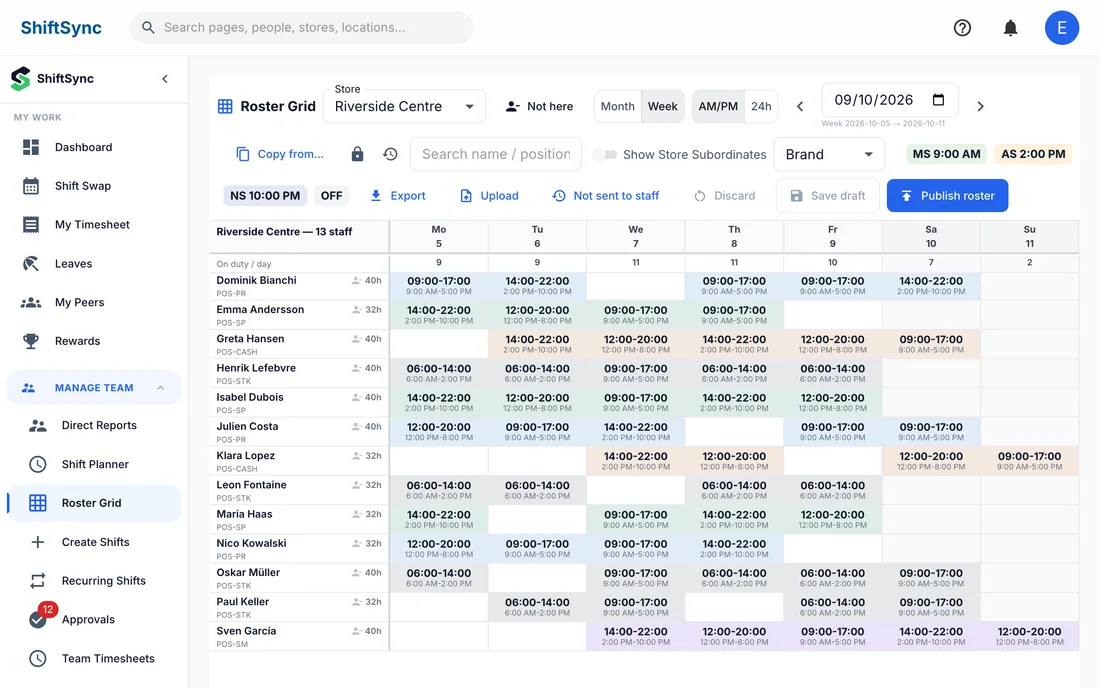
Screens from the working product, shown with fictional sample data.
Plan the week for a whole store in one grid. See hours per person and who is on duty each day, then publish when you are ready.
Screenshots show a demo environment, with the interface in English. All people, companies and figures are fictional.
Capabilities
What it does
Roster grid with versions
Build the week in a grid, keep saved versions and publish a recorded edition. Import a roster from XLSX or CSV and run a dry run before anything is saved.
Rules checked before you publish
Shifts are checked against approved leave, overlaps, weekly offs and your planning constraints: minimum rest, maximum daily and weekly hours, and maximum consecutive days. Each rule is a warning or a hard stop.
Time & attendance
Staff clock in with face verification and a geofence, on a store kiosk or through SecurTime clocks. Live attendance shows late and missing punches, and a clock resolver corrects mislabeled punches with an audit trail.
Payroll-ready timesheets
Timesheets are built from punches and reviewed by the manager. Overtime is decided separately, time is split by pay type, and approved hours post to Employee Time without duplicates.
Leave, swaps and approvals
Employees request leave and swap shifts with a colleague first, then a manager approves. Approvals follow each manager's scope, and nobody can approve their own request.
Store staffing and FTE planning
A hierarchy board shows each store, department or warehouse and who is seated where, and names the team leaders who may roster each branch. FTE planning compares current staffing with the FTE you need by position and period.
Brand portal for promoters
External brand representatives get their own workspace, limited to their promoters. They can report a departure, request a store move or propose a new promoter, and the store manager and HR are notified.
Reports and an AI assistant
Team reports and a report builder cover attendance, breaks and staffing. An AI assistant answers questions, and every action it takes is checked against the user's permissions.
Roles, scopes and safeguards
Roles for admins, managers, shift planners and employees, plus custom roles, each limited to a scope such as self, direct reports or managed stores. Tenants are isolated, credentials are encrypted and write-backs can be switched to read-only.
How it works
From setup to results
- 1
Connect SuccessFactors
ShiftSync reads employees, positions, locations, schedules, leave and holidays from SuccessFactors and keeps them current with a scheduled sync.
- 2
Plan the roster
Build the week in the grid, with the shift planner or from a spreadsheet. ShiftSync checks leave, overlaps and your planning rules before you publish.
- 3
Publish and clock in
Publishing records an edition and emails employees. After a dry-run plan and your confirmation, weekly offs and temporary schedules are written to SuccessFactors. Staff then clock in on shift.
- 4
Approve and post
Managers approve timesheets, leave and swaps within their scope. Approved time posts to Employee Time or is exported as SAP HCM files, and reports follow.
Use cases
Where teams put it to work
Rostering a store
Plan every department of a store in one grid, keep each version and publish when the roster passes the rules.
Promoters across many stores
Let brand partners report departures and request moves and new promoters, with the store manager and HR in the loop.
Attendance and breaks
Catch late and missing punches during the day and review missing or over-limit breaks in a Break Compliance report.
Payroll-ready time
Turn punches into reviewed timesheets with overtime and pay types separated, ready for Employee Time or an SAP HCM export.
Research
What the research says
Figures come from the studies linked below and belong to their publishers. They describe the wider topic; they are not results delivered by VAKE.
11%
of organizations take a long-term view of workforce planning. Most still plan short-term headcount, according to a survey of about 1,300 HR professionals, mostly in Europe.
McKinsey, HR Monitor 2026 (opens the source in a new tab)62%
of US employees do not have a high-quality work schedule: known at least two weeks ahead, stable from week to week, and with some say over their hours or days.
Gallup, Work Schedules Fail Millions of U.S. Employees (2025) (opens the source in a new tab)50%
higher turnover among US retail and food-service workers who faced three to five kinds of unstable scheduling than among those who faced none, a gap of 12 percentage points. The study shows an association, not proof of cause.
Choper, Schneider & Harknett, ILR Review (2022) (opens the source in a new tab)5.1%
higher store productivity at Gap, Inc. in a randomized experiment with responsible scheduling practices across 28 stores: sales rose 3.3% and labor fell 1.8%.
Kesavan et al., Management Science (2022) (opens the source in a new tab)4.5%
revenue increase at a large US specialty retailer that set store staffing levels from data, rolled out in 168 stores over six months, with annual profit up by nearly $7.4 million.
Fisher, Gallino & Netessine, M&SOM (2021) (opens the source in a new tab)13
percentage-point rise in the share of workers who get at least two weeks' notice of their schedules where US Fair Workweek laws apply. Employers did not respond by cutting wages or benefits.
Schneider, Harknett & Arbelaez, Science Advances (2026) (opens the source in a new tab)
FAQ
Questions we hear most
Does ShiftSync write to SuccessFactors?
Yes, but only approved results: weekly offs and temporary schedules when you publish a roster, and approved time for Employee Time. Publishing shows a dry-run plan and waits for your confirmation, and each tenant can switch write-backs off to run read-only.
How does ShiftSync handle working-time rules?
Planning constraints cover minimum rest, maximum daily and weekly hours and maximum consecutive days, each set as a warning or a hard stop. Starter presets for the UAE, EU and US are included as a starting point; check them against your own legal and collective-agreement requirements.
Who can see and approve what?
Access follows roles — Admin, Manager, Shift Planner, Employee and custom roles — and scopes such as self, direct reports, managed stores or all employees. Self-approval is blocked.
Do employees need to install an app?
No. ShiftSync is a responsive web app that works in the browser on phones, tablets and desktops, with nothing to install.
How can we see it?
Book a demo. We walk you through ShiftSync and how it connects to your SuccessFactors tenant.
Keep exploring
Other VAKE products
VAKE Copilot Agent
Ask SAP SuccessFactors in plain language, from inside Microsoft Copilot. Try it free in your browser.
Learn moreVAKE AI Agent
A chat assistant for your SuccessFactors data. Ask in plain language, then export to Excel or PDF.
Learn moreDocFlow
Draft HR documents from SuccessFactors data, send them for e-signature and keep every file organized.
Learn moreReady to Transform Your Enterprise?
Let's discuss how VAKE Consulting can help you achieve your SAP and AI transformation goals.