DocFlow
Draft HR documents from SuccessFactors data, send them for e-signature and keep every file organized.
HR document automation
Overview
DocFlow takes HR paperwork from first draft to signed file. HR picks a template and an employee, candidate or new hire, DocFlow fills the fields from SuccessFactors, and an optional AI draft or merge fields produce a document HR can edit before it goes anywhere.
The document goes out for e-signature by emailed link, and the signed PDF is filed in the employee's folder. Retention rules, expiry alerts and an audit trail help HR keep each file complete. DocFlow reads from SuccessFactors; it does not write back to it.
Built for
- HR administrators
- HR managers
- Recruiters
- Onboarding specialists
- Managers
At a glance
- Generate documents from templates, filled from SuccessFactors
- Send for e-signature by emailed link — signers need no account
- Track status: pending, in progress, completed or declined
- Employee folders with retention rules and an audit trail
Works with
- SAP SuccessFactors Employee Central
- SuccessFactors Recruiting and Onboarding 2.0
- Microsoft Entra ID sign-in
- Email through Microsoft 365
See it in action
The real product, not a mock-up
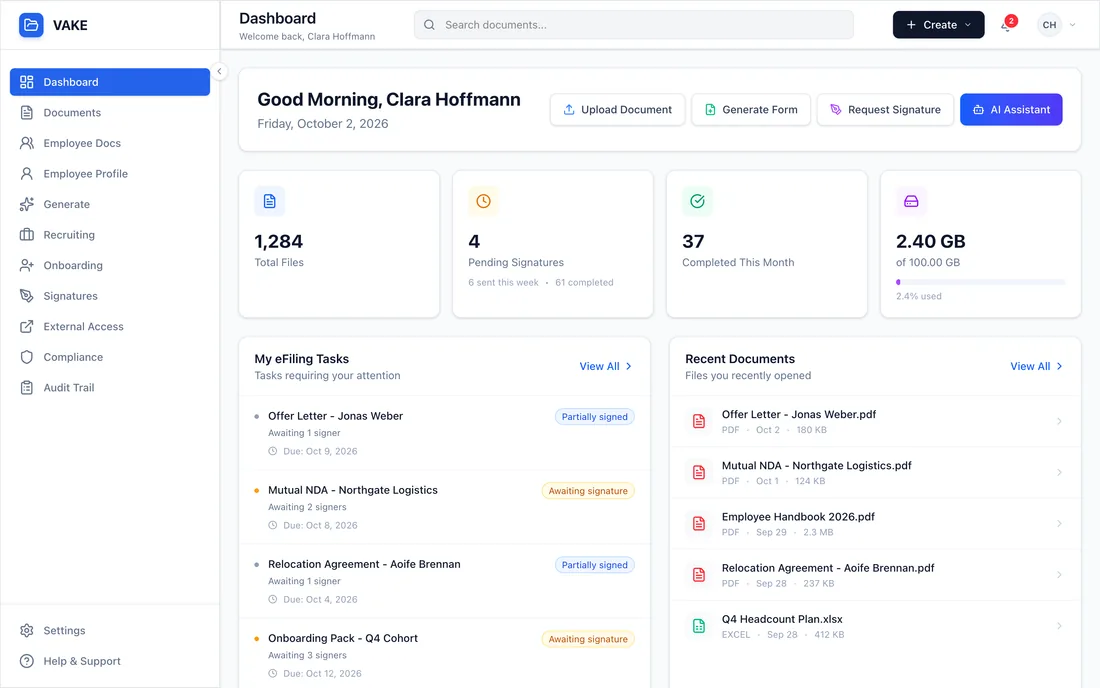
Screens from the working product, shown with fictional sample data.
Signature requests, expiry alerts, recent files and upcoming deadlines on one page.
Screenshots show a demo environment, with the interface in English. All people, companies and figures are fictional.
Capabilities
What it does
Templates and AI drafts
Six built-in templates — contract, offer letter, NDA, performance review, remote-work agreement and termination letter — plus letter types your admins define. Use merge fields, import a DOCX, TXT, MD or HTML file, or draft from a prompt. The result is always an editable draft.
SuccessFactors autofill
Pick the employee and DocFlow fills in name, title, department, dates, manager and address from SuccessFactors. Fields such as salary are entered by hand.
E-signature
Send a PDF to up to 20 signers by emailed link. They sign by drawing or typing, with signature, initials, date and text fields, due dates, reminders and a reason when they decline. The signed PDF is stamped with a SHA-256 hash.
Pre-boarding portal
New hires complete forms, upload checklist documents and sign in one place, and HR accepts or rejects each item.
Employee folders and sharing
A folder per employee, built from a SuccessFactors sync, with access presets, versions and a trash bin. Share files outside the company through expiring, password-protected links with an access log.
Retention, expiry and audit
Retention defaults by country that you can override, legal holds, expiry alerts for documents such as visas and permits, and an audit trail whose hash chain can be verified.
How it works
From setup to results
- 1
Connect
An admin connects SuccessFactors with a read-only connection, and people sign in with Microsoft Entra ID. A sync builds employee records and folders.
- 2
Draft
Choose a template and an employee, candidate or new hire. Fields fill from SuccessFactors, and HR reviews and edits the draft.
- 3
Send for signature
Place the signature fields and send. Signers sign by emailed link with no account, and you see each document as pending, in progress, completed or declined.
- 4
File and govern
The signed PDF goes into the employee's folder, where retention rules, expiry alerts and the audit trail apply.
Use cases
Where teams put it to work
Offer letters from Recruiting
Create the offer for a candidate in SuccessFactors Recruiting and send it for signature.
Contracts and NDAs
Issue contracts and NDAs from approved templates, with the same fields every time.
Onboarding packs
Give new hires one portal to complete forms, upload documents and sign, with HR accepting each item.
Expiry and audit
Track visa and permit expiry, find missing required documents and share files with auditors through expiring links.
FAQ
Questions we hear most
Does DocFlow write documents back to SuccessFactors?
No. DocFlow reads employee data from SuccessFactors over a read-only connection and keeps documents, signatures and folders in DocFlow itself.
What kind of e-signature is it?
DocFlow produces simple electronic signatures: signers draw or type their name, and the signed PDF is stamped with a SHA-256 hash. These are not qualified electronic signatures under eIDAS. Signing works on PDF files up to 25 MB.
Does AI write the documents?
Only if you want it to. AI can draft a document from a prompt, but the result is a draft that HR reviews and edits before anything is sent. Drafting sends your prompt to an external AI provider, and VAKE operators can switch AI off.
Is DocFlow ready for production use?
DocFlow is currently offered as a VAKE-hosted demo. Talk to us if you want to see it with your own SuccessFactors tenant.
Are the retention defaults legal advice?
No. DocFlow ships with retention defaults by country as a starting point. You can override them and set legal holds, and you should confirm the periods with your legal team.
Keep exploring
Other VAKE products
VAKE Copilot Agent
Ask SAP SuccessFactors in plain language, from inside Microsoft Copilot. Try it free in your browser.
Learn moreVAKE AI Agent
A chat assistant for your SuccessFactors data. Ask in plain language, then export to Excel or PDF.
Learn moreShiftSync
Rostering, time & attendance, timesheets and leave for retail and multi-site teams, synced with SAP SuccessFactors.
Learn moreReady to Transform Your Enterprise?
Let's discuss how VAKE Consulting can help you achieve your SAP and AI transformation goals.